
DeepSeek Orb (DSH Floating Ball): One-Click Summon, Computer Use & Background Agents
A frame-verified record of the dsh-orb floating-ball plugin in DeepSeek Harness, recorded by its own author: install it from npm, watch it take one-sentence tasks, drive the screen with Computer Use, dispatch background coding agents — and meet the standalone-app twin. Every screenshot deep-links to its second in the source video.
Last updated: 2026-10-07
A small ball rests at the edge of your screen; you tell it what you need; it either acts on the spot through Computer Use or quietly dispatches the job to a background agent. That is DeepSeek Orb — dsh-orb, an installable bundle by mini-yifan that adds a floating-ball agent to the official dsh desktop app and dsh web without touching the official repository. This page walks the plugin through its author's three recordings: install, dispatch, shop, build, configure.
The orb acts on your whole desktop. When you only need the inside of a browser driven, that narrower axis lives in dsh browser automation with browser MCP
TL;DR
- ▸dsh-orb is one installable bundle: the Computer Use preset, the floating-ball host and the settings UI land together, all three showing as running in the plugin manager.
- ▸Two forms exist: the plugin (mini-yifan/dsh-orb-cordis, ★185) mounts into dsh; the standalone app (mini-yifan/deepseek-harness-orb, ★254) needs no plugin at all.
- ▸Computer Use runs with full permission by default — it reads the screen, clicks and types. The recorded demo shops on JD and screenshots a phone listing unprompted.
- ▸Long tasks go to a background coding agent; the orb's side panel returns a receipt when it is done. Model and reasoning level per agent are set in the floating-ball settings panel.
The walkthrough: nine verified steps
Install the orb, hand it a task
- 1
Meet the package: identity on npm
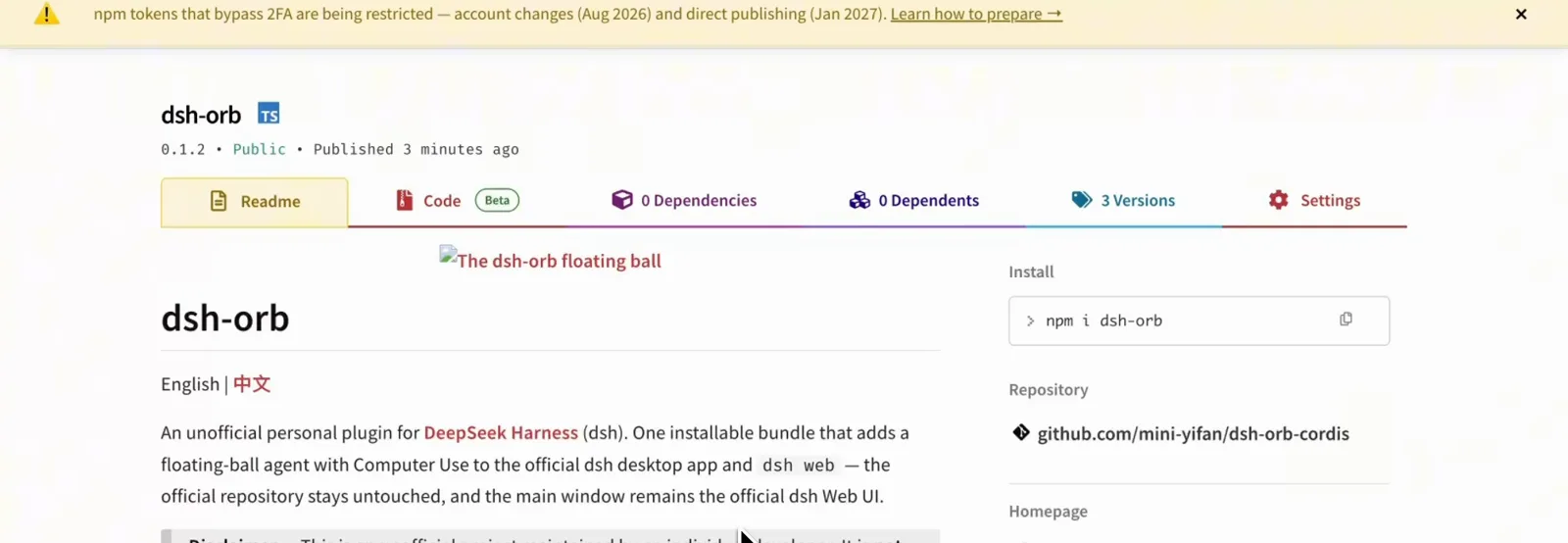
Frame one is the identity evidence: the npm package dsh-orb, version 0.1.2 published minutes before the recording, described as "one installable bundle that adds a floating-ball agent with Computer Use to the official dsh desktop app and dsh web — the official repository stays untouched." The Repository field points at github.com/mini-yifan/dsh-orb-cordis, and the disclaimer sits right below the description. The package has moved on since (0.1.4 at the 2026-10-08 registry check) — the project ships fast.
$npm i dsh-orbOne npm name, one bundle — the official repo stays untouched.Watch at 0:12 - 2
One install, three running components
Inside DeepSeek Harness's plugin manager, dsh-orb appears as a single entry — "Installable Orb bundle. Inserts the Computer Use preset and the floating-ball host" — with its three bundled components listed below: @deepseek-ai/dsh-agent-preset (preset-computer-use), dsh-orb/host (orb-host) and dsh-orb (ui-settings-orb), all three toggled on and running. The uninstall button sits top right; the orb widget itself peeks from the edge as the chibi avatar.
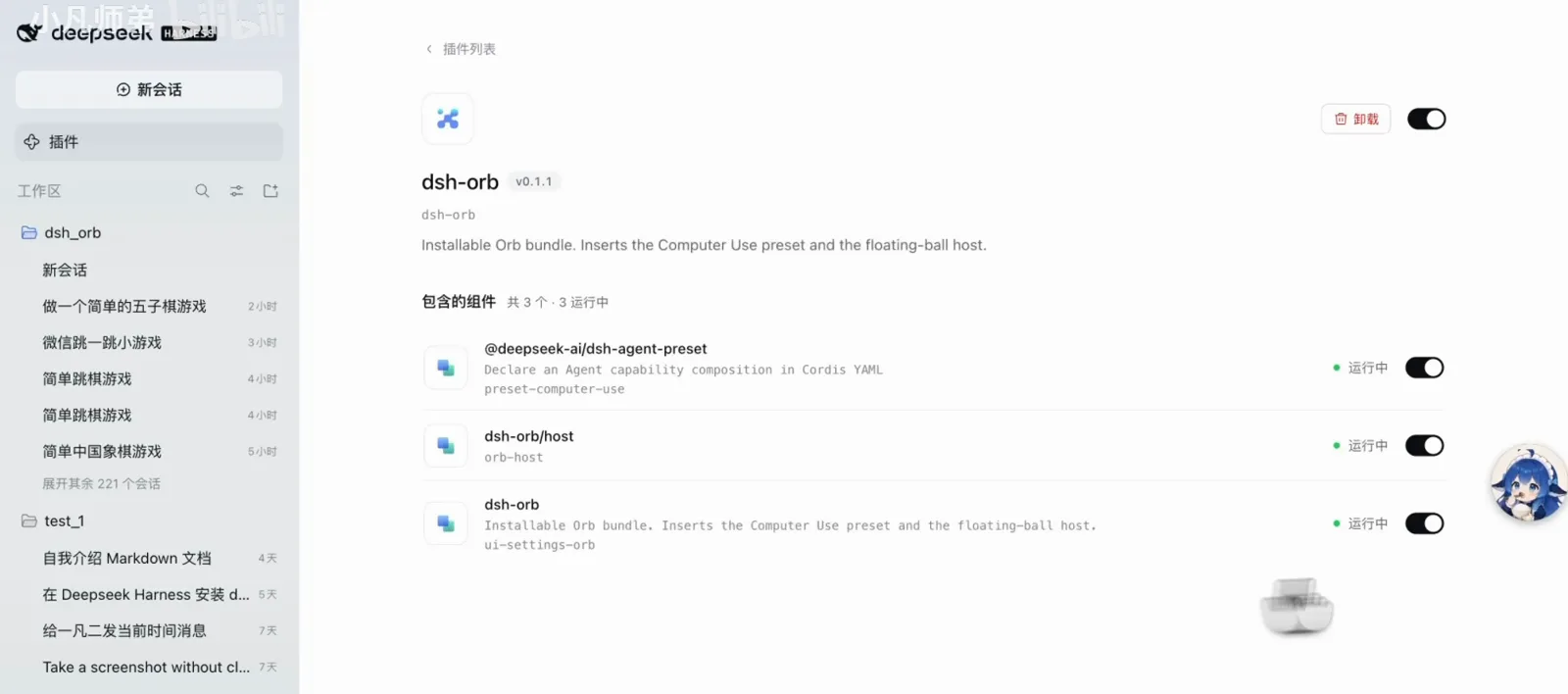
One entry in the manager, three components underneath.Watch at 0:25 - 3
Hand it a task in one sentence
The dispatch shape is the plugin's whole pitch: the composer reads "你给我做一个…" (build me a…) with the dsh_orb workspace and a Computer Use mode selected, and the floating orb's expanded panel waits on the right with its full-permission dropdown and avatar. One sentence is the entire interface — no forms, no configuration wizard.
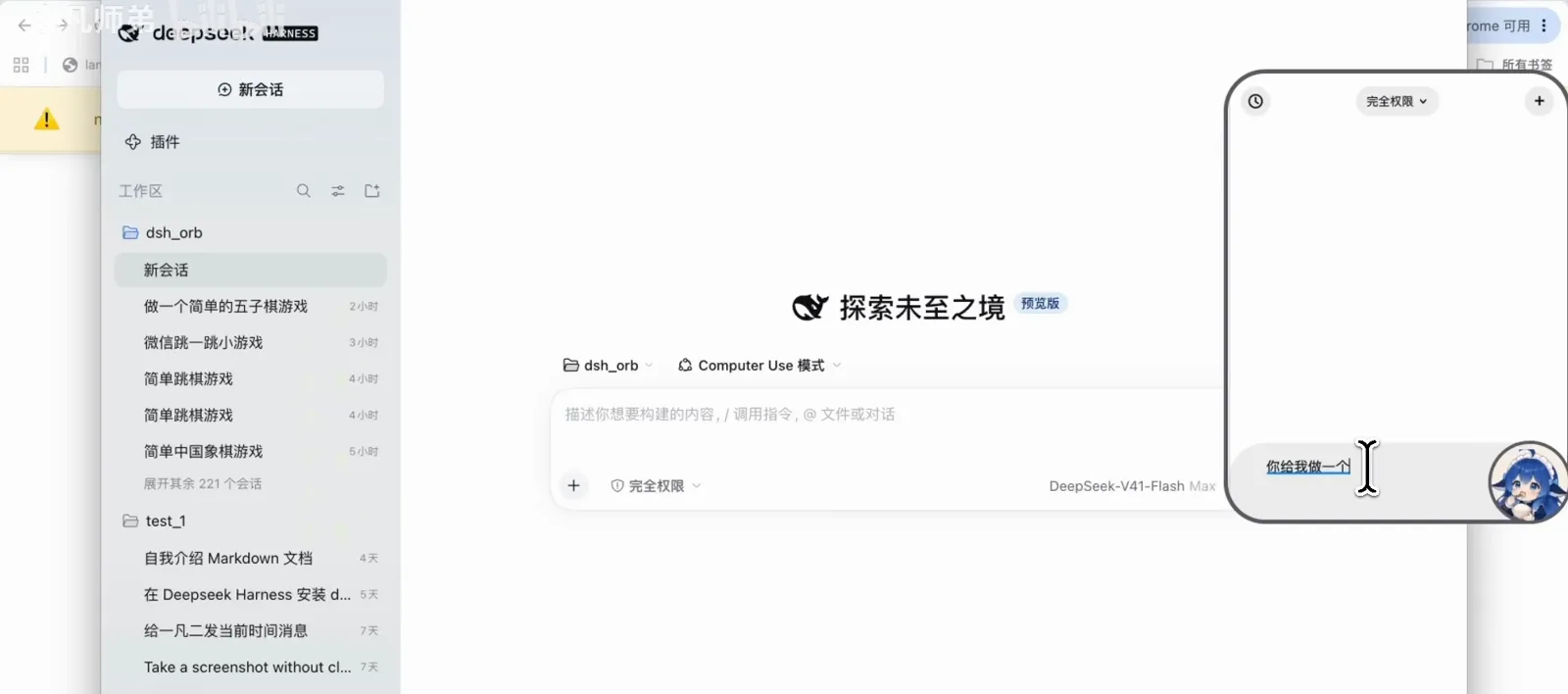
The entire interface is one sentence and one floating panel.Watch at 0:40 - 4
The side panel returns a receipt
When the orb delegates, it reports back in the same panel: a background Code agent was dispatched to build a Chinese-checkers game in a single HTML file, with modes, undo and self-checks — 11.6K tokens spent, an input box at the bottom for follow-ups. The floating task chips at the top let you jump between dispatched jobs; this panel is the bookmark side of the orb.
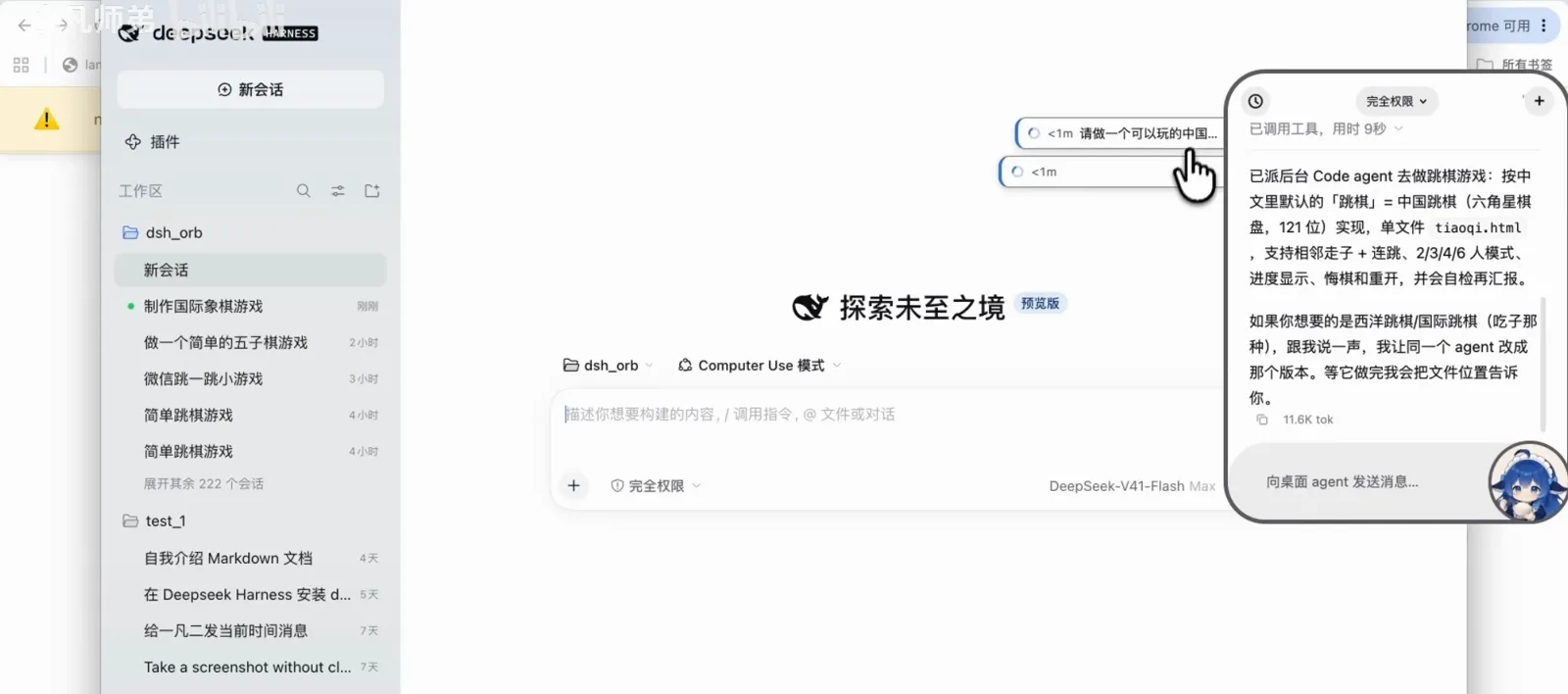
Delegated work comes back as a receipt in the same panel.Watch at 0:55
Watch it operate and work in the background
- 5
Computer Use, the shopping demo
The 155k-play video's most-shared moment: a JD product page — a Xiaomi flagship store, a ¥8,999 flash price, enterprise subsidies — while the orb's chat panel shows the original request (search the phone, screenshot the info, send it to a contact on WeChat, tell me which one I want), a "Deep diving for 26s" line and "Analyzing the request". The orb is driving the desktop without a browser shell: reading the page, moving the cursor, about to screenshot. Full permission is on.

The recorded demo: search, screenshot, send — with full permission on.Watch at 1:40 - 6
The background worker, in its own words
What does the orb hand the background agent? The session shows both halves: the task spec (a solitaire-style tile game with multiples-of-three tile counts, four to six patterns, restart and undo buttons, local node syntax checks) and the English worker prompt — "You are the background worker for a Computer Use session. You do not see the screen and you do not talk to the user…" — the architectural split made text. The narrator states this background run used a GLM model; that is the uploader's own statement, not visible in any frame.
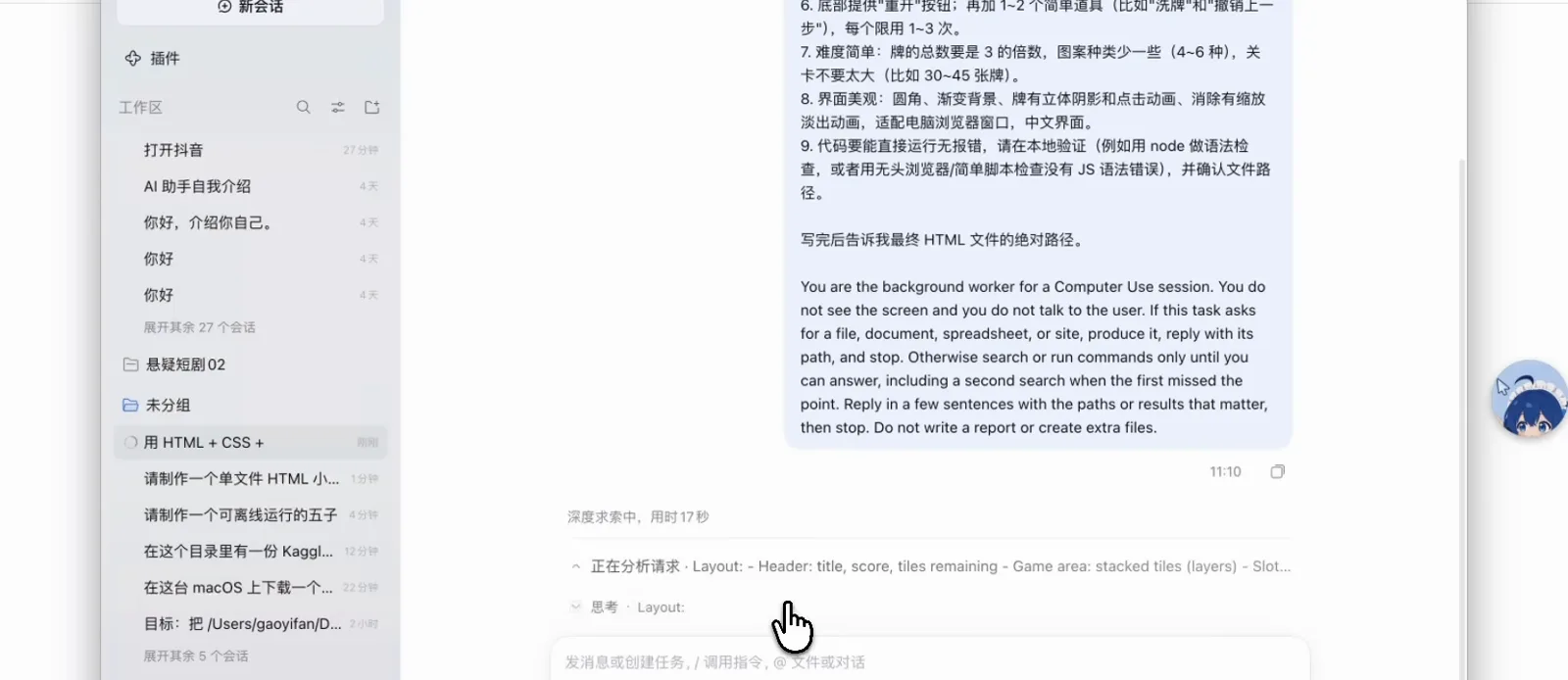
The worker never sees the screen; the receipt does the talking.Watch at 2:40 - 7
The standalone twin: no plugin required
Same author, second track: deepseek-harness-orb is a standalone desktop app — the whole harness wrapped in a floating orb window. The frame shows its session view: a sidebar with workspaces and dozens of sessions, a completed tile-game build with local verification receipts (100% solvable boards, a ~91% random-strategy clear rate, a 36-step full playthrough scoring 460) and one edited index.html. Install the plugin or the app; you do not need both.
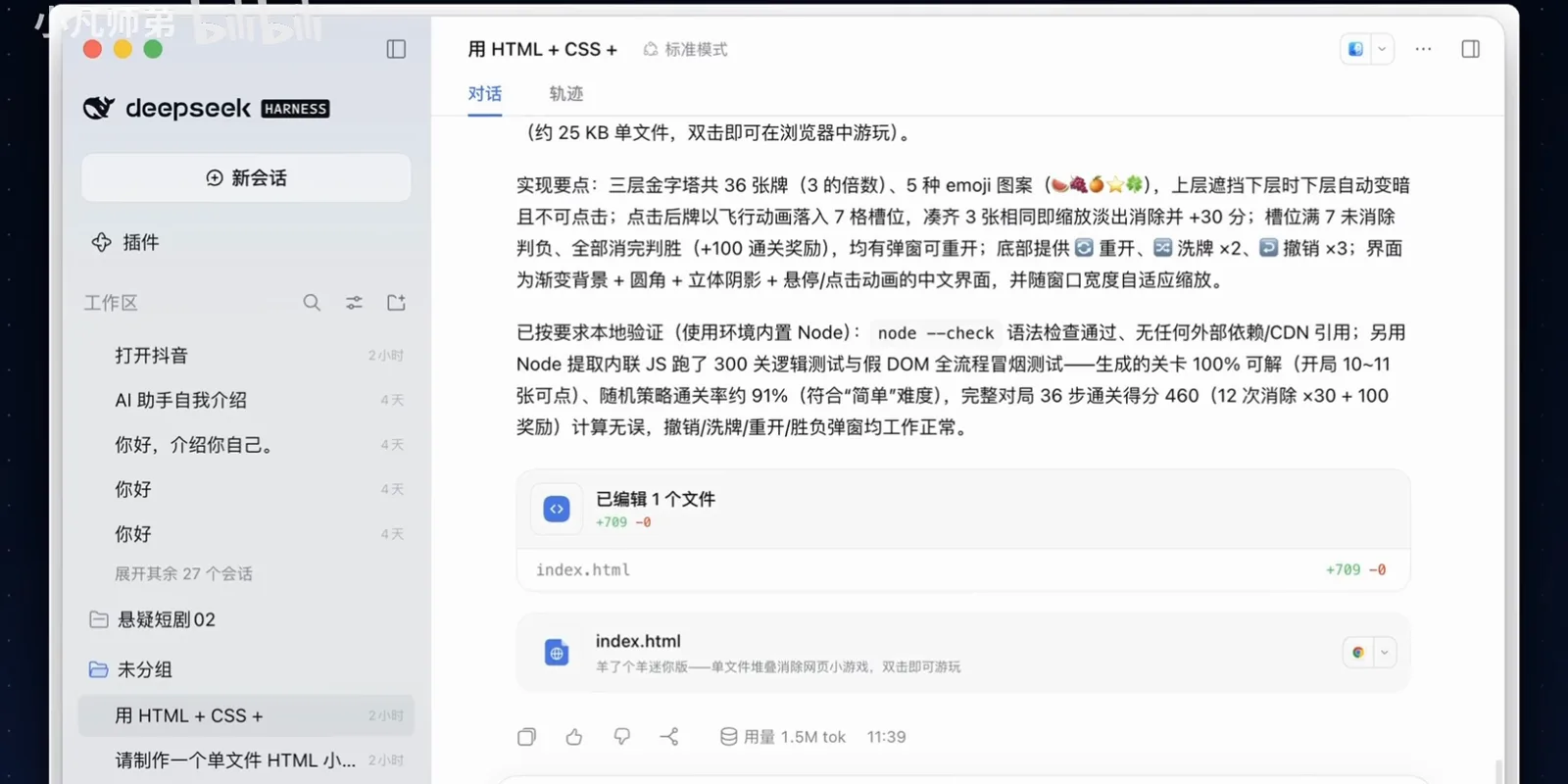
Same author, second track: the whole harness behind one ball.Watch at 1:10
Configure it, read the repo
- 8
Configure the ball: avatars, agents, models
The settings panel, Floating ball: an enable toggle ("turning it off keeps the plugin; Computer Use stays available in the main window"), an avatar picker with six built-in chibi animations — pat, eating, finger-heart, cheer, chin-rest, smile — each swappable for your own GIF/PNG/WebP up to 2 MB, and per-agent model rows: the orb agent on DeepSeek-V4.1-Flash at Max reasoning, with a background-agent section below.
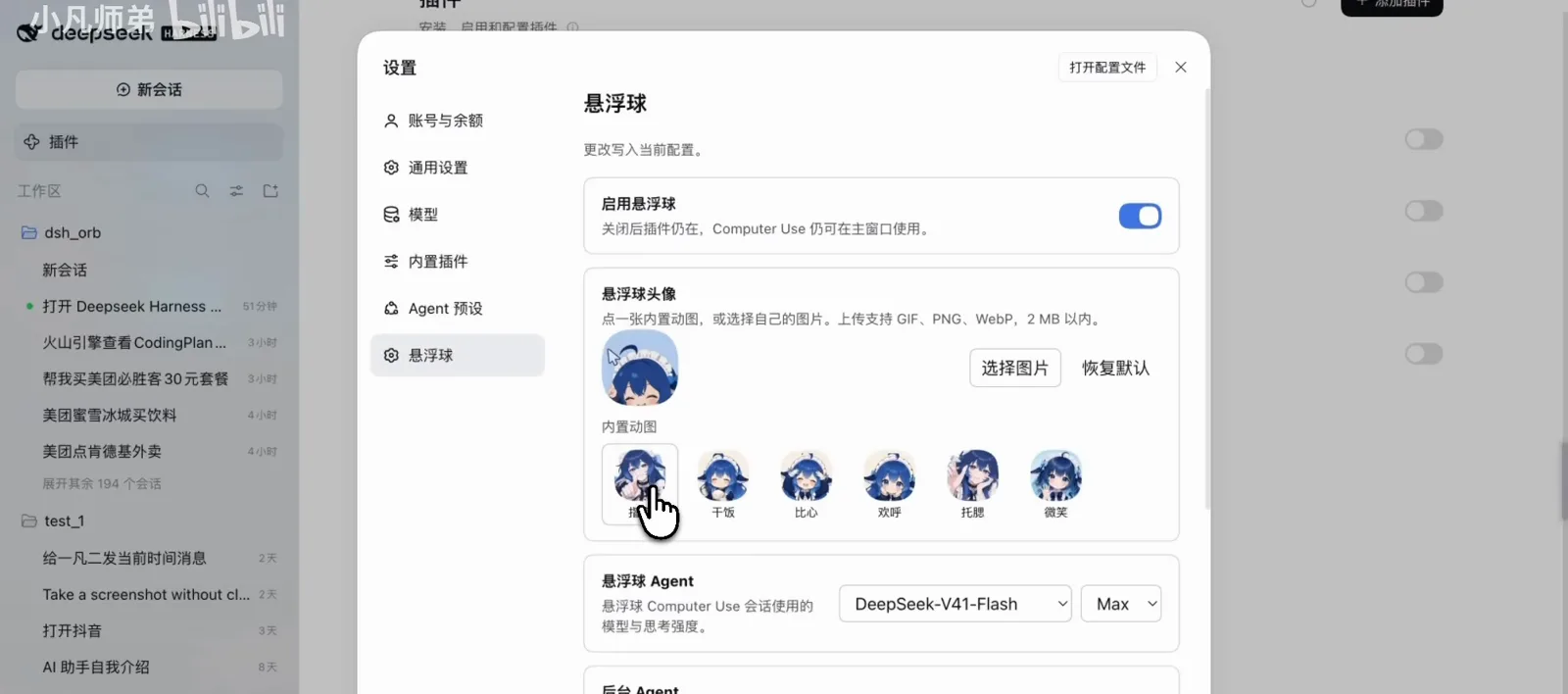
Avatars, permissions and per-agent models live in one panel.Watch at 1:35 - 9
The repo at publish time — and what it became
The GitHub window catches mini-yifan/dsh-orb-cordis two hours after publication: the floating-ball-plugin label, MIT license, Watch 0, 0 stars, 0 forks, the bilingual README.md and README.zh-CN.md, and the latest commit about the six built-in avatar animations. Today the same repo counts 185 stars (2026-10-08 check) — the frame doubles as the growth receipt.
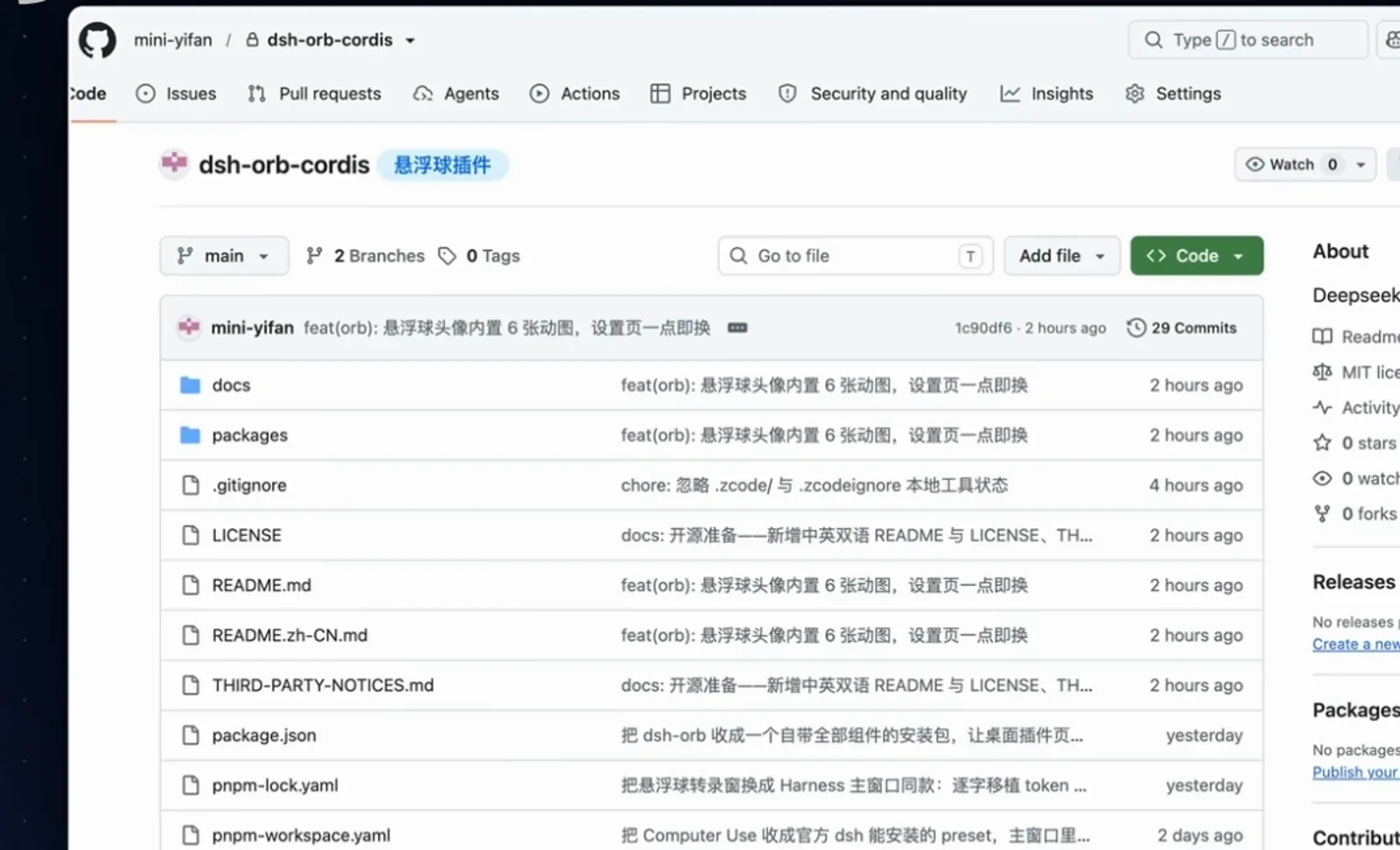
Publish-time snapshot: 0 stars, 29 commits, two hours old.Watch at 1:55
DeepSeek Orb questions, answered
The unofficial status, installation routes, permissions, and how the orb differs from pets, phones and subagents.
Is DeepSeek Orb an official DeepSeek product?
No — and the project says so itself. The npm README's disclaimer, quoted on this page, states it is an unofficial project maintained by an individual developer, not affiliated with, endorsed by, or connected to DeepSeek AI in any way. The author is mini-yifan; the plugin repo (dsh-orb-cordis, ★185) and the standalone app (deepseek-harness-orb, ★254) are both MIT-licensed community projects (checked 2026-10-08).
How do I install it?
Two routes, both visible in the frames. Route one is the npm package: npm i dsh-orb, as printed on the package page. Route two is in-app: the recording's plugin manager shows dsh-orb already installed and running as a bundle of three components. The author's narration mentions a China-mirror option for the install; that option is not visible in any frame, so it is not quoted here.
What can Computer Use actually do, and what permissions does it need?
As recorded: it reads the screen, moves the cursor, clicks and types across whole applications — the demo browses a JD store page, screenshots a product and prepares to send it onward, all under the full-permission mode shown in the orb panel. That power is the point and the risk: Computer Use acts on your real desktop, so grant it the way you grant any full-access agent — deliberately, and for tasks you can see.
How is the floating ball different from a desktop pet?
A desktop pet is decoration with state — the big-fat-fish reacts to what your agent is doing but performs nothing. The orb is an operation entry: it takes tasks, drives the screen and reports receipts. They can coexist; one sits outside the window as a mascot, the other is a control surface.
Plugin or standalone app — which one?
The plugin (dsh-orb / mini-yifan/dsh-orb-cordis, ★185) mounts into the official dsh desktop app or dsh web and keeps the official Web UI as the main window. The standalone app (mini-yifan/deepseek-harness-orb, ★254) is a complete floating-orb remake that needs no plugin install. If you already live in dsh web, take the plugin; if you want a two-click orb without touching a harness install, take the app.
Which model does the background agent use?
Whichever you set: the floating-ball settings panel exposes per-agent model and reasoning rows — the recording shows the orb agent on DeepSeek-V4.1-Flash at Max, with a background-agent section below. In the 155k-play video the narrator says his background runs used a GLM model; that is the uploader's own statement, not a frame fact. The architecture is model-agnostic — any provider your dsh speaks.
Related guides
The neighboring axes: browser automation, pets, phone remote, subagents, and the modes behind the agents.
dsh browser automation with browser MCP
Watch a browser MCP drive navigation, extraction and multi-step research inside DeepSeek Harness — 11 frame-checked steps, deep-linked
Read the guidedsh-dafeiyu: a desktop pet for DeepSeek Harness
One command installs the big-fat-fish desktop pet, which acts out your agent's real task state — frame-checked screenshots.
Read the guideDSH wallpaper plugins, hands-on
Wire Wallpaper Engine into the dsh web UI and let backgrounds follow your model — 9 frames from the plugin authors' own recordings.
Read the guideDeepSeek Harness subagents: run agent teams in parallel
Spawn a five-subagent squad, monitor each child from the header, read completion reports and pin models per subagent — frame-verified steps
Read the guideThe four modes: Standard, PTC, Minimal, Creator
What each agent preset includes, when it wins, and how to build a preset of your own in Creator mode.
Read the guideQuickstart: run dsh in 5 minutes
Install DeepSeek Harness, start the Web UI, run your first task, and pick the right mode.
Read the guideSources & credits
All frames come from the three screen recordings credited above — every one recorded by the plugin's own author, 小凡师弟 (Bilibili) = mini-yifan (GitHub) — cropped to remove watermarks, menu bars and burned-in subtitles. Branded intro/outro cards and the design-card segments of the second video were excluded by timestamp. View counts are yt-dlp/API values; the early contact-sheet reading "meiyilian" was corrected by the npm Repository field at full resolution — github.com/meiyilian/dsh-orb-cordis does not exist. Repository facts re-checked against the GitHub API on 2026-10-08.