
DSH Wallpaper Plugins in Action: Wallpaper Engine Sync, Model Backgrounds & Live Scenes
A frame-verified record of dsh wallpaper plugins in DeepSeek Harness: how the dsh-plugin-wallpaper-engine plugin pipes your local Wallpaper Engine library behind the chat, how dsh-background-by-model repaints the interface per model, and where the community installer ecosystem fits — every screenshot deep-links to its second in the source video.
Last updated: 2026-10-07
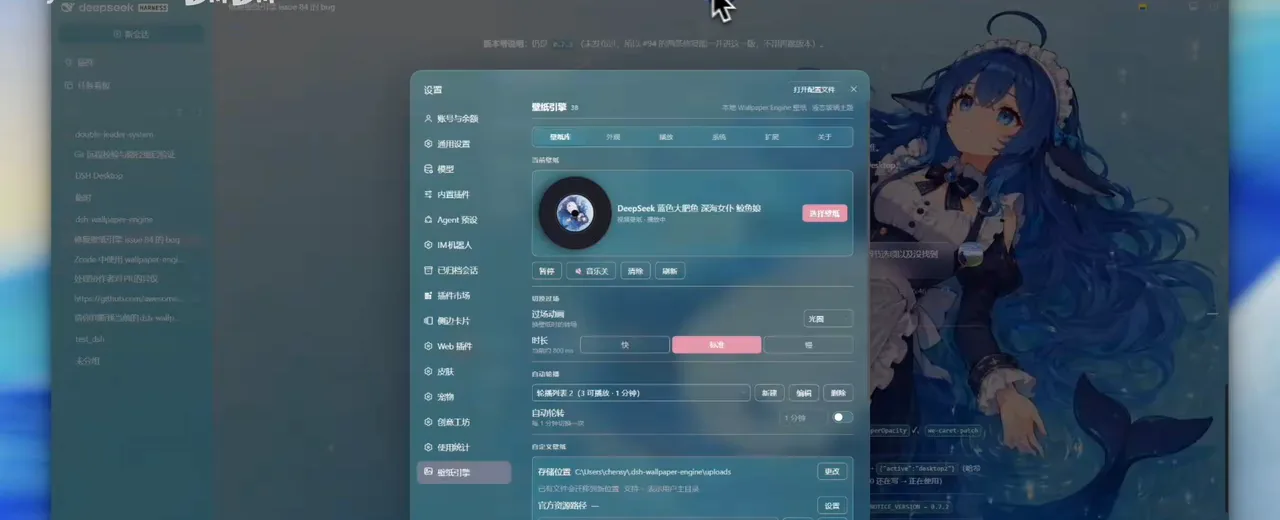
Desktop wallpapers stopped at the monitor edge — until the dsh wallpaper plugin cluster dragged them behind the chat. This guide walks two real plugins on real screens: dsh-plugin-wallpaper-engine (GitHub: elysia395/dsh-wallpaper-engine), which renders your local Wallpaper Engine library behind DeepSeek Harness conversations through a built-in WebGL engine, and dsh-background-by-model (HarmlessFunny), which repaints the interface each time you switch models. Every screenshot below links to the exact second of the recording it came from.
Looking for AI-authored themes and preset studios instead of live wallpapers? That axis lives in Beautify dsh with AI-made themes
The short version
- ▸Two plugins cover the wallpaper axis: dsh-plugin-wallpaper-engine syncs your local Wallpaper Engine library into the dsh web UI; dsh-background-by-model switches backgrounds when you switch models.
- ▸Install names differ from repo names: the market command is dsh plugin --profile web add dsh-plugin-wallpaper-engine, while the GitHub repo is elysia395/dsh-wallpaper-engine — the author's own README ships both this way.
- ▸Settings live host-side and the agent never sees them — the plugin's own dialog says so, and the README repeats it: zero token overhead.
- ▸Scene wallpapers render live in WebGL (particles, audio reactivity, mouse interaction) and fall back to MP4, then a still frame, automatically.
The walkthrough: nine verified steps
The wallpaper-engine plugin, end to end
- 1
Install the plugin and find its settings entry
One command installs the market package — the name the author's own README uses — and after restarting dsh web, the settings menu gains a Wallpaper Engine entry of its own, sitting beside Agent presets, the plugin market and skins. That entry is the official door this page walks through; the frame catches the menu mid-scroll with Wallpaper Engine highlighted at the bottom.
$dsh plugin --profile web add dsh-plugin-wallpaper-engine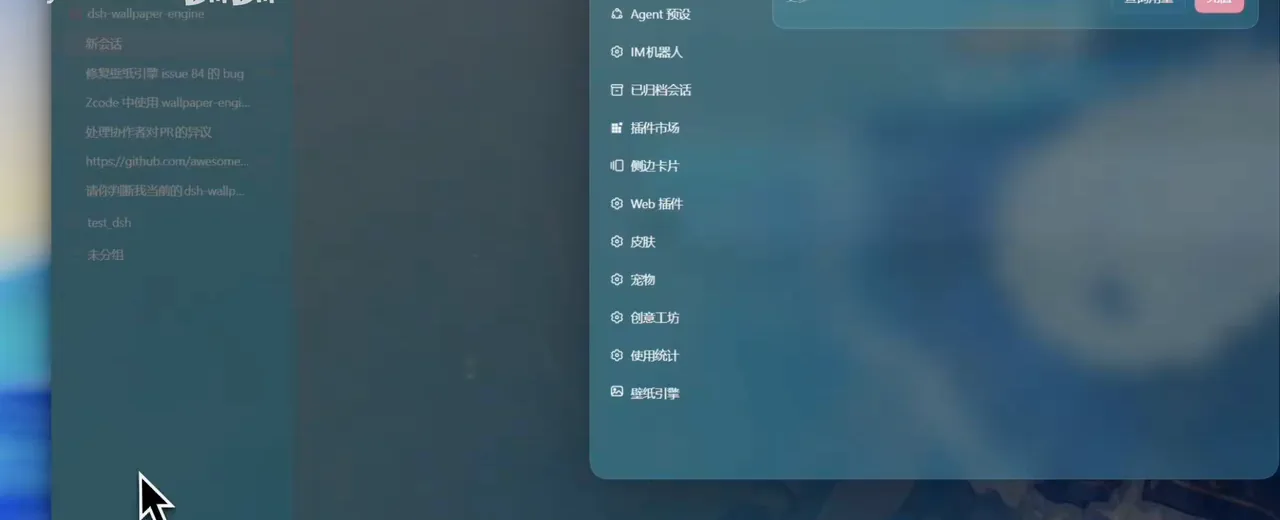
The entry lives in the built-in settings menu — no separate app to open.Watch at 0:10 - 2
Tune the wallpaper while the chat keeps running
With a dynamic wallpaper applied to the conversation background, a slider column floats on the right: transparency, blur, page-switch speed, plus a row of theme-color dots. Nothing pauses — the code review in the middle pane keeps scrolling while the wallpaper reacts underneath. The panel is the plugin's in-session tuning surface, and the frame shows its live-adjust shape.
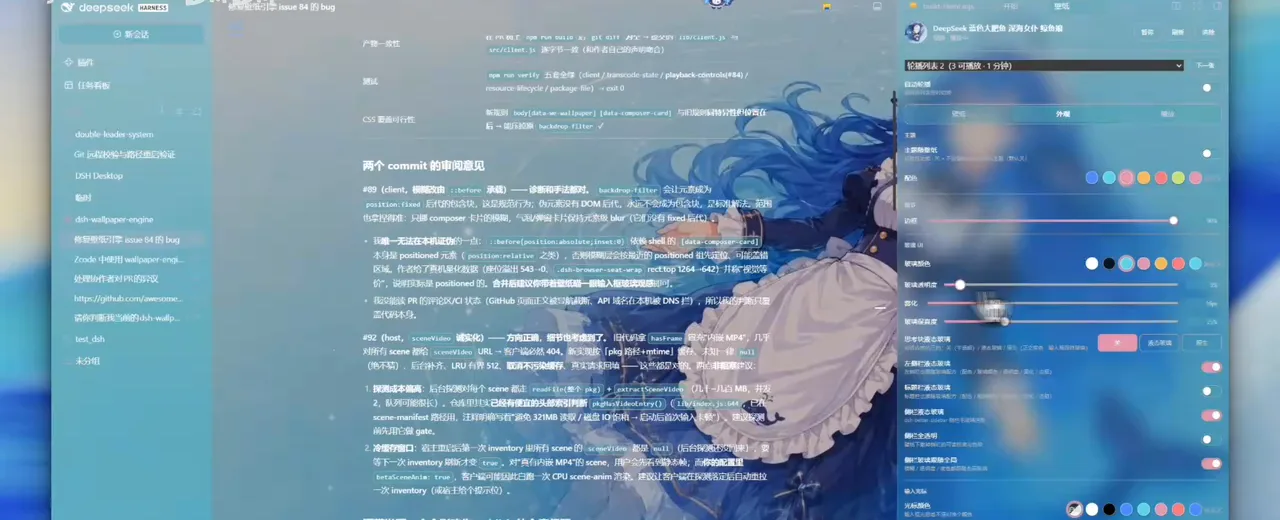
Sliders apply in real time — the conversation never pauses while you tune.Watch at 0:40 - 3
Shape the liquid-glass look, region by region
The wallpaper engine ships its own appearance language: glass color, glass transparency, frost and fidelity sliders at the top, then per-region liquid-glass toggles — thinking block, sidebar, title bar — each independently configurable. This is where the iOS-style frosted look comes from; the frame catches the panel with the defaults at 35% transparency and 15px frost.
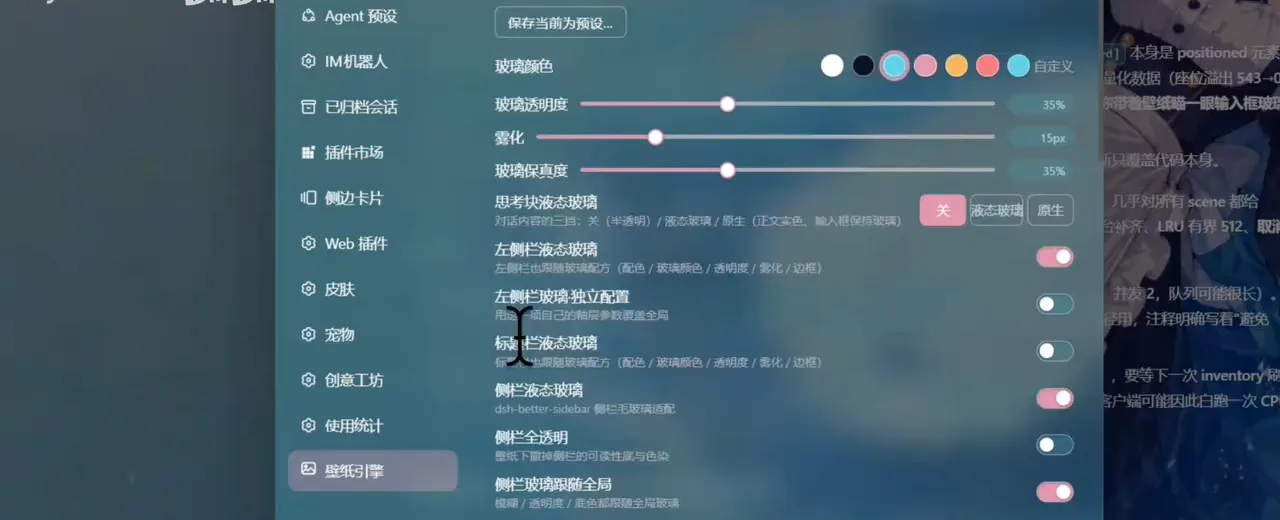
Frosted glass is a first-class setting here, with independent toggles per region.Watch at 1:15 - 4
The management dialog: rotations, day switch, storage
The Wallpaper Engine (3) dialog is the plugin's cockpit: tabs for wallpaper cards, appearance, playback, system, extensions and about; the current wallpaper card (a dark deep-sea scene) with a pink replace button; transition animation off; a rotation list of two entries with three playable, plus a one-minute day-switch toggle. The storage line at the bottom — C:\Users\...\.dsh-wallpaper-engine\uploads — is the host-side promise made visible: your settings and uploads live on your disk, not in the agent's context.
One dialog runs the whole wallpaper lifecycle: replace, rotate, schedule, store.Watch at 2:15
Backgrounds that follow your model
- 5
Let the background follow the model
The second plugin answers a different question: not which wallpaper, but which wallpaper for which model. Install it, restart, and the DeepSeek Harness composer floats over a full-bleed deep-sea illustration — the frame catches the workspace list (dsh-background-by-model, chat, DeepSeek) with the plugin's badge row above the input box. The model reads DeepSeek V4.1 Flash High; the wallpaper is bound to exactly that.
$dsh plugin --profile web add dsh-background-by-model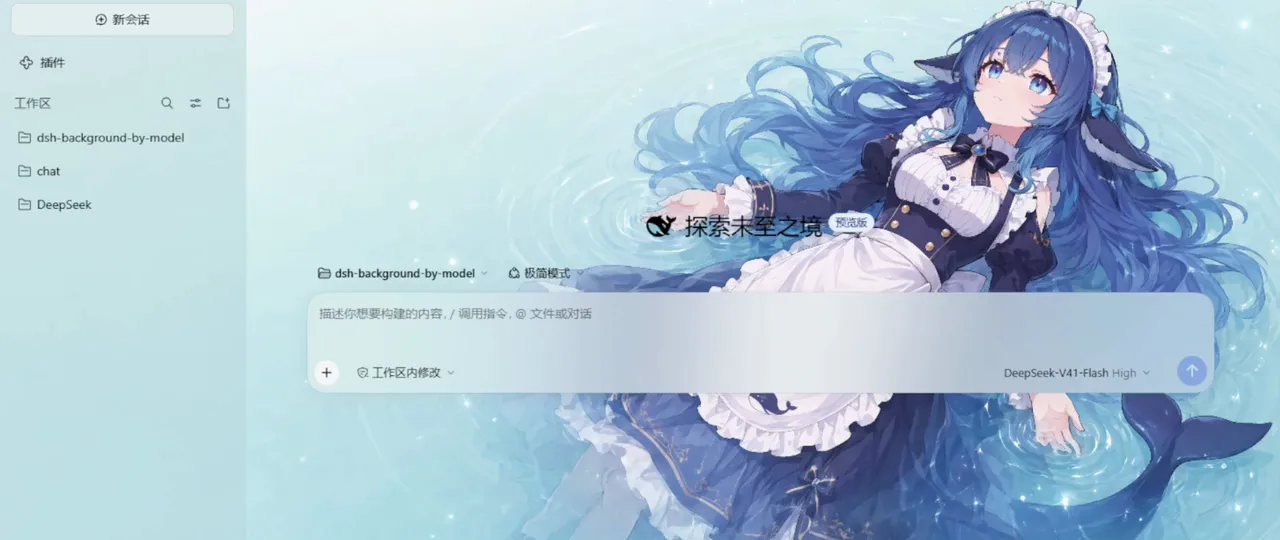
Model switch, background switch — the binding is the plugin's whole idea.Watch at 0:05 - 6
Bind images to models with rotation and layout
Its settings panel, Model background, works in ordered rules: two thumbnails currently loaded (the second of two shown — a hand-drawn whale-token card), with add, add-from-URL, replace and remove buttons beneath. The multi-image rotation toggle turns a rule into a carousel, and layout mode picks between fit, fill, stretch, tile and center. The README spells out the matching rule: the first matching string wins, so order is priority.
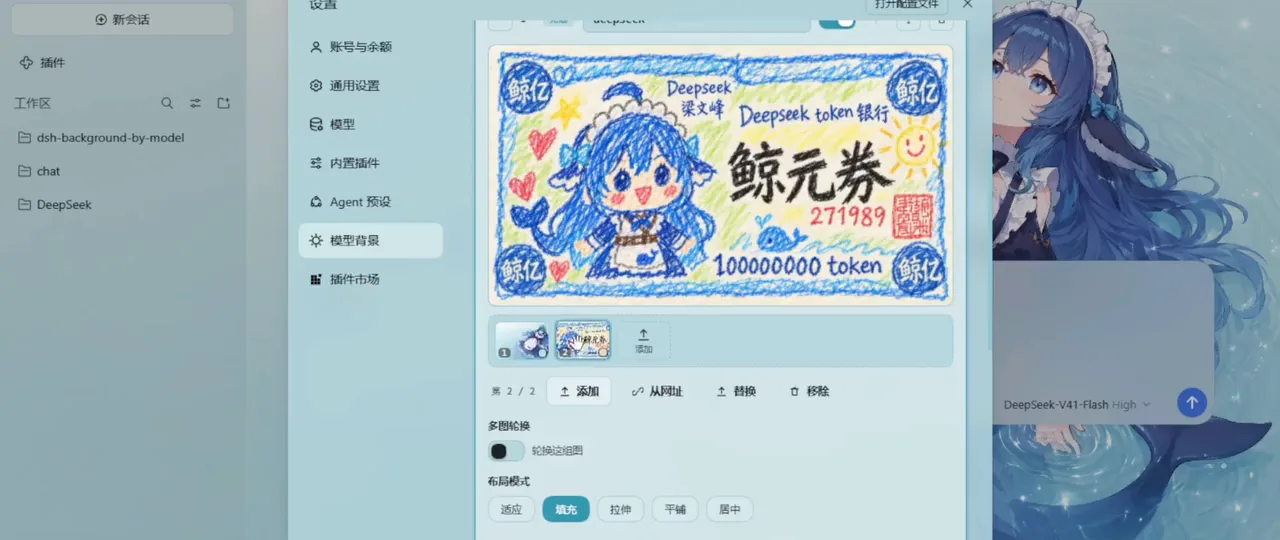
Rules, rotation and layout: the whole model-background config in one panel.Watch at 0:14 - 7
Dial each interface surface separately
Backgrounds are one axis, concentration another: the Surfaces view gives every interface region its own pair of sliders — main background at 0%, left sidebar at 34%, right sidebar at 58%, cards and menus at 100%, input area at 58%, settings panel at 87% — each with blur beside it. The frame is the proof that per-region tuning exists; the settings apply to all models at once.
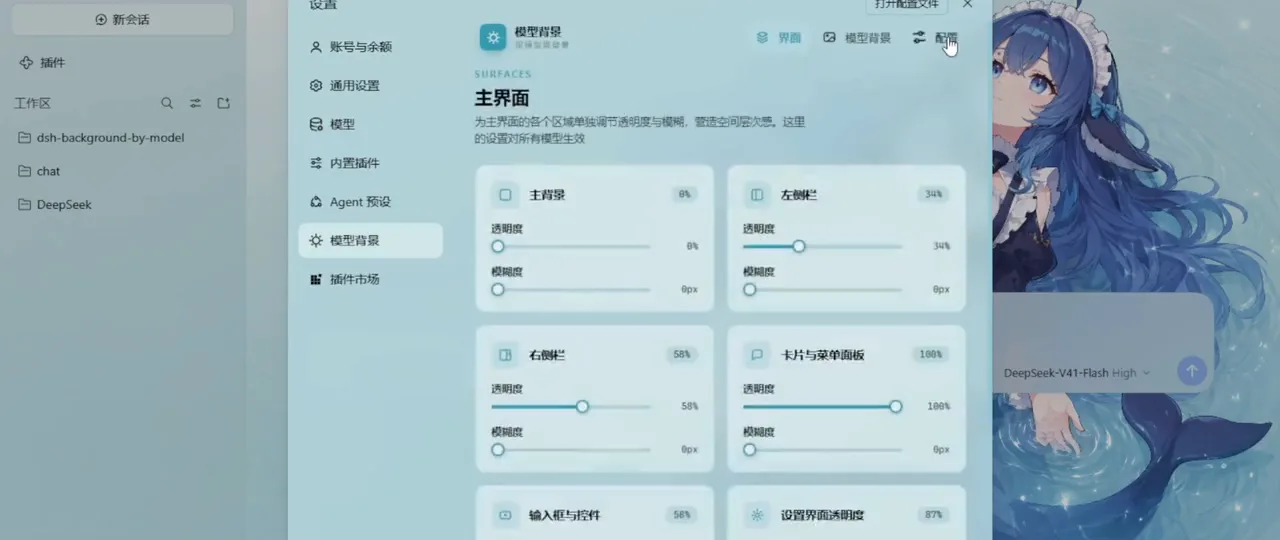
Every region gets its own concentration dial — from 0% to 100%.Watch at 0:22
Around the plugins: installer & config
- 8
The ecosystem route: a third-party installer
Not every DSH install starts from the CLI. The third video shows Baomiao AI manager, a community AI-environment installer whose store grid lists ChatGPT, Claude Desktop, Codex CLI, Cursor — and DeepSeek Harness v0.1.5-rc.1 with an installing badge. It is a third-party distribution channel, not an official one; the frame is kept as ecosystem evidence, and the plugin itself still comes from the dsh plugin market.
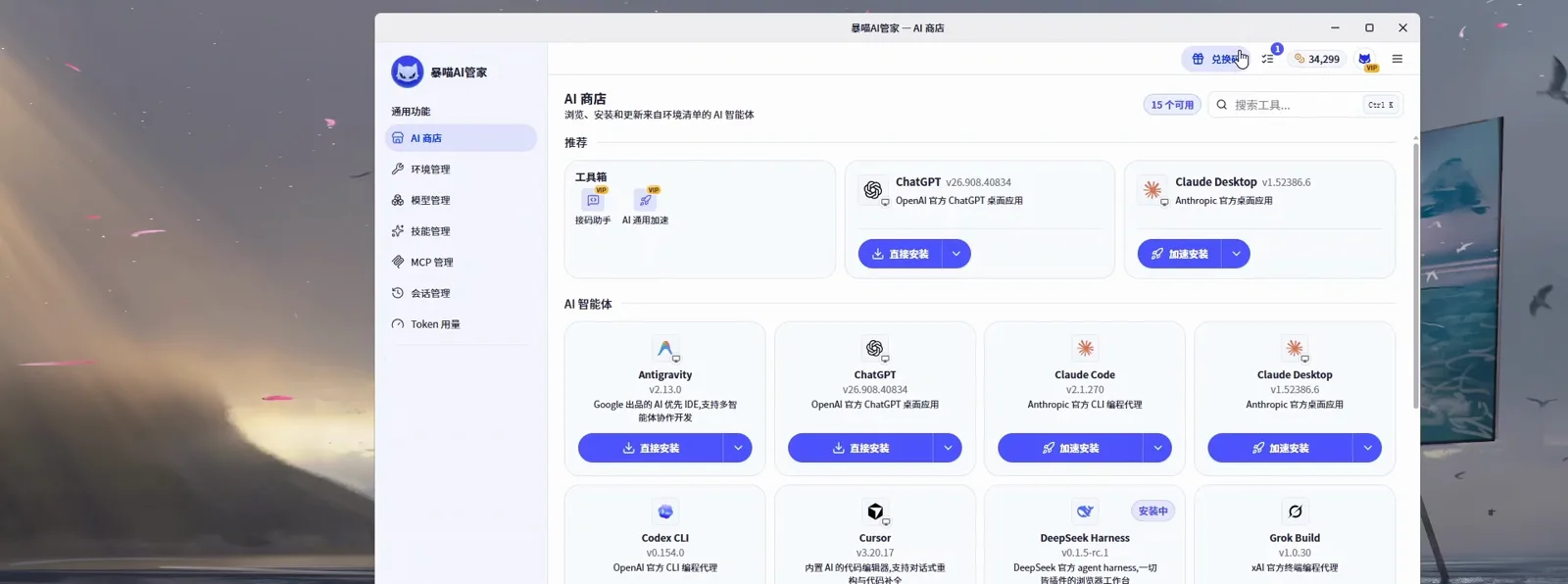
Community installers distribute DSH too — the plugin market remains the source for plugins.Watch at 0:24 - 9
Advanced: patch configs beside the wallpaper library
The closing dual-pane is the power-user view: on the left, a DeepSeek Harness session patches cordis.patch.yaml and verifies with dsh --profile web --dump-config during a wallpaper-engine upgrade; on the right, the wallpaper picker browses a library of ninety Wallpaper Engine titles with a content-rating filter. Config file and wallpaper library, working side by side.
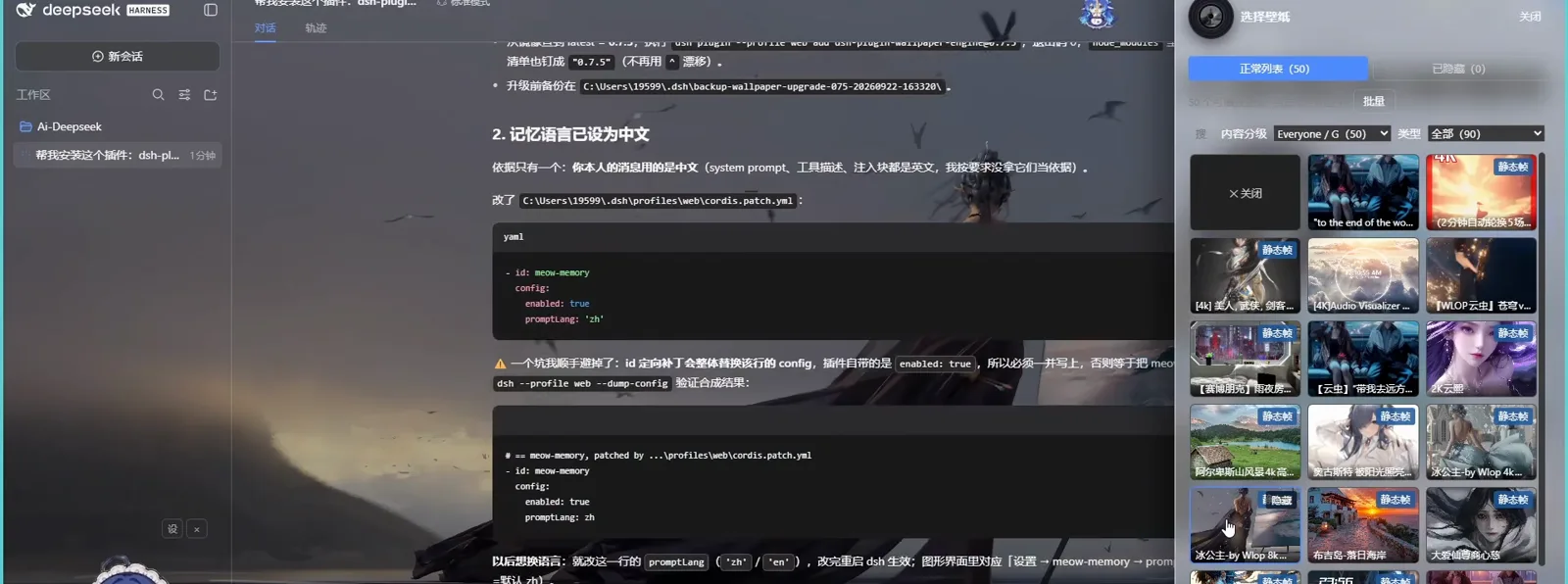
The power-user close-up: config patches on the left, wallpaper library on the right.Watch at 0:52
DSH wallpaper questions, answered
The dual-naming trap, token cost, model binding, and how this page splits duties with the theme axis.
Is the install name dsh-wallpaper-engine or dsh-plugin-wallpaper-engine?
Both exist and they are different things. The GitHub repository is elysia395/dsh-wallpaper-engine (★724, checked 2026-10-08) — that is where the source and issues live. The installable package name is dsh-plugin-wallpaper-engine, and that is what the author's own README ships as the install command: dsh plugin --profile web add dsh-plugin-wallpaper-engine. This page keeps the two names in their own lanes: repo for source, market name for install.
Do animated wallpapers burn tokens or slow the agent down?
No tokens, by design: the plugin stores all settings on the host side and exposes nothing to the model — the management dialog's own caption says settings stay host-side, and the README repeats the zero-token claim. On power, scene rendering pauses when the window is occluded, and heavy videos are re-encoded with a frame-rate cap through ffmpeg. If the WebGL engine cannot render a scene, the plugin falls back to an embedded MP4 and then to a static frame.
Can I use my existing Wallpaper Engine library?
Yes — that is the plugin's core trick. It discovers your local Wallpaper Engine install, lists your wallpapers, and renders the portable types behind the dsh web UI through its built-in MIT-licensed WebGL engine (particles, puppet warp, SceneScript, audio reactivity, mouse interaction). Windows, macOS and Linux use the same package and the same command.
How do I get a different background per model?
Install the second plugin: dsh plugin --profile web add dsh-background-by-model (HarmlessFunny, ★14). It matches an ordered list of rules against the current session's model — provider, model id or display name — and applies the first match, so "deepseek" can pin one image while "glm" gets another, with per-rule opacity, blur and layout. A multi-image rotation toggle turns any rule into a carousel, and a one-click config download replicates the author's own setup.
How is this different from the UI presets and themes page?
The theme axis authors complete looks — color roles, fonts, preset studios, AI-generated themes — and lives at /learn/ui-presets. This page is narrower and more literal: live wallpapers rendered behind the chat, and backgrounds that switch with your model. Use the themes page when the interface itself should change; use this page when you want motion and imagery behind it.
Are these wallpaper plugins official DeepSeek features?
No. Both are community plugins by individual developers — elysia395 (dsh-plugin-wallpaper-engine, ★724) and HarmlessFunny (dsh-background-by-model, ★14), both re-checked via the GitHub API on 2026-10-08. They install into the official dsh web UI through the normal plugin system but are not affiliated with DeepSeek.
Related guides
The neighboring axes: themes, client skins, pets, the orb sister page and the widget sibling.
Beautify dsh with AI-made themes
The wallpaper-plugin walkthrough: the appearance three-state switch, the preset studio with its layer-composite wallpaper editor, and one chat message that spins a full light-and-dark theme.
Read the guideDeepSeek Harness client UI: themes & custom skins
Install a ready-made theme skin like Firefly, or fine-tune your own with dsh-client-ui-custom: six presets, frosted glass, wallpapers — instant apply, safe rollback.
Read the guideDSH UI Plugins (DeepSeek Harness)
Web UIs, themes and skins that change how DSH looks and feels.
Read the guidedsh-dafeiyu: a desktop pet for DeepSeek Harness
One command installs the big-fat-fish desktop pet, which acts out your agent's real task state — frame-checked screenshots.
Read the guideDeepSeek Orb: the floating ball, hands-on
Install dsh-orb, hand it one-sentence tasks, watch Computer Use drive the screen and background agents do the long work — 9 frames from the author's own recordings.
Read the guideTrack dsh balance with the whale widget
Link dsh-whale-widget into the web profile and configure the corner bubble that shows your remaining DeepSeek balance, today's spend and a refresh countdown.
Read the guideSources & credits
All frames come from the three screen recordings credited above, cropped to remove watermarks and burned-in subtitles. The main source is the plugin author's own same-day recording of the major update (720p was the day's ceiling on the html5 channel); the second source is the model-background author's own recording; the third contributed only its two verified-clean UI moments — its yellow callout-card segment was never framed. View counts are yt-dlp API values (Bilibili search pages inflate them ~10x), and repository facts were re-checked against the GitHub API on 2026-10-08.