
DeepSeek Harness desktop pet: install dsh-dafeiyu and put the big fat fish on your desktop
A real screen recording, frame by frame: one plugin command hangs a state-aware pet on dsh — when your agent thinks, works, waits for your confirmation or wraps up, the fish acts it out on the desktop, and it never touches your API keys.
Last updated: 2026-10-01
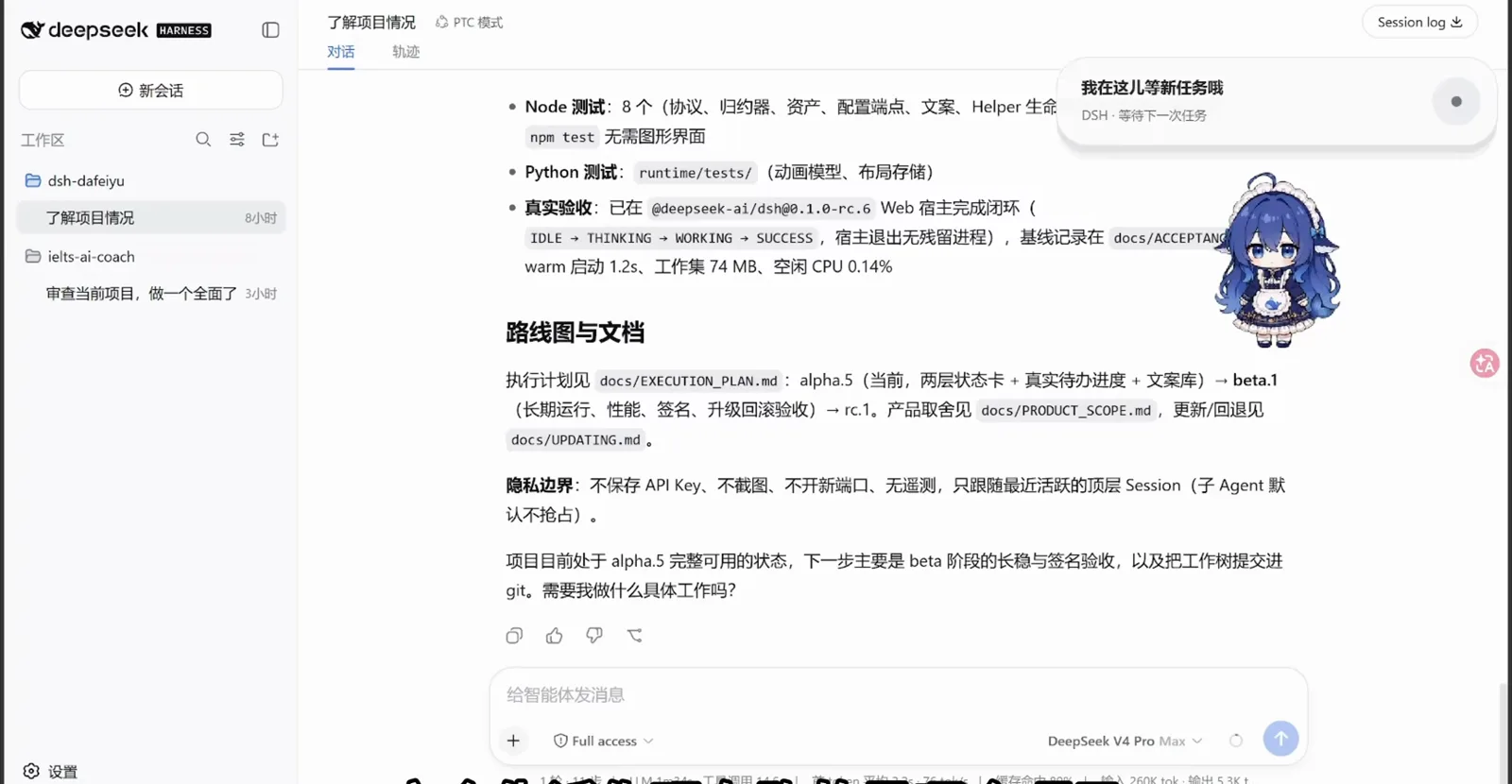
DeepSeek Harness works in the terminal and the browser, but nothing on your desktop tells you how a run is going without opening the window. dsh-dafeiyu — the community's "big fat fish" — is a desktop pet plugin by 瓜皮老花生 (QCYTTSN on GitHub) that fills exactly that gap: a chibi companion floats on the top layer of your Windows desktop and switches pose and speech bubble with the agent's real state — thinking, working, waiting for your confirmation, done.
This guide walks the full loop from two screen recordings: the install command and the profile check, the first appearance after a restart, the size and motion sliders, then the task-state bubbles, the privacy boundary and how updates work. New to the plugin system? Start here: What are dsh plugins, and how does the plugin system work?
TL;DR
- ▸One command on Windows 10/11 x64: pnpm exec dsh plugin --profile web add dsh-dafeiyu@alpha, then quit DSH completely and restart — the fish appears on the desktop's top layer.
- ▸The pet mirrors real agent state, not a looping gif: idle / thinking / working / waiting / done, with progress like 已完成 3/5 步 read from the harness's own task list — it never invents percentages.
- ▸Size, idle-motion frequency and sub-agent tracking live in Settings → Plugins → 大肥鱼桌面伴侣; the author's acceptance run measured a 74 MB working set and 0.14% idle CPU.
- ▸The README's privacy boundary: no API key storage, no screenshots, no new open ports, no telemetry — the pet only follows the most recent active top-level session.
From one command to a fish on your desktop
Part 1 · Install and first run
- 1
Run the install command, then check the web profile
dsh-dafeiyu is open-sourced by its author 瓜皮老花生 on GitHub (QCYTTSN/dsh-dafeiyu, MIT) and ships through the npm alpha channel — 0.1.0-alpha.6 on both recordings. Send the install command in a DSH session (or run it in your terminal); the verification output shows the plugin landing in the web profile: package.json gains the dsh-dafeiyu dependency, and dsh.profile.bundles appends it beside dsh-base and dsh-web-app. Alpha means pre-release: Windows-first, with occasional rough edges.
$pnpm exec dsh plugin --profile web add dsh-dafeiyu@alpha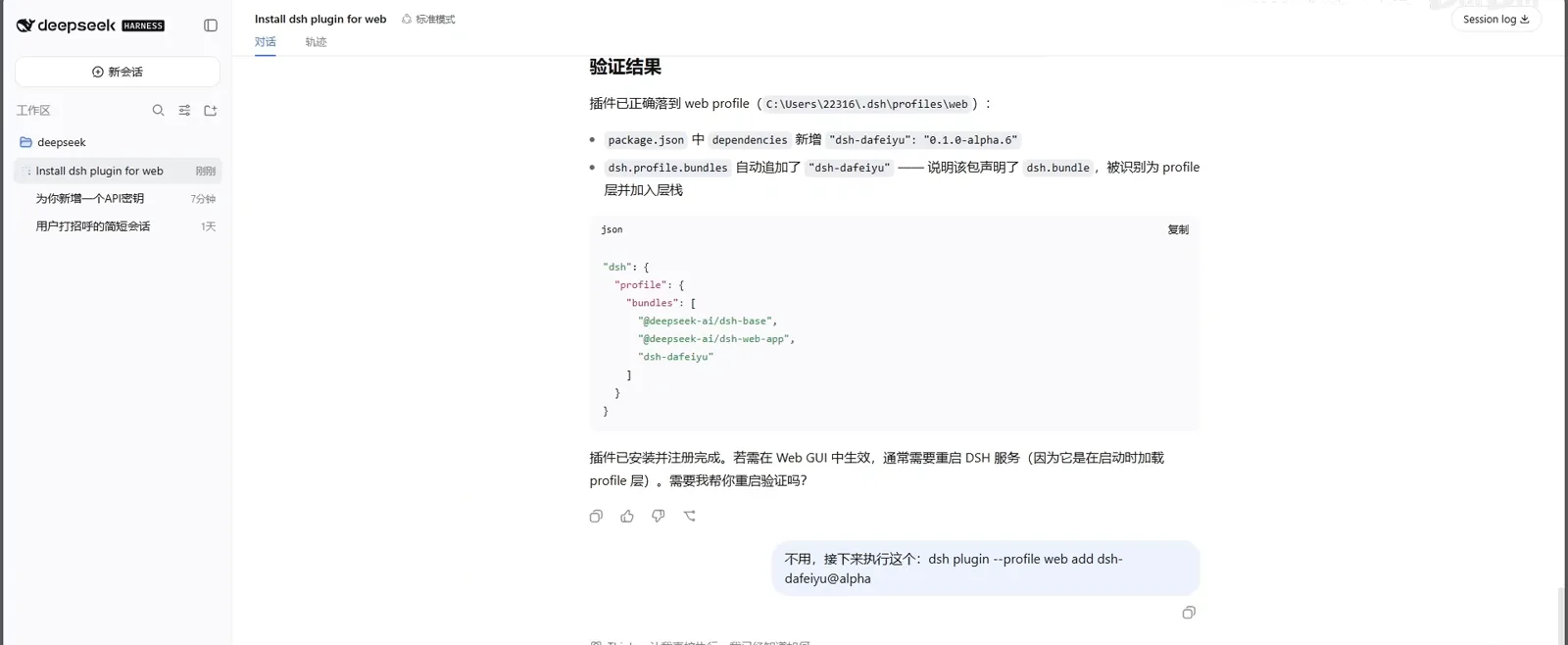
Verification result: the plugin landed in the web profile's bundle layerWatch at 0:50 - 2
Quit DSH fully and meet your fish
Plugins load when DSH starts, so a running process never picks one up: exit DSH completely and start it again. In the teaching recording a fresh greeting session is proof enough — the chibi fish stands on the desktop's top layer beside the chat window, waving at you. Click it while idle and it plays a small interaction.
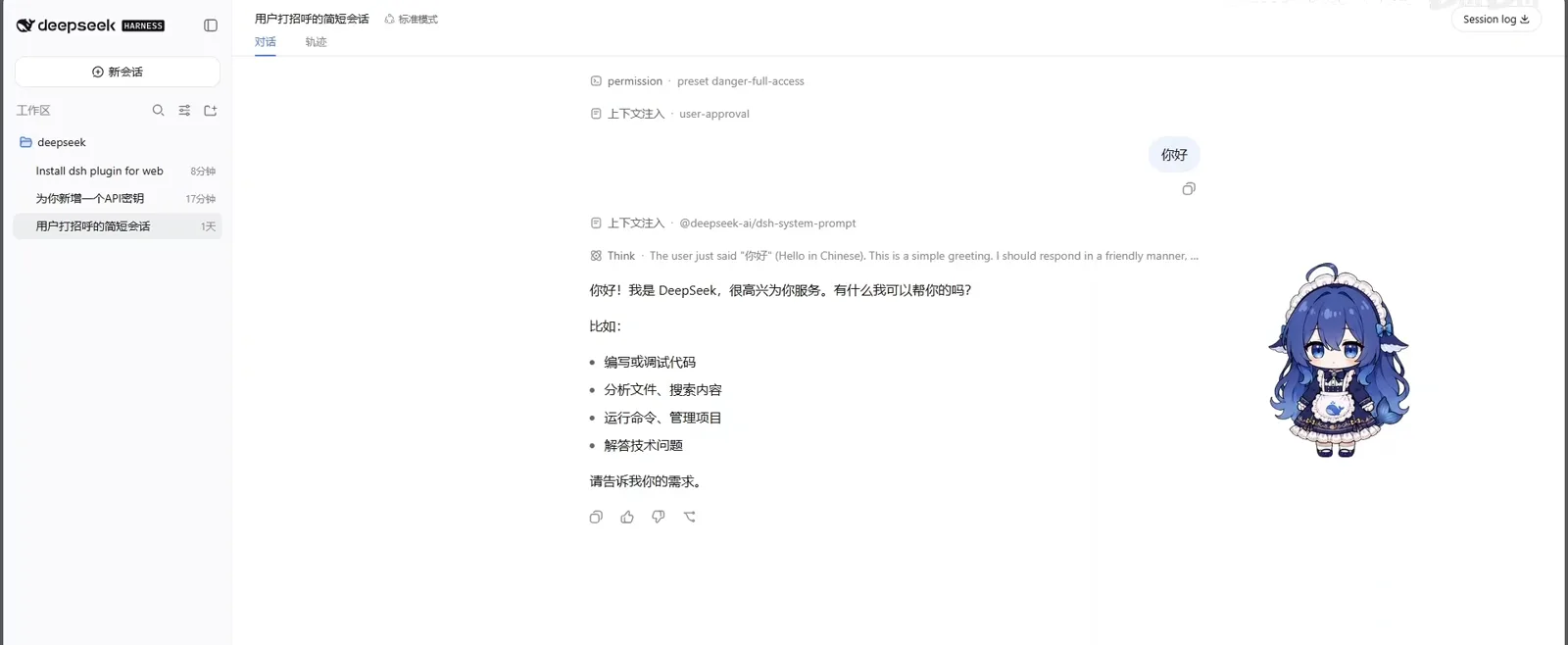
First appearance: the fish greets you from the desktop's top layerWatch at 1:00 - 3
Resize and tune it in Settings → Plugins
Open Settings → Plugins → 插件配置 and find the 大肥鱼桌面伴侣 panel: the enable toggle works without a reinstall (turning it off exits immediately; re-enabling needs no separate launcher), the 角色大小 slider drags from small to large — 70% on the recording — 活跃程度 controls how often idle micro-animations fire, 减少动态效果 trims walking and looping frames, and 响应子 Agent (off by default) decides whether sub-agents may move the pet.
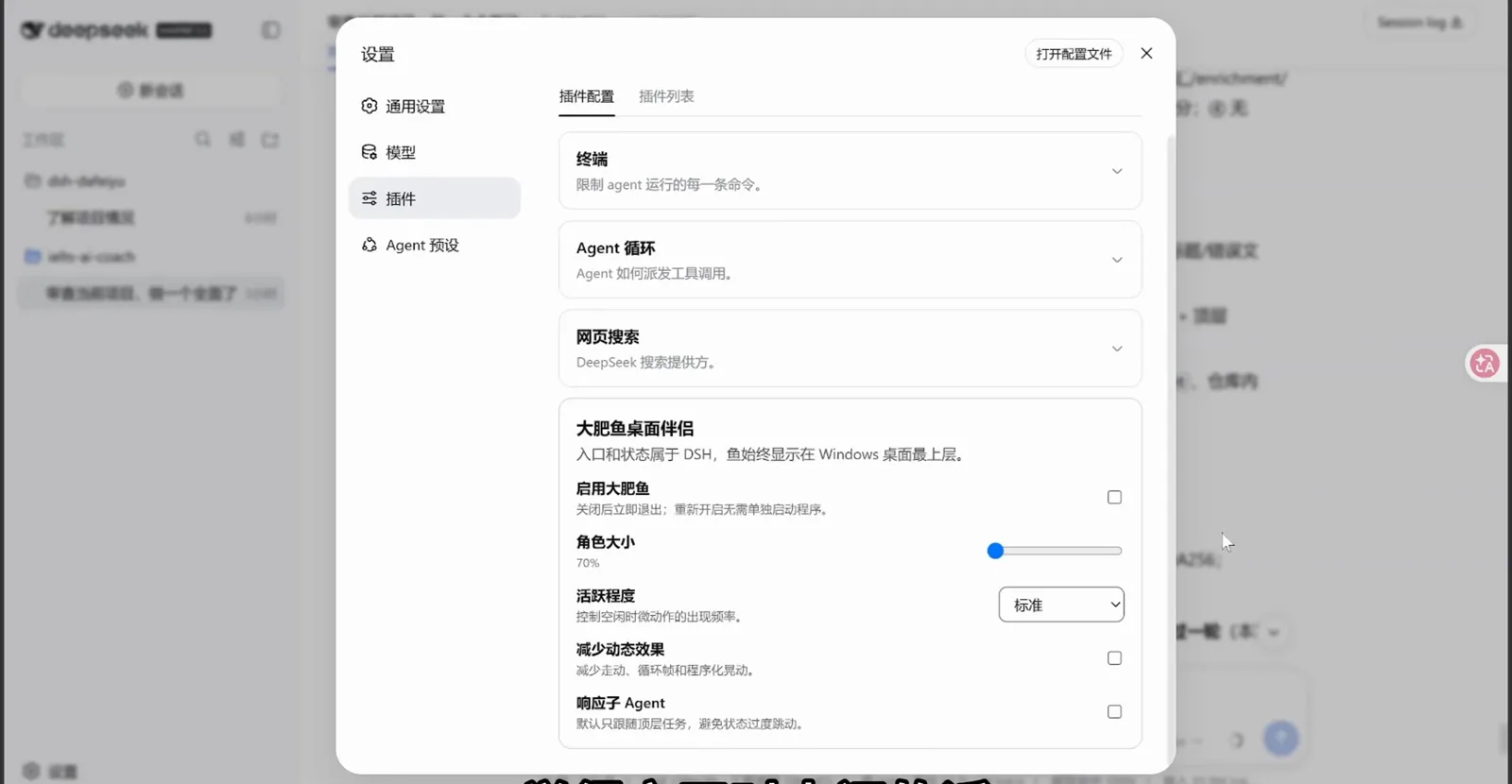
Size and motion live in Settings → Plugins → 大肥鱼桌面伴侣Watch at 0:39
Part 2 · Task states and daily care
- 4
Four states, read straight from the task list
The README's status table gives the mapping: thinking (正在梳理思路哦) while the model plans, working (这部分正在修改中 · 已完成 3/5 步) while tools run, waiting (需要你确认一下后续呢) when your approval is needed, and done (这次的任务搞定啦) when the run closes. If DSH provides no task list, the fish falls back to phase words like 分析阶段 / 实现阶段 / 验证阶段 — it never invents completion percentages.
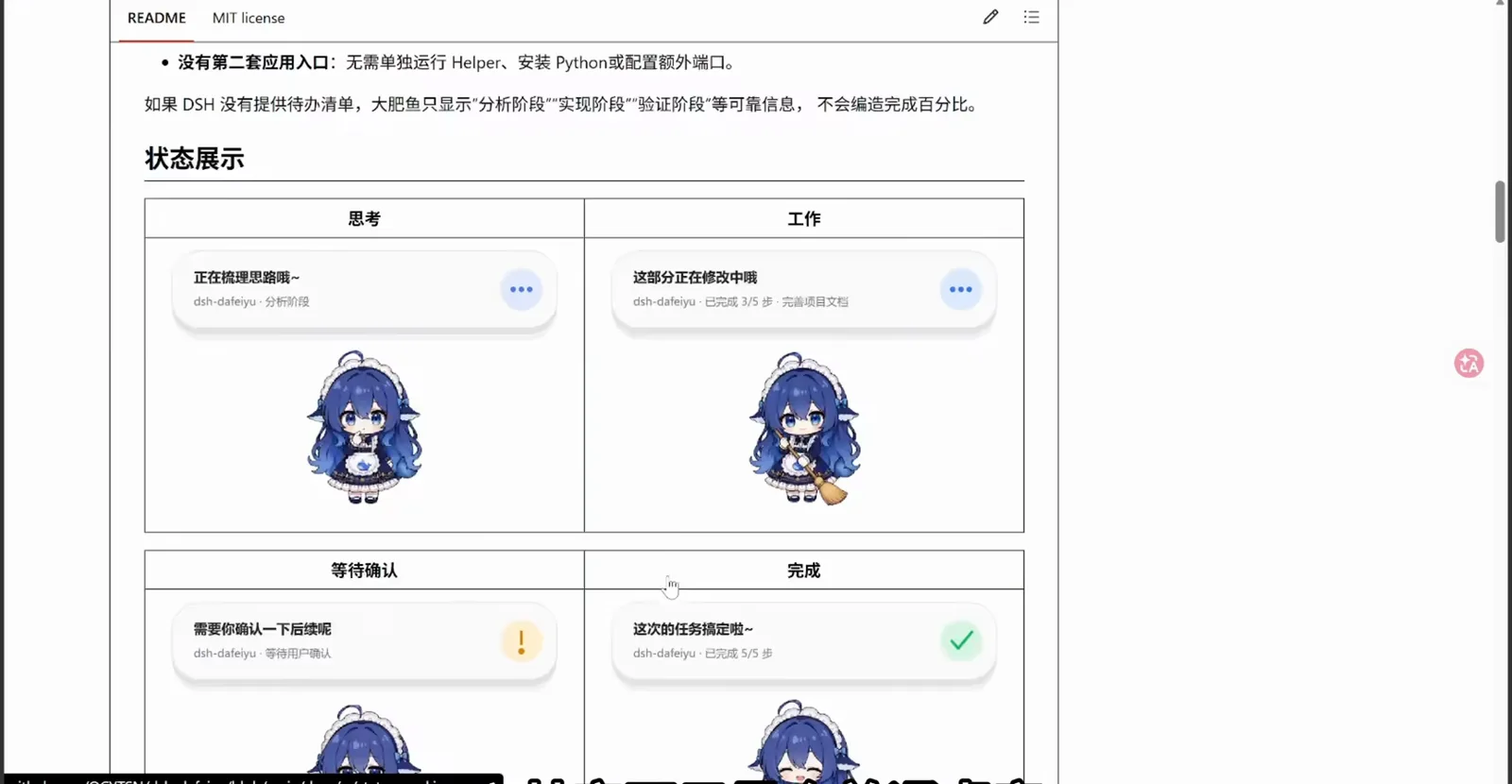
The README's status table: one bubble per agent stateWatch at 0:10 - 5
It follows the real session, not the other way round
In the author's recording the fish tags along a real "understand this project" run: while the agent works through a structured seven-point checklist, the pet announces 让我整理一下刚才的结果呢 (dsh-dafeiyu · 分析阶段). When several sessions run at once it shows the top-level task that most needs attention — waiting > error > working > thinking > idle — and sub-agents never grab the display unless you opt in.
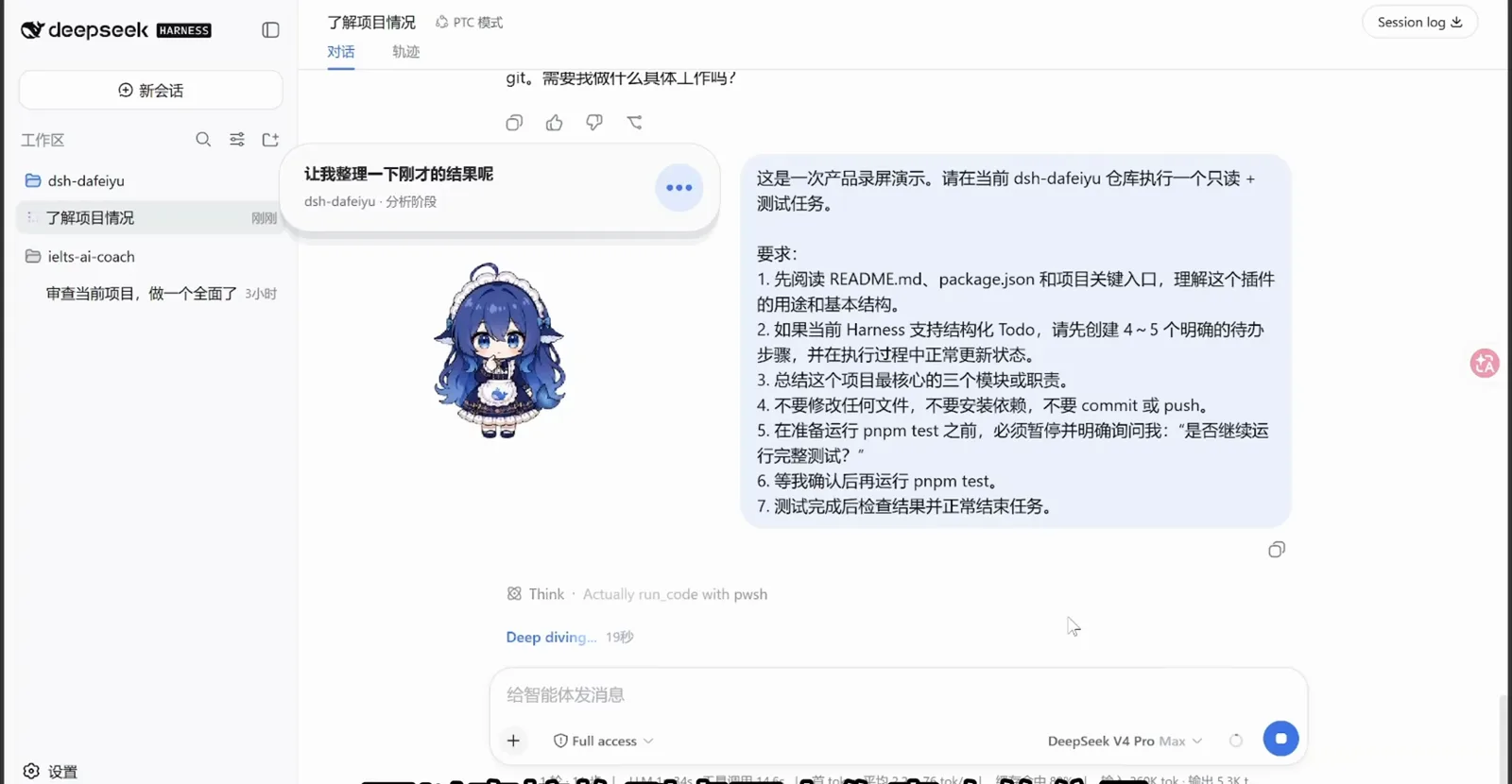
On duty: the pet mirrors a structured task running in the sessionWatch at 1:05 - 6
Updates, hide and close
Installed plugins never auto-update: after a new release, quit DSH completely and run the update command — or simply re-run the add command, which resolves whatever the alpha tag points at now. Need a break? 本次隐藏 tucks the window away without disabling the plugin, while 本次关闭 stops the Helper for the rest of this DSH run; it returns on the next start. Both keep your saved settings.
$pnpm exec dsh plugin --profile web update dsh-dafeiyu@alpha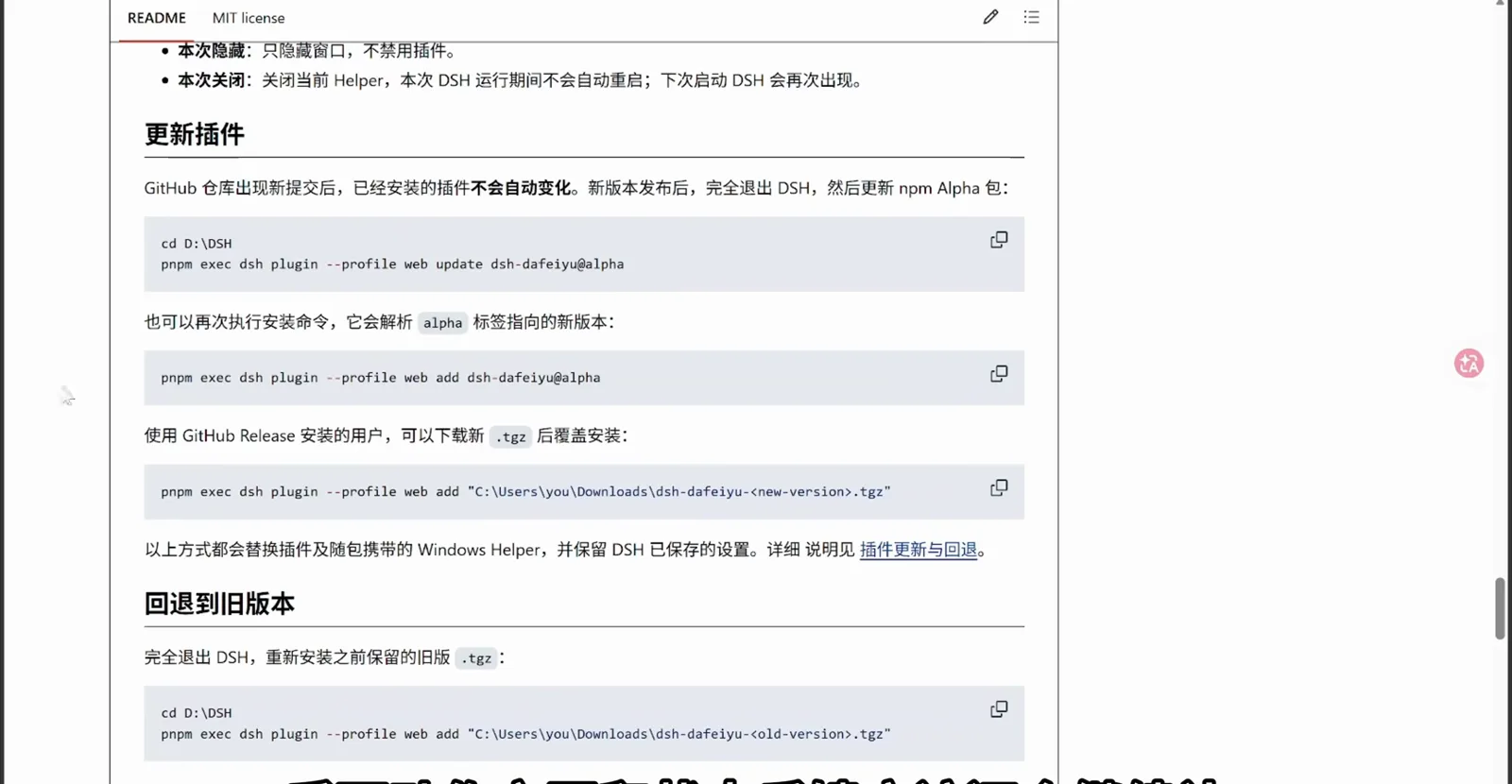
Updates are a command; hide tucks it away, close stops the HelperWatch at 1:18
FAQ
What this pet's new owners ask most.
Which pet plugin is this — and how does it differ from the other dsh pets?
This page covers dsh-dafeiyu, the state-aware pet plugin by 瓜皮老花生 (QCYTTSN/dsh-dafeiyu on GitHub) that binds to your DSH session. Don't confuse it with its lookalikes: dsh-deep-whale is a whale-girl theme skin, the balance widget is a token-and-balance whale, and 張墨林's standalone big fat fish is a separate desktop app that runs without DSH entirely. Our desktop-pets collection ranks the whole cluster.
Does the pet eat CPU and memory?
Less than you'd expect: the author's acceptance run on @deepseek-ai/dsh@0.1.0-rc.6 measured a 1.2 s warm start, a 74 MB working set and 0.14% idle CPU. If it feels busy, lower 活跃程度, tick 减少动态效果, or shrink 角色大小 — all in Settings → Plugins.
What does the pet see and store?
Per the README privacy boundary shown in the recording: it saves no API keys, takes no screenshots, opens no new ports and sends no telemetry. It only follows the most recent active top-level session, and sub-agents don't take over the display by default.
How do I get rid of it?
For a temporary goodbye: 本次隐藏 comes back on the next restart, and 本次关闭 stops the Helper for the current DSH run. For a full removal use the standard uninstall flow in our uninstall guide — and to roll back a bad update, reinstall the old .tgz you kept, as the README instructs.
Related guides
Other corners of the same playground.
More desktop pets for dsh
The ranked collection: Live2D companions, pixel whales and pet galleries — where dsh-dafeiyu sits in the cluster.
Read the guidedsh mini-game plugins
More desktop toys: mini-game plugins worth a coffee-break round.
Read the guideThe whale balance widget
A different whale: token spend and balance on your desktop — the pet cluster's accountant.
Read the guideAI-made themes with ui-presets
Reskin the harness itself: AI-generated theme presets for the web UI.
Read the guideInstall plugins the standard way
Profiles, the -w flag and the plugin marketplace — the mechanics behind step 1.
Read the guideUninstall plugins cleanly
Remove a plugin, roll back a bad update and keep your config intact.
Read the guideSources
Frames and on-screen facts come from the first two recordings: the pet plugin's author demoing dsh-dafeiyu himself, and a full beginner walkthrough (whose burned-in captions and overlays stay outside our crops). Install commands and the privacy boundary are quoted from the plugin's GitHub README; the third video — 張墨林's standalone desktop port — is credited for standalone-app facts only and contributed no frames.