
dsh-plugin-rapidspeech
メンテナンス: 活発yoletpig/dsh-plugin-rapidspeech
RapidSpeech.cppを使って音声をローカルで文字起こしし、認識結果をDSHの入力欄に挿入します。音声データは端末外へ送信されません。
$ dsh plugin add dsh-plugin-rapidspeech5
スター
0
フォーク
TypeScript
言語
MIT
ライセンス
2026-11-07
作成日
2026-11-08
最終プッシュ
README
dsh-plugin-rapidspeech
English | 简体中文
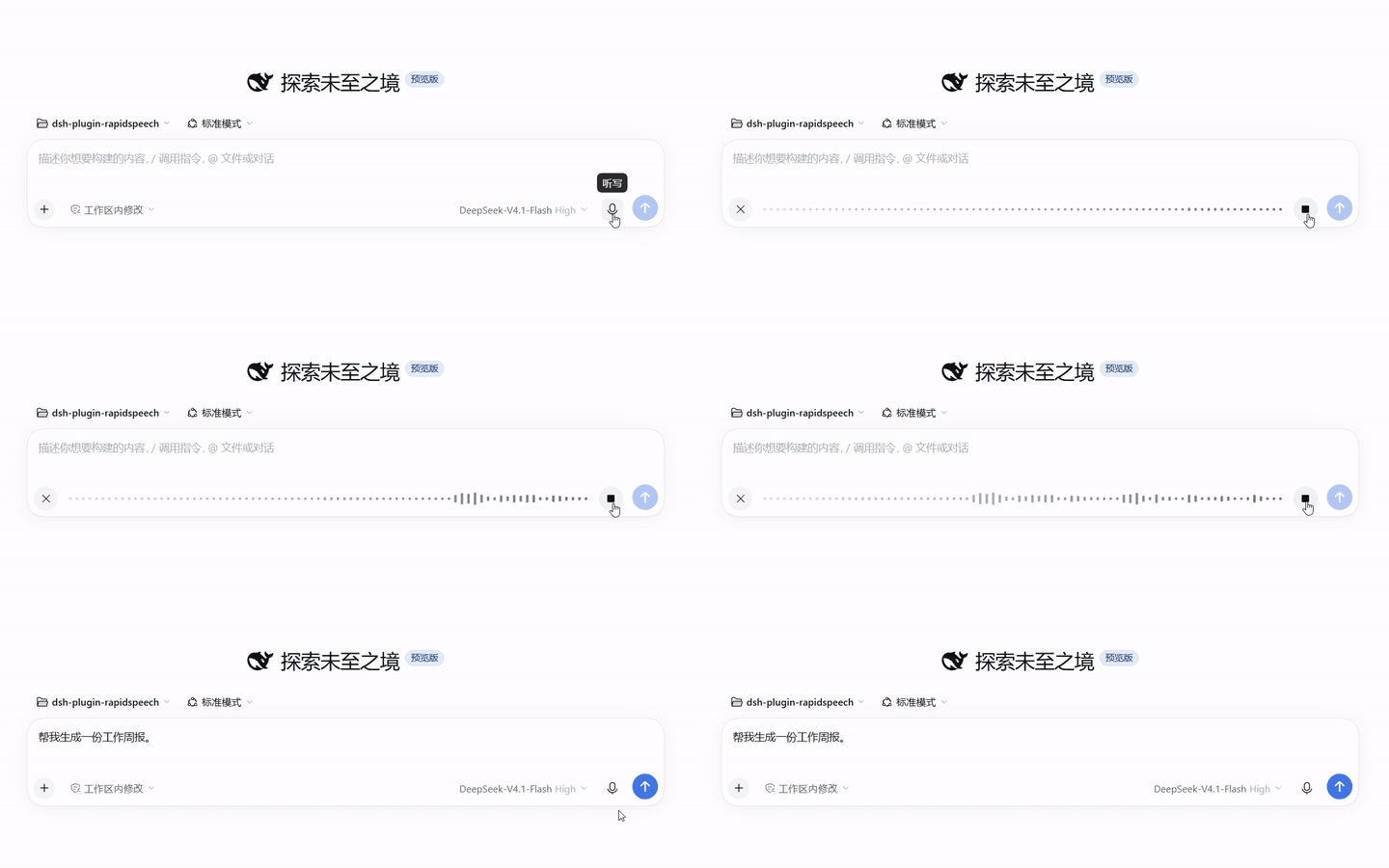
Local, offline speech-to-text for the DeepSeek Harness (dsh). Click the microphone in the composer, speak, and the recognized text is inserted into your draft — transcribed by a RapidSpeech.cpp rs-server running on your own machine. Audio never leaves your computer.
Features
- Fully offline — audio, model inference, and transcripts stay on this machine end to end.
- Managed server — on first use, dsh downloads the
rs-serverbinary and your chosen model, verifies their integrity, spawns the server on a loopback port, and reclaims it after idle time. No manual services. - Model switching from the plugin page — pick a model in the plugin's settings; it downloads on the next recording and hot-swaps. Every downloaded model stays cached, so switching back is instant.
- Curated model catalog — X-ASR, SenseVoice, and FunASR-Nano from RapidAI's official mirrors (ModelScope, HuggingFace, hf-mirror), each pinned to a SHA-256.
- Coexists with other providers — installs beside the official SenseVoice plugin; pick a provider per recording from the voice-input selector.
- External mode — point the plugin at an
rs-serveryou run yourself; the plugin then only connects and never manages it.
Requirements
- DeepSeek Harness 0.2.2 or newer (npm CLI or Desktop app)
- CPU with AVX2 — Intel Haswell (2013) / AMD Excavator (2015) or newer. Both the Linux and Windows builds target AVX2 as their baseline, so the requirement is identical on either OS.
- Disk: ~200 MB–1 GB per model; RAM: ~1–2 GB while transcribing
- Windows x64 and Linux x64
Install
From the plugin marketplace (Desktop / Web UI)
Two ways — both put RapidSpeech ASR (local) in your plugin list:
-
Search and install (simplest): open the market's install page, search for
dsh-plugin-rapidspeech, and install it. The package lives on the official npm registry; if your npm mirror lags behind, give it a few minutes or point the registry back atregistry.npmjs.org. -
Index source (curated card with a description): add this index URL in the market's index settings, then find RapidSpeech ASR (local) and install:
https://github.com/yoletPig/dsh-plugin-rapidspeech/releases/latest/download/market-index.json
From the CLI
dsh plugin --profile <your-profile> add dsh-plugin-rapidspeech
Or install a specific release artifact without any build tooling:
# Download dsh-plugin-rapidspeech-<version>.tgz from GitHub Releases, then:
dsh plugin --profile <your-profile> add ./dsh-plugin-rapidspeech-<version>.tgz
Installing from a git checkout
git clone https://github.com/yoletPig/dsh-plugin-rapidspeech.git
cd dsh-plugin-rapidspeech
npm install          # the prepare script builds lib/
dsh plugin --profile <your-profile> add ./dsh-plugin-rapidspeech
On pnpm ≥ 10, the first add from git asks you to allow the build script — add the
package key printed by pnpm to the profile's pnpm-workspace.yaml under allowBuilds.
Quick start
- Start dsh and open the composer.
- Click the microphone, then Install when prompted — the rs-server binary and the model download in the background (one-time, ~180 MB for the default model).
- Record. Stop, and the transcript appears in your draft, ready to edit and send.
The server reclaims itself after 5 idle minutes and wakes in about 2 seconds on the next recording.
Models
modelId |
Size | Languages | Mirrors |
|---|---|---|---|
xasr-q8_0 (default) |
178 MB | auto, zh, en | ModelScope |
sense-voice-small-q4_k |
182 MB | auto, zh, en, yue, ja, ko | HuggingFace, hf-mirror, ModelScope |
funasr-nano-q4_k_m |
692 MB | auto, zh, en | HuggingFace, ModelScope |
Switching models
Open the plugin's page in dsh and pick a model — the field is live: the next recording downloads it (after your consent) and subsequent recordings use it. All catalog models live in the same cache, so switching back to a previously downloaded model needs no download.
X-ASR is only published on ModelScope, so the HuggingFace mirror is not offered for it; choosing an unavailable mirror fails explicitly rather than falling back.
Advanced overrides
Set these in the plugin page or in your profile's cordis.patch.yml (precedence
top to bottom):
modelPath— use a local GGUF file directly.modelDownloadUrl— download from any HTTPS URL.modelId— a catalog entry.
Configuration
音声 の他のプラグイン
dsh-plugin-tts
by 1624318455
Edge TTS 音声プラグイン:返信読み上げ、自動読取トグル、無料・キー不要
dsh-voice-scribe
by pensivefei
DSH音声入力プラグイン。Altを押して話すと入力欄に文字起こし。Web Speech標準(設定不要)・任意でOpenAI互換ASR・DSH LLMで推敲。
dsh-voice-ai-girlfriend
by beiyege-01
Whisper 音声入力と Qwen3-TTS 音声合成による会話型コンパニオンプラグイン。文単位のストリーミング読み上げ、割り込み/キュー両モード対応
dsh-localtts
by abbccdd
DeepSeek Harness 向けのローカル IndexTTS 2.5 と GPT-SoVITS 音声合成・再生。