
dsh-localtts
In a curated listMaintenance: Activeabbccdd/dsh-localtts
DeepSeek Harness 向けのローカル IndexTTS 2.5 と GPT-SoVITS 音声合成・再生。
$ dsh plugin add dsh-localttsInstall
dsh has no central install command — add this plugin’s entry (documented in its README) to your profile or patch config, then restart.
How installs work12
stars
0
forks
JavaScript
Language
MIT
License
2026-08-28
Created
2026-10-29
Last push
README
DeepSeek Harness Local AI TTS Plugin
English | 简体中文 · Version 0.1.12-rc.5 release candidate · MIT
Read DeepSeek Harness assistant replies through a compatible local HTTP API or JSONL worker, with built-in launchers for IndexTTS 2.5 and GPT-SoVITS. The user supplies the local service or existing Python/project/model configuration; the plugin sends one natural sentence per request and plays the returned audio.
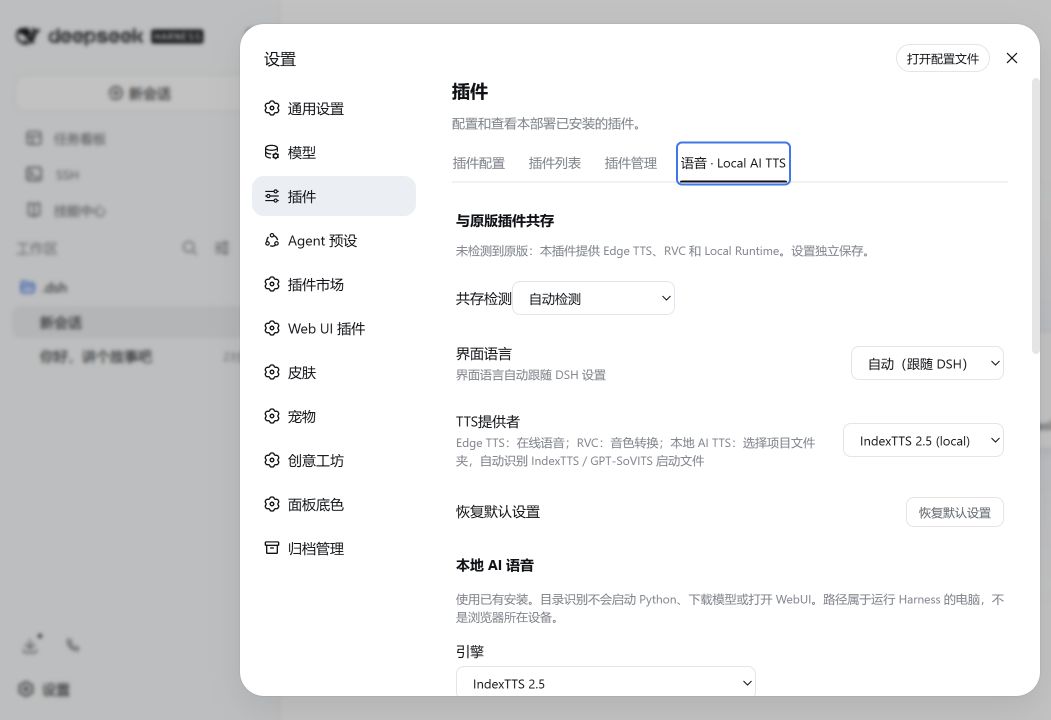
Based on 1624318455/dsh-plugin-tts, commit ec0cf87ef52abb81ae91681a966aa3096365e631. Its message buttons, Auto Read toggle, Edge/RVC providers, pause/stop controls, settings and Harness API integration are reused. See NOTICE.
This is a connector and process launcher, not a model distribution. It does not install, trim, retrain or modify TTS models. It uses an existing environment for bundled SDK loading recipes or a worker command that you configure. No checkpoints, reference recordings, voice caches, Python environments or generated audio are included.
Harness assistant events → SentenceBuffer → local process provider
                                               ↓ JSONL stdin/stdout
                                    IndexTTS / GPT-SoVITS adapter
                                               ↓ audio / PCM
                                        Browser Web Audio
Model folders and bilingual settings
Select Local model folder (auto detect), choose a folder, recognize the model, select a voice, load, then try reading. Known layouts cover Kokoro 82M, Qwen3 CustomVoice, F5 v1 Base, VoxCPM and CosyVoice 3. One packaged JSONL worker calls existing SDKs directly; no HTTP gateway is required. Cloning models require reference audio and a matching transcript, which can be saved as a reusable voice preset. Environment overrides are collapsed. Unload releases the browser's model lease. See the folder guide.
Universal protocols and the existing IndexTTS / GPT-SoVITS entries remain available. Recognition does not install dependencies or infer arbitrary unknown weight architectures.
All five folder recipes passed direct SDK synthesis and formal DSH load, trial, pause, resume, stop and unload checks on the local test machine, without an HTTP gateway. See the scope recorded in the folder guide.
Universal local TTS (release candidate)
Select Universal local TTS (HTTP / worker) for OpenAI-compatible speech, configurable JSON, URL-encoded forms, multipart reference-audio uploads, or custom JSONL workers. Models and transport protocols are independent; presets use the same provider. OpenAI-compatible describes the local API format; it does not require an OpenAI account or cloud service.
Native Piper and GPT-SoVITS HTTP synthesis were verified. Kokoro, F5-TTS, VoxCPM1.5, Qwen3-TTS 0.6B and CosyVoice3 were verified through a developer-local SDK gateway and the formal DSH settings/player. These tests do not certify every engine's native API/WebUI. The gateway, model environments and recordings are not included. See the configuration guide and model test boundaries.
Requirements and support
Harness 0.1 (from 0.1.0-rc.6, including 0.1.1-rc.2) and 0.2 (from 0.2.0-rc.2) share one plugin package. Compatibility uses public services and message selectors; 0.1 Session chunks and 0.2 Agent stream frames feed the same sentence player. The peer range retains an upper bound at the next minor family. Future breaking interfaces need validation before expanding it. See validation boundaries.
- DeepSeek Harness web profile with
webServer,session/eventand client UI slots. Node.js 22+ and a browser with Web Audio. - A compatible local HTTP service, or an existing model installation with a worker implementing the JSONL worker protocol.
- The built-in IndexTTS / GPT-SoVITS launchers need the existing Python environment, project and model files. Thin examples in
adapters/contain no weights.
The plugin discovers known paths only inside the selected local project/wrapper folder. It does not scan whole disks, install dependencies or open WebUI pages. Detected and manually configured paths are kept in browser settings. IndexTTS and GPT-SoVITS retain separate project/model/voice profiles, so switching back restores that engine's previous paths without copying them into the other engine.
Install
This plugin can be installed and enabled alongside the original. Its package, routes, settings and UI identifiers are independent. Detection of the original automatically enables Local companion mode; see below.
Install the current GitHub source (also replaces an older installation and enables market update checks):
dsh plugin --profile web add github:abbccdd/dsh-localtts
The client bundle is committed, so this source needs no build script. Alternatively, download the package and SHA256 checksum from the v0.1.12-rc.5 candidate release. The previous v0.1.11 archive does not contain the new universal or model-folder entries. Version 0.1.8 is incompatible with Harness 0.2. Restart Harness and refresh the browser after installation.
For local development, install a checkout instead:
dsh plugin --profile web add "file:/path/to/dsh-plugin-local-ai-tts"
dsh web
Restart dsh web and refresh its browser page after installation. On Windows a file: installation may be a copy; reinstall the local package after changing it. Do not edit Harness core files.
The community DSH Market catalog is maintained separately from this repository. If it still offers 0.1.8, use the command above.
Updates and compatibility
More in 音声
vox-director
by alisa0808
1 トピックから Vox 風ペーパーコラージュ解説・広告動画を Atlas Cloud + ffmpeg で E2E 自動生成するエージェントスキル
dsh-voice-ai-girlfriend
by beiyege-01
Whisper 音声入力と Qwen3-TTS 音声合成による会話型コンパニオンプラグイン。文単位のストリーミング読み上げ、割り込み/キュー両モード対応
dsh-voice-prompt-enhancer
by fishsb
プロンプト強化と音声入力補正をまとめたDSHプラグインです。複数モードやモデル・メモリ連携、ホットキー、自動停止、フィラー除去、音声誤り訂正に対応します。
dsh-plugin-tts
by 1624318455
Edge TTS 音声プラグイン:返信読み上げ、自動読取トグル、無料・キー不要