
DeepSeek Harness MCP setup: migrate, register, call
How MCP servers get wired into dsh: the field mapping that moves a server over from Claude Code or Codex, what a registered server looks like, the config you paste, and the official DeepSeek Harness Web UI actually calling the Amap Maps MCP — six screenshots, and every step image links back to its second in the source video.
Last updated: 2026-09-27
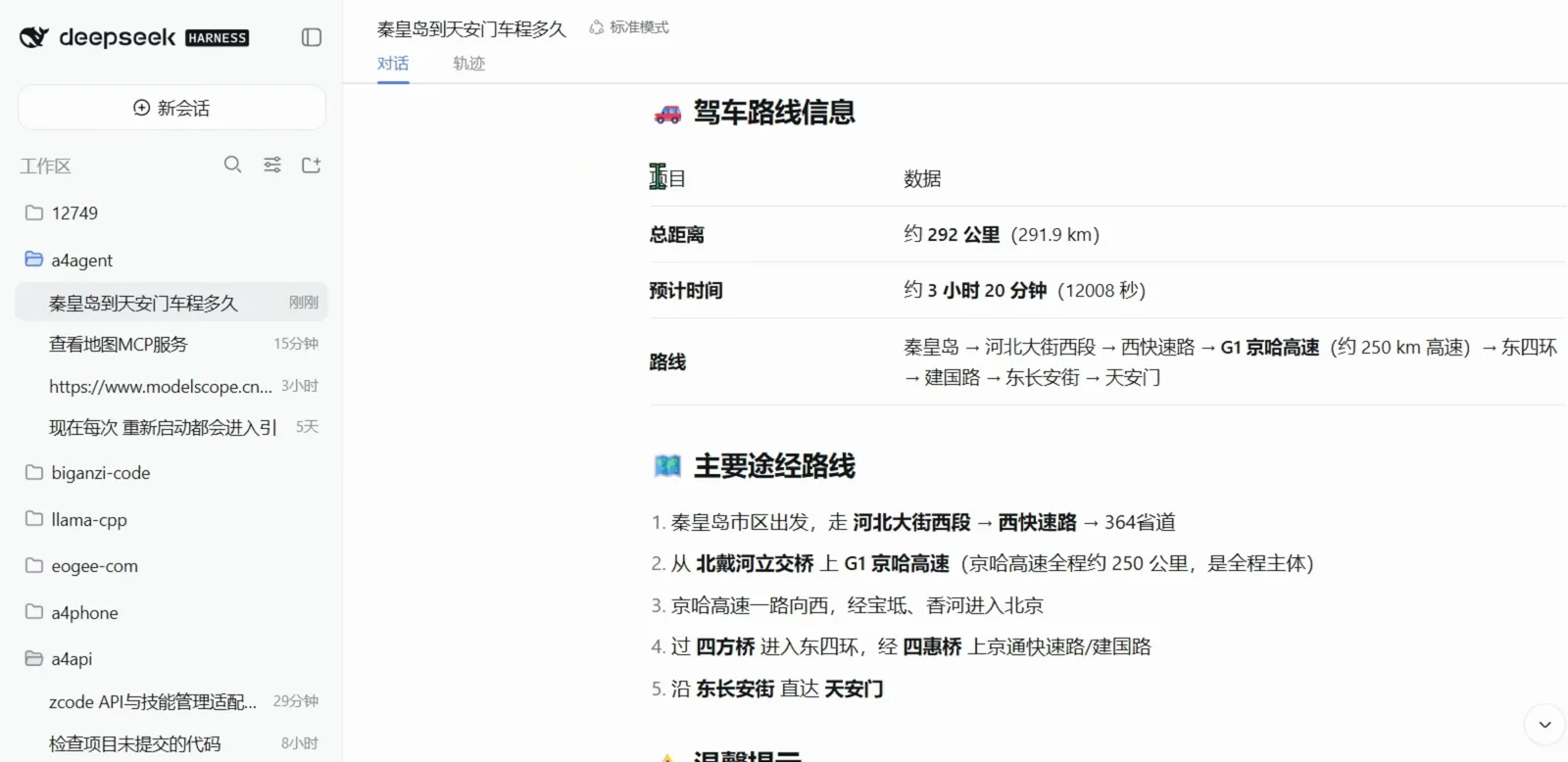
Connecting MCP servers to DeepSeek Harness is a configuration job rather than a settings screen: once a server is registered it arrives in a session as an ordinary tool call. The recording this page follows — by Bilibili creator eogee — walks the whole path in one take: migration, registration, and a real call.
Two things to know about the pictures before you scroll, because this page is deliberately blunt about its source. Most of the footage is a scroll-through of the author's own illustrated tutorial on eogee.com plus his self-built a4api panel — a third-party tool, not an official DeepSeek Harness screen. Only the hero image and the last two step images come from the official DeepSeek Harness Web UI at localhost:3080. Every frame is labelled accordingly, and official dsh behaviour is described only on those three.
The short version
- ▸MCP is how dsh borrows outside tools. Wiring one in is a config edit, not a settings screen: the video's field-mapping table moves a single server definition across five short rows — serverName, transport: stdio, command + args, env, and streamable-http + url for remote servers.
- ▸A registered server shows up as a card in a management panel — chrome-devtools, playwright, open-websearch and github tagged dsh; node_repl and cua_repl tagged Codex; my-fastmcp-server and open-webserch tagged Claude. That panel is a4api, the author's own tool, not a dsh screen.
- ▸The only real proof of a connection is the last frame: the official dsh Web UI at localhost:3080 answers 秦皇岛 → 天安门 with an Amap Maps MCP driving route — about 292 km, about 3 h 20 min — after a chain of mcp__amap-maps__* tool calls.
Five steps from a config edit to a real MCP answer
Group 1 · Get the server in
- 1
Start with the field mapping: what dsh calls each MCP field
Reusing an MCP server you already configured elsewhere is a rename job, not a rewrite. The video's 4.1 字段对照 table sets three clients side by side — dsh (labelled cordis.patch.yml), Claude Code (claude mcp / JSON) and Codex (config.toml) — and the rows are all short: serverName (dsh wants a field of its own, where Claude Code uses the key inside mcpServers and Codex uses [mcp_servers.<name>]), transport: stdio (all three default to stdio; Codex infers it from a command field), command + args and env (identical in all three), and transport: streamable-http + url for remote servers. Config file names shift between dsh releases, so treat that column label as the author's note for that day and check the configuration guide before you edit anything.
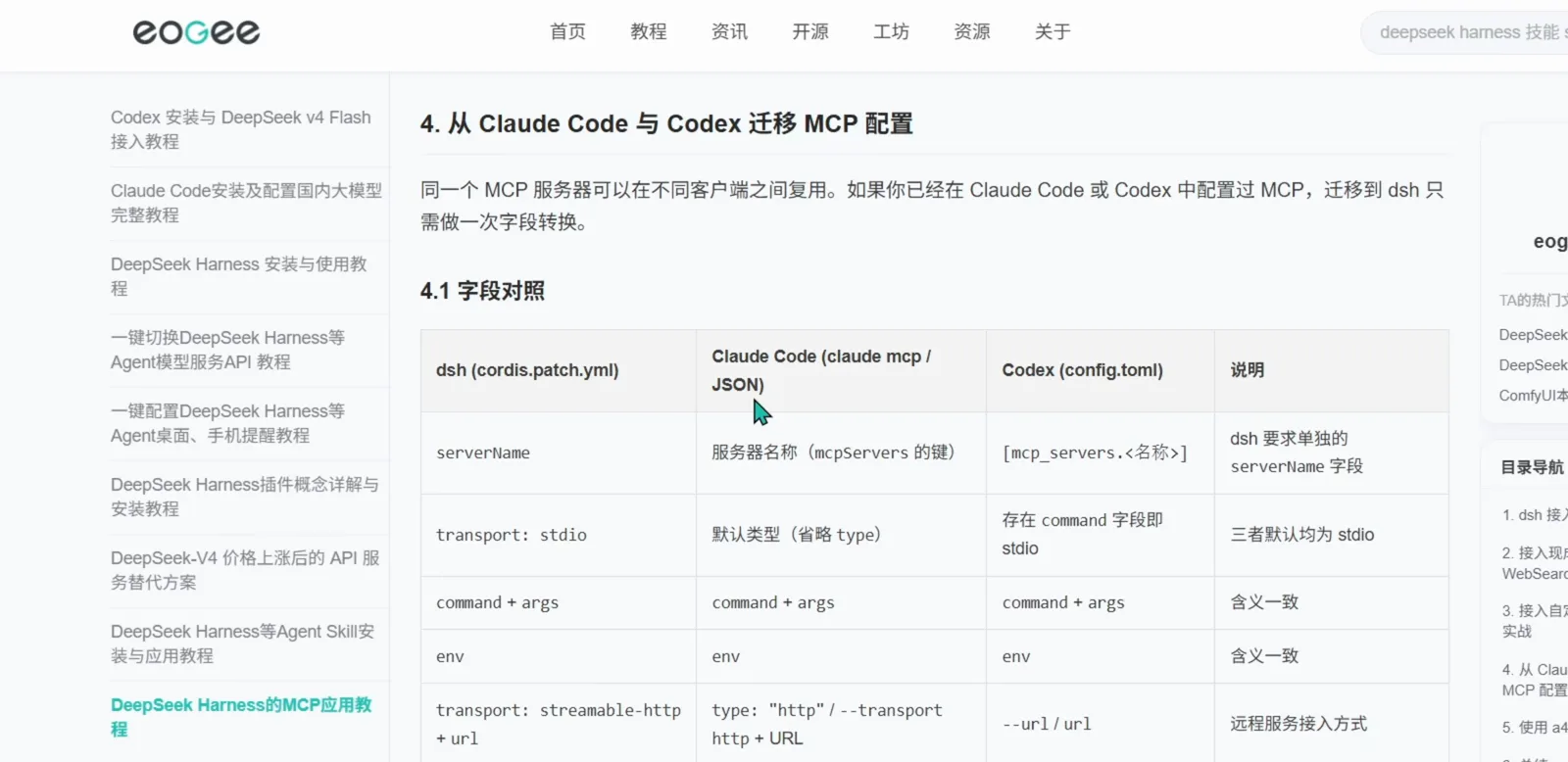
The author's 4.1 字段对照 table: five rows cover almost every MCP server definition you would move between clients.Watch at 2:50 - 2
See what is already connected: one card per MCP server
The panel in this frame is a4api — the author's self-built third-party manager, not an official dsh screen. Its MCP 管理 tab lists one card per registered server with the client it came from: chrome-devtools (browser debugging, DOM, network and performance checks) on dsh, playwright (browser automation) on dsh, open-websearch (search-engine integration that returns live results) on dsh, github on dsh — plus node_repl and cua_repl on Codex, and my-fastmcp-server and open-webserch on Claude. Each card also states its transport (stdio for most, sse for two) and offers 迁移… / 介绍 / 预览; the toolbar above holds 全局视图 / 项目视图, 迁移日志, 回收站, 安装 MCP and 刷新.
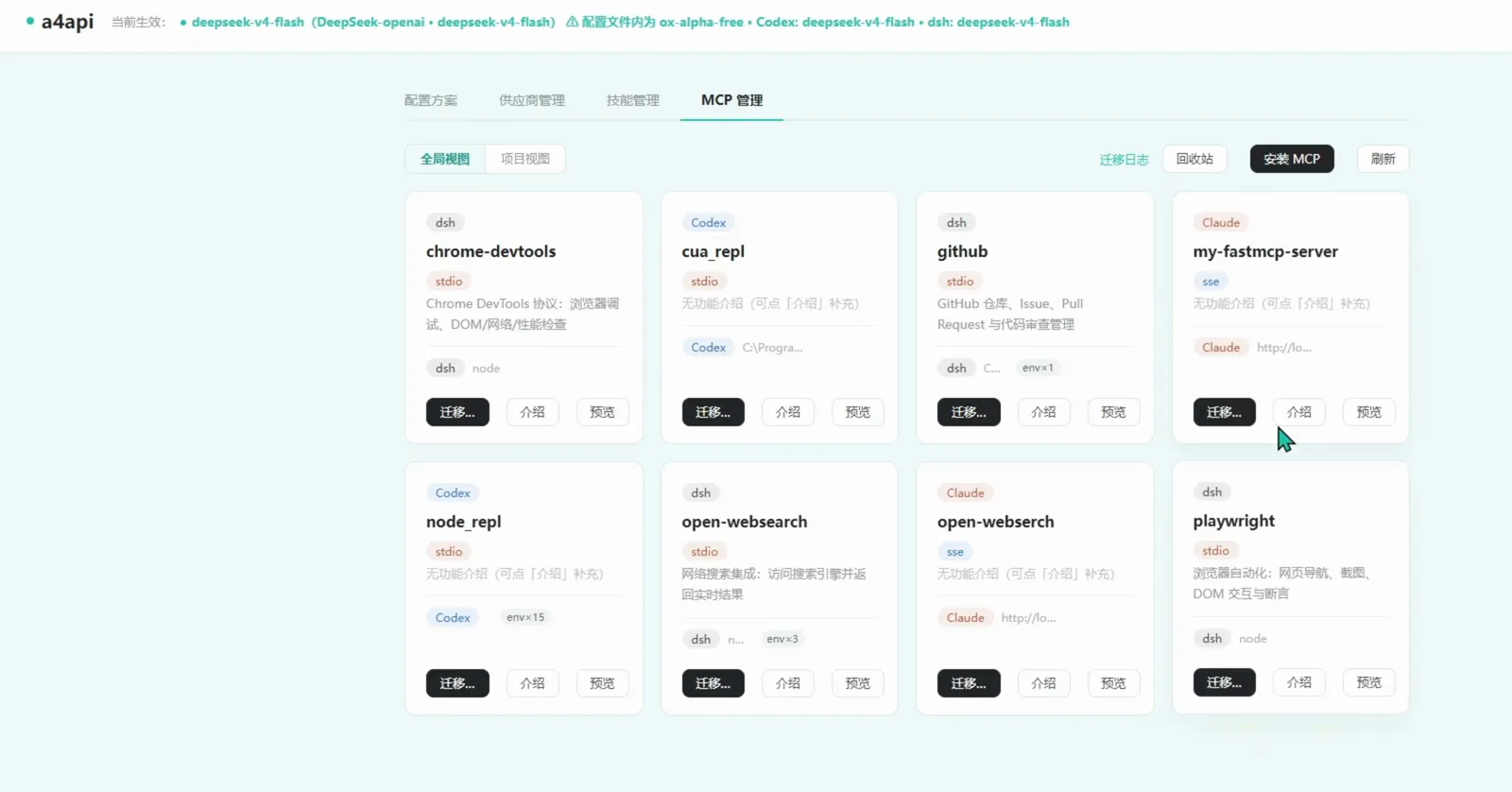
Eight registered servers on one grid, each tagged with the client it came from. This panel is a4api — the author's own tool, not a dsh screen.Watch at 3:30 - 3
Register one: paste the mcpServers block
安装 MCP opens a two-tab dialog — 粘贴 JSON, or 表单填写 to fill the same fields in by hand. The JSON tab takes a standard server block, and the video pastes the Amap Maps server straight in: command npx, args ["-y", "@amap/amap-maps-mcp-server"], and env carrying AMAP_MAPS_API_KEY. The hint under the box says it accepts a top-level mcpServers object, a dictionary keyed by server name, or a single object, and that several servers can be imported in one go. Watch the target selector, though: it reads 安装到 Claude in this shot. The panel writes into whichever client you pick, and the dsh-tagged cards in the previous frame show it manages the dsh side too.
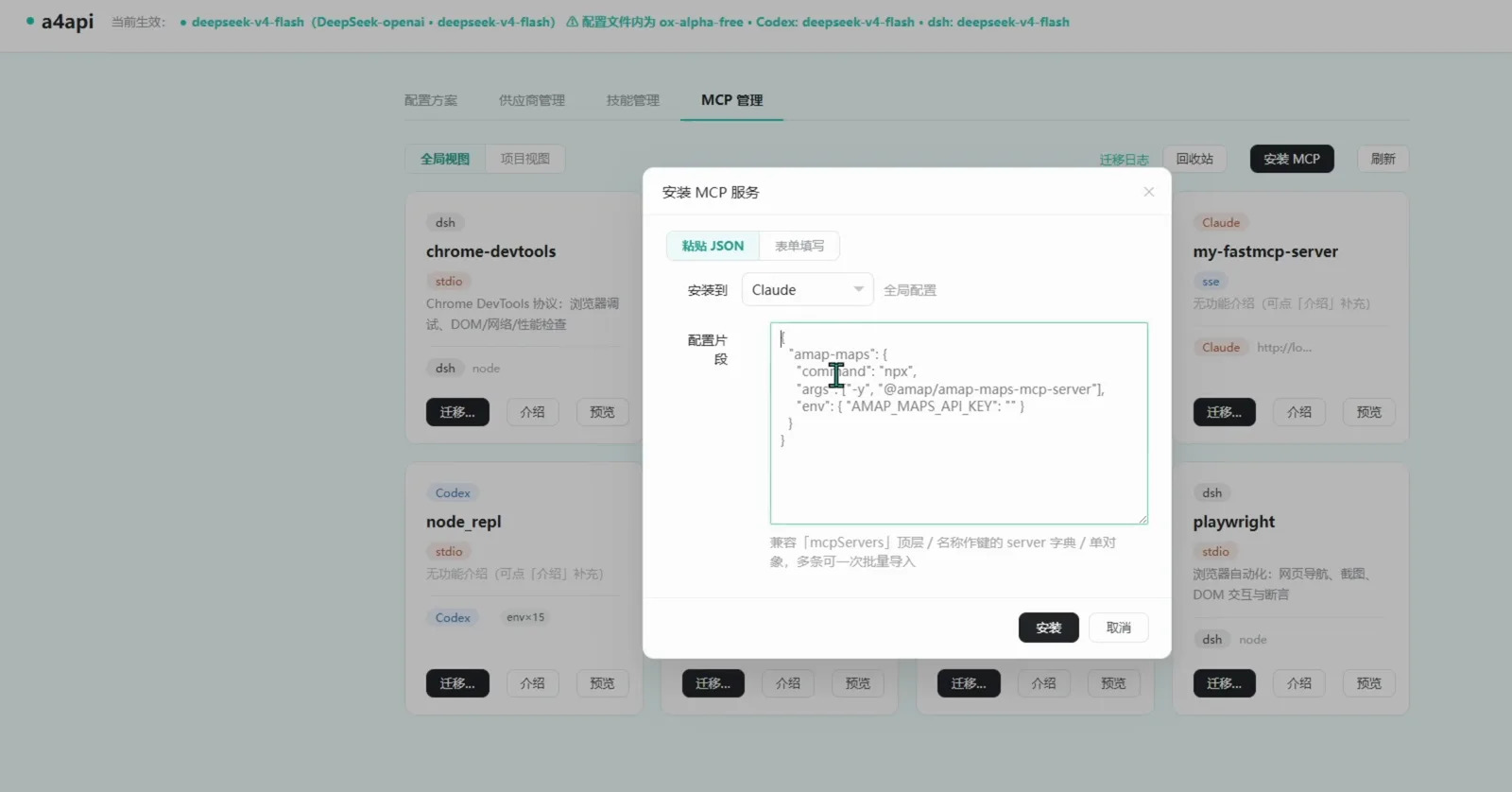
The JSON route: paste a standard server block, choose the client under 安装到, and the panel writes it into that client's config.Watch at 3:56
Group 2 · Use it from a dsh session
- 4
Ask in the official dsh session
From here on it is the real thing: the official DeepSeek Harness Web UI at localhost:3080, in the a4agent workspace, on the 探索未至之境(预览版)preview with DeepSeek V4 Flash. A new session is just an input box — no MCP picker, no server list, nothing to switch on. Type the question in plain language — “I'm in Qinhuangdao, I want to go to Tiananmen, how far is it and how long does driving take?” — and send it. Which server answers is the model's decision, not a setting you tick.
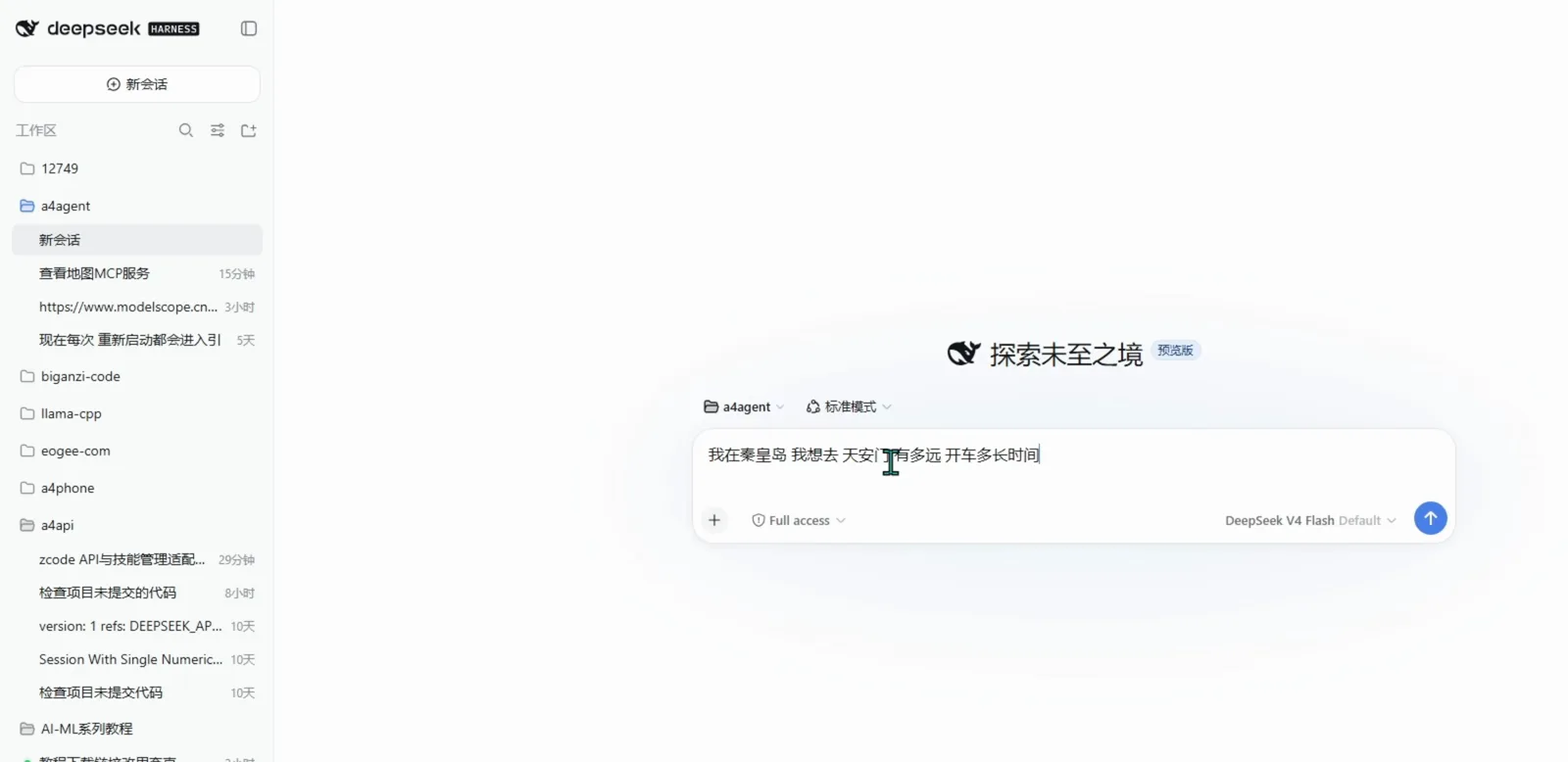
The ask: a plain-language question in a new dsh session — there is no MCP picker to set first.Watch at 5:18 - 5
Watch dsh call the MCP tool, then read the receipt
The session has two tabs, 对话 and 轨迹, and the second one is where the wiring becomes visible. It prints the model's reasoning and then the calls themselves: Tool call · mcp__amap-maps__maps_geo for 秦皇岛市, again for 天安门, then mcp__amap-maps__maps_direction_driving and mcp__amap-maps__maps_distance with the resolved coordinates. That mcp__<server>__<tool> naming is your receipt that an MCP server, not a built-in, did the work — and it is also the fastest way to tell a working registration from one that failed silently.
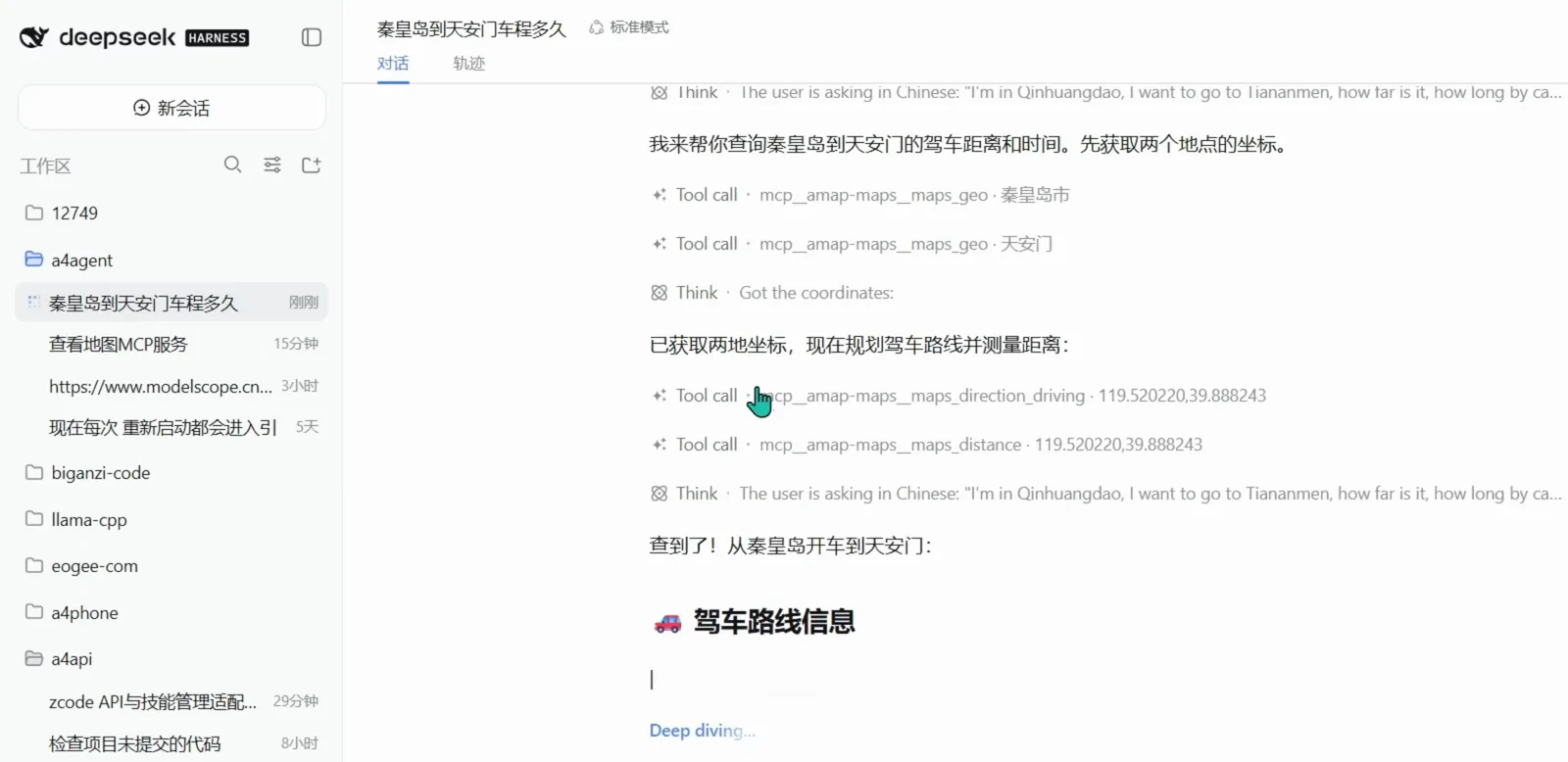
轨迹 view: the mcp__<server>__<tool> rows are the receipt that the Amap Maps MCP, not a built-in, answered.Watch at 5:28
dsh MCP setup FAQ
Whether dsh has an MCP manager, what carries over from Claude Code and Codex, and how to tell a working registration from a silent failure.
Does DeepSeek Harness have an MCP manager screen?
Not in anything this video shows, and the distinction is worth being precise about. The MCP 管理 panel with the eight service cards, and the 安装 MCP dialog next to it, belong to a4api — the author's self-built third-party tool. The official dsh Web UI in the same video has no MCP tab at all: servers are wired in through configuration and then surface in a session as tool calls. If you want a GUI anyway, a third-party panel like this one is an option — but treat it as third-party code and read it before you run it.
Can I reuse the MCP servers I already set up in Claude Code or Codex?
Yes — that is exactly what the video's 4.1 字段对照 table is for. serverName, transport: stdio, command + args and env line up almost one-to-one. The genuinely dsh-specific row is serverName, which dsh wants as its own field while Claude Code uses the key inside mcpServers and Codex uses [mcp_servers.<name>]. For remote servers, dsh's transport: streamable-http + url sits against Claude Code's type: "http" / --transport http and Codex's --url / url. Check the config file name against the current configuration guide before editing: the table labels the dsh column cordis.patch.yml.
Which MCP servers does the video actually register?
Eight cards are on screen in one grid: chrome-devtools, playwright, open-websearch and github tagged dsh; node_repl and cua_repl tagged Codex; my-fastmcp-server and open-webserch tagged Claude. Most run over stdio, with my-fastmcp-server and open-webserch on sse. The one it then follows all the way through is Amap Maps — registered as npx @amap/amap-maps-mcp-server with an AMAP_MAPS_API_KEY in env.
How do I know an MCP server is actually connected?
Ask something only that server can answer and open the session's 轨迹 tab. A working registration produces rows like Tool call · mcp__amap-maps__maps_geo · 秦皇岛市, where the mcp__<server>__<tool> prefix names the server. If the model answers from its own knowledge instead, or the row never appears, the registration did not take: check the config first, then the server's own start command.
Do MCP servers need their own API keys?
The ones that wrap a paid or account-bound API do. The Amap Maps server is the example here: its config carries AMAP_MAPS_API_KEY in env, and after pasting that block the author goes to the 高德开放平台 console (应用管理 → 我的应用) to collect the key and fill it back in. Put keys in the server's env block or the panel's 请求头 field as one KEY=VALUE per line, never in the prompt — and once a key lives in a config file, that file is a secret.
Keep going with MCP
MCP servers are one rack of the dsh ecosystem — these pages pick up where this one stops.
MCP tools & servers collection
The plugins and connectors on this site that speak MCP, grouped by what they connect to.
Read the guideBest MCP servers for DeepSeek
An editorial shortlist of MCP servers worth installing first, separate from the broad directory.
Read the guideProfiles, patches & presets
How a dsh process is assembled from stacked config layers — read this before editing an MCP entry.
Read the guideInstalling plugins you can trust
What to check before you run third-party code such as a visual MCP panel.
Read the guideSandboxes, approvals & secrets
MCP tools really execute things — the permission model behind that, and where keys belong.
Read the guideSource & credits
All 6 screenshots come from one Bilibili hands-on video — thanks to eogee for recording the whole path. Read the frames with their labels: the field-mapping table is the author's own tutorial page (eogee.com); the MCP 管理 panel and the 安装 MCP 服务 dialog are his self-built a4api tool, a third-party panel and not part of DeepSeek Harness; only the composer, the tool-call list and the route card are the official dsh Web UI. Every image deep-links to its second in the source, so you can check any of it yourself. For the dsh side of the config itself, start with the profiles, patches & presets guide