
Steer DSH while it works: dsh-improved-inline-edit, the runtime steering plugin
A 65-second screen recording, frame by frame: the task list keeps scrolling while a gold revision bar pops above the composer, and each message rides the official agent.steer() API into the agent's next decision step — no interrupt, no lost context, plus recallable bubbles and a 100-phrase Deep pool.
Last updated: 2026-10-25
On 2026-08-28, uploader 小速溶家 published a 65-second recording of the plugin xiaosurongjia/dsh-improved-inline-edit (31,464 plays per the 2026-10-17 Bilibili view API — the highest play count of any frame source on this site): while the agent is busy, a 「修改要求」 (revision request) bar pops up above the composer; you type whenever you like, and the message rides the official agent.steer() mechanism into the agent's next decision step — no need to interrupt the conversation first. Every frame on this page comes from that recording; the mechanism description was checked item by item against the repo README.
The video opens on the pain point itself: waiting for the run to finish wastes time, and stopping to re-prompt throws away progress. This plugin's answer is a third option — the task keeps running, you chime in whenever, and the agent picks up your new instruction after the step it is on. The README comparison table puts it bluntly: interrupting = losing context; chime in anytime and the agent responds on its very next step. And the identity needs no guesswork: the repo README's 「演示视频(B站)」 section links this exact video, so the uploader↔GitHub-author pairing is vouched by the repo itself.
The short version
- ▸dsh-improved-inline-edit makes interrupting and continuing stop being mutually exclusive: while the agent runs, a revision bar pops above the composer and each message is injected into the agent's next decision step via the official agent.steer() API — context fully preserved, and the bar vanishes when the run ends.
- ▸Sent steers can be recalled: a recall button sits beside the bubble — unread messages can be pulled back, read ones gray out. The optional guide prefix is DEFAULT OFF; when on, messages are formatted as 【修改要求|请基于当前任务继续执行,不要改变任务目标】 before injection.
- ▸The running status line rotates through a 100-phrase Deep pool (borrowed from dsh-deep-verbs and freely expanded): shuffle-bag draws avoid short-term repeats, one rotation per step, and a click toggles Chinese/English.
- ▸Identity and upkeep: the repo README links the demo video directly — the uploader↔GitHub pairing is directly proven. xiaosurongjia/dsh-improved-inline-edit is ★16, MIT (2026-10-17 check) and has not been updated since 09-04; defer to the repo badge before installing.
From install to your first mid-run message: the recording in six steps
Part 1 · Know the plugin, install
- 1
The repo first: what's inside this steering plugin
xiaosurongjia/dsh-improved-inline-edit, MIT licensed (GitHub API check 2026-10-17: ★16, created 08-28, pushed 09-04). The repo is small: two source files (client.js / index.js), an install.ps1 script, and a bilingual README (zh default + English). The recording catches the repo on release day: 3 commits, 1 star. No install command is quoted on this page — the README's install section is the source of truth, and the source card at the bottom links straight to it. One framing note: the demo environment is a Gitea-style code-hosting UI; the canonical repo lives on GitHub.
$dsh-improved-inline-edit · 公共$main · 1 分支 · 0 标签 · 3 次提交$install.ps1 · LICENSE · README.md · README.en.md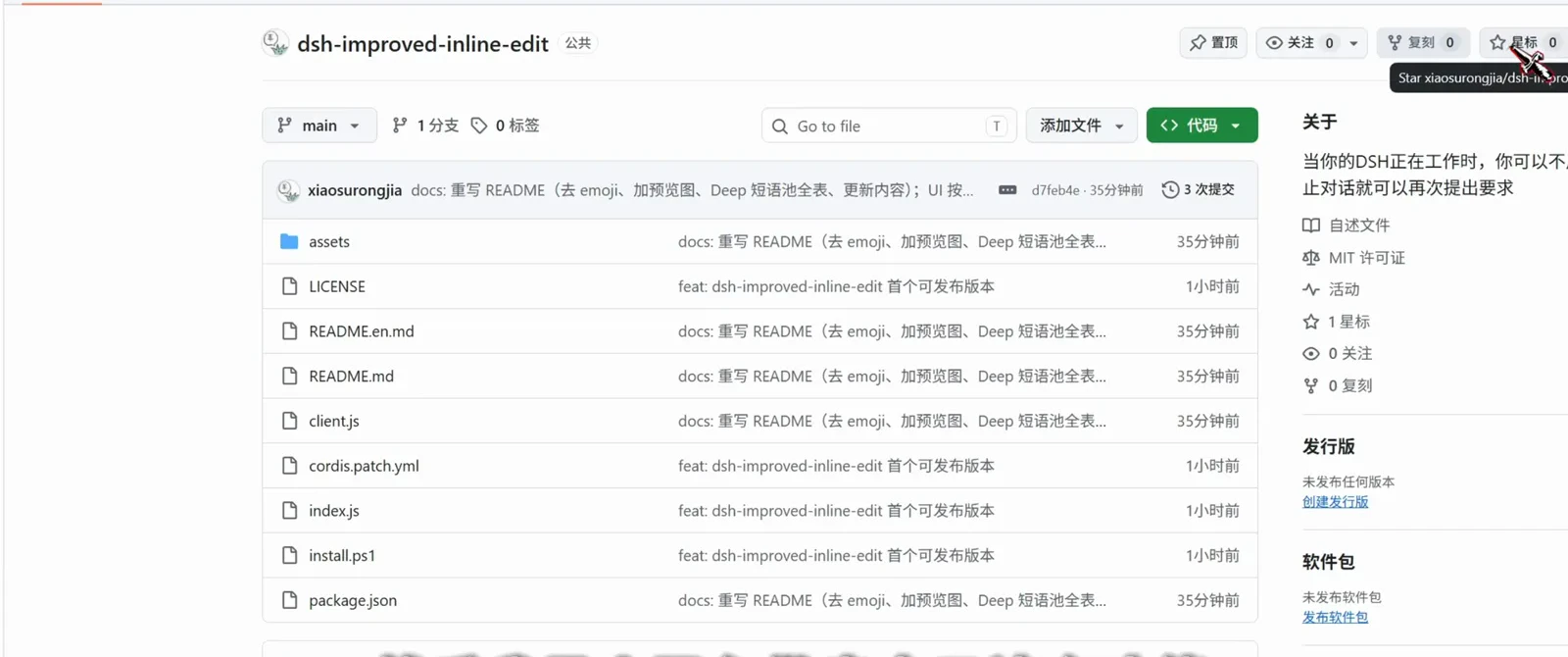
The repo on release day: 3 commits, 1 star; for installing, the README's install section on GitHub is the source of truthWatch at 0:23 - 2
Reading the README: why interrupt and continue stop being opposites
The README's opening line is the whole mechanism: while the agent runs, a 「修改要求」 bar pops above the composer; you type a request and send, and the message is seamlessly injected into the agent's next decision step through the official agent.steer() mechanism. The comparison table lists three: interrupting = losing context, while a steer keeps context fully intact; only waiting for the run to end, versus chiming in anytime with a response on the very next step; a cluttered UI, versus a bar that only appears mid-run and disappears when the run ends. Further down come the UI preview and the Deep phrase pool section.
$agent.steer()$打断 = 丢失上下文 → 无缝注入,上下文完整保留$仅在运行时弹出,运行结束自动消失$Deep 短语池 · 100 条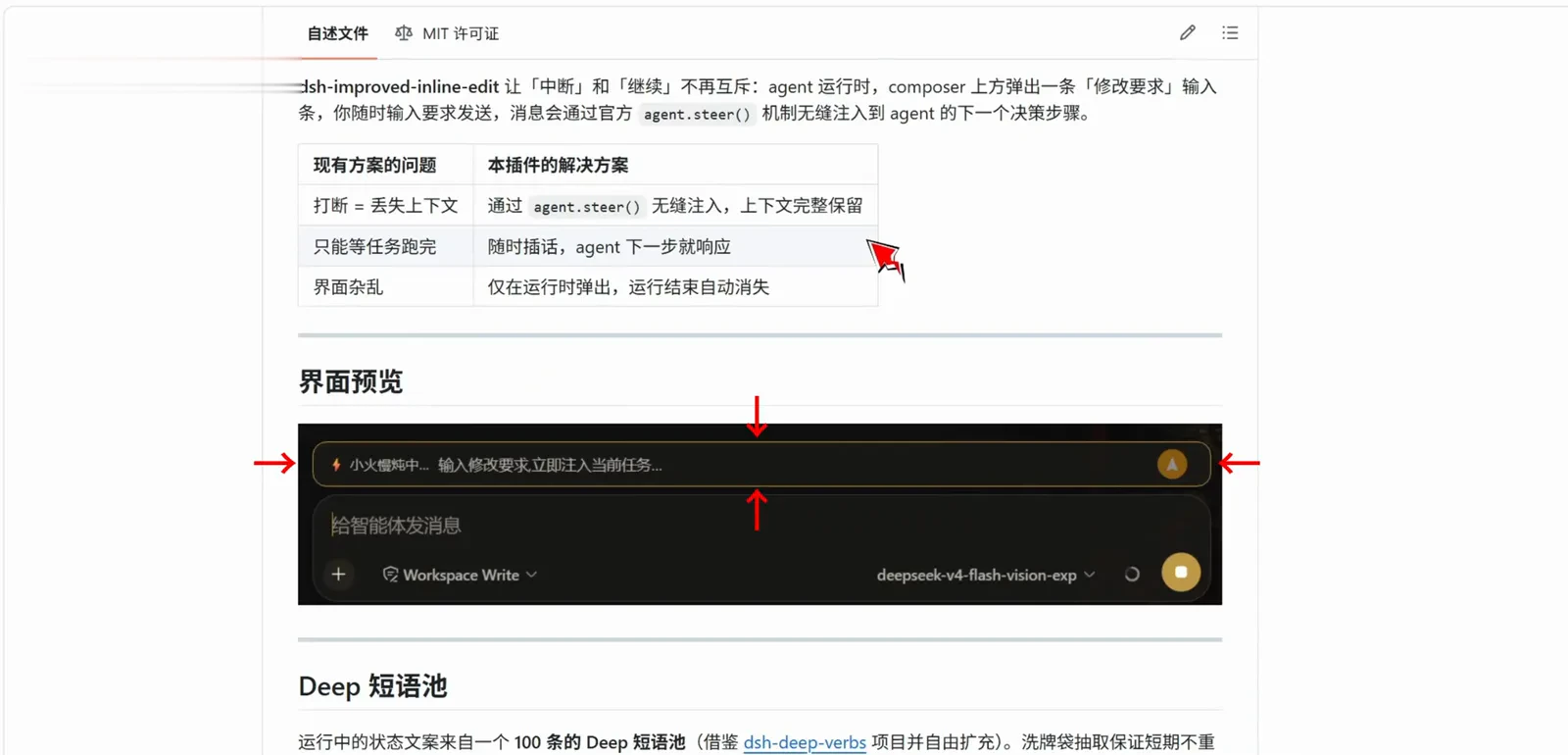
Three table rows carry the whole pitch: context preserved, answered next step, gone when the run endsWatch at 0:26
Part 2 · Steering a live task
- 3
What the steer bar looks like: run-only by design
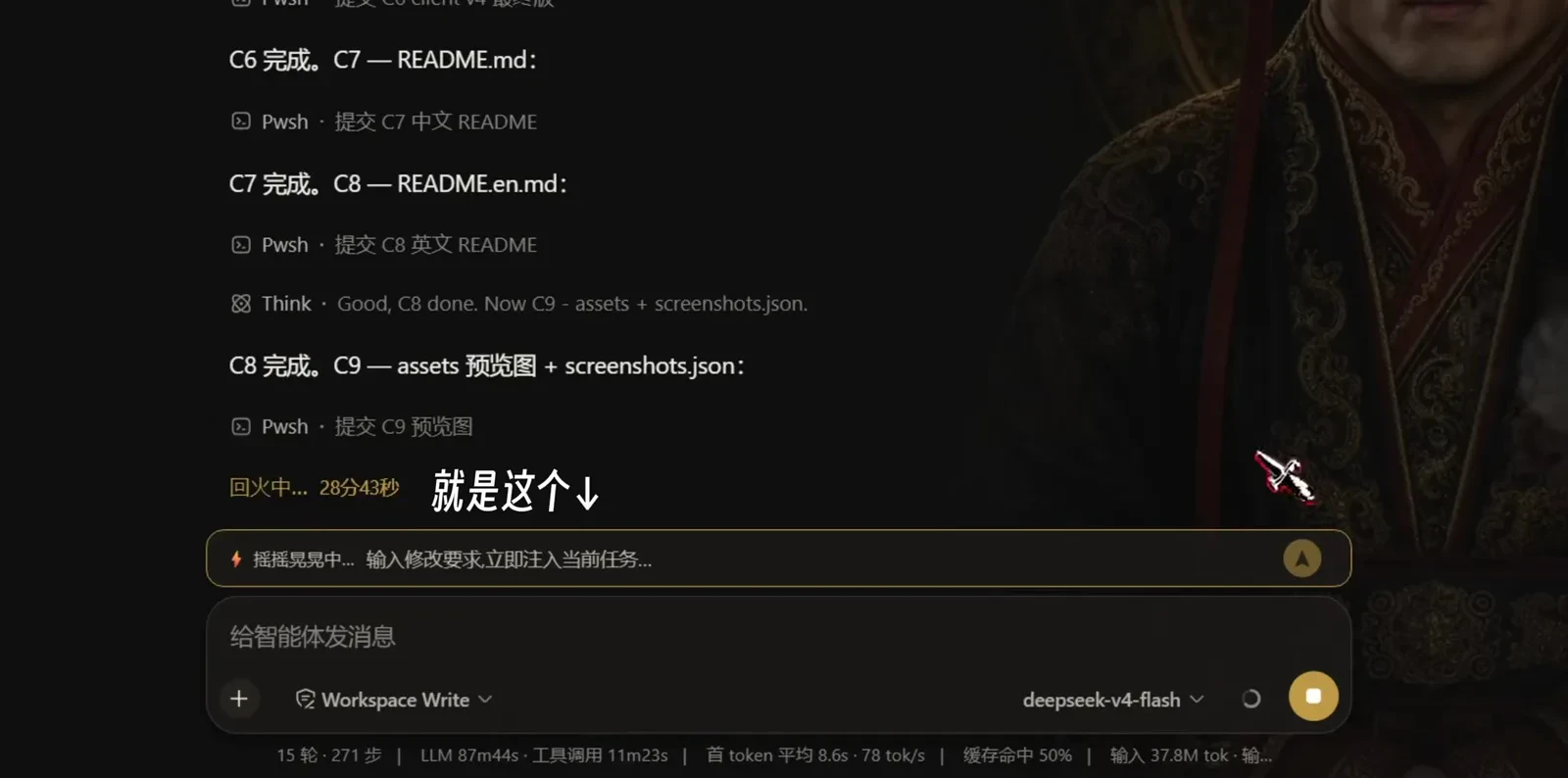
The recording's task is a real packaging run: the task list advances from C6 through C9 (Chinese and English READMEs, asset previews, screenshots.json) while a gold-bordered steer strip sits above the composer — on the left a rotating status phrase (this frame catches 「回火中… 28分43秒」, 'tempering… 28m43s'), and the placeholder reads 「输入修改要求,立即注入当前任务…」 ('type a revision, injected into the current task immediately'). The bottom bar shows the session at 15 rounds and 271 steps. It is not permanent: the strip disappears when the task ends. Full disclosure: the portrait wallpaper and maid desktop pet on the right of the dark session frames are the uploader's custom theme, not the default UI.
$回火中… 28分43秒$输入修改要求,立即注入当前任务…$给智能体发消息 · Workspace Write · deepseek-v4-flash$15 轮 · 271 步The steer strip only exists while the task runs — 「回火中…」 is a rotating pool phrase, not an errorWatch at 0:08 - 4
How a steer lands: no interrupt, no lost progress
Type and send — the task list keeps moving (C9 done, C10 working package.json) as the agent finishes its current step and takes your message as input for the next decision. The strip's status phrase has moved on to 「编码中…」 ('encoding…'). Regret a sent message? A recall button sits beside the bubble: unread messages can be pulled back, read ones gray out. The bottom stats walk from 271 to 273 steps and 228K output tokens — the task never restarted, and not one step of progress was lost.
$C10 — package.json 完善(files 含 assets)$瞎鼓捣中… 28分57秒$15 轮 · 273 步 · 输出 228K tok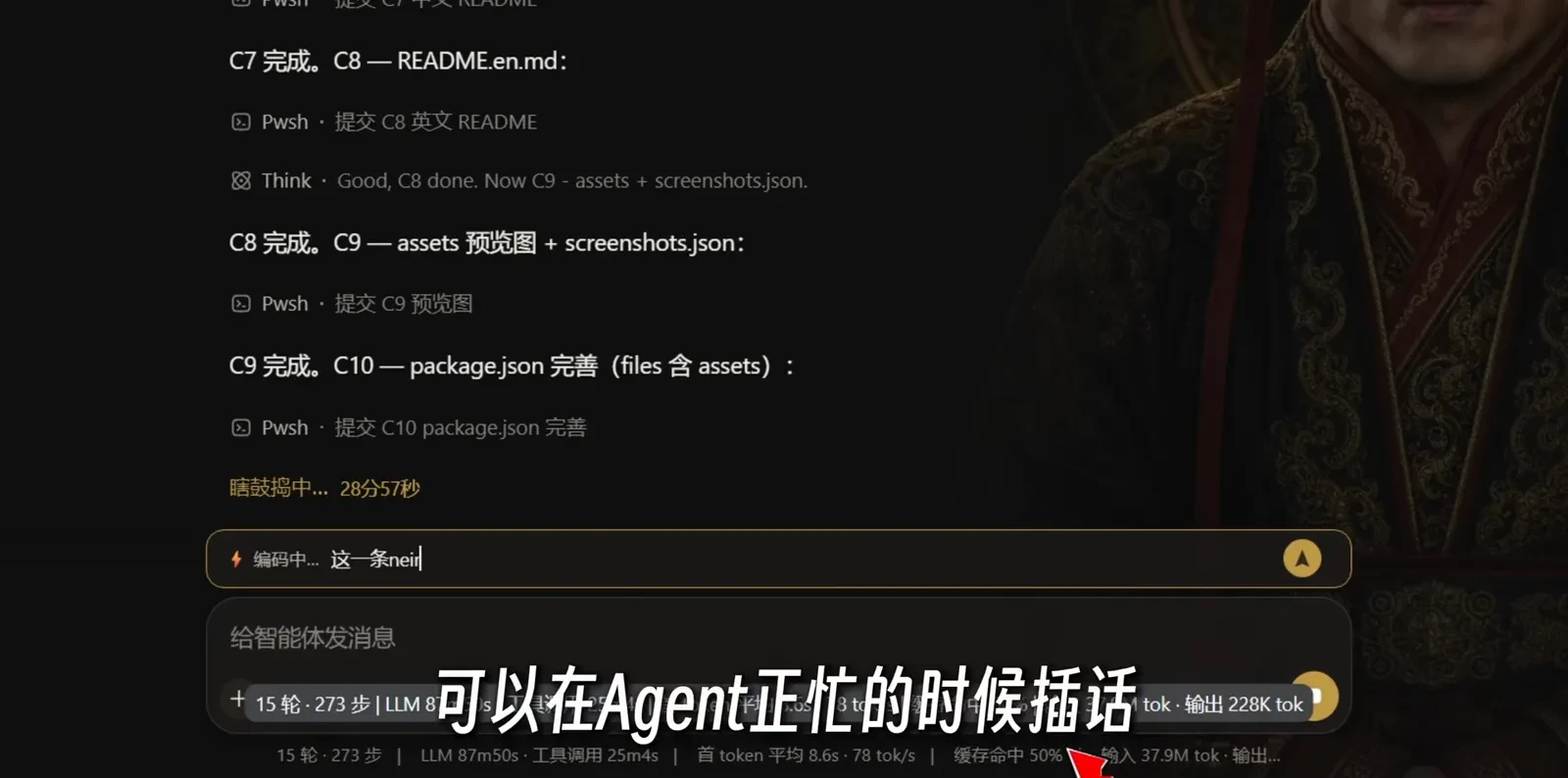
Type, send, and the agent picks it up after the current step — no restart, 271 steps on to 273Watch at 0:15
Part 3 · The Deep phrase pool
- 5
The status line is alive: phrase-pool rotation, live
The status text left of the steer bar is not decoration: it comes from a 100-phrase Deep pool (borrowed from the dsh-deep-verbs project and freely expanded), drawn shuffle-bag style so nothing repeats short-term, rotating once per agent step. This frame catches the Chinese 「洞窟探秘中… 18秒」 ('cave-exploring… 18s') and the English 「Deep surfacing…」 on screen at once — clicking the status phrase toggles between Chinese and English.
$洞窟探秘中… 18秒$Deep surfacing…$100条Deep XX 短语池(可以点击更换中英文)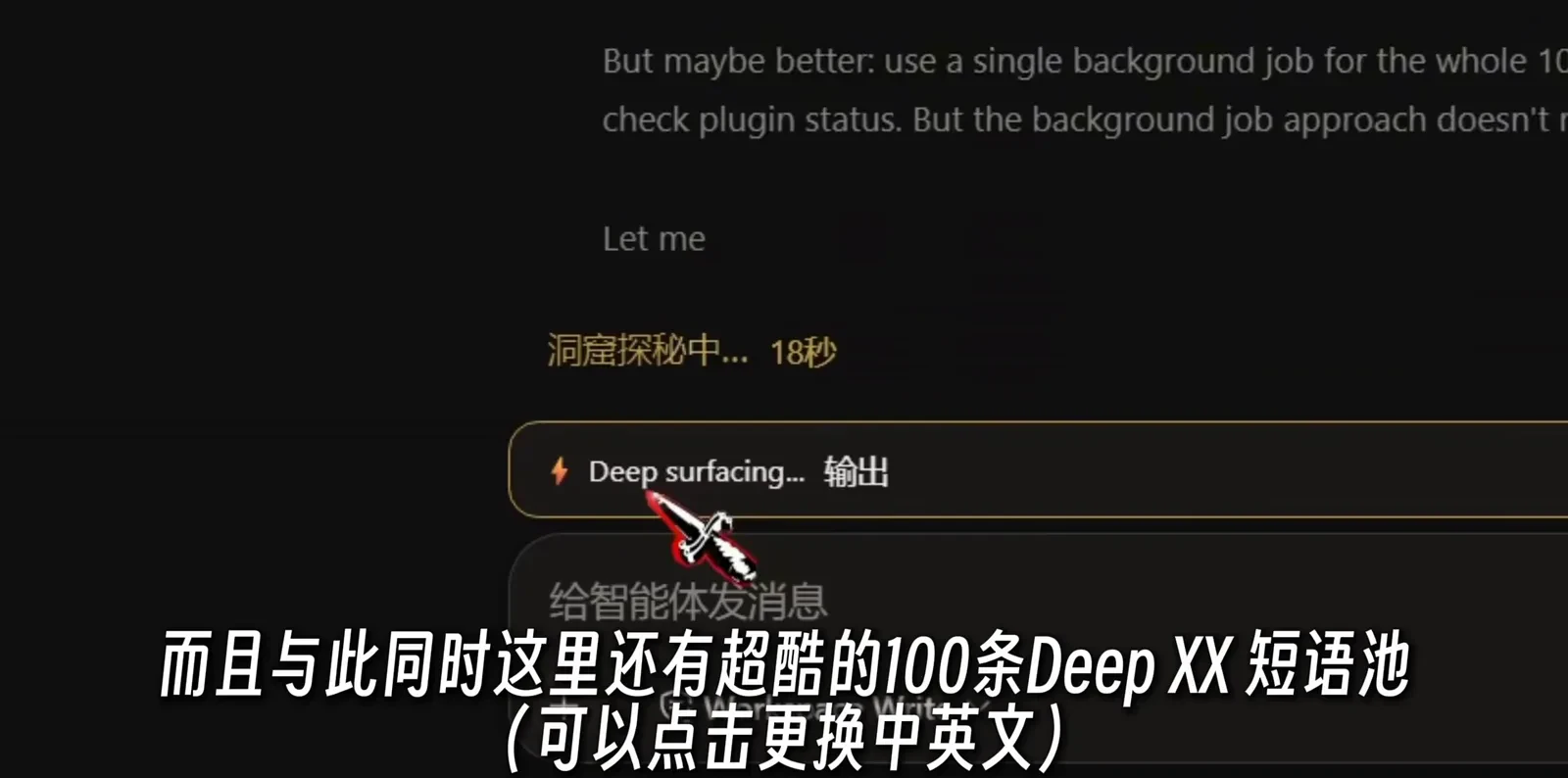
One Chinese, one English, same moment: the shuffle-bag rotates and a click flips the languageWatch at 0:40 - 6
The full 100: an inventory of cooking metaphors
The README carries the pool's full table in three columns: English, Chinese status, short word. It is cooking all the way down — 烘焙中 (baking), 熬糖色中 (caramelizing), 喷火炙烤中 (flambéing), 腌制入味中 (marinating), 咕嘟咕嘟中 (simmering) — and the best of the lot: 「醒面中(面团休息=思考)」 ('proofing — dough resting = thinking'). The 「回火中…」 caught in step 3 is the Deep tempering row. Watching the phrases rotate makes waiting for a run genuinely more fun.
$Deep tempering… 回火中… 回火$Deep proofing… 醒面中… 醒面(面团休息=思考)$Deep simmering… 咕嘟咕嘟中… 咕嘟冒泡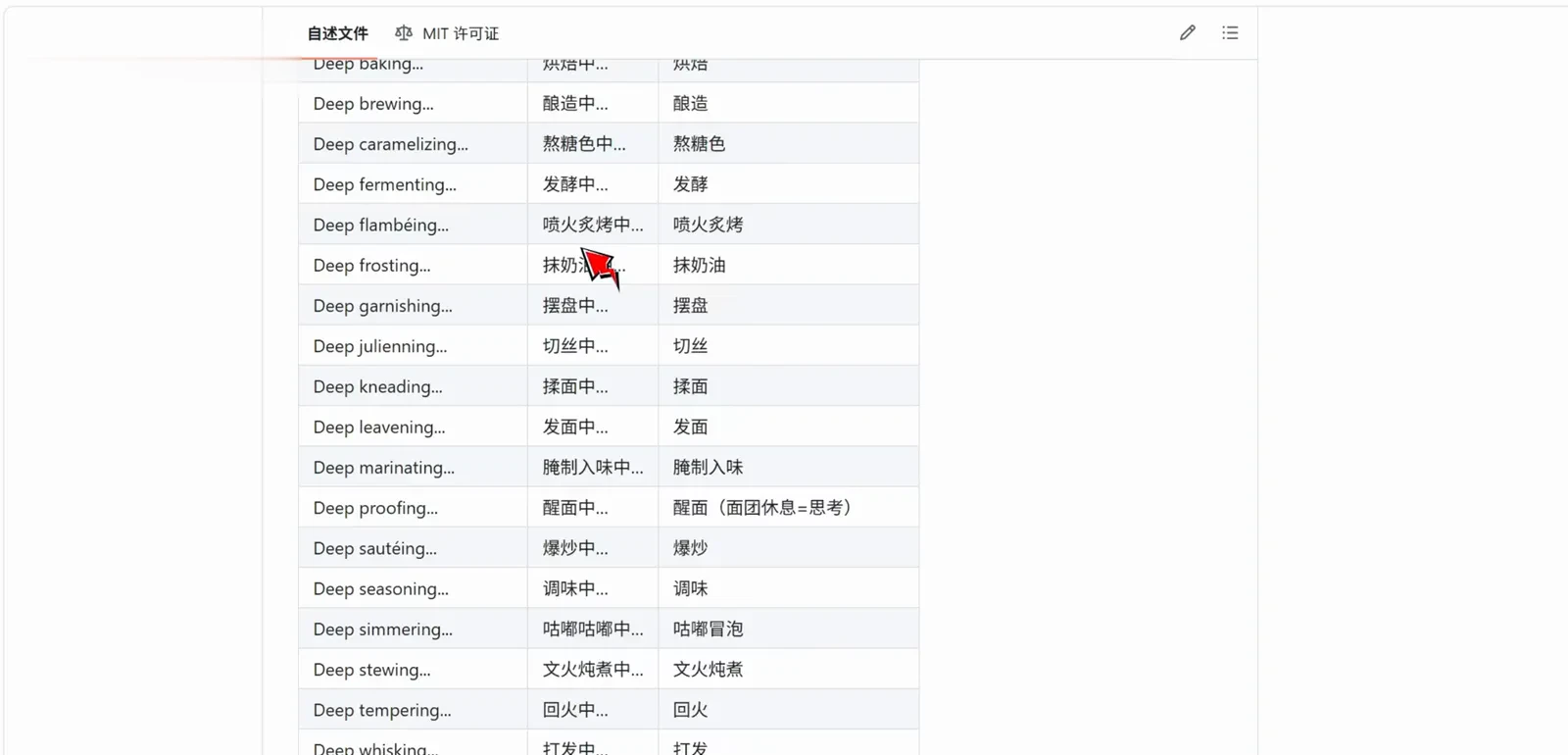
The 100-entry table is cooking metaphors throughout — step 3's 「回火中」 is the Deep tempering rowWatch at 0:45
FAQ
Interruption and context, recall timing, the guide prefix, the phrase pool and install caveats for the dsh steering plugin.
Does steering interrupt the running task? Is context lost?
No interruption and no lost context — that is exactly what separates it from stop-and-resend. The message is injected into the agent's next decision step through the official agent.steer() mechanism: the tool call in flight finishes normally, your new instruction becomes input for the very next step, and session context is fully preserved. The README's first comparison row says it directly: interrupting = losing context, while a steer keeps context intact.
Can I recall a steer after sending it?
Yes, but the window is short: a recall button sits beside the bubble, and a message the agent has not read yet can be pulled back — once read it grays out and stays. Recall arrived on 08-29, so the first half of the recording (published 08-28) predates the button. If you regret a message, watch the bubble's state right away.
What is the guide prefix, and should I enable it?
An optional toggle, default off. When on, your steer is formatted as 【修改要求|请基于当前任务继续执行,不要改变任务目标】 (revision request — continue from the current task, do not change the goal) plus your content before injection — a built-in stay-on-target reminder, useful for large revisions where the agent drifting along with you is a real risk. For small tweaks leave it off and let your words speak.
What are the odd phrases beside the input bar — 「回火中…」, 「瞎鼓捣中…」?
Not errors — that is the Deep phrase pool: 100 running-status lines (borrowed from the dsh-deep-verbs project and freely expanded), drawn shuffle-bag style so they don't repeat short-term, rotating once per agent step, with a click toggling Chinese/English. This page caught 回火中 (tempering), 瞎鼓捣中 (fiddling), 洞窟探秘中 (cave-exploring), 编码中 (encoding) and the English Deep surfacing — the README carries the full table, cooking and handcraft metaphors throughout.
How do I install it? Is a plugin this stale still safe to use?
Install per the repo README's install section (no command is quoted on this page); the repo ships an install.ps1 script. The upkeep status, honestly: xiaosurongjia/dsh-improved-inline-edit is ★16, MIT (2026-10-17 check), created 08-28 and not pushed since 09-04. The compatibility case, also honestly: steering rides the official agent.steer() mechanism rather than private interfaces, so there is little kernel coupling to rot — still, defer to the repo's own badge before installing.
How is this steering plugin different from prompt injection, rollback or canvas branching?
Four things, four roles. Prompt injection is the system auto-injecting prompts between turns to keep cheap models on-script — you never act; this page is you manually steering a running task — same injection layer, opposite roles. Rollback is damage control after a drift; steering is correction before one, which makes the two pages a natural pair. Canvas branching forks parallel sessions to explore several directions; a steer stays inside the one original task. For which loop step a steer lands in, read the agent loop page.
Related guides
Four neighboring capabilities with very different jobs.
Make cheap models listen: prompt injection walkthrough
Mid-turn prompt injection for DSH: manual one-shot injection, the condition panel and the window criterion that keep a cheap model on task — a frame-verified illustrated guide.
Read the guidedsh agent loop, explained
How one dsh turn actually runs: turn lifecycle, plugin hook points, and the loop guards that prevent runaway sessions.
Read the guideDeepSeek Harness rollback: undo & savepoints
Install dsh-undo-savepoint and roll any session back — web buttons, Ctrl+Alt+Z or chat, plus snapshot manager and crash rescue, frame-checked.
Read the guidedsh infinite canvas: branch contexts with ThoughtDAG
Questions become nodes, lines inject a summary or the full context, PDFs grow branches, and old Claude Code sessions import read-only — an illustrated canvas walkthrough.
Read the guideSources & credits
All 6 frames on this page come from the recording published by 小速溶家 (BV1D4tN6TEGT, 65 seconds, published 2026-08-28; 31,464 plays per the 2026-10-17 Bilibili view API — the highest of any frame source on this site), credited as source only; the exports keep the uploader's burned-in captions and custom theme background. The fact base is the xiaosurongjia/dsh-improved-inline-edit README (checked 2026-10-17 via the GitHub API: ★16, 0 forks, MIT, created 08-28, pushed 09-04). Identity is DIRECTLY proven: the README's 「演示视频(B站)」 section links this exact video, so the uploader↔GitHub-author pairing is vouched by the repo itself — the only such case in the R33 sweep, stronger than the usual description-interplay evidence. The portrait wallpaper and maid desktop pet in the dark frames are the uploader's custom theme; the repo-page frame is a Gitea-style demo environment, and the canonical repo lives on GitHub.