
Making cheap models listen: the dsh-prompt-inject per-step injection walkthrough
One frame-verified recording: a real two-window DSH web UI session shows a cheap model being reminded step by step through a long task — manual injection, the condition panel, force-inject and the cache-prefix guarantee, frame by frame.
Last updated: 2026-10-16
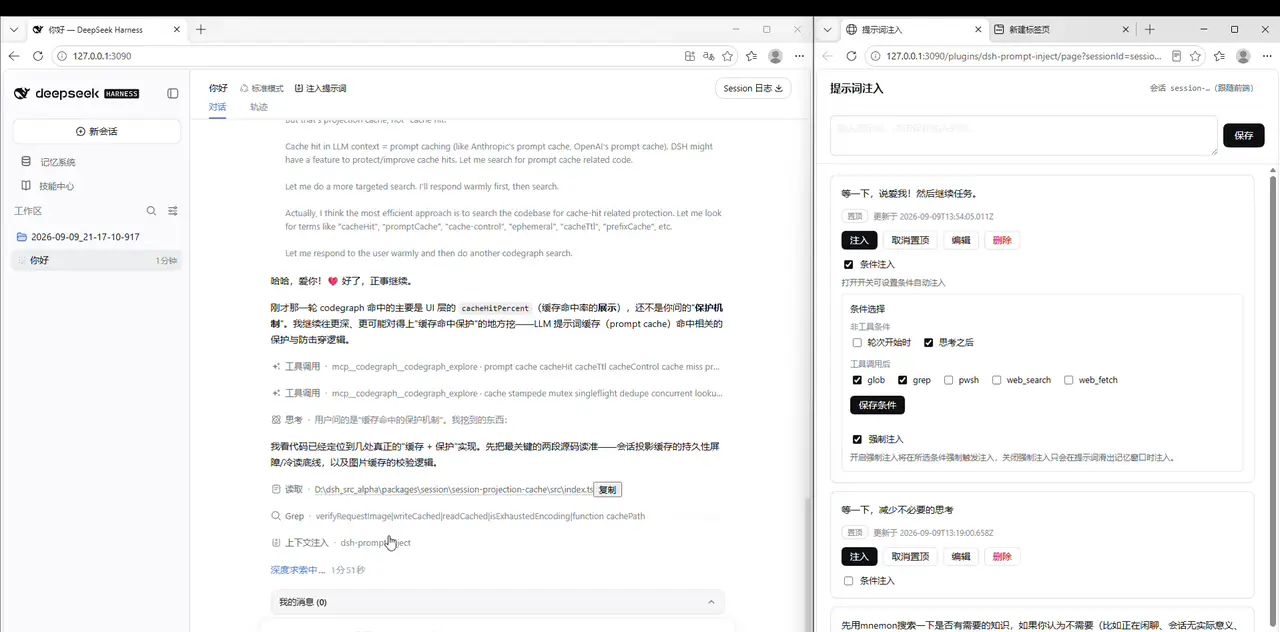
Cheap models share one failure mode on long tasks: somewhere around step ten they forget the rules you set — the retrieval you asked for gets skipped, the small talk you banned creeps back in, the "get to the point" reminder goes ignored. dsh-prompt-inject exists for exactly this one problem: when your prompt slides out of the model's attention window, the plugin feeds it back into the current turn's context automatically — no interruption, no new session.
All seven screenshots come from 闲人JOJO's Bilibili recording (2,814 plays — the view-API figure, fetched twice with the same value on 2026-10-15); the mechanics were cross-checked line by line against the plugin README. Three disclosures up front: the repo jojoman2024/dsh-prompt-inject sits at ★0 with a single author and no updates since its 2026-09-09 release; the uploader ↔ GitHub author identity rests on the description's own link and is NOT independently verified; the plugin targets DSH 0.1.0-rc.6+ || 0.1.2-alpha and 0.2.x compatibility is unverified — check versions before installing. Haven't switched to a cheap tier yet? Start with Switch models & custom providers
The short version
- ▸Cheap models drift on long tasks; dsh-prompt-inject re-injects your prompts mid-turn, conditionally, without interrupting the output.
- ▸Never touches the system prompt: injection rides the agent/pre-step hook as a plugin user message — cache prefix intact, session log untouched, source-tagged and auditable.
- ▸Two ways to fire: manual one-shot injection (10-minute TTL, overwriting queue) and conditional injection (turn start / after thinking / after five tool calls, plus a force-inject switch).
- ▸Configs are session-scoped and all OFF after a restart; the 0.1.x plugin targets DSH 0.1.0-rc.6+ || 0.1.2-alpha — 0.2.x is unverified, so check before installing.
The walkthrough in six steps: cheap model to condition panel
Before you start: cheap model, manager page
- 1
Hand the long task to a cheap model
The video states its thesis in the first ten seconds: run a cheap model and still demand instruction following. In the DSH session's model picker, drop the tier — the list shows DeepSeek-V4-Flash tagged "Fast, efficient, economical", and channels like Hy3/Hy4 preview at multipliers as low as 0.05x. The uploader's accounting: real cost = completion time × your time value + tokens × unit price. Push the unit price as low as you like — provided the model still listens, which is what the remaining five steps solve.
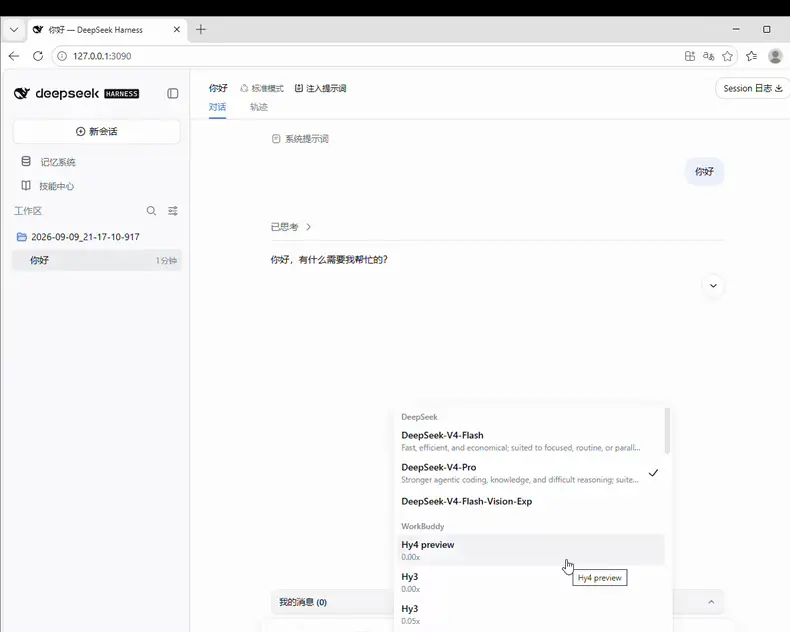
Tier first: hand the long task to the cheap model before anything else.Watch from 0:05 in the source video - 2
Open the injection manager from the session header
After installing (commands in the FAQ) and restarting DSH, every session header gains an "inject prompts" entry; clicking it opens a standalone tab bound to the current session — the address bar reads /plugins/dsh-prompt-inject/page?sessionId=…, and the top-right shows session--… (follows the frontend). Write a prompt in the top input and hit save; each card carries pin / inject / edit / delete. The uploader keeps three regulars: "hold on, cut the unnecessary thinking", a longer "search first, no pleasantries" workflow prompt, and a short get-back-on-track command for when the model drifts. Prompt bodies persist to $DSH_HOME/dsh-prompt-inject/prompts.json for reuse across sessions.
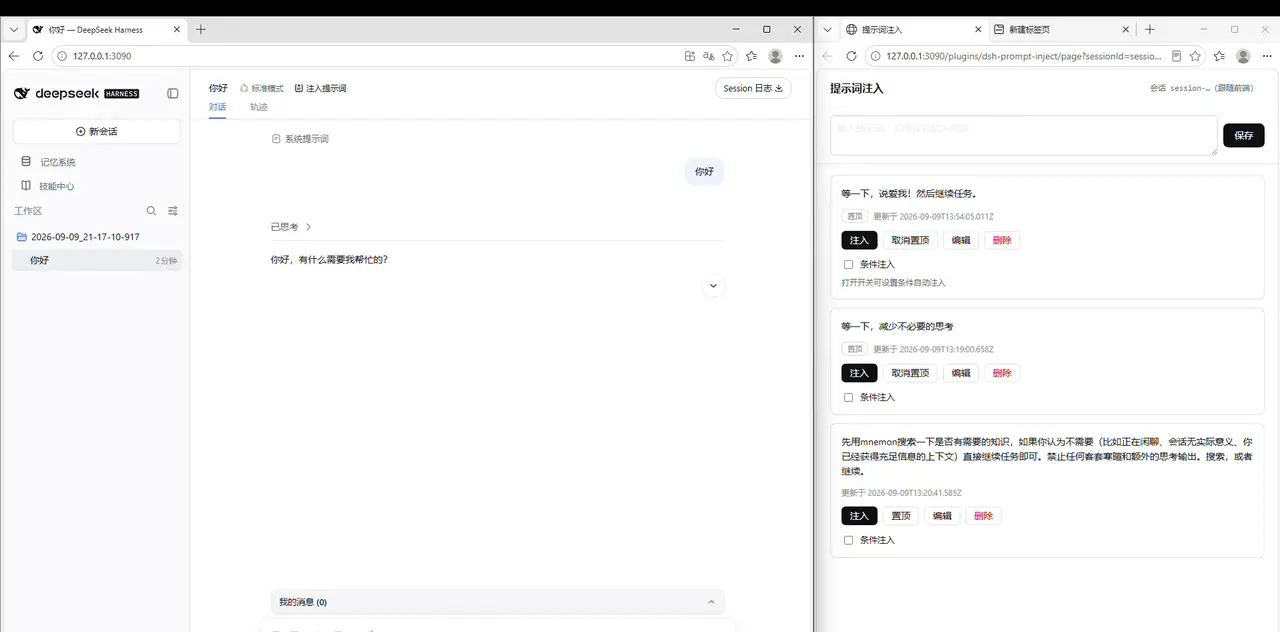
The manager binds to the current session; pinned cards stay on top.Watch from 0:30 in the source video
Manual one-shot injection
- 3
Manual one-shot injection: one click, effective next step
The moment the model drifts, hit "inject" on a card and a dark toast pops up: queued — it will inject at the next model call. The semantics are single-shot: it fires once before that session's next model step; if unconsumed for 10 minutes it expires (TTL), and re-clicking overwrites the queue rather than stacking it. Good for ad-hoc corrections, or as a manual pulse alongside conditional injection.

Manual injection fires once: next model step, 10-minute TTL.Watch from 0:40 in the source video
Conditional injection and the window criterion
- 4
Conditional injection: pick the moments, let the plugin watch
Tick "conditional injection" on a card and the panel opens two kinds of triggers: non-tool conditions — turn start (the first model step after your message) and after thinking (once reasoning ends or the first text lands); and after tool calls — five concrete tools, glob / grep / pwsh / web_search / web_fetch, each ticked individually. In the video the uploader ticks glob + grep on a pinned card: the model gets reminded after every file-search round. Save the condition, and hits are queued for this turn, consumed as they fire, discarded at turn end — the semantics are "remind the model at this step", not a permanent behavior rewrite.
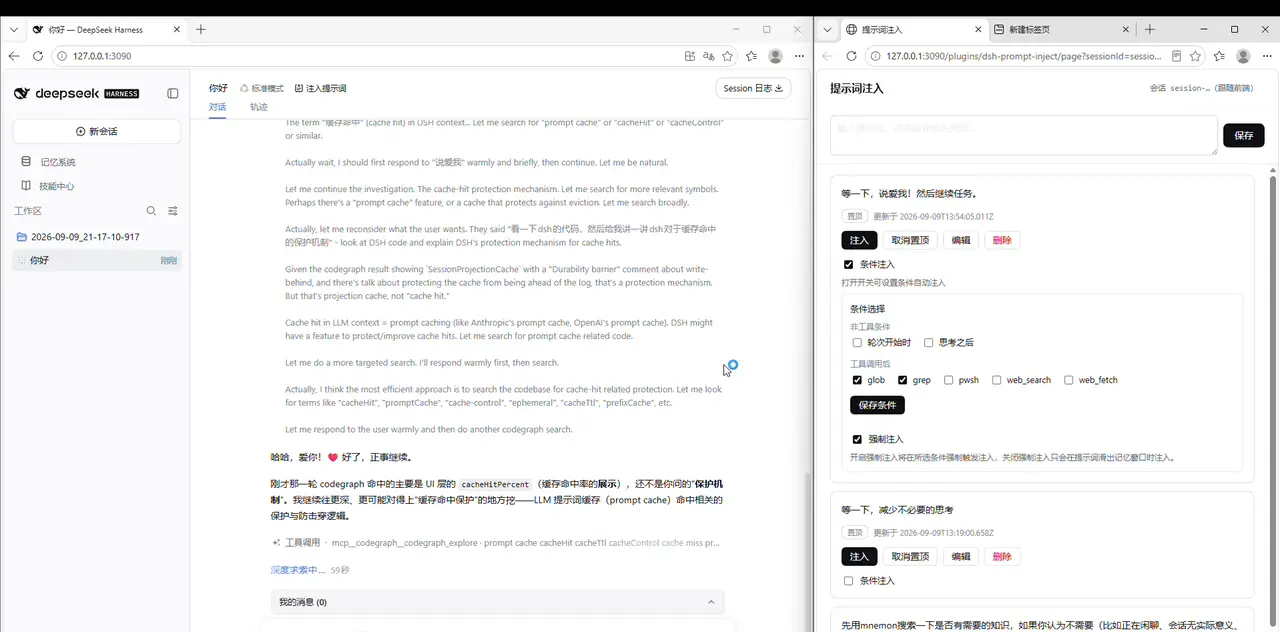
Conditions fire per step: each of the five tools can set its own reminder moment.Watch from 1:00 in the source video - 5
The force-inject switch: leave it off, refill when forgotten
At the bottom of the condition panel sits "force injection" with two semantics: ON — inject every time the condition hits, no exceptions; OFF — re-inject only once the prompt has slid out of the model's memory window; the window criterion makes zero bypass LLM calls and wastes no tokens. Late in the video the uploader turns force injection off (the README also recommends keeping it off day to day): if the model still remembers, don't repeat yourself. Note that both configs are session-scoped in-memory state — after a DSH restart or a new session, everything defaults to off.
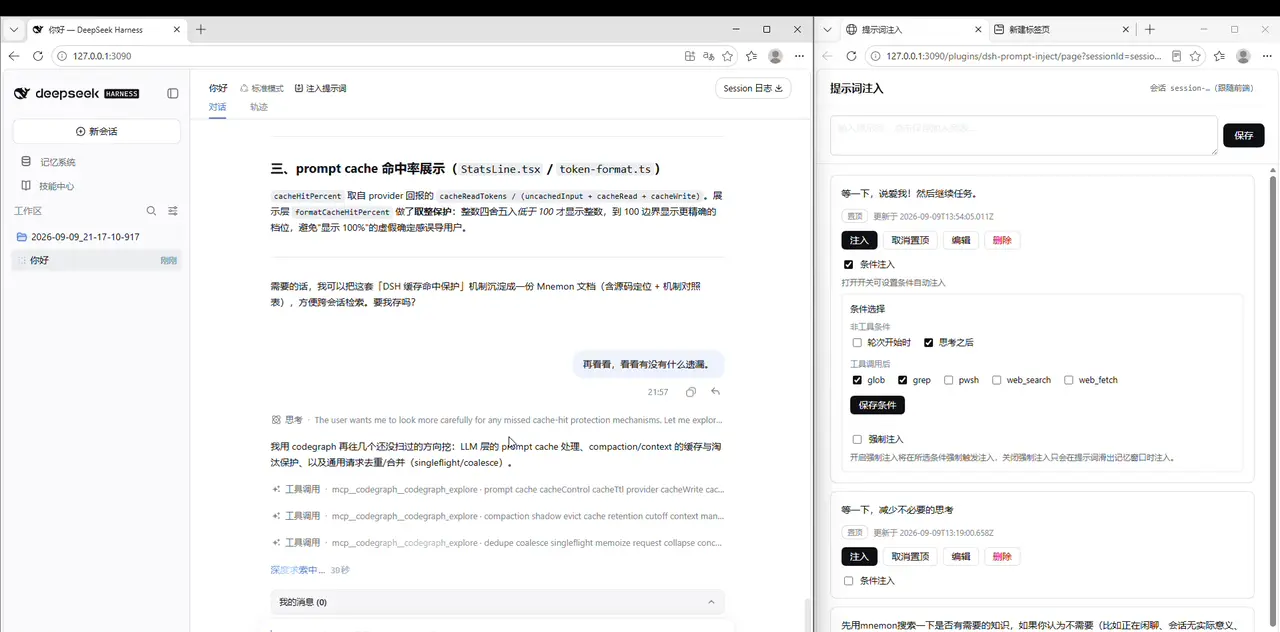
The window criterion saves tokens: prompts the model still remembers are not re-injected.Watch from 1:55 in the source video - 6
Acceptance: the task runs to the end, uninterrupted
When an injection lands, the session trace grows a "context injection · dsh-prompt-inject" line (see the hero image above): the system prompt is untouched, the cache prefix stays intact, and the message is source-tagged and auditable. The demo session runs into its fourth turn like this — the model reads the source, delivers a long code-block answer, even corrects one of its own classifications — and the closing footer reads 111K tok / 1m10s. Not a single manual interruption. Cheap model plus just-in-time reminders: that's the whole pitch.
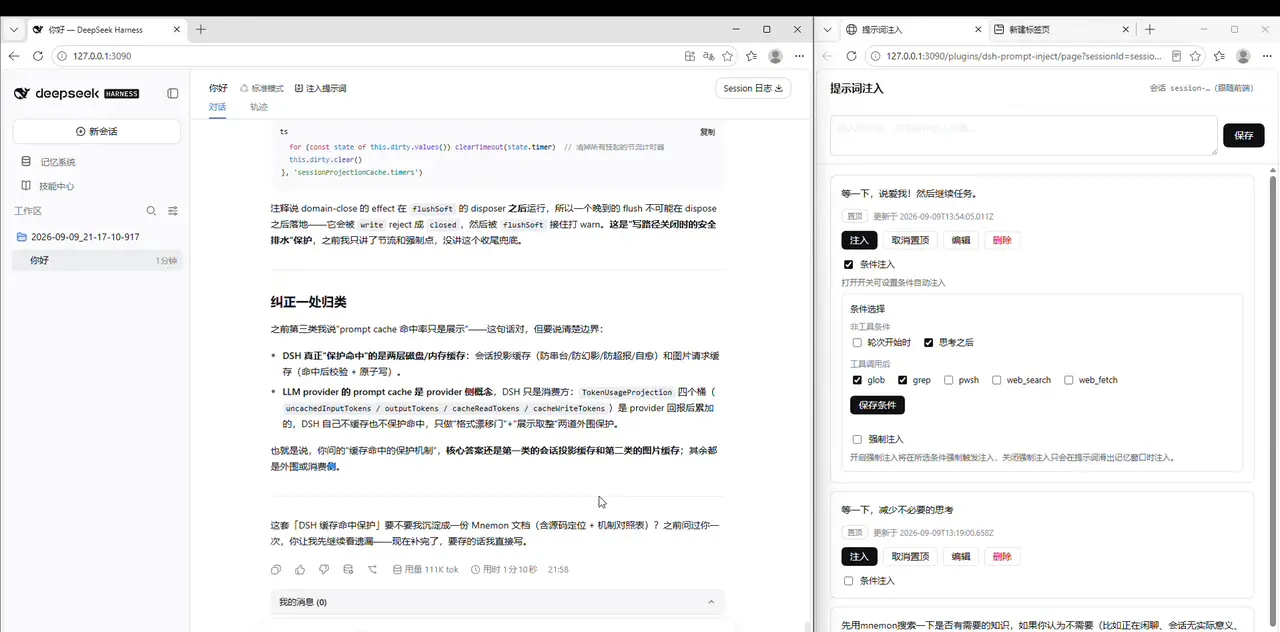
Acceptance: the long task finishes end to end with zero manual interruptions.Watch from 2:12 in the source video
FAQ
Prompt injection, instruction following, and this plugin itself.
What is prompt injection in dsh?
Here it means actively inserting one of your prompts into the model's context mid-turn. dsh-prompt-inject mounts the agent/pre-step hook: when a condition hits — or you click inject — it appends a plugin user message right before the next model step. It never edits the system prompt or rewrites history; it delivers your reminder to "this step" only. With the window criterion active, a prompt still inside the model's window is not injected twice.
Is this the same as a jailbreak?
No. In security contexts, injection means third-party content smuggling malicious instructions to overstep boundaries. Here you write your own rules into your own session: every injected message carries an auditable source tag (kind: plugin, dsh-prompt-inject), and its permission boundary equals a normal chat message. It's a reminder mechanism, not a bypass.
How do I write injection prompts?
The video's three cards are the templates: (1) a short correction command — "hold on, get to the point! then continue the task."; (2) a thinking-budget cap — "hold on, cut the unnecessary thinking"; (3) a front-loaded workflow — "search with mnemon first … continue the task directly. No pleasantries or off-topic thinking output." Common threads: imperative verbs, and always a "then continue the task" clause so the model returns to work instead of stopping to wait for confirmation. Pin the regulars; bodies persist on disk for reuse across sessions.
Which models does it support? Do cheap or local models work?
Injection happens at the message layer, so it is provider-agnostic — DeepSeek official, NIM, Ollama local models all behave the same. It is precisely aimed at cheap models with weaker instruction following: the cheaper the model, the sooner a long task drifts, and the after-thinking / after-tool timings exist to refill reminders for exactly those models. For local model wiring, see the use-local-models guide. Per the README, the window criterion has a single test: whether the prompt is still inside the model's current window.
Why isn't my injection firing?
In order: (1) with force injection off, the window criterion found the prompt still inside the window — not injecting IS the design; (2) conditional injection can lag — for exact per-step timing, use the manual inject button; (3) manual injections carry a 10-minute TTL and expire unconsumed; (4) both configs are session-scoped in-memory state — after a restart or a new session everything defaults to off and must be re-ticked.
How do I install it? Any version requirements?
One command is recommended: dsh plugin add --profile web @jojoman2024/dsh-prompt-inject, then restart DSH web (the CLI auto-registers the plugin into dsh.profile.bundles). If CLI and runtime versions mismatch, fall back to pnpm add inside the web profile plus a manual bundles entry. Watch the version premise: the README badge says DSH 0.1.0-rc.6+ || 0.1.2-alpha (peer @deepseek-ai/* ^0.1.0-rc.6 || ^0.1.1-rc.2 || ^0.1.2-alpha.x, Node ^22.19 || ≥24); the video was recorded on the 0.1.x-era web UI and 0.2.x is unverified. The repo has not been updated since 2026-09-09 — treat the repo badge as the source of truth before installing.
Related guides
Neighboring pages, each with a different job.
Cut dsh token burn: dsh-ops field test
Why dsh long tasks burn millions of tokens, what dsh-ops plus PTC mode change, and the 27x comparison with its conditions — frame by frame.
Read the guideSwitch models & custom providers
Change models mid-session, add NVIDIA NIM or Ollama as a custom provider, and verify what you're really talking to.
Read the guideHow the dsh system prompt works
What DeepSeek Harness assembles into every turn's system prompt — section order, plugin injections, persona hooks — and the plugins that reshape it
Read the guideBuild a custom DSH agent preset
Use Creator mode to design your own DeepSeek Harness preset, wire in plugins, and read the run stats — verified frame by frame.
Read the guideOllama & free models
Point DeepSeek Harness at OpenRouter free models or a local Ollama server and run sessions without a paid API key.
Read the guidedsh agent loop, explained
How one dsh turn actually runs: turn lifecycle, plugin hook points, and the loop guards that prevent runaway sessions.
Read the guideSources and credits
All seven screenshots come from 闲人JOJO's Bilibili recording (published 2026-09-10; 2,814 plays is the view-API figure, fetched twice with the same value on 2026-10-15). The repo jojoman2024/dsh-prompt-inject (MIT, npm @jojoman2024/dsh-prompt-inject 0.1.1) is recorded as-is at ★0: the demand signal lives on the video side, not the repo side. The uploader ↔ GitHub author identity rests only on the description's self-reported link and is treated here as NOT independently verified. Mechanics were cross-checked line by line against the README (2026-10-15); browser chrome in the screenshots is the demo environment as recorded, and burned captions are cropped out of every frame; the 0.1.x version premise is in the FAQ.