
DeepSeek Harness rollback: one-click undo and savepoint restore with dsh-undo-savepoint
A real screen recording, frame by frame: install one plugin, take the red Undo / green Restore buttons, the desktop undo manager or a plain sentence to the agent — then watch a deliberately crashed DSH come back with its session intact.
Last updated: 2026-10-01
Hand your DSH agent a risky task — swap a dependency, restructure a plugin, let it rewrite cordis.patch.yml — and sooner or later it breaks something you have no backup of. DeepSeek Harness itself has no Ctrl+Z. The community's answer is dsh-undo-savepoint by lire-安安 (GitHub lire1131, MIT): an automatic vault that snapshots when plugins mount, when config changes, every 15 minutes and at startup, plus a manual vault whose snapshots are never auto-cleaned.
This page is the hands-on tutorial for using it — every screenshot is a frame from the author's own recording, each deep-linking back to the exact second. If you are still deciding which rollback plugin to install, the rewind and undo collection lists the whole family first: The rewind and undo plugin collection
TL;DR
- ▸One command: dsh plugin --profile web add github:lire1131/dsh-undo-savepoint#master (Node.js ≥ 20), restart dsh web — a red 撤销 (undo), green 恢复 (restore) and gray 快照 (snapshots) button appear in every session header.
- ▸Three entrances: those header buttons, desktop shortcuts Ctrl+Alt+Z / Ctrl+Alt+Y (remappable in web settings), or just ask the agent in chat to undo.
- ▸Undo is soft-delete with a safety net: every rollback first records a 后悔档 (regret snapshot), the manual vault is never auto-cleaned, and the auto vault keeps the newest 20 by default.
- ▸DSH won't boot? The desktop DSH undo manager works from outside. Snapshots contain .env copies — never share them; ZIP export supports AES-256-GCM encryption.
From install to a survived crash
Part 1 · Install and the three ways back
- 1
Install the plugin and restart dsh web
dsh-undo-savepoint is an open-source (MIT) plugin by lire-安安 — the recording's author. It needs Node.js ≥ 20 alongside DSH. Install from the GitHub source and restart, and the plugin takes a baseline snapshot the moment it mounts: the first row you will later see in the manager is that plugin-mounted baseline. Snapshots cover the DSH config, the profiles' cordis.patch.yml and the user plugin tree.
$dsh plugin --profile web add github:lire1131/dsh-undo-savepoint#master - 2
Learn the three ways back
Every session header carries three buttons next to the mode label: red 撤销 (undo the last change), green 恢复 (restore), gray 快照 (open the snapshot manager). Prefer the keyboard? Defaults are Ctrl+Alt+Z for undo and Ctrl+Alt+Y for restore — remappable in dsh web's settings, Backspace clears a binding. The author's slide deck lists a third entrance: simply tell the agent in chat, and the plugin triggers the same rollback.
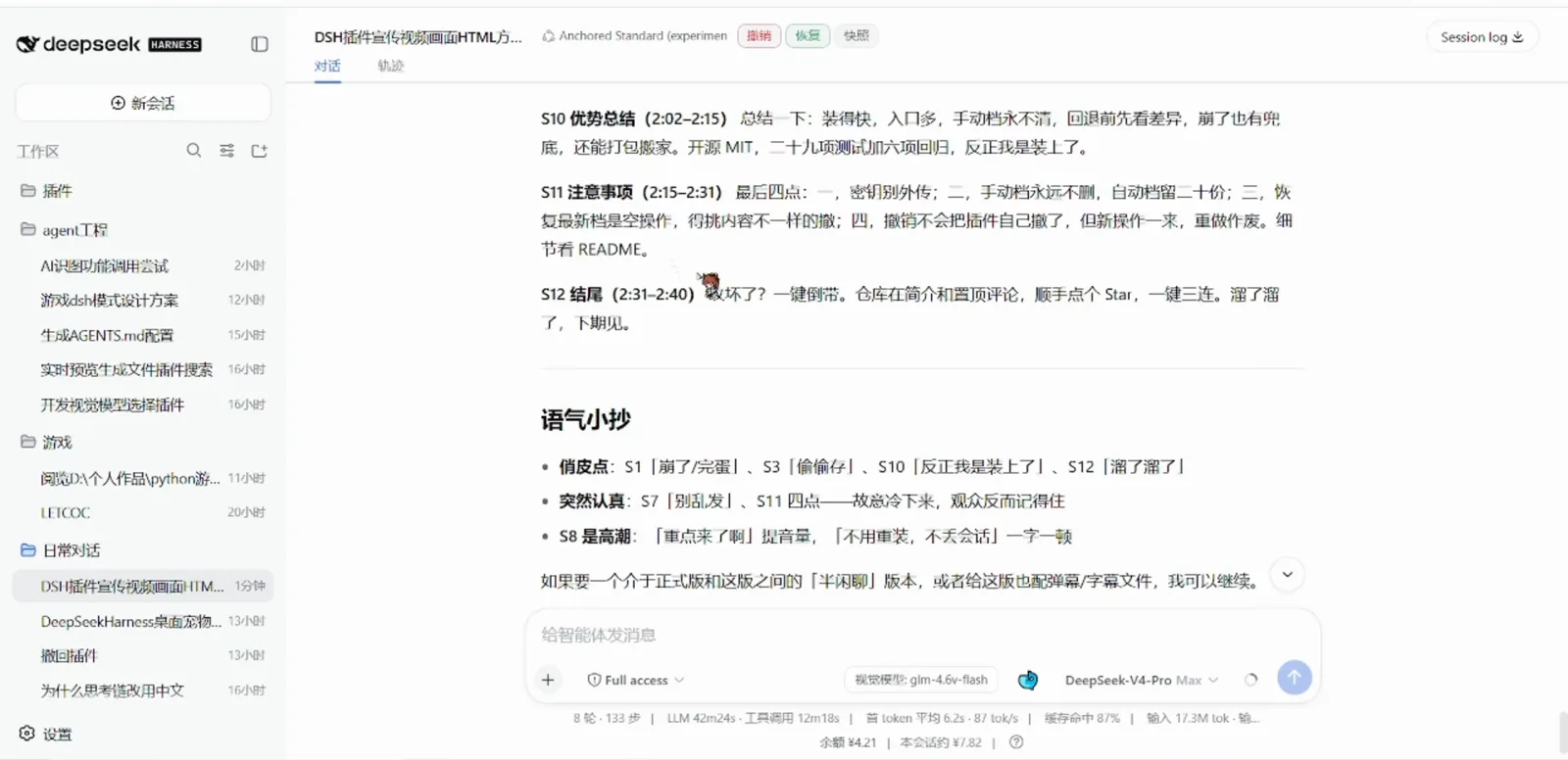
Session header: Undo, Restore and Snapshot — always one click awayWatch at 6:36 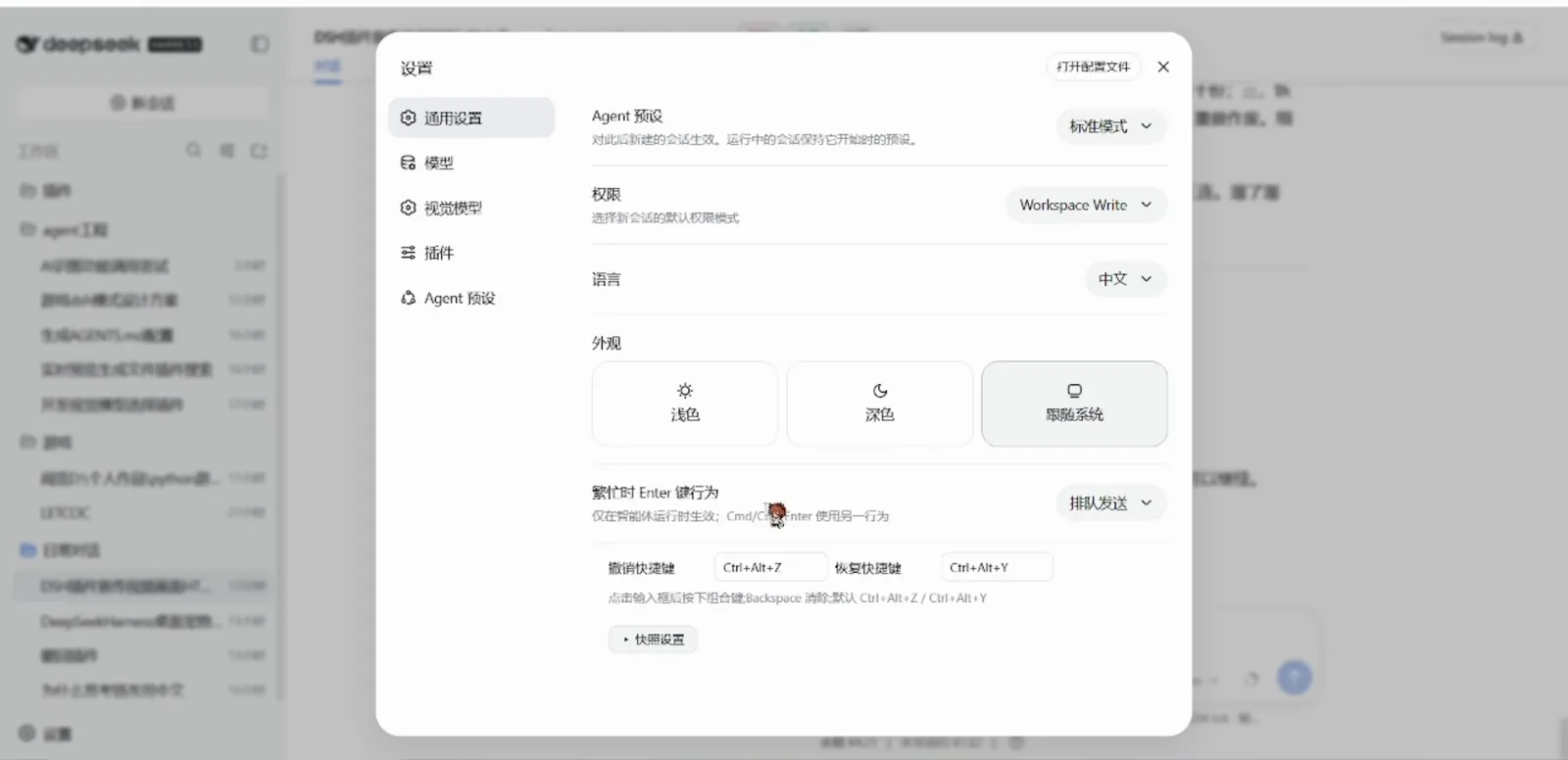
Keyboard route: undo Ctrl+Alt+Z, restore Ctrl+Alt+Y — remappable in settingsWatch at 7:28
Part 2 · Everyday rollback and the crash drill
- 3
Open 快照管理 and restore any version
The snapshot manager dialog has seven actions: 手动保存 (manual save), 撤销, 恢复, 刷新 (refresh), 清理过期 (clean expired) and 导出 / 导入 (ZIP out/in). Every row shows its time, type — 基线 baseline, 自动 auto, 手动 manual, 后悔档 regret — the reason (plugin-mounted, config-change, settings-change, before-restore…), the file count and its vault. Per row: 差异 opens the diff, 回退到此版本 restores that version, 删除 deletes it. By default the auto vault keeps 20 snapshots, the regret rows 10, and manual saves are never auto-cleaned — all editable under 快照设置.
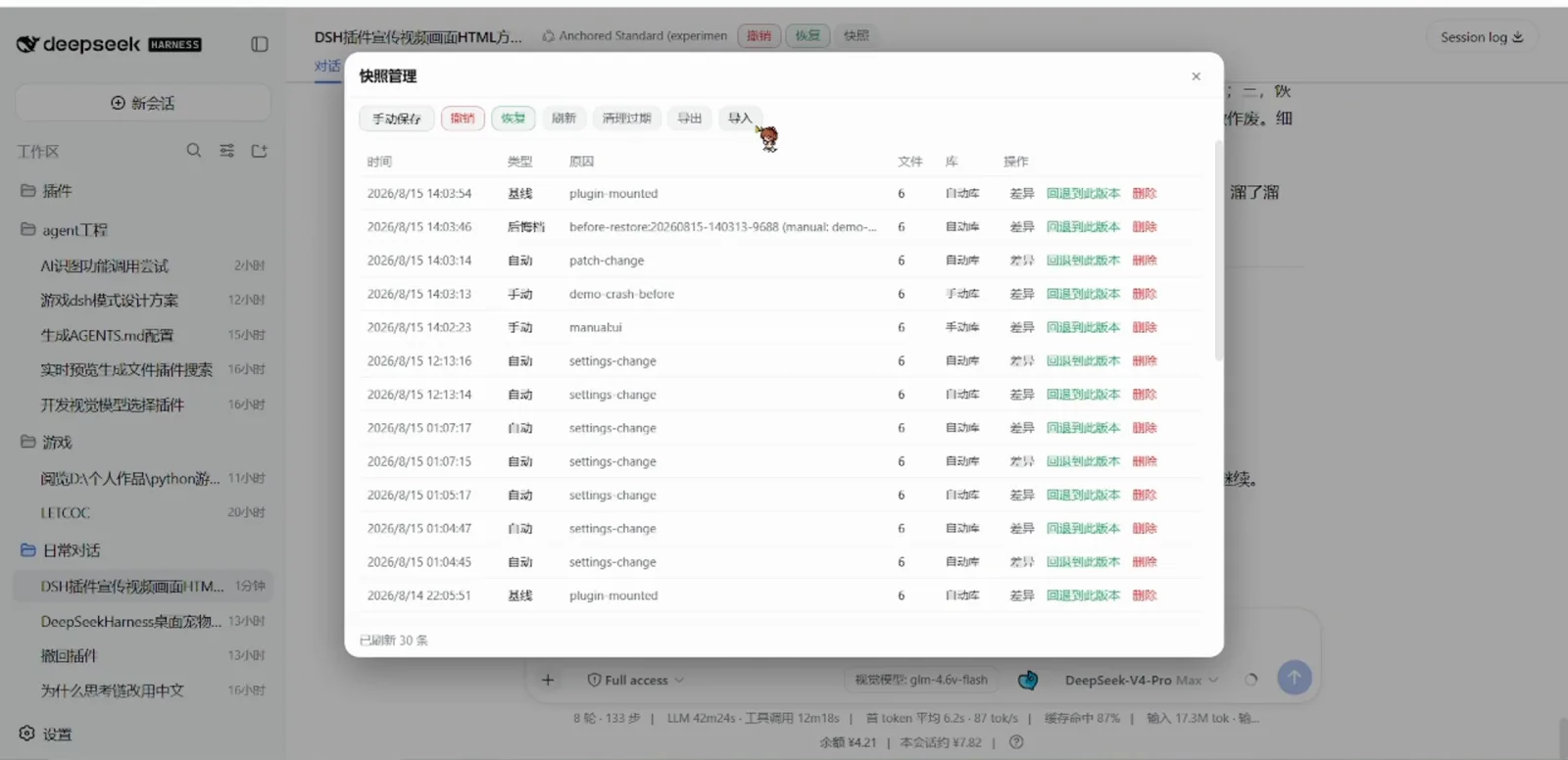
The snapshot manager: seven actions, and every row can diff, restore or deleteWatch at 7:00 - 4
The desktop undo manager writes a regret row first
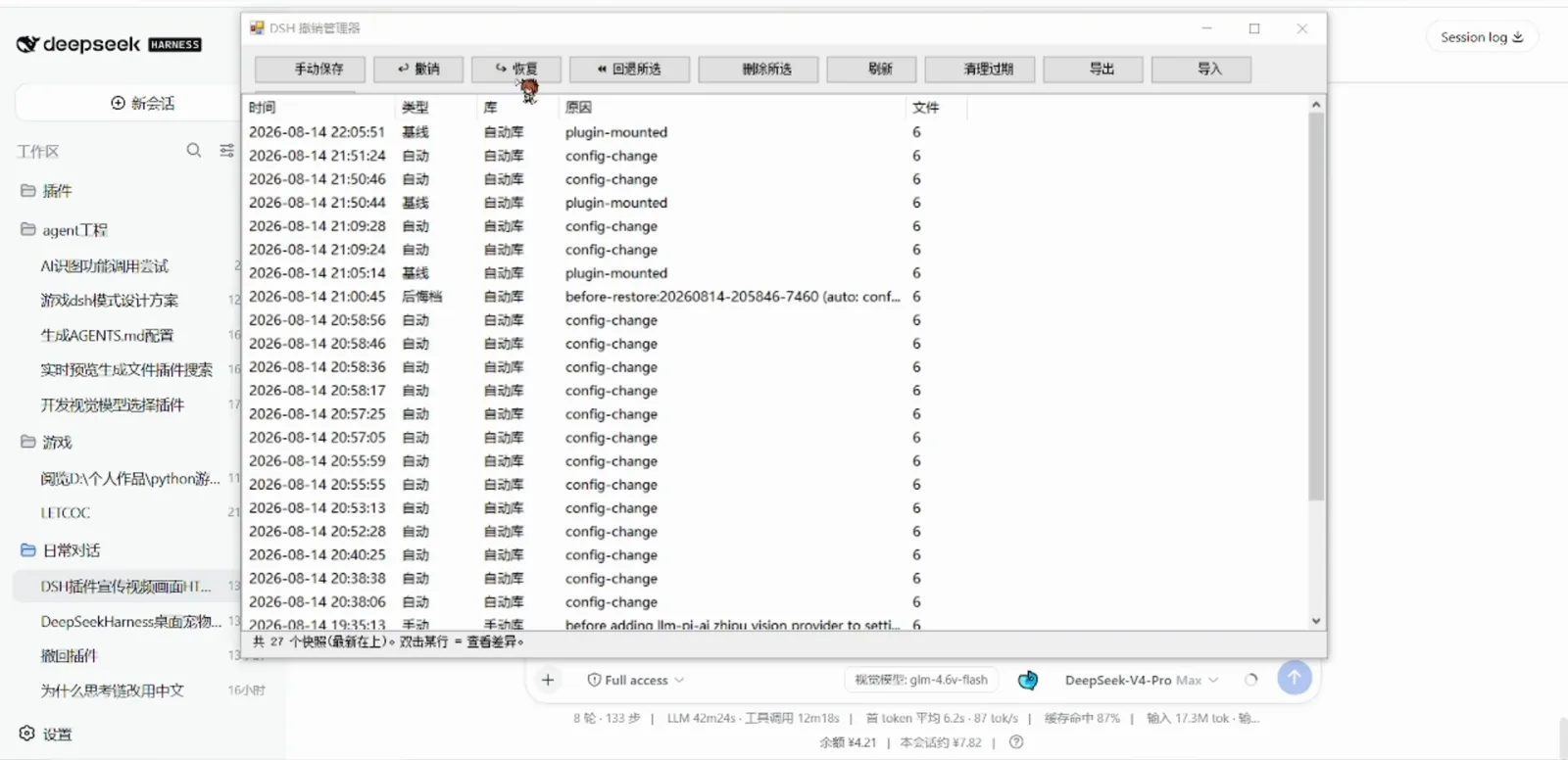
The same operations live in a native desktop window, DSH 撤销管理器: 手动保存, 撤销, 恢复, 回退所选 (restore selected), 删除所选, 刷新, 清理过期, 导出, 导入 — and it reads the vault even while DSH itself refuses to boot. Click 撤销 and watch the top row: a fresh 后悔档 before-restore snapshot is written before anything is rolled back, so regretting your regret is always possible. Double-click any row to see the diff.
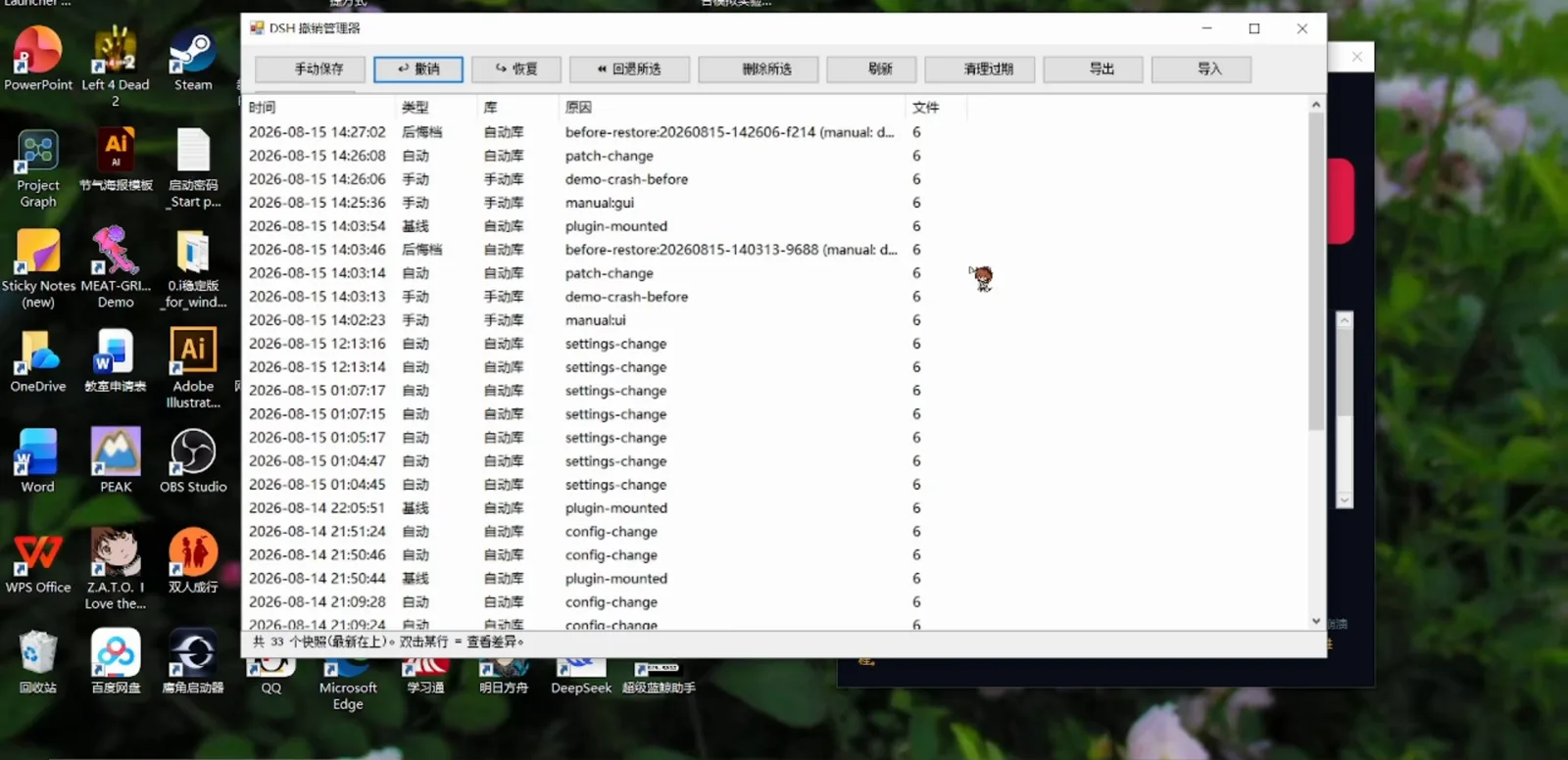
Undo first writes a regret row (后悔档), then rolls backWatch at 10:30 - 5
Crash drill: kill DSH on purpose, bring it back intact
The author's crash-demo button injects a duplicate dsh-vision loader id into the patch file — DSH dies with TypeError: duplicate loader entry id, exit code 1. But before dying it had already stored a manual snapshot (demo-crash-before) and a backup of cordis.patch.yml. The same dialog offers 清除注入 (the safety valve that removes the bad injection), 打开撤销管理器 and 查看 patch 文件. Undo the bad change, clear the injection, restart — in the recording the session comes back whole: 8 rounds, 133 steps, costs and model settings untouched. The button's own printed warning: it really kills the running DSH process, so save your session first.
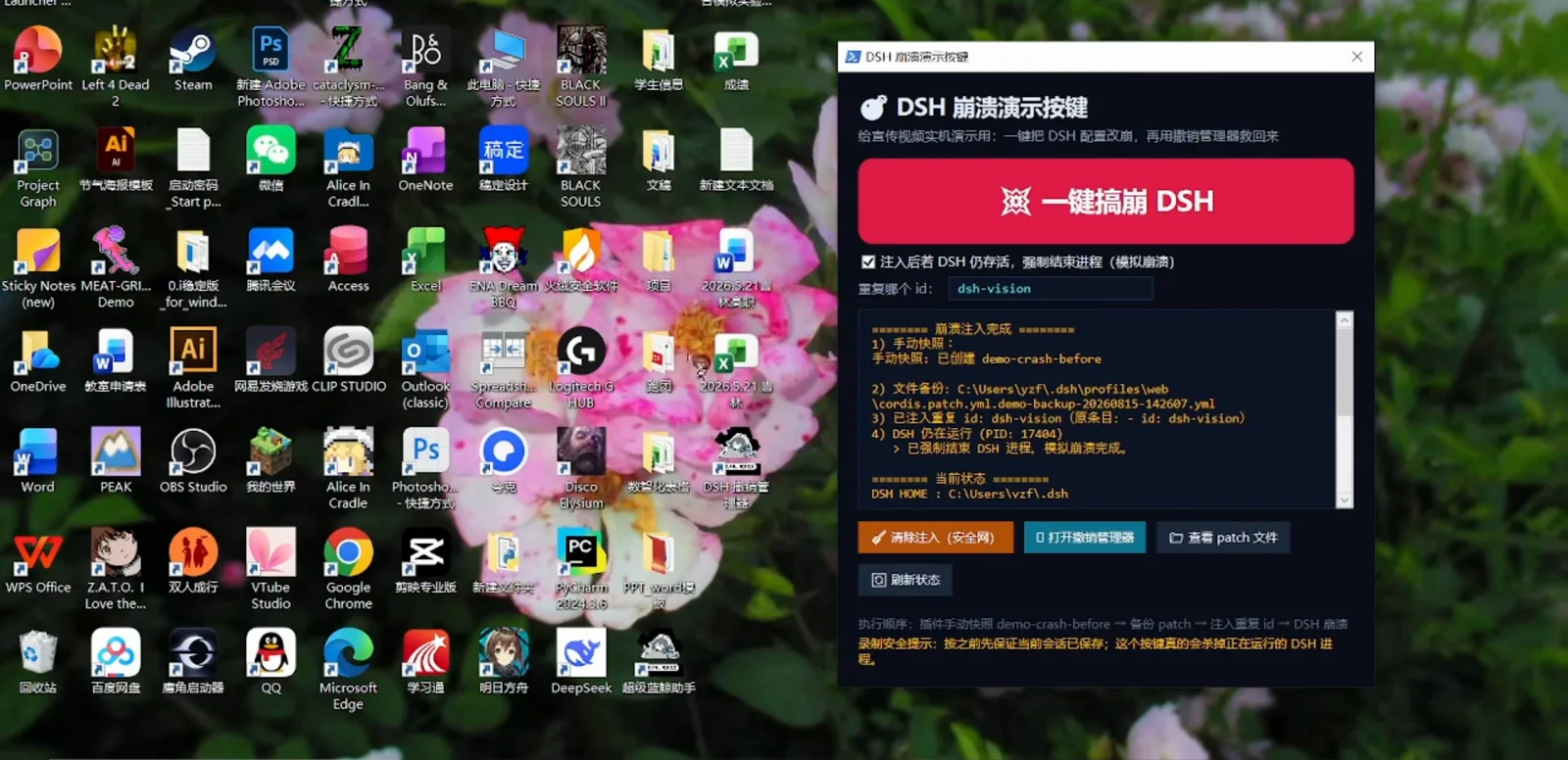
The crash drill: snapshot first, then inject, then kill — rescue buttons readyWatch at 10:18 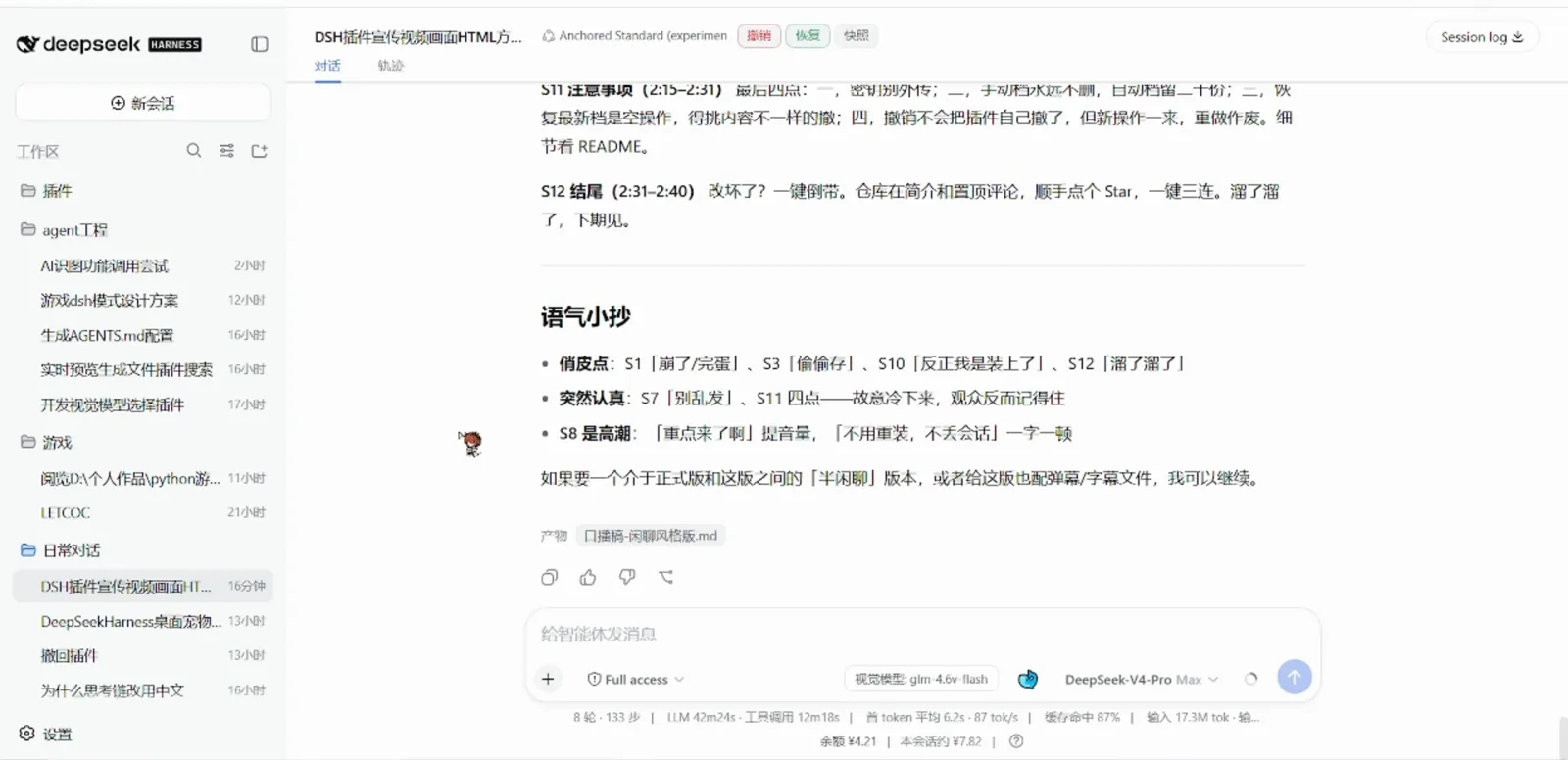
After rollback and a restart, the session is whole againWatch at 10:58
Part 3 · The v0.4.5 snapshot timeline
- 6
v0.4.5 trades the dialog for a snapshot timeline
Current releases replace the dialog with a timeline page: rows grouped by date, each tagged AUTO or BASELINE with its reason and size, and four actions — 对比 (compare), 恢复 (restore), 编辑备注/标签 (note and tags), 删除. The toolbar adds 安全模式 (safe mode for when DSH cannot boot), 诊断 (undo_doctor checks), 清理, 对话撤回 and ZIP 导出/导入. Since this generation, snapshots are redacted by default: .env files, credentials and home-level settings are masked into a local vault, and ZIP export can be encrypted with AES-256-GCM.
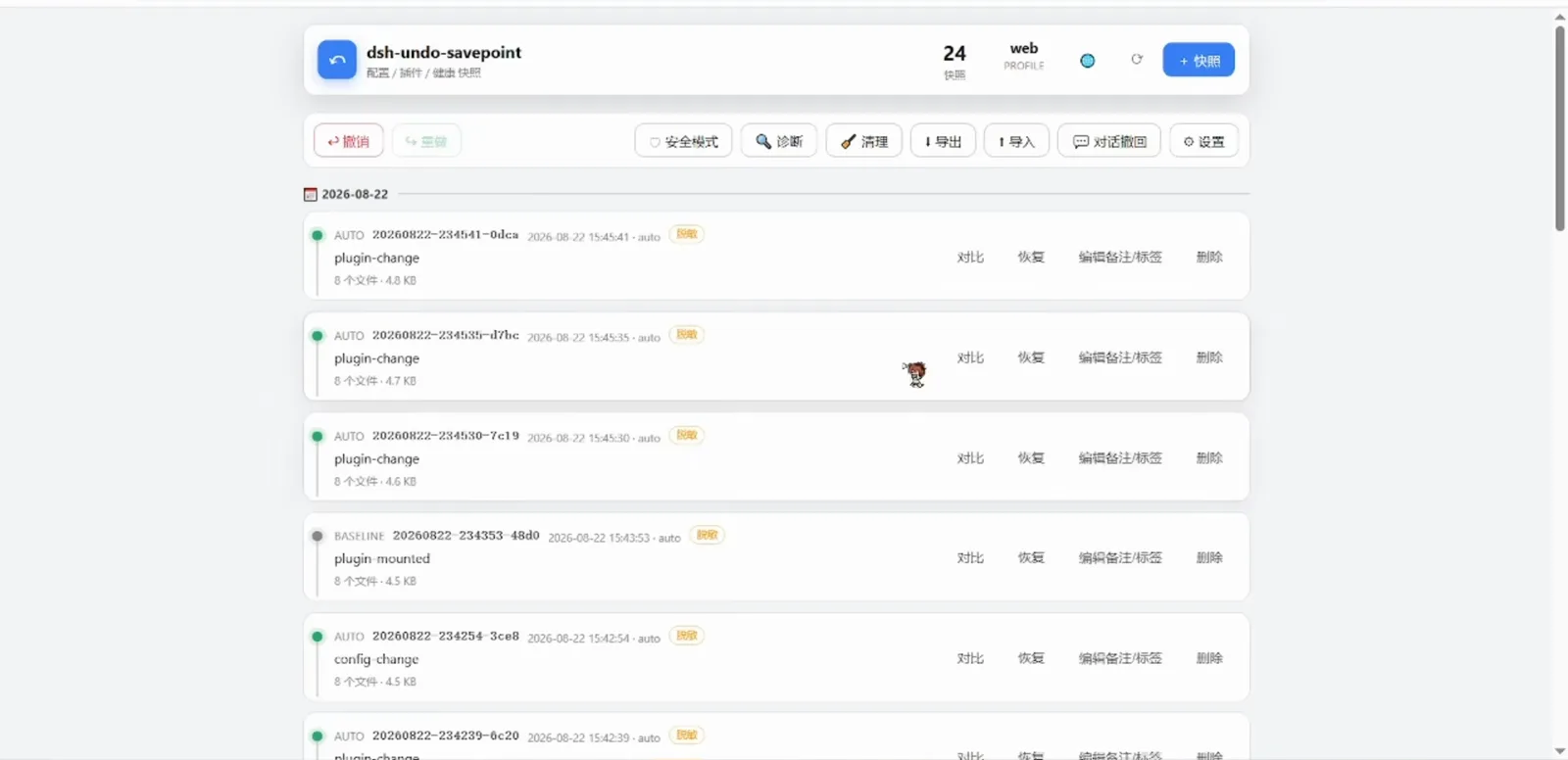
v0.4.5 timeline: compare, restore, note and tags, deleteWatch at 5:09
The other regret pill: message-level rewind with dsh-rewind
dsh-undo-savepoint rolls configs and files back to a savepoint. dsh-rewind by 夏桑菊XSJ (GitHub XSJUSTC, package @xsj/dsh-rewind) rolls the conversation itself back to any user message — an unsend for prompts. Its README spells out how: a ↺ 回退 (rewind) icon appears next to the copy icon on every user message; clicking it interrupts a running turn immediately, hides that message and everything after it from the chat view, and puts the text back into the input box, unsent and editable. A 取消回溯 (cancel rewind) button appears beside the send button until you send again, restoring the hidden messages untouched.
Send, and the model only sees the truncated history plus the new message — the rewound tail never re-enters the model context. Only user messages can be rewound; assistant replies have no rewind entry, enforced host-side. Install: dsh plugin --profile web add github:XSJUSTC/dsh-rewind.
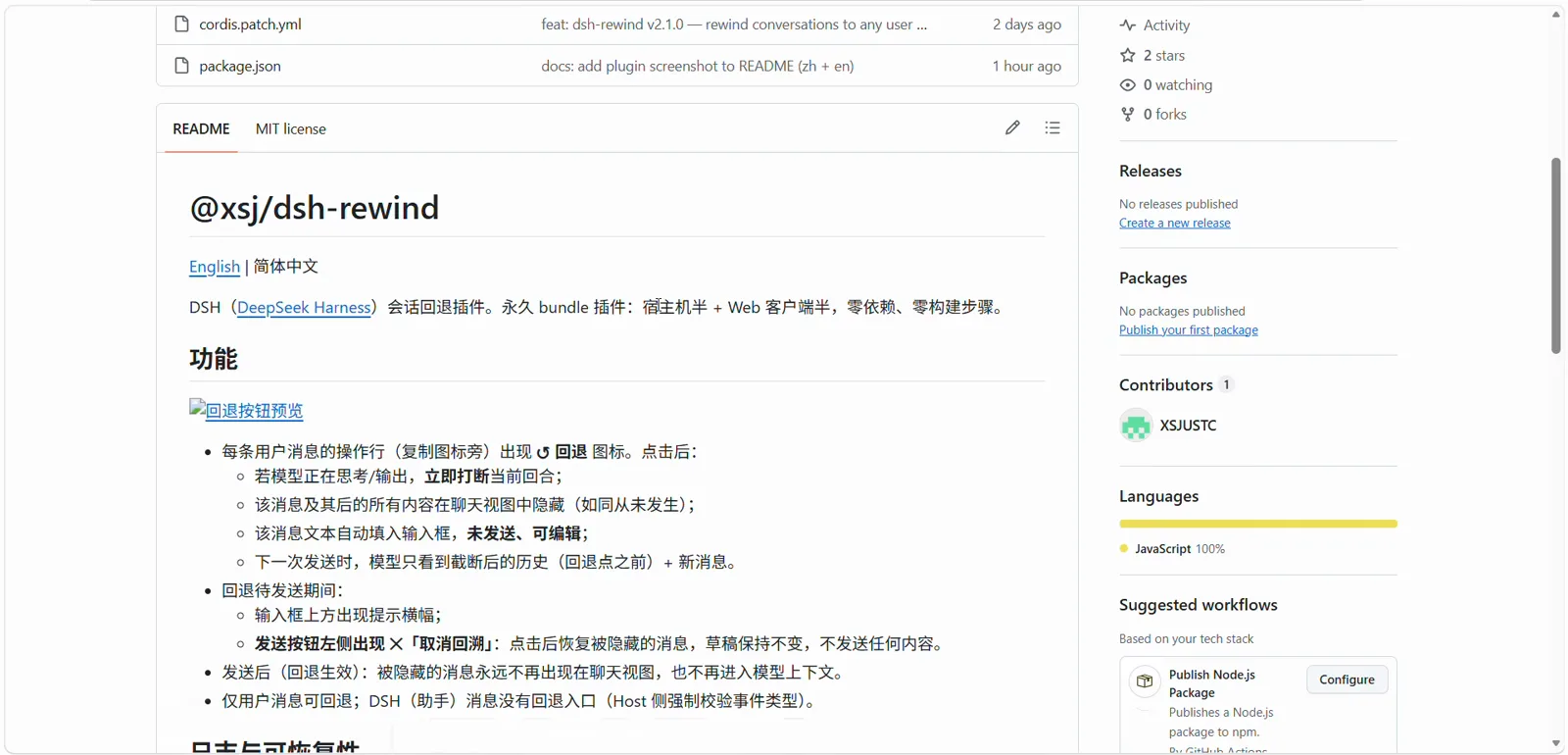
Do not confuse the three: dsh-undo-savepoint (this page) guards config and files with savepoints and crash rescue; dsh-rewind rewinds single turns of one conversation; anionex/dsh-turn-rewind is a third, independent community turn-rewind plugin. The collection below keeps the whole family side by side.
FAQ
What readers ask before trusting a rollback plugin.
Will undoing throw away changes I wanted to keep?
Rollback is soft-delete with a paper trail: the undo itself is recorded as a 后悔档 regret snapshot, so you can step forward again. The author's own slide warns that restoring the newest snapshot is a no-op — pick a row whose content actually differs, and read the 差异 diff before confirming. By default the auto vault keeps the newest 20 snapshots and 10 regret rows, while manual saves are never auto-cleaned; all three numbers live in 快照设置. Work done after the point you return to has to be redone.
DSH is already dead — can I still roll back?
That is what the desktop window exists for: DSH 撤销管理器 reads the snapshot vaults without the web UI, and the author's demo kills DSH on purpose to prove the way back. If the crash came from a bad patch injection, 清除注入 restores cordis.patch.yml from the automatic backup file. v0.4.5 adds a one-click 安全模式 (safe mode) for when DSH cannot boot, plus 诊断 (undo_doctor) pre-flight checks.
Do snapshots leak my API keys?
A snapshot contains copies of your .env and config — treat it like a secret and never share or upload it (the author's slide says the same). Since v0.4.x the default 敏感模式 redacts .env files, credentials and home-level settings: real values move to a local vault, snapshots carry masked placeholders, and ZIP export supports optional AES-256-GCM encryption. Keep the vault local; encrypt exported ZIPs.
Are dsh-rewind, dsh-turn-rewind and undo-savepoint the same plugin?
No — three different projects. dsh-undo-savepoint by lire1131 (this page) takes savepoint snapshots of config and files and rescues crashed DSH instances. dsh-rewind by XSJUSTC rewinds a conversation to any earlier user message. anionex/dsh-turn-rewind is a third, community turn-rewind plugin with its own approach. The rewind and undo collection lists all of them; this tutorial stays hands-on with undo-savepoint.
Related guides
The same safety net, from other angles.
The rewind and undo plugin collection
undo-savepoint, turn-rewind, config-manager and the rest of the rollback family, compared — the which-plugin layer above this tutorial.
Read the guideDSH troubleshooting playbook
General diagnosis when dsh will not start or misbehaves — pair it with the crash drill in step 5.
Read the guideReplay a session's trajectory
Retrace what the agent did after the fact — the after-the-fact sibling of before-the-fact snapshots.
Read the guideExport and migrate sessions
Take sessions with you when you move machines — together with snapshot ZIP export for configs.
Read the guideHow DSH configuration works
Profiles, cordis.patch.yml and settings — exactly the files your snapshots guard.
Read the guideWhat are DSH plugins?
New to plugins? Start here: what they are, how installs work and where they live.
Read the guideSources and credits
All screenshots are frames from the authors' own Bilibili recordings, each deep-linked to the exact second; the walkthrough text is original. Facts were cross-checked against the lire1131/dsh-undo-savepoint and XSJUSTC/dsh-rewind READMEs.