
Back Up, Export and Migrate DeepSeek Harness Sessions
The upgrade-proof route from a real recording: clone your install into an isolated lane with its own home directory and port, verify the copy before you trust it, and keep per-lane conversation backups — so a bad plugin or a bumped version never takes your session history down with it.
Last updated: 2026-09-29
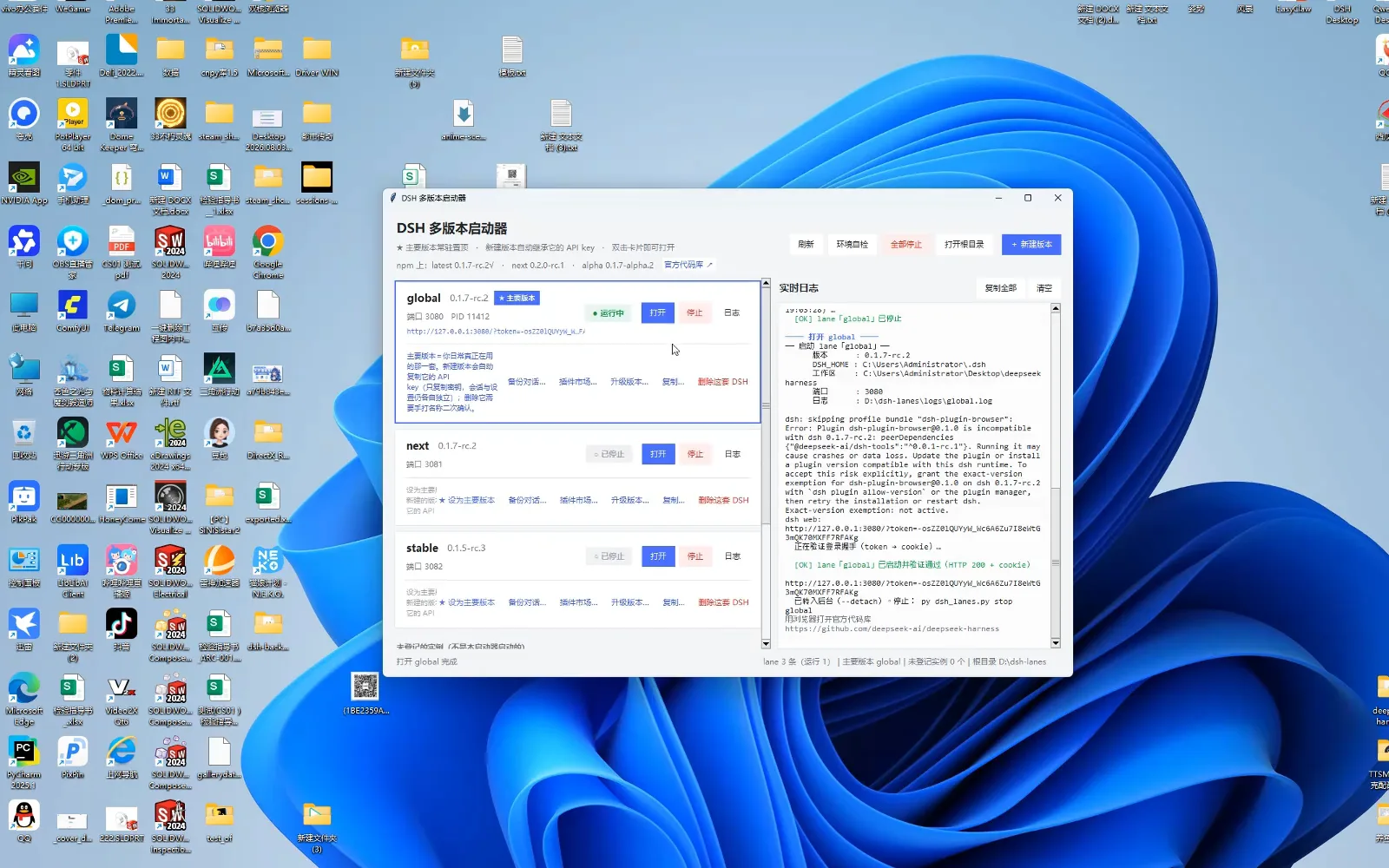
A harness keeps your work the way a browser keeps tabs: every session, every trajectory, every approval lives in that install's home directory. Which is why the riskiest moment of owning dsh is not a bad prompt — it is an upgrade. When a plugin does not match the runtime, dsh itself prints the warning this page is built around: running it may cause crashes or data loss. The recording below shows the defensive layout — keep the daily install untouched, clone it into an isolated lane, make the copy prove itself, and only then change versions.
Every screenshot below is a still from that recording, and each one deep-links back to its second; the recording has no captions, so the facts — card labels, log lines, the self-check fields — were read off the on-screen UI frame by frame. Where session storage internals matter, we cite a second, credited source. The versions on screen (0.1.5 through 0.2.0 release candidates) are September 2026 snapshots; the lane pattern is the durable part. For the read side of session history, see Replay and review past sessions
Quick answer
- ▸Never upgrade your only install. dsh's own log warns that a mismatched plugin may cause crashes or data loss — the recording's answer is to keep the daily lane untouched and experiment on a copy.
- ▸The DSH multi-version launcher (dsh-lanes) clones an install into its own tree and home: the recording copies global into global-copy — 45,323 files, 1.6 GB, 308 seconds — on its own port 3083, API key inherited.
- ▸A copy inherits the key only: conversations and settings stay independent per lane. Back up a lane's chats with its 备份对话… action; copy the lane's clone and home directories together for a full snapshot.
- ▸Trust is a receipt, not a feeling: ask the copy for an environment self-check (version, DSH_HOME, its own DSH_WEB_URL), read the trajectory of that turn, then upgrade in place — the clone's path and home links never change.
Step by step
Clone your install into an isolated lane
- 1
Read the clone receipt before you touch anything
The launcher keeps one card per installed copy, and the recording shows four: global — the daily lane on port 3080, badged ★主要版本 (main version) — next on 3081, stable on 3082, and global-copy on 3083, created by the 复制… (duplicate) action. The live log receipts the whole operation: install tree D:\dsh-lanes\clones\global-copy, home D:\dsh-lanes\homes\global-copy, 45,323 files / 1.6 GB copied in 308 seconds, DEEPSEEK_API_KEY inherited, then the three commands you run next. The status bar sums it up: 4 lanes, 1 running, root directory D:\dsh-lanes.
$py dsh_lanes.py open global-copy --no-browser$py dsh_lanes.py verify global-copy$py dsh_lanes.py upgrade global-copy <版本>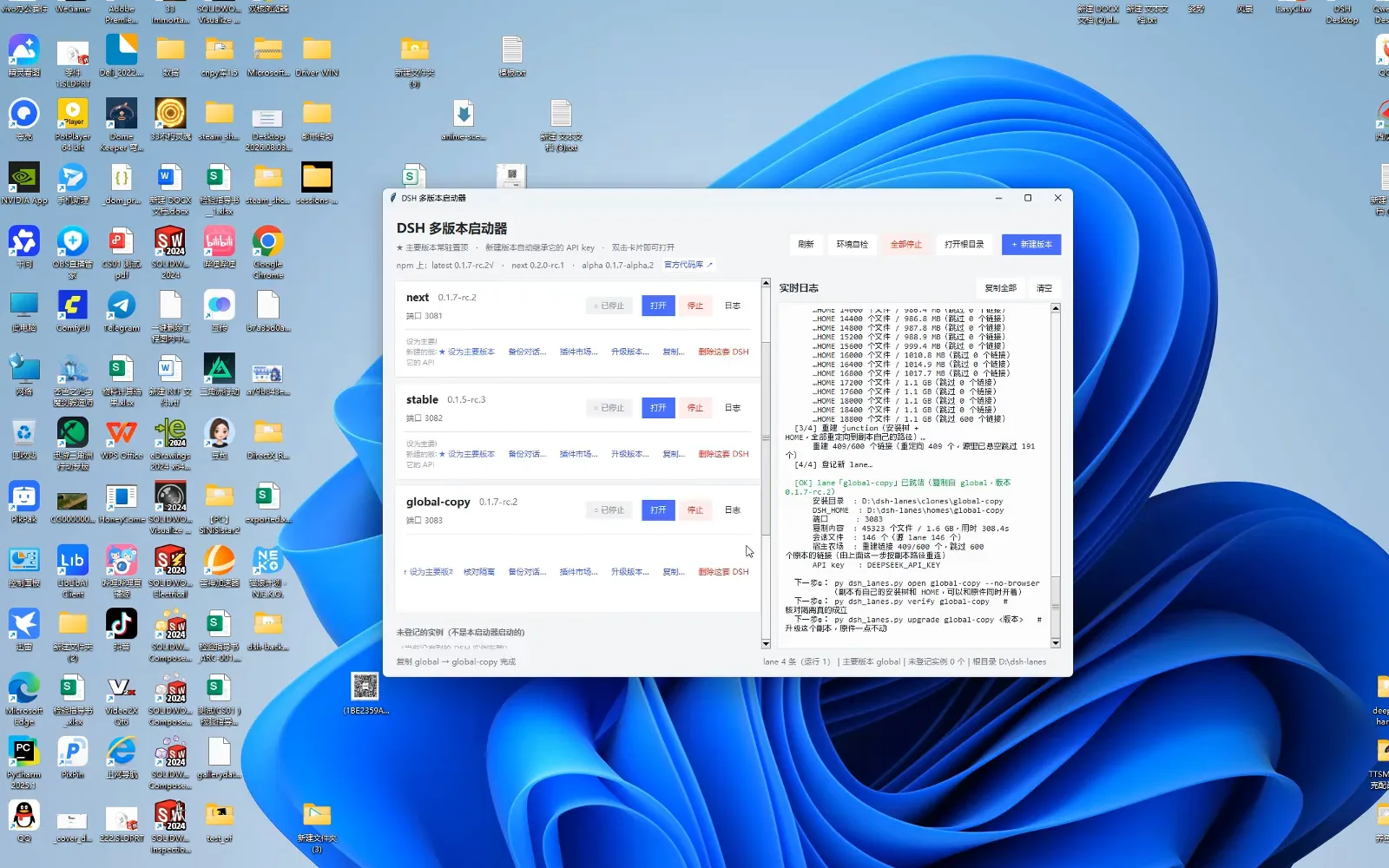
The copy receipt: own install tree, own home, own port — then the three commands you run next.Watch at 1:10 - 2
Ask the copy to prove it is really the version you cloned
Open the copy's Web UI and request an environment self-check. The report answers with evidence, not assurances: DSH version 0.1.7-rc.2 (a release candidate), installed via npm global @deepseek-ai/dsh, the dsh.cmd path it resolves to, and the checks it ran — the dsh --version output, the package.json name and version pair, the npm dependency tree. Then the part this guide turns on, the runtime environment: DSH_HOME = D:\dsh-lanes\homes\global-copy, DSH_PROFILE = web, DSH_WEB_URL = http://127.0.0.1:3083 — the copy is answering from its own home on its own port, not from your daily lane's.
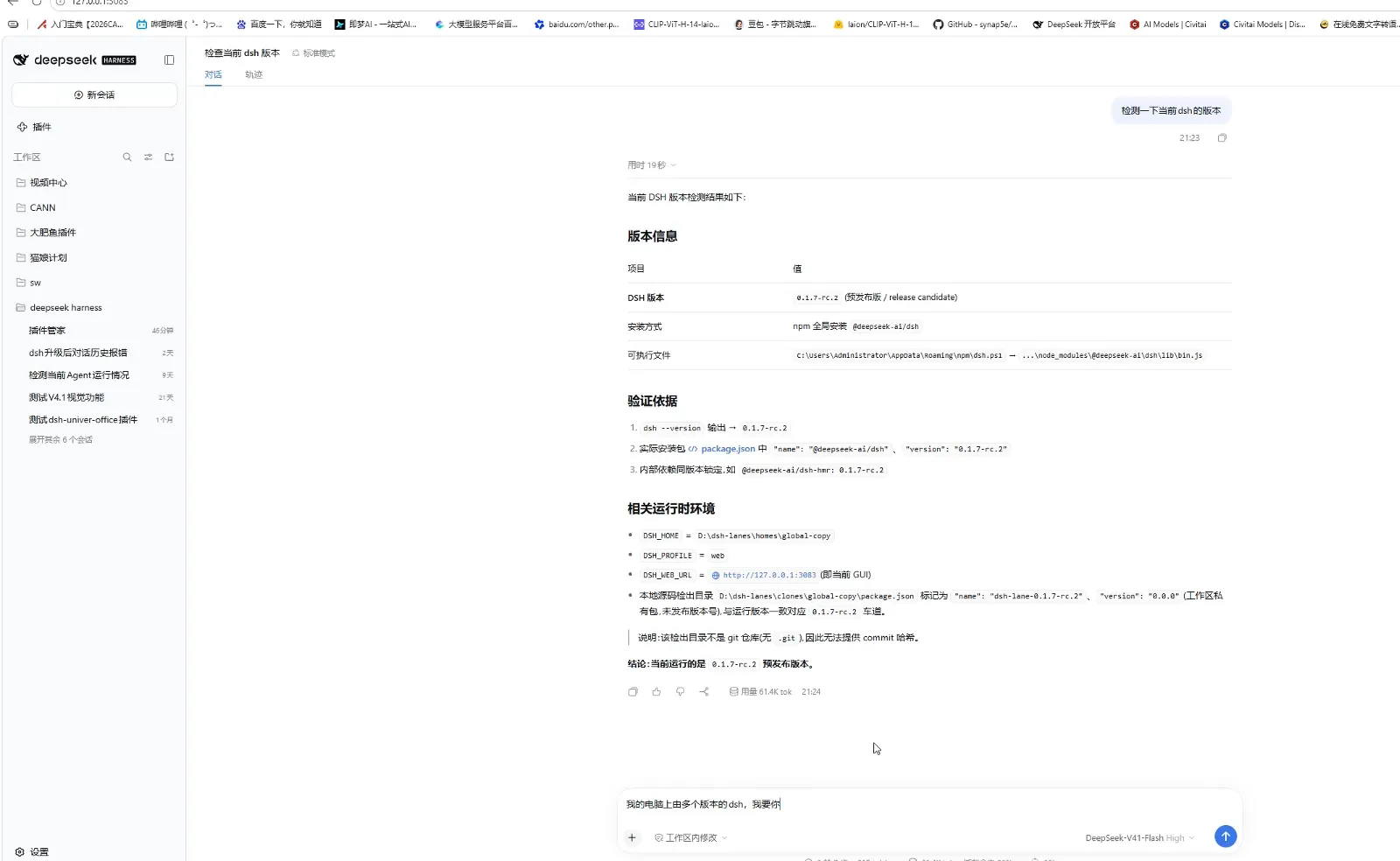
The copy answers for itself: its version, its own home, its own port.Watch at 3:30 - 3
Open the trajectory and audit the audit
The same turn's trajectory view is where the claim becomes checkable: sequential tool rows list the cloned home's contents, read package.json, inspect process command lines to see which installation is actually running, enumerate the dsh-lanes root, and inspect the running lane process and its launcher. That habit — ask for a check, then read how it was checked — is what separates a backup you can trust from a backup you hope works.
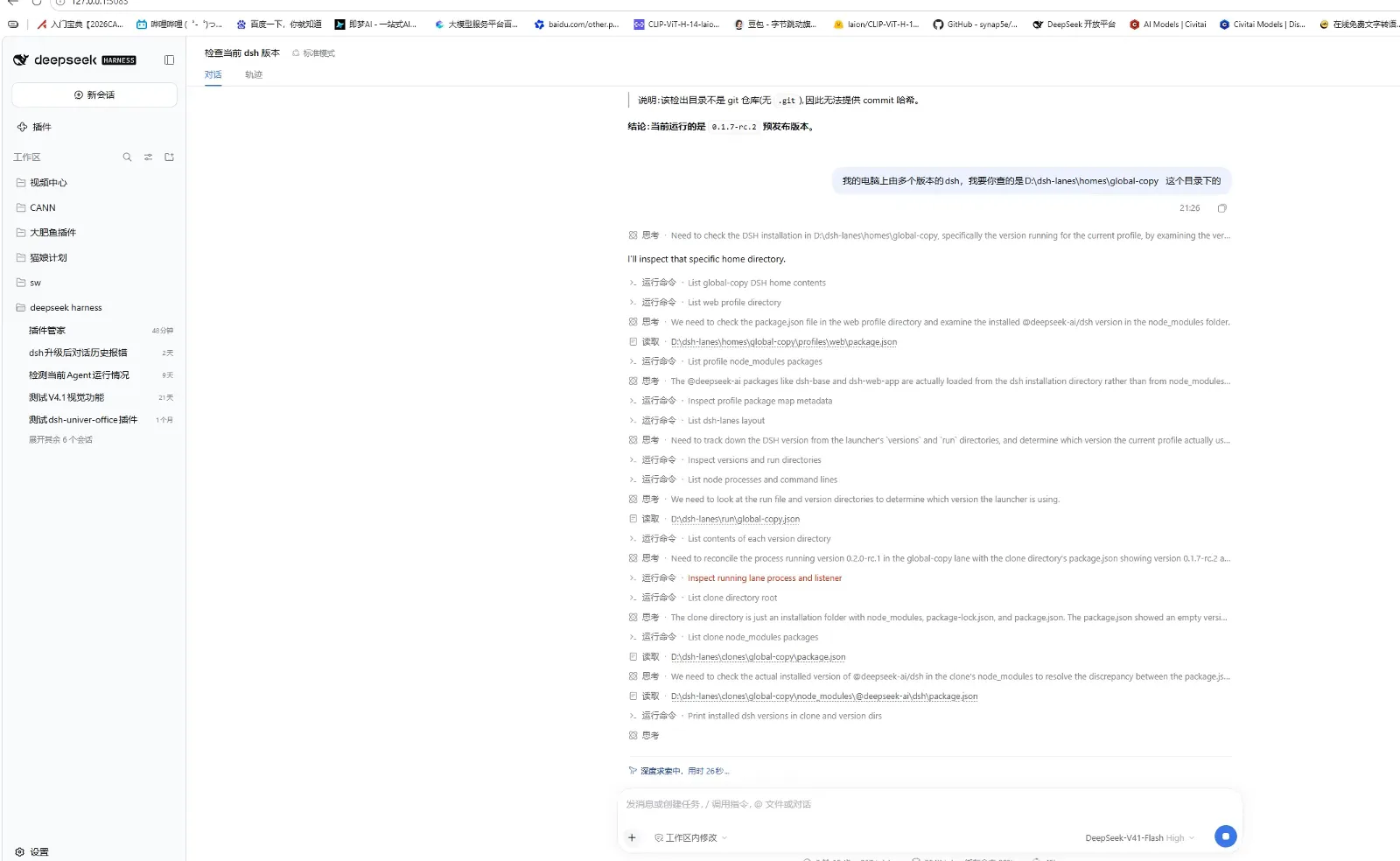
Every claim in the report traces back to a tool step you can open.Watch at 4:10 - 4
Sessions and settings stay independent per lane
The global card's description says it outright: a new copy automatically inherits the API key — only the key; conversations and settings remain independent. So each lane's settings dialog (General, Models, Built-in plugins, Agent presets) edits that lane's own configuration, reachable any time via 打开配置文件 (open config file). Under the hood, per a separate source-code walkthrough of dsh's session internals cited below, the journal is one append-only JSONL file per session under the dsh home — which is exactly why the per-lane home split keeps histories from bleeding into each other.
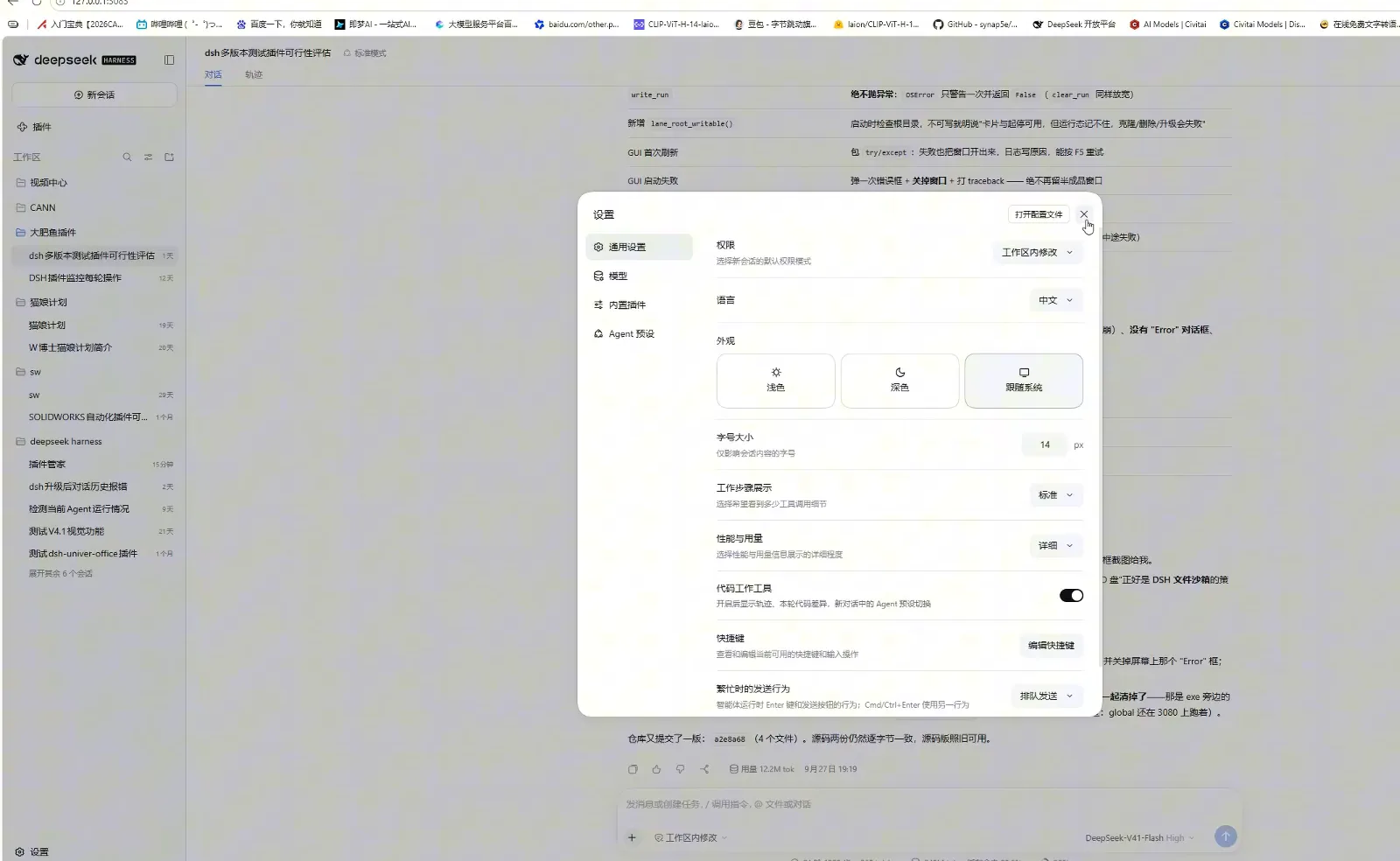
Key inherited, everything else separate: each lane edits its own config file.Watch at 2:00
Upgrade the copy, keep the original intact
- 5
Upgrade the copy in place, original untouched
升级版本… (upgrade version) on the copy's card opens 换 DSH 版本:lane「global-copy」 (switch DSH version for this lane): current version 0.1.7-rc.2, install tree D:\dsh-lanes\clones\global-copy, and the promise that matters — the upgrade happens inside the copy's own tree, so the path never changes and not a single home link needs re-connecting. Pick a version from the npm registry list — 0.2.0-rc.1 tagged next, 0.1.7-rc.2 tagged latest and marked 现在用的·本地已装 (the one in use, installed locally) — or type a version number; 先看会改什么 (see what changes first) previews the change before 升级到这一版 (upgrade to this version) commits it.
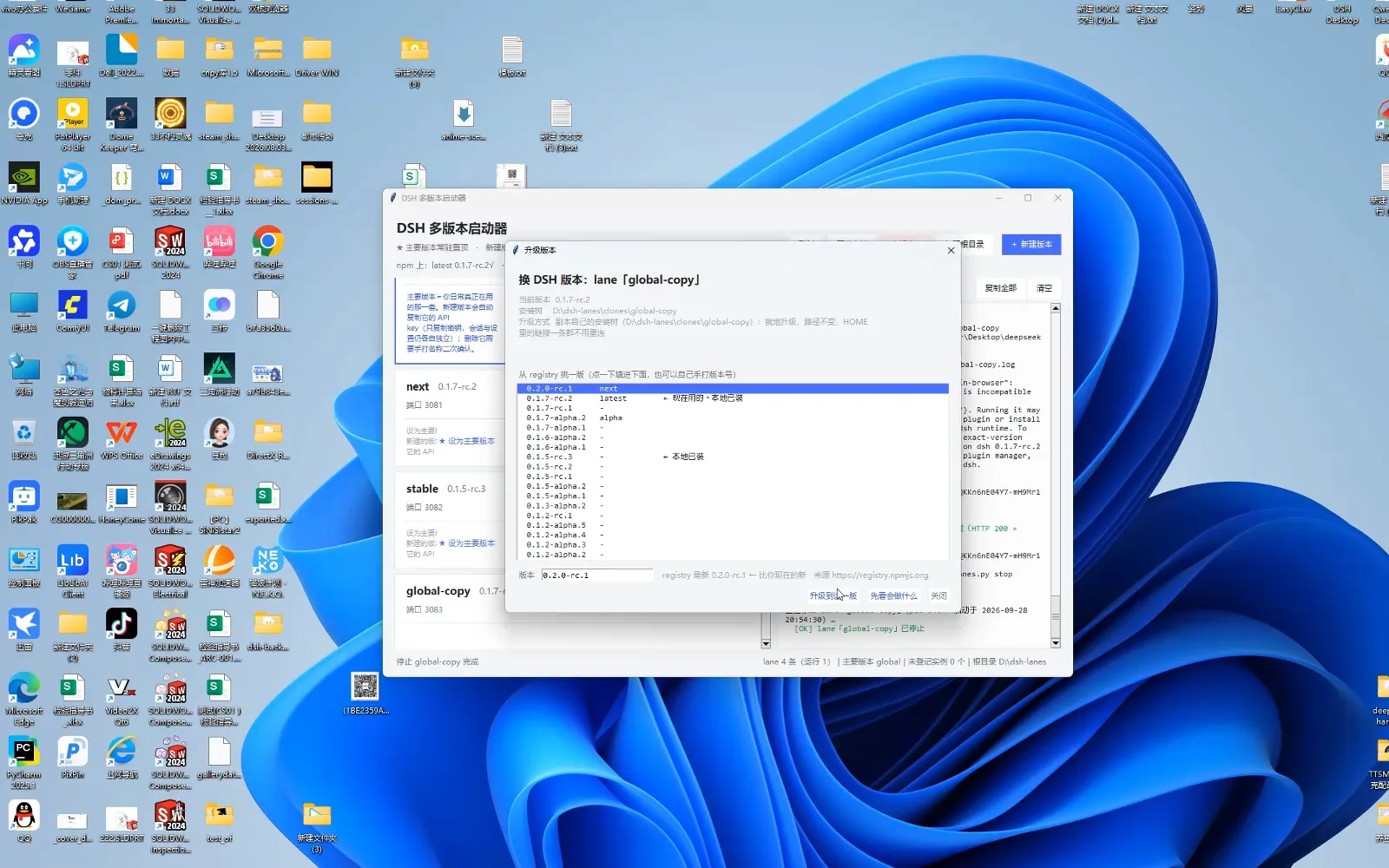
Upgrades land inside the clone's own tree — the original path never moves.Watch at 3:15 - 6
Daily belt: per-lane actions and honest logs
Every card carries the maintenance belt: 备份对话… (back up conversations) archives that lane's chats, 插件市场… opens its plugin market, 升级版本…, 复制… spawns another copy, and 删除这套 DSH (delete this dsh install) demands typing the lane's name to confirm. The live log does not prettify upgrades either — npm ERESOLVE peer-dependency warnings scroll past while the run proceeds. That honesty is the point: you watch the risky part happen on a lane where a failure costs a copy, not your history.
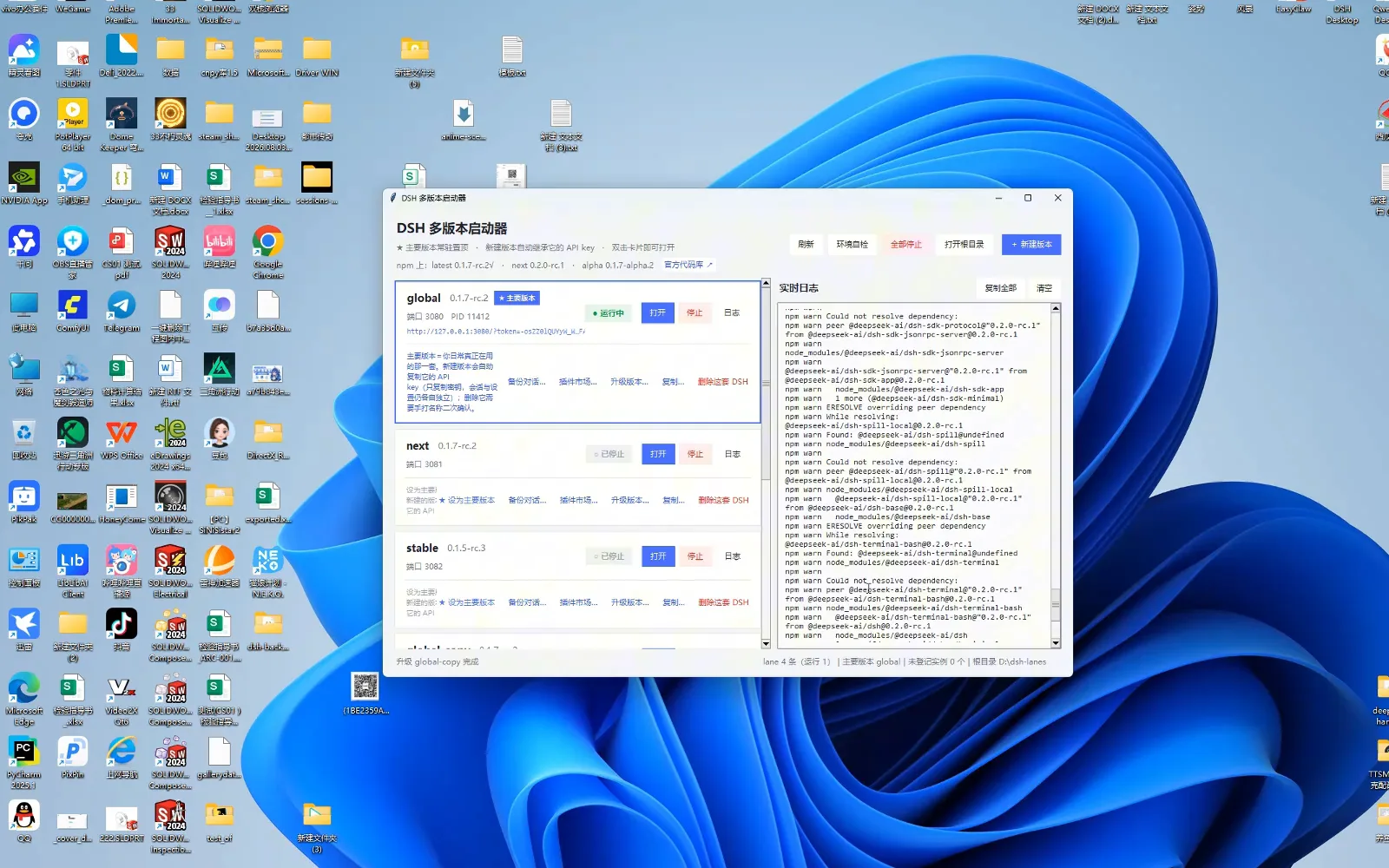
The per-lane belt: 备份对话 archives a lane's chats; upgrades log their own friction.Watch at 2:20
Session backup FAQ
The questions that decide whether your history survives the next upgrade.
Where does dsh actually store my sessions?
Under the dsh home directory of whichever install you are using. The recording makes this visible: the daily lane reports DSH_HOME = C:\Users\Administrator\.dsh while the cloned lane reports DSH_HOME = D:\dsh-lanes\homes\global-copy. A separate source-code walkthrough of dsh's session internals (credited below) documents the journal itself as one append-only JSONL file per session under that home. Practical upshot: backing up a home directory backs up the sessions, and each lane's home is separate by design.
Does the clone include my conversations?
No, and that is deliberate. The lane card states that a new copy inherits the API key only — conversations and settings stay independent. To archive chats, run the per-lane 备份对话… action; to snapshot everything, copy both of the lane's directories: the clone under clones and the home under homes. Treat them as a pair — the clone is the program, the home is your history.
The launcher is in Chinese — can I still follow the pattern?
Yes. The recording's tool is a community launcher driven by a dsh_lanes.py script, and the commands shown on screen are plain romanized words: open, verify, upgrade, stop. The pattern transfers to any setup: keep the daily install on its default port — the official package serves the Web UI at 127.0.0.1:3080 — give a second install its own DSH_HOME and port, upgrade the second one first, and promote it only after the self-check passes.
Can the original and the copy run at the same time?
Yes — separate ports exist precisely for that. The recording's status bar tracks four lanes with one running, and the log notes that a copy has its own install tree and home and can open alongside the original. One caution from the same log: a plugin pinned to an older dsh can refuse to load against a newer runtime, which is exactly the failure you want to meet on a copy first.
Related guides
Where to go next once your lanes are set up.
Replay and review past sessions
The read side of the same history: open a past session's trajectory, drill into tool calls and branch a new chat from any step.
Read the guideUpdate plugins safely
Plugin and runtime version mismatches trigger the data-loss warning this page works around — update them on purpose, not by accident.
Read the guideUninstall plugins cleanly
When a lane accumulates leftovers, the clean-removal workflow keeps your next clone honest.
Read the guideEssential plugins, hands-on
What is worth installing into a fresh lane in the first place — the market, background tasks and vision, demonstrated step by step.
Read the guideSource videos
Frames come from the first video — a Bilibili recording with no captions, so every fact was read off the on-screen UI frame by frame; the second video, a slide-based source-code lecture on dsh's session event log, is credited for the session-storage facts only and contributed no frames. Versions on screen are September 2026 snapshots. For the read side of session history, see Replay and review past sessions