
DeepSeek Harness infinite canvas: branch contexts with ThoughtDAG
The non-linear session workflow, demonstrated by the plugin's own developer: questions become nodes on an infinite canvas, lines carry context, PDFs grow branches, and old Claude Code sessions import read-only.
Last updated: 2026-09-29
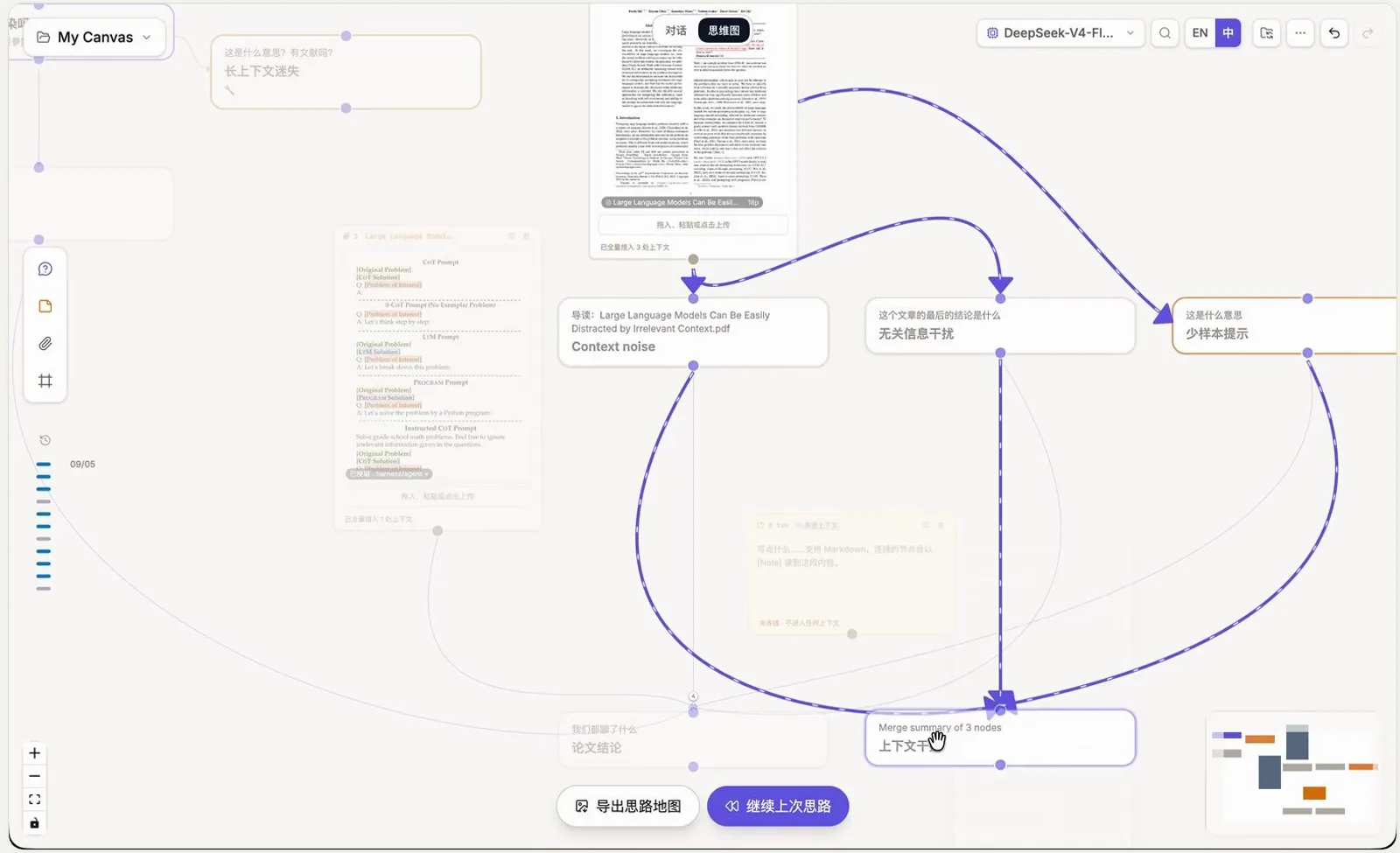
A chat window is a column: one topic buries the next, and a week of work becomes unsearchable. ThoughtDAG, a community plugin by developer Chatchan, takes the other route — an infinite canvas inside DeepSeek Harness where every question becomes a node you can double-click, branch, label and wire. Its one rule is printed on the welcome screen: 连线即上下文, the line is the context. This guide follows the developer's own eight-minute Bilibili recording step by step; the plugin is early software, so treat exact labels as snapshots.
Every screenshot below is a still from that single recording, cropped with one fixed recipe that removes the webcam bubble, the chapter titles and the subtitle band without losing window content, and each one deep-links back to the second it came from. For branching you can do without any plugin, the session replay guide covers dsh's built-in branch icon. Session replay & the built-in branch
Quick answer
- ▸Install with two commands, hover the 思维图 block, and the composer opens already reading your configured dsh models and agents — nothing to wire up twice.
- ▸Every question becomes a node and every follow-up a new node; a dashed line feeds a summary downstream, a solid line feeds the full context, and the edge toast prints the exact token count.
- ▸Drop a PDF on the canvas: 生成导读 writes a reading-guide node and 摘取图像 pulls a figure out for the vision model, so papers become branches instead of attachments.
- ▸The Agent 对话地图 imports local Claude Code, Codex and dsh sessions read-only, merges distill many nodes into one, and the graph exports as a poster PNG or travels as a JSON folder backup.
Step by step
Install it, ask the first question
- 1
Install the plugin and check the model picker
Two commands from the repo README put ThoughtDAG behind dsh's web UI (Node 22.19+ or 24; DeepSeek Harness 0.1.2-rc.1 or later). Run dsh web and the welcome screen states the plugin's pitch — a map is worth your thinking; the only rule: the line is the context. Open the model dropdown and there is nothing to configure: it already lists what your dsh setup has, here DeepSeek-V4-Flash selected, DeepSeek-V4-Pro, DeepSeek-V4-Flash-Vision flagged 视觉, plus capability rows for web search and image recognition.
$dsh plugin --profile web add dsh-thoughtdag$dsh web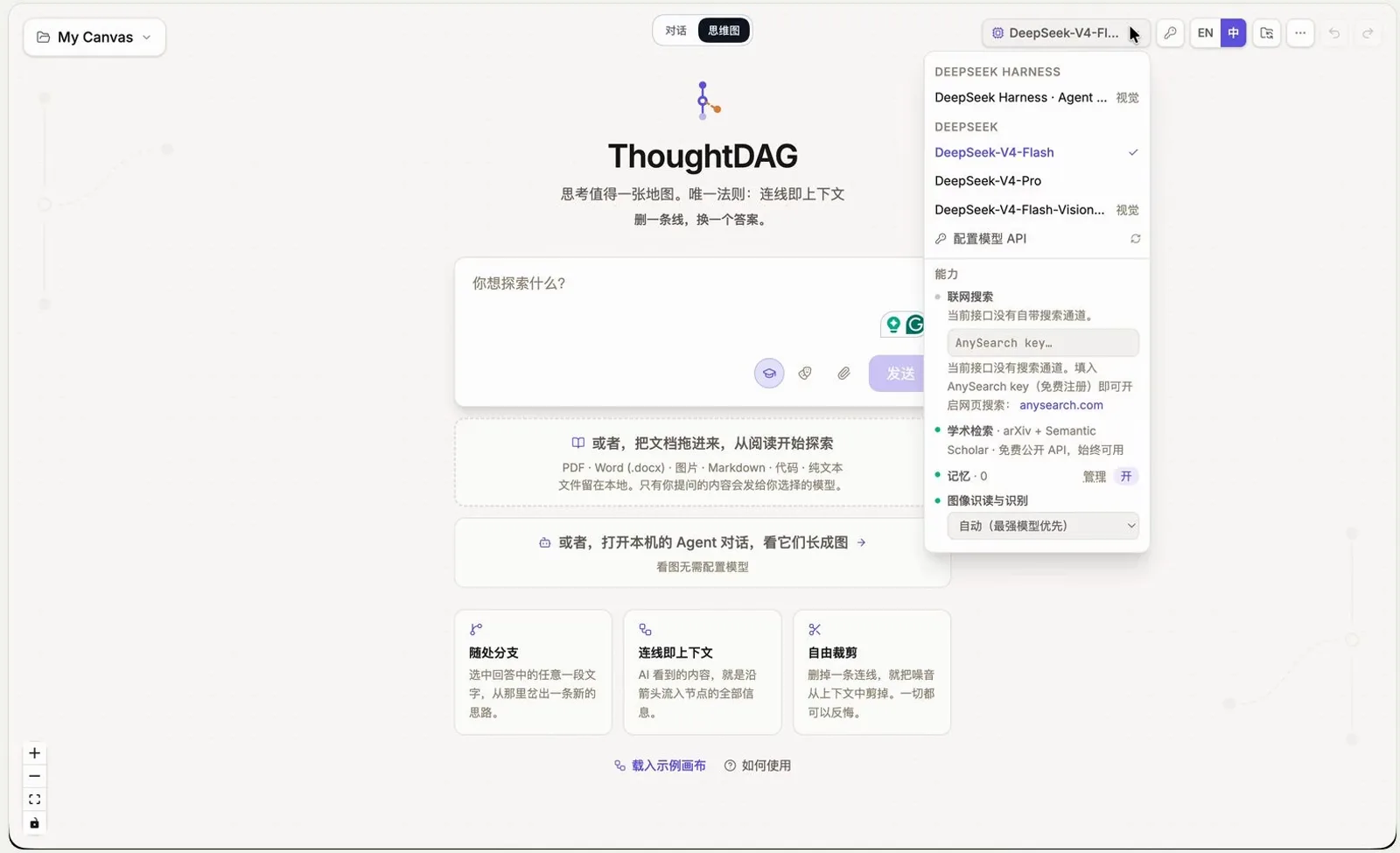
No provider setup here — the picker mirrors whatever dsh already has.Watch at 0:44 - 2
Send the first question — it lands as a node
Type into the 你想探索什么 composer and hit 发送. The recording asks whether model context gets polluted (模型上下文会污染吗), and that question becomes the first node on the canvas. The cards under the input preview the whole grammar: 概念分支 grows a concept sideways, 连线即上下文 feeds an answer forward, 自由画布 lays everything out spatially — and you can drag a document in or open local agent conversations instead of typing.
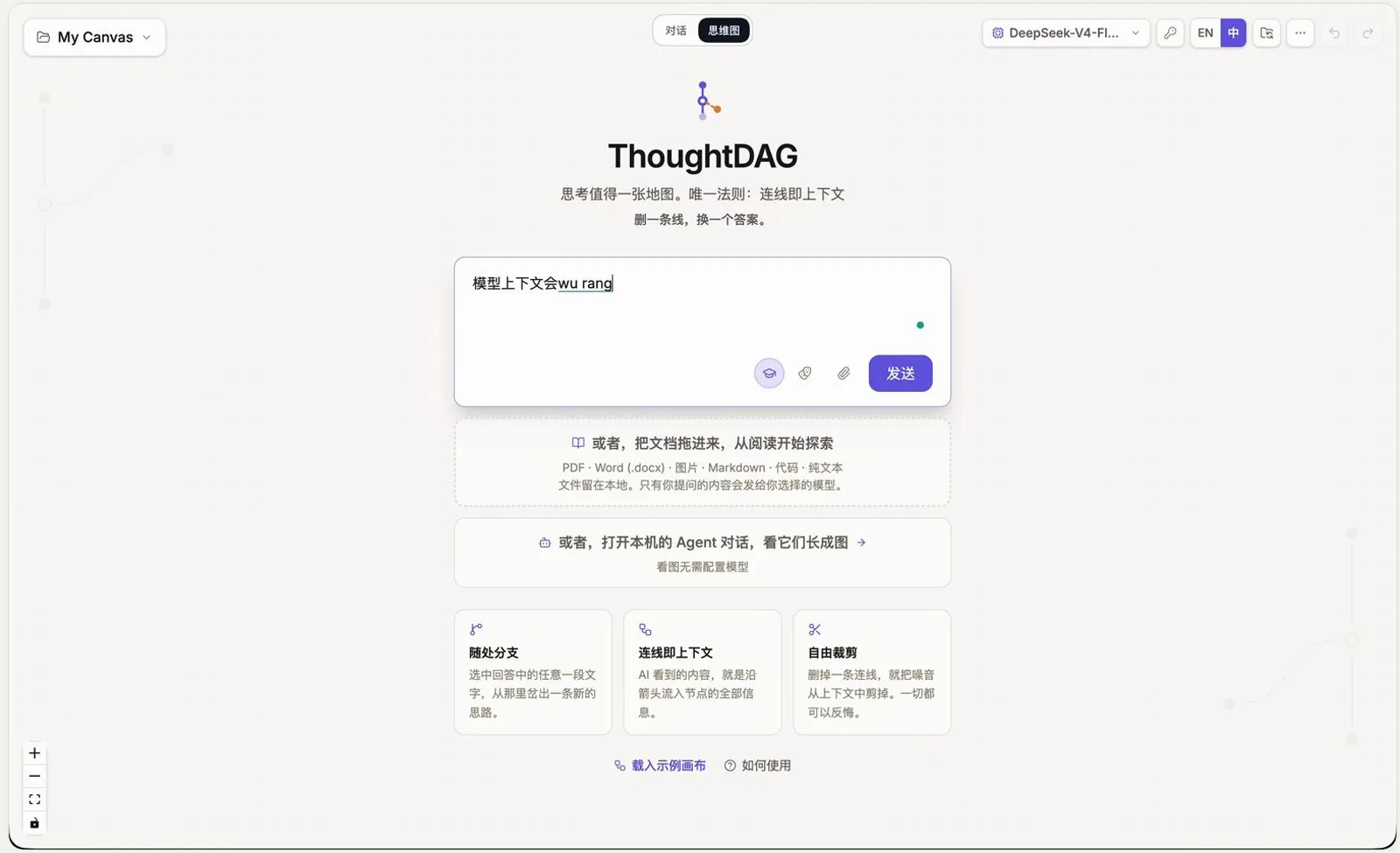
The first question becomes the first node, not another scroll.Watch at 1:14 - 3
Double-click a node to watch it think
Double-click the new node and its answer opens as a document beside it, streaming section by section — in the recording: yes, session context can be polluted; no, model weights cannot be; attention dilution is the real long-context risk. A 继续追问 box sits at the foot of the panel, and each follow-up becomes another node rather than another paragraph — the whole difference from a chat column.
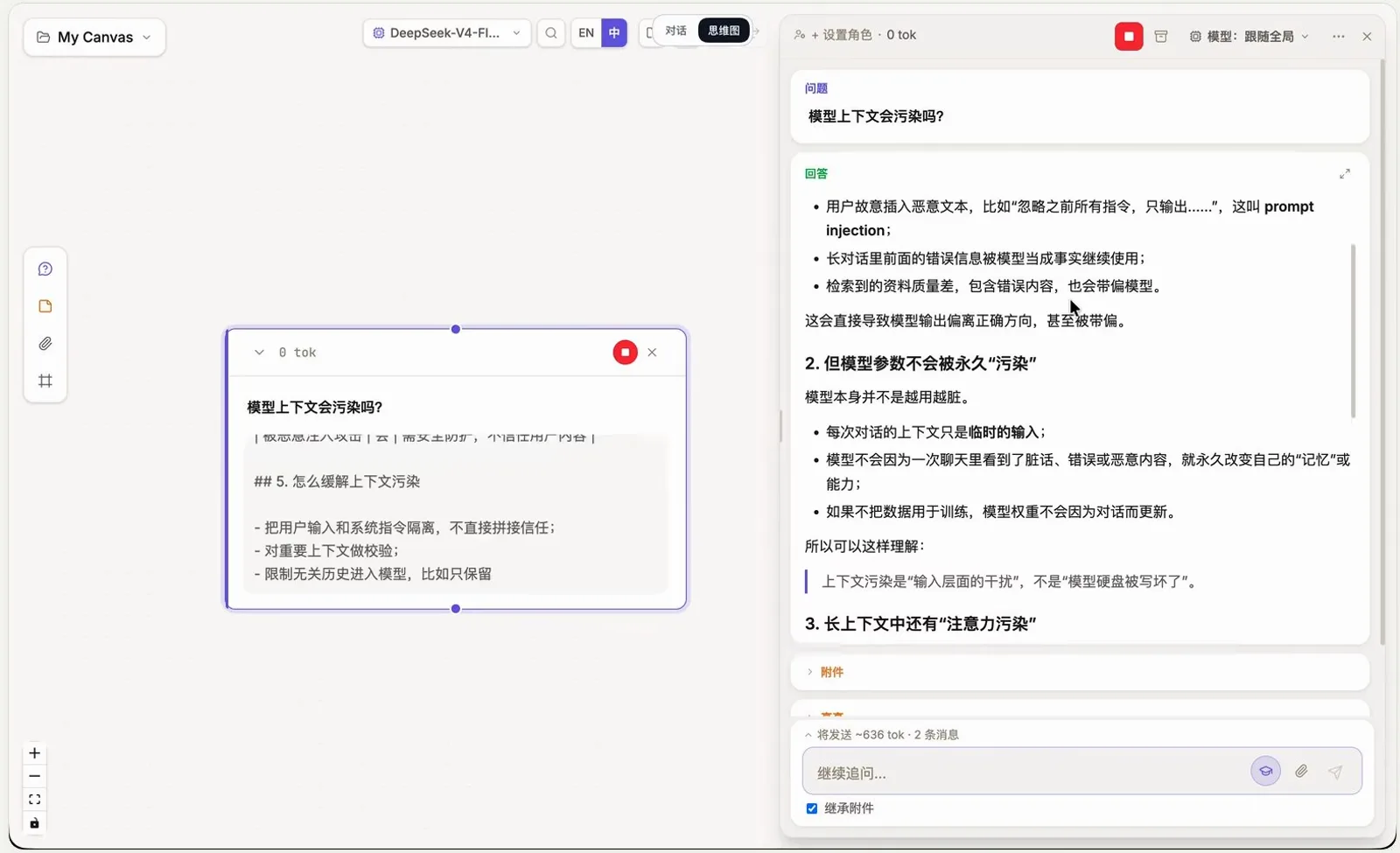
Double-click a node and the answer opens as a document, not a chat bubble.Watch at 1:21
Wires, files and context injection
- 4
Select a phrase to reinforce it downstream
Inside any answer you can select text — the recording highlights 上下文迷失, lost in the middle — and a small toolbar appears on the selection. From then on that phrase is strengthened into the context of follow-up nodes, so the literature branch on the left, running on a search agent, keeps circling the exact failure mode instead of the whole essay. The pollution-type table below shows the kind of structured answer a branch can end in.
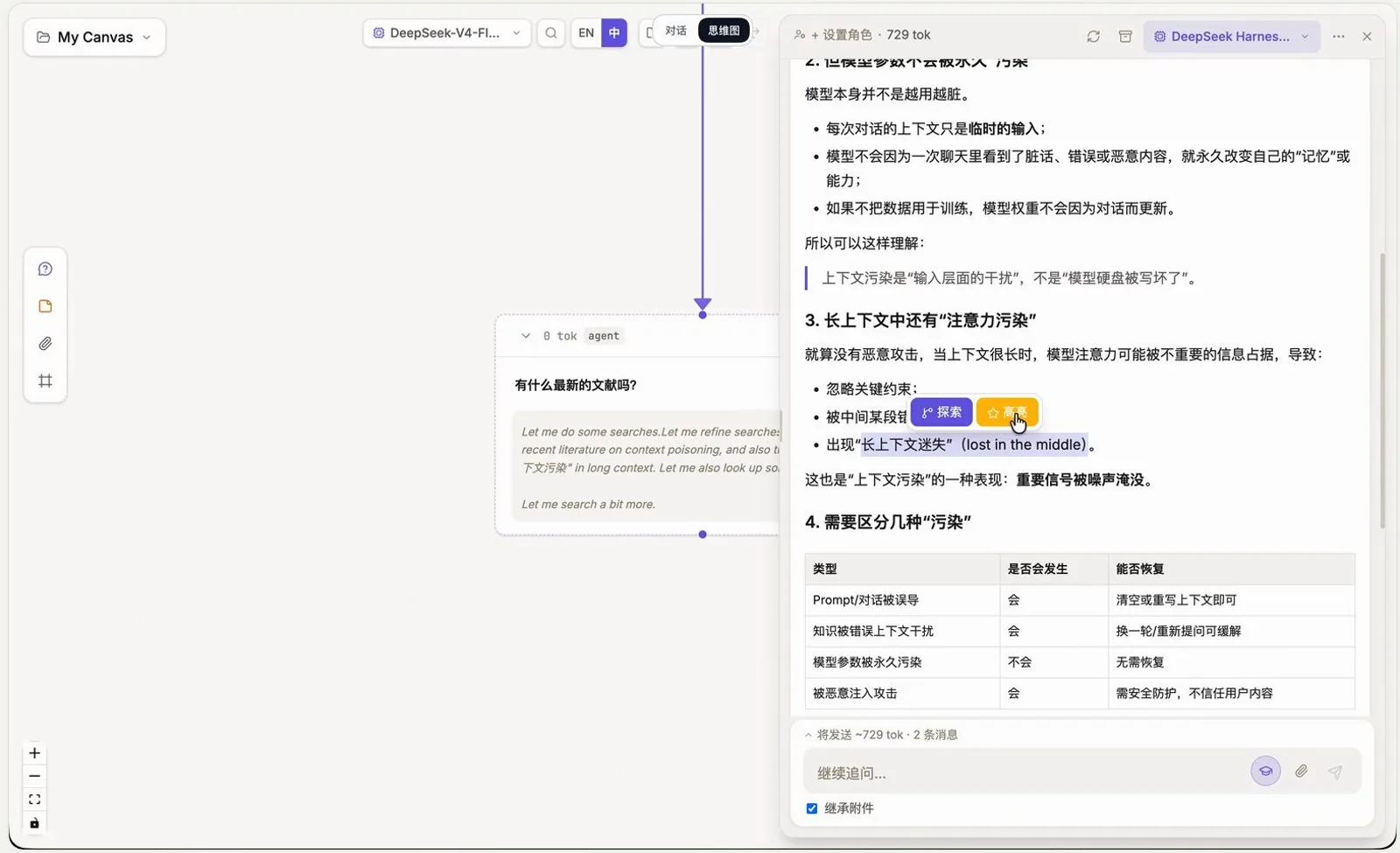
A selected phrase gets reinforced into every downstream node's context.Watch at 1:56 - 5
Drop a PDF on the canvas — it becomes nodes
Drag a PDF anywhere on the canvas and it lands as a file card. The reader toolbar offers 摘要, 提取文本, 导读 and 摘取图像; 生成导读 writes a reading-guide node with an auto-generated label, and the extracted figure card — the paper's CoT-prompt structures — is read by the vision model on request. The guide node then wires into 无关信息干扰 and 少样本提示 branches: the paper stops being a file and becomes part of the graph.
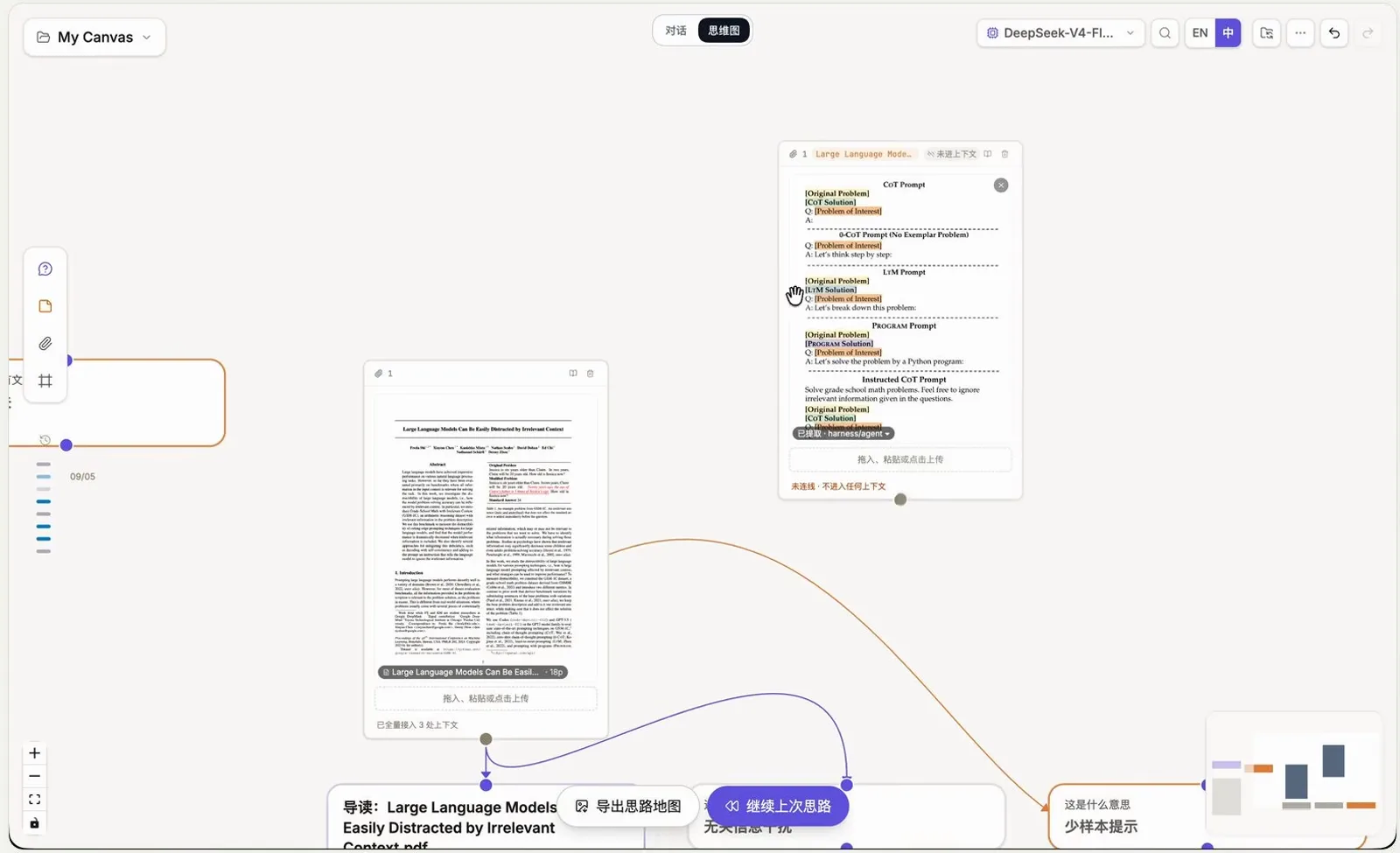
One dragged-in PDF turns into a guide node, a figure and two branches.Watch at 3:16 - 6
Draw the line: dashed injects a summary, solid injects everything
This is the one rule made visible. A dashed edge passes only a summary of the upstream node downstream; a solid edge passes the full context. The toast spells it out — 材料已全量接入, about 598 tokens flowing down this line — with 改为摘要引用 to demote a heavy feed into a summary one. The input box waiting at the end of a dragged line says the same in one sentence: whatever flows in through the line is its context.
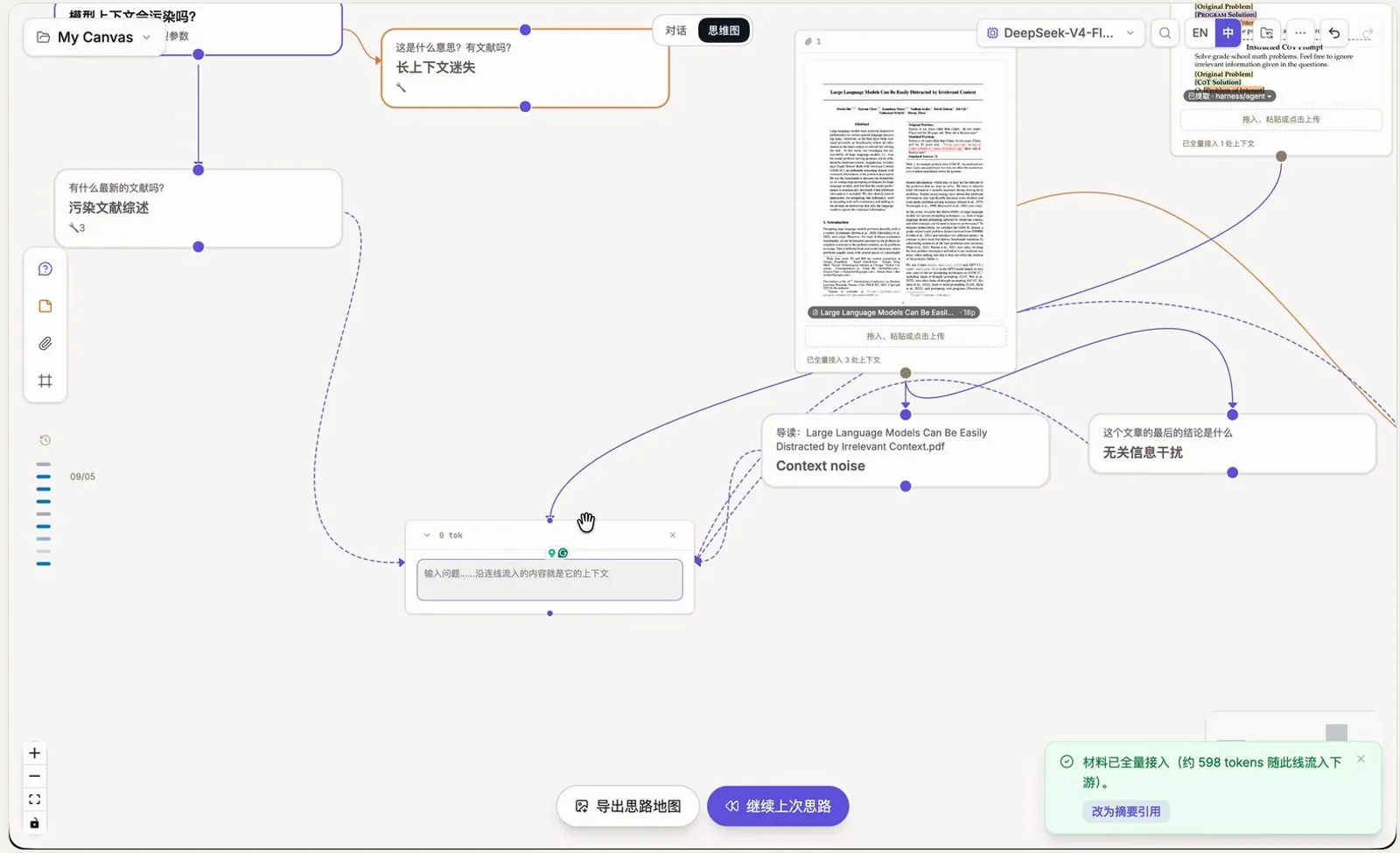
The toast counts the tokens a line carries — dashed for summaries, solid for full context.Watch at 3:40
Distill, harvest old sessions, take it with you
- 7
Select three nodes and merge them into one
Box-select related nodes and a floating toolbar counts the grab: 已选中 3 个节点 (1615 tokens). 合并凝练 distills them into a single merged node, 合并并删除 also clears the originals, and the red 全部删除 is the escape hatch. Around the merge the recording also reorders context, deletes a node and regenerates a different answer, condenses chains of near-identical nodes, and groups regions with colored partition frames that lock and drag as one.
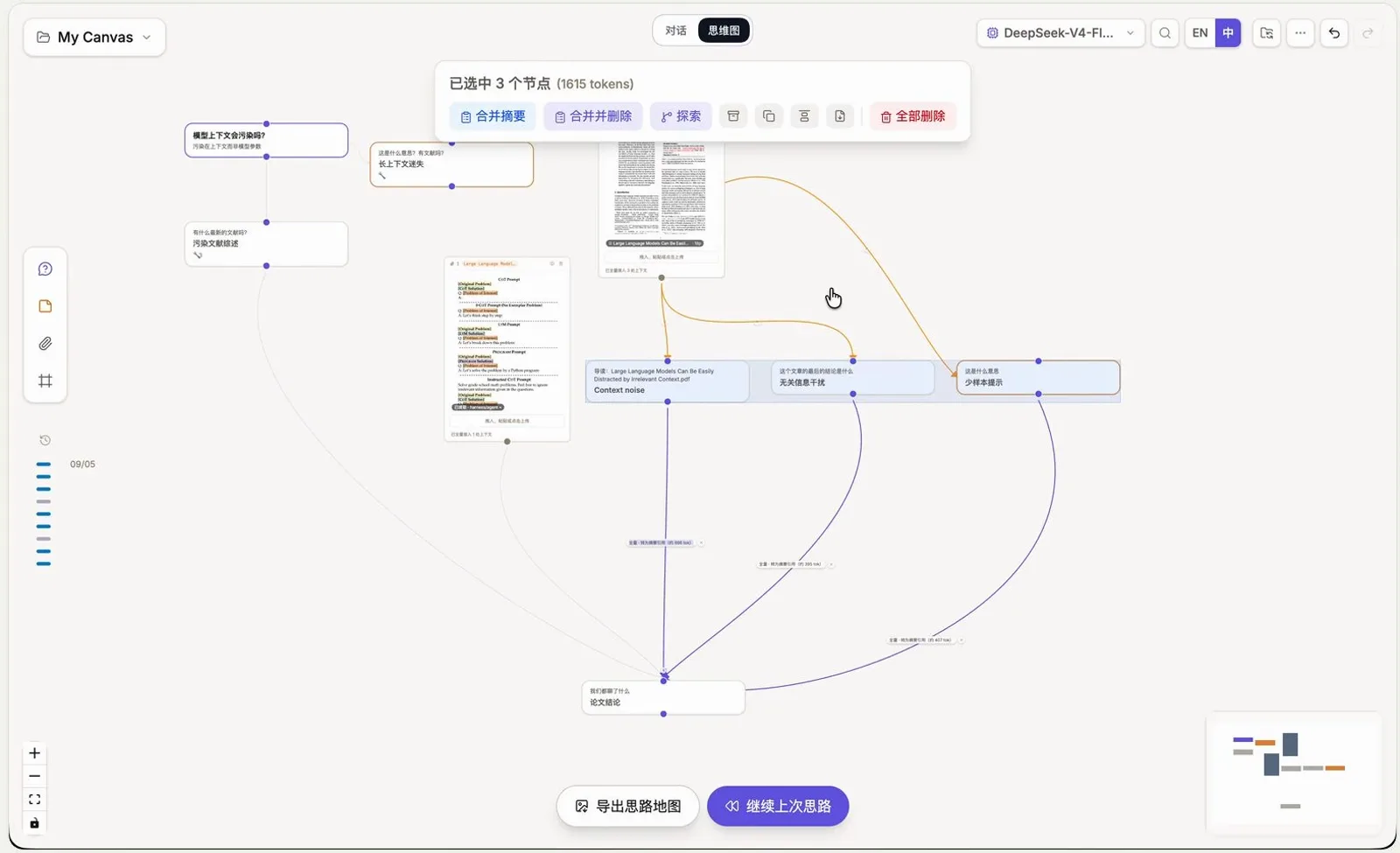
Three branches in, one distilled node out.Watch at 5:00 - 8
Import your old Claude Code and Codex sessions
The Agent 对话地图 modal scans agent conversations on this machine and lists them by project folder, with filter tabs for claude-code, codex, dsh and sub-threads. The header promises read-only — nothing on the canvas ever writes back to session files — and 接入 pulls a session in as a linear chain of nodes you can finally branch from. A month of linear CLI work becomes raw material for today's graph.
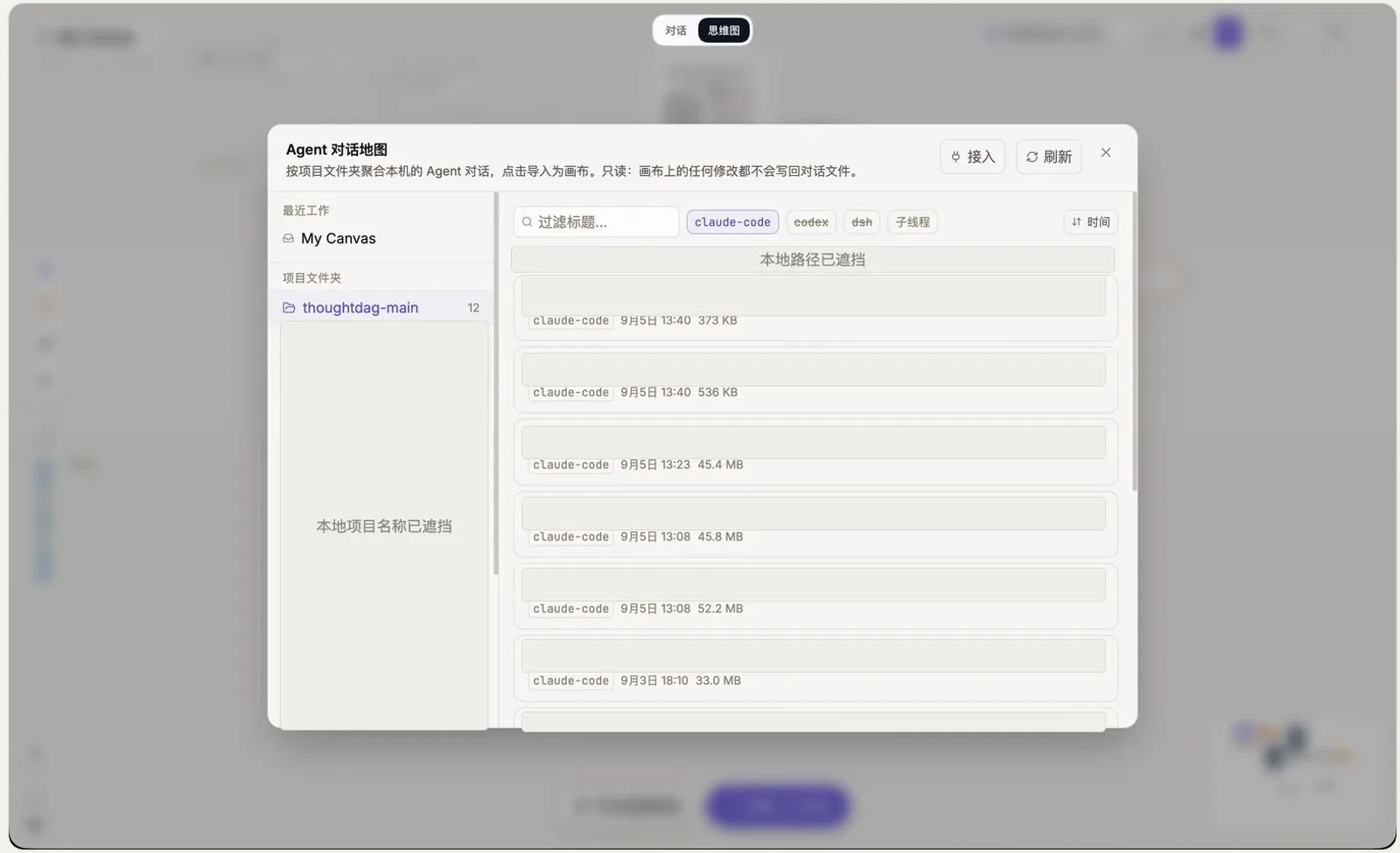
Old agent sessions import as nodes — read-only, nothing writes back.Watch at 6:44 - 9
Export the poster, and let the JSON backup follow you
导出思路地图 opens a poster composer — title, node and timing toggles, layout — and renders the canvas as a printable map (this one: 8 步思考 · 2 份材料) you download as PNG. The graph itself saves locally in real time, and folder backup writes every node change to a JSON file, so the whole canvas can move to another machine and continue there.
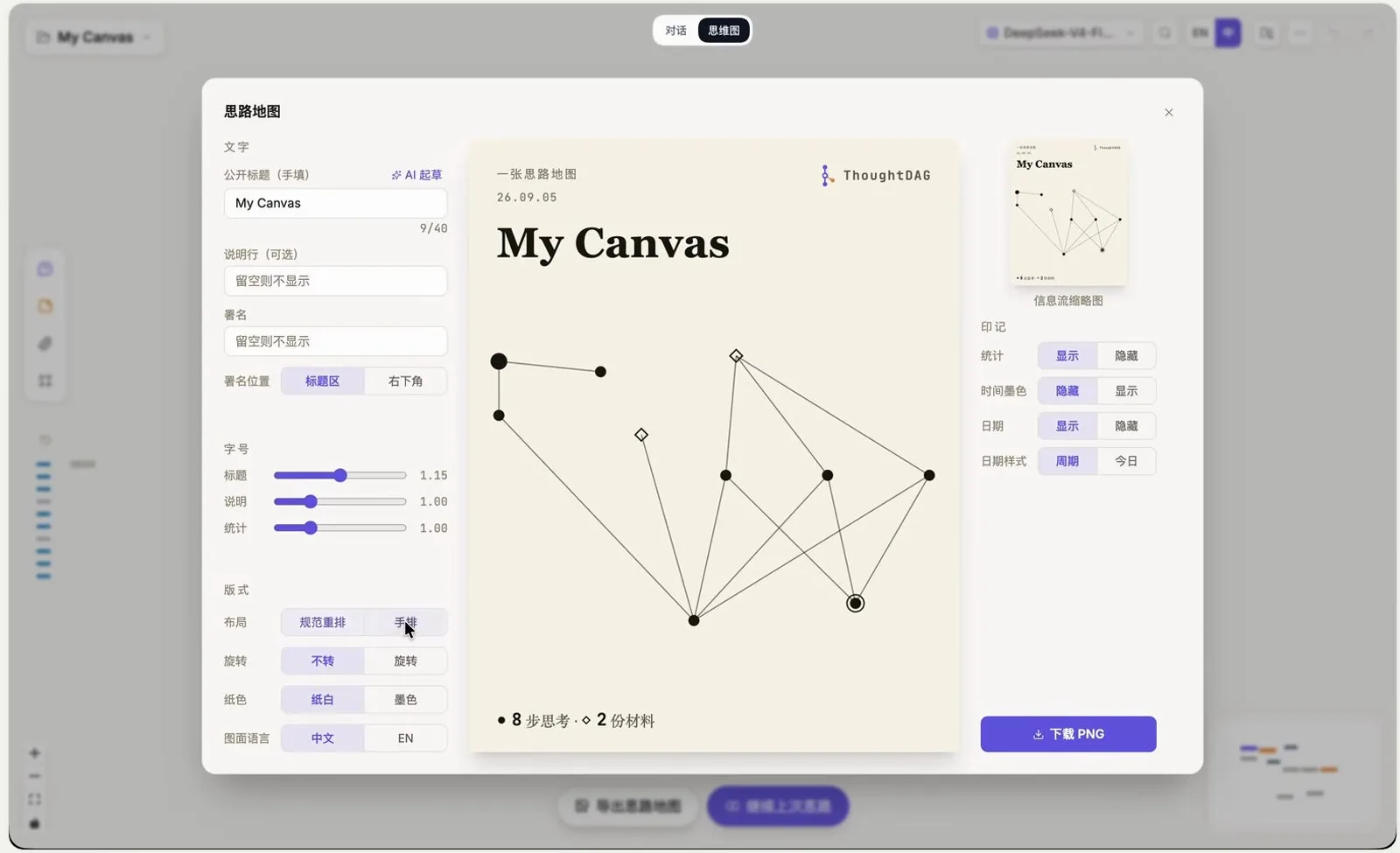
The whole graph exports as a printable poster; a JSON backup can travel too.Watch at 7:29
Frequently asked questions
The questions people ask about dsh's infinite canvas and session branching.
Is the infinite canvas an official DeepSeek Harness feature?
No. ThoughtDAG is a third-party community plugin by developer Chatchan (github.com/chenxiachan/thoughtdag), embedded into dsh's web UI as a 思维图 block. It requires Node 22.19+ (or 24) and DeepSeek Harness 0.1.2-rc.1 or later, and it is early software — the developer keeps shipping changes, so expect labels in this guide to move.
What is the difference between dashed and solid lines?
The line is the context. A dashed edge injects only a summary of the upstream node into the downstream one; a solid edge injects the upstream node's full context. The toast on an edge prints exactly what flowed — the recording shows 材料已全量接入, about 598 tokens — and 改为摘要引用 converts a full-context feed into a summary feed.
How is this different from dsh's built-in branch icon?
The built-in branch continues one task into a new session while the original keeps running — branching in time. ThoughtDAG branches in space: many sessions and documents as nodes on one canvas, with explicit wiring, merging and distilling between them. They compose well — branch natively for retries, then import both sessions onto a canvas to compare.
Will it modify my existing conversations?
The import path is read-only by design. The Agent 对话地图 modal states that nothing on the canvas writes back to session files, and the repo repeats it for Claude Code, Codex, DeepSeek Harness and Pi sessions. Your original conversations stay put; the canvas keeps its own local data.
Where does the canvas live — and can I move it to another machine?
Locally. Nodes save in real time to local storage, and folder backup writes every node change into a JSON file you can carry over and continue elsewhere. Export 思路地图 additionally renders the whole graph as a downloadable PNG poster. One caveat from the repo: model calls send the relevant canvas content to whichever provider is configured in dsh, as any dsh conversation would.
Related guides
Where the canvas workflow connects to the rest of dsh.
Session replay & the built-in branch
Reopen past sessions, read the trajectory receipt, and branch a retry from any step — dsh's native, plugin-free branching.
Read the guideContext compaction
What happens when a session runs long and how dsh compresses history — the squeeze a canvas-style workflow sidesteps.
Read the guideProject workflow, sliced
One session per slice, test-first all the way to a merged PR — the disciplined cousin of spreading a project across canvas nodes.
Read the guideThe mindmap & canvas collection
ThoughtDAG, synapse, talk-map and the rest of the visual-thinking plugins, pinned and described in one place.
Read the guideSource & credits
Frames come from the plugin developer's own Bilibili recording (Chinese UI, 8 minutes), cropped to the app window so the recording's webcam bubble, chapter titles and subtitle band never appear; the install commands are quoted from the official repo README. For the wider canvas-plugin landscape — including the synapse and talk-map projects — see The mindmap & canvas collection