
DeepSeek Harness Context Compaction: a Frame-by-Frame Teardown
Thirteen frames from a source-level mechanism teardown: when dsh decides to compact, what it trims and summarizes, and how the append-only log rebuilds your session after replacement.
Last updated: 2026-09-23

This page walks through a source-level teardown of DeepSeek Harness context compaction, one frame at a time. First, the nature of the footage: the video is a narrated schematic animation — the presenter draws the compaction pipeline slide by slide, not a product screen recording. That is also its strength: each mechanism sits cleanly isolated on its own slide, so the video reads like an architecture textbook.
The key numbers — the 80% default trigger, the 8,192-code-point prune that keeps 4,096 head plus 1,024 tail, and the 16% verbatim tail — were cross-checked against the official deepseek-harness package docs on 2026-09-23 and match (thresholdRatio 0.8, thresholdChars 8192, retainRatio 0.16). Details the docs do not spell out, such as the eight-part checkpoint layout, come from the presenter’s reading of the source and are marked as his interpretation.
The short version
- ▸Compaction is a plugin capability, not built-in logic: ctx.compaction is the interface, compaction-basic the default implementation — and it fires near 80% of the window, on a server overflow, or when you type /compact while the agent is idle.
- ▸Before summarizing anything, dsh trims oversized tool results — anything over 8,192 code points keeps only its first 4,096 and last 1,024 — and if the trimmed context fits, the summary model call is skipped entirely.
- ▸Summarized history becomes a structured checkpoint, the newest ~16% of the window stays verbatim, and the durable log keeps every event — so the model’s view can always be rebuilt by replay.
The compaction pipeline, step by step
Where compaction sits in the architecture
- 1
See the slot: DeepSeek requests carry a compaction stage
The teardown opens by comparing request structures: a Codex-style request is input plus context plus model request, while DeepSeek Harness inserts a dedicated compression stage between context and the model call. This slide is the map for the whole video — compression is a first-class part of the request pipeline, not an afterthought.
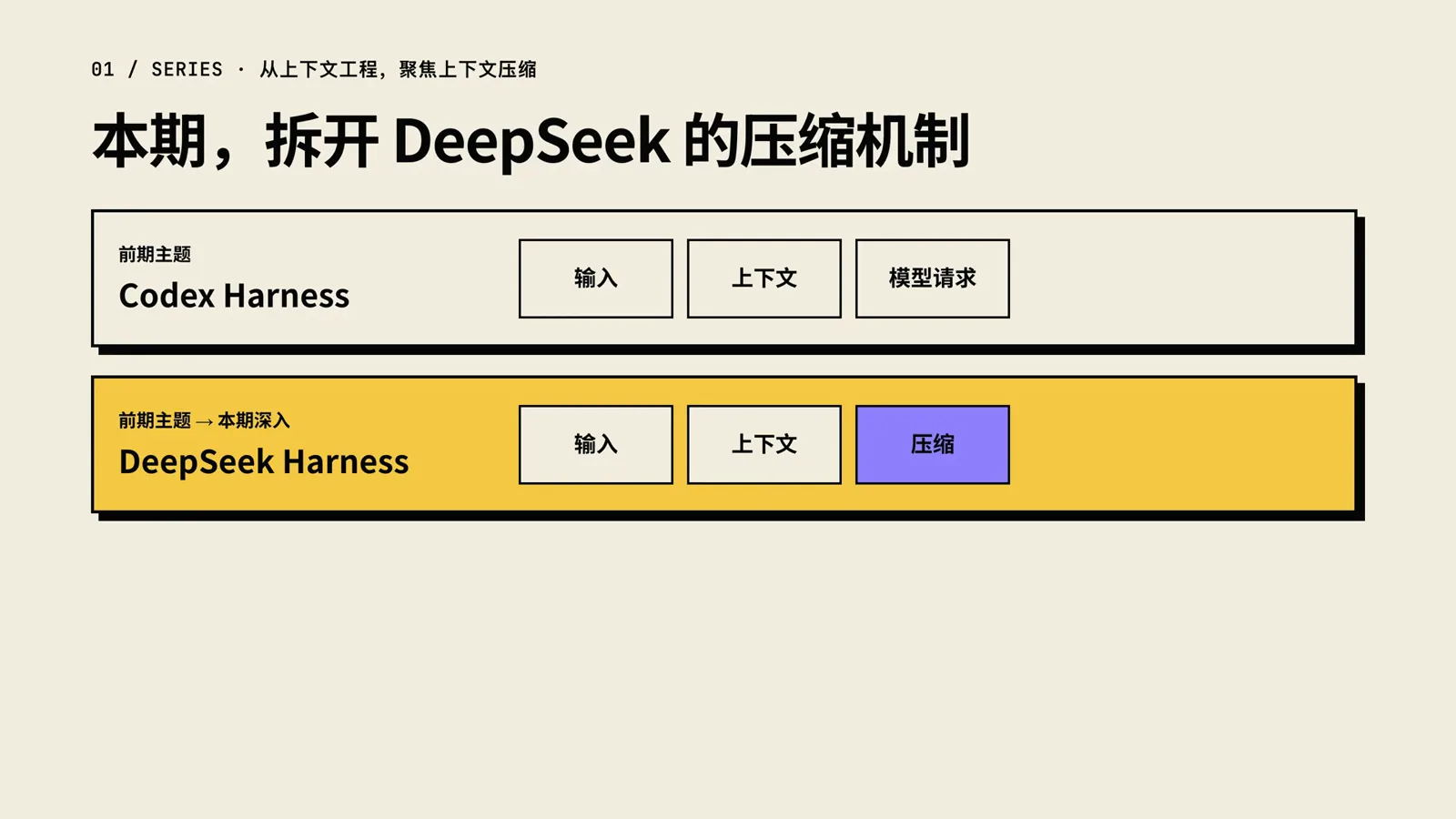
The request pipeline gains a compression slot between context and the model call.Watch at 0:32 - 2
Identify the cast: one capability, several plugins
Compaction is organized as a capability seam. The /compact command is the manual entry point, ctx.compaction is the capability interface, and compaction-basic is the default implementation behind it. Two optional helpers plug in alongside: the token meter that measures pressure and the tool-result pruner that cuts fat. Swap compaction-basic and everything else keeps working.
$ctx.compaction$dsh-compaction$compaction-basic$command-compact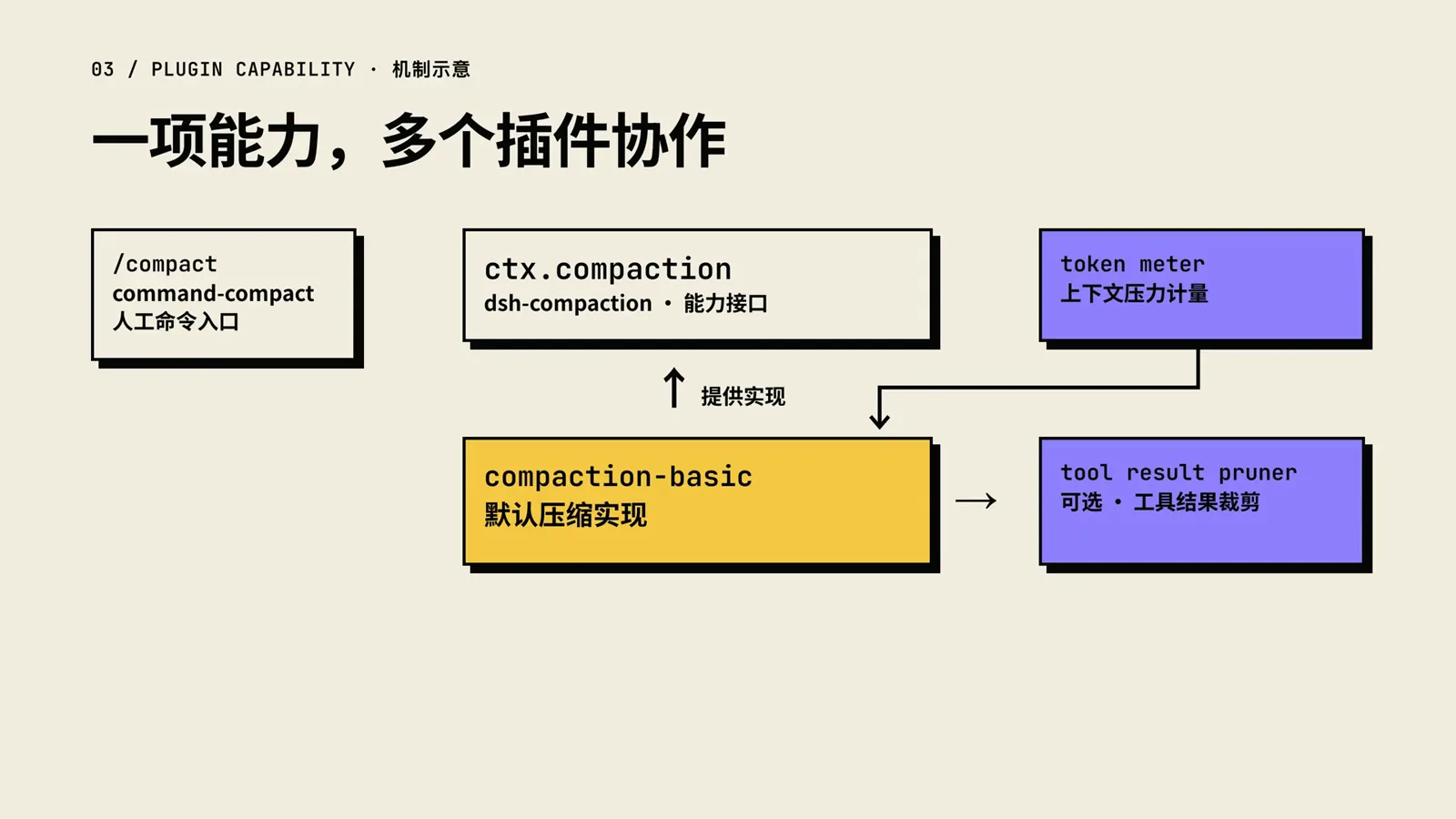
One capability seam, five pieces: command, interface, default implementation, and two optional helpers.Watch at 2:18 - 3
Learn the three triggers
Compaction starts from three entries. Before every request, a pre-step check compares estimated pressure against a default 80% threshold, configurable per model. If the server has already reported a context overflow, recovery skips the normal threshold and repairs the surface first. And typing /compact while the agent is idle condenses on demand, without waiting for 80%.
$agent/pre-step$context-overflow$/compact · agent idle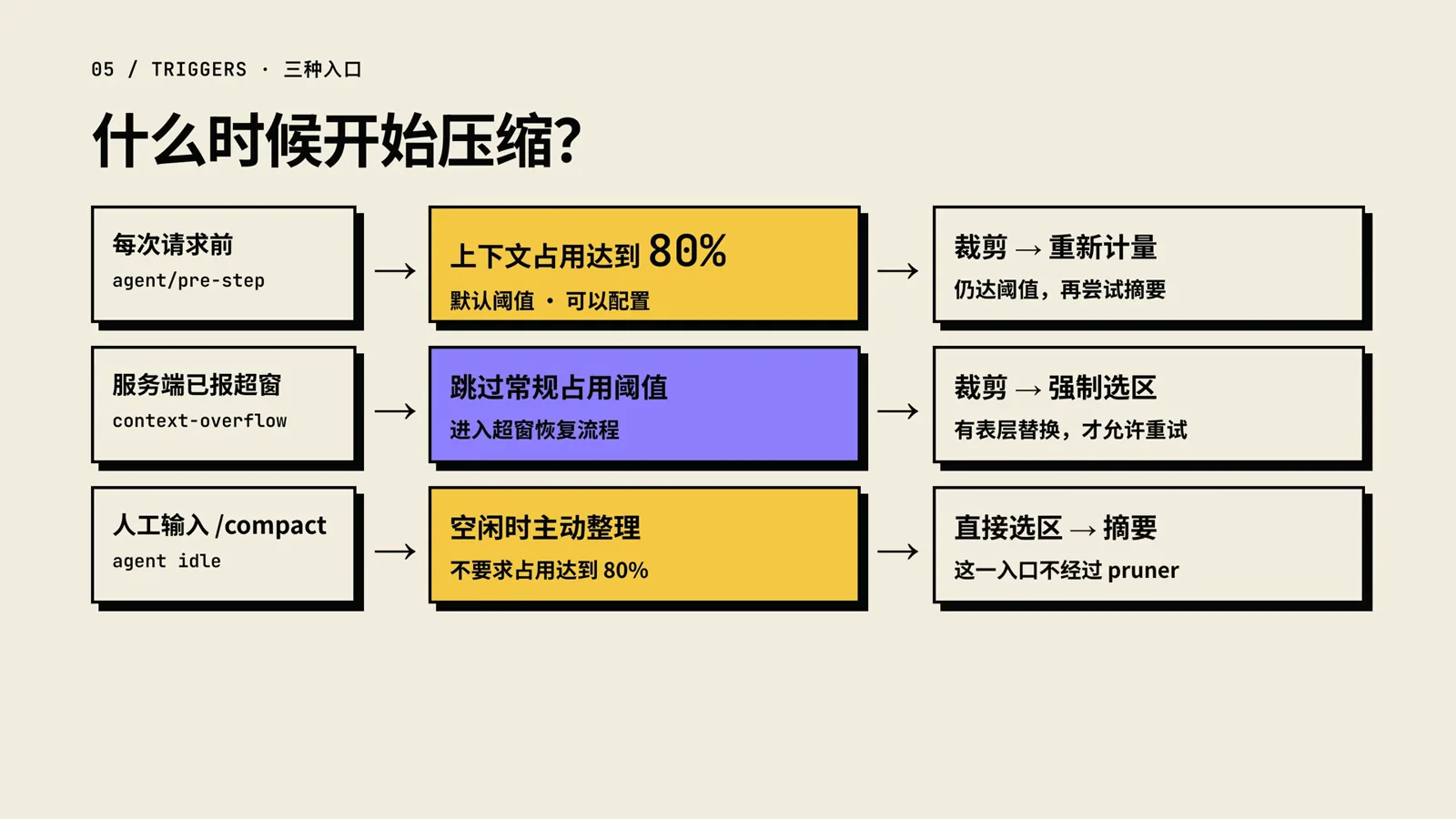
Three ways compaction can start — only the first one actually waits for 80%.Watch at 3:50 - 4
Read the gauge: provider anchor plus estimated drift
The token meter is honest about being an estimate: it anchors on the provider’s usage from the last successful call, then estimates how the visible content changed since — new messages add, replacements can subtract. The slide’s bar is a qualitative sketch, not a measured ratio.
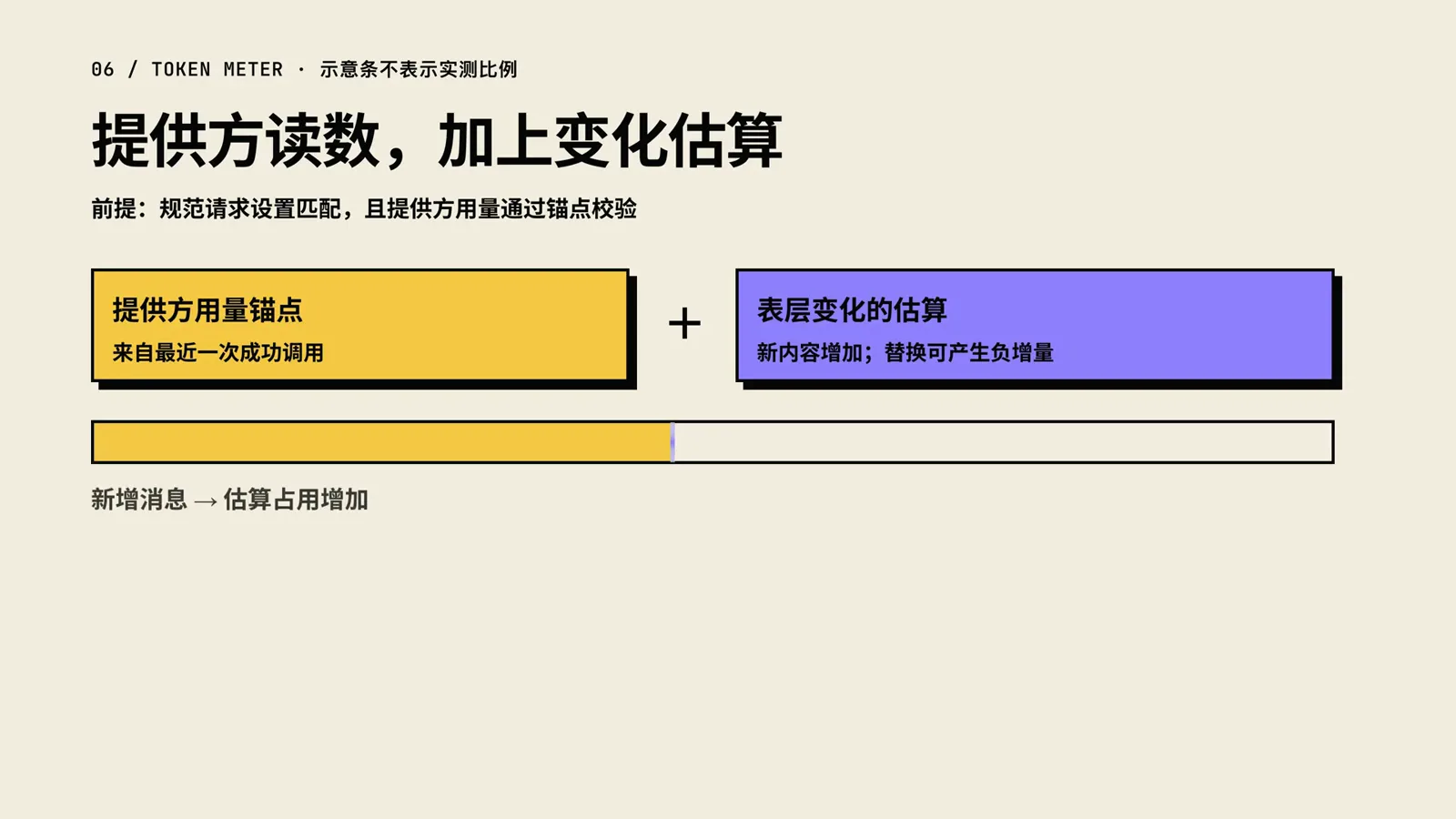
The gauge is an estimate: the last provider reading plus drift since.Watch at 4:20
Trim, select, summarize
- 5
Cut the log before measuring twice
The first lever is not summarization — it is deletion. One oversized tool result can dominate the whole context, so trimming its middle may alone bring pressure back under the line. The mechanism chapters that follow all assume this cheapest pass has already run.
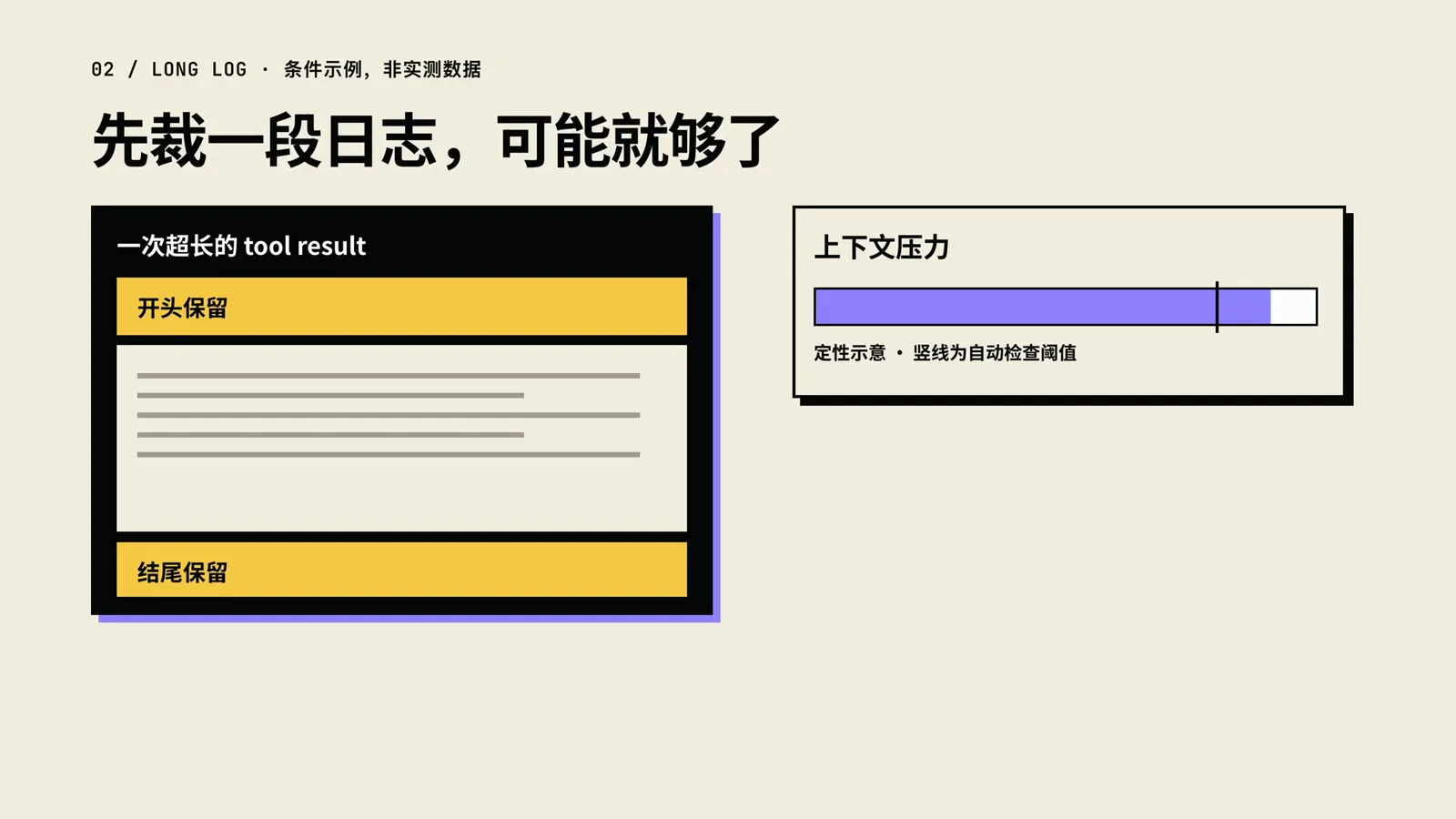
Trim first — one huge tool result may be the whole problem.Watch at 1:15 - 6
Inside the pruner: 8,192 code points, 4,096 + 1,024 kept
The tool-result pruner rewrites any result whose text exceeds 8,192 Unicode code points — the configuration the three Web presets currently ship — into its first 4,096 code points, a truncation marker, and its last 1,024. The unit is code points, not tokens, and this pass never calls the model. Both numbers match the official compaction-tool-result-pruner defaults (thresholdChars 8192, headChars 4096, tailChars 1024).
$threshold: 8192 code points$keep head 4096 + tail 1024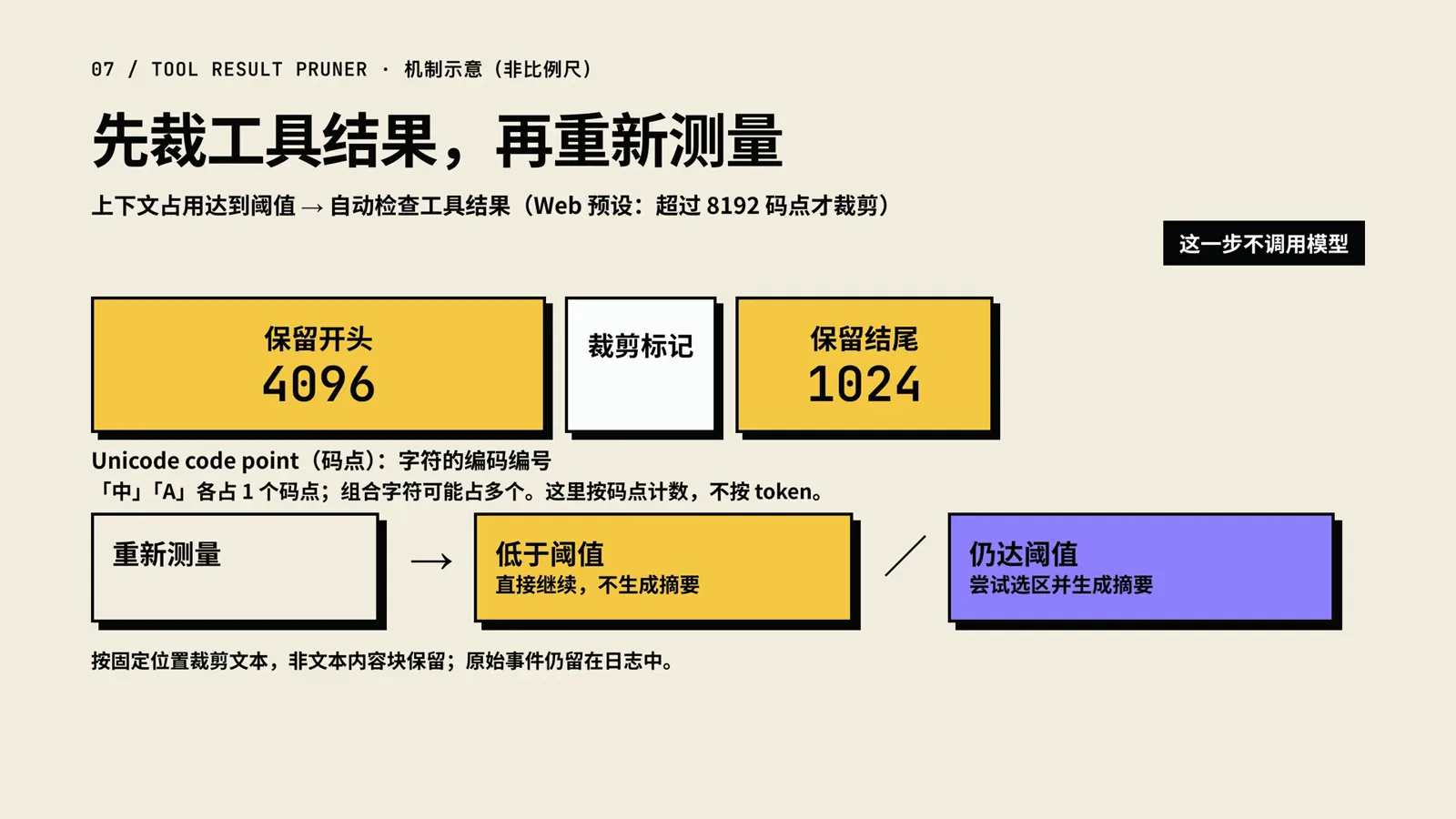
8,192 code points is the cutoff; head 4,096, marker, tail 1,024.Watch at 5:40 - 7
Range selection: keep the recent 16% verbatim, cut between pairs
When pressure remains, compaction-basic picks a range: it walks backward from the newest message until roughly 16% of the window is kept verbatim — the official retainRatio default — and it never draws the cut line between a tool call and its result. Counting whole message nodes can push retention slightly past 16%; at this stage a range is only selected, nothing is summarized yet.
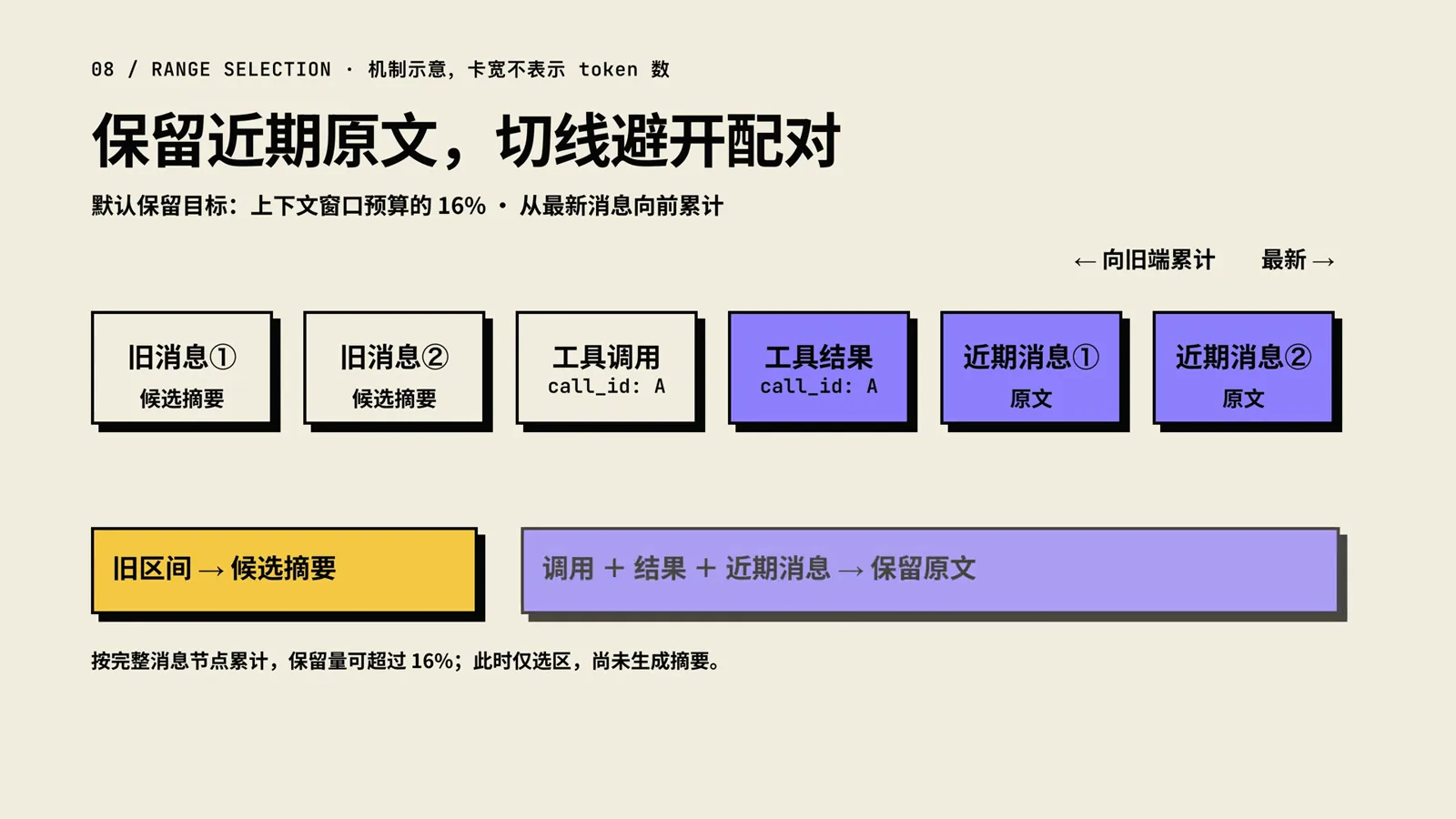
Walk backward from the newest message; the cut never lands between a call and its result.Watch at 6:00 - 8
Ask for a checkpoint: compaction/start and the eight slots
Summarization runs as an appended instruction: the request keeps the original system prompt, tools, and selected old messages, then a user message asks the model to turn the conversation into a structured checkpoint. The video renders it as eight information types — user goal and intent, key technical concepts, files and code, errors and fixes, pending work, current work, next actions, and key background with constraints. The official docs confirm a checkpoint preamble exists; the eight-slot breakdown is the presenter’s schematic of it.
$compaction/start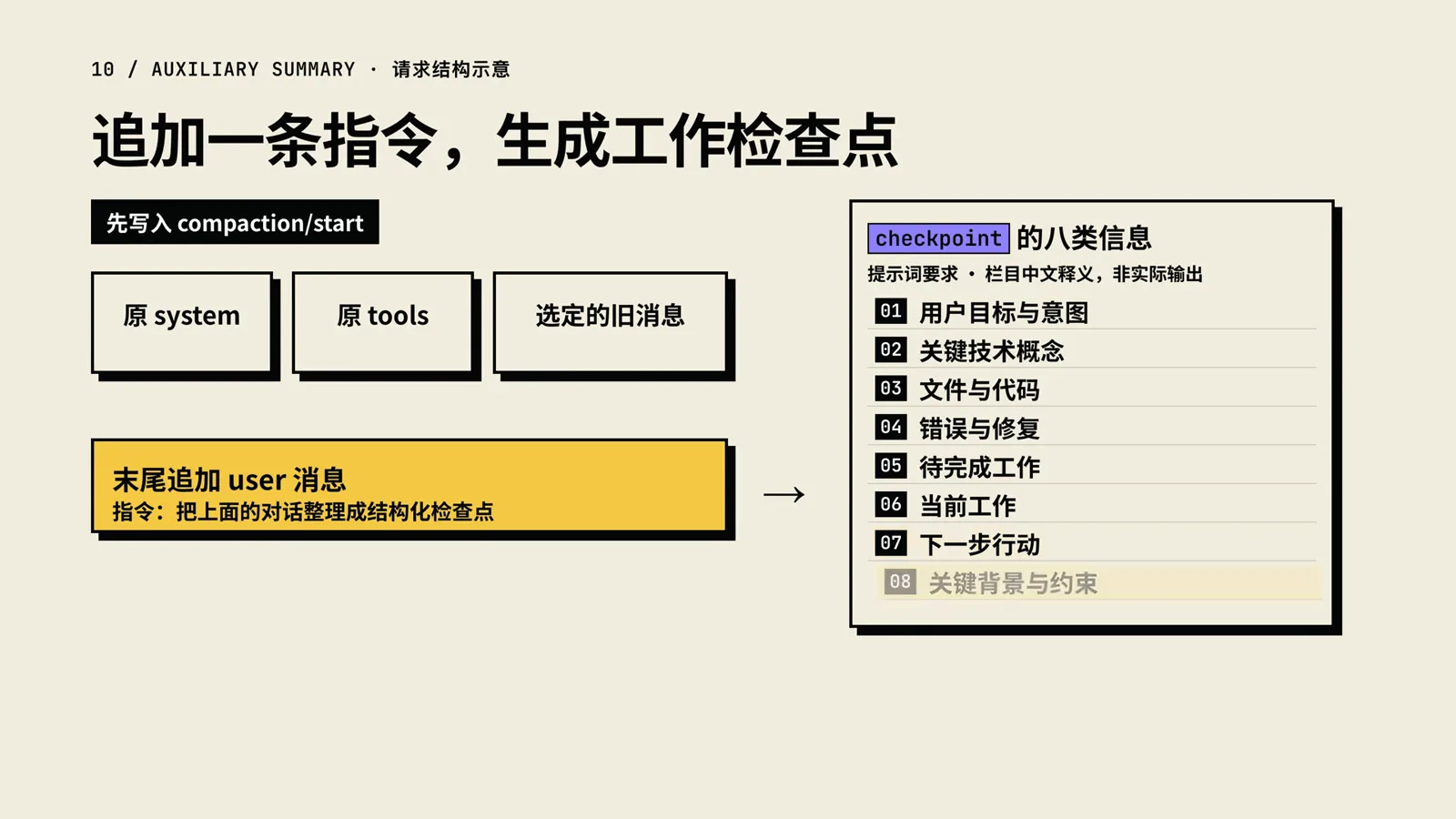
The summary prompt asks for a structured checkpoint — eight slots in the presenter’s schematic.Watch at 7:05 - 9
Validate before anything is replaced
A summary earns the right to replace history only after three gates: the model finished completely with non-empty text — errors, interruptions, or output-limit cutoffs fail the attempt; only text content is kept, so reasoning and tool calls never enter the checkpoint and image output is rejected outright; and the wrapped summary’s estimated size must be smaller than the old range it would replace.
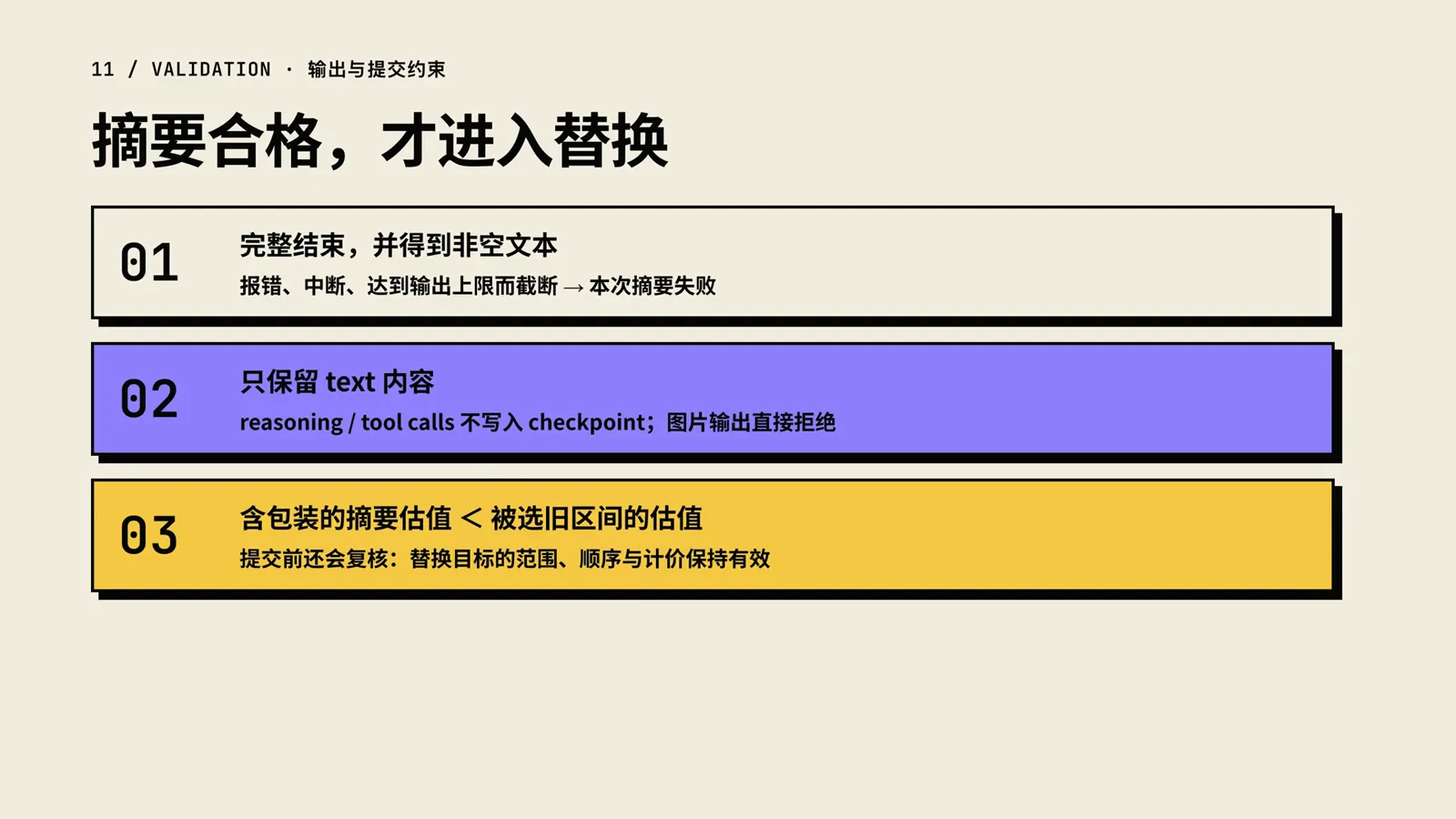
A summary that fails any gate never reaches the model.Watch at 7:56
Replace, replay, and the boundaries
- 10
Replace the view, append the log
On success, the durable log is appended — start, summary, checkpoint, end — while the model’s visible history is swapped by a surface replacement, shown on the slide as surfaceOp: undefined: checkpoint first, then the retained recent originals. Nothing upstream is deleted; the log remains the complete record.
$surfaceOp: { op: 'replace' }$compaction/start · summary · end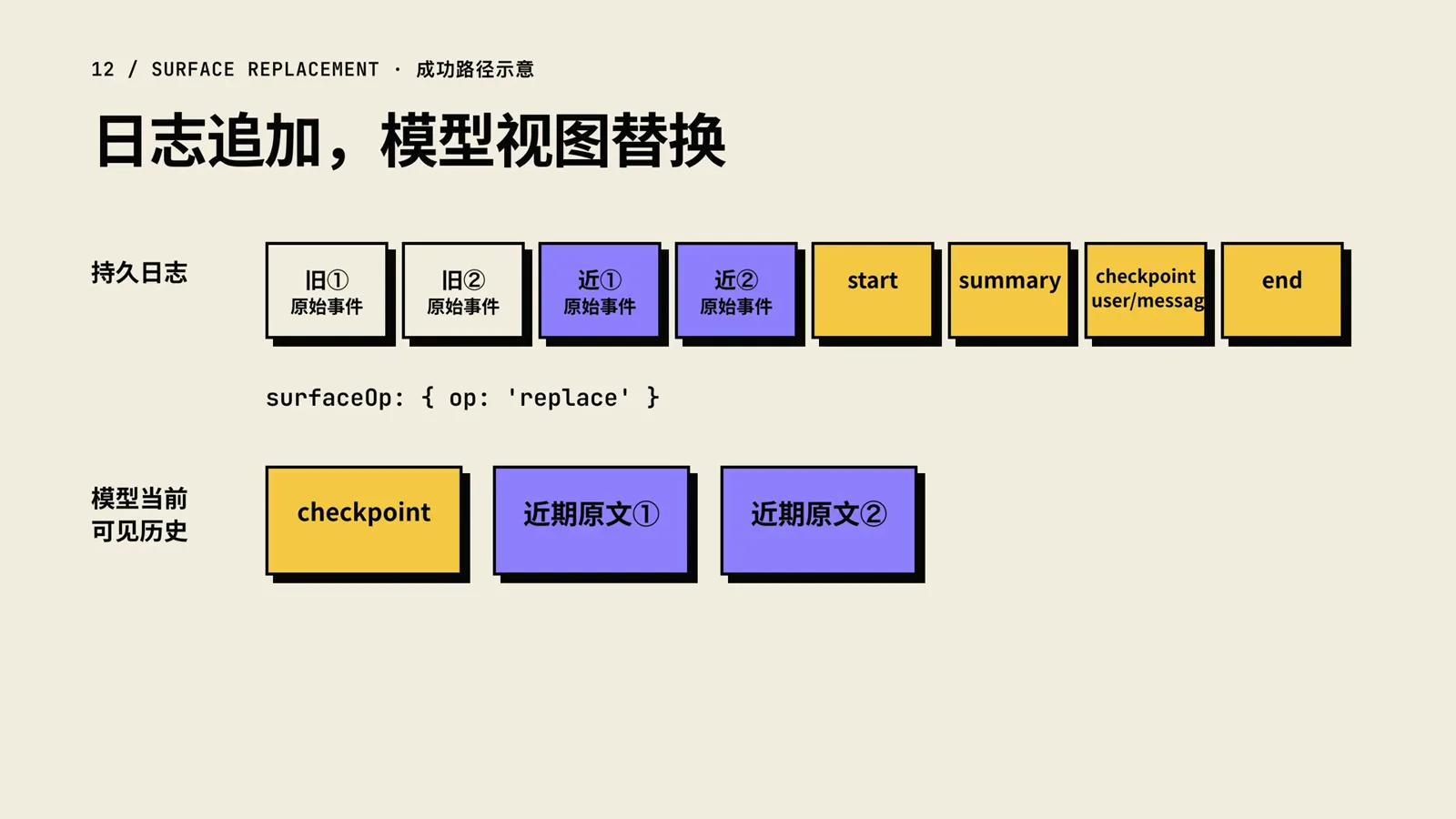
The log only grows; the model’s view is the side that gets replaced.Watch at 8:48 - 11
Recover by replaying the log
Because the log is append-only and complete, recovery never needs the original context: replay the events in order, apply each surfaceOp append or replace, and the model view rebuilds itself — old content, then the checkpoint, then the retained recent tail. This is what lets a compacted session survive a restart.
$surfaceOp: append / replace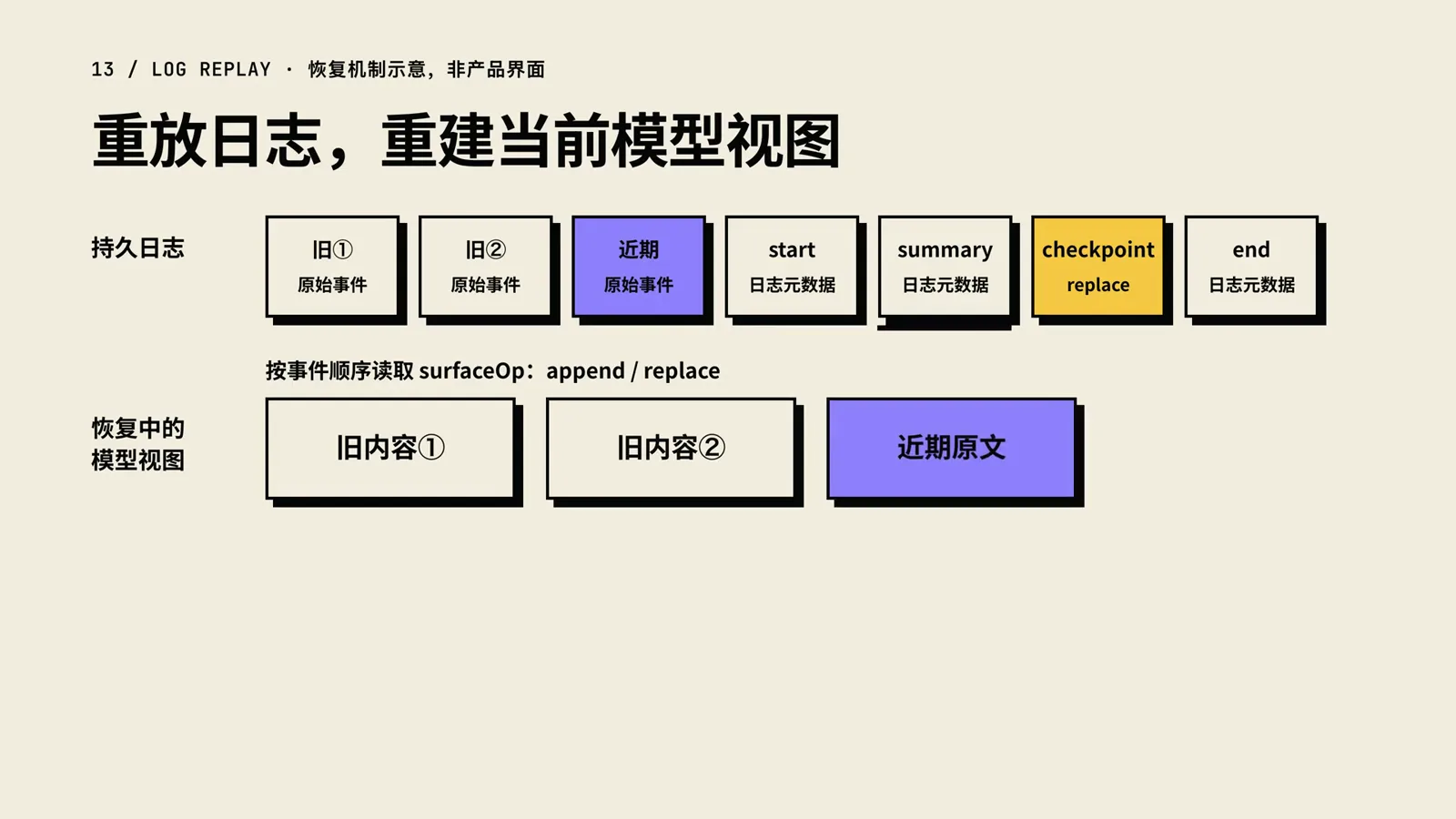
Recovery is deterministic replay of the append-only log.Watch at 9:05 - 12
Recap: a stable interface, swappable machinery
The closing slide compresses the pipeline into four verbs — measure pressure, prune tool results, summarize as needed, replace the model view — and divides the labor: ctx.compaction stays the stable interface, compaction-basic is the current default implementation, and the agent loop, token meter, and /compact entry surround them. Every piece can evolve without breaking the others.
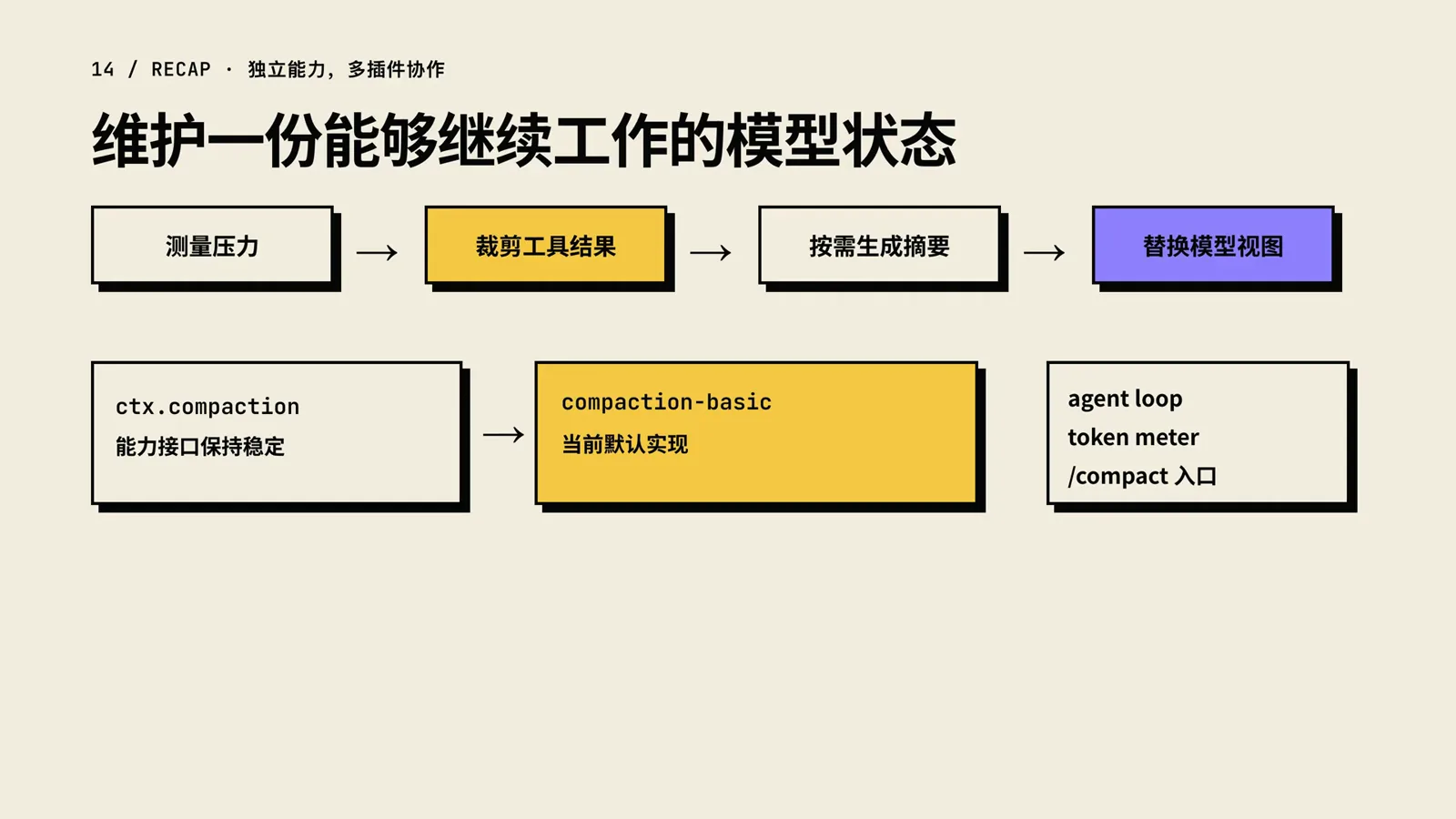
Four verbs, one stable interface, one replaceable implementation.Watch at 10:00
Where official 0.1.7 meets this mechanism
This teardown describes the plugin pipeline; the official 0.1.7 line works the same seam from the product side — its alpha notes call out reserving output capacity and context headroom for proactive compaction, and letting long-running commands continue in the background after a wait timeout. To see what those long tasks actually spend, read the token usage and cost tracking guide.
FAQ
Costs, losses and limits — what the frames alone do not settle.
Does compaction cost extra tokens?
Yes, one model request per summary: the checkpoint instruction is sent to the model and only its text answer is kept. Pruning oversized tool results is free by comparison — the pruner makes no model call, and when trimming alone brings pressure under the threshold, the summary request is skipped entirely.
How is this different from typing /compact myself?
Same pipeline, different trigger. Automatic compaction waits for the roughly 80% pressure threshold — or a server overflow — while /compact runs the same condensation on demand while the agent is idle, even far below the threshold. The command reports how many items were condensed and roughly how many tokens were saved, and anything you send while it runs queues until it finishes.
Will I lose context after compaction?
Older turns lose their verbatim text — they survive as a structured checkpoint covering goals, files, errors, and pending work. The newest slice of the conversation, 16% of the window by default, stays word for word, and the durable log still holds every original event. What the model loses is direct sight of the old raw text, not the record itself.
Are those numbers fixed?
No. 80% is the default of thresholdRatio and 16% the default of retainRatio, both configurable per provider and model; the pruner’s 8,192/4,096/1,024 code-point budget is configurable too. The figures on this page were verified against the official package docs as of 2026-09-23 — treat them as current defaults, not constants.
When does compaction not help?
It cannot shrink the system prompt, the tool definitions, or the session prefix, and it will not split an indivisible unit such as one enormous tool call — the video flags this as a hard boundary. If a single artifact outweighs your budget, split the task or move the work into a subagent or background job, and let the main session collect only conclusions.
Related guides
Adjacent tracks in the DSH learning path.
DeepSeek Harness Token Usage & Cost Tracking
Compaction saves tokens — measure it: reconcile usage in-session, in the log, and on the provider’s usage page.
Read the guideDeepSeek Harness’s Four Modes, Compared
The standard, code (PTC) and cordis presets share the same compaction group — see how the modes differ everywhere else.
Read the guideDeepSeek Harness Troubleshooting Playbook
Context-overflow errors, compaction retries, and other long-session failures — with fixes that stick.
Read the guideDeepSeek Harness Subagents: the Practical Guide
When one context is not enough: split long tasks across subagents and background agents instead of forcing one thread.
Read the guidedsh-tui terminal guide
The terminal where ask_user_question and background jobs share one screen — a natural home for long tasks
Read the guideSource and credits
All 13 frames are stills from the video — a narrated mechanism animation, not official product UI or a screen recording; each image deep-links back to the exact second. The same teardown is published on YouTube by 01Coder and on Bilibili by 五里墩茶社 (same author, 小木头).