
dsh-context: X-Ray Your Context Window (Illustrated)
A frame-verified walkthrough of the dsh-context plugin — the session Context tab, the /context command, the composition modal, the per-request trend chart and the request browser — every frame cropped from real plugin UI in one annotated recording.
Last updated: 2026-10-15
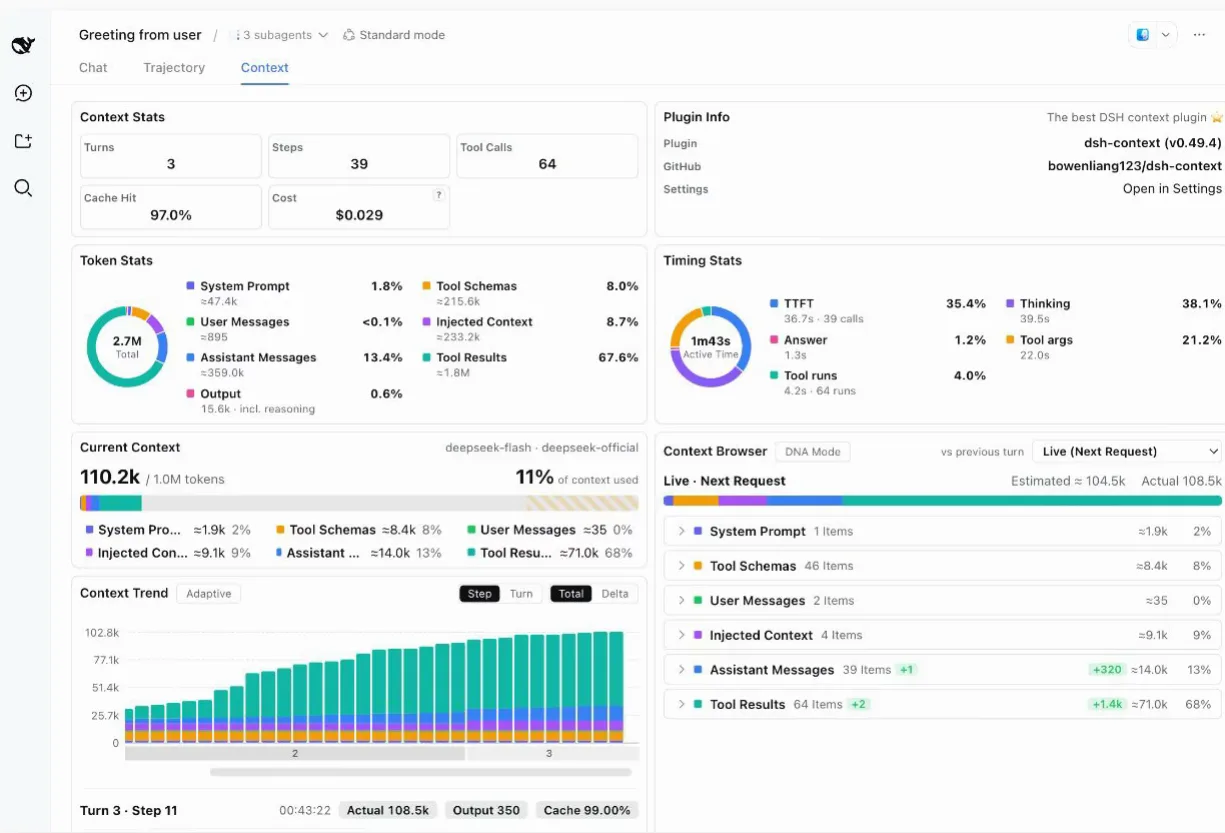
When a long session starts drifting, the usual advice is to guess: too much history? A runaway tool? The dsh-context plugin replaces the guessing with instrumentation — every model request's context window, split into system prompt, tool schemas, user messages, injected context, assistant replies and tool results, each bucket priced in approximate tokens. The hero frame is that instrument panel mid-session: 110.2k tokens, 11% of a 1M window, with a per-request trend chart scrolling underneath like a heartbeat monitor.
This page is the context-visualization deep dive — seeing what the window is made of. For how DSH decides to shrink that window in the first place, open Context compaction & long tasks
TL;DR
- ▸Install without building anything: search dsh-context in the Add-plugin wizard and click Install, or run dsh plugin --profile web add dsh-context — the README promises no build step and no restart.
- ▸Five surfaces, one story: a sidebar-level Context Insights page, a per-session Context tab, a Fleet tab for the agent family, a right-sidebar panel, and the /context command's centered modal.
- ▸The numbers match the ring: occupancy and composition read the same official token-meter projections as the composer's context ring, and hovering the trend exposes the provider-reported Actual Prompt / Output / Cache.
- ▸Deltas are signed: the browser's per-category badges (+1 item, −2.8k tokens) say what a turn added or reclaimed — in the recorded modal, a single turn released 2.8k of injected context and 7.7k of tool results.
The five frame-verified steps
Part 1 · Install and open
- 1
Install from the Add-plugin wizard
On the DSH web UI's Plugins page, Add plugin opens a dialog that takes a package name, a GitHub address, or a local directory path. Typing dsh-context is enough — the wizard searches the npm registry (a Mainland China mirror selector sits beside the input) and the black Install button finishes the job. The recording runs on a DSH Local Build 0.1.7-rc.2 badge; the repo README quotes the same move as one command, dsh plugin --profile web add dsh-context, with no build step and no restart.
$Settings → Plugins → Add plugin$dsh-context$Registry: Mainland China mirror$Install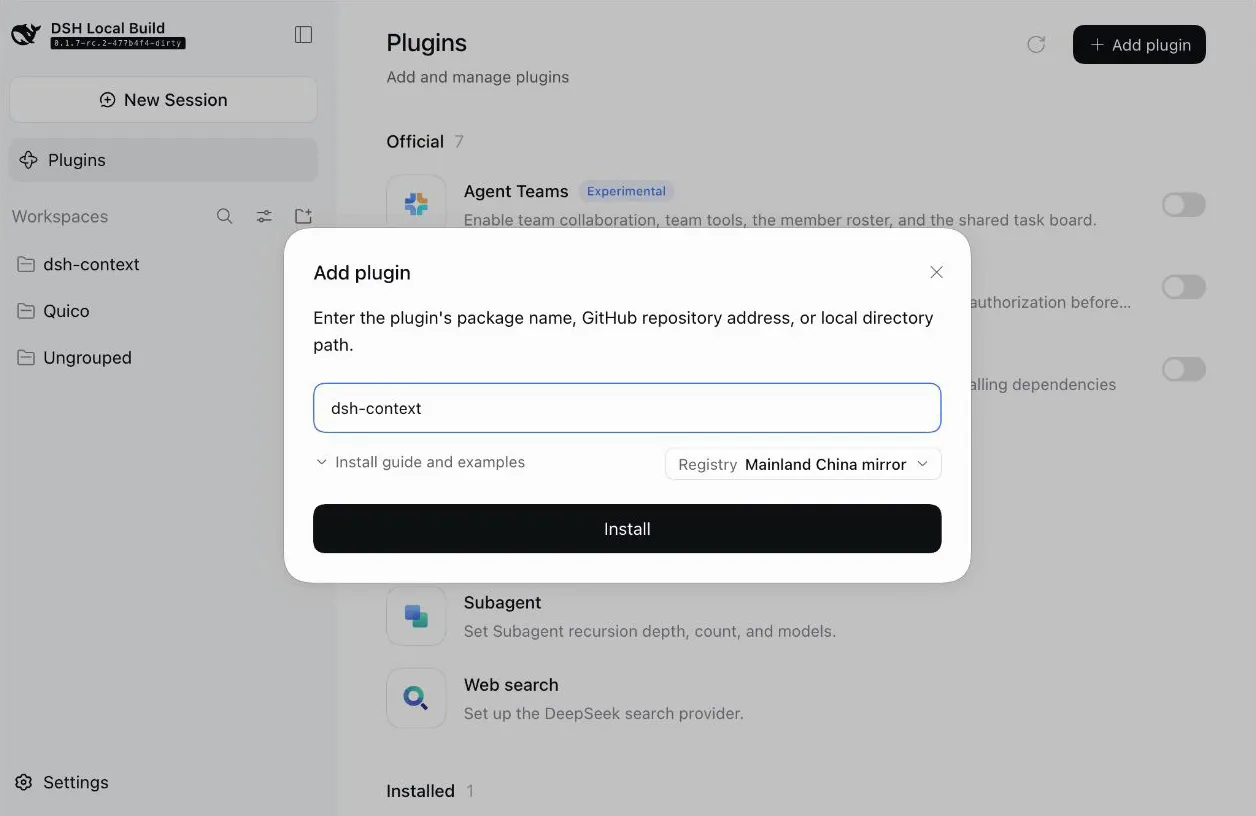
Type the name, click Install — no build step, no restart.Watch at 2:06 - 2
Type /context in the chat
The plugin's fastest door is a slash command. Typing /context in the composer raises one suggestion row — Context, View current context makeup, browse per-step composition — next to the usual Workspace Write permission chip and the model picker (DeepSeek-V41-Flash High in the frame). Enter opens the centered modal, so you never leave the conversation.
$/context$Context — View current context makeup, browse per-step composition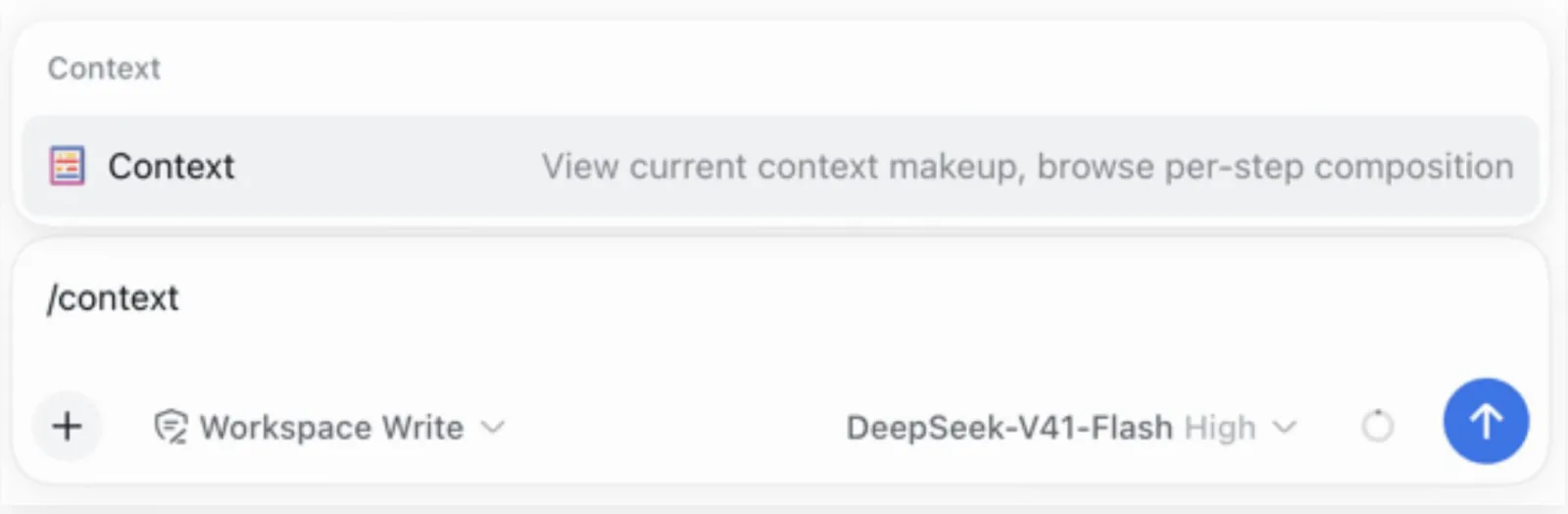
One slash command opens the view without leaving the chat.Watch at 2:12
Part 2 · Read what the window is made of
- 3
Read the window: composition plus signed deltas
The modal opens on Current Context: this fresh session carries 11.5k of a 1.0M window — 1% used — split into System Prompt ≈1.8k (15%), Tool Schemas ≈8.2k (70%), Injected Context ≈1.6k (13%), Assistant Messages ≈184 (2%), with User Messages and Tool Results still empty. Below, the Context Browser compares against the previous turn with signed badges: User Messages −1 item (−36 tokens), Injected Context −3 (−2.8k), Assistant Messages −1 (+42), Tool Results −3 (−7.7k) — a turn that mostly gave context back.
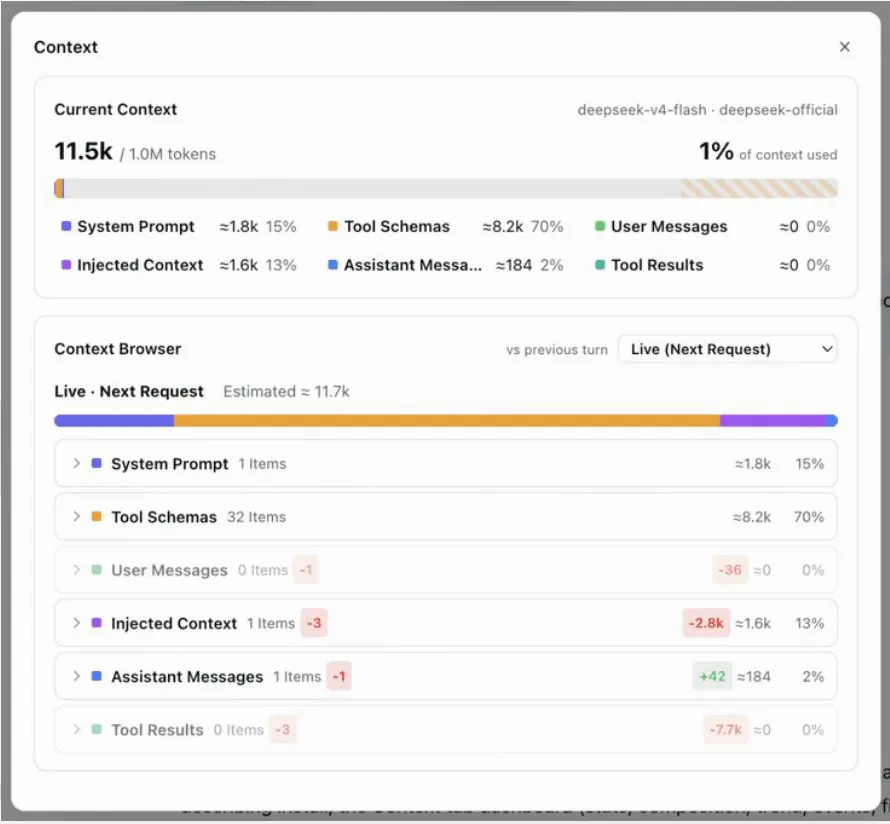
What the next request will carry — and what the last turn changed.Watch at 2:14 - 4
Watch the window grow, request by request
The Context Trend card draws one stacked bar per model request — finer than per message. In the recorded long run, Turn 5 · Step 41 of 41 stands at 00:06:19 with Actual 152.6k, Output 4.5k and a 99.70% cache hit; the legend splits System Prompt ≈1.7k (1%), Tool Schemas ≈6.8k (5%), Skill Injections ≈4.7k (3%), User Messages ≈50 (0%), Assistant Messages ≈49.2k (36%) and Tool Results ≈66.4k (48%). Skill content gets its own bucket, so a stealthy skill's footprint can't hide inside injected context; Step/Turn granularity and Total/Delta modes switch between cumulative makeup and per-request change.
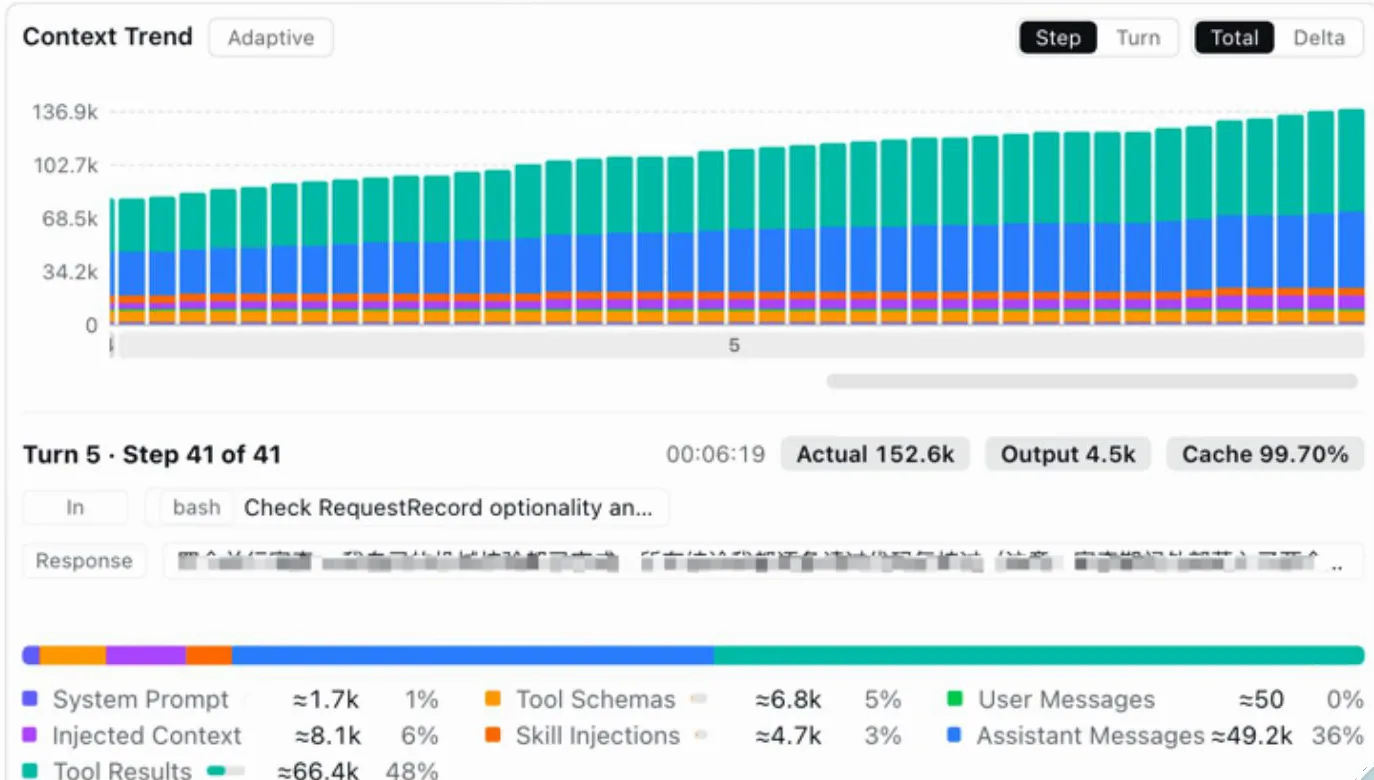
One bar per request — the window's heartbeat monitor.Watch at 2:04 - 5
Open any request and browse what it was assembled from
The Context Browser is the box-opening move: pick Live (Next Request) or any retained step, and seven collapsible categories expand into one row per element with its token price. In the frame, Tool Results (21 items, 60%) is open to a filterable list of bash, read and tool_write calls with timestamps and sizes — one git diff HEAD call expands to its command, description, workdir (/Users/bw/dev/dsh-context) and an 882-line result with a Raw/Markdown toggle. That workdir is the plugin's own development workspace, which reads as the author dogfooding their tool.
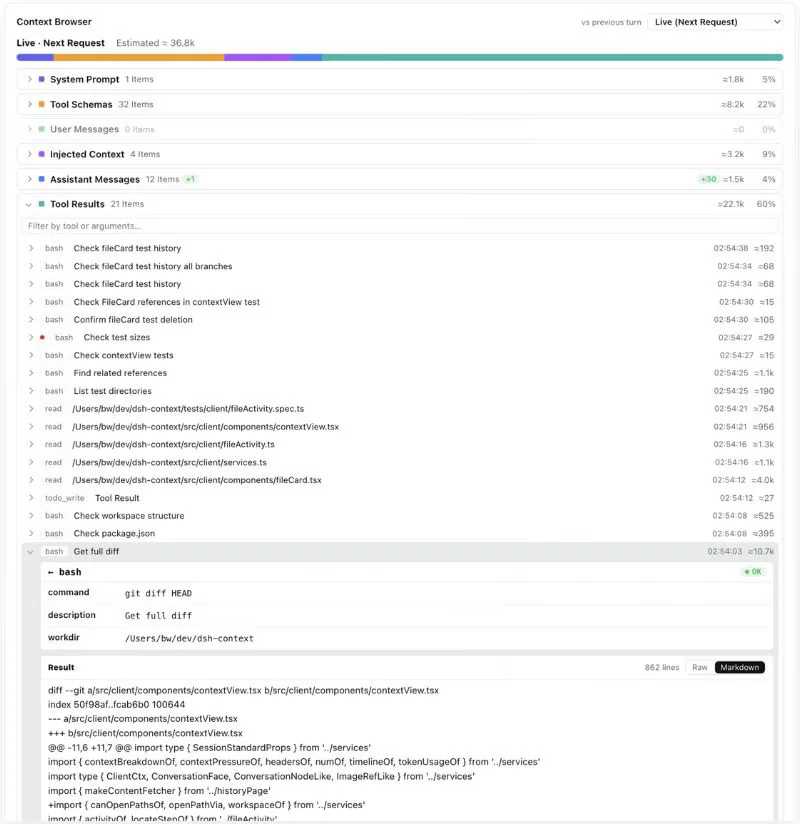
Every element priced, every result openable.Watch at 0:48
FAQ
The questions this page gets asked, answered from the recording and the plugin's repository.
What is dsh-context, and is the footage real?
It's a third-party DeepSeek Harness plugin for context insight and management — npm package dsh-context, GitHub repo bowenliang123/dsh-context (★2,114, Apache-2.0, pushed 2026-10-14 at the 2026-10-15 check). The uploader's description points at that repo, and the recording's own Plugin Info card renders dsh-context (v0.49.4) with the same GitHub path, so frames and repo corroborate each other. All six frames on this page are cropped from real plugin UI in the recording; the uploader's hand-drawn diagrams, designed bar illustrations and corner mascot were excluded. Install: dsh plugin --profile web add dsh-context.
How is this different from context compaction?
Compaction is the mechanism; this is the microscope. The 80% trigger, /compact and tool-result pruning decide what leaves the window; dsh-context shows what the window holds, request by request, and its Context Events log pins compactions to the bar where they happened so the drops explain themselves. They compose: run compaction for safety, then read the events and trend to see what it actually reclaimed. The mechanism's own walkthrough is on the context-compaction page.
Isn't this just a token cost dashboard?
No — cost is a side note here. The Context Stats card does estimate cost from list prices ($0.029 in the recorded session), but the axis is composition: which bucket is eating the window and how that shifts per request. Bills, ledgers and saving levers live on the usage-tracking page; this one is for understanding what the model actually receives.
What exactly does it measure, and can the numbers be trusted?
Composition and evolution of the context window. Per the repo README, the headline occupancy and composition read the same official token-meter projections as the composer's context ring (contextPressure / contextBreakdown), so they match what DSH itself shows; estimates carry a ≈ mark, and the trend card's hover exposes the provider-reported Actual Prompt / Output / Cache next to them — 152.6k actual against the estimates in the frame. Timing Stats, File Activity and a Fleet tab for the agent family round it out.
Is this the same as replaying a session?
No. Session replay re-watches what happened — turns, tool calls, receipts. dsh-context answers a different question: what will the model receive, and where did each piece come from. The Context Browser's Live (Next Request) mode previews the next request's assembly before you send it; replay tools look backward after the fact. Neither replaces the other.
Can it help me spend less?
Indirectly. Pricing every bucket per request shows where a cut would bite — an 8.2k tool-schema block in a session that uses 1% of the window is a prime candidate for a leaner setup. The actual cutting — model choice, output trimming, ops plugins — is treatment, covered on the token-optimization page; this page is the imaging that tells you where to operate.
Related guides
Neighbors in the context cluster — and what each one is actually about.
Context compaction & long tasks
How the 80% trigger, /compact and tool-result pruning keep long sessions from falling apart
Read the guideTrack dsh token usage & costs
Read the per-request receipt, spot context hogs in Trajectory, then cut costs with model tiers and usage plugins.
Read the guideReplay & review your dsh sessions
Open the trajectory viewer, read structured receipts, locate failures by turn and branch a new chat from any step — illustrated walkthrough
Read the guideSources and credits
The recording is by Bilibili creator 阿梨Aria早鸟报 (published 2026-10-12, 145s, 826 plays at the 2026-10-15 API check); the video description self-reports the plugin's GitHub repo, and the frames' own Plugin Info card shows the same path — identity is stated as self-reported, not independently verified, and none of the material is from the DSH team. Star count and license were verified via the GitHub API on 2026-10-15. Every frame above links back to its own timestamp.