
dsh genui: watching AI output become an interface you can click
Ten frames from OpenTiny community's 295-second walkthrough of dsh-genui: install by asking the agent, a train-fare query form, a sortable results table, a fare chart, a working pomodoro and calculator — and the sparkle switch that turns generated UI off.
Last updated: 2026-10-15
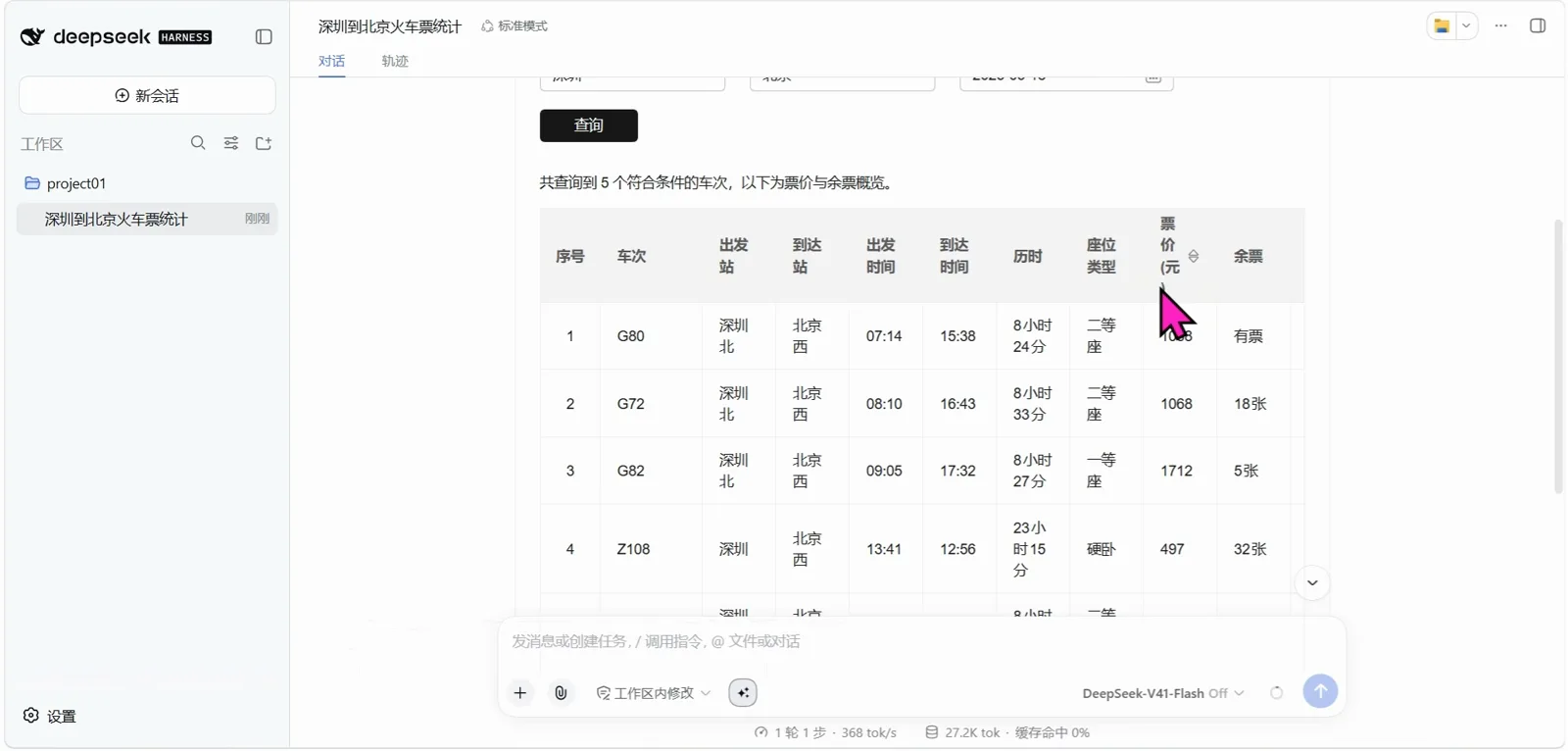
Ask an assistant 'how much is a train ticket to Beijing' and you get prose: numbers to scan, comparisons to build in your head. The plugin on this page lets the model answer with real components instead — the hero frame above is its sortable fare table, mid-click, inside a DeepSeek Harness session. The whole page follows one 295-second screen recording published by the OpenTiny community: every panel you'll see came out of an ordinary chat message.
This page is the interactive-output deep dive — components your clicks and submissions feed back into the conversation. For making AI-emitted HTML simply visible in a reply, open dsh raw-html rendering: make chat answers visible (illustrated)
TL;DR
- ▸dsh-genui (lhuans/dsh-genui, ★12 at the 2026-10-15 check; the OpenTiny/dsh-genui name redirects there) renders model replies as real components — charts, forms, tables, little apps — and whatever you click or submit flows back into the conversation.
- ▸Install is one line — dsh plugin --profile web add dsh-genui — and in the recording it's the agent that runs it: when PowerShell's execution policy blocked the script wrapper, it switched to calling the CLI directly. A restart is required before anything changes.
- ▸The demo is one train query: the reply contains a Shenzhen → Beijing query form (origin, destination, date picker, 查询 button), a five-train sortable fare table, and a fare-by-time-of-day bar chart — then a pomodoro timer and a calculator, each generated on request.
- ▸The sparkle icon in the composer toggles the GenUI authoring prompt ('GenUI prompt on' in the frame); off, the model goes back to plain text. Removal is dsh plugin --profile web remove dsh-genui — and the recording shows replies reverting to prose.
The nine frame-verified steps
Part 1 · The wall of text and the install
- 1
Where the page starts: research as a wall of markdown
Before the plugin enters the picture, the recording shows a plain DeepSeek chat answering a plugins question with a statistics essay — totals ranging from 'three hundred-odd to over sixteen thousand' depending on counting method, then a markdown table of awesome-lists and aggregated markets (353+ curated, 2,825 in one market). Nothing is wrong with it; you just have to read all of it. That's the baseline dsh-genui is pitched against. (Note: this frame is ordinary DeepSeek chat, not the Harness web UI.)
$三百多个到一万六千多个不等$awesome-dsh-plugins 353+ · @ace-zone/dsh-market 2,825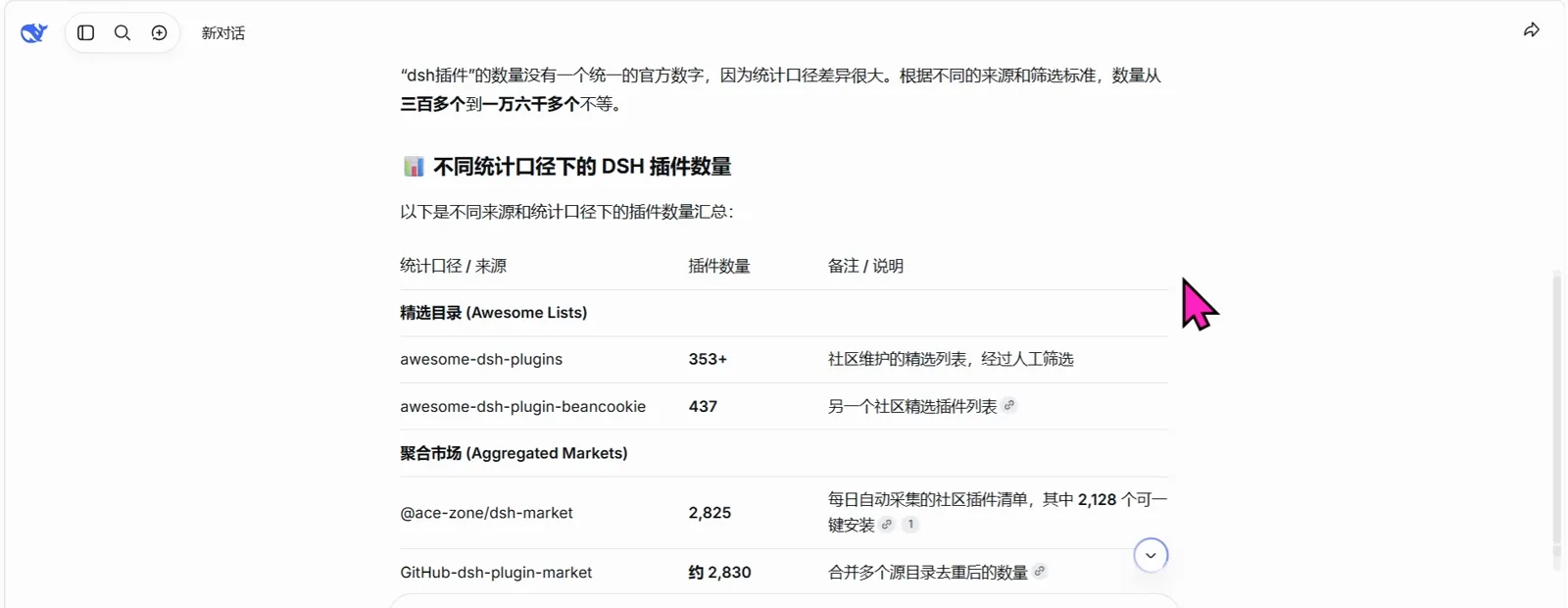
The baseline: the same answer as a wall of markdown.Watch at 0:28 - 2
Install by asking the agent, in one sentence
No terminal yet: the recording types 帮我把 npm 上的 dsh-genui 插件装到 web profile,执行 dsh plugin --profile web add dsh-genui straight into a fresh Harness conversation and hits send. That's the command from the README's own 'let the AI install it' section, handed to the agent verbatim. The README's prerequisites still apply (Node, pnpm), and nothing changes until you restart the harness — stop it, start it again, refresh, open a new conversation.
$帮我把 npm 上的 dsh-genui 插件装到 web profile,执行 dsh plugin --profile web add dsh-genui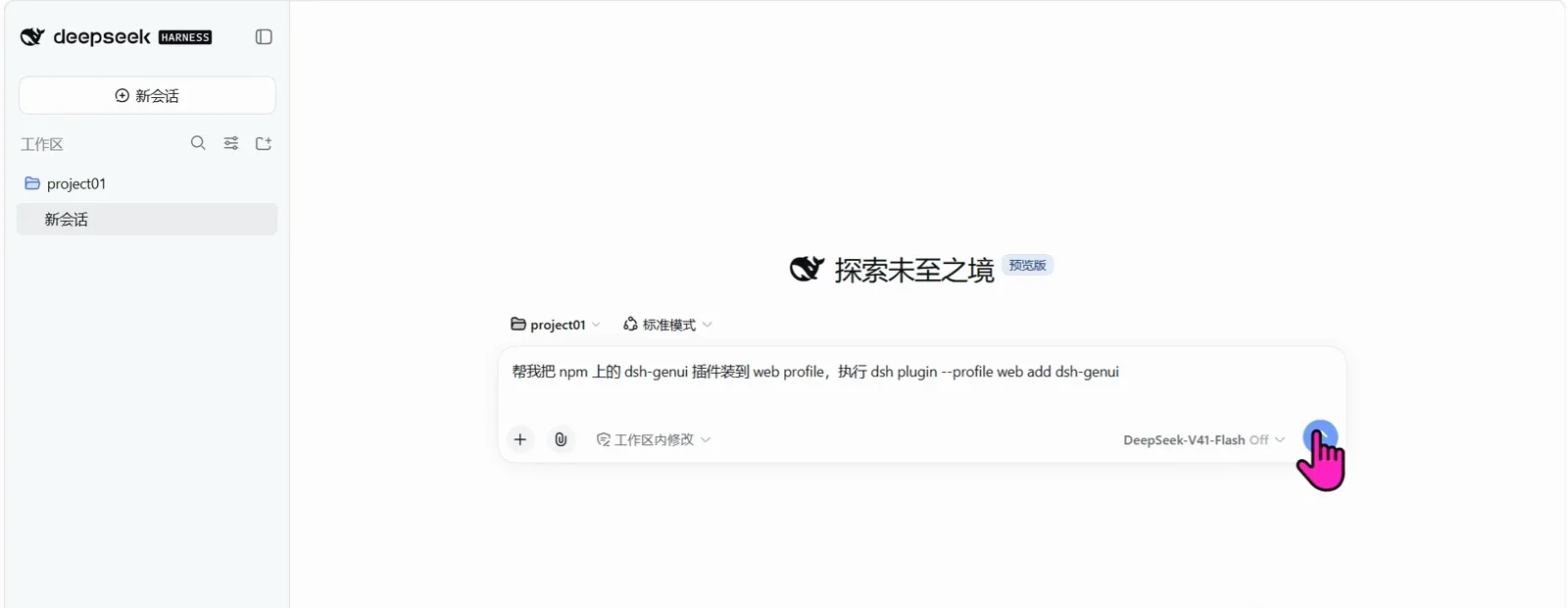
The whole install is one chat message.Watch at 2:15 - 3
The agent really runs it — and adapts when blocked
The session retitles itself 安装 dsh-genui 到 web profile and starts working: 'I'll run that plugin install command for you… The PowerShell dsh plugin is blocked by execution policy, let me call the CLI directly.' That's a real install meeting a real Windows guard, adjusted mid-flight — not a scripted slide. In the same stretch the video also shows the manual fallback (the same add command typed into a terminal) and, near the end, its mirror-image remove command.
$安装 dsh-genui 到 web profile$blocked by execution policy → call the CLI directly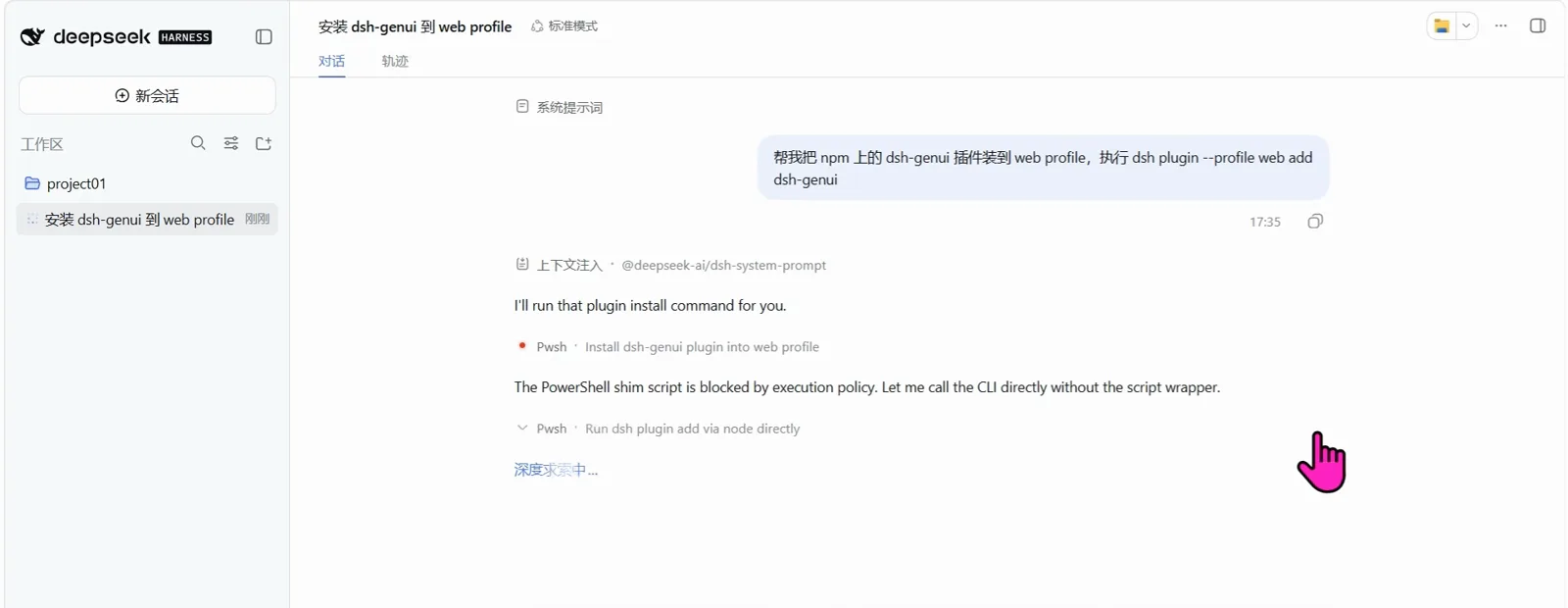
A real install, adapting mid-flight.Watch at 2:22
Part 2 · One train query, three components
- 4
The ask: one train query, in ordinary Chinese
In a new session the user types 统计一下今天深圳到北京的火车票 — 'count today's Shenzhen-to-Beijing trains'. The reply opens with a generated card, 深圳 → 北京 火车票查询: origin city prefilled 深圳, destination 北京, a date picker (2025-06-18 in the frame), and a black 查询 button. A form — because the model decided a form was the right shape for this answer.
$深圳 → 北京 火车票查询$出发城市 深圳 · 到达城市 北京 · 出发日期 2025-06-18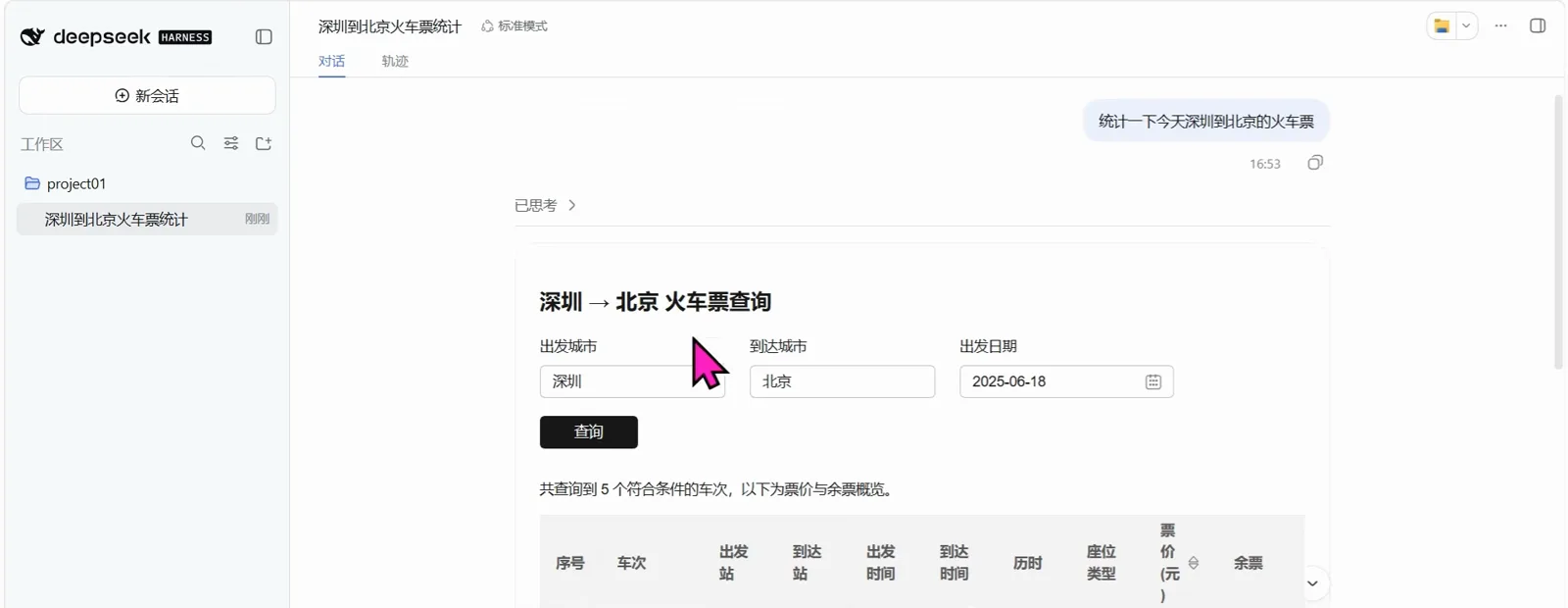
The model chose a form as the reply's front door.Watch at 1:26 - 5
The answer: a sortable five-train fare table
Below the form, the results render as a real table — row numbers, train codes, departure and arrival stations and times, duration, seat class, fare, tickets left: G80 07:14→15:38 second class ¥1068 available, G82 first class ¥1712, the slow Z108 sleeper ¥497 with 32 tickets, G96 sold out. The 票价(元) column header carries sort arrows, and the hero frame catches the exact click. It's one dataset with three interfaces: form to ask, table to scan, sort to rank.
$G80 07:14→15:38 二等座 1068 有票$G82 一等座 1712 · Z108 硬卧 497 · 32张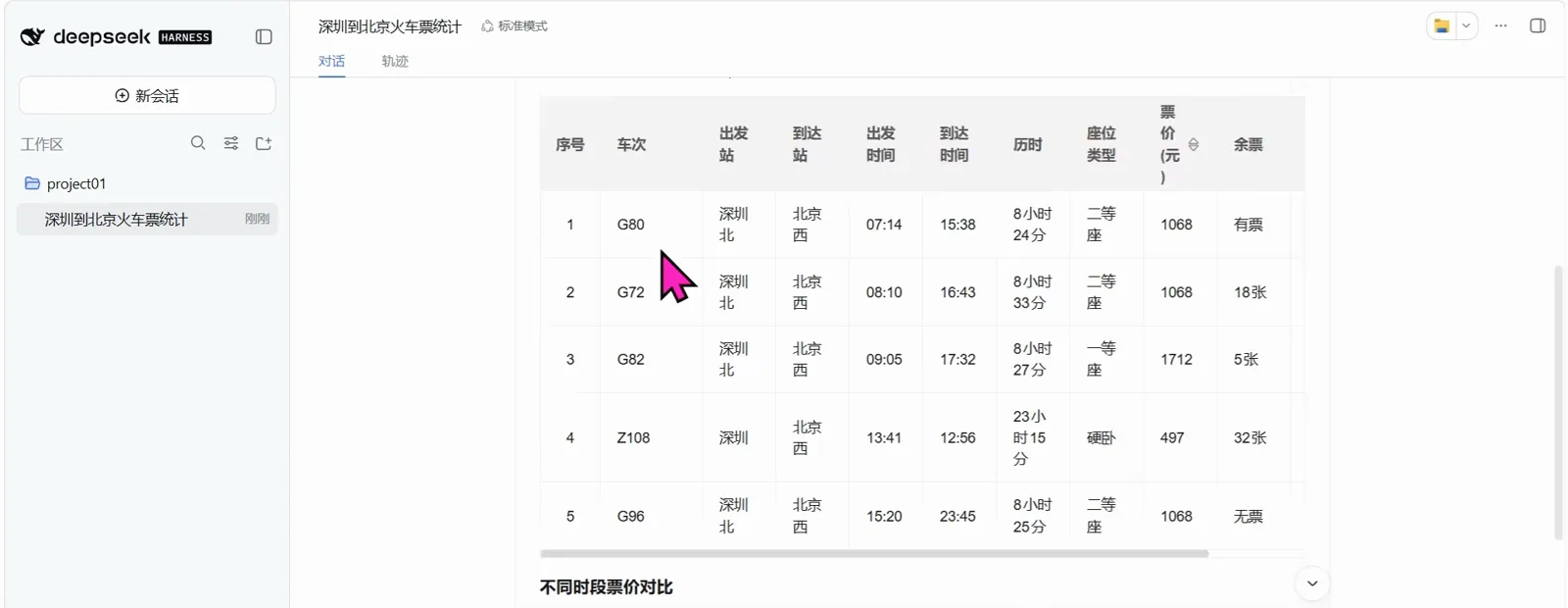
Five trains, every column sortable, no screenshot in sight.Watch at 1:30 - 6
The pattern made visible: fares as a bar chart
The same reply continues with 不同时段票价对比 — a bar chart on real axes, four bars for 上午 / 中午 / 下午 / 夜间, midday peaking near ¥1,700 while the night departure sits under ¥500. The message footer reads 用量 27.2K tok · 用时 6秒. The repo README's chart menu (bar, line, pie, radar, gauge and more) is the general capability; this frame is the concrete instance.
$不同时段票价对比$上午 · 中午 · 下午 · 夜间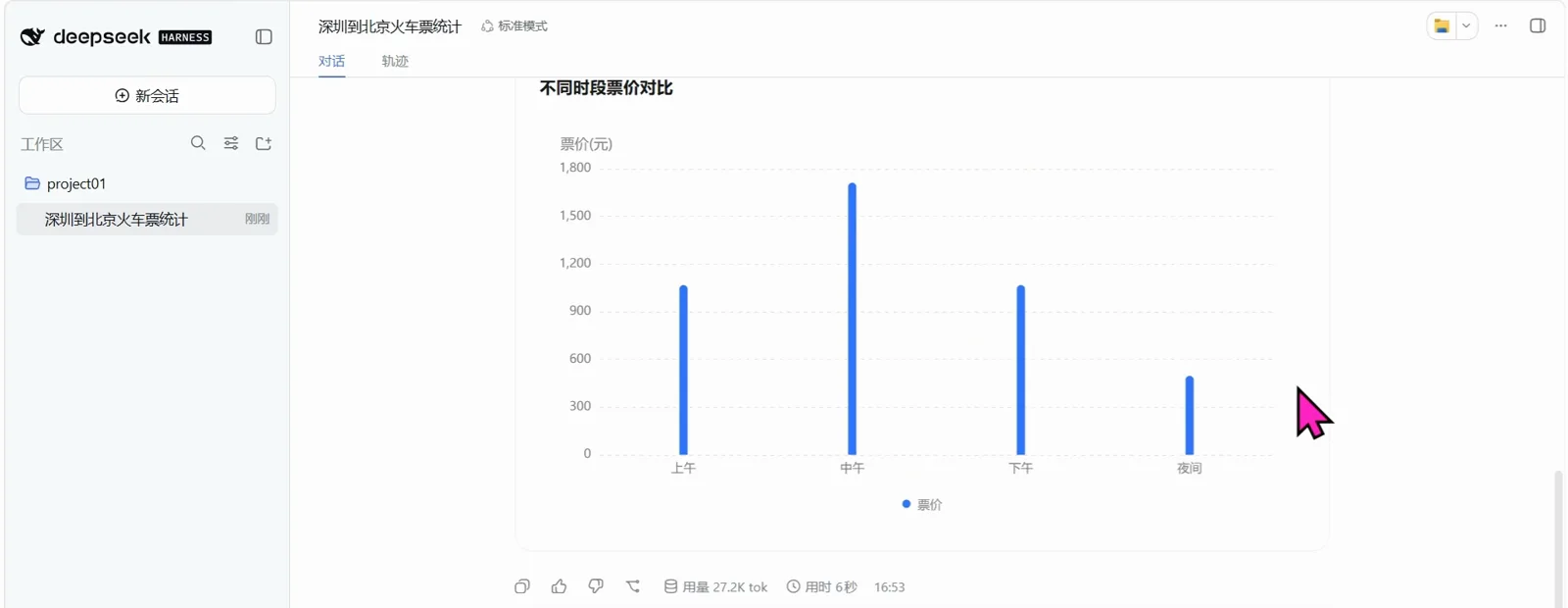
Same reply, second component: the trend you can see.Watch at 1:22
Part 3 · Little apps and the switch
- 7
'Generate a pomodoro timer' — a working little app
A new session, 生成精美番茄钟: the reply builds a pomodoro with a dial (0 to 1,500), 开始专注 / 重置 / 跳过本段 buttons, a task field holding 完成产品方案初稿 with its own save button, and a stats table — pomodoros today, focus minutes, current mode. Nothing in this loop was coded by a human: the model wrote the interface, and the buttons do things.
$开始专注 · 重置 · 跳过本段$本次专注任务:完成产品方案初稿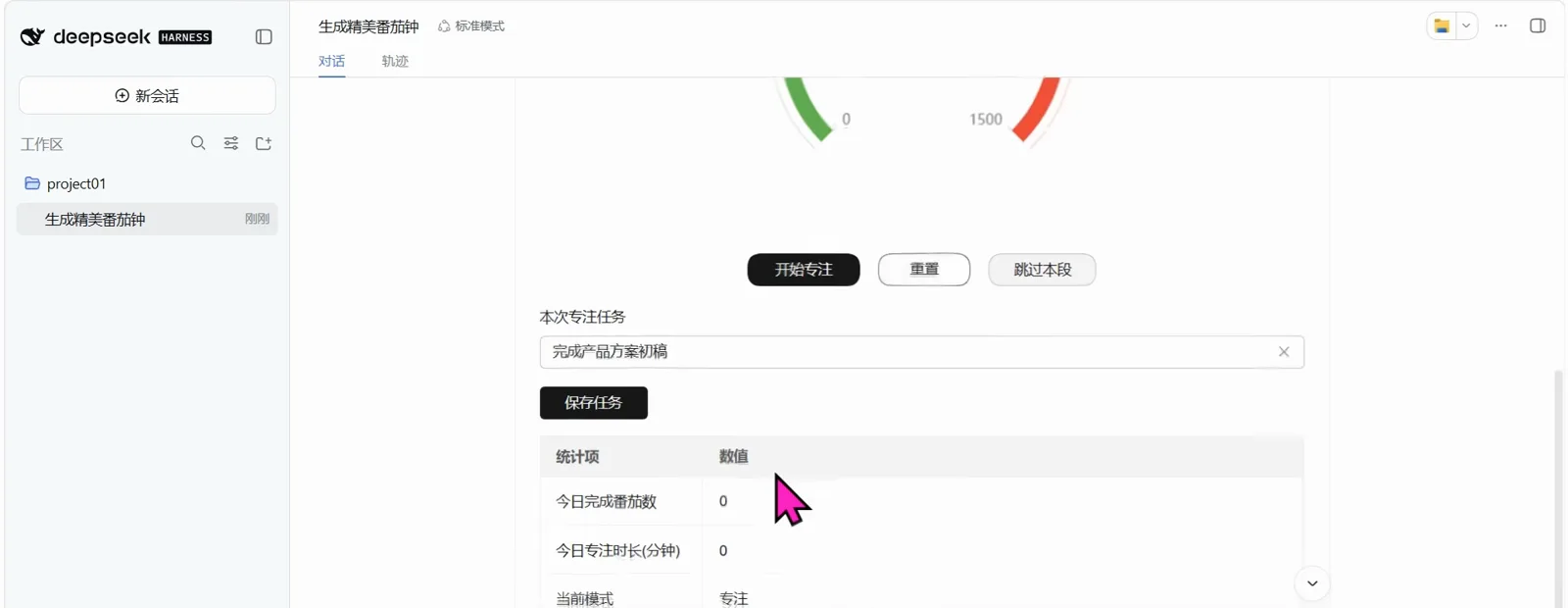
A working little app, written into the reply.Watch at 3:26 - 8
'Generate a calculator' — and type on it
The 生成计算器 session renders a calculator card — AC, ±, digits, operators, equals — and the recording actually uses it: the display holds 450-93 with the cursor pressing = (the README's own flagship example, reproduced live). The keys are real components streaming in from the model's JSON description, not a screenshot of one.
$450-93$AC ± 7 8 9 × 4 5 6 + 1 2 3 = 0 . 00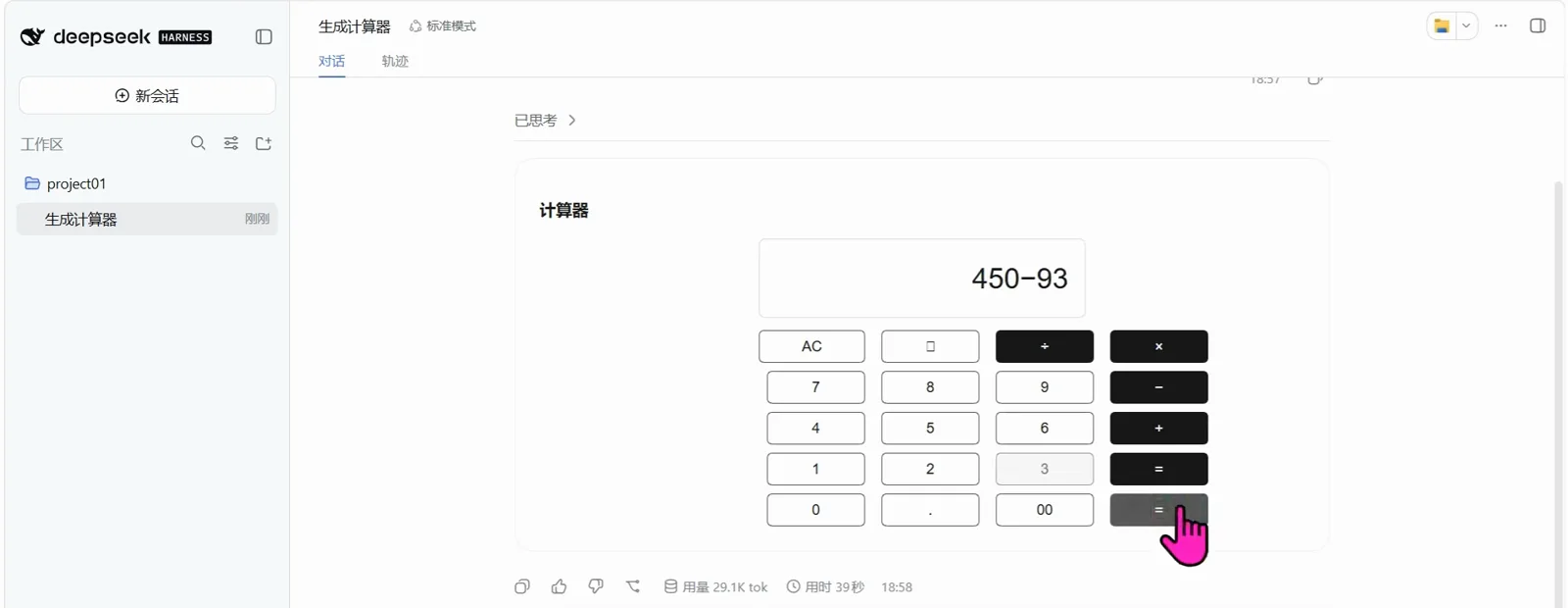
Every key works — this is the click, not the pitch.Watch at 3:46 - 9
The switch: 'GenUI prompt on'
In the composer's tool row sits a sparkle icon; hovering it shows the tooltip 'GenUI prompt on'. That toggle controls the GenUI authoring guidance — the extra prompt section that tells the model when to emit an interface (the uploader's comment-section term: 提示词注入). It's on by default and remembered across restarts; turn it off and the model answers in plain text again. The recording ends by removing the plugin (dsh plugin --profile web remove dsh-genui) and showing the same kinds of questions answered as prose.
$GenUI prompt on$DeepSeek-V4-Pro Low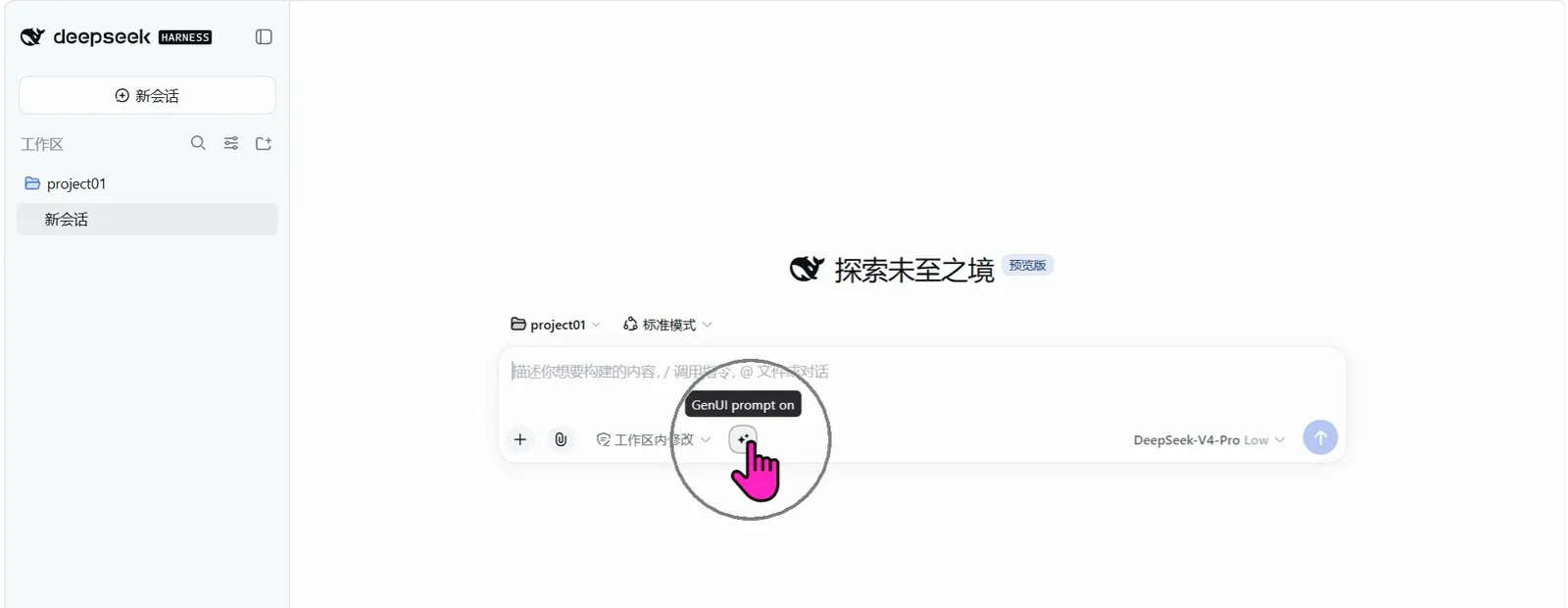
One toggle decides whether replies grow interfaces.Watch at 3:52
FAQ
The questions this page gets asked, answered from the recording, the comment section and the plugin repo.
What is dsh genui?
A DeepSeek Harness plugin that turns model replies into interactive interfaces — charts, forms, tables, pickers, little apps — and sends your clicks and submissions back into the conversation. The repo is lhuans/dsh-genui (★12 at the 2026-10-15 GitHub check, MIT; the old OpenTiny/dsh-genui URL redirects there, and the uploader's own pinned comment points to it). It publishes to npm as dsh-genui and installs with dsh plugin --profile web add dsh-genui. The account that published the walkthrough is the OpenTiny community, and the rendering components come from OpenTiny's genui-sdk.
How is this different from a plugin that renders HTML?
Two layers: what the model writes, and what you can do with the result. A raw-HTML renderer takes HTML the model wrote and makes the chat display it — charts and animations you watch, not operate. dsh-genui has the model emit a structured JSON description of an interface (in a schemaJson block, per the README), which a renderer turns into whitelisted components — and whatever you click or submit flows back into the session so the model continues from it. Display versus round-trip; the frames on this page show the round-trip half (form submitted, table sorted, keys pressed).
What kinds of interactions and components does it support?
Per the repo README: chart types (bar, line, pie, ring, radar, gauge, funnel, scatter, waterfall); form controls (text, dropdown, radio, checkbox, toggle, stepper, date picker, search box, transfer list) whose submitted values return to the conversation automatically; tables with paging and search, plus trees, timelines, tabs and cards; multi-turn flows like wizards and graded quizzes; and free-form 'little apps' like the calculator and pomodoro in the frames. The model decides per reply, and asking for 'an interface' explicitly also works. Only whitelisted components can render — no arbitrary HTML or scripts.
How do I install it, and why does nothing happen at first?
One line: dsh plugin --profile web add dsh-genui (from npm — no account, no clone). The recording lets the agent run it; when PowerShell's execution policy blocked the wrapper script, the agent called the CLI directly. Then the step people skip: restart — stop the harness (Ctrl+C), start it again, refresh the browser, open a new conversation. DSH locks in its plugin set at startup, so until you restart the reply stays plain text. Removal is the mirror command: dsh plugin --profile web remove dsh-genui.
Which repo is it? I see two dsh-genui projects on GitHub.
The one in the video is lhuans/dsh-genui — confirmed by the uploader's pinned comment and the OpenTiny/dsh-genui redirect (both checked 2026-10-15; ★12, pushed 2026-10-09). The similarly named omdsh-dev/dsh-genui (★588, pushed 2026-10-14) is a separate project with a different architecture (a dsh-ui fence renderer) — easy to confuse in search results, and a viewer in the video's own comments hit the same ambiguity. This page's links all go to the lhuans repo and its site.
Does every reply become a UI? What does it cost?
No — the model emits an interface only when one fits, and ordinary questions still get ordinary text (the README is explicit, and the frames show prose answers too). The sparkle toggle in the composer turns the GenUI authoring guidance off, which returns you to all-text replies while keeping card rendering installed. Interactions do add tokens: each generated interface is model output, and the frames' footers show tens of thousands of tokens per demo turn — the recording's own answers ran 27.2K and 29.1K tok.
Related guides
The neighboring axes — what each one changes, and why it isn't this.
dsh raw-html rendering: make chat answers visible (illustrated)
The raw-html plugin turns plain replies into HTML cards, charts, canvas animations and themed style systems — with trusted-mode script gating explained
Read the guideDeepSeek Harness client UI: themes & custom skins
Install a ready-made theme skin like Firefly, or fine-tune your own with dsh-client-ui-custom: six presets, frosted glass, wallpapers — instant apply, safe rollback.
Read the guideBeautify dsh with AI-made themes
The wallpaper-plugin walkthrough: the appearance three-state switch, the preset studio with its layer-composite wallpaper editor, and one chat message that spins a full light-and-dark theme.
Read the guideSources and credits
All frames come from one Bilibili walkthrough published by the OpenTiny community account on 2026-10-12 (295 seconds, no subtitles; 9,072 plays as of the 2026-10-15 API check — search pages inflate the same figure roughly 10x, so only API values are quoted). The repo identity was resolved via the uploader's own pinned comment and a GitHub-API redirect check on 2026-10-15; star counts are API values from the same day. Facts about the uploader beyond the account itself are stated as shown on screen, not independently verified. Every frame above links back to its own timestamp.