
DeepSeek Harness mobile access with dsh-pocket: scan a QR and take over from your phone
A real screen recording, frame by frame: install one plugin, open the new Phone access panel, scan the LAN QR at home or open a free Cloudflare tunnel outside — the same session streams to your phone, and taps on the phone act back on the computer.
Last updated: 2026-09-30
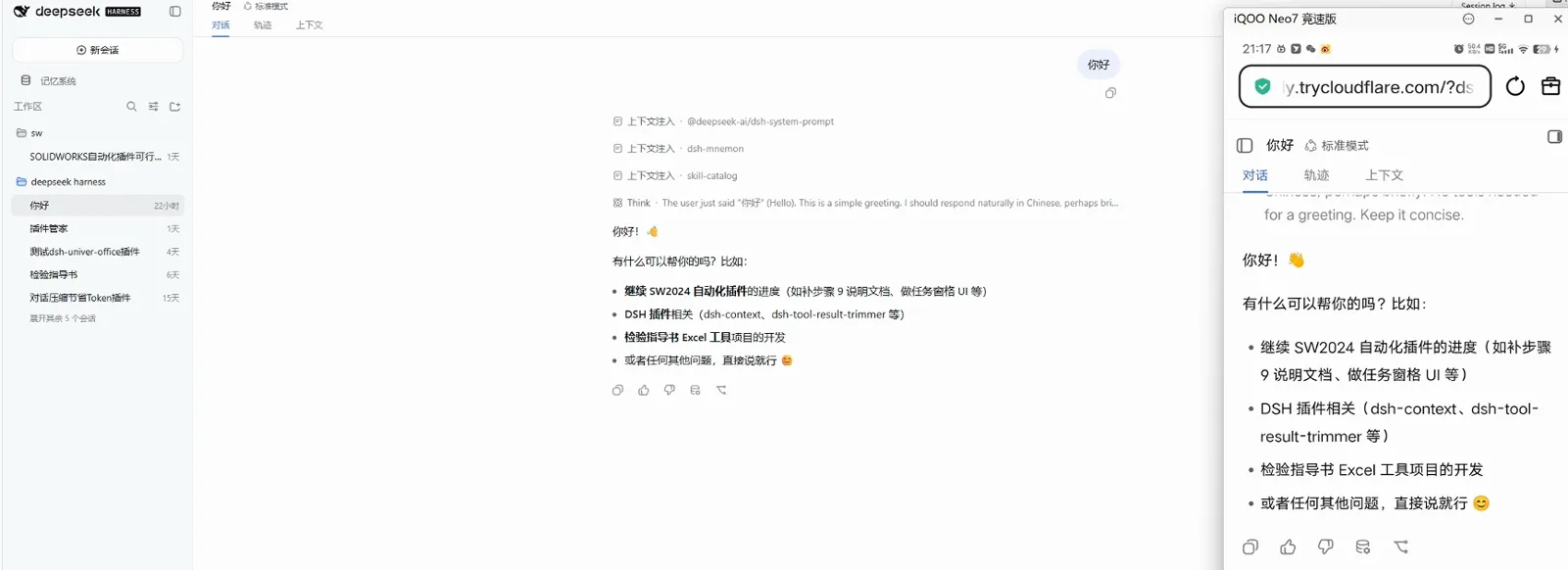
DeepSeek Harness runs on your computer, but the task does not wait until you are back at the desk: an agent mid-run wants an approval, or you suddenly need it to look something up while you are out. Remote desktop and SSH both work, but they are heavy, and putting a home machine on the internet usually starts from a public IP you do not have.
dsh-pocket takes a different route: one plugin adds a Phone access panel to dsh web. Your phone scans a QR code and opens the same interface, synced in real time over your LAN or a free Cloudflare tunnel — no public IP, no server, nothing to pay. This guide covers the phone pairing flow only; for the desktop-browser side of dsh web, see the web UI guide. The dsh web UI on the desktop
TL;DR
- ▸One npm package: dsh plugin --profile web add dsh-pocket -w, restart dsh web, and a Phone access entry appears in Settings.
- ▸Same Wi-Fi: scan the LAN QR and open the link — protected by an 8-digit password you can refresh or replace.
- ▸Outside: click Enable public access once — a cloudflared quick tunnel publishes a random trycloudflare.com URL with a fresh 8-digit password.
- ▸Output streams over WebSocket to both screens, and the phone can act back — the recording ends with a choice question answered on the phone and returned into the session.
From install to a working phone session
Part 1 · Install and pair
- 1
Install the plugin and restart dsh web
dsh-pocket is a single package by shaobeichen (GPL-2.0) — the recording shows v2.10.3, three weeks and 111 releases after its first publish. Add it with the -w flag that workspace installs need, then restart dsh web; a running process keeps the old code, so the new panel only appears after the restart.
$dsh plugin --profile web add dsh-pocket -w$npx @deepseek-ai/dsh web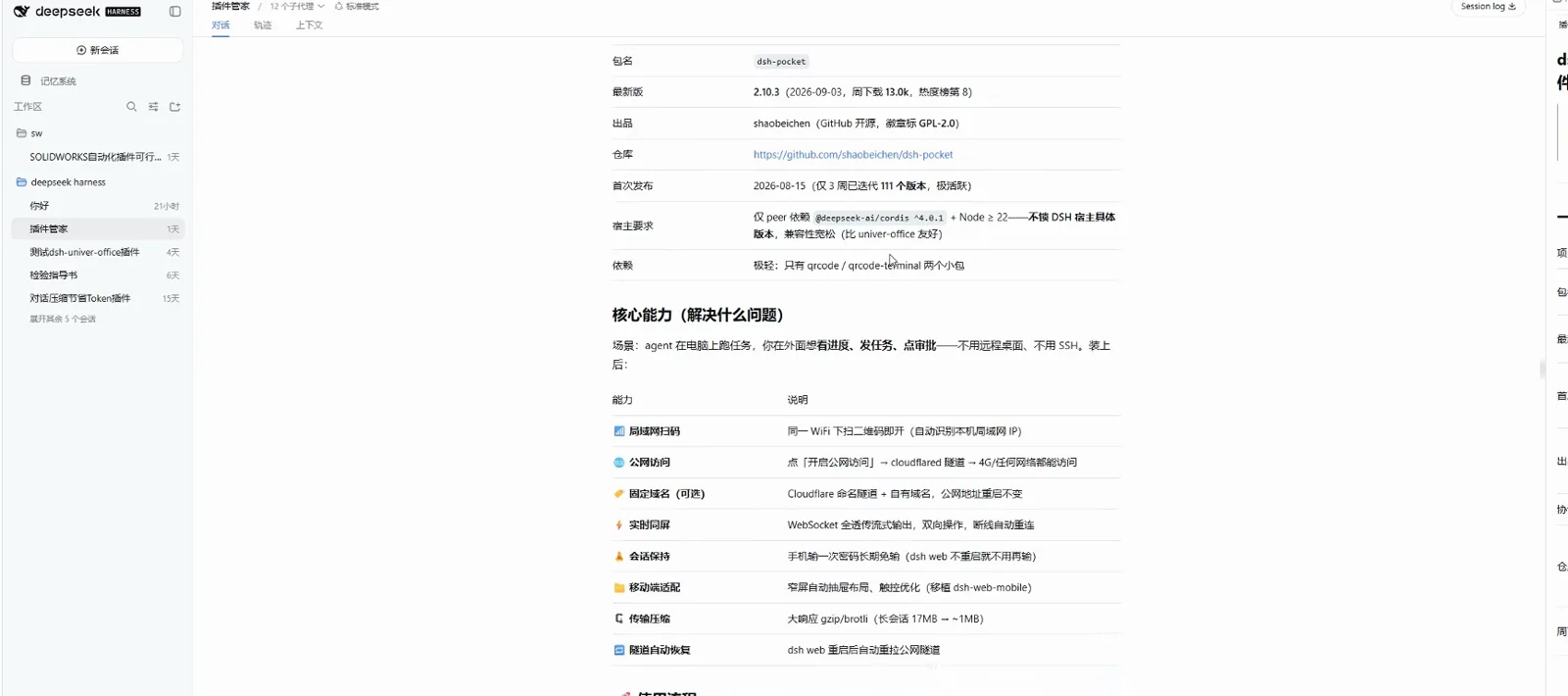
The dsh-pocket card in the plugin manager: version, origin and capabilities at a glanceWatch at 0:28 - 2
Open Phone access and scan the LAN QR
Settings now has a Phone access entry next to General settings and Models. It shows a LAN QR encoding the auto-detected address — http://192.168.31.134:3081 on the recording — plus an 8-digit LAN password that is on by default; tap Refresh for a new one or Custom to set your own 8-64 character password. Scan, enter the password once, and the phone is in.
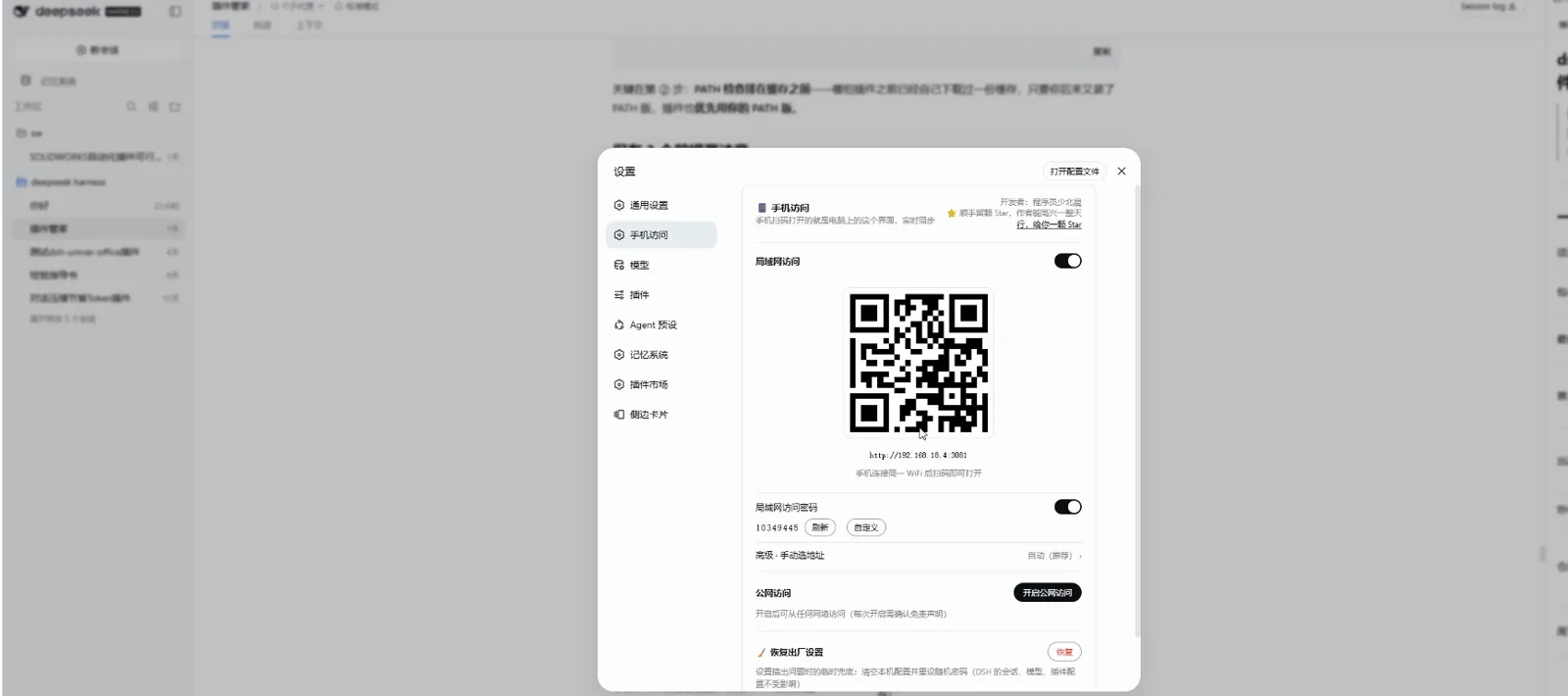
Settings → Phone access: the LAN QR code and its 8-digit passwordWatch at 1:00 - 3
Switch the route: LAN off, public tunnel on
The LAN master switch turns the local QR off without touching public access. Clicking Enable public access first demands the data disclaimer — every time — then reports Connecting to Cloudflare edge: about 5-30 seconds, with the first run downloading cloudflared. Each activation mints a fresh random URL and a fresh 8-digit password.
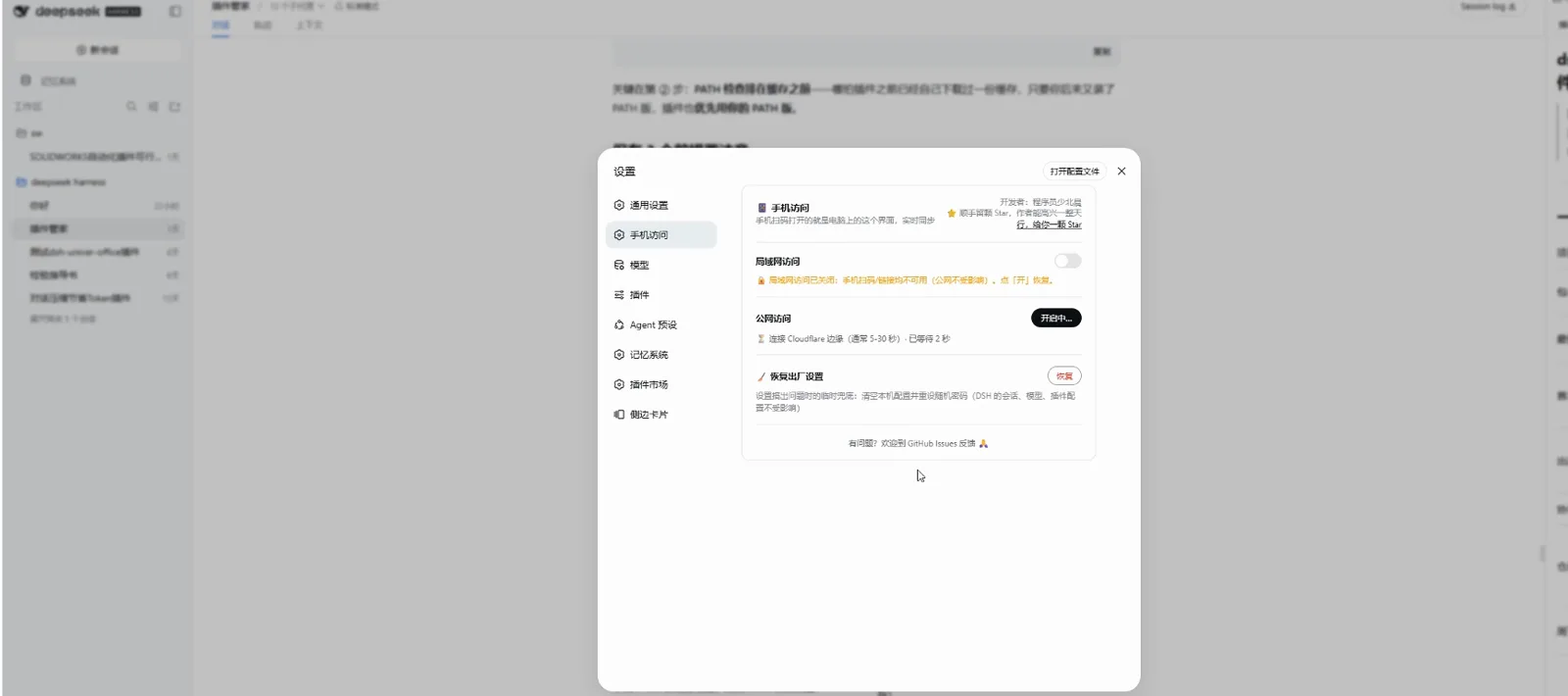
Turn the LAN switch off, click Enable public access, wait for the edge linkWatch at 1:16 - 4
Scan the public QR and unlock the session
The public QR carries the new trycloudflare.com URL — valid only while public access is on, and refreshed at every re-enable. The phone browser loads it and shows the HARNESS splash while plugins come up; enter the access password shown in the panel and the same interface opens on the phone.
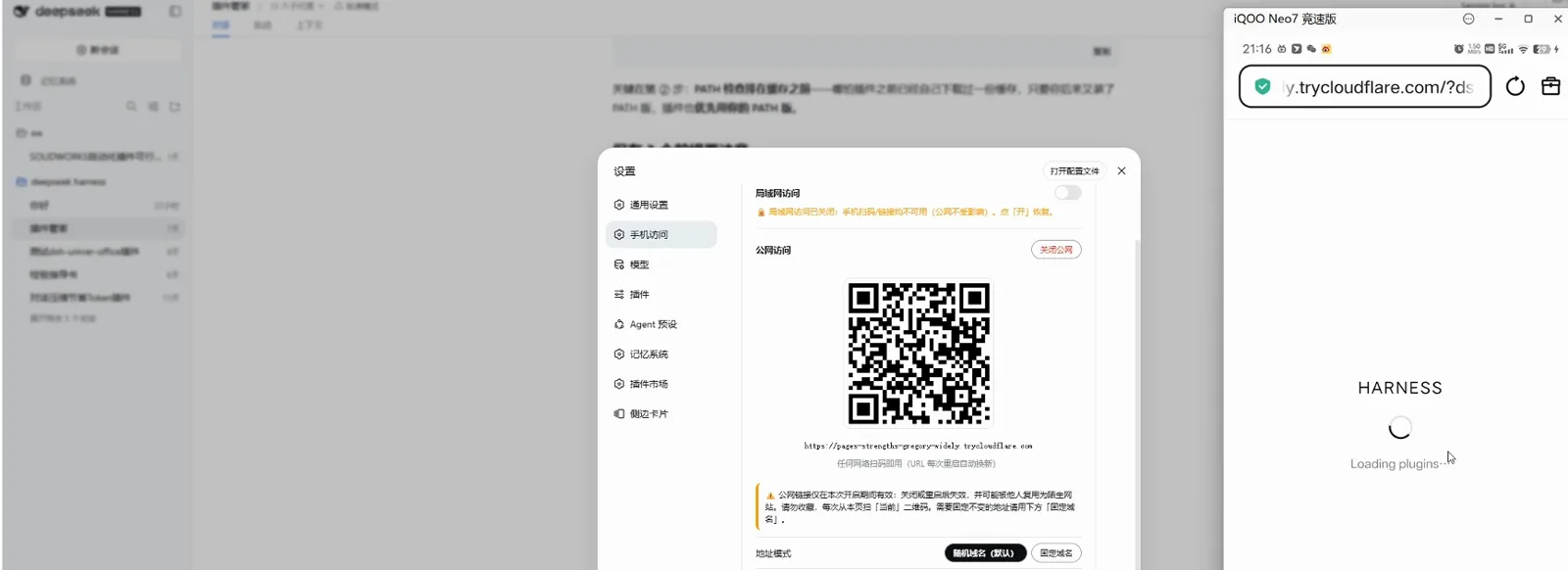
The public QR is live: the phone is loading the HARNESS interfaceWatch at 2:10
Part 2 · Take it outside
- 5
The narrow screen folds into a drawer
On the phone the interface switches to a mobile layout: the sidebar collapses into a drawer with the same session list as the desktop — workspaces, recent sessions, export session log — sized for thumbs with safe-area padding.
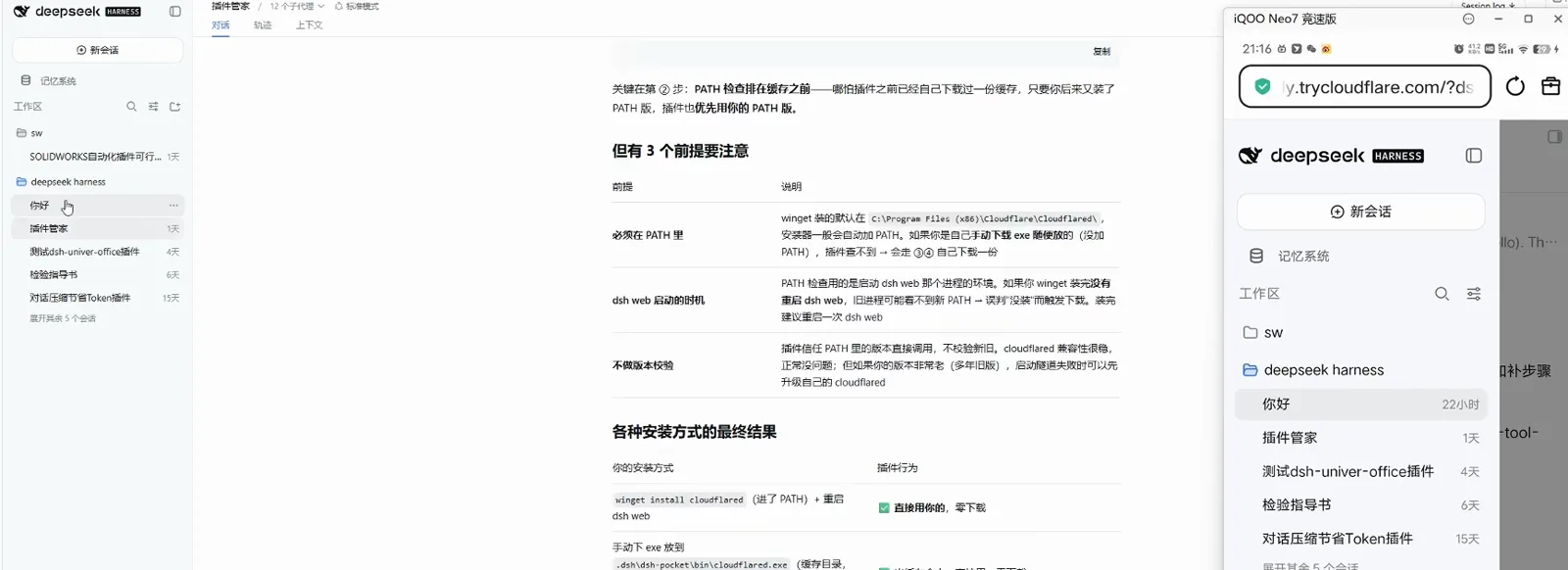
Mobile drawer layout: the session list mirrors the desktop in real timeWatch at 2:30 - 6
Prove the loop: ask on the PC, answer on the phone
Streaming output rides a WebSocket pass-through, so text scrolls on both screens at once. The recording closes the loop with a test: a choice question sent from the computer, answered by tapping on the phone, and the result — I can see and click choose — written back into the same session with all three checklist items green.
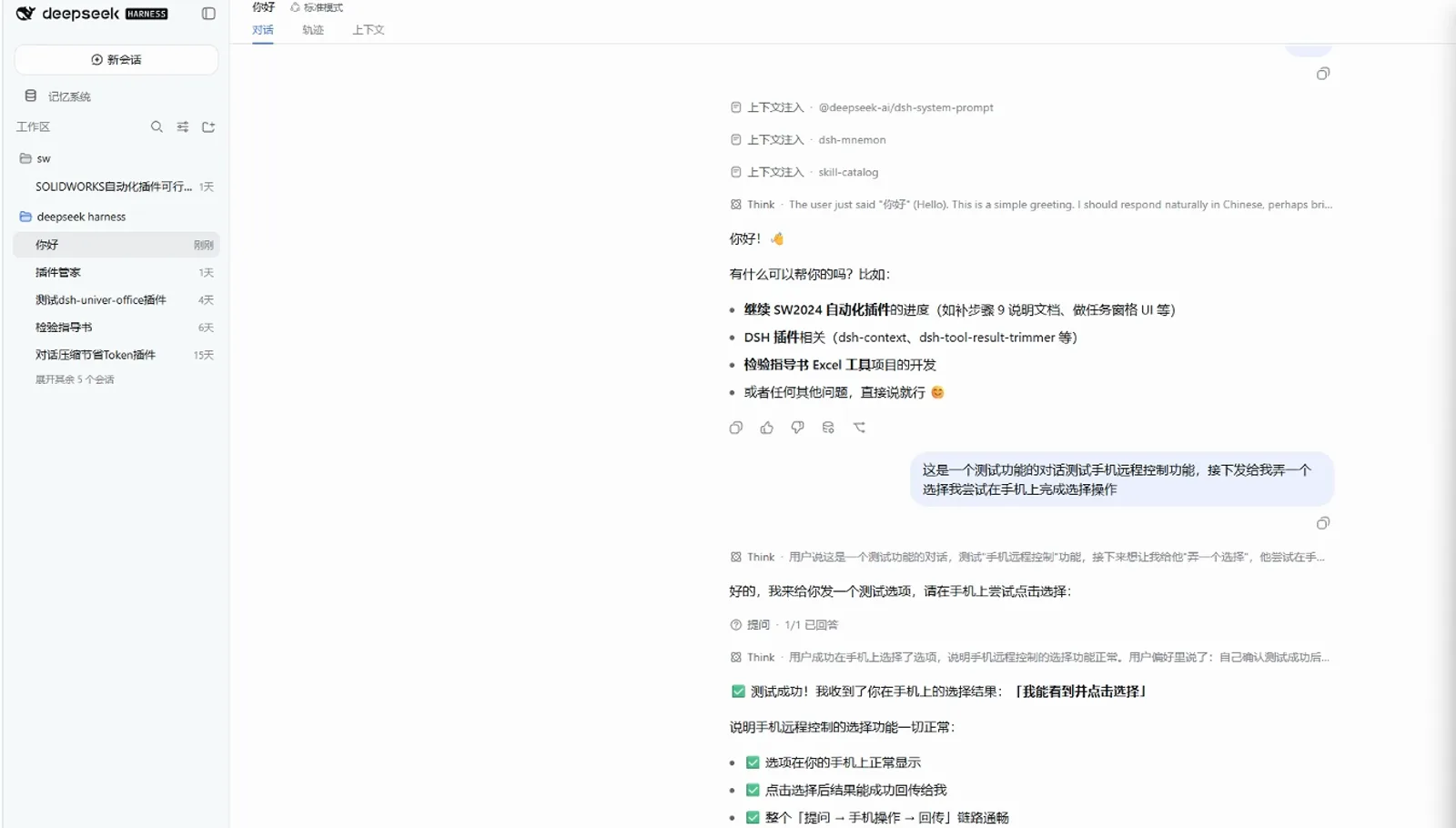
The loop checks out: question → phone answer → result written backWatch at 4:20
FAQ
The questions this plugin's users keep asking.
How can public access work without a public IP or a server?
The plugin runs cloudflared, Cloudflare's tunnel client, on your machine. It keeps an outbound connection to Cloudflare's edge, so visitors hit a random trycloudflare.com address that relays into your dsh web. The quick tunnel is free and needs no Cloudflare account. One field caveat: proxy or VPN tools in TUN mode can cut the tunnel — add DIRECT rules for argotunnel.com and trycloudflare.com, or fall back to LAN mode over your phone's hotspot.
Is it safe to put a code-executing DSH on the internet?
The default public password is 8 random digits, regenerated at every enable, and the previous link is voided immediately. The disclaimer is enforced server-side, login attempts are rate-limited — 5 wrong tries lock the address for 60 seconds — and public detection is fail-closed, so an unknown domain pointing at your machine is still treated as public. Set a strong custom password and switch public access off when you are done.
Does the phone need the password every time?
No. The login state is bound to the dsh web process on the computer: while it keeps running, the phone stays signed in. After a restart or a plugin update, enter the password once more.
LAN or public tunnel — which one when?
On the same Wi-Fi, take LAN: direct, fast and independent of any tunnel. Out of the house, take the public tunnel. One desktop note: DSH Desktop's advanced mode does not support phone access — switch the app to compatibility mode and restart first.
Related guides
Other corners of the same workflow.
The dsh web UI on the desktop
Everyday operation of the browser interface this plugin mirrors — sessions, modes and settings on the big screen.
Read the guideRemote access, the older ways
SSH, port forwarding and the earlier remote-control playbook — and why the QR route above needs none of it.
Read the guideInstall plugins the standard way
Profiles, the -w flag and the plugin marketplace — the mechanics behind step 1.
Read the guideEssential DSH plugins
Where dsh-pocket sits among the plugins worth installing first.
Read the guideDSH Common Errors and Hands-On Fixes
Match your symptom — install failure, plugin-caused startup crash, or a broken update — against real screenshots and commands cross-checked with official discussions.
Read the guideRemote & mobile collection
Every curated remote-access client — dsh-web, dsh-pocket, Agents-Anywhere, dsh-mobile — on one shelf.
Read the guideSources
Frames and on-screen facts come from the first recording; install commands, password rules and security notes are quoted from the plugin's official README; the third item is a slide-style overview used for facts only — its frames are not usable.