
DSH Web UI hands-on: from dsh web launch to your phone
Follow along with real screen recordings: launch with dsh web, get through first-run setup, learn the 3080 workspace, then extend it to your phone with the dsh-web ecosystem.
Last updated: 2026-09-30
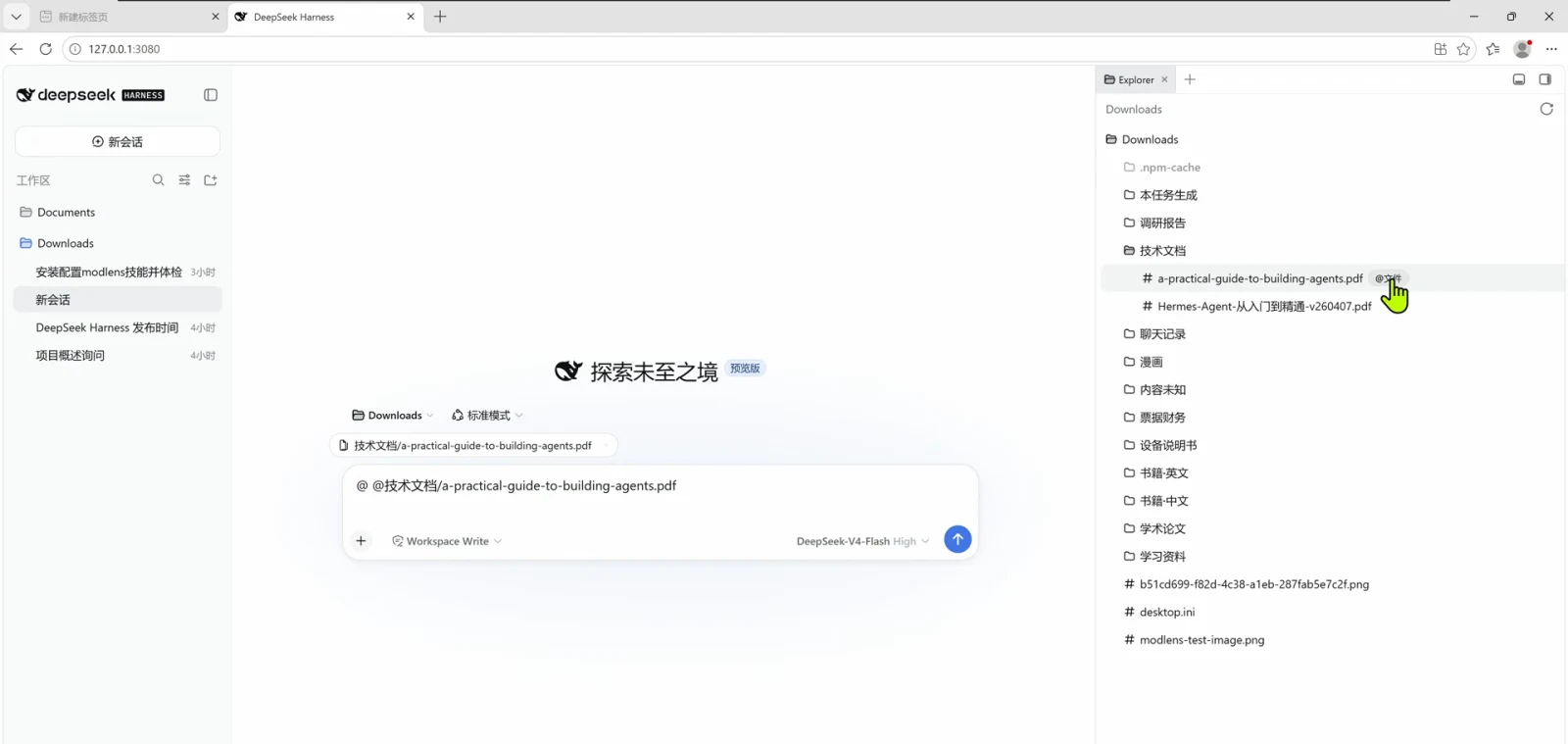
Most DeepSeek Harness tutorials stop at installing dsh — but the harness has a second front door: the browser. One `dsh web` command and your agent's sessions, workspace files and settings move into a browser tab at 127.0.0.1:3080. This guide walks that web UI end to end, following public hands-on recordings frame by frame.
This page covers the web UI itself: launching, first-run setup, working inside the interface, and the dsh-web ecosystem that adds a mobile remote UI and skins. For driving your home agent from outside the network, the companion guide is Remote access from your phone (ngrok)
TL;DR
- ▸`npx @deepseek-ai/dsh web` (or `dsh web` after a global install) starts the UI and opens the browser at 127.0.0.1:3080 by itself.
- ▸First run asks for a DeepSeek API key; Settings → Model is where you add third-party providers later.
- ▸Type / in the composer to invoke skills; the permission selector (Workspace Write) and model picker sit on the composer's bottom row.
- ▸Install the dsh-web ecosystem and your phone pairs in over the LAN for a mobile remote UI — plus 18 community skins on dsh-market.com.
From dsh web launch to phone access in 9 steps
Part 1 · Launch and drive the web UI
- 1
One command: dsh web 启动
Open a terminal and run the npx one-liner. npm asks "Need to install the following packages: @deepseek-ai/dsh… Ok to proceed? (y)" — type y and DSH downloads on the spot. If you already installed DeepSeek Harness globally, plain `dsh web` does the same job; either way the web UI starts and your browser opens it automatically.
$npx @deepseek-ai/dsh web$dsh web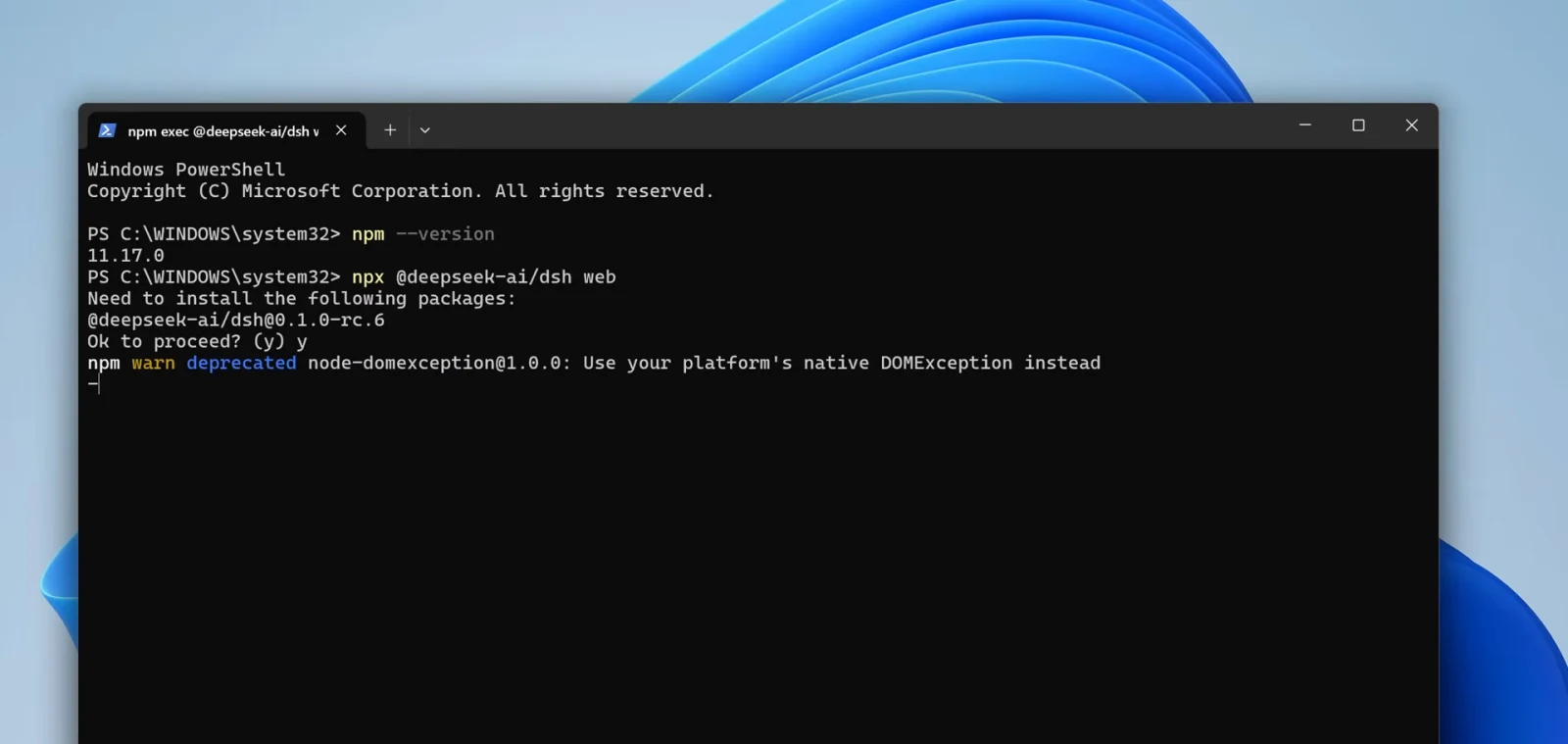
一条 npx 命令启动 Web UI,npm 询问时输入 y 即可。Watch at 2:00 - 2
First run: add an API key
The browser lands on 127.0.0.1:3080 and a dialog asks for an API key before anything else — "添加一个 API Key 开始使用". Paste a DeepSeek key and hit 保存并继续 (save and continue), or pick 稍后配置 (configure later); the same field stays available in Settings whenever you're ready.
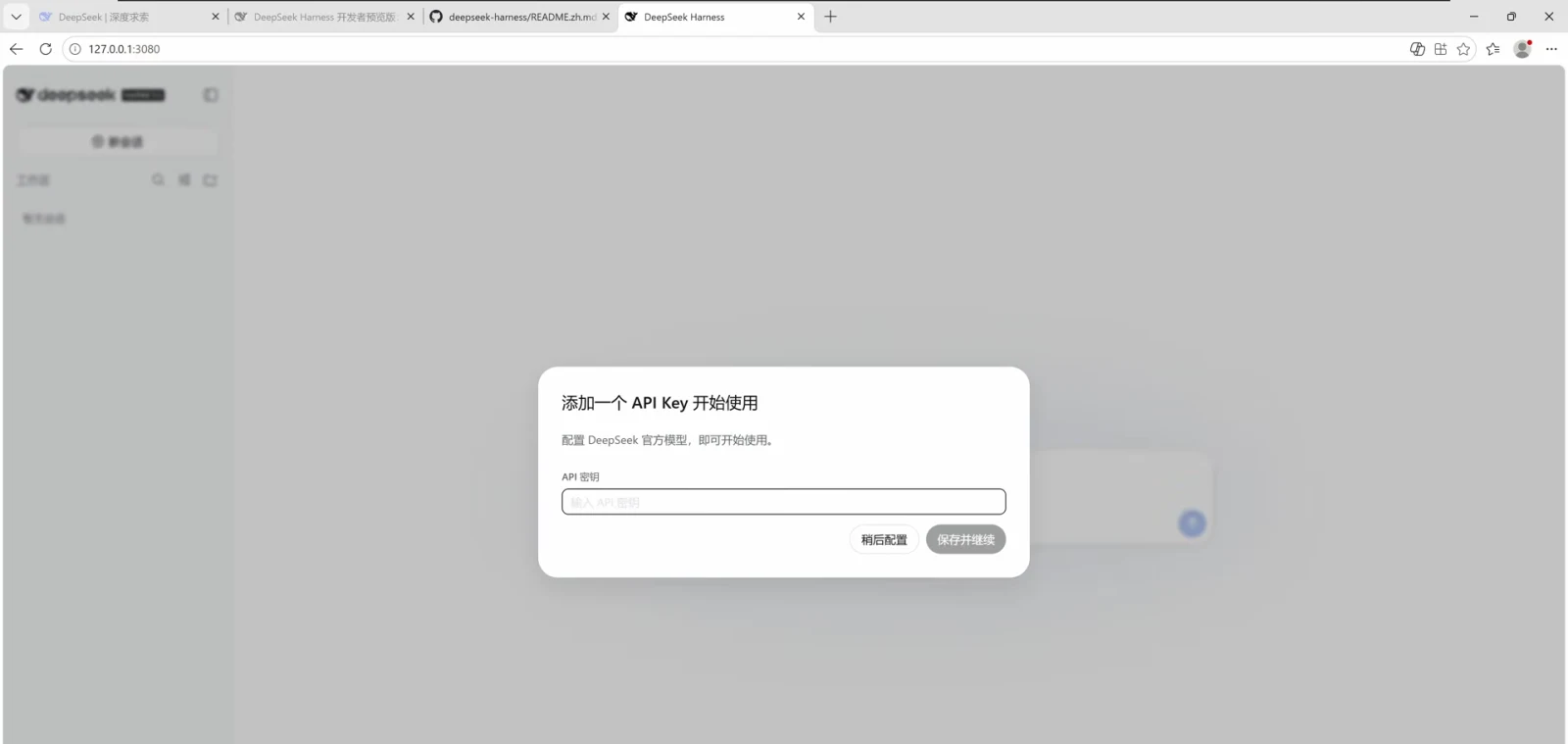
首次打开会先要一个 API 密钥,也可以稍后在设置里补。Watch at 2:21 - 3
Set the model in Settings → Model
Open 设置 (settings) from the bottom-left corner. The Model tab lists every configured provider — DeepSeek ships preconfigured — and 添加提供方 (add provider) or 添加自定义提供方 (add custom provider) is where third-party keys go. 打开配置文件 (open config file) jumps straight to the underlying profile if you prefer editing files.
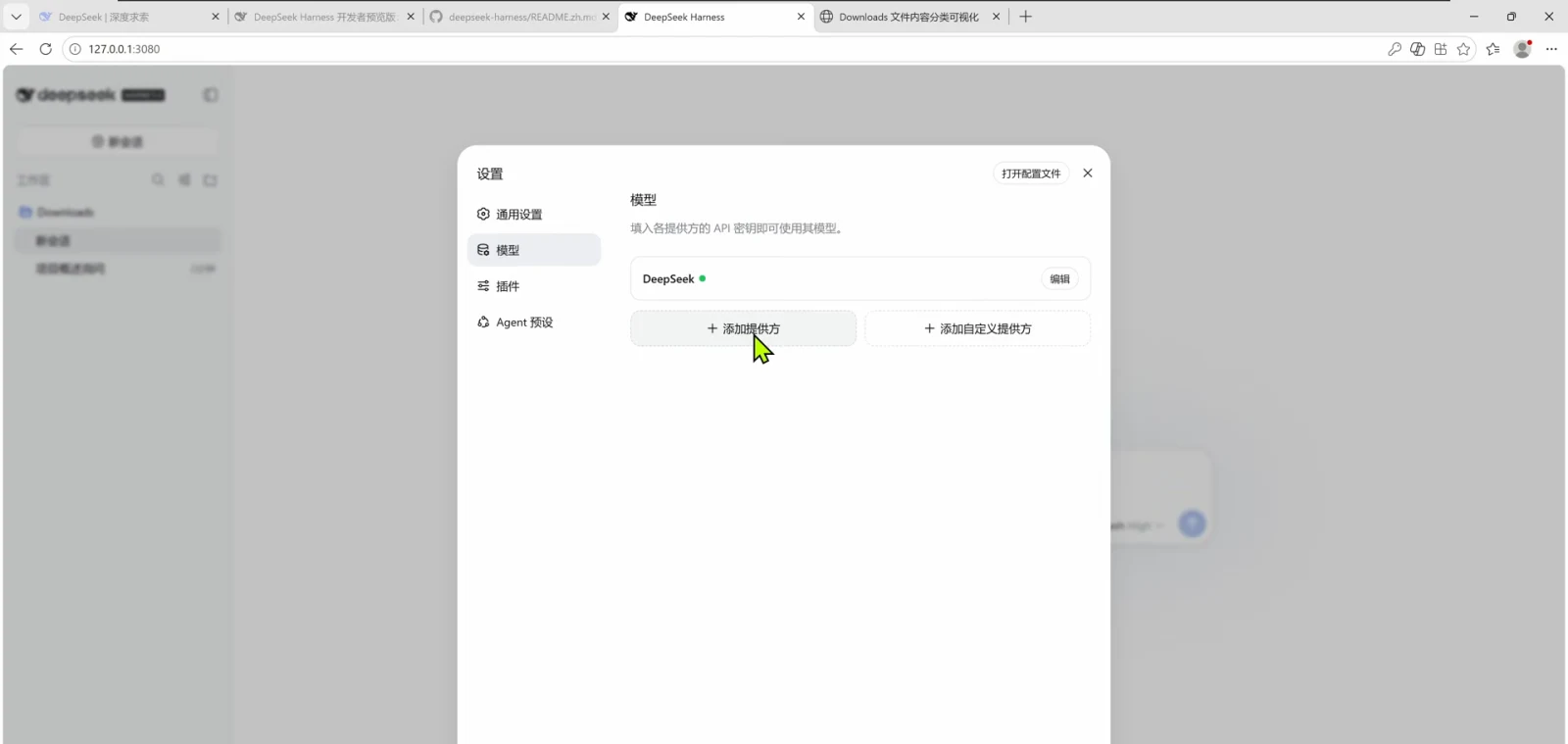
设置 → 模型:换模型、加第三方提供方都在这里。Watch at 2:30 - 4
Know the 3080 workspace
The main screen is three columns: sessions and workspace folders (Documents, Downloads…) on the left, the chat composer in the middle with the workspace and permission selectors, and a file Explorer on the right that browses the working directory. The address bar says 127.0.0.1:3080 — that's the whole UI, served locally.
- 5
Slash commands invoke skills
Type / at the start of a message and a 技能 (skills) popup appears — in the recording, /grill-with-d matches the grill-with-docs skill. The same bottom row carries the permission selector (Read-only / Workspace Write / Full access) and the model with its reasoning effort, so mode switches never leave the input box.
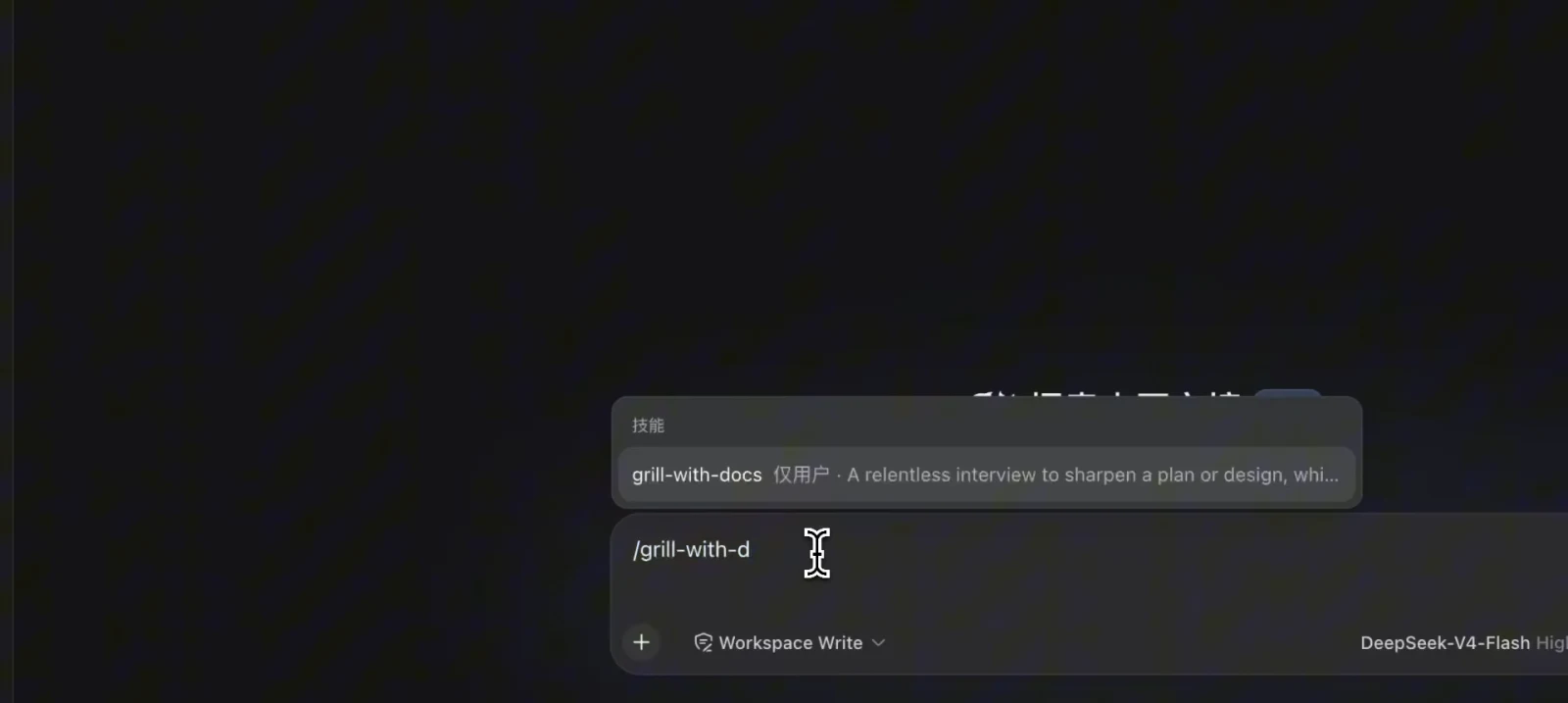
输入 / 唤出技能菜单;权限与模型就在输入框下沿切换。Watch at 4:56 - 6
Run a real task and read the trace
Give it something concrete — in the recording, organizing the Downloads folder into a visual HTML page. The session streams its trace: Think, Pwsh and Read tool calls, then a stats line under the composer (4 轮 · 11 步 | LLM 34.3s | 缓存命中 90% | 输入 144K tok · 输出 3.8K tok) that tells you exactly what a run cost.
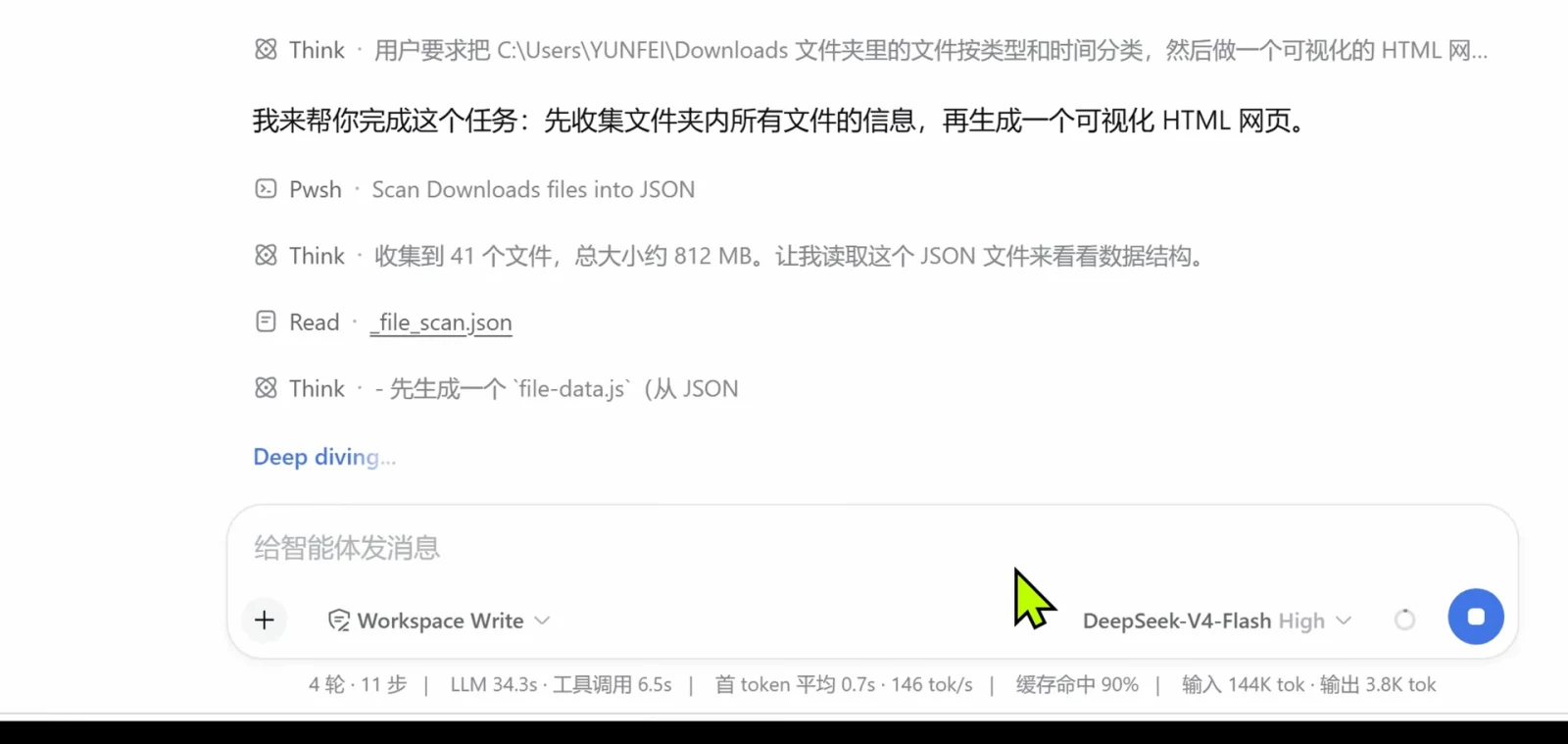
真实任务跑起来了:工具调用轨迹加底部一行运行统计。Watch at 3:25
Part 2 · Extend it: ecosystem, phone, skins
- 7
dsh-web: the web UI plugin ecosystem
The community's dsh-web bundle mounts through DSH's official plugin profile mechanism — no core edits — and adds a task board, git graph, right-side panel, mobile remote UI, pet, skins and the dsh-market.com workshop. Install it with the command below from the project's README, then restart `dsh web` so the web UI picks it up.
$dsh plugin --profile web add @linxin666/dsh-web-all@latest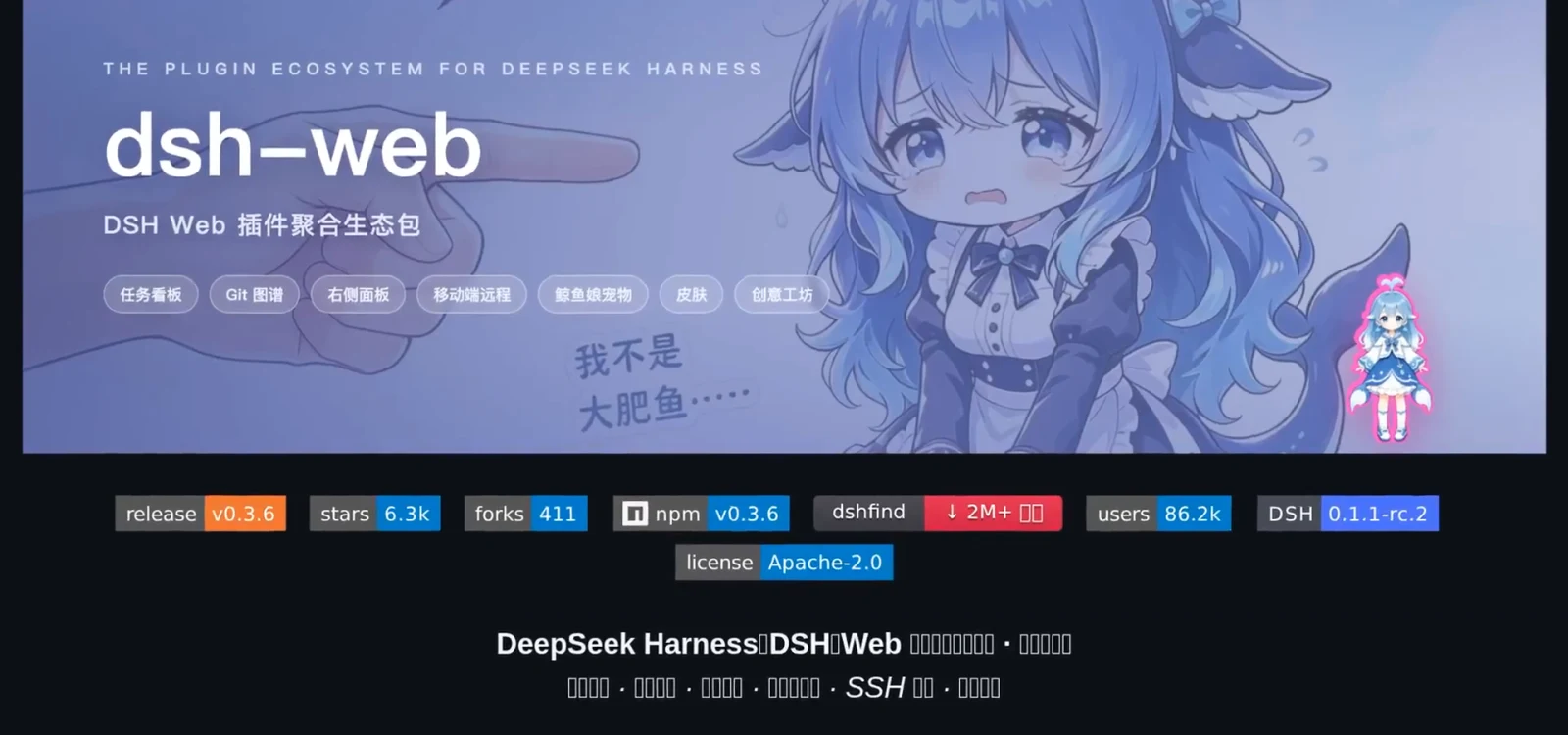
dsh-web 生态包:看板、图谱、远程、皮肤、创意工坊一次装齐。Watch at 3:28 - 8
What dsh-web-ui adds, incl. the mobile remote
The repo's About line reads like a feature list: task board, git graph, right-side panel, remote mobile UI, pet, live token stats, and skin center. The mobile part pairs your phone by QR code over the LAN and streams the session with touch-friendly controls — that's the fastest route to "dsh web ui on my phone".
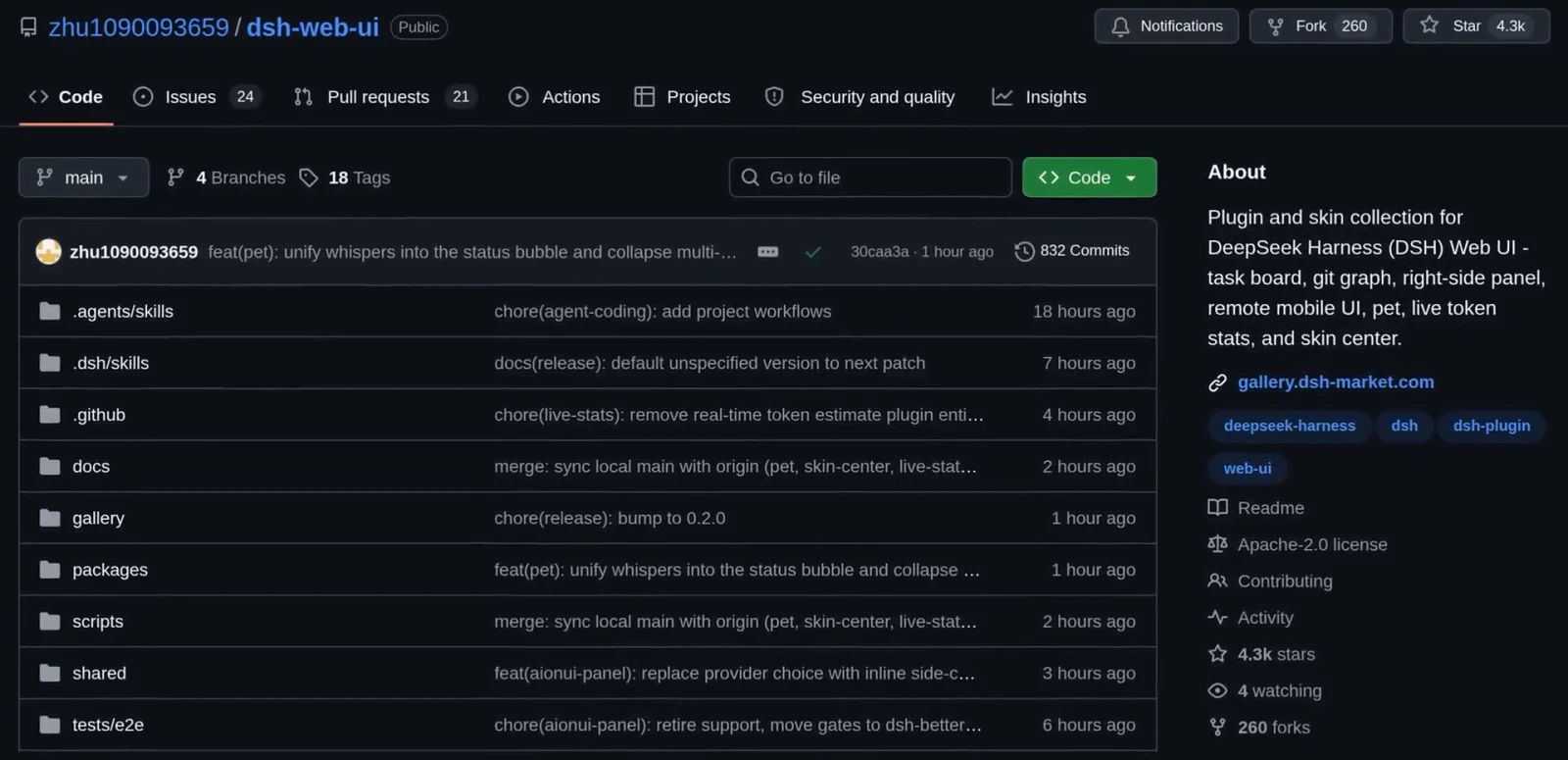
dsh-web-ui 仓库自述:任务看板、移动端 UI、皮肤中心一栏看全。Watch at 5:32 - 9
Pick a skin on dsh-market.com
The ecosystem's workshop ranks 18 community skins by popularity — in the recording, Blue Fantasy holds the #1 spot beside Abyssal Maid Atelier and Harbor, each card listing its author and version. Skins install straight into the web UI, so the interface you just learned keeps its layout and changes its coat.
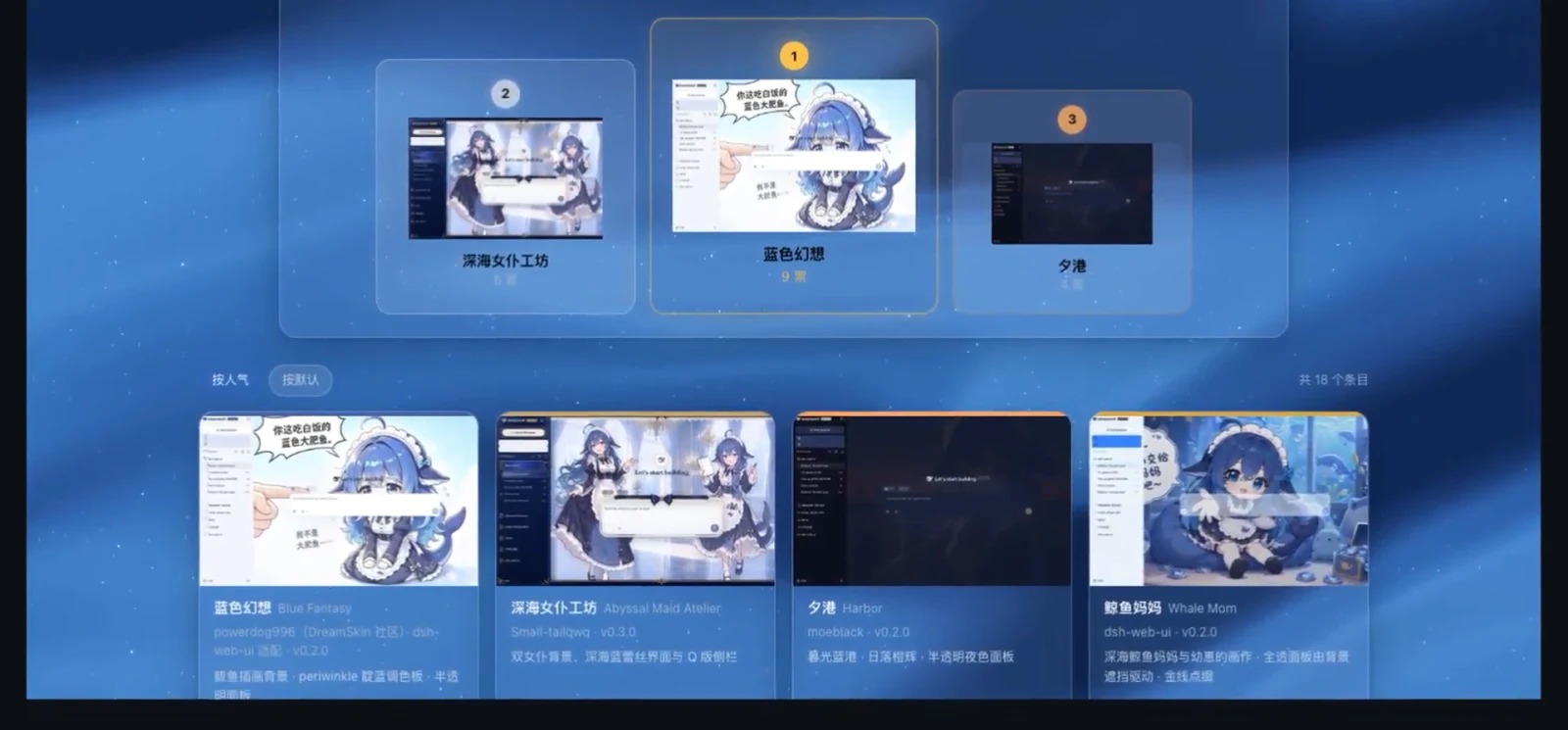
创意工坊按人气排 18 套皮肤,选中即可装进 Web UI。Watch at 4:50
FAQ
Questions this page gets asked most, answered from the recordings above.
I closed the terminal — what was the web UI address again?
Re-run `dsh web`: it always prints its address (in these recordings, http://127.0.0.1:3080) before opening the browser. If the tab ever fails to pop, type the printed URL manually; `dsh web --no-open` starts the server without auto-opening a browser when you'd rather click the link yourself.
How do I open this web UI from my phone?
Two routes. Inside the same Wi-Fi, install the dsh-web ecosystem (step 7): its mobile remote pairs your phone by QR code and streams the UI with touch controls. Outside your network you need a tunnel — the site's remote-access guide walks the free ngrok path step by step.
Can I try the web UI without installing anything?
Yes — `npx @deepseek-ai/dsh web` downloads and runs DSH in one line (the recording pinned 0.1.0-rc.6); type y at the npm prompt and nothing stays installed. A global install gives you the shorter `dsh web`, and the version you get may differ, so trust the address your own terminal prints.
Is the dsh-web ecosystem safe to add?
It mounts through DSH's official plugin profile mechanism without modifying core code, per the project's README — but it is a third-party community project: read the README and sources before installing and decide for yourself. Star counts and download numbers in the screenshots were true on the recording day (2026-09) and will have moved on.
Related guides
Where to go next, depending on what you're setting up.
Remote access from your phone (ngrok)
Expose the same 3080 web UI through a free tunnel and drive your home agent from any outside browser.
Read the guidedsh-pocket: DeepSeek Harness in your pocket
Pair your phone by scanning a QR code: the dsh-pocket plugin mirrors your computer's dsh web over LAN or a free Cloudflare tunnel, with real-time two-way control — 7 frame-checked screenshots.
Read the guideDSH Common Errors and Hands-On Fixes
Match your symptom — install failure, plugin-caused startup crash, or a broken update — against real screenshots and commands cross-checked with official discussions.
Read the guideRemote & mobile collection
Every curated remote-access client — dsh-web, dsh-pocket, Agents-Anywhere, dsh-mobile — on one shelf.
Read the guideInstall DeepSeek Harness on Windows
Get the global dsh command working first — the web UI in this guide launches from it.
Read the guideDesktop apps for DSH
The official desktop client and community wrappers — other shells around the same agent.
Read the guidedsh-tui terminal onboarding
Prefer the keyboard-driven terminal face of the harness? Profiles, skills and jobs in the community TUI.
Read the guideSources & credits
All screenshots come from public screen recordings; each figure deep-links back to the exact second it was taken from. Text, structure and conclusions are our own. Facts were cross-checked against the dsh-web GitHub README and this site's install guide. For the tunnel path to the same UI, read Remote access from your phone (ngrok)