
DSH on Your Phone: Three Routes, Frame Verified
A local container client, a native Android terminal and the QR-paired DSH Mobile clients — what actually runs on a phone in 2026, one frame at a time.
Last updated: 2026-10-07
DeepSeek Harness runs your agents, your plugins and your sessions — and sooner or later you want it in your pocket. Reality check: there is no official mobile app that installs and settles it. What works today are three real routes with different trade-offs: a community-built native client that pairs with your computer over a QR code, a local container client that runs the full dsh stack on the phone itself, and a Linux terminal app that runs dsh natively before the phone's browser takes over. This page walks all three — routes two and three step by step from two phone screen recordings, route one from its development receipts.
If all you want is to reach your computer's dsh from the couch, none of this is needed — the pocket mirror plugin or a tunnel gets there in minutes, and the cluster note below draws the line. For the full catalog of phone-and-browser options, see the remote & mobile collection. remote & mobile collection
TL;DR
- ▸Three routes put dsh on a phone: a QR-paired native client (community-built), a local container client, or a native Android terminal install.
- ▸The container route is full dsh: plugins run, model and reasoning level switch, traces stay inspectable, files move through a shared folder — all frame-verified.
- ▸DSH Mobile — the Android client with QR pairing, Wi-Fi/Tailscale and no cloud — is a community project announced in the official repo's discussions, not an official DeepSeek product.
- ▸No clean recording of the QR-pairing flow exists yet (checked 2026-10-07), so route one is documented from its receipts; this page upgrades the moment a source appears.
The three routes, side by side
Route 1 · Native mobile client with QR pairing — DSH Mobile
The youngest route, documented in discussion #8907 of the official deepseek-ai/deepseek-harness repository: a Kotlin Android app whose companion plugin gives the paired phone a limited HTTPS API — the web UI itself is never exposed to the network. Pairing is a one-use QR invitation, valid for 15 minutes, that also pins the computer's certificate; each phone gets its own revocable key, with read-only or can-run-tasks permission. It connects over home Wi-Fi or Tailscale without touching the router, the QR scan works without Google Play services, and models, tools and history stay on the computer. An iOS-flavored twin is in beta at dshmobile.app: paste the host address and token, connect over Cloudflare Tunnel or Tailscale.
Straight talk on supply: on 2026-10-07 we went through Bilibili's dsh mobile and DSH Mobile search results frame by frame and found zero clean recordings of the apk install or the QR-pairing flow — every existing video shows one of the other two routes. Rather than pad this section with unrelated footage, route one stands on the receipts below; when a net-clean source shows up, frames land here at zero cost.
Route 2 · Local container client — the full harness on the phone
The main recording runs an Android local-container client: the complete dsh stack, plugins included, lives on the phone. Seven frames verify the whole loop — the plugin panel, model switching, a live chat with its context injections, the trace of a finished turn, the shared folder and an in-app HTML preview. It is a real phone recording (dark mobile UI, no face, no captions) with only the corner watermark cropped away.
- 1
Confirm the full plugin system runs on the phone
The recording opens on desktop-grade chrome — the deepseek HARNESS header, the new-session button, the workspace list — with the Cordis plugin panel open. Three plugins show as running, each with a version picker, a stop toggle and a delete control, and the counter reads 4 running. First proof: the phone runs the whole harness, not a stripped chat wrapper.
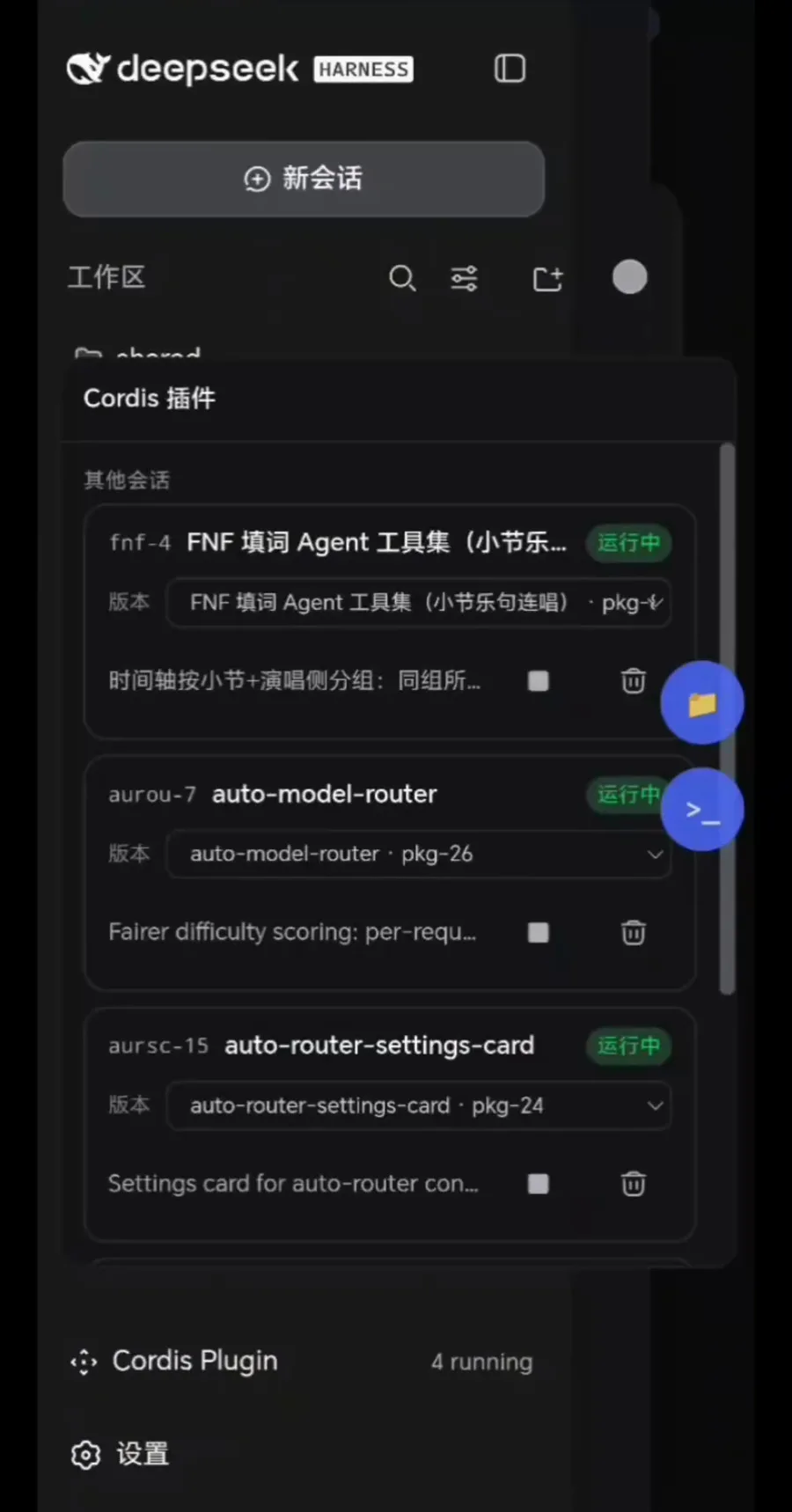
Version pickers and running badges: the desktop plugin panel, pocket-sized.Watch at 0:08 - 2
Switch model and reasoning level from the home screen
The home screen carries the explore banner and two selectors: the dsh workspace and Standard mode. Tapping the mode selector opens a menu with Model — Kimi K3-256K in this recording — and Reasoning level, Default here. Whatever models your dsh configuration offers appear in the same menu, so model choice travels with the phone.
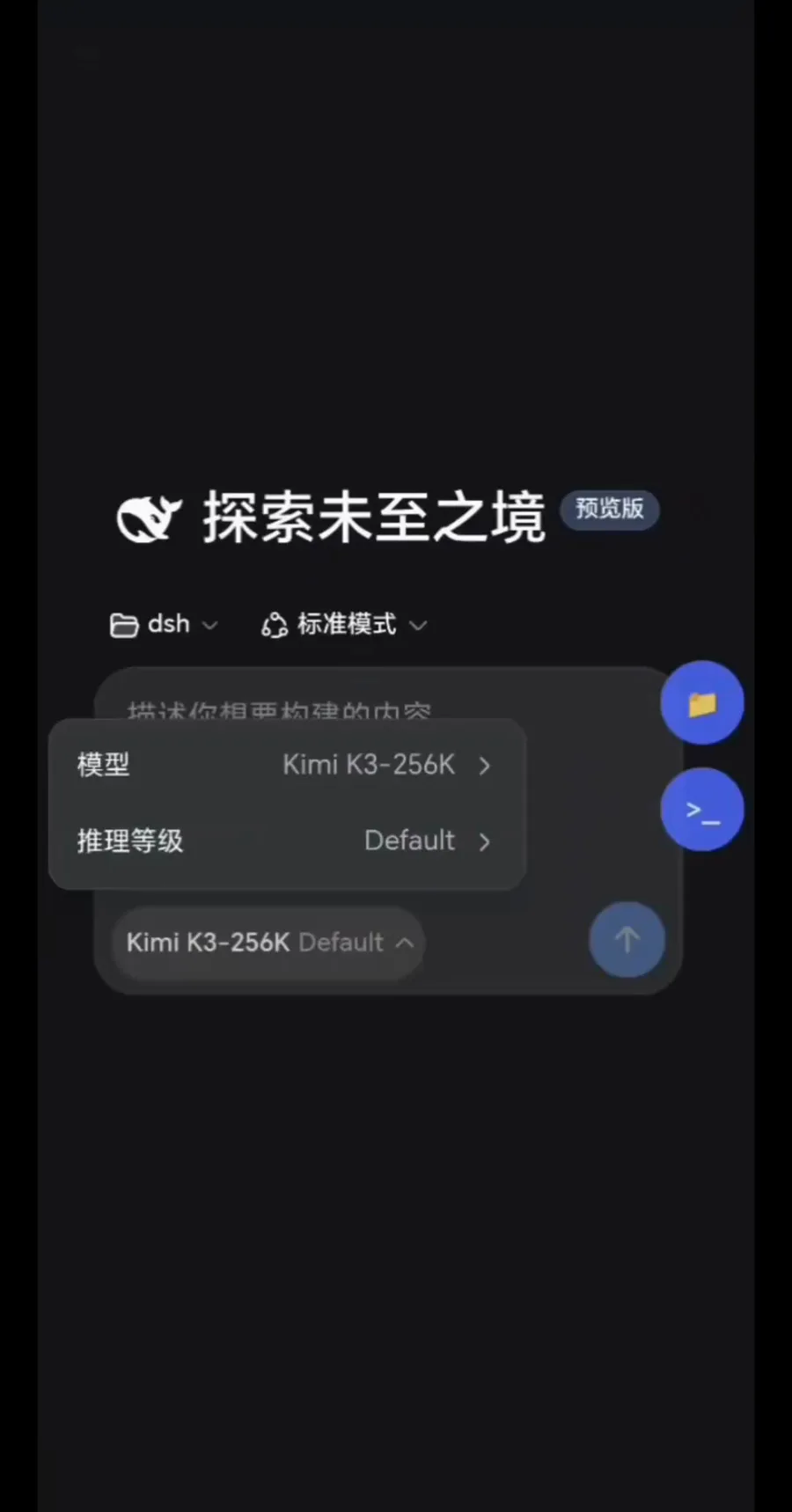
Model and reasoning level switch right from the home screen.Watch at 0:16 - 3
Send a task and watch the context assemble
Asking which model are you from the phone, the transcript shows dsh's machinery in the open: an injection of the dsh system prompt, an injection of the skill catalog, then a thinking entry as the model starts. The answer had not streamed in yet at this frame — the point is that the plumbing is visible on mobile exactly as on the desktop.
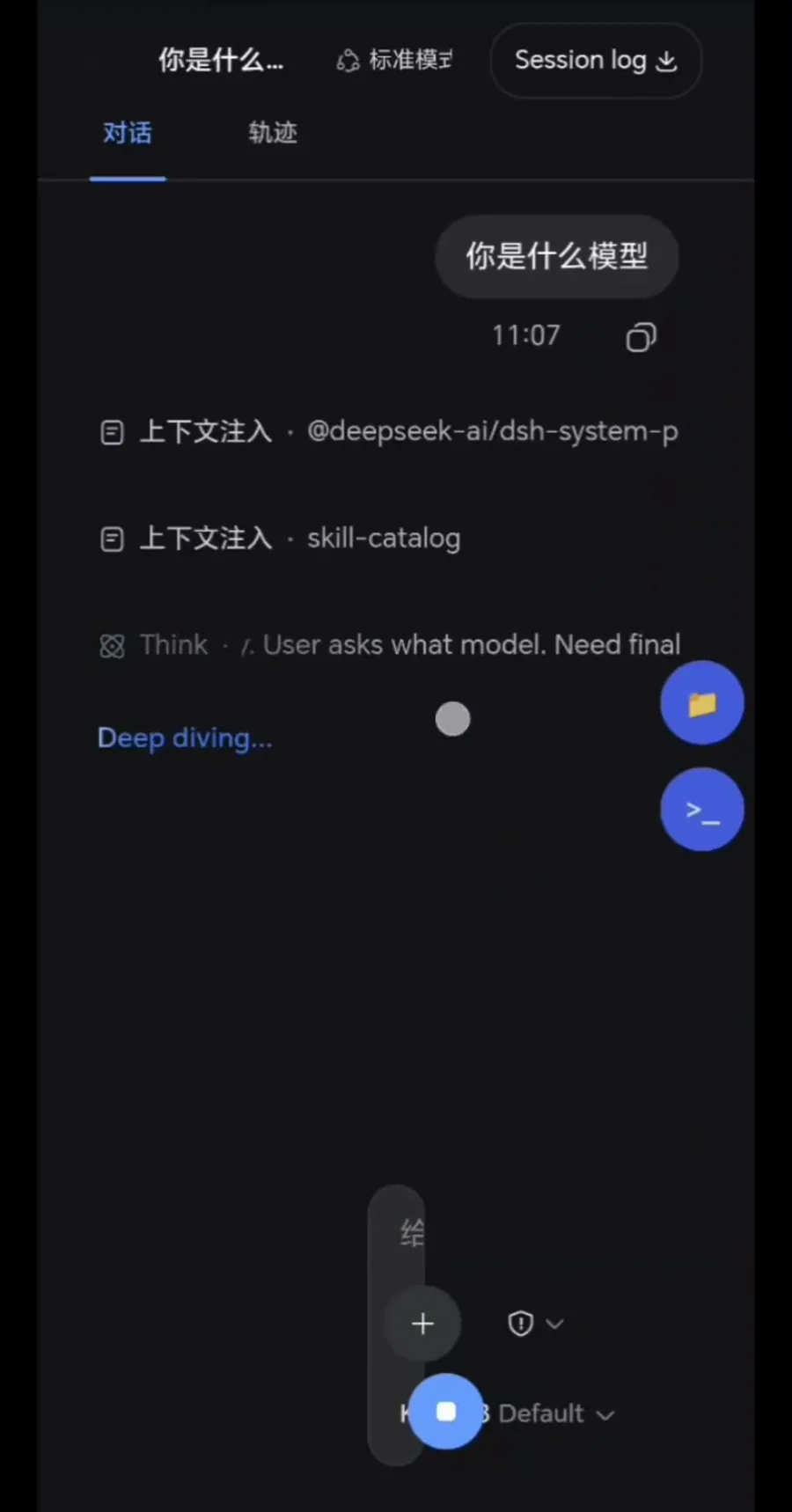
Context injections and the thinking indicator render inline, mid-turn.Watch at 0:32 - 4
Expand the injection to audit exactly which skills loaded
Tapping the skill-catalog entry expands it: five Exa skills — build-with-exa, company-research, exa-contents, exa-search, lead-generation — each with its description, listed above the finished identity answer (I'm Kimi, developed by Moonshot AI…). Nothing about the injection is a black box on a phone screen.
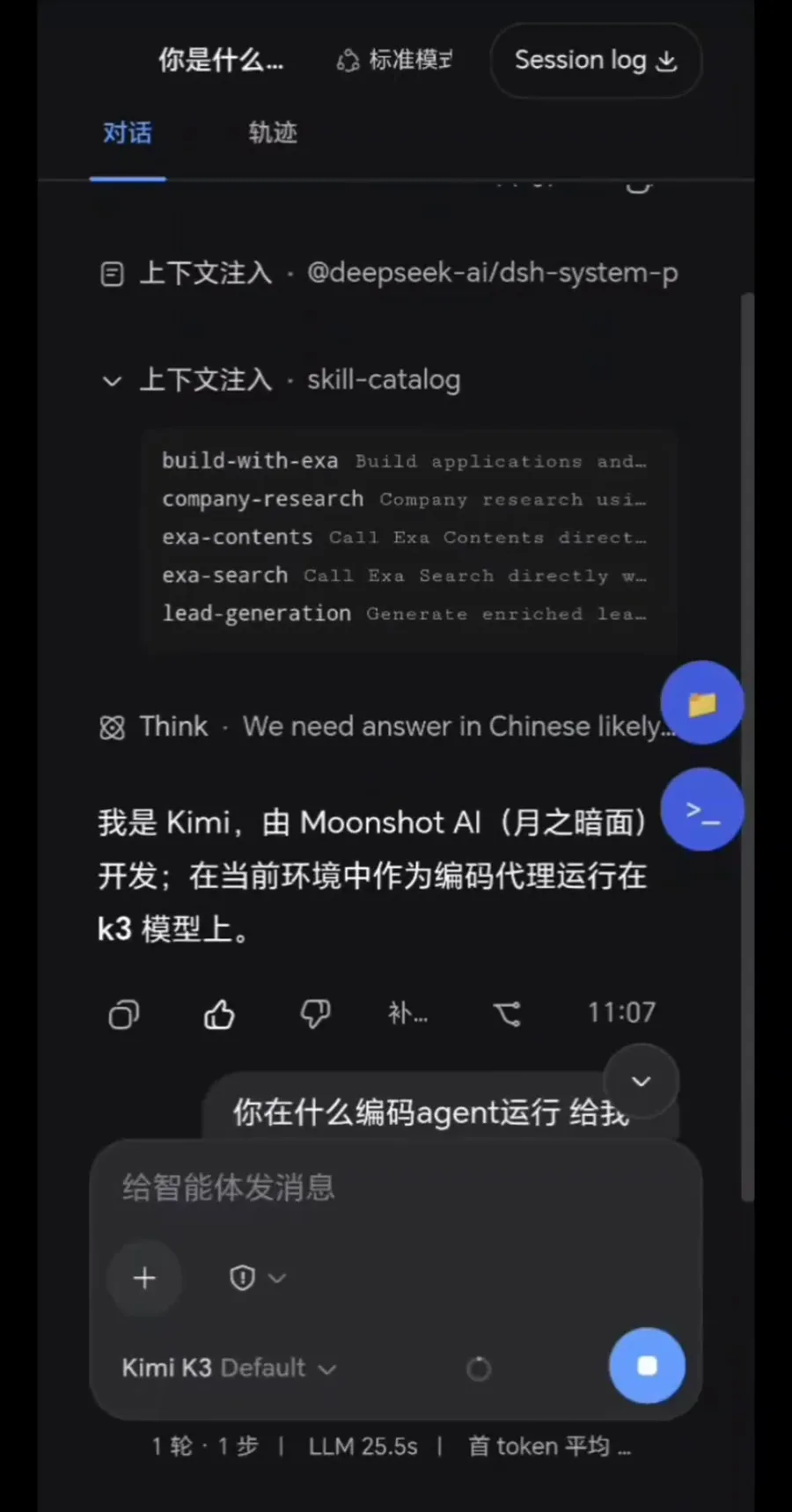
Five Exa skills in the expanded catalog — nothing hidden on mobile.Watch at 1:06 - 5
Inspect the trace of the finished turn
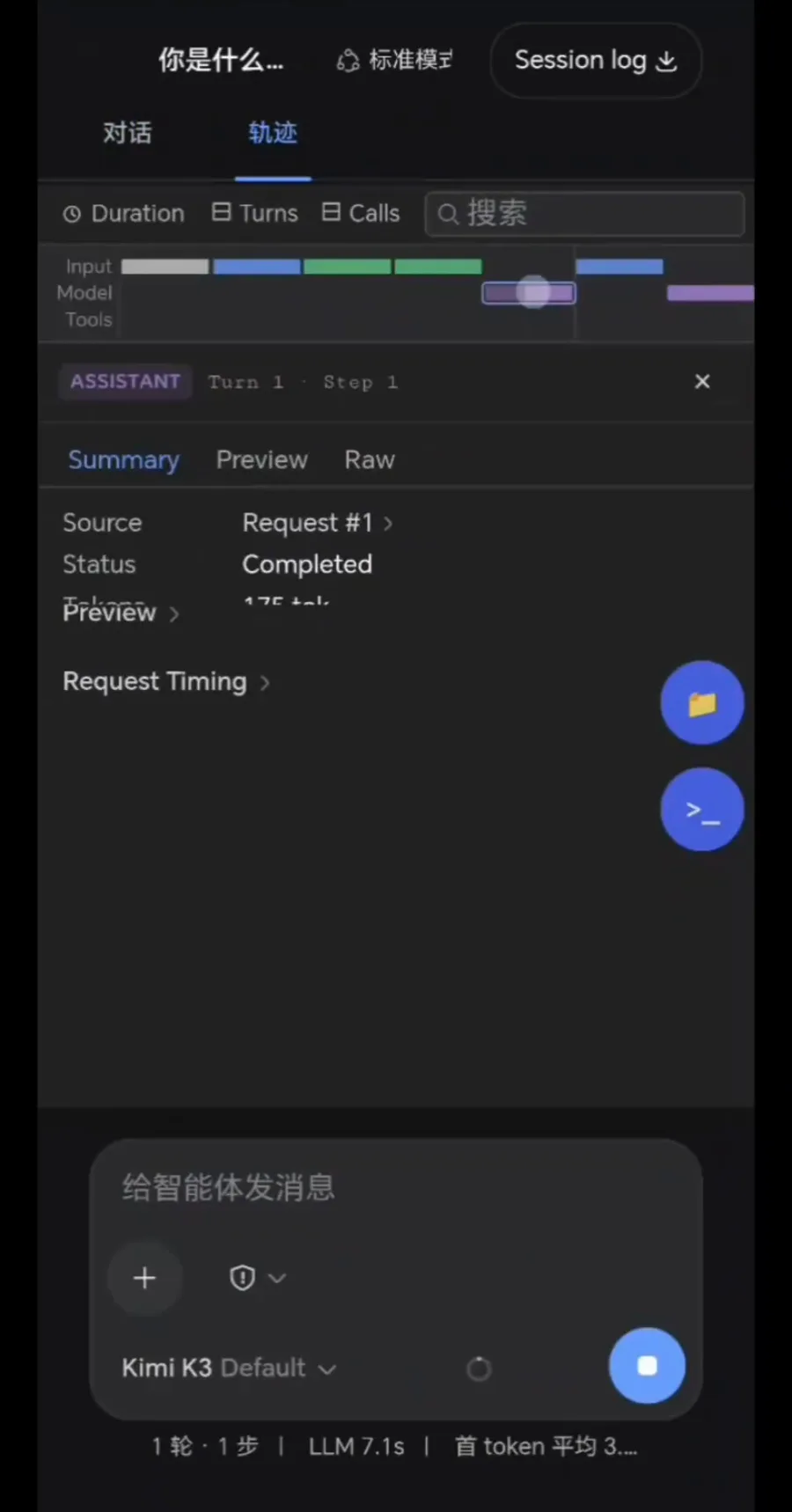
The Traces tab is the differentiation evidence that this is the real harness: a filter bar with Duration, Turns and Calls, a color-coded token timeline for input, model and tools, and the ASSISTANT Turn 1 · Step 1 panel showing Source Request #1, Status Completed, 175 tokens and request timing. The composer status line reads 1 turn · 1 step, LLM 7.1s.
Request #1, Completed, 175 tokens — the whole trace on one screen.Watch at 0:58 - 6
Exchange files through the shared folder
The phone's file manager opens …/emulated/0/dsh-shared/ — twelve files this session: rhythm-game audio as .ogg, chart .json files and lyric .txt files. A long-press brings up copy, move, delete, rename, compress, share and more. This folder is the bridge between the container's filesystem and the phone's own storage.
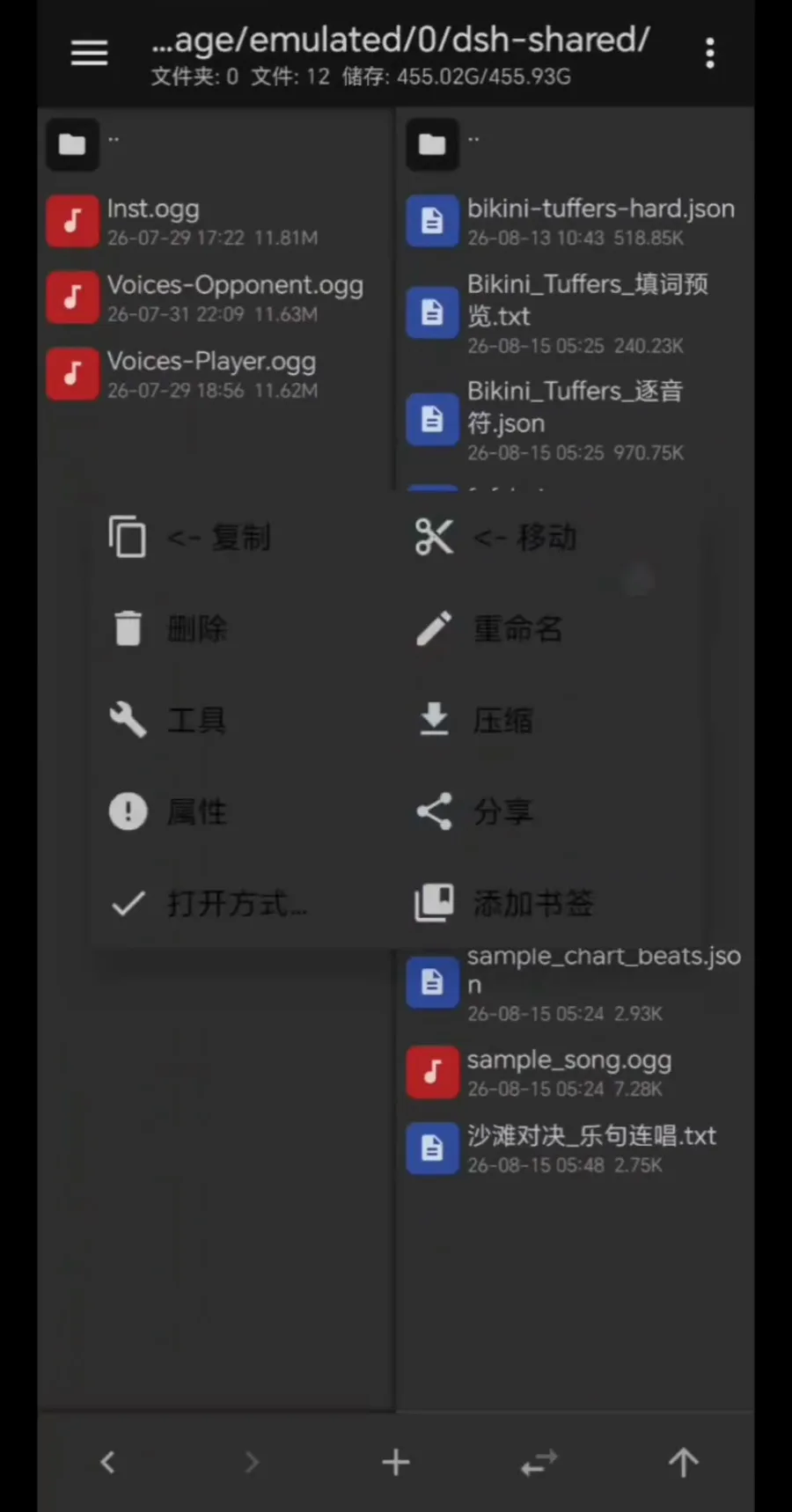
dsh-shared is the bridge between the container and the phone's storage.Watch at 1:18 - 7
Close the loop: preview what the agent built
The task asked for an HTML hello page; the in-app preview renders it — a dark card reading Hello from DeepSeek Harness! Build on the phone, preview on the phone; nothing rounds back to a desktop.
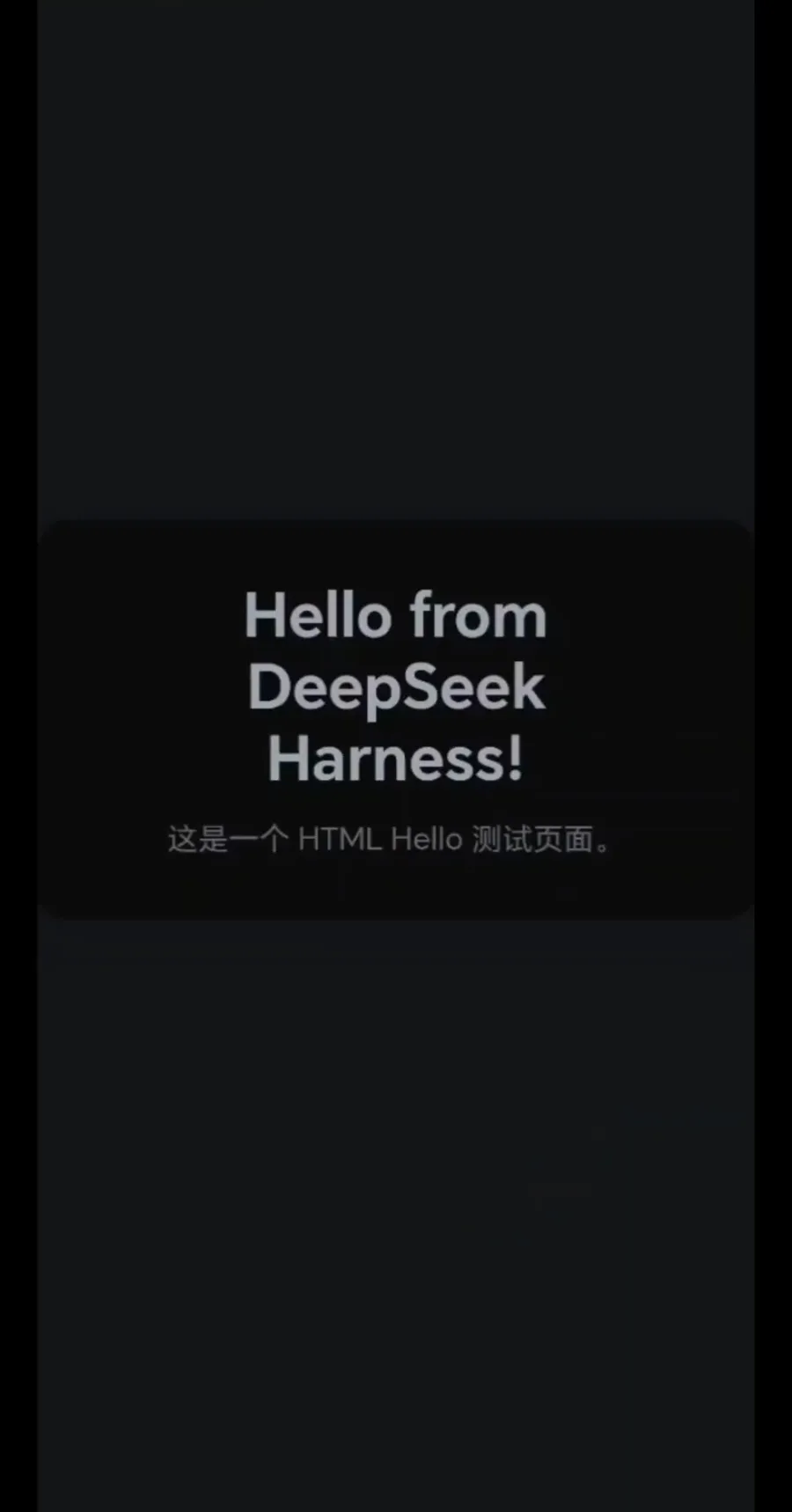
Built on the phone, previewed in place — loop closed.Watch at 1:26
Route 3 · Native Android terminal, then the phone browser
The purist route: install a Linux terminal app on Android, grant it disk and port permissions, pull dsh's build guide and run it — then open the web UI in the phone's browser. The second recording (708 plays by the API count; its search page showed 7,080 — the known tenfold inflation) contributes two frames: the terminal app's settings screen and the browser loading the HARNESS splash.
- 8
Prepare the terminal environment
Route three starts in a Linux terminal app's own settings, white and sparse: adjust disk size for the root partition, port control to allow or deny listening ports, and recovery options for the partition. Sizing the disk and permitting ports is what gives dsh room to run natively on the phone.
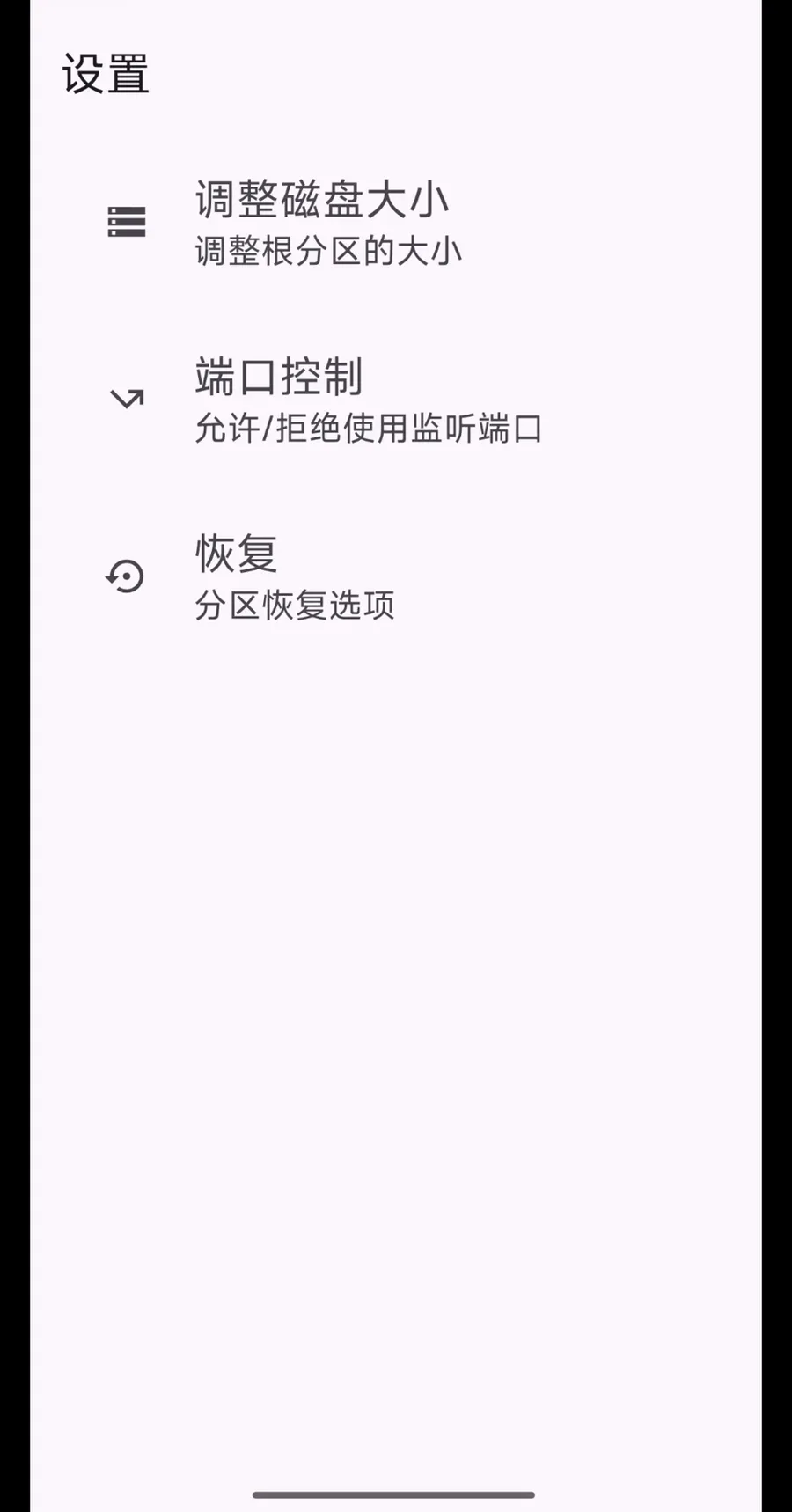
Disk size, port control, recovery: prep work before dsh runs natively.Watch at 2:08 - 9
Open the dsh web UI in the phone browser
With dsh running in the terminal, the phone's browser loads the local address: the HARNESS splash with a Loading plugins spinner, under an address bar reading DeepSeek Harness. From here the web UI is the same one a laptop would see — the terminal route ends where every dsh session begins.
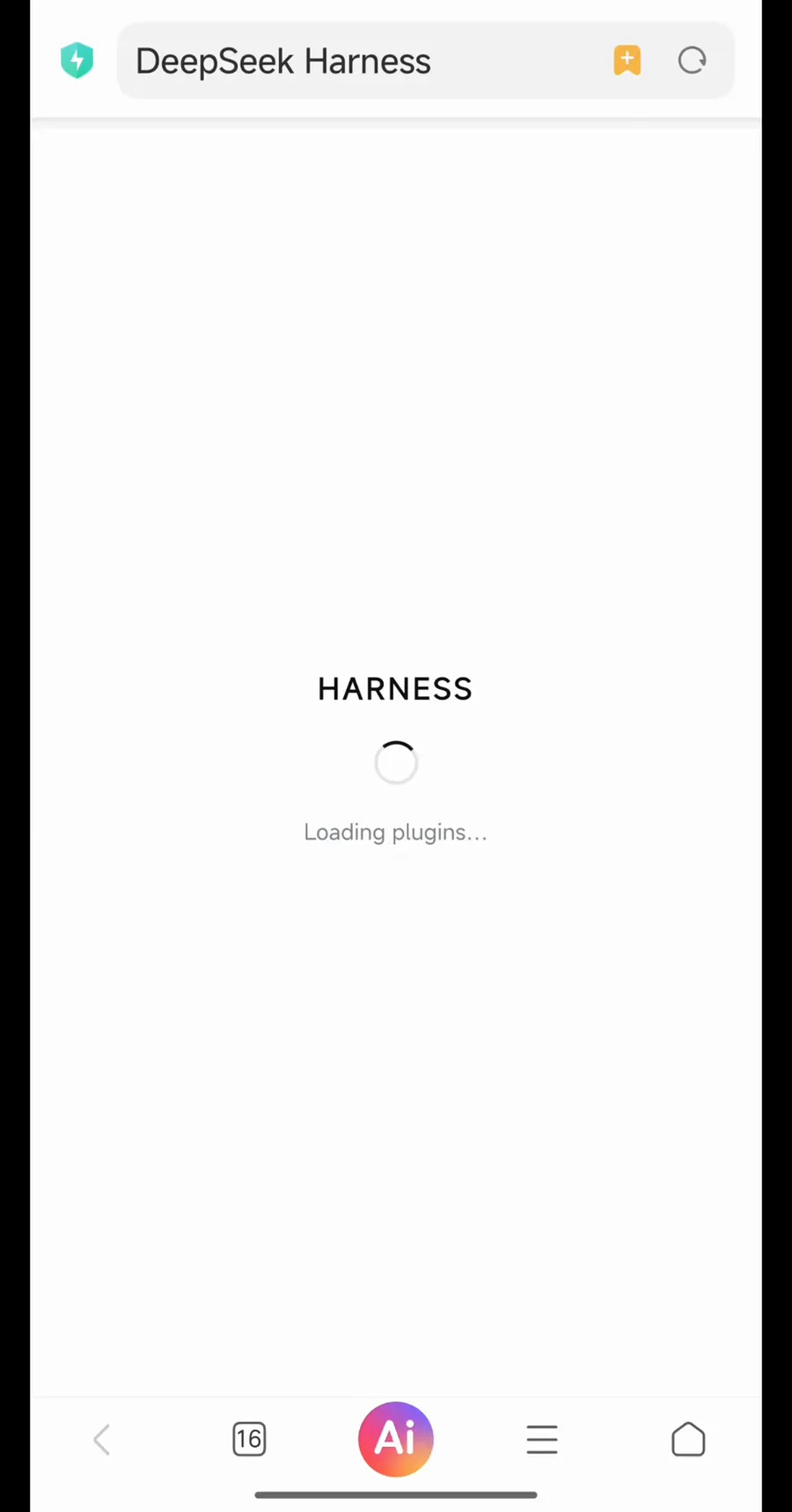
The familiar HARNESS splash, now loading in the phone's browser.Watch at 3:25
dsh on mobile: FAQ
The questions people actually ask before putting the harness on a phone.
Where do I download the DSH Mobile apk?
From the project's own GitHub releases, not an app store: v0.4.0 ships a signed APK, the companion host-plugin zip and SHA-256 checksums to verify the download. Android installation is therefore a sideload — allow install-from-unknown-sources for your browser or file manager. On iPhone, the counterpart is the dshmobile.app beta distributed through the App Store.
Is DSH Mobile an official DeepSeek product?
No — and the project says so itself. Discussion #8907 in the official deepseek-ai/deepseek-harness repository opens with a disclaimer: unofficial, independently developed by a community member, not affiliated with or endorsed by DeepSeek. The official repo hosts the announcement thread, which is why people call it official; the code and releases live in the author's own repository.
How is this different from dsh-pocket or remote access?
Direction of travel. dsh-pocket (★1,555) and tunnel-based remote-access setups keep dsh on the computer and turn the phone into a remote screen over a QR code, LAN or a tunnel. This page's routes run dsh on the phone itself — a container client or a native terminal — so your sessions survive even with the computer off. All of them appear together in the remote & mobile collection.
Does dsh on the phone work offline?
The harness runs on the phone, but model calls still go to whatever API endpoint you configured — offline you get the UI, not fresh completions. Two genuinely offline facts from the receipts: the QR pairing scan works without Google Play services, and in the client route models, tools and history never leave the computer. The container and terminal routes keep sessions and plugins on the device.
Which dsh versions does the Android client support?
The #8907 post names 0.2.0-rc.2 and 0.2.1-alpha.1 as verified, and the companion plugin refuses to start on versions it has not been checked against. Before installing, hand the project's setup guide to your dsh agent — it checks the versions and asks for your approval at each step.
Can I use an iPhone?
Yes, via the separate iOS beta at dshmobile.app: install the host, start it with a token, expose it privately through Cloudflare Tunnel or Tailscale, then paste the host address and token into the app. Tokens live in the iOS Keychain, and the site claims no cloud, no account and no analytics. It belongs to the same community, unofficial category — not an official client.
Related guides
The other half of the mobile story: reaching a dsh that stayed on your desk.
dsh-pocket: DeepSeek Harness in your pocket
Pair your phone by scanning a QR code: the dsh-pocket plugin mirrors your computer's dsh web over LAN or a free Cloudflare tunnel, with real-time two-way control — 7 frame-checked screenshots.
Read the guideRemote access from your phone
Expose the dsh web UI with a free ngrok tunnel and drive your home agent from any outside browser — no companion app, eight verified steps.
Read the guideDSH Web UI, start to phone
Launch the web UI with dsh web, learn the 3080 workspace, slash skills and model settings, then reach it from your phone — nine verified steps
Read the guideLAN access & ports
Why http://<your-ip>:3080 is loopback-only, how --port works, and the dsh-LAN plugin that opens the web UI to your phones — firewall included.
Read the guideSources & credits
Frames come from two phone screen recordings, cropped per the inventory recipe (the top watermark/status-bar band removed, 900-pixel-wide portrait exports); play counts use the Bilibili API figures. Route one has no frames anywhere yet — its facts were cross-checked against discussion #8907, the dsh-mobile repository and dshmobile.app on 2026-10-07.