
dsh-web-ui
キュレーション掲載メンテナンス: 活発zhu1090093659/dsh-web-ui
DeepSeek Harness Web UI 向けプラグイン・スキン集。タスクボード、Git グラフ、右パネル、モバイルリモート UI、ペット、トークン統計、スキンセンターを収録
4,838
スター
298
フォーク
TypeScript
言語
Apache-2.0
ライセンス
2026-08-12
作成日
2026-08-19
最終プッシュ
README
dsh-web-ui · DSH Web UI
中文 | English
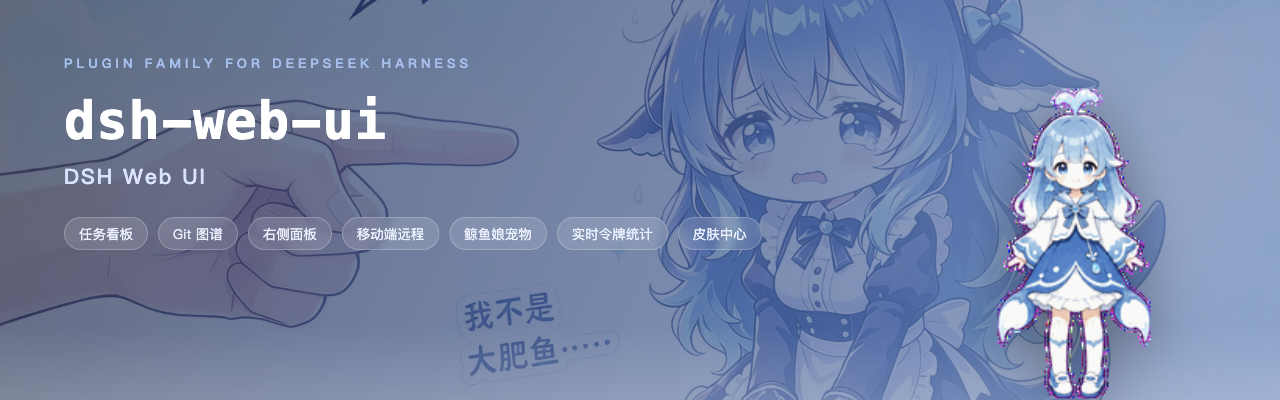





DeepSeek Harness(DSH)Web GUI 的插件与皮肤全家桶 · 一切皆开发,一切皆插件
梁神模式 · 任务看板 · Git 图谱 · 右侧面板 · 移动端远程 · SSH 运维 · 图像理解 · 鲸鱼娘宠物 · 皮肤中心
是什么
dsh-web-ui 继承 DeepSeek Harness(DSH)「一切皆开发、一切皆插件」的核心理念,也是这一理念在 Web GUI 上最完整的落地:它不只是一个插件包,更是一个可拓展性极强的插件生态。面向 DeepSeek V4 Pro 的「梁神模式」agent 预设,以及任务看板、Git 图谱、右侧面板、移动端远程、SSH 运维、图像理解、鲸鱼娘宠物和皮肤中心——每一样都是独立成包的模块,可插拔、可替换、可再开发;可以一次装齐全家桶,拼出完整的开发工作台,也可以只挑一两个,安静地融入原生界面。所有插件都走官方 profile 机制挂载到 dsh web,不改 DSH 源码;聚合包还能把外部插件(如 dsh-better-sidebar)拼进全家桶,详见 dsh-web-ui-all README。
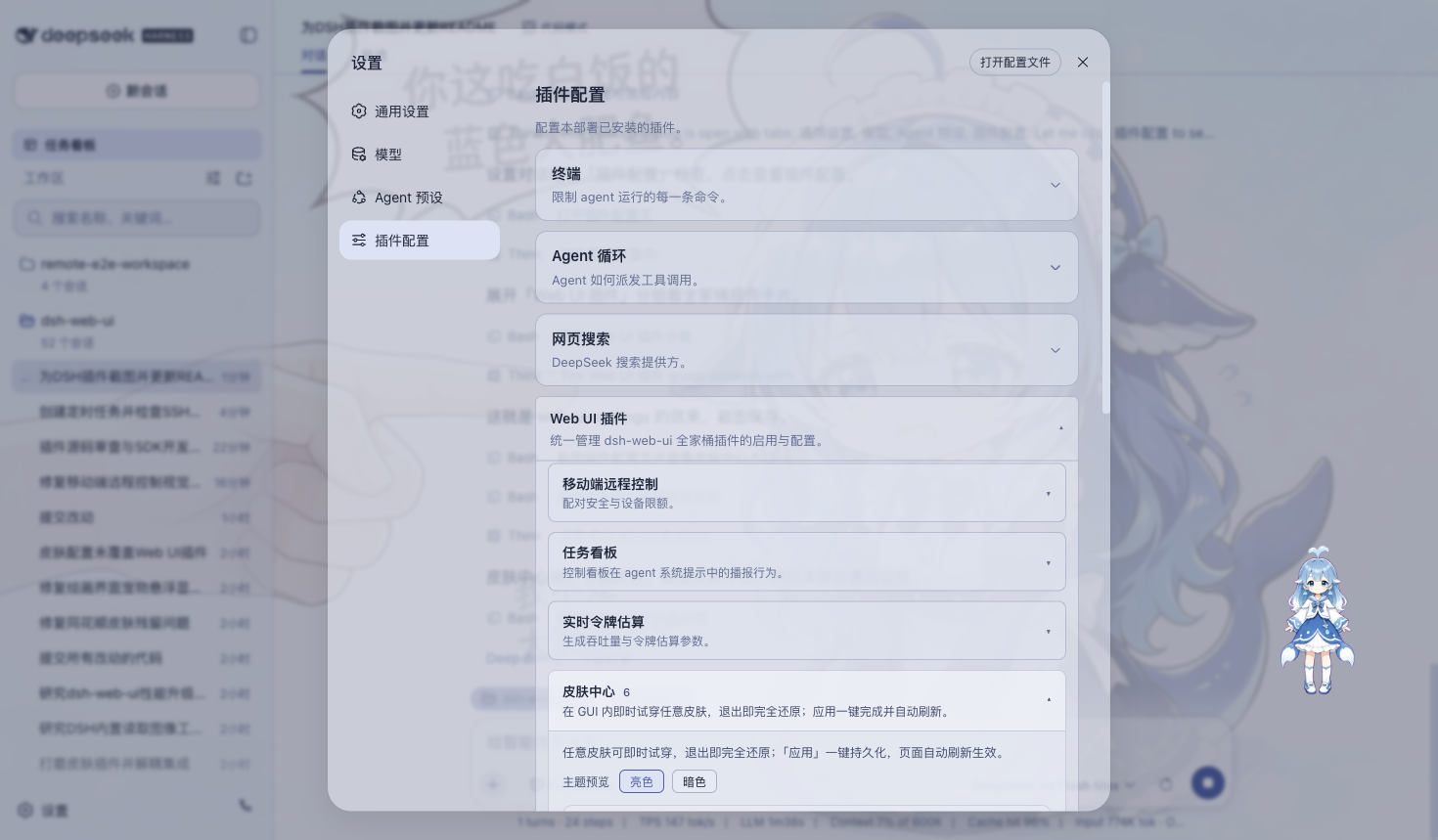
「一切皆插件」还贯彻到了皮肤本身:皮肤中心 v2 重构后,一款皮肤不再是耦合官方 DSH 的 npm 包,而是一个纯资产目录——一份 skin.json 清单加上样式、贴图与可选特效脚本,交由皮肤中心这一唯一加载器即时加载。皮肤与官方彻底解耦、只与皮肤中心耦合:官方升级不再牵动任何皮肤,新增一款皮肤也只需落一个目录,无需发布、无需安装。插件负责逻辑,皮肤负责外观,边界从此清晰。
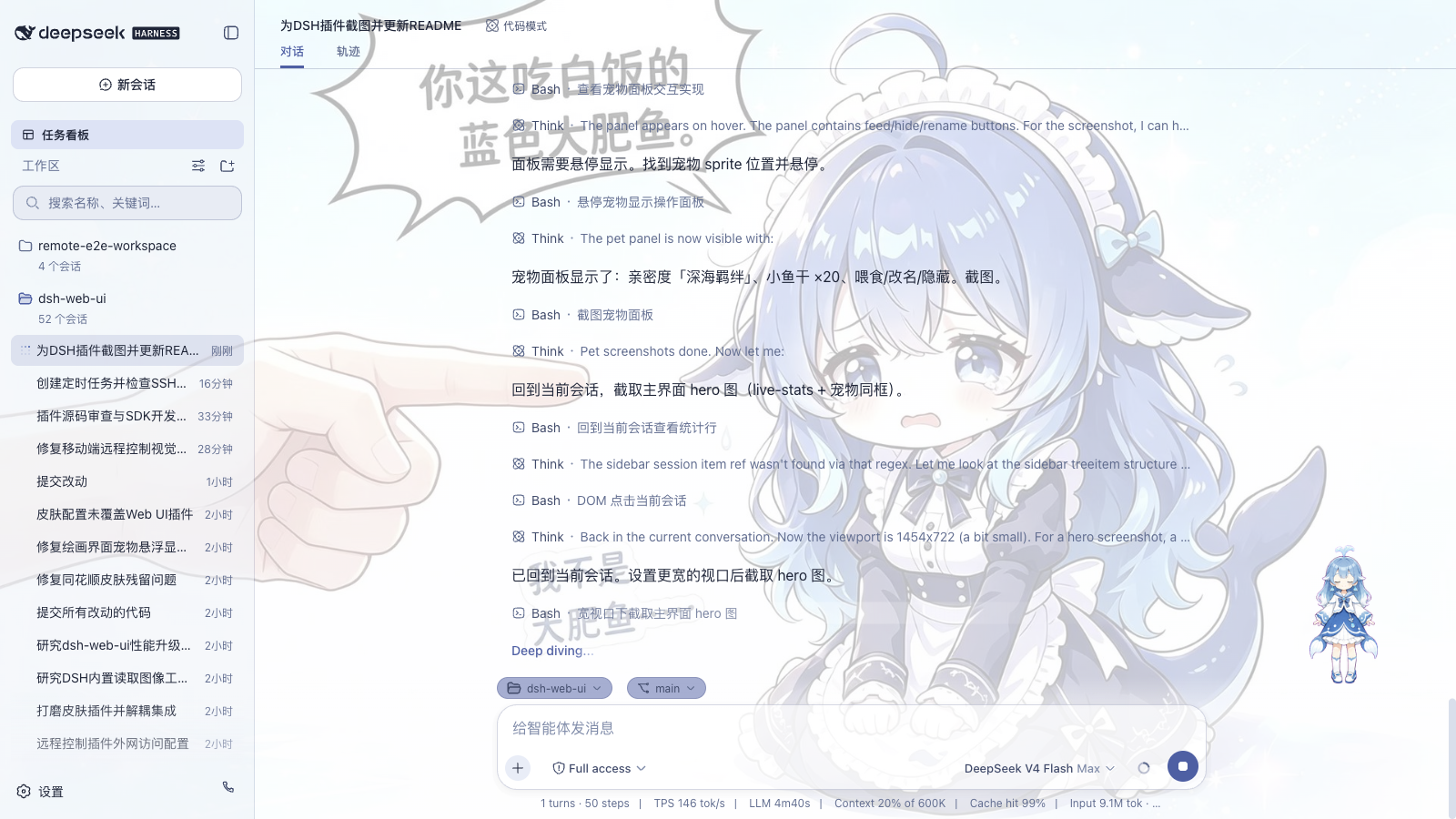
| 能力 | 原生 dsh web | dsh-web-ui 全家桶 |
|---|---|---|
| Agent 预设 | 官方预设(Standard / Minimal 等) | 梁神模式:面向 V4 Pro 的两阶段锚定预设 |
| 任务看板 | 无 | 多列看板 + cron 定时真实执行 |
| Git 可视化 | 无 | 分支泳道 + 提交历史图谱 |
| 文件预览与变更 | 无 | 右侧面板:better-sidebar(资源管理器 / 编辑器 / 终端 / Git / 浏览器);旧 aionui 面板已停止支持(默认关闭,设置卡可临时切回) |
| 移动端远程 | 无 | 扫码配对,SSE 实时同步 |
| 远程服务器运维 | 无 | SSH 面板:终端 / 传输 / 隧道 / 集群 |
| 图像理解 | 无 | describe_image 视觉工具 |
| 主题皮肤 | 默认主题 | 皮肤中心 12 款,先试穿再应用 |
功能插件
梁神模式
DeepSeek V4 Pro 对首轮工具目录很敏感。社区评测里,官方 Standard / PTC 预设只有 91 / 92 分,Minimal 能到 99 / 96,但 Minimal 只有两个工具。梁神模式把这两步拼起来:新建会话时在预设选择器里选「梁神模式」,首轮按 Minimal 开局(只暴露持久 bash 与 str_replace_editor,只放行你自己的消息),轨迹锚定后自动切到 PTC Mode,完整工具注册表、workspace 指令和 skill 目录随后恢复。Windows 原生环境实测(DeepSeek V4 Pro)98 / 99,均值 98.5,不是抽卡,也不需要牺牲完整工具能力。
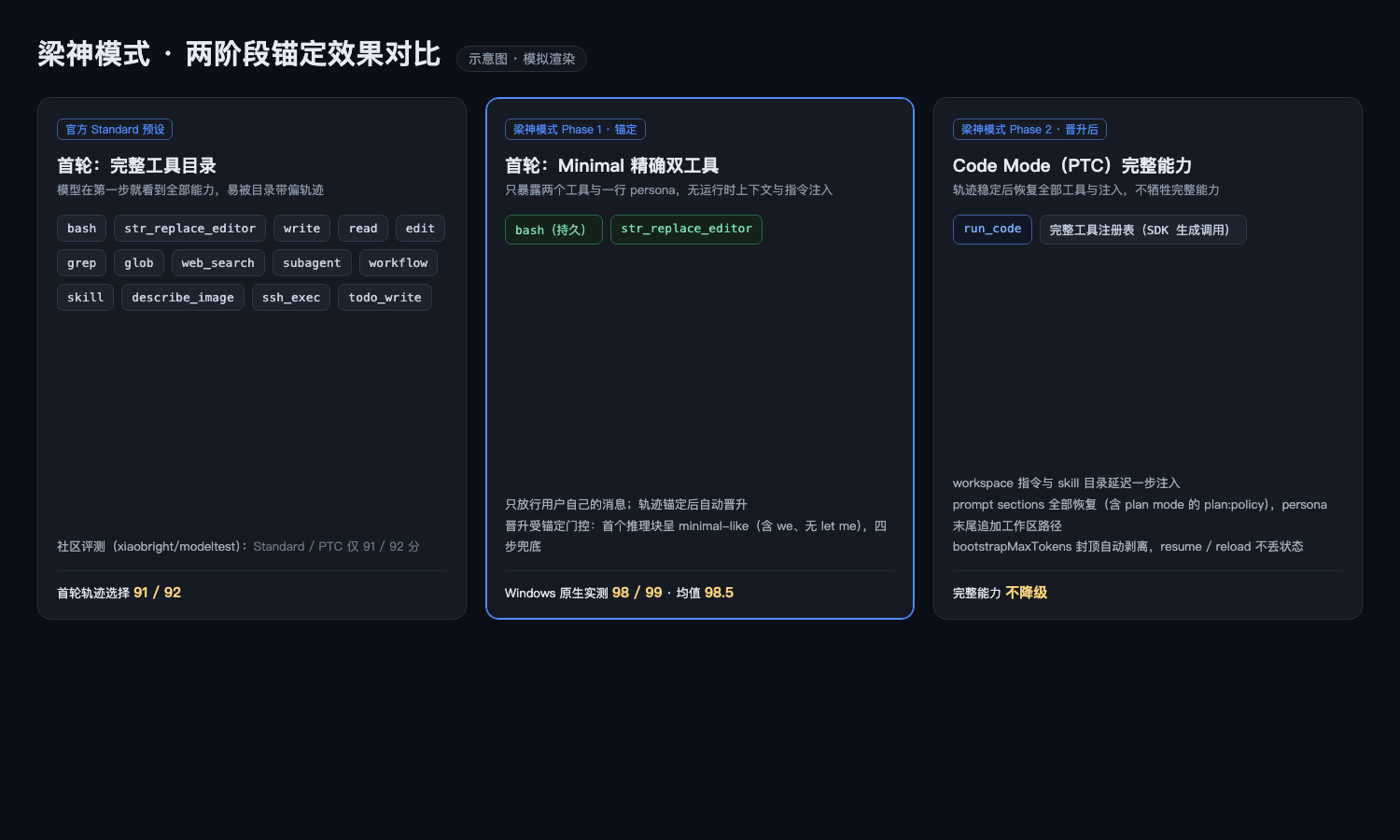
原理、稳定化控制与限制详见 dsh-liangshen README。
任务看板
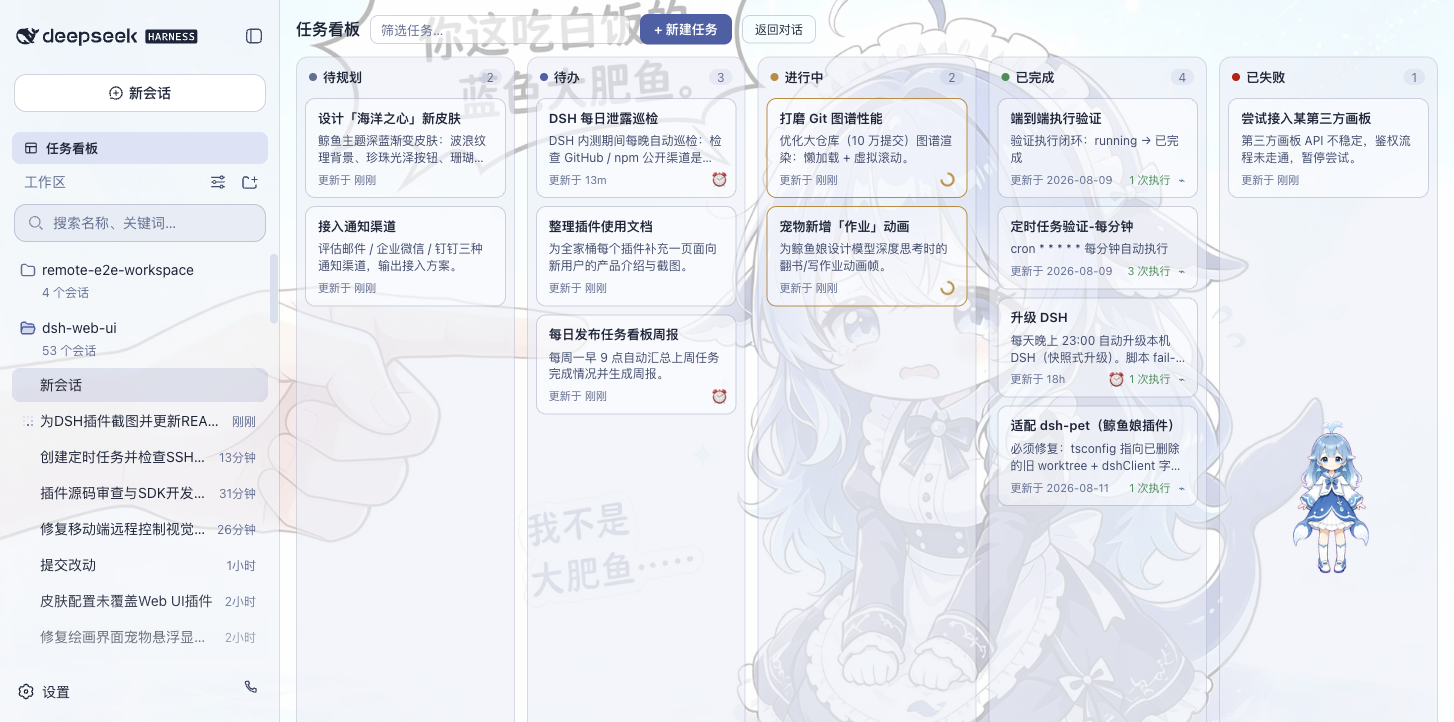
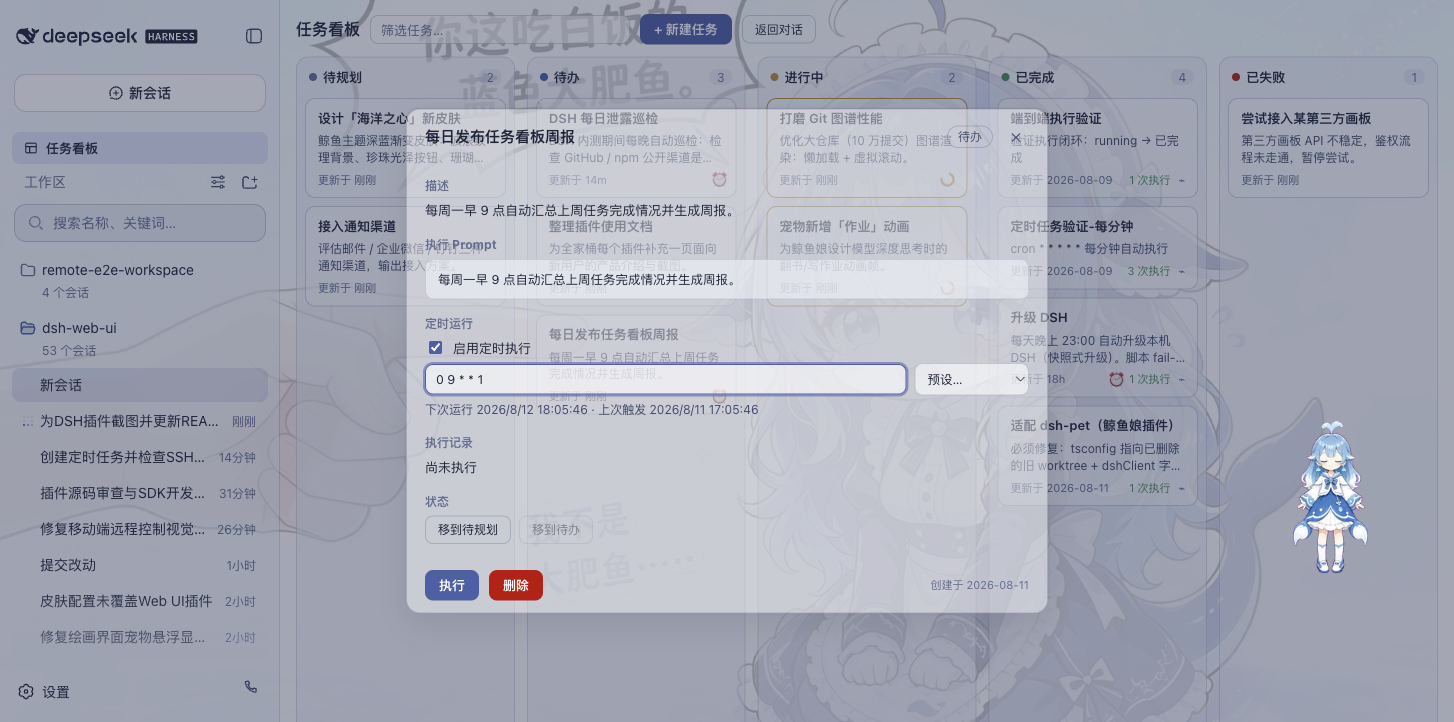
侧边栏点「任务看板」进入。任务按五列摆开:待规划、待办、进行中、已完成、已失败。点卡片上的「执行」,任务交给真实的 DSH 智能体会话去跑,跑完状态自动回写;想复盘就跳回执行会话看完整过程。
任务也支持 Host 定时跑:详情里配 cron 表达式(比如每天 23:00 自动升级 DSH、每周一 09:00 生成周报),关闭浏览器后仍会到点执行和结算。可选的空闲睡眠保护支持 Windows、macOS 和带 systemd-logind 的 Linux,允许屏幕熄灭,同时阻止整机因空闲睡眠;该设置默认关闭。
| 多列看板 | 定时执行 |
|---|---|
 |
 |
Git 图谱
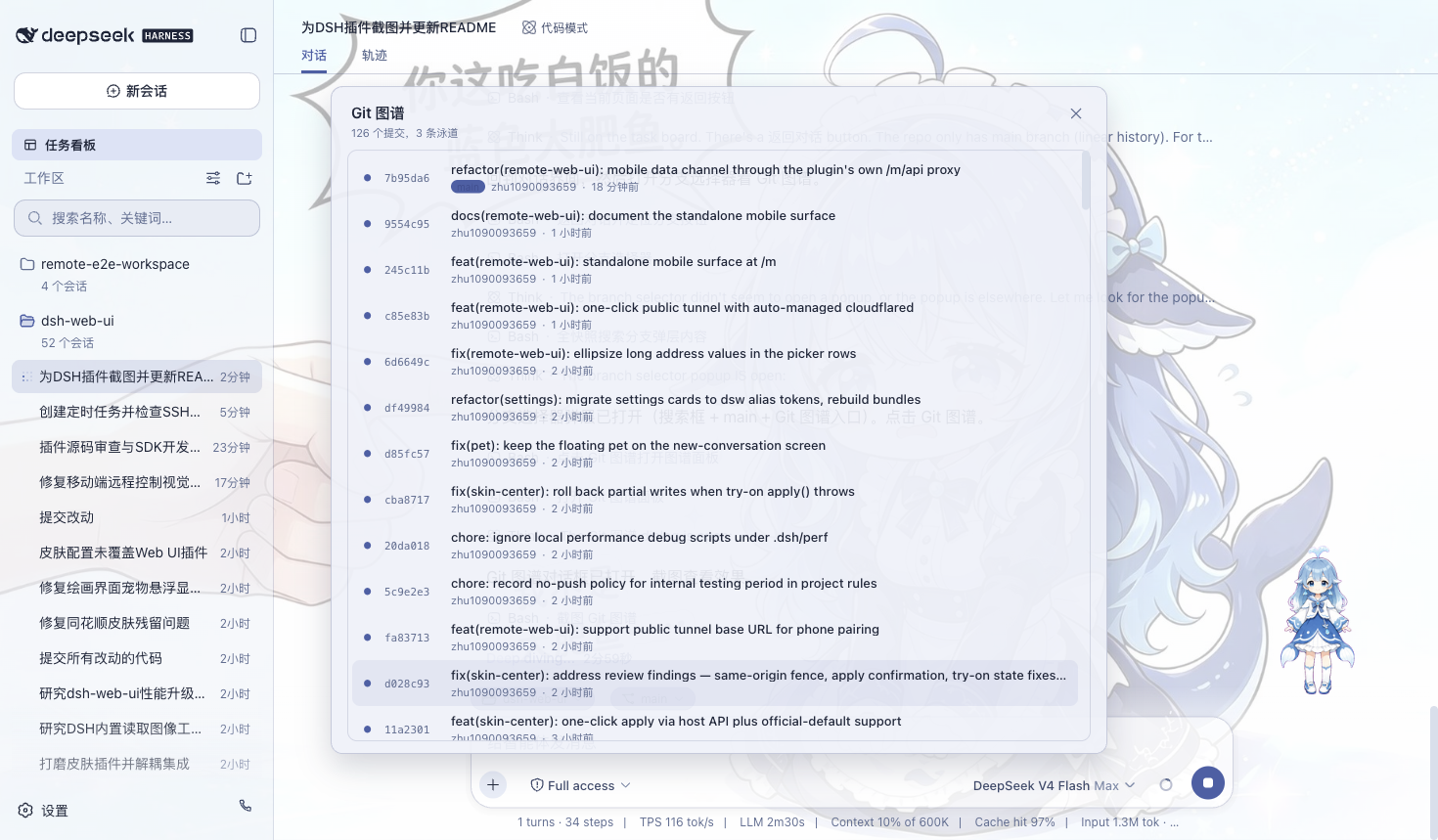
输入框上方有分支选择器,可以切分支、翻提交历史;Git 图谱把分支泳道和提交历史画出来,仓库再大也能顺着时间线找到变更。
移动端远程
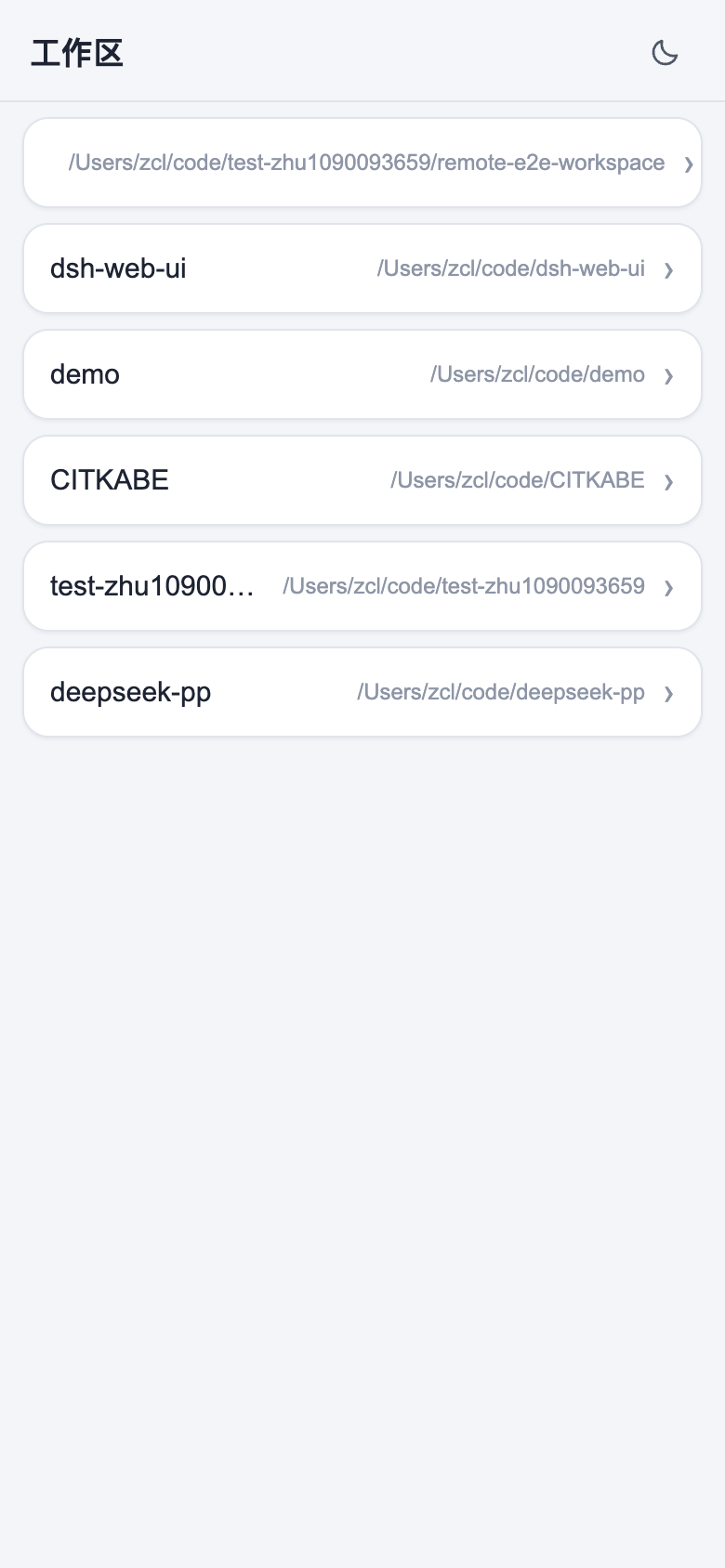
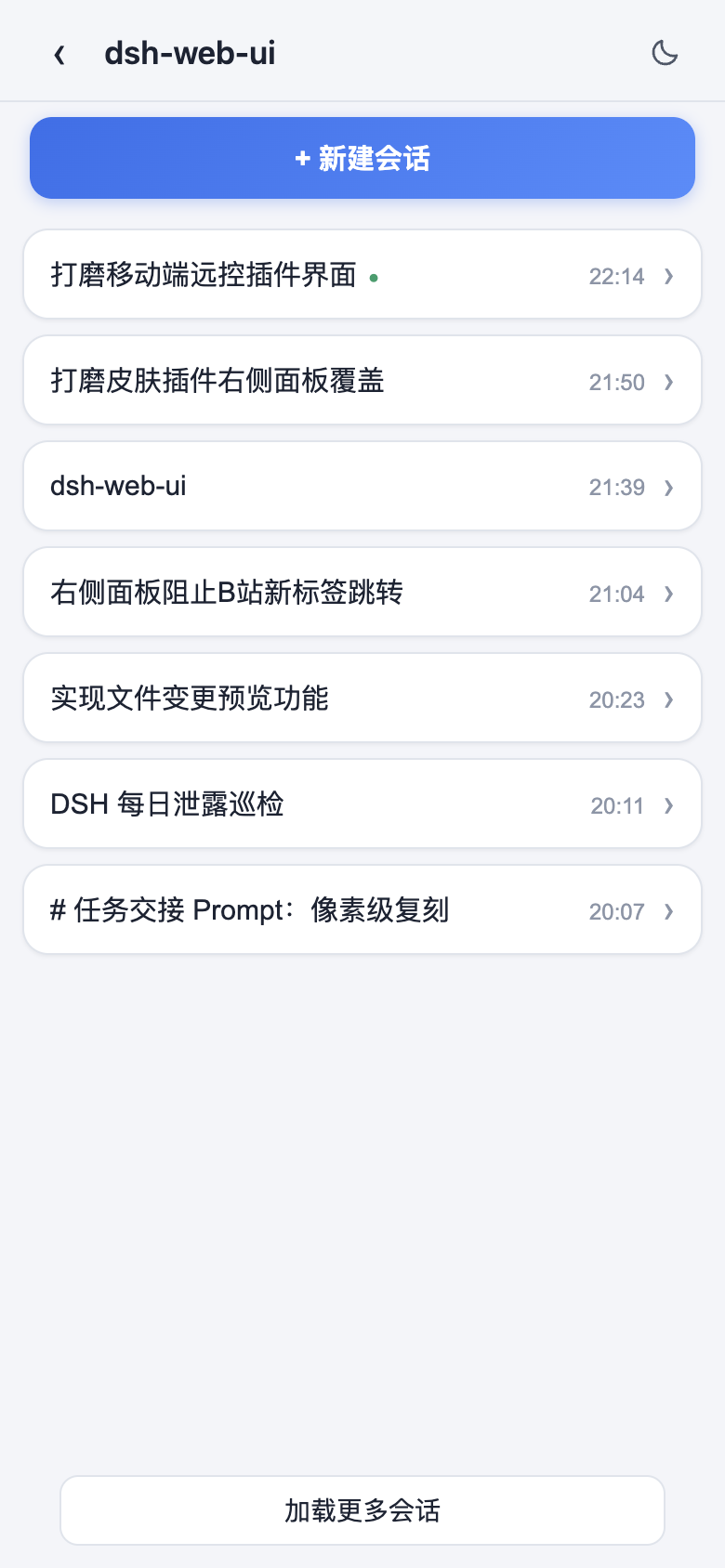
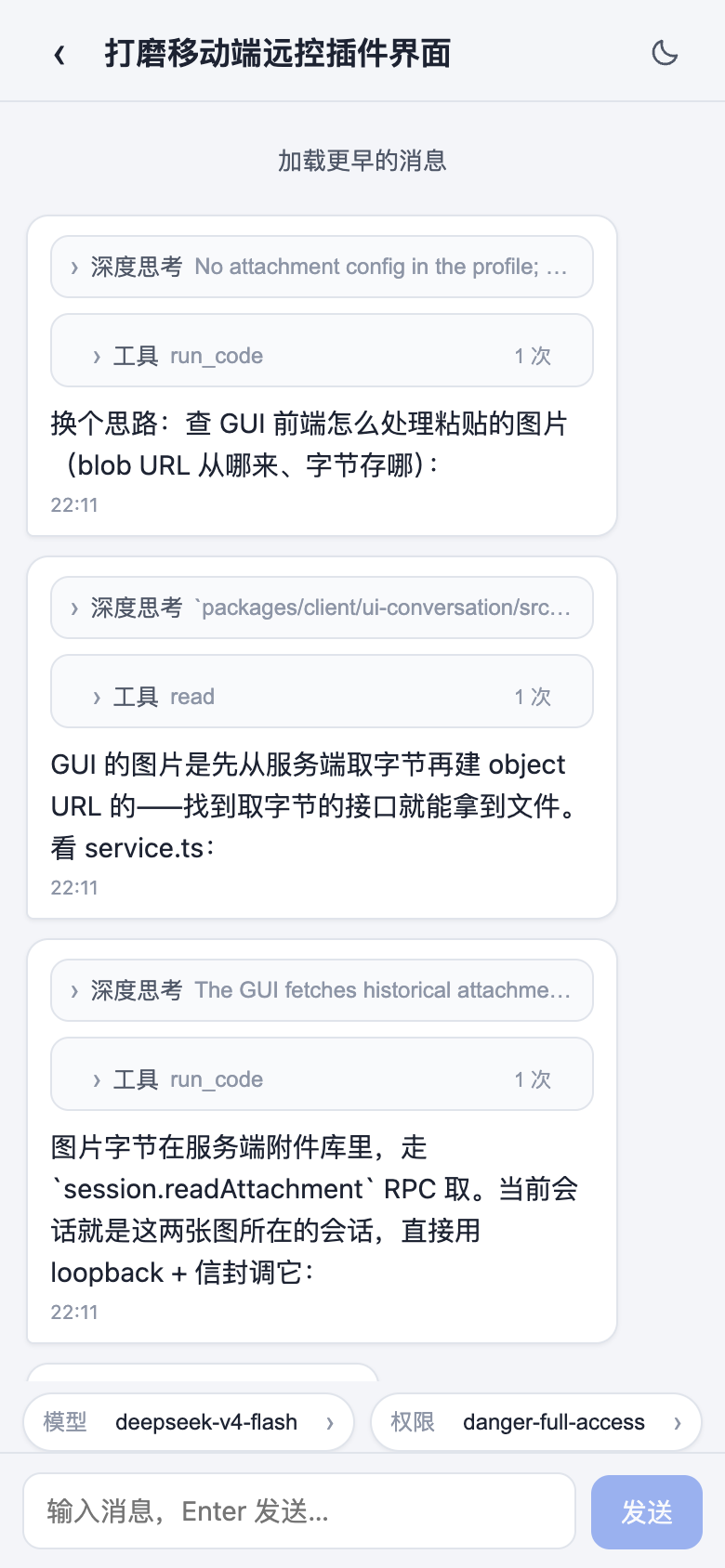
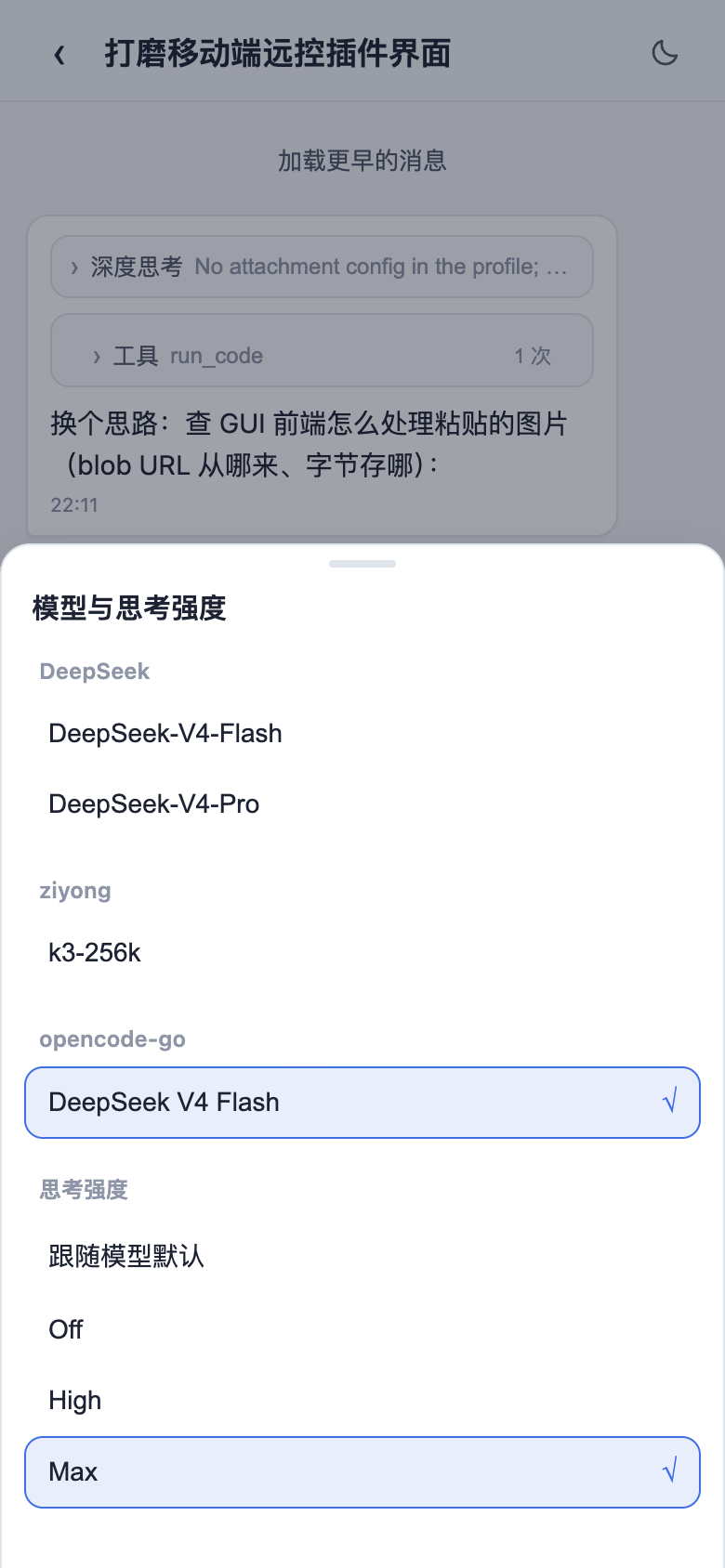
侧边栏底部的手机图标打开配对面板。扫码(或复制链接)配对后,手机进独立移动端界面,远程操作当前的 dsh web 工作区:看会话、开新会话、收发消息、切模型和思考强度、调权限预设,都和桌面端同步。配对令牌一次性、限时,「停止」随时吊销所有设备;二维码默认走局域网,开 cloudflared 公网隧道后手机在任何网络都能配对。
实时消息与隧道:移动端靠 SSE(Server-Sent Events)收实时消息。Cloudflare quick tunnel(trycloudflare.com)和 Tailscale Serve 不透传 SSE,普通 HTTP 正常、实时推送到不了;这种网络下插件自动降级轮询,收发消息正常,只是新消息可能晚几秒。要即时推送就用支持 SSE 的隧道(Cloudflare named tunnel、自定义 TCP 端口转发等)。
| 工作区列表 | 会话列表与新建会话 |
|---|---|
 |
 |
| 聊天(折叠的深度思考与工具调用) | 模型与思考强度选择 |
 |
 |
远程连接
侧边栏「SSH」入口打开远程运维面板。主机支持密钥 / 密码认证,可从 ~/.ssh/config 一键导入;配置都在 ~/.dsh/dsh-ssh.json。对已配置主机可执行真实操作:
- Web 终端:xterm.js 远程终端,实时输出,窗口大小自适应;
- 文件传输:SFTP 上传 / 下载,有进度条,能浏览远程目录;
- 端口转发:本地隧道直连远程内网服务(数据库、API、管理后台),只监听 127.0.0.1;
- 集群执行:一条命令并发跑多台主机,按别名 / 环境 / 标签过滤;
- Agent 直连:Agent 和面板共用同一份主机配置,对话里说一句「连一下 xxx 看看状态」,智能体就去执行远程命令。
图像理解
给纯文本模型补上视觉:对话里提到图片(本地路径、http(s) URL、会话附件)时,describe_image 把图片发给配置好的 OpenAI 兼容视觉端点(Qwen-VL、GLM-4V、GPT-4o、本地 Ollama 都行)回答,进会话的只有返回的文本,图片本身不进会话记录。纯文本模型输入框没有图片入口,插件在输入框加了个图片按钮:选图后生成附件引用插进草稿,模型就能用 describe_image 分析;工具还支持 prompt 参数传自定义指令(OCR、UI 诊断、翻译),比默认描述准。端点、模型、密钥、默认指令在「设置 > 插件配置 > Image understanding」里配,即时生效。
右侧面板
右侧面板由外部插件 dsh-better-sidebar 提供(聚合包已集成并默认启用),支持其内置功能与第三方插件注册,详见其 README。
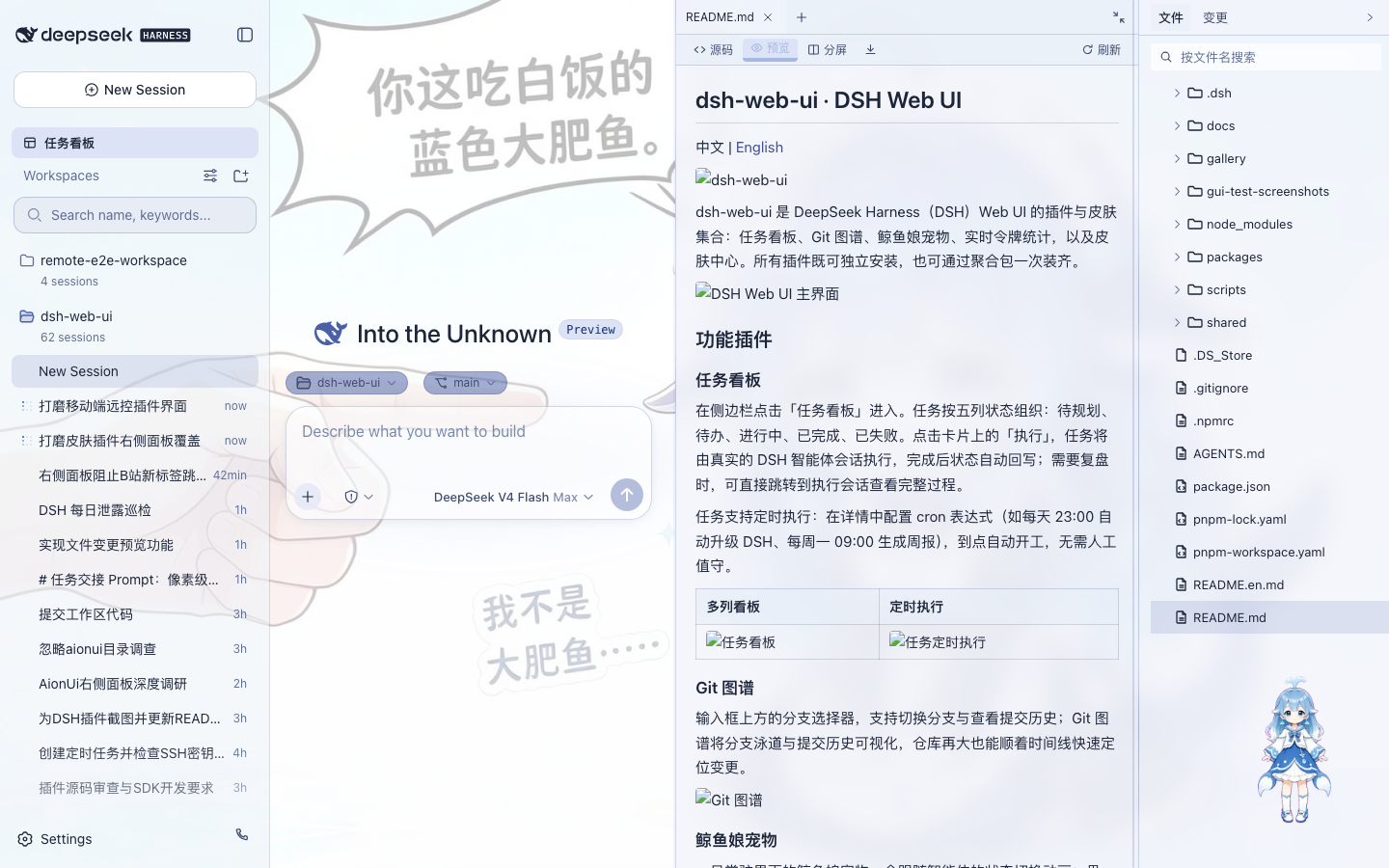
此前的 aionui-panel 右侧面板已停止支持:默认关闭,不再维护、测试或接受修复,后续版本将从全家桶移除;设置 → Web UI 插件 → 侧边卡片 卡内嵌其常用设置。
鲸鱼娘宠物
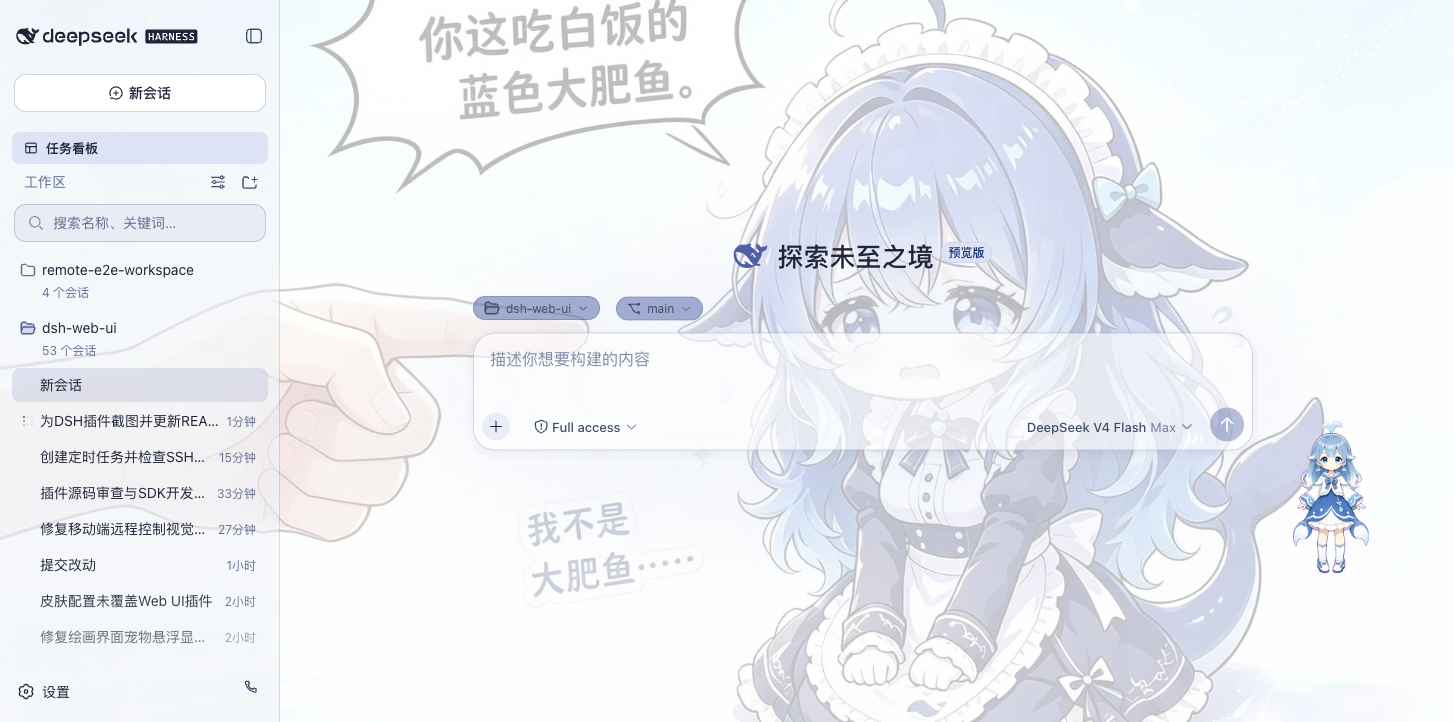
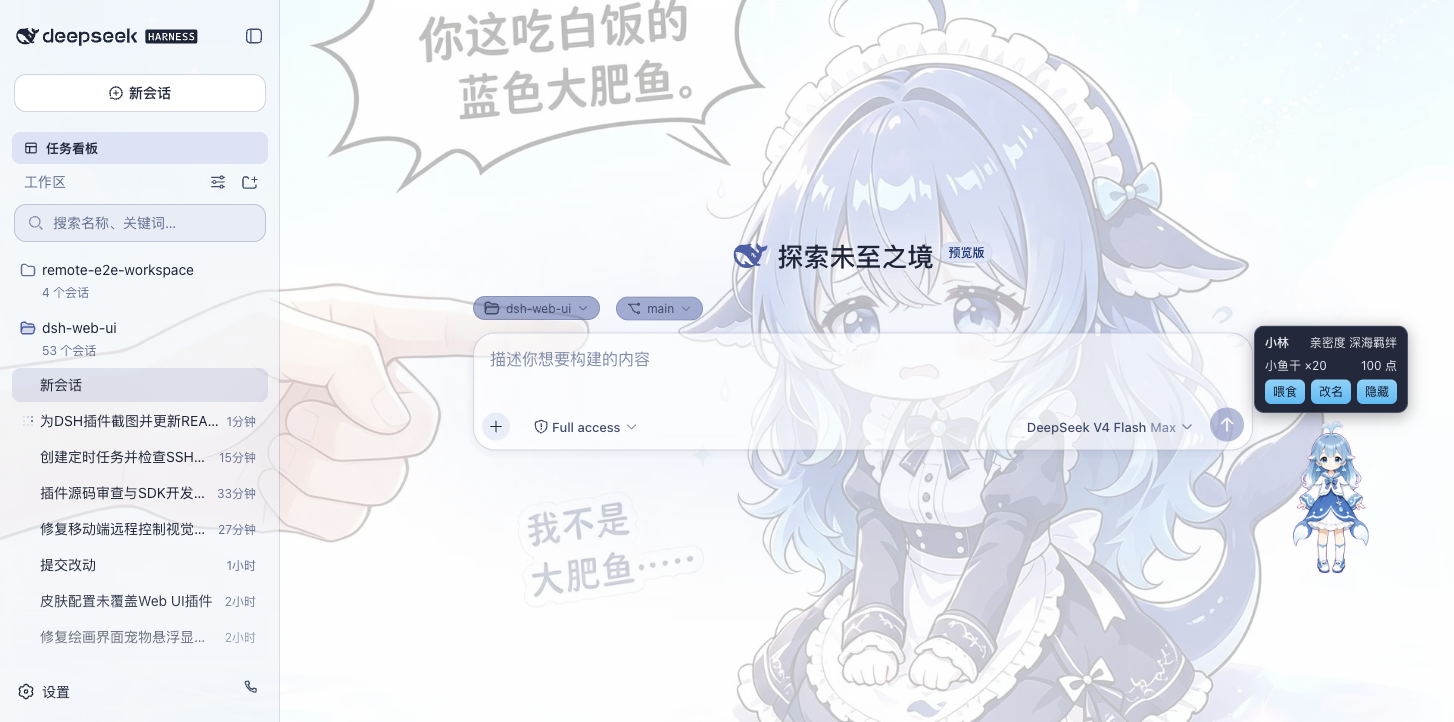
一只常驻界面的鲸鱼娘,跟着智能体状态换动画:思考、等待、工作、庆祝。可以点她互动(摸头),喂小鱼干加亲密度,从幼鲸一路养到「深海羁绊」。名字能改,位置能拖,不想看就藏起来。
| 陪伴工作 | 互动面板 |
|---|---|
 |
 |
皮肤
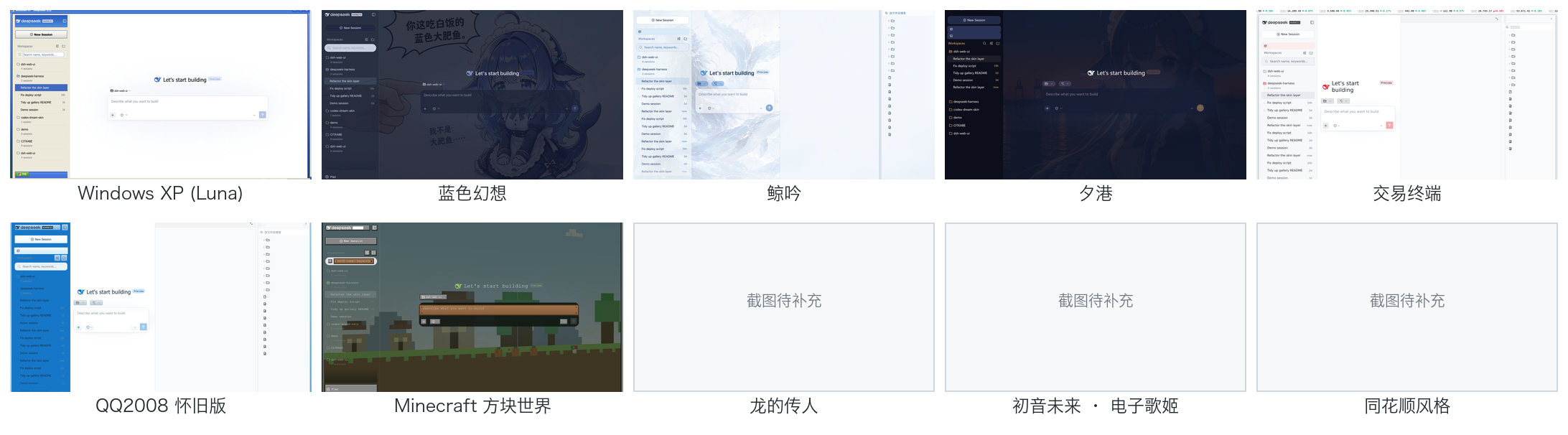
皮肤中心有 12 款皮肤,都支持先试穿再应用:试穿即时生效、退出完全还原,满意再一键应用。
12 款皮肤一览;Maid Atelier 预览见下方:
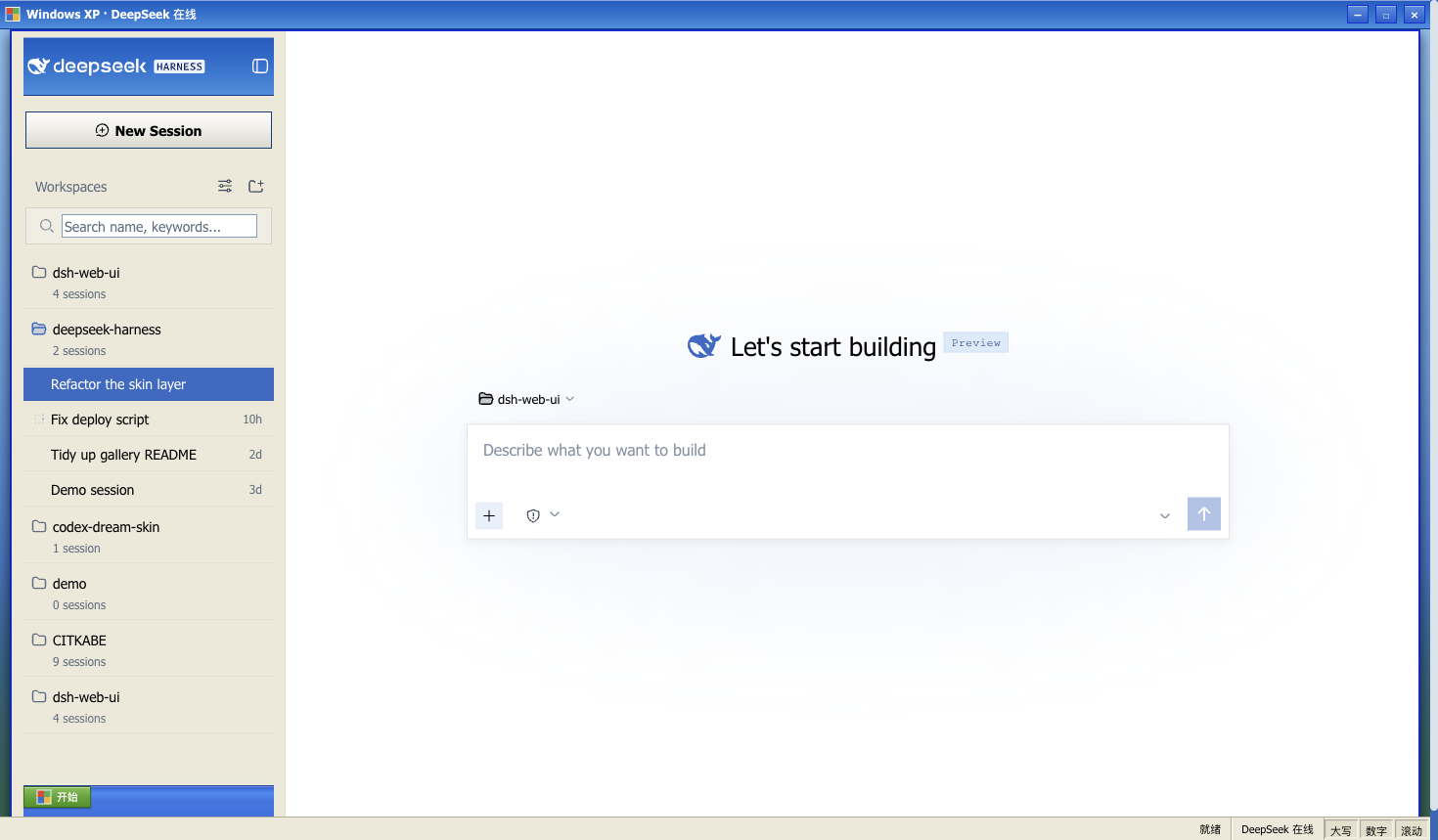
Windows XP(Luna)
还原 Luna 经典界面:蓝色渐变窗口条、绿色「开始」按钮、Bliss 蓝天桌面,全局直角风格。
Blue Fantasy 蓝色幻想
鲸鱼插画垫在半透明面板下面,靛蓝色调贯穿全局,暗色主题下更明显。
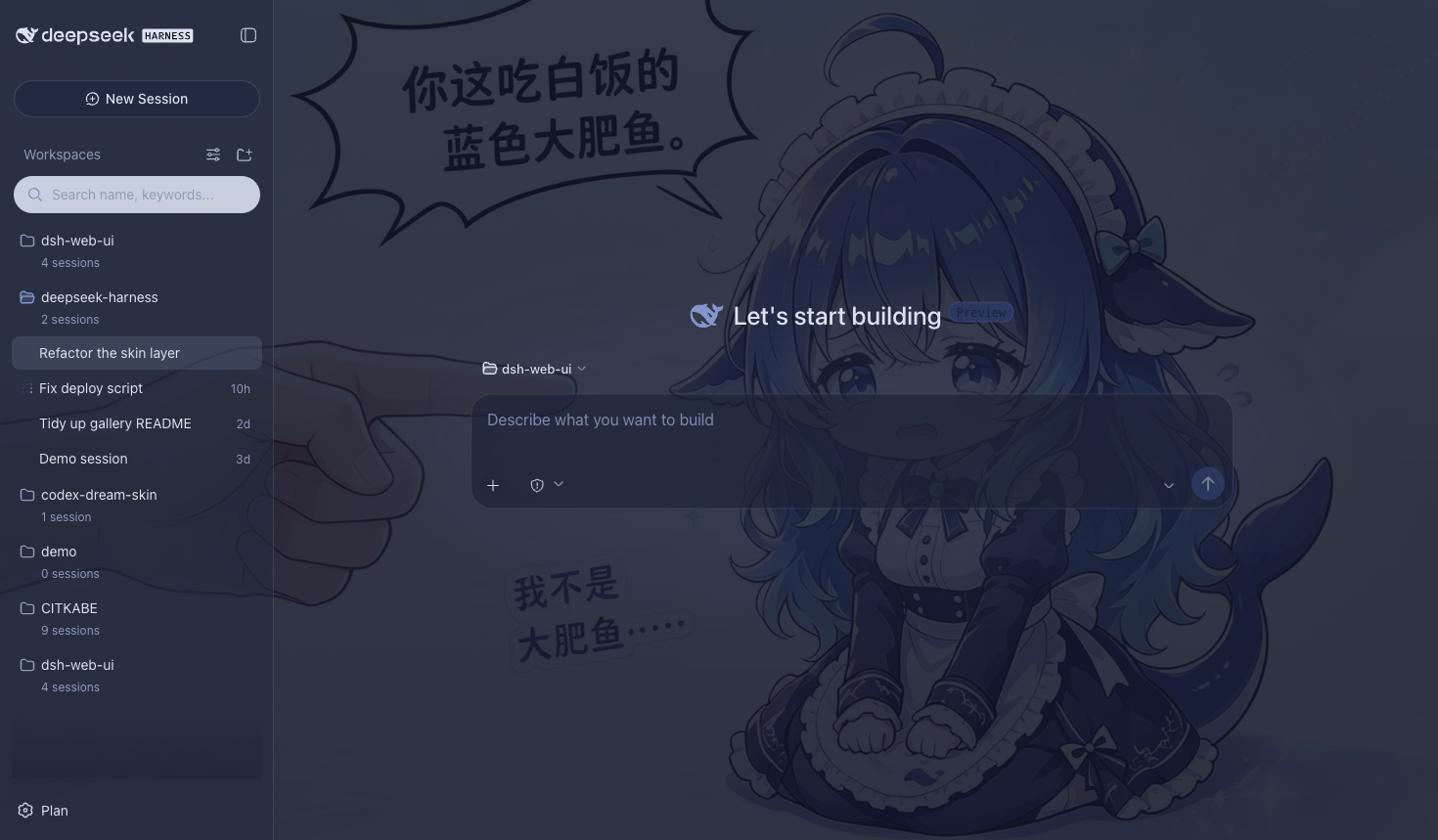
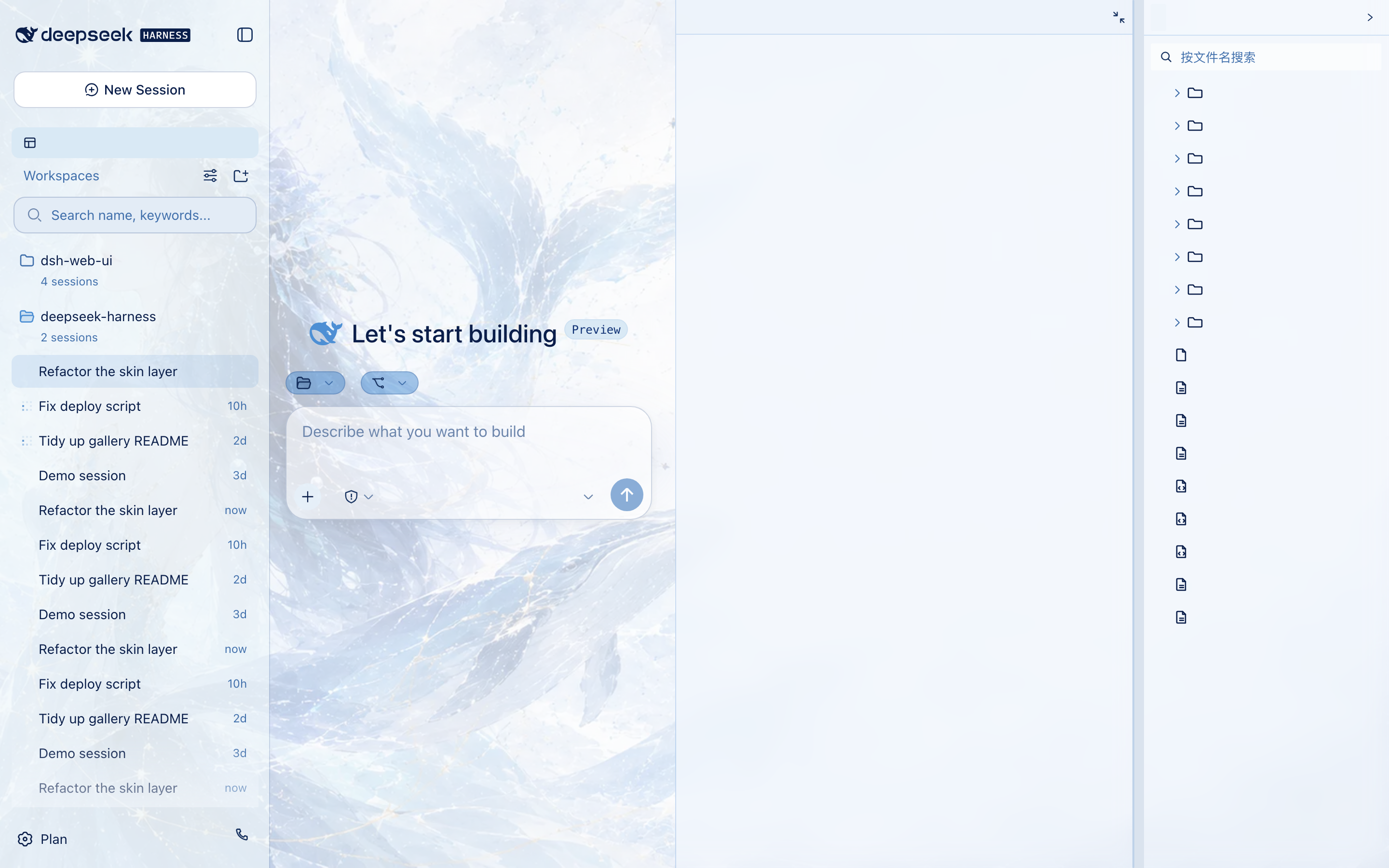
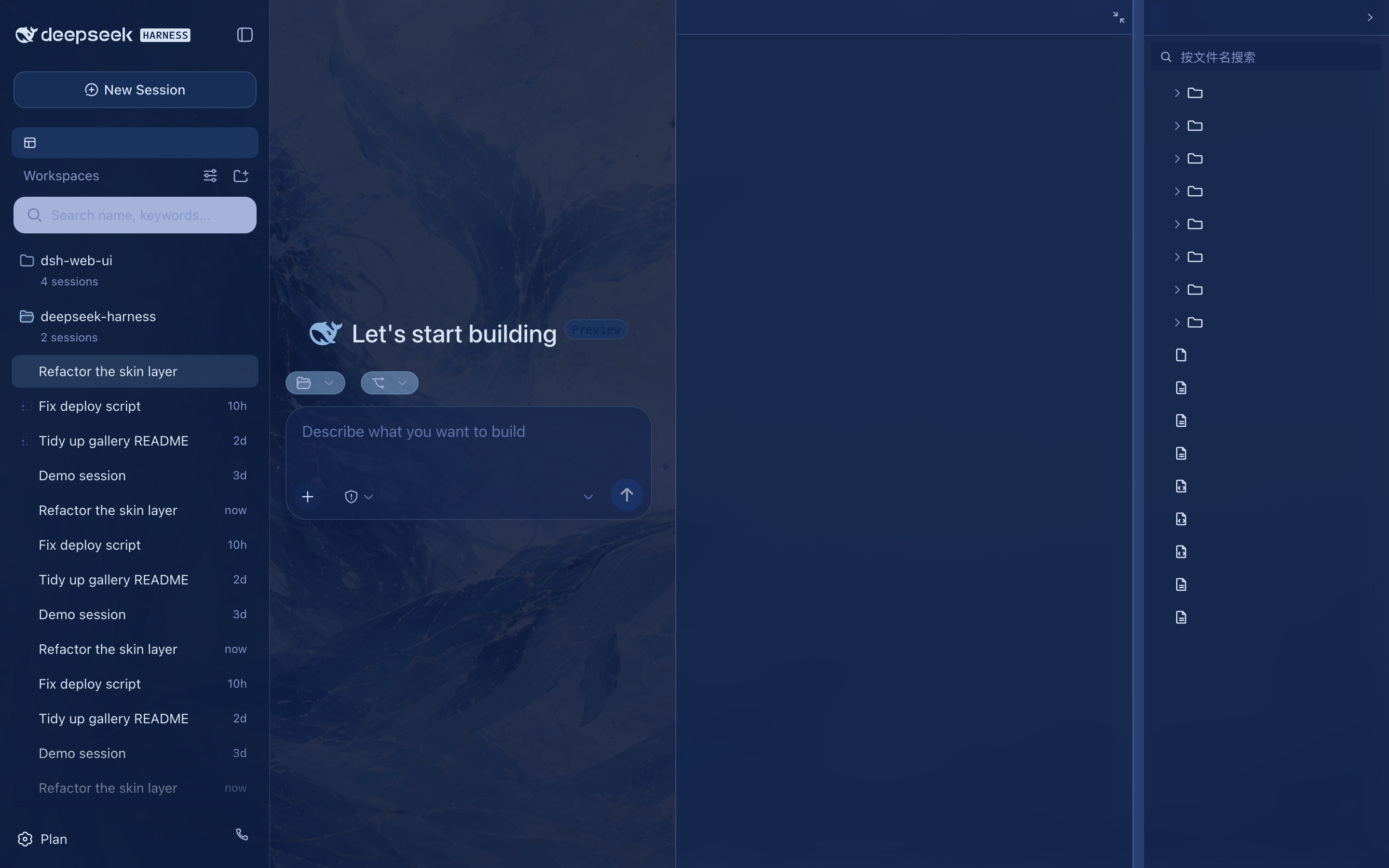
鲸吟(Whale Song)
深海鲸语女神主题:无文字纯氛围背景画(蓝发女神与鲸群居左、冰蓝星座网格与金色细线点缀、右侧大量留白)垫在半透明面板下面,冰蓝 / 浅青 / 深海军蓝 / 钴蓝冷色体系贯穿全局,暗色变体是深海夜航调。
 ·
· 
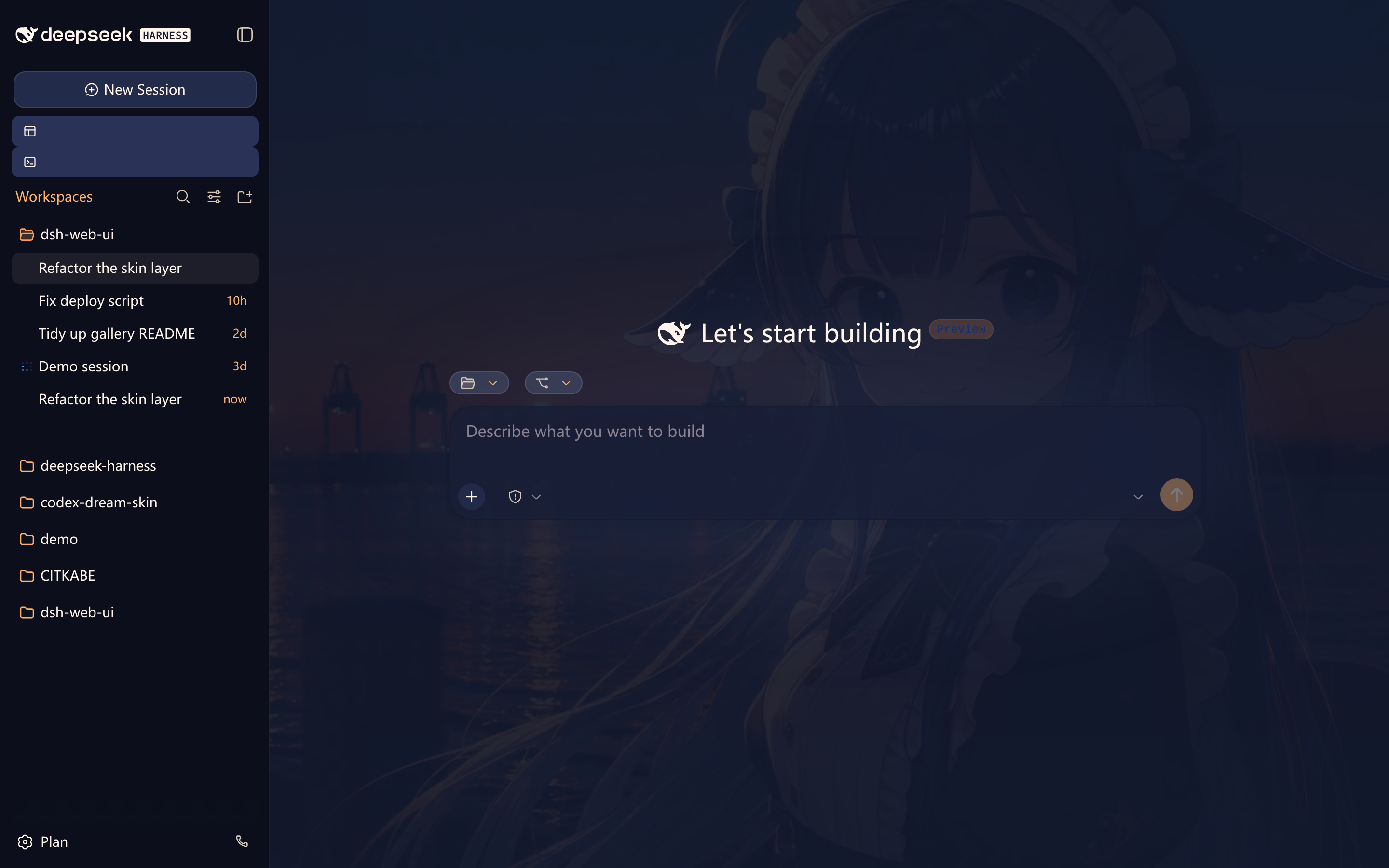
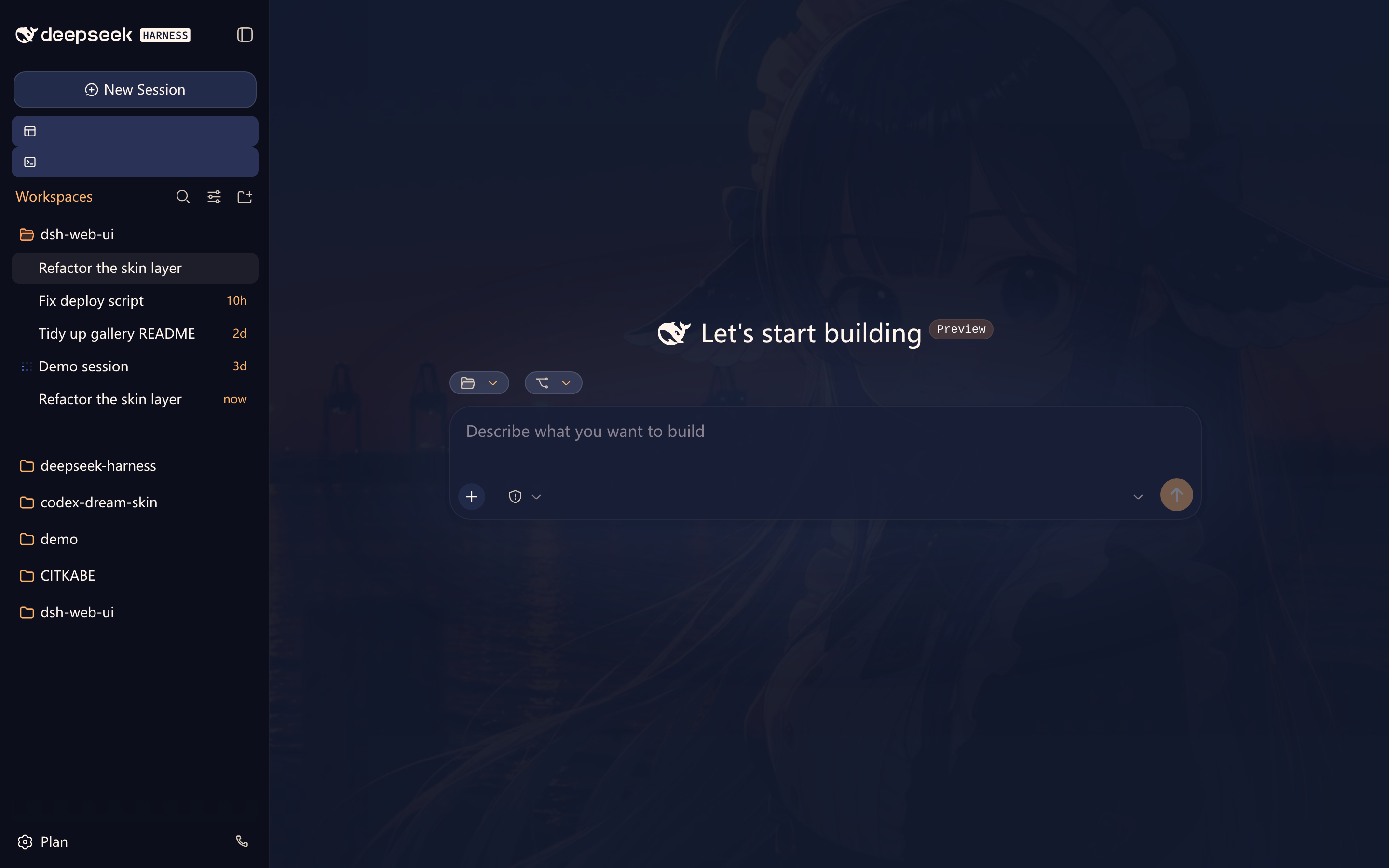
夕港(Harbor)
黄昏港口主题:动漫少女港口背景(暮光蓝天空渐入日落橙)垫在半透明面板下面,深暮蓝底与日落橙主色贯穿全局,亮色是薄暮纱、暗色是深海夜航纱。
 ·
· 
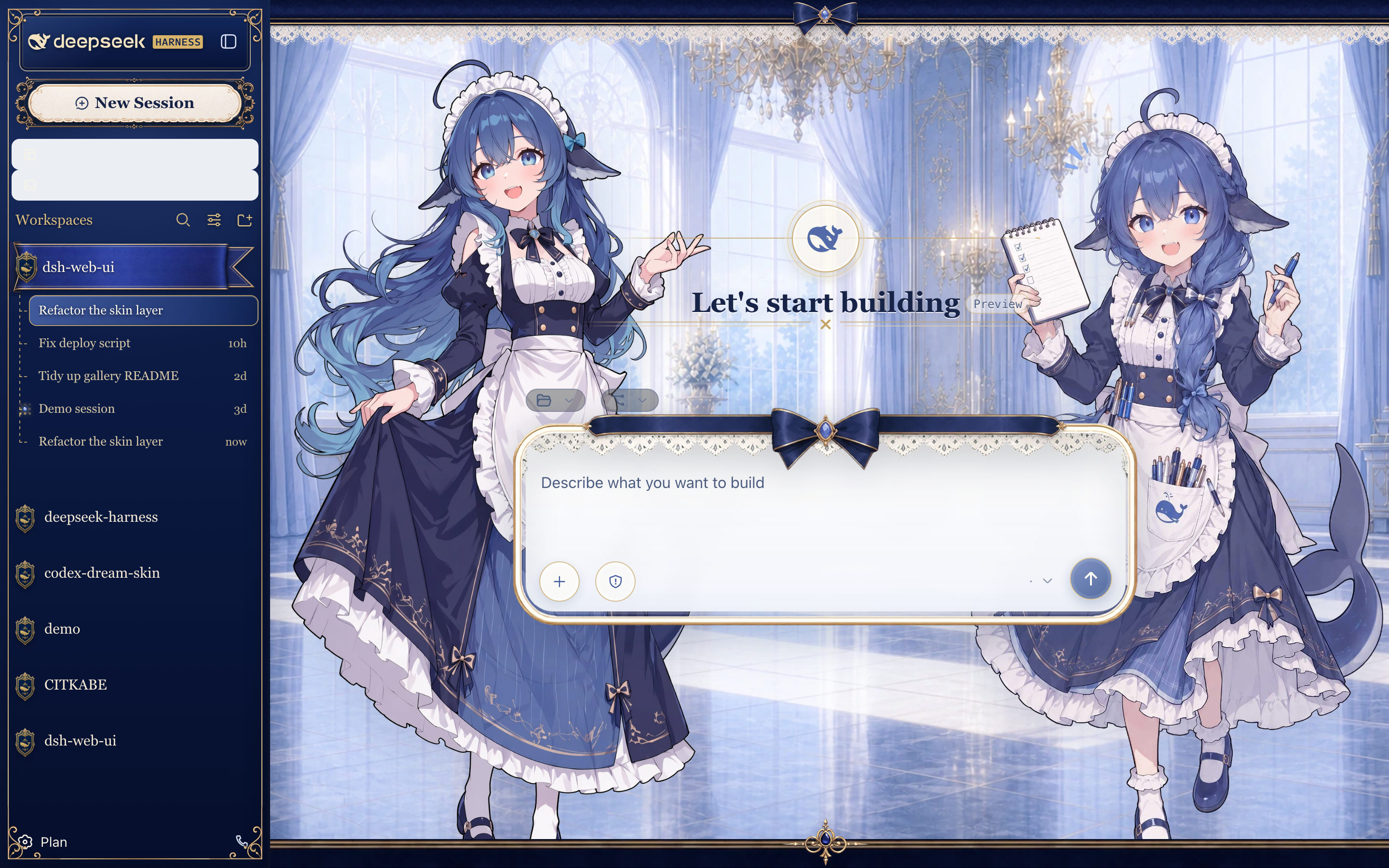
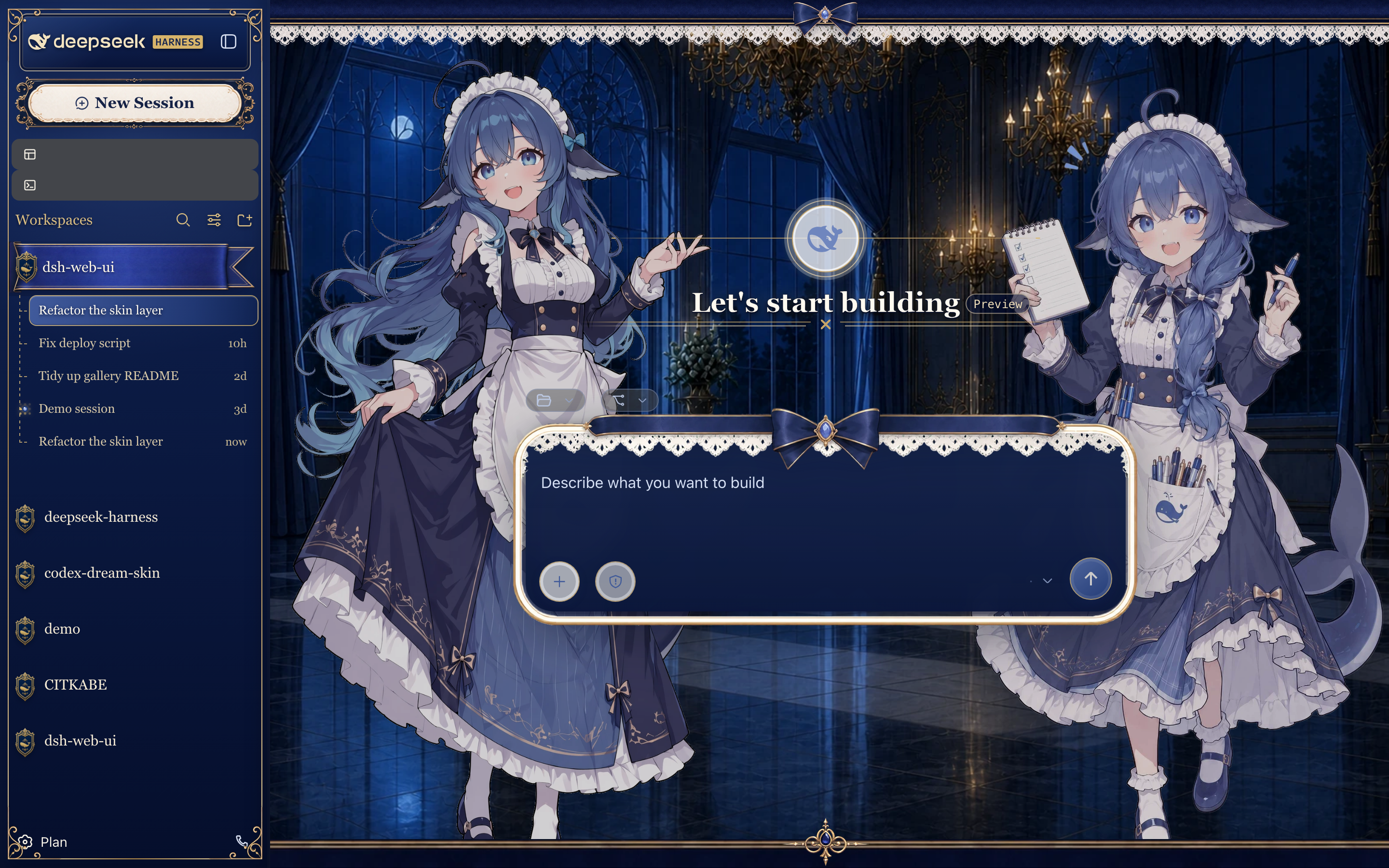
深海女仆工坊(Maid Atelier)
深海蓝工坊主题,包含双角色图层与响应式侧边栏装饰。本皮肤单独采用 CC BY-NC-SA 4.0,仅限非商业使用。
 ·
· 
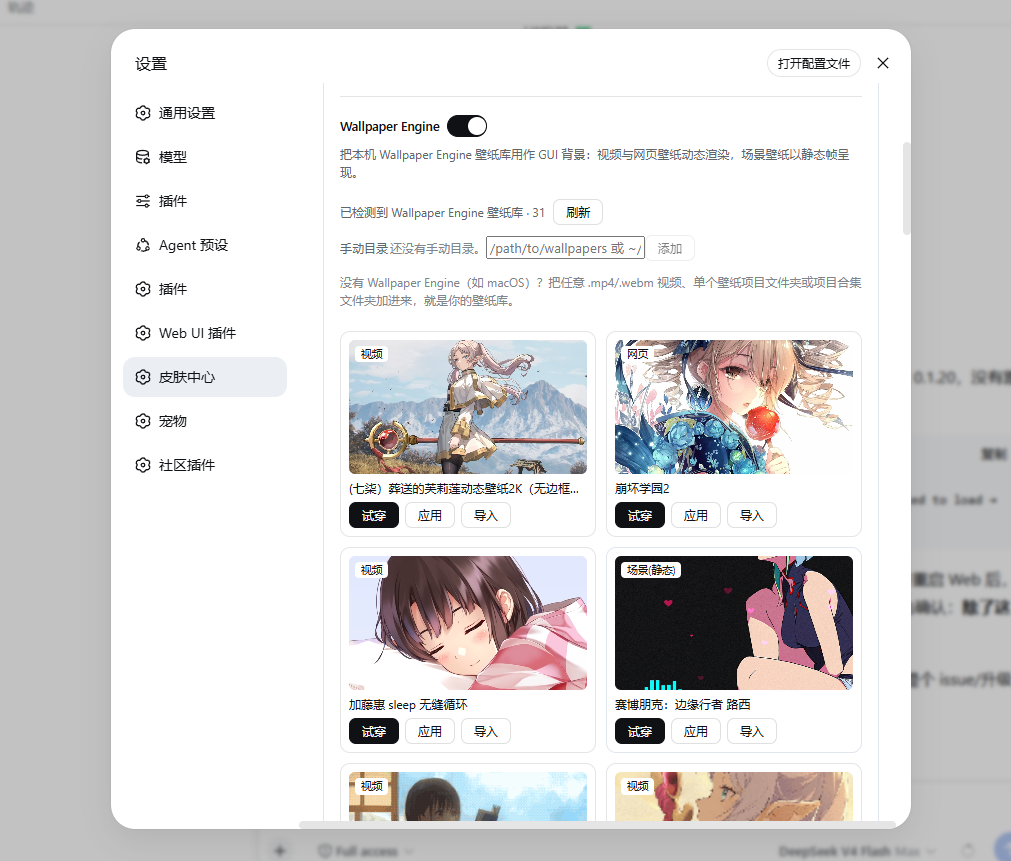
Wallpaper Engine 壁纸
皮肤中心可直接把本机 Wallpaper Engine 壁纸库用作 GUI 背景,支持导入动态与静态壁纸:视频与网页壁纸动态渲染,场景壁纸以静态帧呈现,任意类型也能用「静态帧」模式钉成零动画开销的图片。单张壁纸可导入 skin-center/wallpapers/,脱离 Steam 库也能用,并检测创意工坊原作更新;没有 Wallpaper Engine(如 macOS)时,手动目录可把任意 .mp4/.webm 视频文件夹或壁纸项目文件夹加为壁纸库。壁纸都是本机文件,从不上传或再分发。
快速开始
系统要求
- 已安装 DeepSeek Harness,
dsh web可正常启动。 - npm 安装方式无额外要求;从仓库安装需要 Node.js >= 22 与 pnpm。
三步上手
- 安装聚合包:
dsh plugin --profile web add @linxin666/dsh-web-ui-all@latest - 重启
dsh web,侧边栏出现全部插件入口 - 打开「设置 > 插件配置」按需开关插件,或在皮肤中心试穿皮肤
从 npm 安装(推荐)
插件已发布到 npm(@linxin666 scope),一条命令装齐:
dsh plugin --profile web add @linxin666/dsh-web-ui-all@latest
装完重启 dsh web,侧边栏就有全部插件入口。只要皮肤就装 @linxin666/dsh-client-ui-skin-center。
装到了旧版本? pnpm 11+ 默认的发布年龄门禁(
minimumReleaseAge,内置 24 小时)会把新发布的版本静默隔离,导致按上面命令实际装到上一个版本(如0.1.20而非0.2.0);显式写@latest也一样会被隔离。旧版皮肤中心缺少 "carrier 内建皮肤可解析入口" 的修复,应用皮肤后重启会以ERR_MODULE_NOT_FOUND .../dsh-client-ui-skin-<id>/index.js崩溃。解决办法:在 profile 的pnpm-workspace.yaml设置minimumReleaseAge: 0(或把@linxin666/*加进minimumReleaseAgeExclude),再执行dsh plugin --profile web update @linxin666/dsh-web-ui-all@latest升级到最新版。详见 issue #71。
从 GitHub 仓库安装(开发调试)
插件包已在 npm 发布,仓库安装仅供开发调试(需要 Node.js >= 22 与 pnpm):
# 1. 克隆仓库
git clone https://github.com/zhu1090093659/dsh-web-ui.git
cd dsh-web-ui

# 2. 安装依赖并构建
pnpm install
pnpm -r build

# 3. 把全家桶链接进 web profile(推荐,先链接全部子包再注册聚合包)
node scripts/link-profile.mjs
dsh plugin --profile web add link:$(pwd)/packages/dsh-web-ui-all

# 4. 重启 dsh web,侧边栏即可看到全部插件入口
dsh web
只想用皮肤:第 3 步只执行 link-profile 后安装
packages/skins/skin-center即可。注意:profile 目录不是 pnpm workspace,聚合包里的
workspace:*依赖会回退拉取 npm 已发布版本; 若 npm 版本滞后或损坏会出现「宿主已挂载但 UI 不显示」,此时先用node scripts/link-profile.mjs让全部子包走仓库构建产物。
单独安装某个插件
不想装全家桶时,可单独安装任意插件(npm 已发布,直接用包名):
dsh plugin --profile web add @linxin666/dsh-liangshen@latest               # 梁神模式
dsh plugin --profile web add @linxin666/dsh-client-ui-task-board@latest    # 任务看板
dsh plugin --profile web add @linxin666/dsh-ssh@latest                     # 远程连接(SSH)
dsh plugin --profile web add @linxin666/dsh-tool-describe-image@latest     # 图像理解工具
dsh plugin --profile web add @linxin666/dsh-pet@latest                     # 鲸鱼娘宠物
dsh plugin --profile web add dsh-better-sidebar@latest                     # 右侧面板(推荐;资源管理器/编辑器/终端/Git/浏览器)
dsh plugin --profile web add @linxin666/dsh-client-ui-aionui-panel@latest  # 旧右侧面板(aionui-panel,已停止支持,仅过渡保留)
验证与卸载
装好重启 dsh web,侧边栏出现对应入口就是生效了;也可以用 dsh --profile web --dump-config 确认插件配置层已挂载。侧边栏没新入口,多半是装完没重启 dsh web。
卸载:dsh plugin --profile web remove @linxin666/dsh-web-ui-all,然后重启 dsh web。
技术细节见 docs/plugins.md。
安装排障
展开查看 pnpm 常见问题
pnpm 的严格(isolated)布局只把聚合包放在 profile 顶层,patch 行引用的 11 个子包(共 12 行 insert)会被收进嵌套目录,
dsh web会报Cannot find package '@linxin666/dsh-...'。本包的子包已声明为 dependencies;使用严格布局时,在 profile 的pnpm-workspace.yaml加nodeLinker: hoisted(或旧式public-hoist-pattern: ['@linxin666/*']),再重新安装即可。
首次安装若提示
ERR_PNPM_IGNORED_BUILDS(pnpm 拒绝依赖的构建脚本),按提示把cloudflared/cpu-features/ssh2加入 profile 的pnpm-workspace.yamlallowBuilds后重新执行即可。
pnpm 11 release-age 门禁:新版本发布后 24 小时内(
minimumReleaseAge内置默认值),pnpm 11 会静默装回更旧的@linxin666/*版本(如dsh-web-ui-all@0.1.20配旧版皮肤中心),显式写@latest同样被隔离。旧版皮肤中心 Apply 皮肤时会写入独立皮肤包引用,导致dsh web启动崩溃(ERR_MODULE_NOT_FOUND ... dsh-client-ui-skin-*)。在 profile 的pnpm-workspace.yaml中排除全部@linxin666/*包后再安装或更新:minimumReleaseAgeExclude: - '@linxin666/*'
常见问题
装完重启了,侧边栏还是没有入口?
A: 先确认插件装进了 web profile(命令里的 --profile web),再用 dsh --profile web --dump-config 确认插件配置层已挂载;还不行就看上文「安装排障」。注意页面刷新不够,要重启 dsh web 进程。
定时任务为什么没有到点执行?
A: 定时调度由 dsh web Host 完成,不要求浏览器标签页保持打开。Host 停止、系统睡眠或长暂停期间错过的触发点按「错过即跳过」处理,不排队补跑;同一任务正在运行时到点也会顺延到下一个匹配点。若需要允许息屏但阻止整机因空闲睡眠,可显式开启任务看板的电源保护设置。
手机配对后收不到实时消息?
A: Cloudflare quick tunnel 和 Tailscale Serve 不透传 SSE,这种网络下插件自动降级轮询,消息正常收发,只是新消息可能晚几秒。要即时推送就用支持 SSE 的隧道(Cloudflare named tunnel、自定义 TCP 端口转发等)。
皮肤试了不满意怎么办?
A: 皮肤支持先试穿再应用:试穿即时生效、退出完全还原,没点「应用」就不落盘,随便试。
只想用皮肤,或者只装某一个插件?
A: 只要皮肤就装 @linxin666/dsh-client-ui-skin-center;只装某一个插件就用「单独安装某个插件」里的包名,两者都走 npm 安装。
装了全家桶还能再单独装同一个插件吗?
A: 可以。聚合包的行 id 统一带 web-ui- 前缀(如 web-ui-describe-image),与独立包自己的 id(如 describe-image)不冲突,dsh web 不会再报 duplicate loader entry id;同一插件双源加载时 host 半区只注册一次,浏览器半区按包名去重。两个来源并存没有额外收益,建议只保留一个。注意:profile 里按 id 写的配置行,若插件来自聚合包要用 web-ui- 前缀的 id(如 remote-web-ui 的 autoTunnel 配置行写成 web-ui-remote-web-ui);独立安装时仍用插件原 id。
已知限制
- 任务看板由 Host 调度,关闭浏览器后仍可运行;Host 停止或整机睡眠期间错过的触发点跳过、不补跑。可选电源保护默认关闭,只阻止空闲系统睡眠,不拦截合盖、手动睡眠、休眠或关机,详见 dsh-task-board README。
- SSH 密码与 passphrase 口令以明文保存在
~/.dsh/dsh-ssh.json(权限 0600);断线重连可能重放非幂等命令,远程输出原样返回、不脱敏,安全模型见 dsh-ssh README。 - 移动端靠 SSE 实时推送:Cloudflare quick tunnel 和 Tailscale Serve 不透传 SSE,插件自动降级轮询,新消息可能晚几秒。
- 仓库安装需要 Node.js >= 22 与 pnpm,仅供开发调试;npm 安装不受影响。
社区
社区交流群在这里,和开发者、其他用户一起聊用法、报问题、提想法。QQ 扫码加入「DSH Web UI 交流群」:
也可以加 Discord 社区,或直接到 GitHub Issues 报 Bug / 提需求。
友情链接
- DeepSeek Harness Desktop —— 为 DeepSeek Harness (DSH) 生态打造的现代化桌面端体验。
- LINUX DO —— 有理想的新社区。
- dshfind —— 面向 DeepSeek Harness 的学习与分享社区,聚合论文精读、插件超市与用户排名。
- deepseek-plugin-store —— DeepSeek Harness 独立社区插件商店,发现、安装并提交经过验证的插件、工具与扩展。
- dsh-data-agent —— 为 DSH 定义专用 Data Agent 预设,让 AI 帮你查询、更新、分析数据。
- dsh-TUI —— Claude Code 风格全屏交互终端插件,补位官方缺失的终端 TUI:像素鲸鱼顶栏、实时工作状态行、思考流式展开、双击 Esc 回滚、上下文进度条与 TPS 仪表。
- dsh-tianshu-tui —— 基于官方 DeepSeek Harness 的交互式终端 UI 插件,在官方基础上增加 TDD 与证据门等工作流。
- dsh-genui —— 助手回复内联渲染生成式 UI(dsh-ui fence):布局、图表、表单、Mermaid、3D 与面板停靠,组件交互回传模型。
- dsh-annotation —— DSH Web 选中批注插件:选文字、写批注、随消息发送,模型按 Annotation N 逐条对照回复。
参与贡献
- 先读 CONTRIBUTING.md 再开 PR;用户可见变更请附截图或验证证据。
- 提交信息遵循 Conventional Commits(如
fix(task-board): 修复 xxx),代码、文档与提交信息全程禁止 emoji。 - 新插件与皮肤用脚手架生成:
node scripts/dsh-plugin-new <name>、node scripts/dsh-skin-new。 - 提交前过门禁
pnpm typecheck && pnpm test && pnpm docs:check;完整开发流程见 docs/development.md。
许可证
本仓库以 Apache-2.0 授权。迁入第三方代码必须保留 LICENSE 与署名;活跃且有上游的第三方优先 fork 或依赖引用,不搬代码。
来源与版权
| 包 | 来源 | 版权 |
|---|---|---|
| dsh-task-board / dsh-git-graph / dsh-aionui-panel / dsh-pet / dsh-remote-web-ui / dsh-web-ui-settings / dsh-liangshen / dsh-skins / dsh-web-ui-all / skins | 作者 zhu1090093659 个人开发 | Apache-2.0(zhu1090093659) |
| dsh-client-ui-skin-matrix | 贡献者原创(Matrix 深夜护眼暗色皮肤) | Apache-2.0(贡献者 seanchen 声明) |
| dsh-tool-describe-image | 移植自 whitelonng/dsh-plugin-describe-image(deepseek-harness packages/vision/tool-describe-image) |
Apache-2.0(zhu1090093659) |
| dsh-better-sidebar | 外部集成插件 omdsh-dev/DSH-better-sidebar(右侧面板,npm 依赖引用) | MIT(omdsh-dev) |
贡献者
UI・体験 の他のプラグイン
dsh-better-sidebar
by omdsh-dev
ファイル表示・編集、ターミナル、Git、サブエージェントのページを内蔵し、サードパーティによる新規サイドバーページの登録にも対応する拡張可能なサイドバー基盤
dsh-tui
by ccch1mneyyy
Claude Code 風の全画面 TUI プラグイン。鯨トップバー、リアルタイム状態行、思考ストリーミング、Esc 二連打の巻き戻し、コンテキスト進捗バーと TPS メーター搭載。npm で一発インストール
openpets
by alvinunreal
DSH ライフサイクルを OpenPets デスクトップコンパニオンへ
dsh-tianshu-tui
by huiliyi37
DeepSeek Harness 向けインタラクティブ TUI:セッションワークスペース、画像 E2E(クリップボード/ビジョン橋)、スラッシュ補完、承認カード、推論可視化の純粋な表示層