
dsh-liquid-glass-balance-card
キュレーション掲載メンテナンス: 活発sodazilla-zzz/dsh-liquid-glass-balance-card
ドラッグ可能なリキッドガラス風 DeepSeek API 残高カード
5
スター
1
フォーク
JavaScript
言語
MIT
ライセンス
2026-08-16
作成日
2026-08-19
最終プッシュ
README
dsh-liquid-glass-balance-card
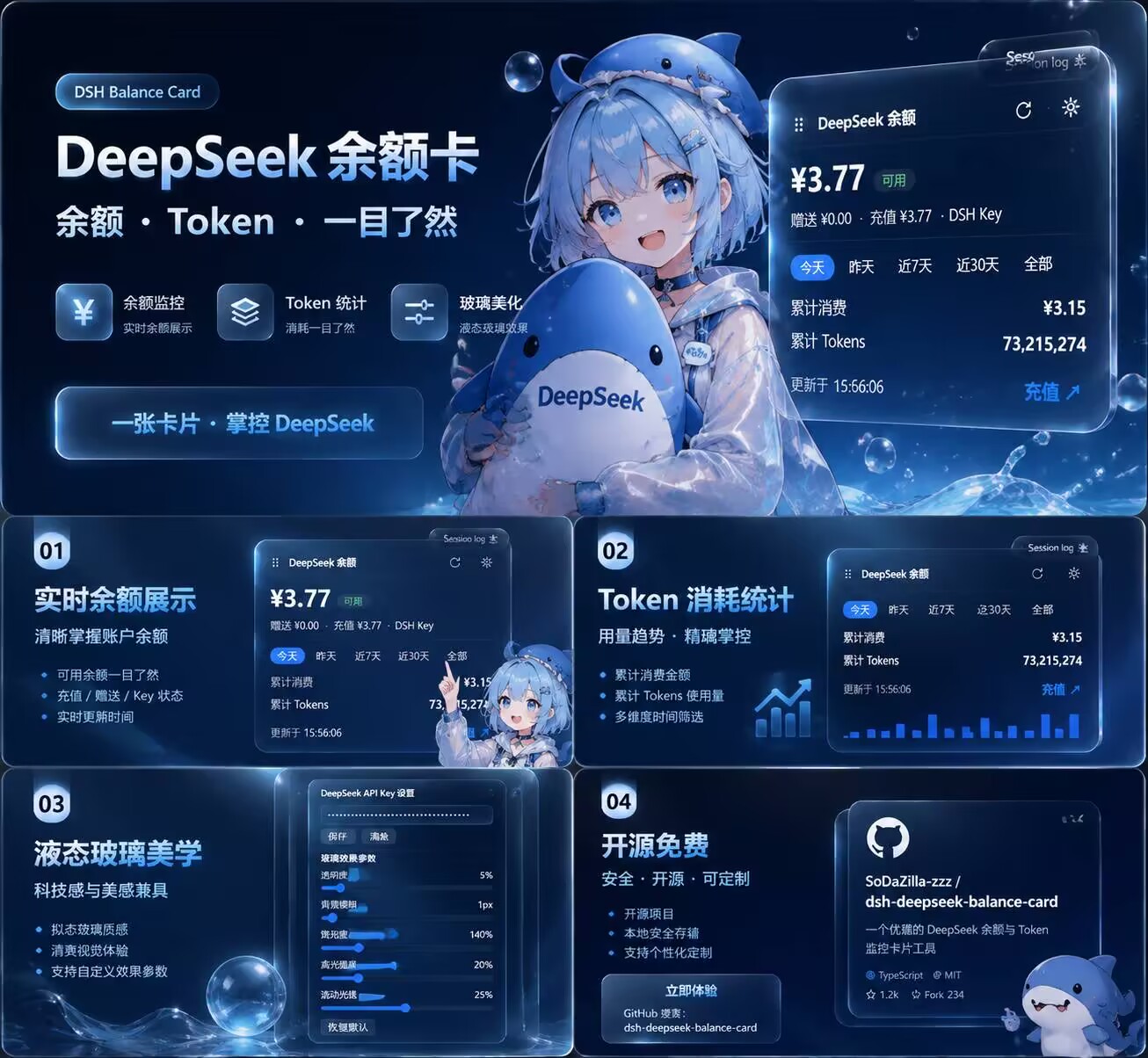
A draggable liquid-glass floating card for the DeepSeek Harness (DSH) web GUI that shows your DeepSeek API balance, cumulative spend, and token usage.
一个给 DeepSeek Harness(DSH)网页界面 使用的插件:在页面右上角显示 DeepSeek API 余额、累计消费 与 Token 用量,采用可拖动的液态玻璃卡片。
Created with ❤️ by sooodaaa · 创作者:sooodaaa
🎬 Demo / 效果演示
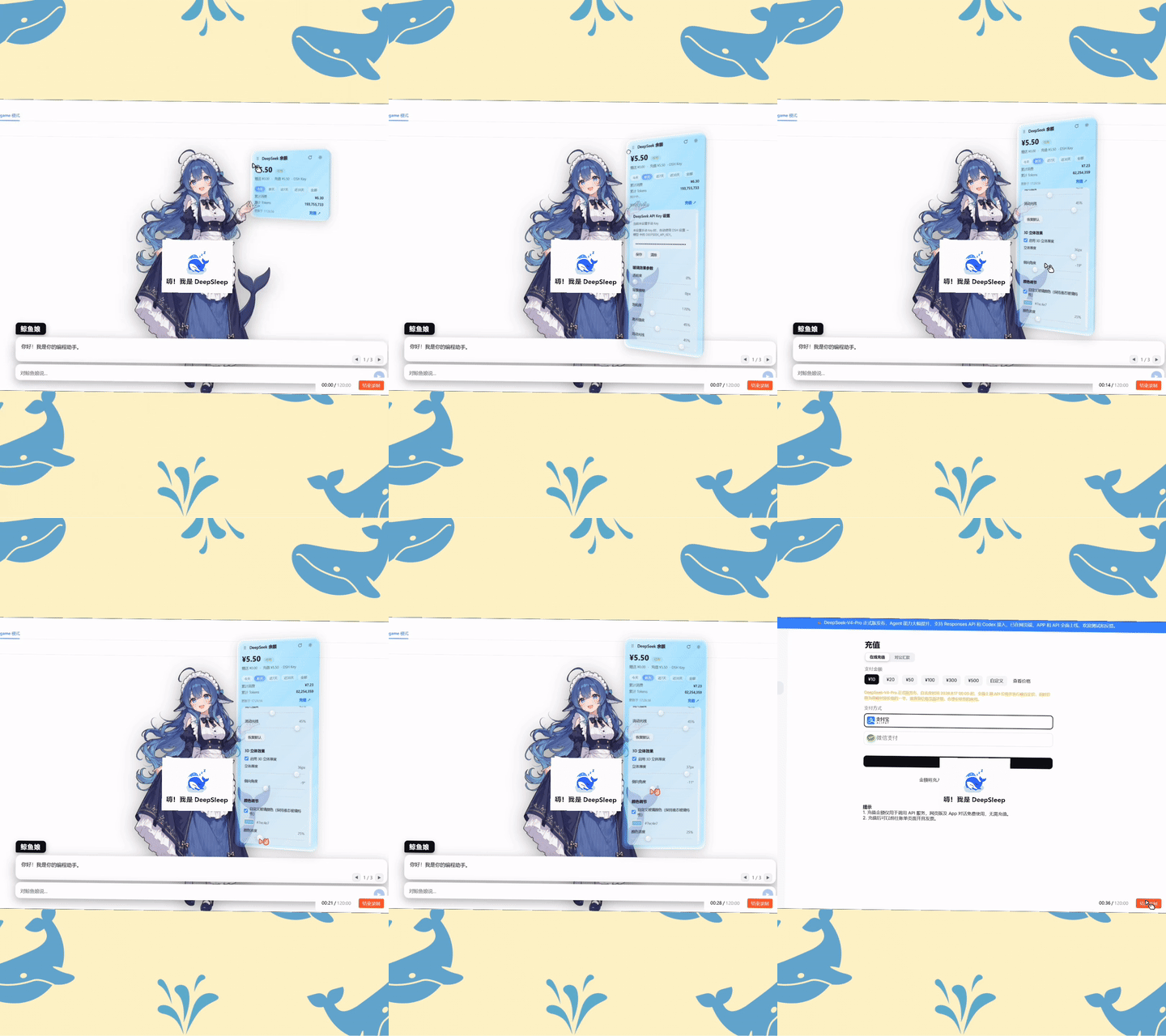
GIF 预览 · 完整视频见下方播放器。
完整演示:液态玻璃效果、3D 立体厚度、颜色调节、余额与用量统计、充值入口。
Full demo: liquid glass, 3D thickness, color customization, balance & usage stats, and top-up entry.
✨ Features / 功能
| English | 中文 |
|---|---|
| Floating card in the top-right corner by default | 默认悬浮在右上角 |
Draggable; position is remembered in localStorage |
可拖动,位置自动保存在浏览器 localStorage |
| Liquid Glass effect with adjustable parameters | 液态玻璃效果,参数可实时调节 |
| 3D thickness effect with toggle, depth and side-angle controls | 3D 立体厚度效果:可开关、调节厚度与侧向角度 |
| Custom glass color while keeping liquid glass properties | 自定义玻璃颜色,调节后仍保持液态玻璃特性 |
| Shows total balance, availability, granted & topped-up balance | 显示总余额、可用状态、赠送余额与充值余额 |
| Currency preference (CNY / USD / Auto) to avoid multi-currency conflicts | 币种偏好(人民币/美元/自动),避免多币种余额冲突 |
| Cumulative spend & cumulative tokens | 累计消费金额与累计 Token 用量 |
| Two-tier usage stats: 本地 (aggregated from DSH session logs) + 总计(线上) (official DeepSeek platform usage) | 双层用量统计:本地(由 DSH 会话日志聚合)+ 总计(线上)(DeepSeek 官方平台用量) |
| Time ranges: Today / Yesterday / Last 7 days / Last 30 days / All | 时间维度:今天 / 昨天 / 近7天 / 近30天 / 全部 |
Optional platform userToken credential for online totals |
可选配置 DeepSeek 平台 userToken 以启用线上「总计」 |
| Toggle to show/hide the online totals in the card settings | 卡片设置中可开关「总计(线上)」显示 |
| Liquid-glass bar charts for 7d/30d spend & token trends, with the date range shown below | 近7天/近30天液态玻璃柱状图展示消费与 Token 趋势,柱状图下方显示日期范围 |
| One-click DeepSeek top-up link | 一键跳转 DeepSeek 官方充值入口 |
| Manual API key input in the card settings | 支持在卡片设置中手动填写 API Key |
Falls back to the DSH DEEPSEEK_API_KEY credential |
未填写手动 Key 时自动使用 DSH 已配置的 DEEPSEEK_API_KEY |
| Auto-refresh every 60 seconds + manual refresh | 每 60 秒自动刷新,也可手动刷新 |
| Configurable refresh intervals (balance & online totals) in the plugin config card | 插件配置卡中可分别设置余额与线上「总计」的自动刷新间隔 |
Follows DSH light/dark theme variables (--dsw-*) |
跟随 DSH 明暗主题变量(--dsw-*) |
📦 Install / 安装
Requires the DSH CLI and pnpm.
需要 DSH CLI 与 pnpm。
dsh plugin --profile web add dsh-liquid-glass-balance-card
Restart DSH Web / 重启 DSH Web:
dsh web
Open http://127.0.0.1:3080 and refresh the page. The card appears in the top-right corner.
打开 http://127.0.0.1:3080 并刷新页面,右上角会出现卡片。
Manual install / 手动安装: Put the package into the profile's
node_modules, then add a loader entry to~/.dsh/profiles/web/cordis.patch.yml:将包放入 profile 的
node_modules,并在~/.dsh/profiles/web/cordis.patch.yml中加入:- insert: - id: liquid-glass-balance-card name: dsh-liquid-glass-balance-card
⚙️ Configuration / 配置
API Key
You can set the key from the gear icon on the card, or from the official plugin-configuration card under Settings → Plugins → 插件配置 → DeepSeek 余额卡片:
你可以通过卡片上的齿轮图标,或 设置 → 插件 → 插件配置 → DeepSeek 余额卡片(与官方插件配置卡片同款 UI)来配置 Key:
- Paste a DeepSeek API Key and click Save / 粘贴 DeepSeek API Key 并点击「保存」;
- The key is stored through the official DSH credentials seam (reference
DSH_LIQUID_GLASS_API_KEY, managed by the harness credential provider, never in a plugin-owned plaintext file); the browser never sees the value / Key 通过 DSH 官方凭据系统存储(引用名DSH_LIQUID_GLASS_API_KEY,由 harness 凭据提供者管理,不落任何插件自有的明文文件),浏览器永远看不到明文; - Click Clear to remove the manual key and fall back to the DSH
DEEPSEEK_API_KEY/ 点击「清除」可删除手动 Key,之后回退使用 DSH 自身的DEEPSEEK_API_KEY。
Manual key takes priority. If neither is configured, the card shows a clear error.
手动 Key 优先于 DSH 已配置的
DEEPSEEK_API_KEY。若两者都没有,卡片会显示明确的错误提示。
Upgrade note: keys stored by v0.1 in
$DSH_HOME/storages/dsh-liquid-glass-balance-card.jsonare migrated into the credentials seam automatically on the next start, then the legacy file is removed.升级说明:v0.1 存储在
$DSH_HOME/storages/dsh-liquid-glass-balance-card.json的旧 Key 会在下次启动时自动迁移进凭据系统,随后旧文件被删除。
Platform Token (for online totals) / 平台 Token(用于线上总计)
The online 「总计」 statistics are read from DeepSeek's private platform dashboard endpoints, which require the userToken of a signed-in platform session (an API key cannot read them). You can paste it in the card settings (gear icon) or in Settings → Plugins → 插件配置 → DeepSeek 余额卡片, and it is stored through the DSH credentials seam under DSH_LIQUID_GLASS_PLATFORM_TOKEN.
线上「总计」统计读取的是 DeepSeek 平台控制台的私有用量接口,需要已登录平台会话的 userToken(普通 API Key 无法读取)。可在卡片设置(齿轮)或 设置 → 插件 → 插件配置 → DeepSeek 余额卡片 中粘贴,并通过 DSH 凭据系统存储(引用名 DSH_LIQUID_GLASS_PLATFORM_TOKEN)。
How to get it / 获取方式:
- Sign in to https://platform.deepseek.com in your browser / 在浏览器中登录 https://platform.deepseek.com;
- Open DevTools (F12) → Application → Local Storage →
platform.deepseek.com→ copy the value ofuserToken/ 打开开发者工具(F12)→ 应用(Application) → 本地存储(Local Storage) →platform.deepseek.com→ 复制userToken的值; - Paste it into the card/plugin settings and Save / 粘贴到卡片或插件设置中并保存。
The token never appears in the browser UI back-traffic: the browser only talks to local host routes; the host sends it only to
platform.deepseek.comfor the two usage endpoints.Token 不会回流到浏览器:浏览器只访问本地宿主路由;宿主仅将其发送给
platform.deepseek.com的两个用量接口。
Liquid Glass Parameters / 玻璃效果参数
All parameters are adjustable in real time in the settings panel:
所有参数均可在设置面板实时调节:
| Parameter / 参数 | Range / 范围 |
|---|---|
| Transparency / 透明度 | 0% ~ 80% |
| Background blur / 背景模糊 | 0px ~ 40px |
| Saturation / 饱和度 | 100% ~ 300% |
| Highlight intensity / 高光强度 | 0% ~ 100% |
| Moving shine / 流动光线 | 0% ~ 50% |
| 3D thickness / 3D 立体厚度 | 0px ~ 40px(可开关) |
| Side angle / 侧向角度 | -30° ~ 30° |
| Glass color / 玻璃颜色 | 自定义取色器(保持液态玻璃特性) |
Settings are saved in localStorage and a Reset to default button is provided.
参数保存在浏览器 localStorage,并提供「恢复默认」按钮。
Usage Statistics / 用量统计
The card shows cumulative spend and cumulative tokens with selectable time ranges:
卡片显示累计消费与累计 Token,可切换时间维度:
- Today / 今天
- Yesterday / 昨天
- Last 7 days / 近7天
- Last 30 days / 近30天
- All time / 全部
Each range shows two tiers / 每个时间维度下都有两层统计:
- 本地: aggregated locally from DSH session logs using the official DeepSeek pricing timeline. No data is sent to any third party.
- 本地: 由宿主侧本地聚合 DSH 会话日志,并使用 DeepSeek 官方价格时间表计价,不会向任何第三方发送数据。
- 总计(线上): official usage read from DeepSeek's platform dashboard (
platform.deepseek.com/api/v0/usage/amount+.../cost), which only a signed-in platform session can read — a plain API key cannot. Requires the optional platformuserToken(see below). The 「总计」 section can be hidden from the card settings (gear icon → 统计显示 → 显示总计(线上统计)). - 总计(线上): 通过 DeepSeek 平台控制台用量接口(
platform.deepseek.com/api/v0/usage/amount与.../cost)读取的官方用量;该接口只有已登录的平台会话(userToken)可以读取,普通 API Key 无法访问。需要可选配置平台userToken(见下文)。可以在卡片设置(齿轮 → 统计显示 → 显示总计(线上统计))中隐藏「总计」区域。
Note on accuracy: 「总计」 is account-wide (includes usage from non-DSH clients), days are aligned to Beijing time (the platform's own calendar), the balance currency is preferred when the account has multiple currencies, and at most the last 36 months are queried (a hint appears when truncated). Platform data may lag behind real-time usage, and the local numbers are estimates from DSH session logs — small differences are expected.
准确性说明:「总计」为账号全部用量(含非 DSH 客户端的调用);按北京时间分天对齐(与平台日历一致);多币种账号优先显示余额对应币种;最多回溯 36 个月(超出会在卡片上提示)。平台数据相对实时用量可能有延迟;「本地」数据本身是基于会话日志的估算,两者存在小幅差异属正常现象。
The stats area is split into two blocks separated by a hairline: 本地 on top and 总计(线上) below, each grouping its cumulative rows together with its 7d/30d bar chart (when the range shows one). The chart metric tabs switch between 消费金额 / Tokens / 输入 / 缓存 / 输出 (tokens split into input, cache-hit and output buckets — both payloads carry these fields). The 7d chart labels every bar with its date, the 30d chart shows the date in the hover tooltip only, and the covered date range is printed below the bars.
统计区分为上下两块、以横线分隔:本地在上,**总计(线上)**在下,每块的累计数值与其 7d/30d 柱状图放在一起(该时间维度有柱状图时)。图表指标可在「消费金额 / Tokens / 输入 / 缓存 / 输出」间切换(Tokens 可拆分为输入、缓存命中、输出三类,本地与线上数据均含这些字段)。近7天图每根柱子下方标注日期,近30天图日期仅显示在鼠标悬浮提示中,图下方显示所覆盖的日期范围。
🔒 Privacy / 隐私说明
- Your API key never leaves your machine. The browser only talks to local host routes.
- API Key 不会离开你的机器,浏览器只访问本地宿主路由。
- Usage statistics are computed locally from DSH session logs; the optional online 「总计」 reads DeepSeek's official platform usage endpoints with your platform
userToken(sent host-side only toplatform.deepseek.com). - 用量统计由本地 DSH 会话日志计算;可选的线上「总计」使用你的平台
userToken读取 DeepSeek 官方平台用量接口(仅由宿主发送给platform.deepseek.com)。 - No analytics, no tracking, no remote telemetry.
- 无统计、无追踪、无远程遥测。
🏗 Architecture / 工作原理
| Part / 部分 | File / 文件 | Responsibility / 作用 |
|---|---|---|
| Host / 宿主侧 | lib/index.js |
Local routes: settings, balance, stats, online-stats; local aggregation from session logs + platform usage aggregation / 注册本地路由:设置、余额、统计、线上统计;本地会话日志聚合 + 平台用量聚合 |
| Pricing / 计价 | lib/pricing.js |
Official DeepSeek pricing timeline + peak/off-peak pricing / DeepSeek 官方价格时间表与峰谷计价 |
| Browser / 浏览器侧 | lib/client.js |
shell.overlay floating card, drag, glass sliders, stats UI, recharge link / shell.overlay 悬浮卡片、拖动、玻璃参数、统计 UI、充值入口 |
| Composition / 组合层 | cordis.patch.yml |
Bundle patch layer / bundle 补丁层 |
🛠 Development / 开发
git clone <your-fork>
cd dsh-liquid-glass-balance-card
# edit lib/index.js or lib/client.js, then install locally:
# 修改 lib/index.js 或 lib/client.js 后本地安装测试:
dsh plugin --profile web add .
After changing lib/client.js, restart dsh web and hard-refresh the page. After changing host code (lib/index.js), a restart is required.
修改 lib/client.js 后重启 dsh web 并强制刷新页面;修改宿主代码(lib/index.js)后需要重启 DSH Web。
📄 License / 协议
利用量・課金 の他のプラグイン
dsh-cost-meter
by han-1413141
セッション/日次 API コスト、予算使用率、公式残高、履歴ダッシュボード、公式価格ワンクリック同期(ピーク/オフピーク)
dsh-usage-stats
by ychris12138
DSH Web GUI 向けトークンヒートマップ、モデル別内訳、DeepSeek 残高
tokdash
by jingbiaomei
セッションとクォータ使用量の可視化ダッシュボード。ヒートマップ、コスト追跡、トークンカウント
dsh-balance-meter
by ghost011118
DSH Web GUI に DeepSeek 残高とセッションコスト表示