
dsh-skin-market
メンテナンス: 活発keman-ai/dsh-skin-market
DeepSeek Harness のスキンを設定画面から検索・インストールできるマーケットプレイス(dsh.a2hmarket.ai のコミュニティスキン対応)。
$ dsh plugin add dsh-skin-market9
スター
0
フォーク
JavaScript
言語
MIT
ライセンス
2026-08-18
作成日
2026-08-31
最終プッシュ
README
DSH Skin Market
Search for skins inside DeepSeek Harness and install them with one click.
Install it once, and changing skins never sends you back to the terminal.
dsh.a2hmarket.ai — where the skin catalog comes from, no login required


English · 简体中文
If this is useful to you, a Star goes a long way
Three tabs
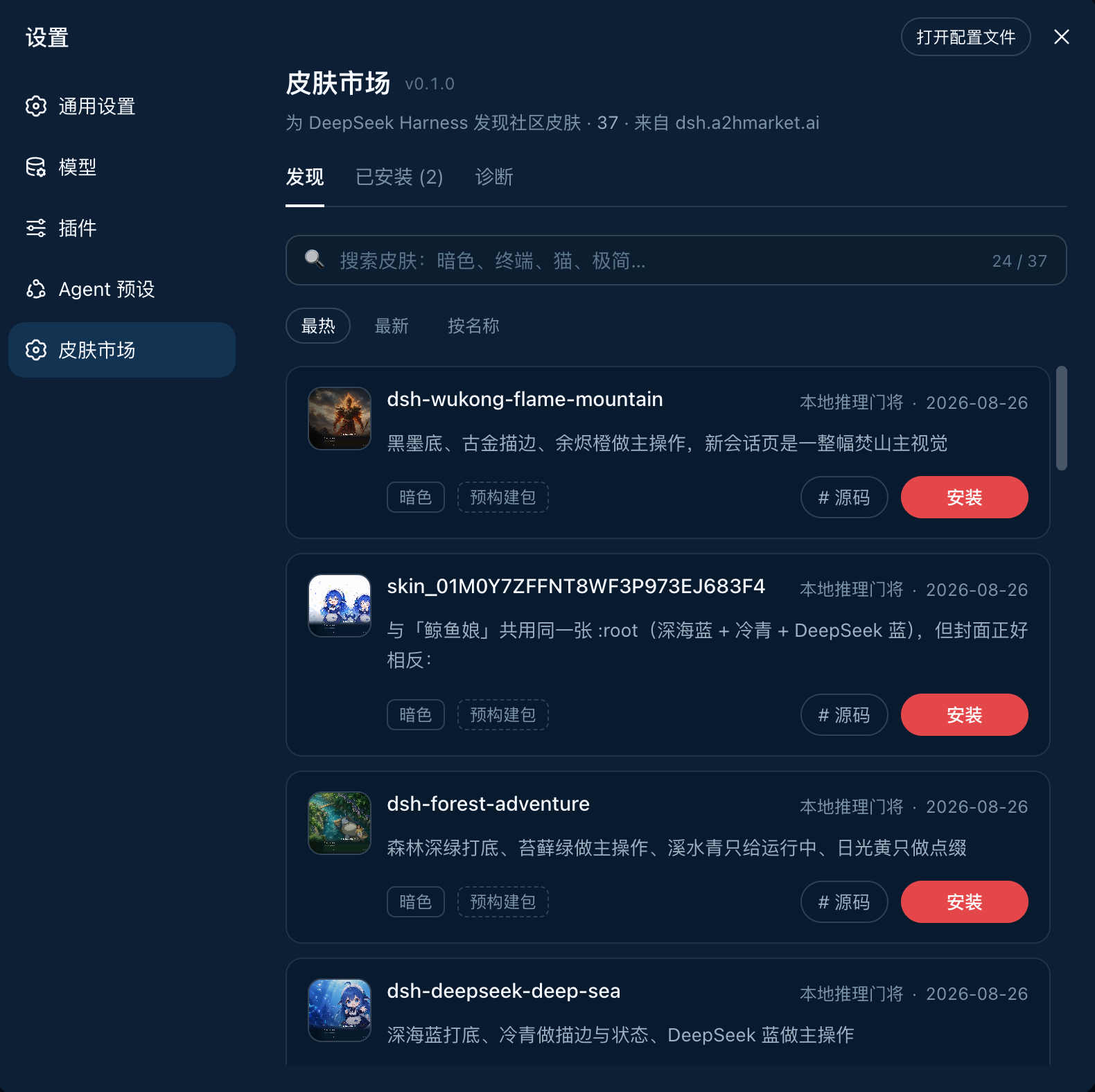
|
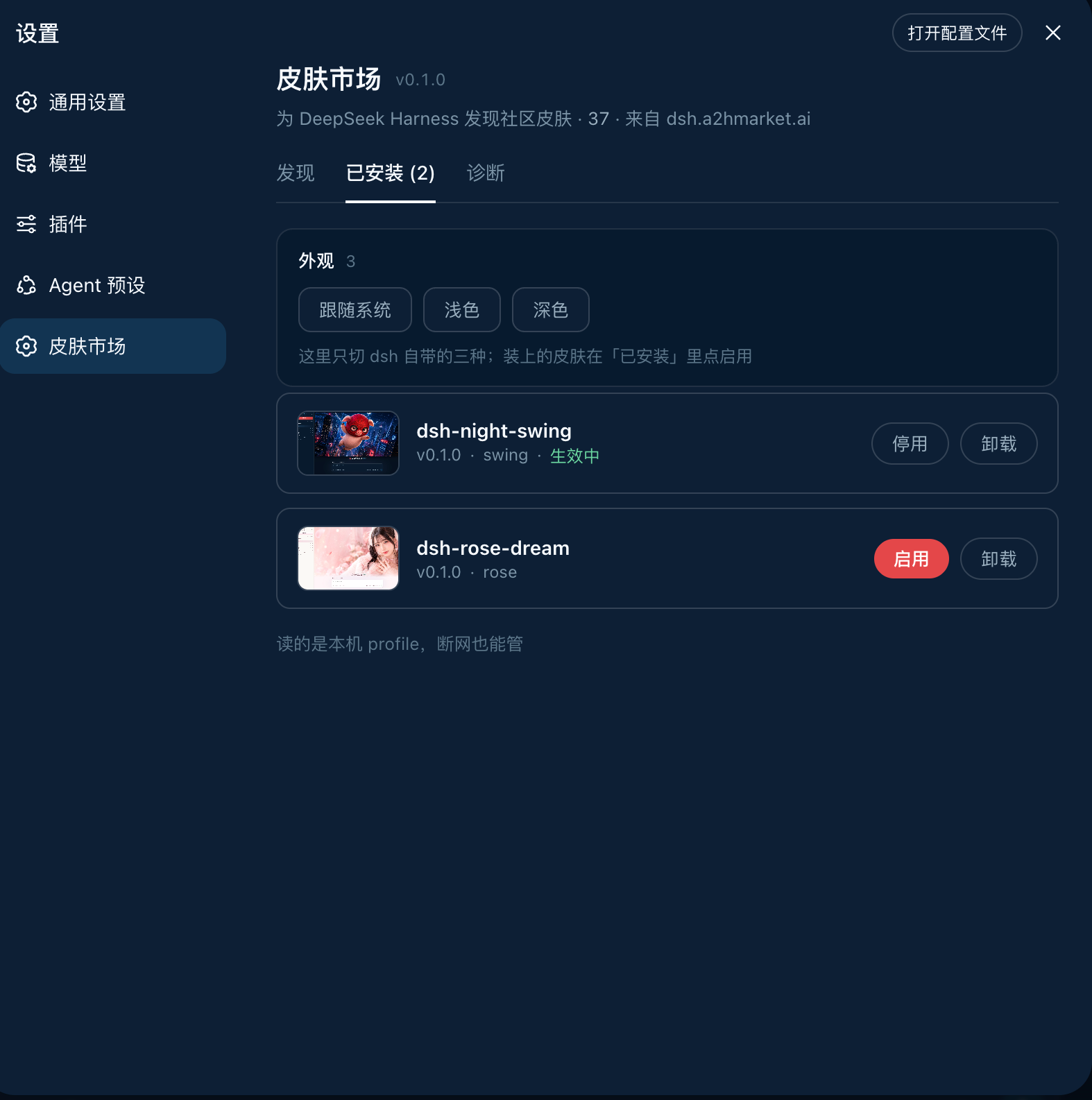
|
DiscoverSearch, sort, install in one click. Each card states whether the skin is a prebuilt package or built from source — so you know whether the click costs seconds or minutes before you make it. |
InstalledVersion, theme id, enable / disable, uninstall. It reads the local profile, so it works offline — even the previews are served locally, with no extra network use. |
Diagnostics · pnpm, the profile path, registry connectivity and the full output of the last install — the first screen to check when something will not install, and far more useful than a screenshot
The source of every official skin on the site lives in dsh-skin-pack.
Install
dsh plugin --profile web add -w github:keman-ai/dsh-skin-market
Restart dsh once, then open Settings → Skin Market.
dsh --profile web
From then on, installing a skin only takes a page refresh — no restart, no commands.
-wis not optional. The profile directory ships apnpm-workspace.yaml, so pnpm reads it as a workspace root and refuses to install (ERR_PNPM_ADDING_TO_ROOT).-wis the "yes, install into the root" declaration, anddsh pluginforwards it to pnpm verbatim. Both pnpm 8 and 10 need it.
The repository ships its build output (lib/) and has no prepare script, so pnpm runs no build script when installing from a git source and you never have to grant allowBuilds.
If you run harness from source, replace both dsh commands above with pnpm dsh inside the harness directory.
Uninstall
dsh plugin --profile web remove dsh-skin-market
Skins installed through the market do not disappear with it — they are independent dependencies in the profile, uninstalled individually from the market's Installed tab.
Requirements
Browsing needs only dsh and a network. Installing is what needs the command-line tools, because installing is fundamentally running pnpm on your behalf.
| Dependency | Requirement | What happens without it |
|---|---|---|
| DeepSeek Harness | 0.1.0-rc.6+ (tested on rc.7) |
Earlier versions lack settings.section and the browser module table, so the plugin cannot mount |
| profile | Must be the web profile | headless / tui bundles have no webServer, so the plugin never activates |
| Node.js | >= 20 (tested on 24) |
dsh's own requirement; the plugin does not raise it |
| pnpm | On PATH (tested on 8.15 and 10) |
Affects installing only. Diagnostics flags it red and the install button reports a clear error, while browsing and search continue |
| git | Only for GitHub-source skins | Most catalog skins now use Release tarballs (no git needed); only a few remain github:owner/repo sources |
| Network | dsh.a2hmarket.ai; also github.com for GitHub-source skins |
An unreachable registry falls back to the cache or bundled snapshot, and the page says so |
| Browser | Installing requires a direct local connection (loopback) | Remote access can browse and search; installing is refused |
The plugin itself has a single runtime dependency: yaml, used to read and write the profile's patch file.
Configuration
No configuration is needed by default. To change something, append a section to the profile's cordis.patch.yml ($DSH_HOME/profiles/web/cordis.patch.yml) overriding this plugin's row by id:
- id: skin-market
  name: dsh-skin-market
  config:
    # Point at a different registry (for a self-hosted catalog). Include the context path.
    catalogOrigin: https://dsh.a2hmarket.ai/dsh-skin
    # Turn this off for a read-only market: browsing and search work, and the install
    # button no longer touches your machine.
    allowInstall: true
Development
pnpm install
pnpm build     # → lib/index.js (host half) + lib/client.js (browser half)
pnpm check     # type check
pnpm test      # unit tests
After changing code, run pnpm build again and restart dsh. When the plugin is installed into a profile with link:, there is no need to add it again.
テーマ・スキン の他のプラグイン
dsh-qq2006
by laplaceyoung
DSH Web UI 向け切替可能 QQ2006 スキン:コーラルブルーテーマとレトロ素材
dsh-beauty-skins
by xierw
DSH 向け美女シリーズスキン:壁紙プレビュー選択、配色自動抽出
deepseek-harness-skin
by heigeai
21 組み込みスキン+1 枚画像から配色生成。コントラスト自動導出、ビルド期可読性検証
whaleisle
by chisaalter
公式機能を備えたDeepSeek Harnessのコミュニティ強化デスクトップ版です。テーマ・壁紙、デスクトップペット、使用量表示、スマホからのリモート接続を追加します。