
dsh-design-mode
メンテナンス: 活発kaichencurry/dsh-design-mode
DeepSeek Harness の画像生成デザインモード。無限キャンバス、ユーザー確認、画像ツール・コメント・プロバイダールーティングを備えます。
$ dsh plugin add dsh-design-mode16
スター
0
フォーク
TypeScript
言語
MIT
ライセンス
2026-08-22
作成日
2026-09-01
最終プッシュ
README
DSH Design Mode
English | 中文
Turn one idea into a visual result you can keep refining—inside DeepSeek Harness.
DSH Design Mode connects guided intent clarification, image generation, an infinite canvas, contextual image tools, and location-aware comments to the native DSH conversation.
Watch the workflow · Quick start · Product PDF




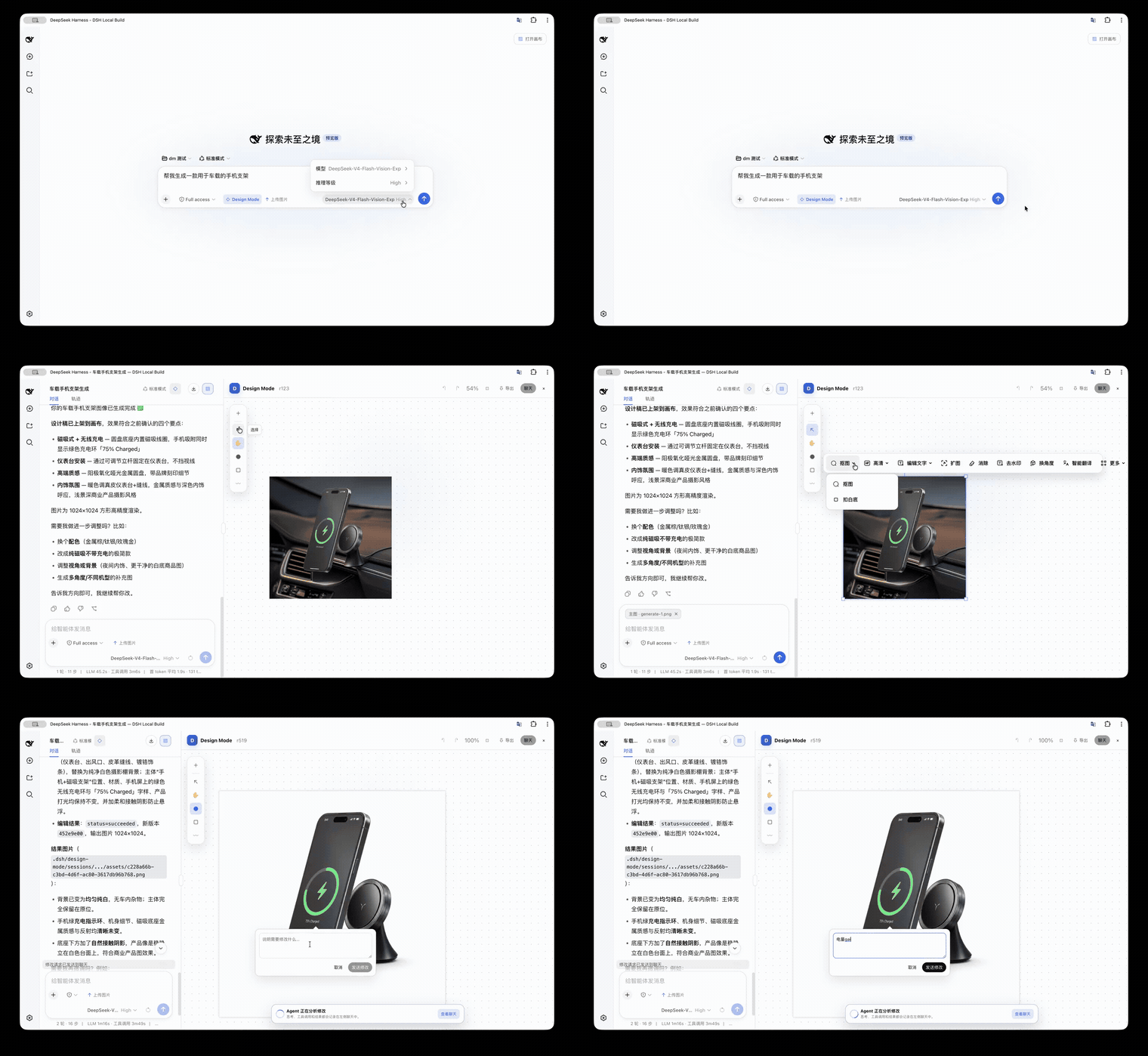
One conversation. One canvas. Every edit stays traceable.
Developer preview based on
dsh-v0.1.1-rc.2. This independent community project is listed under the GitHubdsh-plugintopic and is not an official DeepSeek release.
Why Design Mode exists
Image models can already produce impressive pixels. The surrounding workflow still asks the user to behave like a product manager: translate an idea into a production prompt, choose the correct tool, move context between panels, and reconstruct why each revision exists.
DSH Design Mode makes that coordination part of the Agent session. A user can begin with ordinary language, clarify only the decisions that materially affect the result, generate or import an image, select the object to edit, and send precise visual comments back through the same conversation.
| Without a continuous workflow | With DSH Design Mode |
|---|---|
| A blank canvas or a wall of tools appears before the brief is clear. | Design Mode stays armed but opens the canvas only after text, an image, or both create real visual work. |
| The user must know how to write a production prompt. | ask_user converts an ambiguous request into 3–5 focused decisions before generation. |
| Editing tools are detached from the selected image and its history. | Tools appear for the selected object and write their results back to the current canvas. |
| Comments live in a separate review panel. | Point, rectangle, and brush comments return to chat and are processed in order. |
The product in one minute
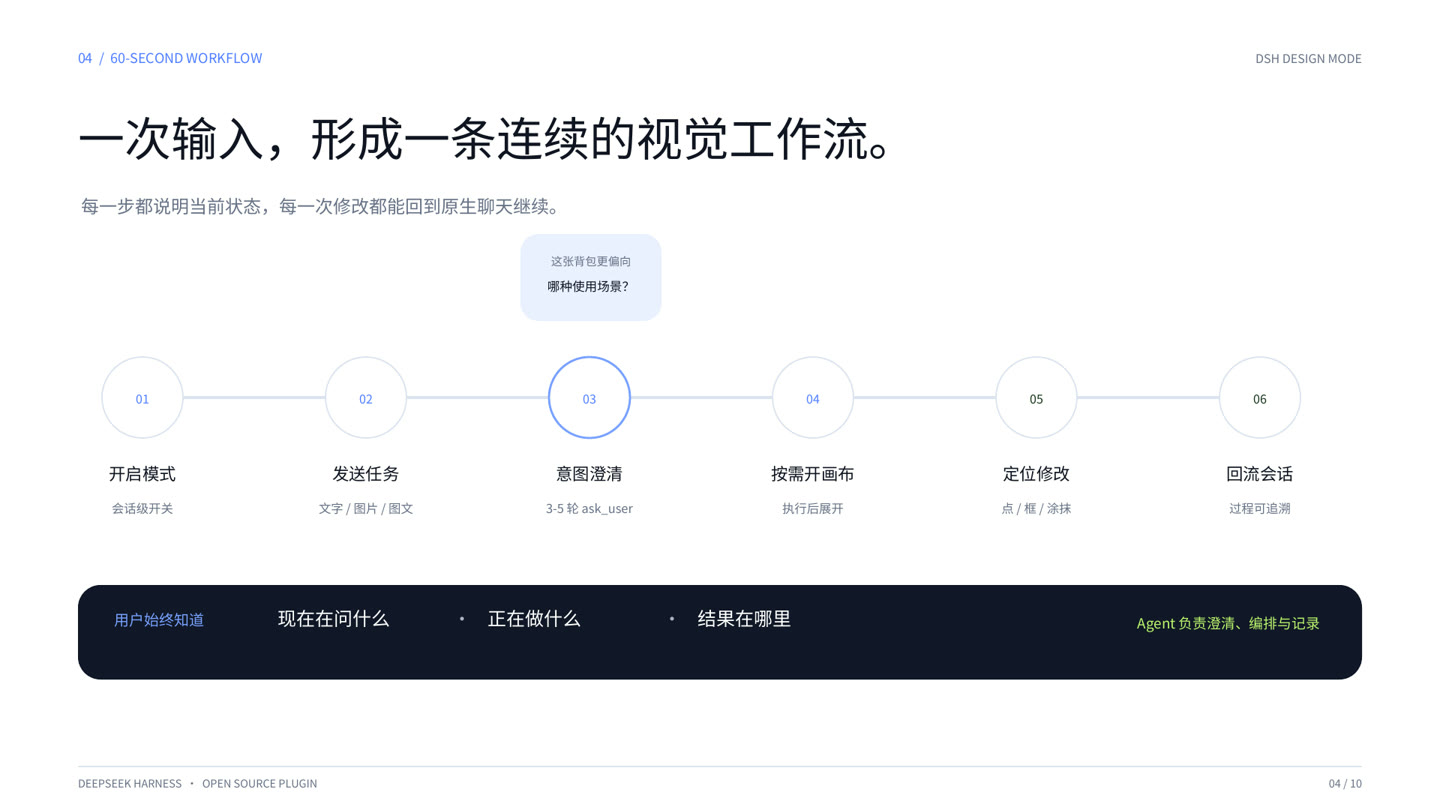
- Arm Design Mode. The mode is explicit and reversible; an empty canvas does not interrupt the conversation.
- Send text, an image, or both. The native Composer remains the single entry point.
- Clarify material ambiguity. The Agent asks one focused question per round, with three recommendations and a UI-owned “Other” input.
- Generate or import. The canvas opens when there is an image to inspect, compare, or edit.
- Edit in context. Selecting an image reveals the capabilities relevant to that object and task.
- Comment and continue. Location-aware requests return to the native conversation, preserving the visible reasoning and modification record.
Watch the real workflow
These recordings come from the working DSH build. Select a card to play the full MP4.
デザイン・メディア・ビジョン の他のプラグイン
dsh-image-gen
by shanliuling
DeepSeek Harness チャット内で直接画像生成
dsh-vision-router
by ysr666
テキスト専用 DeepSeek Harness エージェントに目を与えるプラグイン。キー不要の無料ビジョンチェーン内蔵に加え、QA、グラウンディング、切り抜き、OCR などのツールをワンコマンドで導入可能
dsh-vision-toolkit
by anionex
テキスト専用 DSH エージェントに 10 個の構造化ビジョンツールを提供。意図を意識した画像 QA、長いスクリーンショットの OCR、ピクセルレベルのグラウンディング、UI 復元、ピクセル差分など
dsh-see-now
by saos-3624
画面、OBS、Webカメラのフレームを取得し、変化の大きいものだけを画像シートにまとめてDSHセッションへ渡します。