
dsh-jenkins
キュレーションリスト掲載メンテナンス: 活発jsoncode/dsh-jenkins
複数 Jenkins 管理。設定页/モデルツール/ワークスペースからジョブ実行
$ dsh plugin add dsh-jenkins3
スター
1
フォーク
JavaScript
言語
2026-08-16
作成日
2026-11-11
最終プッシュ
README
dsh-jenkins
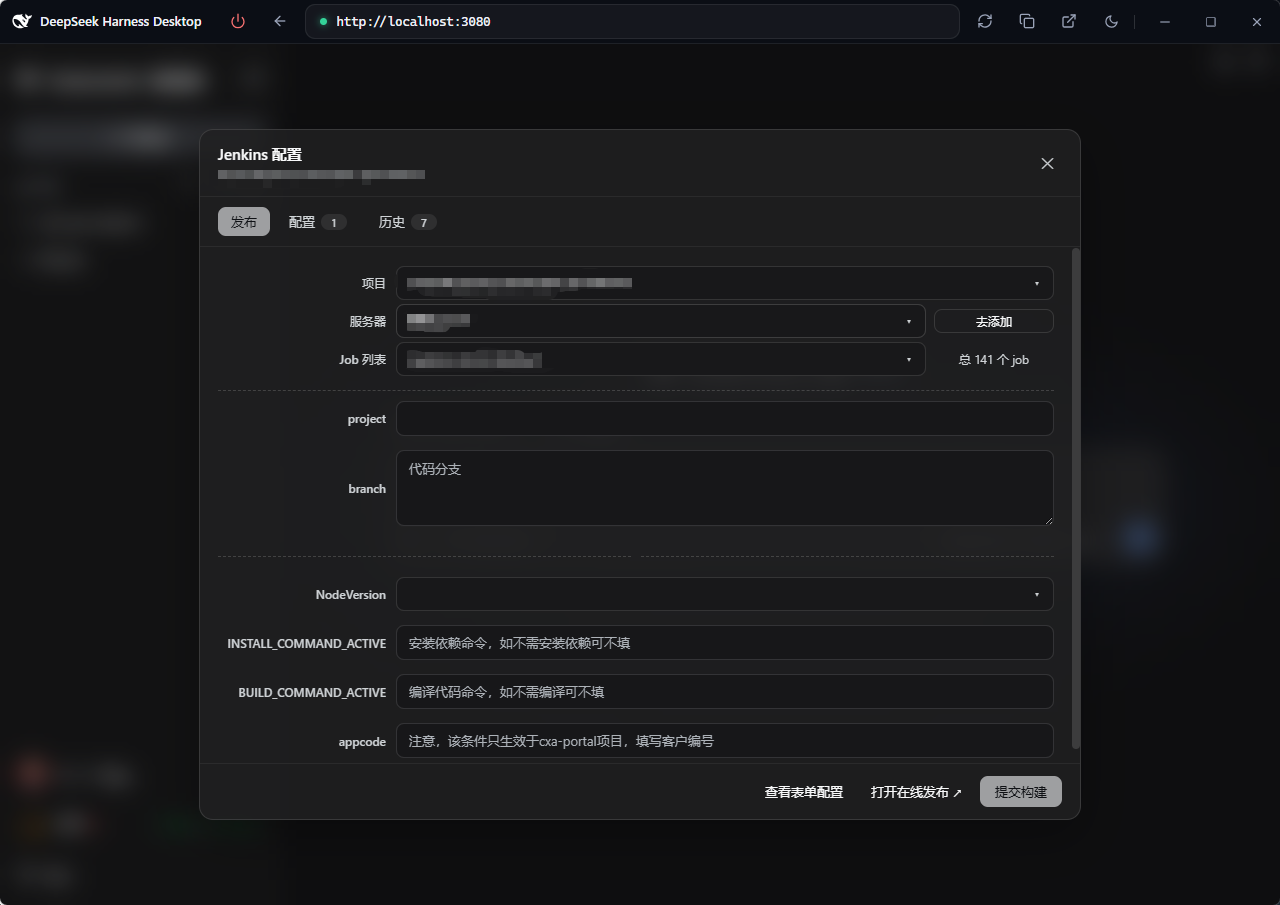
dsh-jenkins is a Jenkins management plugin built on the DeepSeek Harness (DSH) host, centralizing multiple servers and jobs for fast build publishing.
- Multi-server / multi-job management — configure and manage multiple Jenkins servers and jobs in one place
- One-click publishing — trigger parameterized builds, track queue → building → result in real time
- Logs & operations — view build logs, stop or cancel builds at any time
- Bilingual UI — follows the host interface language (中文 / English)
Available from the Settings page (the single UI entry since DSH 0.2.2-rc.1) and model tools.
Preview
Screenshots of the Settings page, workspace entry and run/history modals: see preview.md.
Features
- Settings → Jenkins Config page (
settings.section— the single UI entry): a "Jenkins Config" row (with a Jenkins-logo nav icon) in the settings dialog's left menu; the page embeds four tabs — Publish / Config / Local records / Server history. Its title row carries the task status capsules (building / done-unread / "Update" pill) and a workspace picker (defaults to the current session's workspace, manually switchable). Add / edit / delete multiple servers (URL, username, Token), test connections, skip TLS verification. Only Server URL and Token are required (username defaults toadmin). Secondary modals (build log / server editor / project config / update changelog) render as top-level viewport overlays, never clipped by the settings panel. - Project Config (
$DSH_HOME/dsh-jenkins-map.json): every project's publish targets in one file — project name → target array, with elements identical to a workspace config file ({ name?, job, server, environments }). Each env can carry anamedisplay label (e.g.uat环境/prod灰度/prod环境) and the number of envs is unlimited (an empty name falls back to UAT / Prod / Env N). Adsh-jenkins.json/js/tsin a project root is discovered automatically (folder name as the project name, missing-only — nothing you edited is overwritten), so there is usually nothing to maintain by hand; to edit, click Edit map on the Project Config row of the Config tab (form / JSON). See Project config. - Publish tab (inside the settings page): just three rows — project → server →
job — then the parameter form, build triggering and status polling (queued →
building → result, 10-minute timeout). The env has no row of its own: each env
in a project config is a server, so env selection lives in the Server
dropdown — whose labels show only the plugin's server name (never a mix of the
config's env name and the server name), and picking one switches the job / params
to that env. Config
serverrefs are matched against configured servers by name → id → full URL → domain (the domain level ignores scheme, port and context path). The dropdown shows the intersection of the servers referenced by the project config and the servers configured in the plugin; the last parameters are remembered per project and auto-echoed next time. - Model tools (docs/develop/basic/tool):
dsh_jenkins_build,dsh_jenkins_status. - Config (docs/develop/basic/config): Schemastery
Config+ a plugin data file$DSH_HOME/dsh-jenkins.json(server tokens encrypted with the machine-bound key$DSH_HOME/dsh-jenkins.key, cache in plaintext); the project config is its own file$DSH_HOME/dsh-jenkins-map.json(plaintext, hand-editable). Since DSH 0.2.2-rc.1 the legacysettings.yamldocument is migrated by the host framework itself — the plugin no longer reads or writes it (when the data file is missing it is seeded from the bundle entry'sconfig.servers); a legacyprojectsfield insidedsh-jenkins.jsonis migrated into the new file (missing-only). - Packaging (docs/develop/basic/publish):
dsh.bundle+dsh.client(web) manifests.
Structure
├── src/host/*.ts       # Host half: index.ts (entry), jenkins.ts (curl core), ops.ts (op dispatch), project-map.ts (project config file), projects.ts (normalize/merge), workspace-config.ts, types.ts
├── src/client/*.tsx    # Browser half (React TSX): settings.section entry page (embedded 4 tabs), publish/project/history tabs, secondary modals
├── lib/index.js        # Host half build artifact (tsdown, ESM), committed for git installs
├── lib/client.js       # Browser half build artifact (tsdown → __ModuleLoader__ factory), committed
├── lib/types/          # Type declarations (generated by tsc -b)
├── scripts/            # verify-client.mjs (host-seed simulation check) + isolated tests
├── examples/           # sample configs: dsh-jenkins.json (workspace array), dsh-jenkins-map.json (central map)
├── tsdown.config.ts    # tsdown build config (node half + client bundle banner wrapper)
├── tsconfig.json       # solution: references tsconfig.host.json / tsconfig.client.json
├── cordis.patch.yml    # Bundle patch: plugin row referenced by package name (no paths)
├── package.json        # dsh.bundle + dsh.client(web) manifests + peerDependencies
├── README.md           # This file (English)
├── README.zh.md        # 中文文档
└── preview.md          # Screenshot preview (references assets/preview/*.png)
Workspace config file (dsh-jenkins.json / .js / .ts)
Place it in the workspace root. It is an array; each element is one deploy
target (job + server + environments params). .json is parsed directly; .js / .ts
are evaluated with node (CJS module.exports or ESM export default):
[
  {
    "job": "build-app",
    "server": "http://uat.example.com",

[GitHub で README 全文を読む →](https://github.com/jsoncode/dsh-jenkins)Web・ブラウザ の他のプラグイン
anysearch-dsh
by anysearch-team
DeepSeek Harness 向け AnySearch Web 検索プロバイダーと高度検索ツール
dsh-find-plugin
by awesome-dsh-plugin
エージェント内プラグイン発見:GitHub dsh-plugin トピックのライブ検索、star 順、dsh plugin add コマンド付き
fnos-dsh
by fnosp
DeepSeek HarnessアプリケーションとHarnessプラグインをまとめたモノレポです。
modsearch
by liustack
Web/X 検索・取得ブリッジ:テキスト専用 coding agent 向けに構造化 JSON 証拠(search/fetch/citations)を提供