
dsh-code
メンテナンス: 活発guoxiucai/dsh-code
DeepSeek Harnessをベースにしたpi-tuiスタイルのコード生成エージェント。ターミナル上でコーディングを自動化する。
$ dsh plugin add dsh-code8
スター
4
フォーク
TypeScript
言語
MIT
ライセンス
2026-08-16
作成日
2026-11-20
最終プッシュ
README
dsh-code
A DeepSeek Harness terminal coding agent for developers who prefer a focused TUI workflow.
English · 简体中文



[!IMPORTANT]
dsh-codeis an independent community project, not an official DeepSeek distribution. DeepSeek Harness is also in developer preview, so compatibility-breaking upstream changes may occur between pinned baselines.
Why dsh-code?
DeepSeek Harness provides an
official Web UI and a plugin-first agent runtime. dsh-code is for developers
who prefer to stay in the terminal: it packages the same DSH agent semantics in
a compact, keyboard-driven interface that works naturally beside shells,
editors, Git, and remote development environments.
The product draws on the interaction ideas of
Pi and uses
@earendil-works/pi-tui
for terminal rendering. It does not fork or replace the agent core. The Agent
Loop, sessions, model adapters, tools, sandbox, permissions, MCP, Skills,
Plan/Todo, and sub-agents remain owned by the pinned DSH runtime.
In short:
DeepSeek Harness agent runtime + Pi-inspired terminal UX + pi-tui renderer
Requirements
| Component | Supported platforms (0.1.6+) |
|---|---|
| macOS | 14 or later, Apple Silicon (arm64) |
| Windows | Windows 10 or later, x64 |
| Linux | x64, validated on Ubuntu 22.04; Ubuntu 24.04 installation CI |
| Node.js | 24.9+ |
| Package manager | npm for normal installation |
Linux x64 joins macOS and Windows in 0.1.6. Physical Ubuntu validation is recorded
in the Linux validation report. Linux clipboard support
requires wl-copy/wl-paste (Wayland), or xclip/xsel (X11); /web needs a
desktop browser for automatic opening.
Linux ARM64/Alpine (musl), macOS Intel/Rosetta, Windows ARM, and standalone installations without Node.js are not supported. Other Linux distributions have not been validated.
Installation
npm
npm install -g @tsingwill/dsh-code
Install the current release candidate instead of the stable channel:
npm install -g @tsingwill/dsh-code@next
Verify the installation:
dsh-code --version
dsh-code --help
The scoped npm package is @tsingwill/dsh-code; the installed command remains
the shorter dsh-code.
Build from source
git clone --recurse-submodules https://github.com/guoxiucai/dsh-code.git
cd dsh-code
corepack enable
npm install --global pnpm@11.28.5
pnpm install --frozen-lockfile
pnpm run build:lib
pnpm run build
node lib/bin.js
Preview
Highlights
- Terminal-native workflow — streaming Markdown, five-line collapsed reasoning and verbose tool bodies, always-visible line-numbered file diffs, selectable/copyable results, themed paste markers, shell blocks, and a bottom-pinned composer.
- Standard and PTC modes — Standard makes direct tool calls; PTC composes multi-step work in one TypeScript program. PTC child calls use native tool rows, with long bodies collapsed and file diffs always visible.
- DeepSeek Harness semantics — uses DSH's public session/events and services; there is no second agent loop, session store, permission engine, or tool registry.
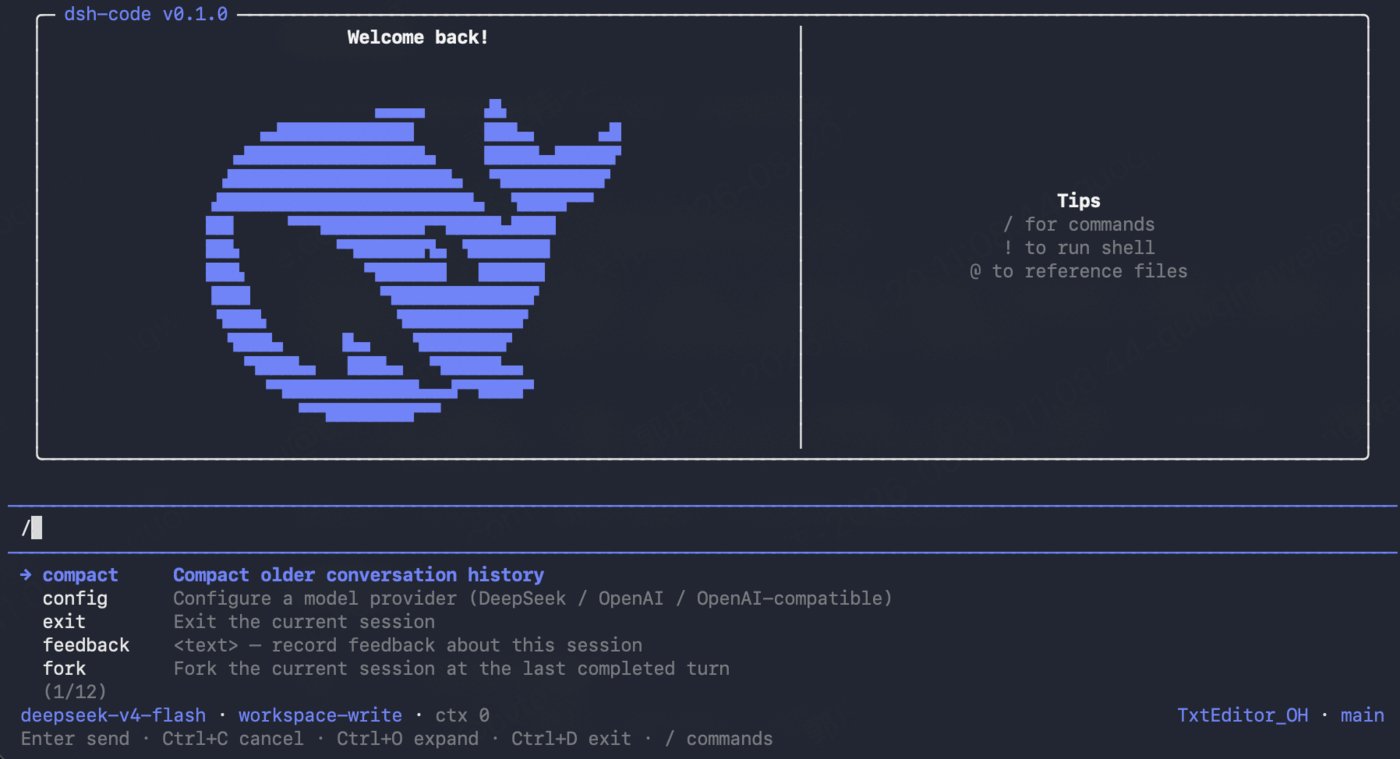
- Model setup in the TUI — configure DeepSeek, OpenAI, or an OpenAI-compatible endpoint through an inline, reversible wizard.
- Safe project startup — canonical-path trust records and
read-only,workspace-write, ordanger-full-accesspermission presets. - Persistent sessions — start, resume, search, delete, fork from a historical request, clone the current snapshot, inspect statistics, and compact context.
- Agent visibility and decisions — dedicated Plan/Todo states, queued-user message feedback, tool progress, retry and compaction indicators, one-shot approval bars, structured questions, plan review, and a clickable active sub-agent indicator with cancel/remove controls.
- Fast terminal controls — slash-command completion, fuzzy
@file and folder completion, direct!shell mode, inline selectors, and keyboard-first navigation. - Independent installation — stores product data under
~/.dsh-code, keeps a separately installeddshcommand untouched, and supports explicit updates. - Adaptive visuals — a DeepSeek-blue palette tuned independently for dark and light terminal backgrounds.
Architecture
dsh-code is deliberately a thin terminal host over a fixed DSH baseline:
flowchart TB
  User["Terminal user"] --> CLI["dsh-code launcher"]
  CLI --> TUI["Terminal host<br/>Pi-inspired UX + pi-tui"]
  TUI --> API["Public DSH services<br/>session/event + AgentHandle"]
  API --> DSH["@deepseek-ai/dsh-base<br/>Standard / PTC Agent Preset"]
  DSH --> Runtime["Agent Loop · Sessions · Models · Tools<br/>Sandbox · Permissions · MCP · Skills<br/>Plan/Todo · Sub-agents"]
CLI・ターミナル の他のプラグイン
deepseek-harness-docker
by runzhliu
DeepSeek Harness のコミュニティ Docker/K8s パッケージ:Compose、Helm、Web UI、ヘッドレス CLI
deepseek-harness-android
by dphmoblie
Capacitor Android:本機 DSH Ubuntu ユーザースペース管理
dsh-subagent-codex
by mjylfz
ローカルのOpenAI Codex CLIにタスクを委譲するsubagent_codexツールを追加。作業は分離された外部プロセス上で実行されます。
mnemon
by mnemon-dev
LLM が監督する AI エージェント向け永続メモリ。グラフベースの想起、セッション横断の知識、単一バイナリで動作し、DeepSeek Harness、Claude Code、OpenClaw などに対応