
dsh-doctor
キュレーションリスト掲載メンテナンス: 活発asdf17128/dsh-doctor
DeepSeek Harness のパッチが静かに壊した箇所を発見:デッドパッチ、設定丸ごと置換で失われたフィールド、未メンテのプラグイン。読み取り専用、依存なし
$ dsh plugin add dsh-doctor1
スター
0
フォーク
JavaScript
言語
MIT
ライセンス
2026-08-13
作成日
2026-08-29
最終プッシュ
README
dsh-doctor

Your dsh config has settings that silently stopped applying. This tells you which ones.
English | 中文
npx github:asdf17128/dsh-doctor
One command, ten seconds, read-only. No config, no signup, no dependencies.
Why your setting isn't taking effect
Two dsh behaviours boot cleanly with exit code 0, so nothing tells you:
A patch replaces an entry's whole config. You change one field; every
sibling field you did not restate disappears from the tree that boots. The
plugin then runs on defaults you never chose.
  config:
    fallbackMaxWords: 12
-   fallbackMaxBytes: 40      ← gone, silently
-   maxTitleBytes: 80         ← gone, silently
A typo in an entry id is inert. Write agent-defualt-model and dsh prints
one stderr line, then boots without your change. Launching the Web UI, you never
see it — you just wonder why nothing happened.
Both get worse after an upgrade renames an entry id, and neither surfaces until behaviour drifts weeks later.
What it looks like
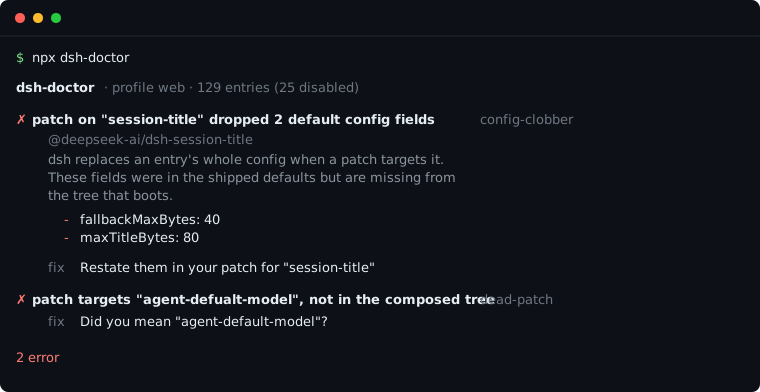
dsh-doctor · profile web · 130 entries (25 disabled)

✗ patch on "session-title" dropped 2 default config fields  config-clobber
    @deepseek-ai/dsh-session-title
    dsh replaces an entry's whole config when a patch targets it. These fields
    were in the shipped defaults but are missing from the tree that boots, so
    the plugin now runs without them.
      - fallbackMaxBytes: 40
      - maxTitleBytes: 80

    fix Restate them in your patch for "session-title":
            fallbackMaxBytes: 40
            maxTitleBytes: 80

✗ patch targets "agent-defualt-model", which is not in the composed tree  dead-patch
    ~/.dsh/profiles/web/cordis.patch.yml patches an entry id that does not
    exist, so dsh prints one stderr warning and boots without it. Everything
    in that patch is inert.

    fix Did you mean "agent-default-model"? Rename the id, or delete the
        patch block if the plugin is gone.

2 error
As a dsh plugin
Installed into a profile, dsh-doctor registers a config_doctor tool so the
agent can inspect the configuration it is itself running under:
dsh plugin --profile web add dsh-doctor
Then ask it — "why isn't my session-title setting taking effect?" — and it
answers from the composed tree instead of guessing. Read-only; --fix stays
CLI-only, because rewriting your patch file is not something an agent should do
from a chat turn.
Checks
| Rule | Severity | What it catches |
|---|---|---|
config-clobber |
error | Default config fields your patch dropped by not restating them |
dead-patch |
error | A patch targeting an entry id that is not in the tree (with a did-you-mean) |
tool-collision |
error | Two mounted plugins registering the same tool name — dsh refuses to start |
plugin-not-mounted |
warn | A plugin installed into the profile that nothing ever loads |
plugin-stale |
warn | A third-party plugin with no npm release in 180+ days |
entry-removed |
warn | A shipped entry your patch layer removed |
entry-toggled / entry-added |
info | Every other difference from the shipped profile, so the diff is visible |
Explain mode
A healthy install gets "no problems found", which tells you nothing about what
you are running. --explain answers that instead:
Your harness: 130 entries, 103 active, 25 disabled, 2 conditional

  Web UI                  32
  Tools                   18  (16 off)
  Sessions & history      11
  Agent loop               5  (1 off)
  ...

Conditional (2) — enablement is decided at mount time, not here
  bash-sandbox             !!js process.platform === 'win32'
  pwsh-sandbox             !!js process.platform !== 'win32'
Entries whose disabled: is a !!js expression are reported as conditional
rather than collapsed to a boolean — the answer depends on the machine that
boots, and the tool never evaluates your config to find out.
Usage
npx dsh-doctor                      # check the web profile
npx dsh-doctor --explain            # describe the tree instead of checking it
npx dsh-doctor --profile headless   # another profile
npx dsh-doctor --verbose            # include informational notes
npx dsh-doctor --json               # machine-readable
npx dsh-doctor --fix                # restate the dropped fields for you
npx dsh-doctor --offline            # skip npm registry lookups
npx dsh-doctor --quiet              # print only when something is wrong
Exit codes: 0 clean or warnings only · 1 at least one error · 2 could not inspect.
Useful in CI, or as a pre-upgrade check:
npx dsh-doctor --quiet || echo "review your patches before upgrading dsh"
--fix
--fix restates the fields a patch dropped, writing them back into the same
config: block with the values the shipped profile declared:
  - id: session-title
    config:
      fallbackMaxWords: 12
+     fallbackMaxBytes: 40
+     maxTitleBytes: 80
It edits inside that block only — comments, ordering and every other entry stay
byte-identical — and writes a .bak beside the file first. A nested key path is
reported for you to restate by hand rather than guessed at, and dead-patch
findings are never auto-fixed because renaming versus deleting is your call.
How it works
It shells out to dsh's own composition:
dsh --profile <p> --dump-config— the tree that actually boots (bundles → profile patch → home patch → overlays)dsh --profile <p> --dump-default-config— the same tree without your user layer
Every finding is a diff between those two, so the report can attribute a change to your patches rather than to an upstream default. It also reads the profile's package.json and cordis.patch.yml files.
CLI・ターミナル の他のプラグイン
deepseek-harness-docker
by runzhliu
DeepSeek Harness のコミュニティ Docker/K8s パッケージ:Compose、Helm、Web UI、ヘッドレス CLI
deepseek-harness-android
by dphmoblie
Capacitor Android:本機 DSH Ubuntu ユーザースペース管理
dsh-subagent-codex
by mjylfz
ローカルのOpenAI Codex CLIにタスクを委譲するsubagent_codexツールを追加。作業は分離された外部プロセス上で実行されます。
mnemon
by mnemon-dev
LLM が監督する AI エージェント向け永続メモリ。グラフベースの想起、セッション横断の知識、単一バイナリで動作し、DeepSeek Harness、Claude Code、OpenClaw などに対応