
DSH 3D Modeling Plugins: Blender MCP, Tripo Image-to-3D & CAD Dev
Three non-overlapping 3D/CAD routes, all from real screen recordings: drive Blender from a dsh session over the generic MCP protocol, turn character art into downloadable 3D models with dsh-tripo-studio, then flip the direction and let dsh write an AutoCAD plugin for you — every screenshot deep-links to the exact second of its source video.
Last updated: 2026-10-09
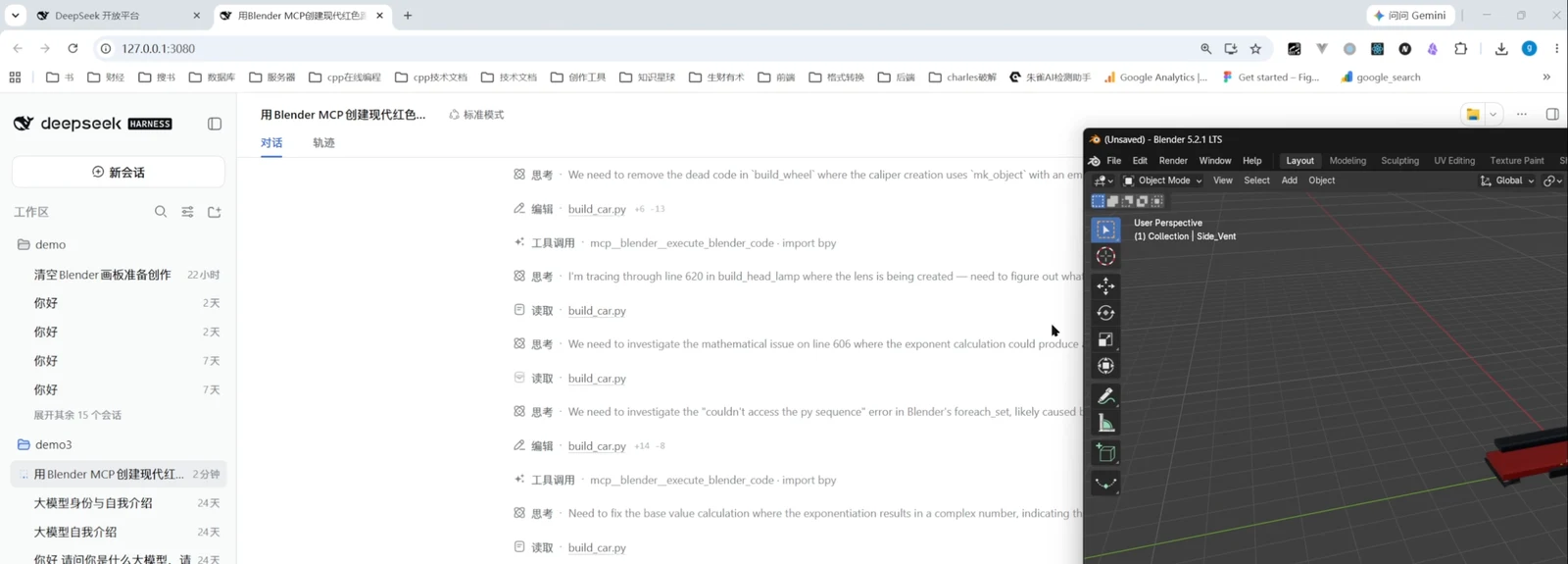
The AI in your chat window used to stop at text and flat images — until dsh reached into 3D scenes over MCP. This page walks three routes on real screens: first, a dsh session drives Blender 5.2.1 directly through a Blender MCP server and builds a red supercar (note: this is the generic MCP protocol at work, not an official DSH-exclusive plugin); second, the dsh-tripo-studio plugin splits character art into parts and sends them to Tripo image-to-3D; third, the direction flips — dsh acts as the coding agent and writes an AutoCAD plugin from scratch. Every screenshot links to the exact second of the recording it came from.
Only after flat images? That axis lives in dsh image generation plugin setup
TL;DR
- ▸The Blender link rides the generic MCP protocol (community server, now named mcp-for-blender), not an official DSH plugin — in the recording the dsh session drives Blender 5.2.1 to build a red supercar
- ▸dsh-tripo-studio (★8, repo self-reported by the video author) puts reference-art triage, AI part-splitting, Tripo image-to-3D, GLB download and preview into one Windows workbench
- ▸The CAD section runs the other way: not CAD inside dsh, but dsh writing an AutoCAD plugin — the session ships PackageContents.xml plus build.ps1/install.ps1 and replicates a Jianren-Toolbox-style panel
- ▸This page is the 3D-assets/CAD axis ≠ image generation (2D) ≠ video generation; the Tripo source video is an AI-produced slide deck, so it is cited as a fact source only, with no frames taken
The nine-step walkthrough
The Blender MCP link, end to end
- 1
Install the Blender MCP server
Everything starts on the Blender side: the tutorial author opens the blender_mcp Setup docs on projects.blender.org, follows the Windows/macOS/Linux instructions to clone the repo, and the blender_mcp folder already sits in File Explorer — this step installs the MCP server and the Blender add-on, which any MCP-capable client can attach to. It is not a DSH-exclusive component.
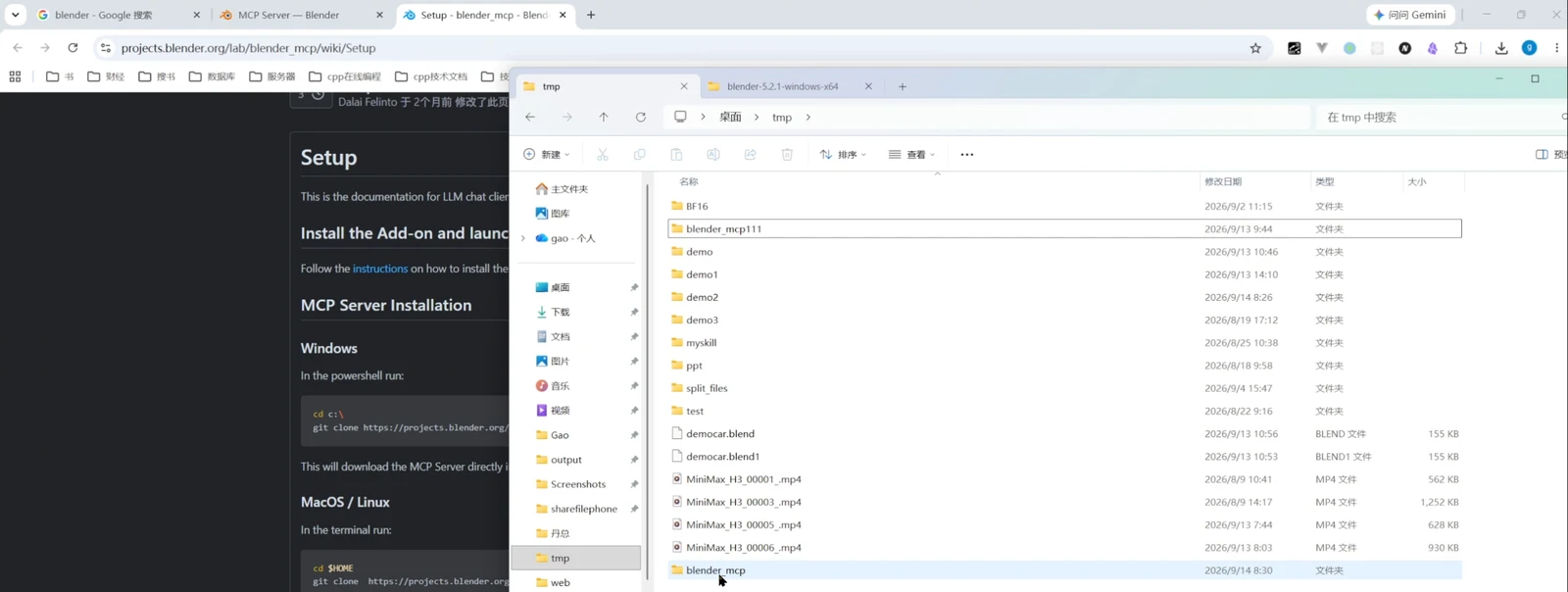
The MCP server install docs next to the unpacked blender_mcp folderWatch at 5:00 - 2
Write the modeling brief in the session
The author pastes one structured brief into the composer — "Please use Blender MCP to create a modern high-performance sports car" — followed by itemized requirements: bright red metallic paint, carbon-fiber front lip, LED headlamps, sport wheels, red calipers, rear wing, dark glass, left-right symmetry, and independently modeled parts to avoid clipping. The more your brief reads like a spec sheet, the less the agent improvises.
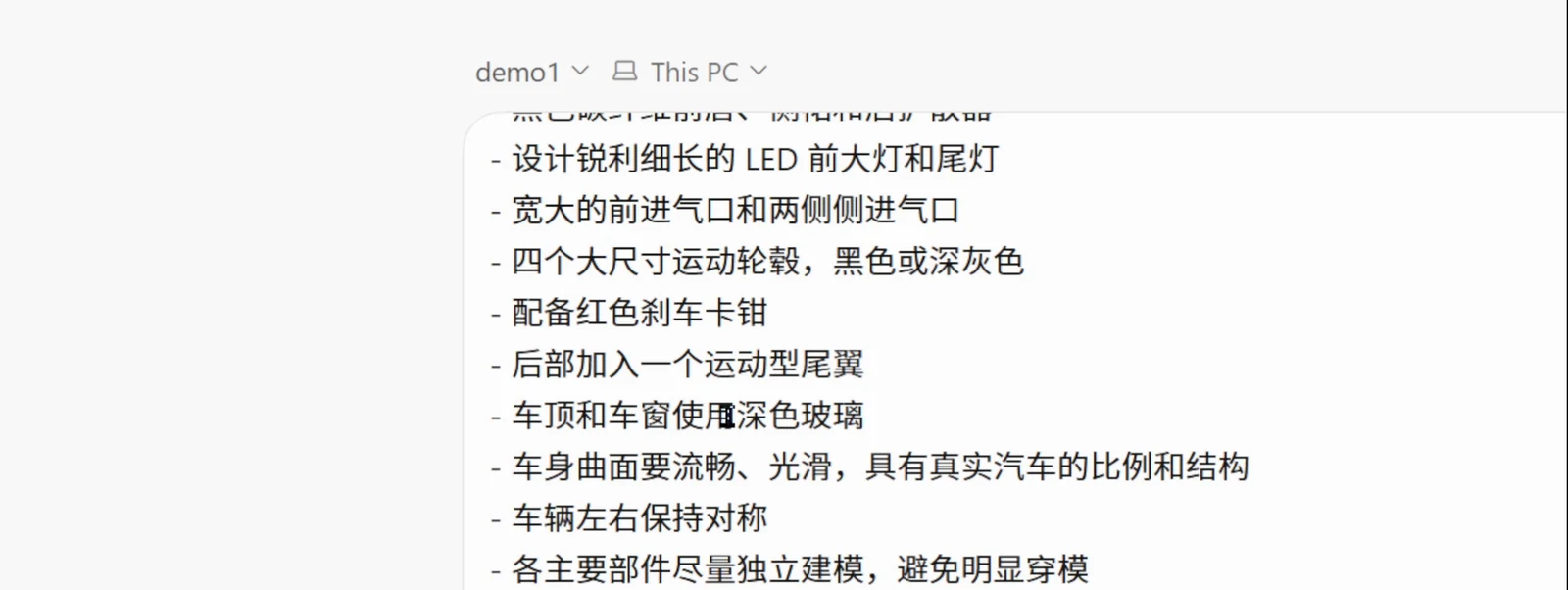
A spec sheet before the handoff: nine requirements, item by itemWatch at 10:46 - 3
Watch the agent drive Blender segment by segment
After the handoff the dsh session settles into a long run: the left pane streams its reasoning and tool calls (editing and re-reading build_car.py, calling mcp_blender_execute_blender_code over and over to run import bpy scripts) while the Blender window on the right grows a car body out of nothing — MCP turns every step in the session into geometry in the scene.
Every tool call in the trace maps to new geometry in the sceneWatch at 7:58 - 4
The first-pass body rolls out
After dozens of tool calls, a first-pass car body appears in the Blender viewport: the low-slung red volume has taken shape, but it is still an untextured base model. The author keeps picking angles and requesting tweaks; the agent goes back, edits the script and re-runs — that is the everyday iteration rhythm of the MCP link.
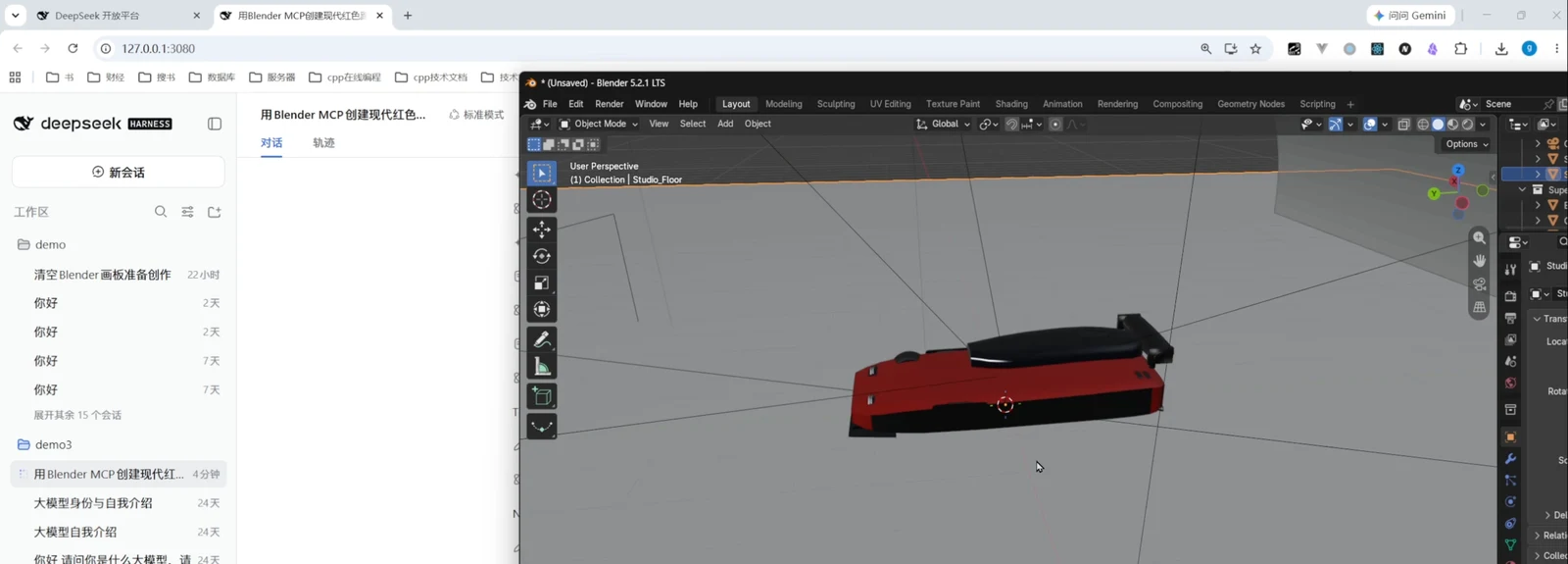
First pass: recognizable, but the edges still showWatch at 8:14 - 5
The result: one complete red supercar
In the closing frame the *.supercar.blend scene already carries the rear wing, dark glass and full paint; the outliner separates Key/Rim/Top lights and a Helpers collection; the floor is a Cycorama studio backdrop — model, lights and camera are all in place, ready to render. The session footer still shows the agent's handover note: the body was lofted into a 120-segment × 192-point grid, perfectly symmetrical, about 4.6 m × 2.0 m × 1.16 m.
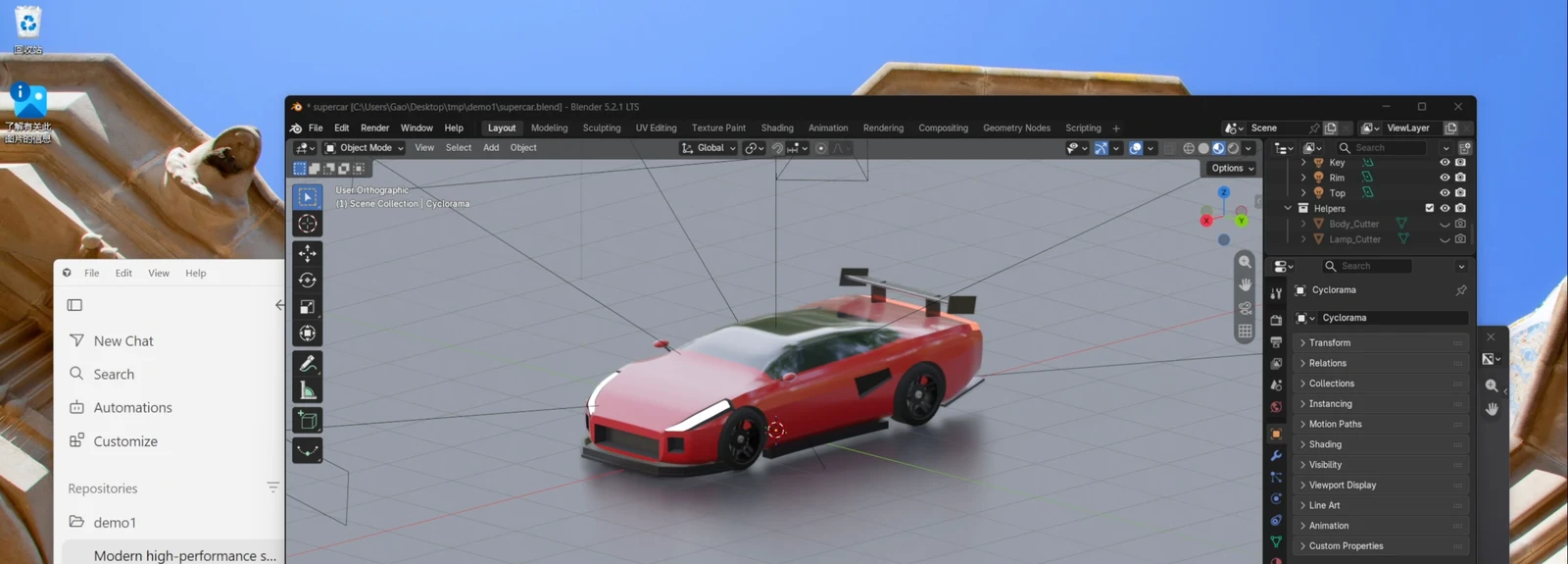
The wrap shot: model, lights and backdrop complete, title bar reading supercar.blendWatch at 11:42
Tripo image-to-3D: the plugin and its fact source
- 6
Tripo image-to-3D: the plugin, cited as a fact source
The second route is the dsh-tripo-studio plugin (the repo the video author self-reports in their Bilibili description, ★8): inside DSH Desktop it organizes reference art, splits parts with AI (primary/secondary/basis tags), sends each part through Tripo image-to-3D, reviews and confirms costs in one place, then downloads GLB models for local preview. The author's own walkthrough video (features from t=8, examples from t=32, finished models from t=56) is a slide-and-animation production, so per this page's framing discipline no frames are taken from it — its timestamps are cited only as evidence for the plugin's identity and results; install commands follow the author README (checked 2026-10-09).
$node .\scripts\install-local.mjs --dry-run$node .\scripts\install-local.mjs --apply
Letting dsh write your CAD plugin
- 7
Let dsh write an AutoCAD plugin from scratch
The third section flips the direction: CAD is not being pulled into dsh — dsh acts as the coding agent. In the recording the agent has already delivered the full AutoCAD 2020 add-on package — PackageContents.xml, Commands.cs, build.ps1, install.ps1 — plus a load check (typing nihao in the command line prints 你好,工程师); the next ask is to point a local qwen2.5-vl vision model at a screenshot and replicate that UI into the plugin.
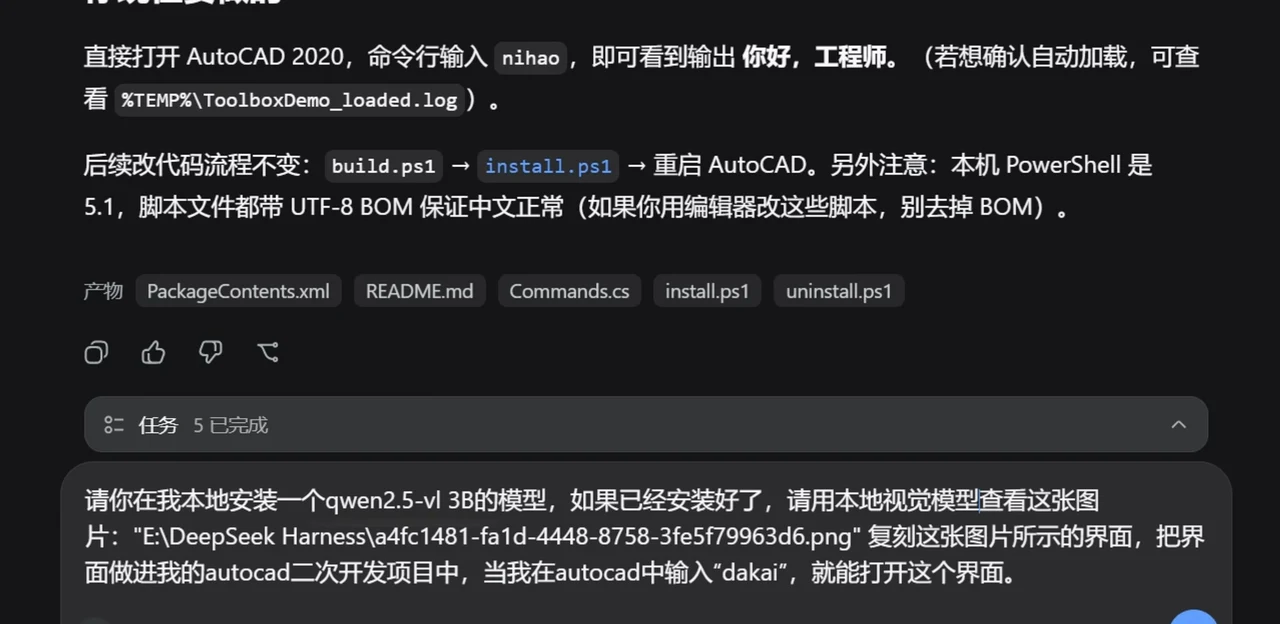
An artifact list plus the next brief: dsh takes on AutoCAD side workWatch at 4:00 - 8
The replicated tool panel lands in AutoCAD
After a reload, a replicated "Jianren Toolbox 5.2" panel floats inside AutoCAD 2020: the full button grids of its Modify/Text/Annotation groups sit on screen next to AutoCAD's native ribbon and layer palette — the chain of replicating a UI from a screenshot and wiring commands through the .NET API genuinely works end to end.
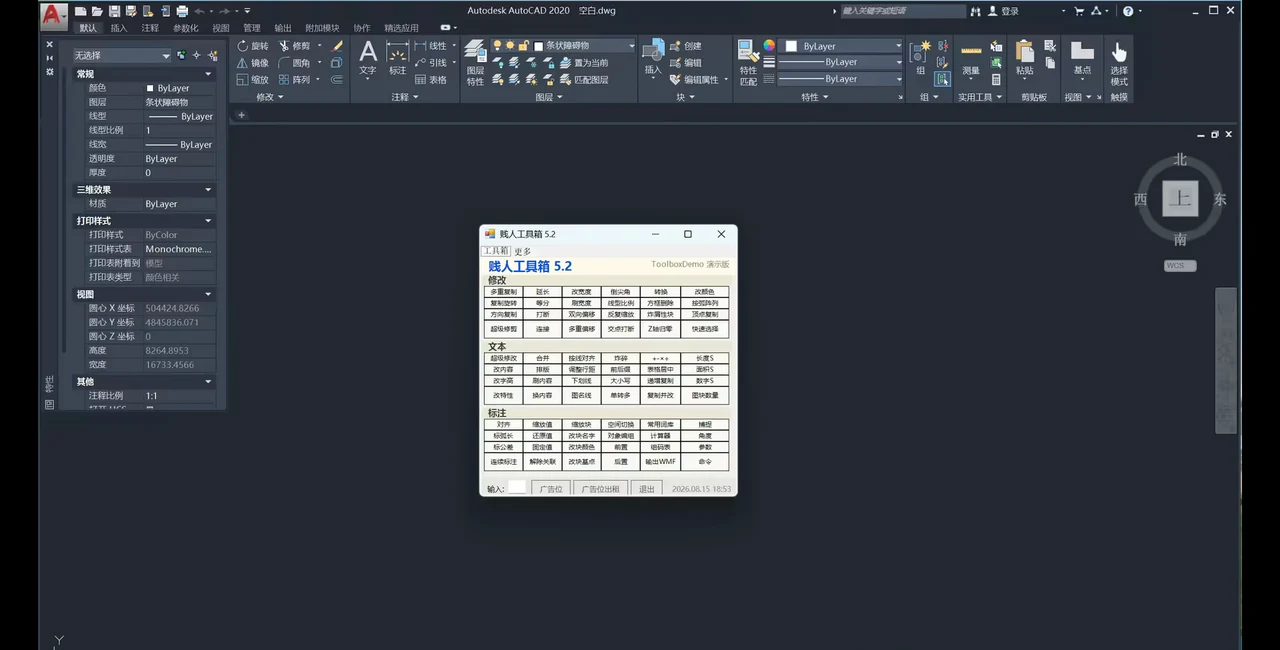
The panel replicated from a screenshot, landed beside AutoCAD's ribbonWatch at 0:00 - 9
The batch commands actually run
The panel is no decoration: after the multi-copy command selects one stick figure, a single drag produces a whole row of copies in varied poses while the command line echoes the COPY instruction — the plugin dsh wrote does real work on an AutoCAD drawing.
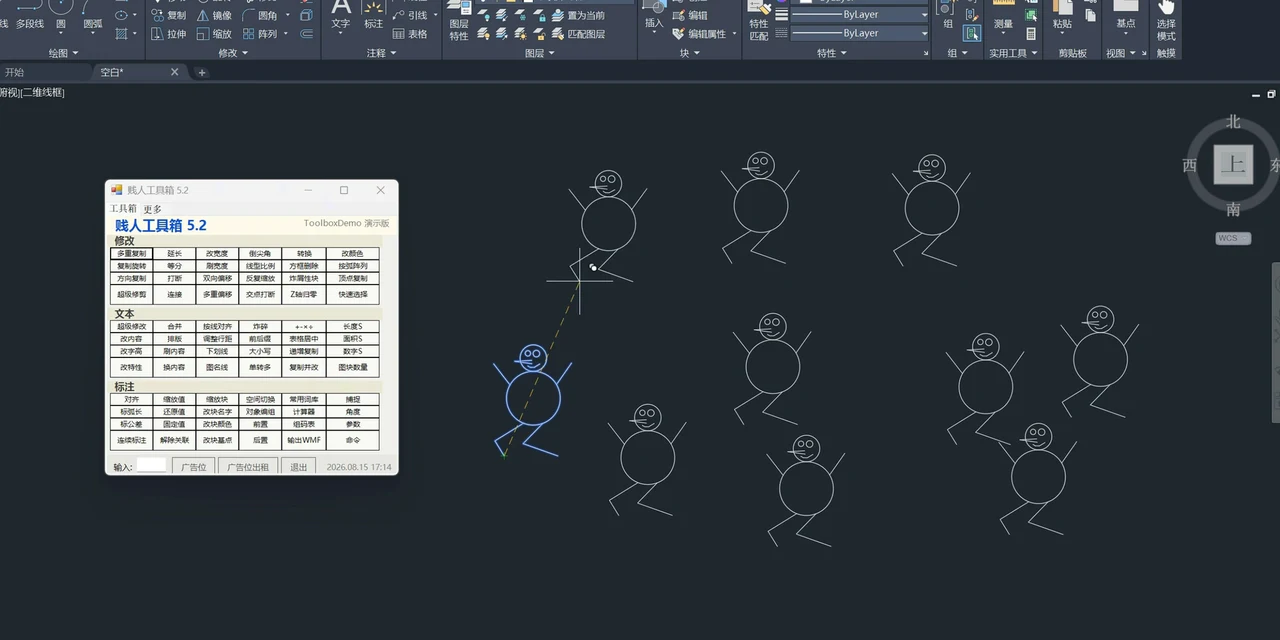
Multi-copy in action: one drag, a row of figuresWatch at 5:40
FAQ
Boundaries and facts about the Blender MCP, Tripo plugin and CAD development routes.
Is the Blender link an official DSH plugin?
No. The recording rides the generic MCP (Model Context Protocol): the Blender side runs a community MCP server (now named mcp-for-blender, whose repo states "Not affiliated with the official Blender Foundation"), and any MCP-capable client can attach to it. dsh plays the MCP-fluent agent here — it is not an official integration.
Who makes the Tripo plugin? Is it trustworthy?
The plugin is azwosile/dsh-tripo-studio (renamed from dsh-tripo-blender on 2026-10-08), MIT-licensed, a Windows-local plugin targeting Tripo's China site that requires your own API key and credits. The Bilibili uploader self-reports the repo in their description; this page has not verified that the Bilibili and GitHub accounts are the same person, hence the "self-reported" wording.
Why does the Tripo section have no screenshots?
That source video is an AI-produced slide-and-animation deck end to end (the uploader says so in the description), which fails this page's framing discipline that footage must come from real screen recordings. The video is therefore demoted to a fact source: the plugin's identity, feature list and result timestamps (t=8/t=32/t=56) are still cited, while all frames come from the Blender and CAD recordings.
Is the CAD section about putting AutoCAD inside dsh?
No — the direction is reversed. AutoCAD runs in AutoCAD; dsh is the coding agent that writes the plugin, shipping a .NET assembly, PackageContents.xml and install scripts that load into AutoCAD 2020 as commands and a panel. To learn plugin development with dsh systematically, see the plugin development guide.
Which model does the recording use? Is it slow?
The Blender session UI shows DeepSeek-V4-Flash (High); one full car build spans roughly two and a half minutes of continuous tool calls in the recording, with the session footer reading "1 round, 16 steps, 255 tok/s, 97% cache hit". The MCP server itself is model-agnostic — any MCP client can attach it.
Can the results be edited further?
Yes. The Blender route's result is a *.supercar.blend scene file with model, lights and camera on separate layers; the Tripo route downloads GLB models — the plugin README states results "can be downloaded and handed to Blender and other tools for further work" — so either imports cleanly into Blender or another DCC for editing.
Related guides
Three adjacent output axes, each with its own page.
dsh image generation plugin setup
Wire MiniMax, DashScope and ChatGPT web channels into img2img-studio, then generate and inpaint covers — 12 steps with timestamps
Read the guideFully automatic video generation with dsh + ComfyUI (illustrated)
A prompt template becomes an installed skill, a ComfyUI workflow renders a 15-second 9:16 film, GPU memory is freed in a background task — frame-verified end to end
Read the guideCreate your own DSH plugin
The full build walkthrough: minimal contract, Config Schema, profile install, and a live MCP Apps demo to verify it works.
Read the guidedsh automation tasks, hands-on
Create a scheduled reminder from a chat message, enable the built-in Automation tasks panel and read delivery records — 10 steps with timestamps
Read the guideSources & credits
All 8 frames on this page come from two real screen recordings (Bilibili IT一哥们 22,866 plays / 伊江痕 27,918 plays — both yt-dlp API values; Bilibili search pages inflate counts ~10x, so search-page numbers are never quoted). The Blender video is a 4K source, cropped per frame to remove the bottom-corner presenter overlay, burned-in subtitles and watermark; the CAD video drops the bottom subtitle band and corner logo; the AI diagram cards mid-way through the Blender video and the subscribe callout at t≈380-460 of the CAD video never entered a frame. The Tripo recording (7,259 plays) is an AI-produced slide deck and is cited as a fact source only. Repo facts re-checked via the GitHub API on 2026-10-09: azwosile/dsh-tripo-studio ★8, ahujasid/mcp-for-blender ★30,315, deepseek-ai/deepseek-harness ★246,275.