
dsh-theme-eink-retro
In a curated listMaintenance: Activeexoticknight/dsh-theme-eink-retro
A paper-and-ink client-side theme for DeepSeek Harness with Balanced and Immersive modes.
$ dsh plugin add dsh-theme-eink-retroInstall
dsh has no central install command — add this plugin’s entry (documented in its README) to your profile or patch config, then restart.
How installs work1
stars
0
forks
CSS
Language
Apache-2.0
License
2026-08-26
Created
2026-10-06
Last push
README
E-Ink Retro for DeepSeek Harness







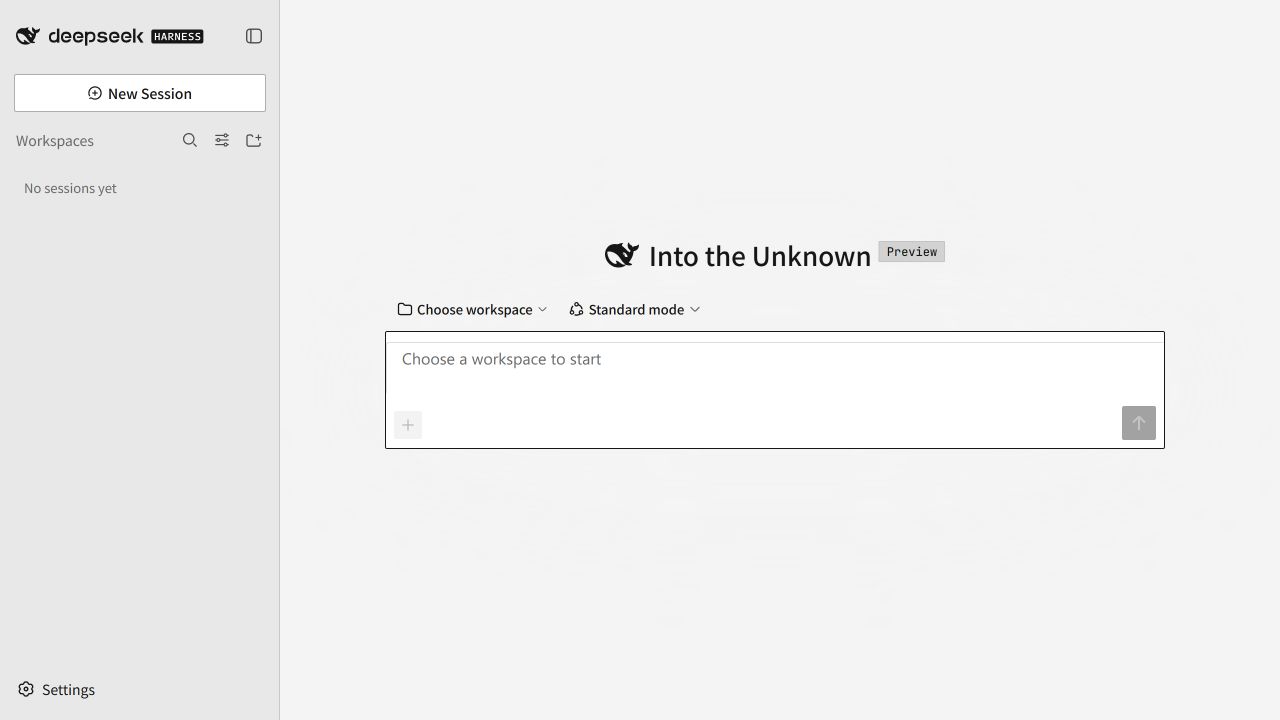
E-Ink Retro is a client-side theme for DeepSeek Harness. It uses neutral paper surfaces, near-black type, hard offset shadows, compact corners, and black-and-white selection states. The geometry takes cues from classic Macintosh interfaces while keeping the DSH layout and workflows recognizable.
Highlights
- Balanced mode applies the paper-and-ink shell while keeping semantic status colors and user media.
- Immersive mode maps supported DSH surfaces and compatibility layers to a monochrome ink ramp.
- Links, menus, form controls, tree items, and other adapted elements share a visible keyboard focus treatment.
- Images, attachments, video, canvas output, and iframe content keep their original rendering.
- Theme settings follow the DSH page language in English or Simplified Chinese, with English as the fallback.
- The theme pauses when you select another third-party theme.
Modes
| Mode | Behavior |
|---|---|
| Balanced | Applies the paper-and-ink shell and control language. Semantic status colors and user content remain available. |
| Immersive | Maps supported DSH surfaces, status tokens, and verified compatibility layers to grayscale. User media remains unchanged. |
| Off | Releases the theme token layer and removes the active root attribute. The plugin stays installed. |
Install
Requirements:
- DeepSeek Harness with a
webprofile - Node.js 20 or newer
pnpmavailable to the DSH plugin command
Install the tagged GitHub release:
dsh plugin --profile web add github:exoticknight/dsh-theme-eink-retro#v0.3.3
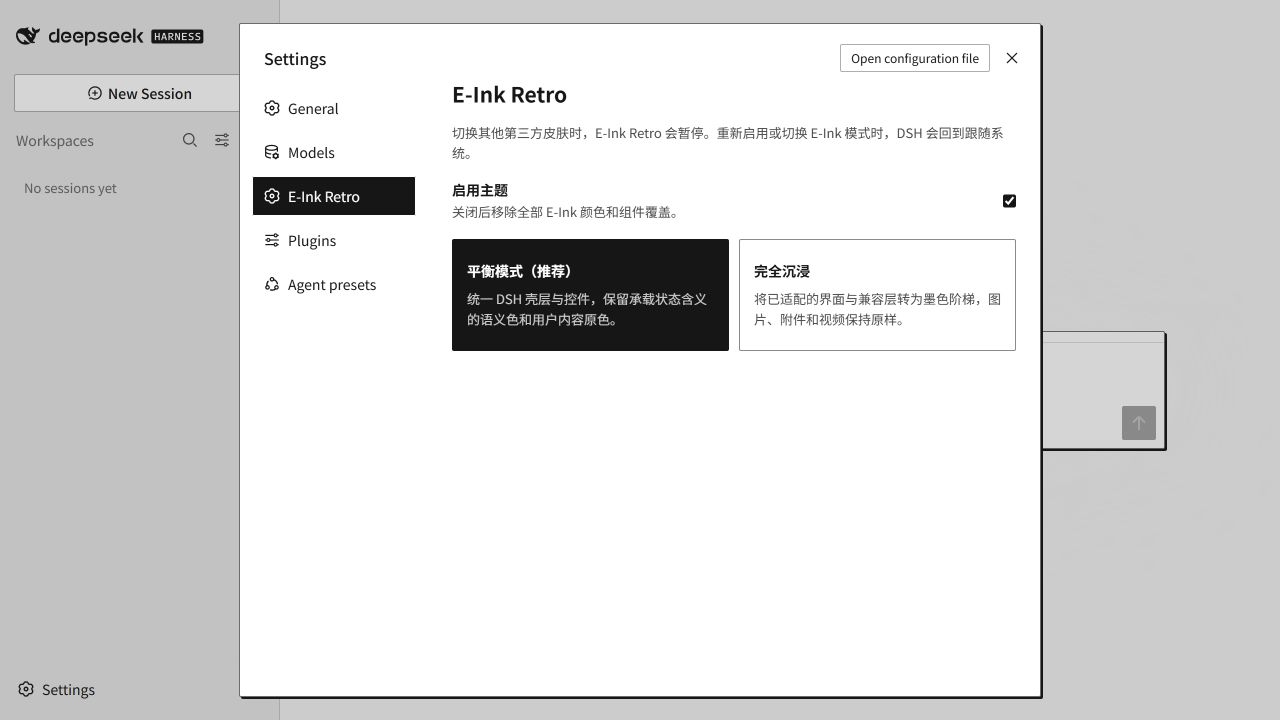
Restart DSH Web after installation, then open Settings → E-Ink Retro.
Update
Install the newer release tag, replacing the version in the command:
dsh plugin --profile web add github:exoticknight/dsh-theme-eink-retro#vX.Y.Z
Restart DSH Web after changing versions. The tag is intentionally pinned, so updates are explicit and reversible.
Disable or remove
Clear Enable theme in Settings → E-Ink Retro to stop applying the theme without removing the plugin.
Remove the package from the profile:
dsh plugin --profile web remove dsh-theme-eink-retro
Restart DSH Web after removal. The plugin removes its injected style and token layer during unload. Two local mode preferences remain in browser storage so a later reinstall can restore your last selection.
Roll back
Install a specific release tag again:
dsh plugin --profile web add github:exoticknight/dsh-theme-eink-retro#v0.1.0
Directories
You can find E-Ink Retro in these directories:
- dsh.pub
- DSH Marketplace
- dshplugins.cc
- dshmarket.com
- dsh-plugin.org
- HackSing DSH Plugins
- Awesome DSH Plugin directory
- DSH Plugin Radar
- Awesome DeepSeek Harness
- dsh-xray capability card
Use
Open Settings → E-Ink Retro, enable the theme, then select Balanced or Immersive.
Selecting another third-party theme pauses E-Ink Retro. Enabling E-Ink Retro or changing its mode while a third-party theme is active switches DSH back to System. Returning to a built-in System, Light, or Dark theme restores the selected E-Ink mode.
Compatibility
The v0.3.3 compatibility checks were run with:
| Component | Version or environment |
|---|---|
| DeepSeek Harness | 0.1.7-rc.1, 0.2.0-rc.2 |
| Node.js | 24.20.0 |
| npm | 11.19.0 |
| Operating system | Windows, DSH web profile |
DSH is in developer preview. A future DSH release may change UI hooks or theme tokens and require a plugin update.
Compatibility boundaries
More in UI & Experience
dsh-tui
by ccch1mneyyy
Claude Code 风格全屏终端 TUI:像素鲸鱼顶栏、双流光大字、实时工作状态行、思考流式展开、双击 Esc 时间回溯、上下文进度条 + TPS 仪表;接入 Agent preset(standard/code/minimal/cordis)、Skills、MCP、Goals、Todos、子代理,/ 命令注册表与随附技能(audit/bug/review/practice/pr_comments/release-notes/vuln-check);纯插件挂载零核心改动。
baoyu-design
by jimliu
Run Claude Design locally as an Agent Skill — Cursor, Codex, DeepSeek Harness & more. Produce polished UI mockups, prototypes, decks & wireframes as self-contained HTML, without claude.ai/design. Best with Opus or Claude.
dsh-better-sidebar
by omdsh-dev
Full sidebar workbench with file rendering and editing, terminal, Git, and subagents; third-party plugins can register new tabs.
dsh-claude-style
by nwflower
Restyles the DSH web UI with Claude-like layout, controls, model picker, branding, and local font routes.