
dsh Video Generation in Practice: Template to 15-Second Film
One Bilibili recording, replayed frame by frame: a fight-scene prompt template becomes a DeepSeek Harness skill, local ComfyUI renders a 15-second 9:16 cinematic clip unattended — five steps, eight frames, each deep-linked to the source video.
Last updated: 2026-09-25
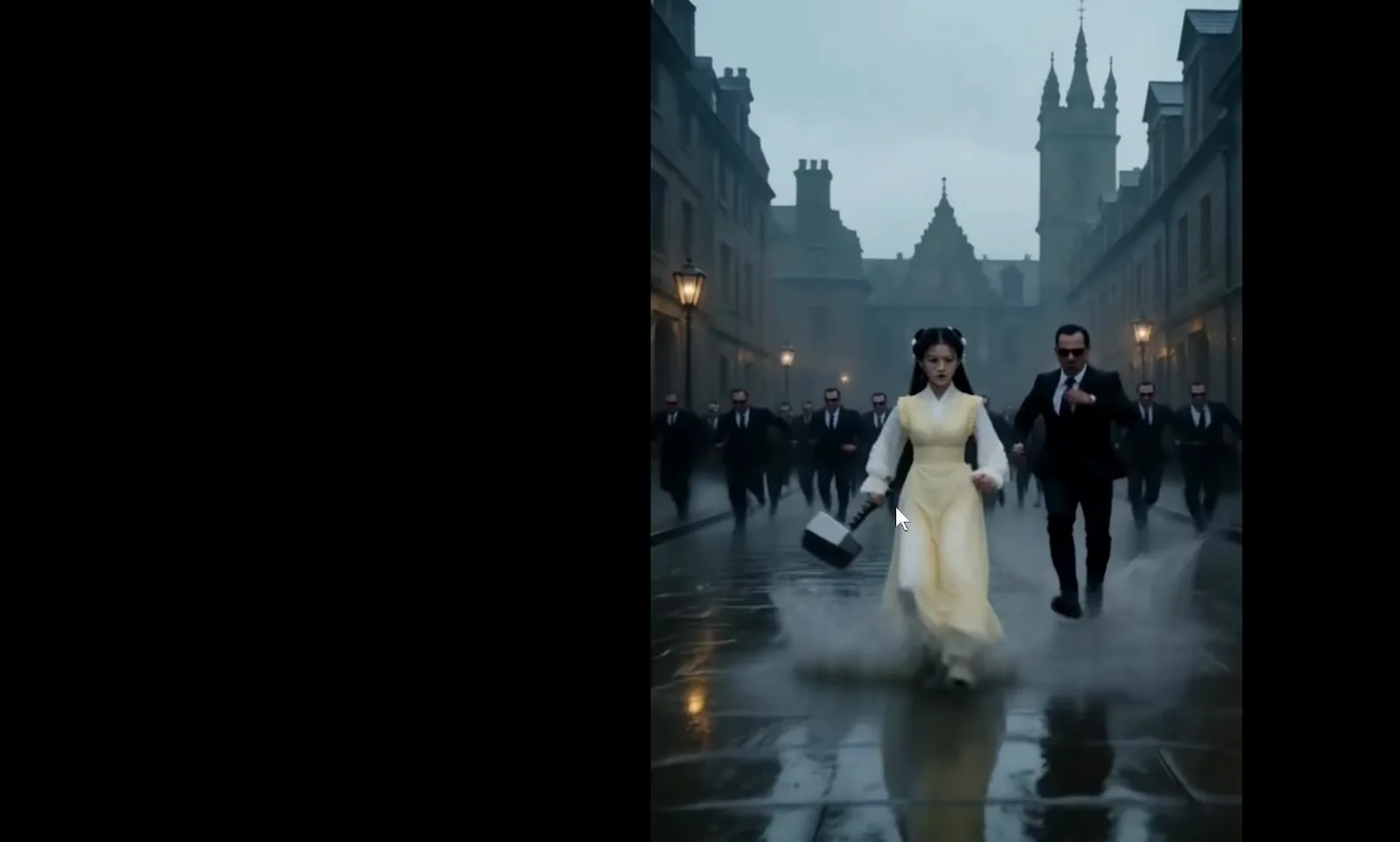
The pipeline fits in one sentence: hand a ready-made prompt template to DeepSeek Harness, let it install the template as a skill, then feed it a written production brief that starts local ComfyUI — rendering, scoring and delivery all run unattended. The source is a 14m10s Bilibili screen recording that starts from an H3 fight-scene prompt template and an installer link pinned in a comment section, and ends with a finished 15-second 9:16 vertical clip. This page compresses those fourteen minutes into five steps and eight frames, each linked back to the exact second of the source video.
The recording was made on Windows — the desktop wallpaper and icons you will see belong to the recorder's personal environment, not to DeepSeek Harness. The source video carries no CC subtitles, so every line of copy here was written from the frames themselves. Turning templates into skills is not video-specific: the same move powers image generation, which is why resources tagged as dsh image generation plugins overlap with this pipeline — video simply adds a timeline, audio and workflow scheduling on top.
TL;DR
- ▸One sentence installs the skill: give DSH the H3 fight-scene prompt template and ask it to become a plugin — h3-action-director lands in both the workspace and user-global skill directories, verified loadable.
- ▸One sentence runs the pipeline: a notepad brief (NB launcher, --lowvram --fast-disk --disable-cuda-malloc, a two-pass refine workflow) has ComfyUI render a 15-second 9:16, 35mm-style fight scene on its own.
- ▸One sentence iterates: report the hammer-teleporting glitch, free VRAM (15.6GB/17GB free), fix the prompt and regenerate — then collect video, workflow json, prompt txt and submit script from the deliverables table.
The walkthrough, step by step
Prepare: from prompt template to skill
- 1
Find the Seedance post and the DSH desktop installer
The recording opens on the Bilibili page carrying the 豆包Seedance 2.5 ad banner — the useful part is the comment section underneath: a pinned comment links the 【DeepSeek Harness桌面版】 one-click installer and hands-on tutorial, with a checklist covering zero-code install, desktop run, visual enhancement and background switching. If you have not installed DSH yet, that pinned entry is the easiest place to get it; everything after this step happens inside a DSH session.
豆包Seedance 2.5 简单指令一键成片置顶 ·【DeepSeek Harness桌面版】一键安装包和上手教程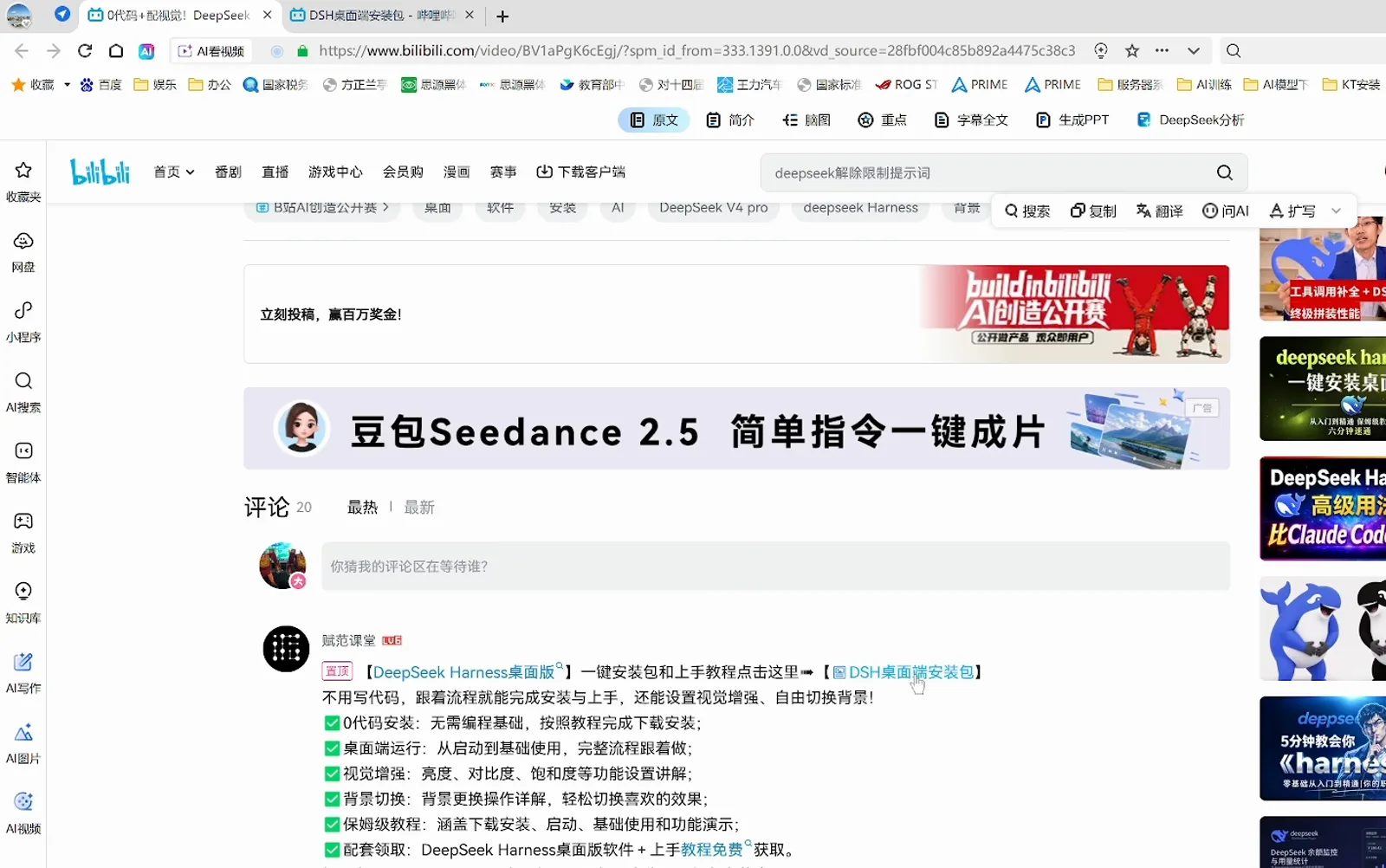
No hunting through download sites: the pinned comment is the installer and tutorial entry point.Watch at 0:33 - 2
Turn the prompt template into a verified skill
The whole move is one message: take H3-高频打斗提示词模板(疯癫版).txt and make it a plugin you can use. The agent Reads the 386-line template (kept verbatim), uses Pwsh to locate the skills directory, packages it as the h3-action-director filesystem skill and writes two copies — one in the G: workspace (project-level, highest priority) and one under the user profile so every workspace can call it — plus name / description / whenToUse metadata. The report line 技能已安装并验证可用 (installed and verified) is your proof that it loads.
将这个提示词模板制作成你可以用的插件h3-action-director — 技能已安装并验证可用G:\NB-Comfyui\提示词\.dsh\skills\h3-action-director\SKILL.mdC:\Users\cyste\.dsh\skills\h3-action-director\SKILL.md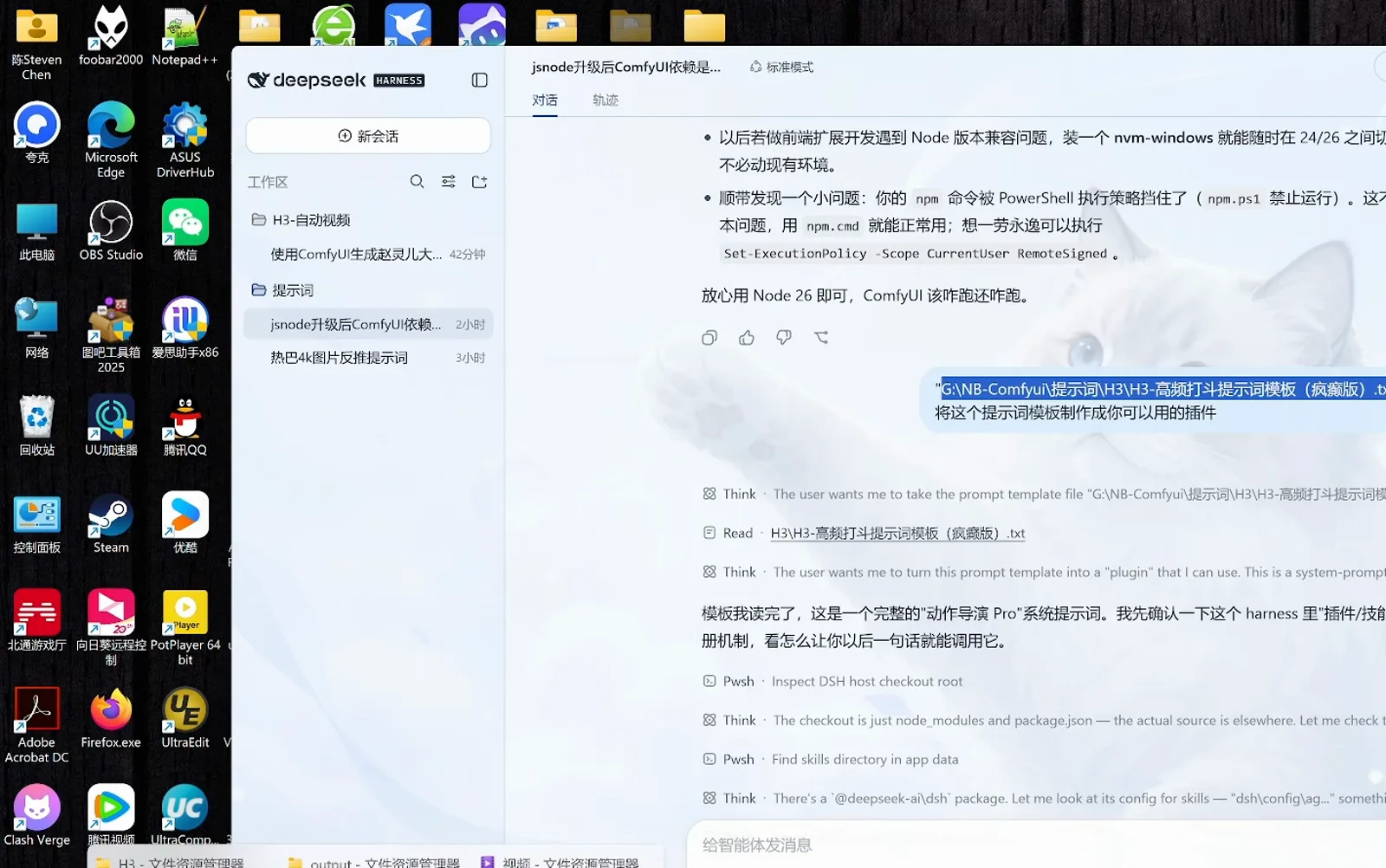
One sentence is enough — reading the template and locating the directory are the agent's job.Watch at 1:58 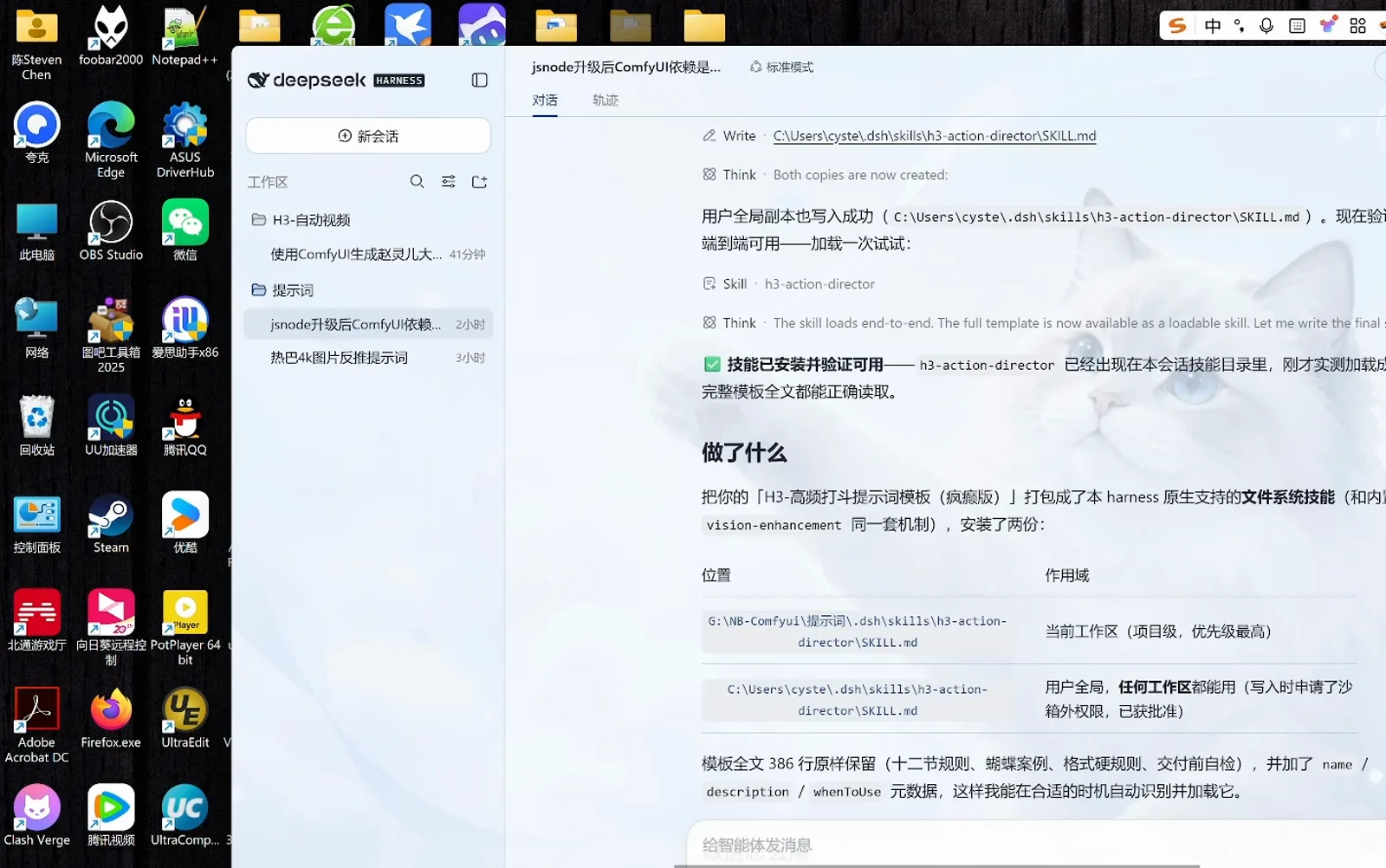
One template, two copies: project-level wins on priority, user-global works in every workspace.Watch at 1:33
Generate and iterate
- 3
Write the production brief, then send it once
Output quality is decided by how concrete the brief is. The recording drafts it in Notepad first: launch ComfyUI through G:\NB-Comfyui\NB启动器.exe with --lowvram --fast-disk --disable-cuda-malloc to spare VRAM; call the 双模型加强版二采重绘!+Minimax+H3全能参考0813.json workflow; pin 15 seconds, 9:16 vertical, 0.4-megapixel first pass, 0.7-megapixel second pass, 35mm realistic film style; define image0 (赵灵儿, 170cm), image1 (Agent Smith, 190cm) and image2 (Mjölnir as a prop); hard-code constraints such as strict height ratios and no weapon teleporting; close with the rainy-night London chase story.
--lowvram --fast-disk --disable-cuda-malloc双模型加强版二采重绘!+Minimax+H3全能参考0813.json15 秒 · 9:16 竖屏 · 35mm 真实电影风格一采 0.4 百万像素 → 二采 0.7 百万像素重绘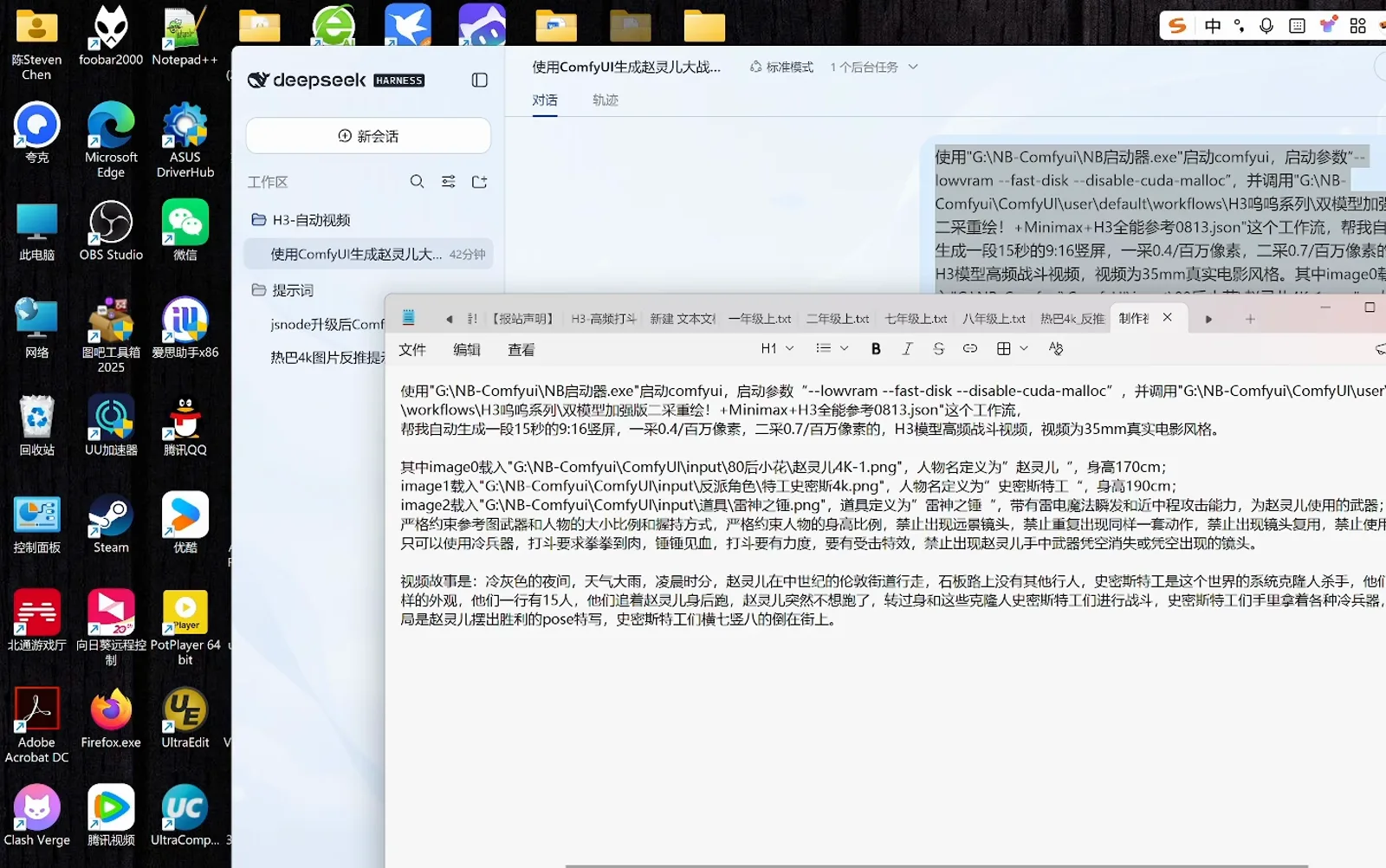
The brief pins heights, prop ownership and a no-weapon-teleport clause — the stricter it reads, the fewer glitches.Watch at 4:08 - 4
Check the output folder, then read the spec sheet
When ComfyUI finishes, the clips land in G:\NB-Comfyui\ComfyUI\output: PotPlayer is playing H3赵灵儿伦敦雨夜_9x16_00002-audio.mp4 with three more files queued, all exactly 15 seconds. Back in the session, the completion report tabulates the specs: 15.08s, 640×1152 (9:16 vertical), 24 fps across 362 frames, H.264 + AAC stereo; sampling ran in two passes — 25 steps @ 0.4MP (480×864) with EasyCache skipping 5, then a 4-step @ 0.7MP (640×1152) refine. A silent .mp4 and a workflow preview .png sit in the same folder.
G:\NB-Comfyui\ComfyUI\outputH3赵灵儿伦敦雨夜_9x16_00002-audio.mp415.08 秒 · 640×1152(9:16 竖屏)· 24 fps(362 帧)H.264 + AAC · 一采 25 步 @ 0.4MP + EasyCache → 二采 4 步 @ 0.7MP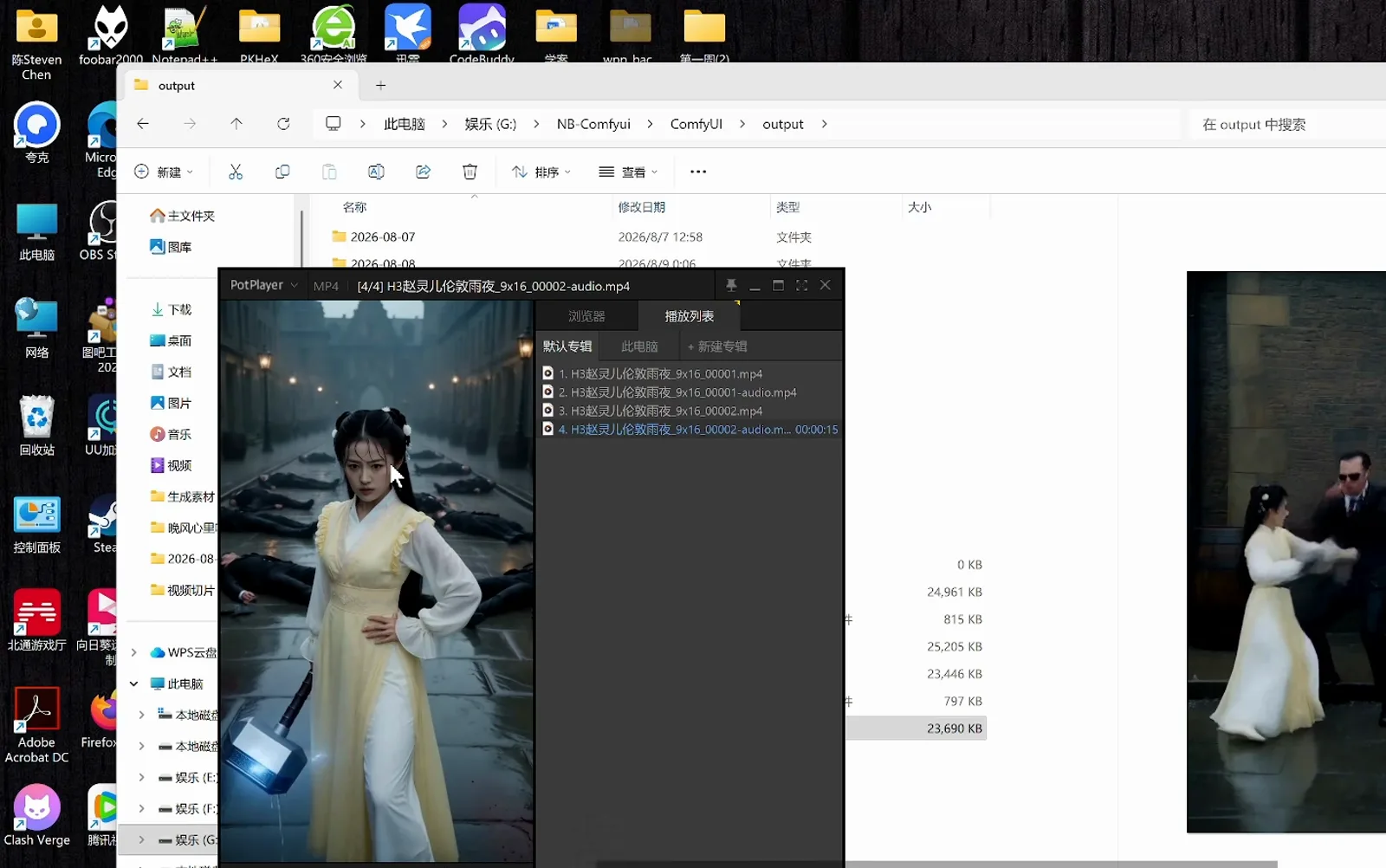
Final cut, silent version and stills all land in output — every file 15 seconds.Watch at 3:33 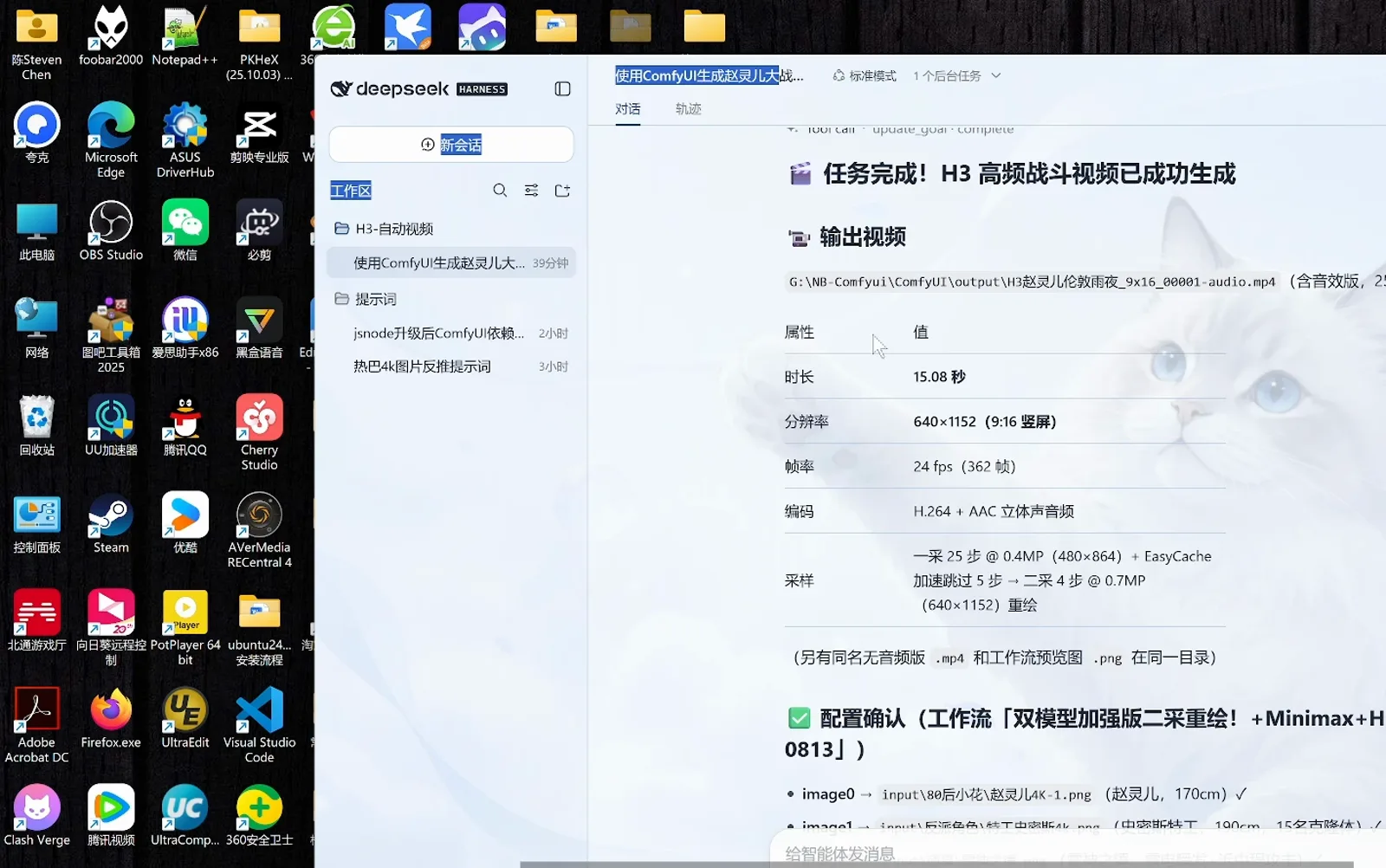
The spec table doubles as an acceptance sheet: resolution, frame count, codec, sampling.Watch at 7:35 - 5
Free VRAM, fix the glitch, collect the deliverables
The clip shows the heroine fighting empty-handed while Mjölnir vanishes between shots — report it in one line: free memory and VRAM, fix the prompt, generate again. The agent runs the Pwsh routine Free ComfyUI GPU memory and unload models, confirms 15.6GB/17GB free, tightens the weapon constraints and re-renders. It then shuts ComfyUI down (port 8188 closed, no leftover python processes) and lists 本次会话产出(均已保留) — everything kept: the final video with sound, the silent version plus preview, the task workflow json, the corrected prompt txt and the submit script py, ready to reuse next time.
Pwsh · Free ComfyUI GPU memory and unload models显存已释放(15.6GB/17GB free)本次会话产出(均已保留)赵灵儿伦敦雨夜_15s_9x16_任务版.json · prompt_赵灵儿伦敦_疯癫版.txt · submit_workflow.py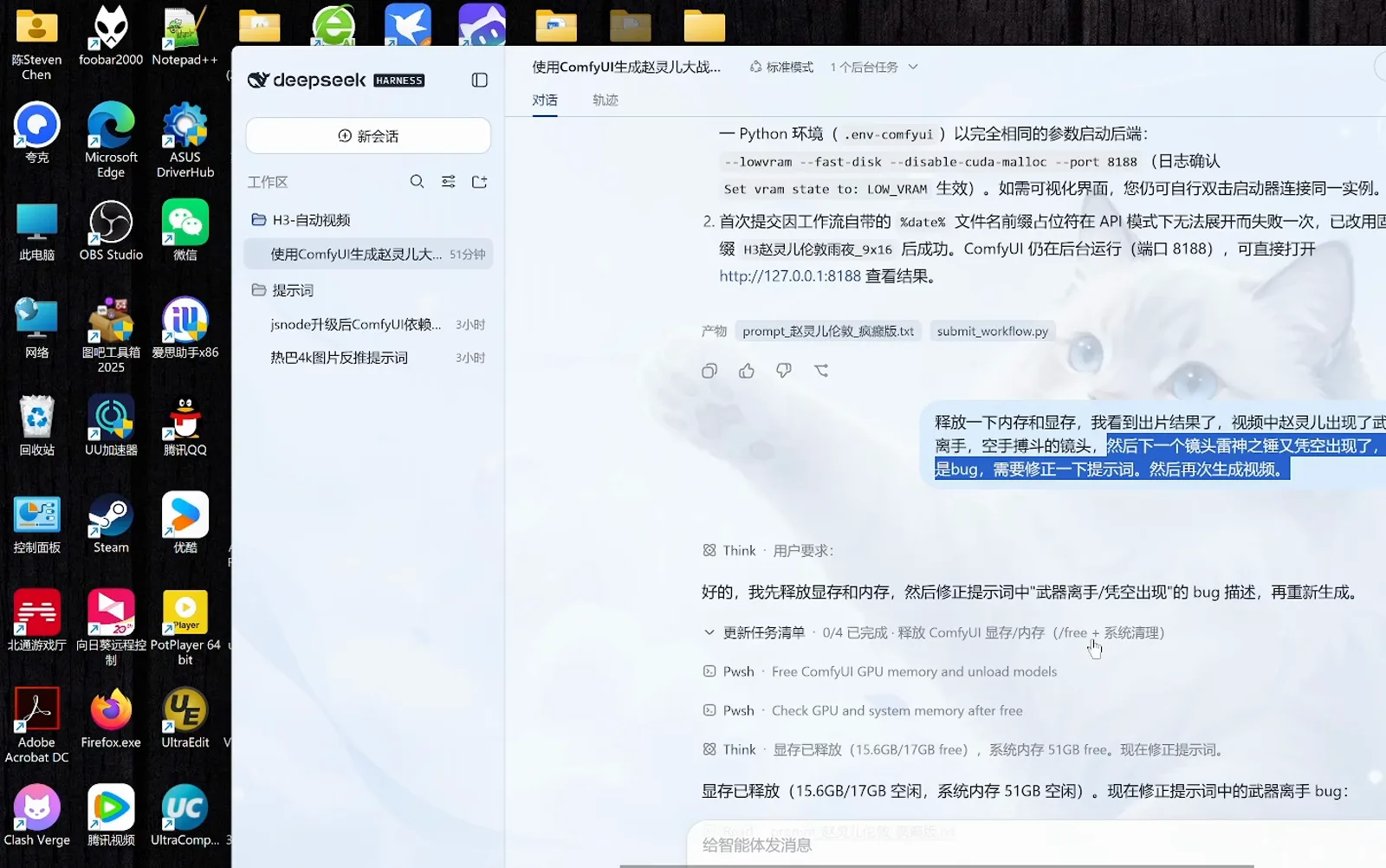
The iteration loop — free VRAM, fix the prompt, regenerate — stays inside one session.Watch at 13:10 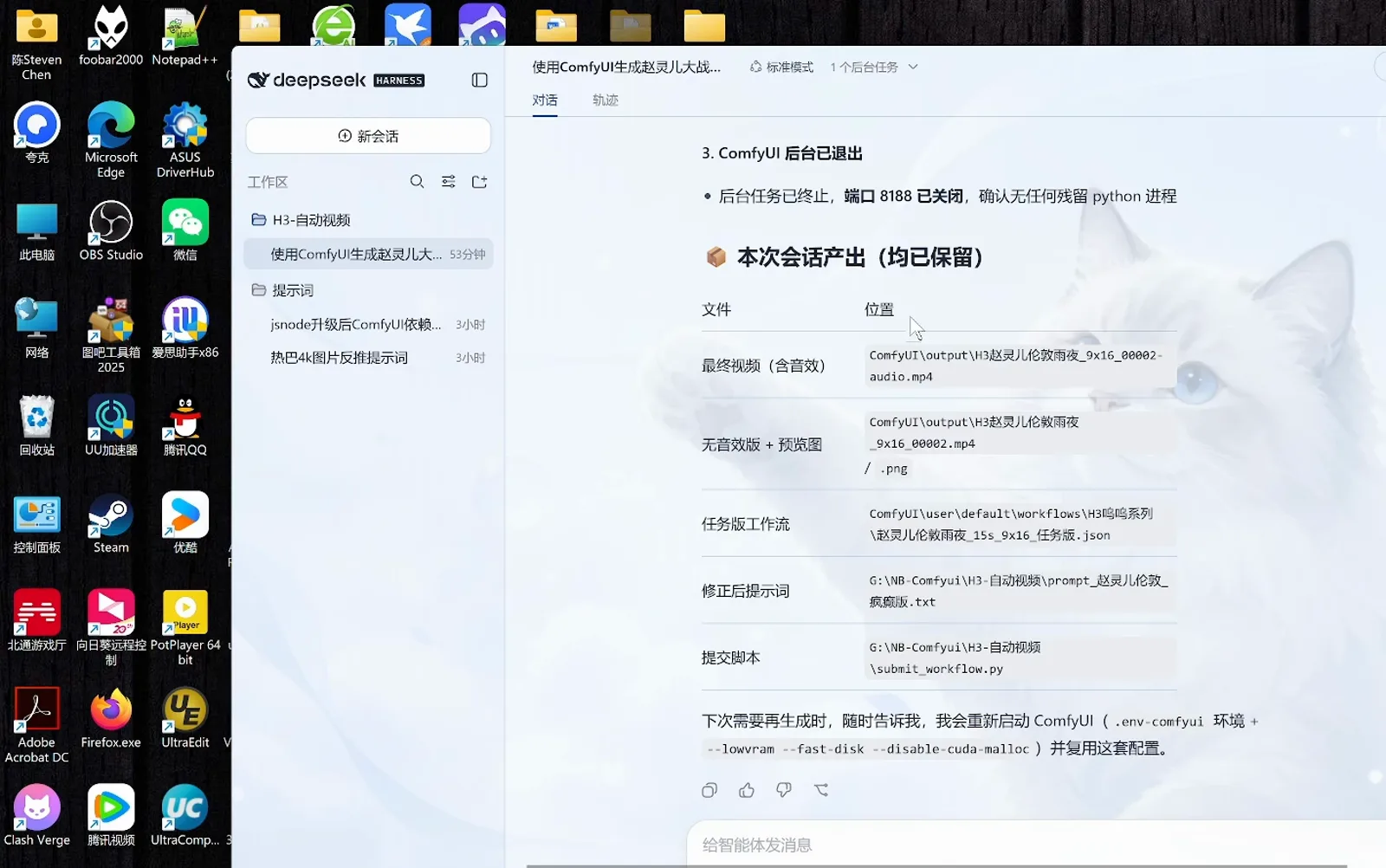
Five artifacts, every path shown; the backend has exited and port 8188 is closed.Watch at 13:58
Frequently asked questions
Four questions people ask about dsh video generation plugins.
Do I need a local GPU for this video pipeline?
This recording runs entirely on local ComfyUI: the NB launcher starts it with --lowvram --fast-disk --disable-cuda-malloc and, after a cleanup, 15.6GB of 17GB VRAM is free — a NVIDIA card with enough VRAM is the baseline. Without one, take the API route: a skill like vox-director produces Vox-style explainers in the cloud, and image-generation plugins can draft storyboard stills while you decide.
How long can one generation be?
The recorded workflow is built for 15 seconds: the delivered clip measures 15.08s at 640×1152 (9:16 vertical), 24 fps across 362 frames, H.264 + AAC. Quality is protected by two-pass sampling — 25 steps @ 0.4MP with EasyCache skipping 5, then a 4-step @ 0.7MP refine. For longer films, generate segments from the same template and splice them in an editor.
How does this relate to dsh image generation plugins?
Same pattern — template, skill, workflow — with the output moving from a still frame to a timed clip. On the image side, vox-director handles script and storyboards, compositing Vox-style explainers through an API; on the video side, h3-action-director owns the fight prompt while a local ComfyUI workflow renders and scores it. If you can ship an image plugin, video is one production brief away.
What if generation fails or the footage glitches?
Paste the error or the glitch back into the session. Both failures in the recording were fixed in one message: the first submission died on the workflow's %date% filename placeholder, which a rename resolved; the teleporting hammer was solved by running the Pwsh VRAM release (15.6GB/17GB free) and tightening the weapon constraints in the prompt before regenerating.
Related guides
Image, vision and plugin basics — the pages this one builds on.
dsh image recognition
Teach DSH to read images and screens — the first step of multimodal work.
Read the guideImage generation collection
Curated dsh image-generation tools, the staging ground before video.
Read the guidedsh office documents
Word, Excel and PowerPoint by agent — the same template trick applies.
Read the guideNo-code plugin building
Turn your own routine into a DSH plugin without writing code.
Read the guideContext compaction explained
How long sessions stay alive — read it before long video pipelines.
Read the guideSources and credits
All frames are captured from the public Bilibili video 《Deepseek_Harness+Comfyui=全自动视频生成》 (14m10s, no CC subtitles; every line on this page was written from the frames). Each screenshot deep-links back to its source timestamp. The installer entry in step 1 comes from a pinned comment by Bilibili creator 赋范课堂. The recording was made on Windows — desktop wallpaper and icons are the recorder's personal environment, unrelated to DeepSeek Harness. To reproduce the pipeline after installing DSH, read the full dsh install guide