
The DSH Task Kanban: Goal Boards Your Agent Works From
Three frame-verified recordings of two DeepSeek Harness kanban plugins — dsh-graph's goal swimlanes and a five-column cron task board — from criteria registration to the delivered badge. One source is a real 5h44m delivery run.
Last updated: 2026-10-11
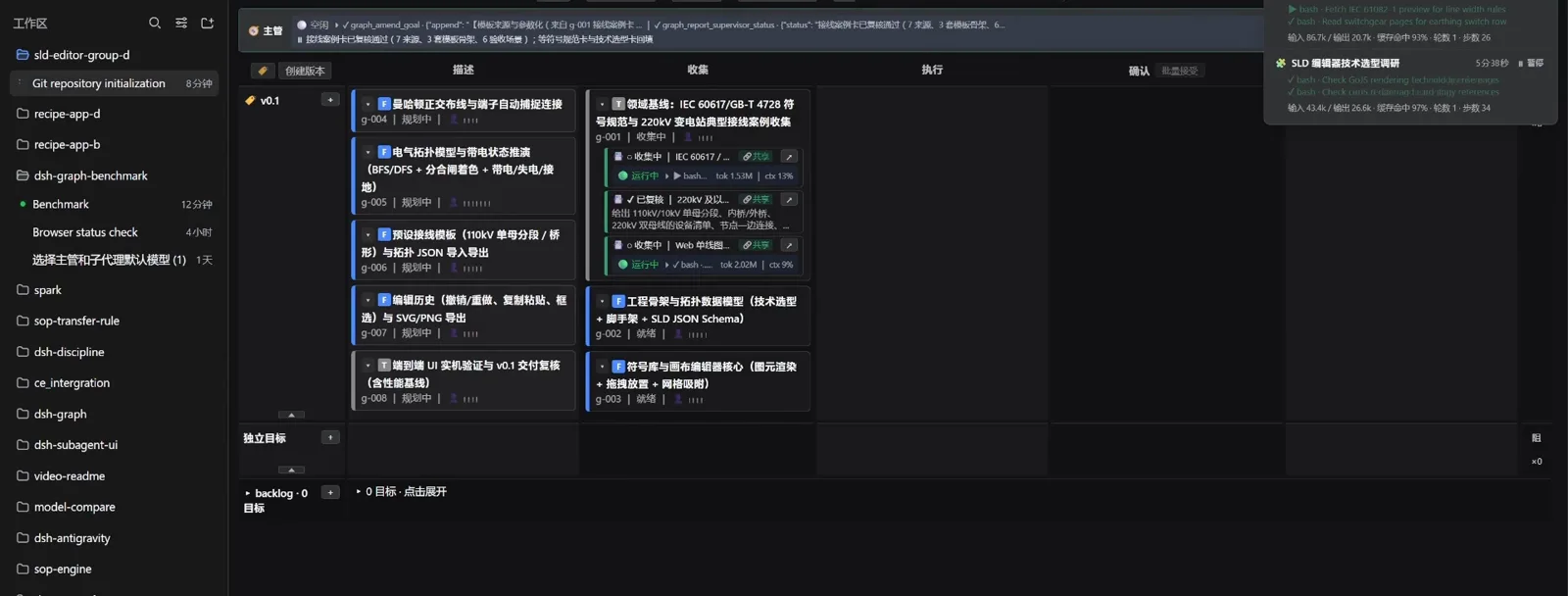
A chat transcript is a bad place to manage work: the agent says it's done and you scroll, guessing. The two plugins on this page move work onto a kanban — every goal a card, every card carrying written acceptance criteria, every dispatch leaving a receipt. The hero frame above comes from a real 5h44m delivery run: collection cards ticking with per-agent token counters while goal cards wait in their lanes.
This page is the task-kanban deep dive — boards where cards are work orders an agent picks up. For the human-AI delivery flow of one project end to end, open From spec to shipped: a real project in DSH
TL;DR
- ▸Two plugins, two shapes: dsh-graph runs goals through draft → planning → collecting → ready → in_progress → review → delivered on version swimlanes; the task-board plugin keeps five plain columns (待规划 to 已失败) with cron on the cards.
- ▸Criteria come before code: the supervisor registers written acceptance criteria per goal, dispatch starts an isolated git-worktree attempt, and every review posts a receipt instead of a feeling.
- ▸The real run, in numbers: 5h44m, 6 owner messages, 22 verdicts, 9 goals delivered, 33 commits (~17,000 lines, 7,700 product), 439 green tests — and a missed p95 budget became the board's next goal.
- ▸Install either way: dsh plugin --profile web add dsh-graph (goal kanban) or dsh plugin --profile web add @linxin666/dsh-client-ui-task-board@latest (five-column cron board).
The ten frame-verified steps
Part 1 · The real delivery run (dsh-graph 实战篇)
- 1
Register goals and acceptance criteria before any code
The run opens with the supervisor calling graph_create_goal eight times, then pairing every goal with graph_set_description and graph_set_criteria — g-001 through g-003 visible in the trace. Nothing has been built yet; the first human gate is confirming this breakdown. The plugin's README states the rule plainly: criteria are registered before execution, so review later checks artifacts against lines written in advance.
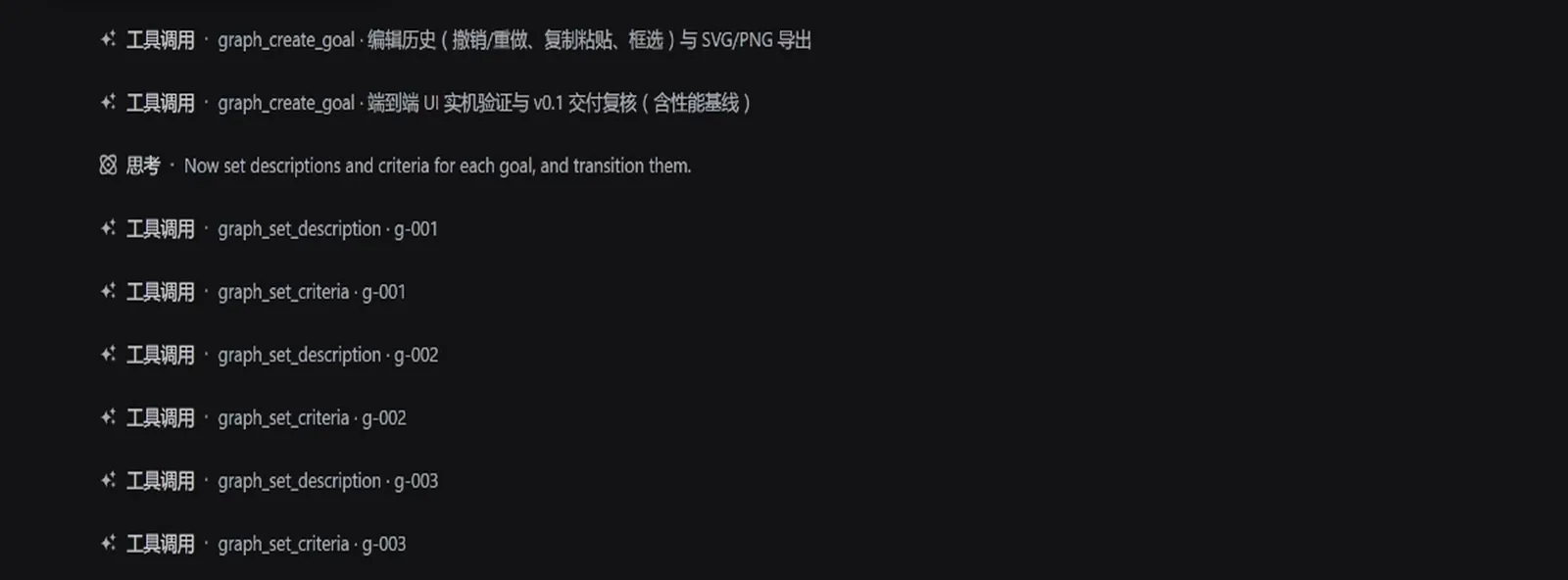
Criteria written first — the run's first gate approves this breakdown.Watch at 1:08 - 2
Dispatch a goal — an isolated worktree attempt starts
Dispatching is one call: graph_start_attempt with worktree: true, visible in the supervisor ribbon. The g-002 card moves to the Executing column, shows a live counter (196.2K tokens, 4% context) and the chip 开工: 继承 worktree 与基线 — the attempt inherits the repo at a fixed baseline, so the work can't clobber the main branch. The popover top-right shows a sibling collection agent still gathering IEC 60617 symbol references.
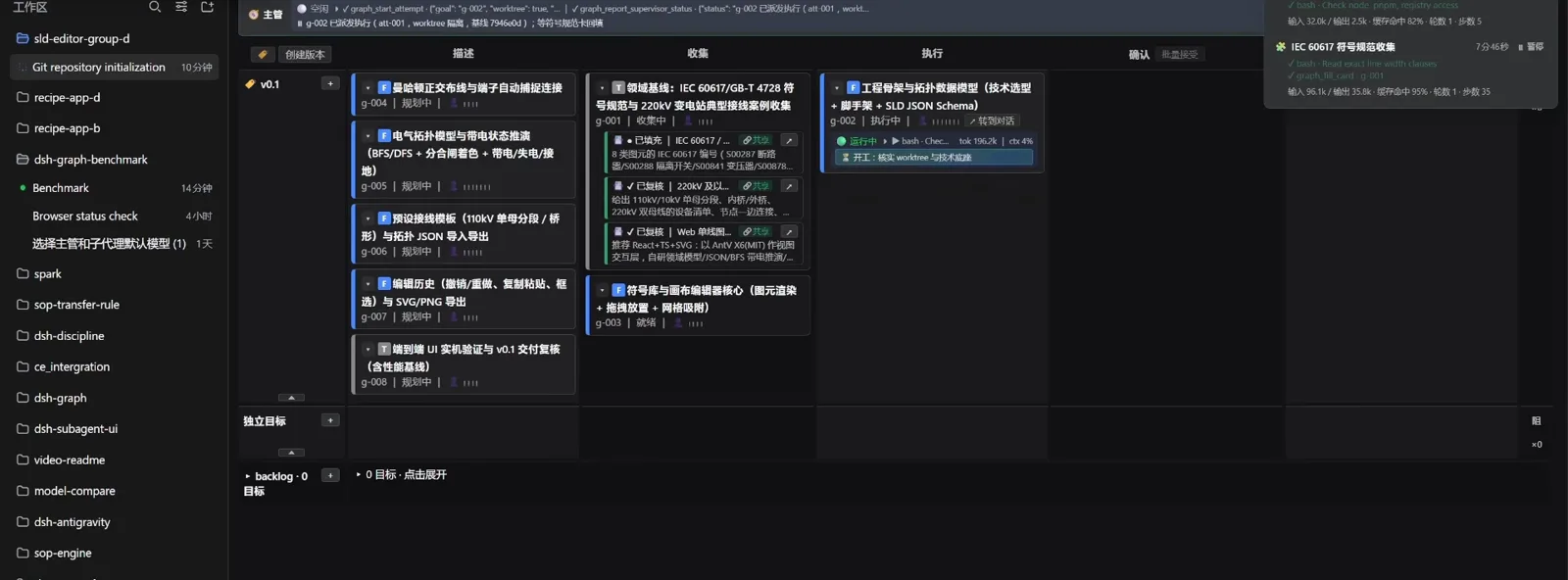
One dispatch, one isolated worktree, one fixed baseline.Watch at 1:36 - 3
Review posts receipts, not vibes
By the review chapter the board itself is evidence: g-003 sits in review in the Confirming column with the receipt 完工: 165 用例/绿 + 实测 35/35 + driver 40/40 无回归, while g-002 already shows 已交付 in the Delivered column. The ribbon also records a supervisor probe with a real mouse click — in this run that rigor caught a 4.7px wiring gap the subagent's own screenshot had papered over, and the work was sent back as a rework ticket.
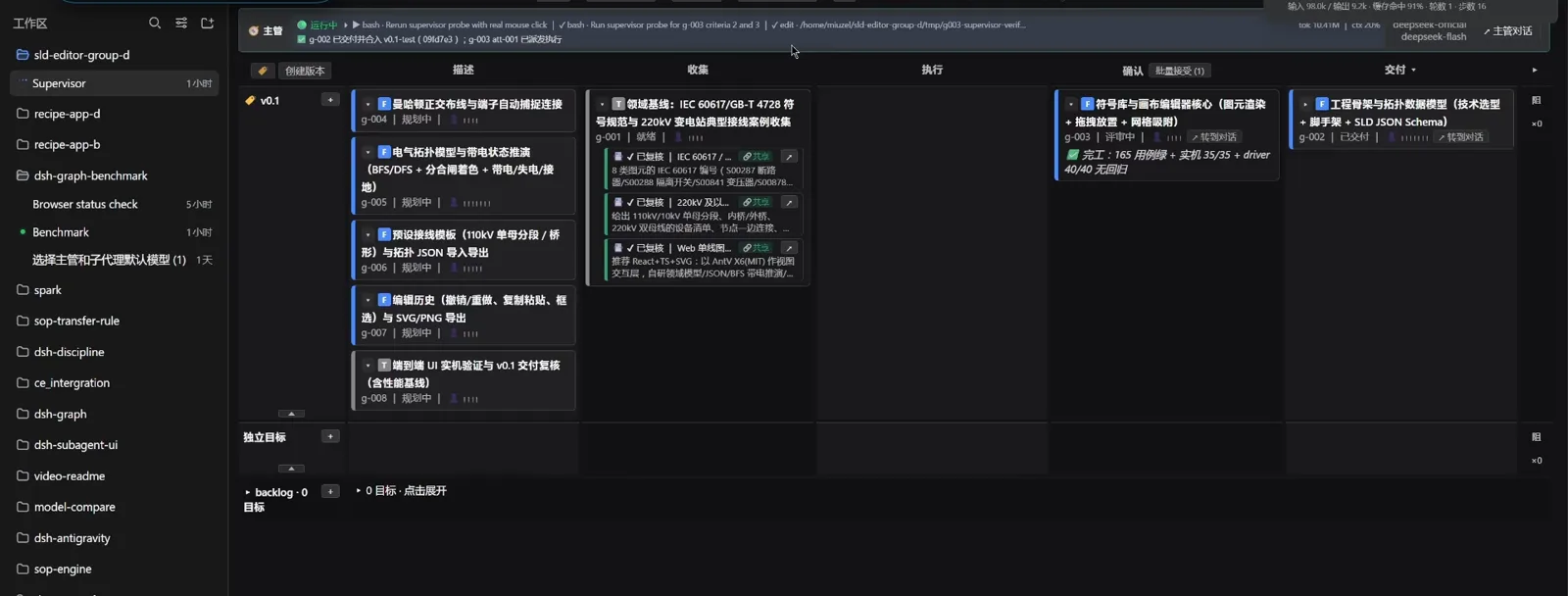
Receipts on the card, the verdict stays human.Watch at 2:30 - 4
Even cleanup waits for a human gate
After seven goals merge, the board asks how to close v0.1: clean worktrees and tmp (recommended), add a local v0.1 tag, or configure a remote and push — each an explicit choice, nothing pushed without the owner. Later the version dialog refuses to publish while one goal is not delivered (无法发布: 1 个目标未 delivered). The night ends at 9 delivered goals, 33 commits, ~17,000 lines and 439 green tests.
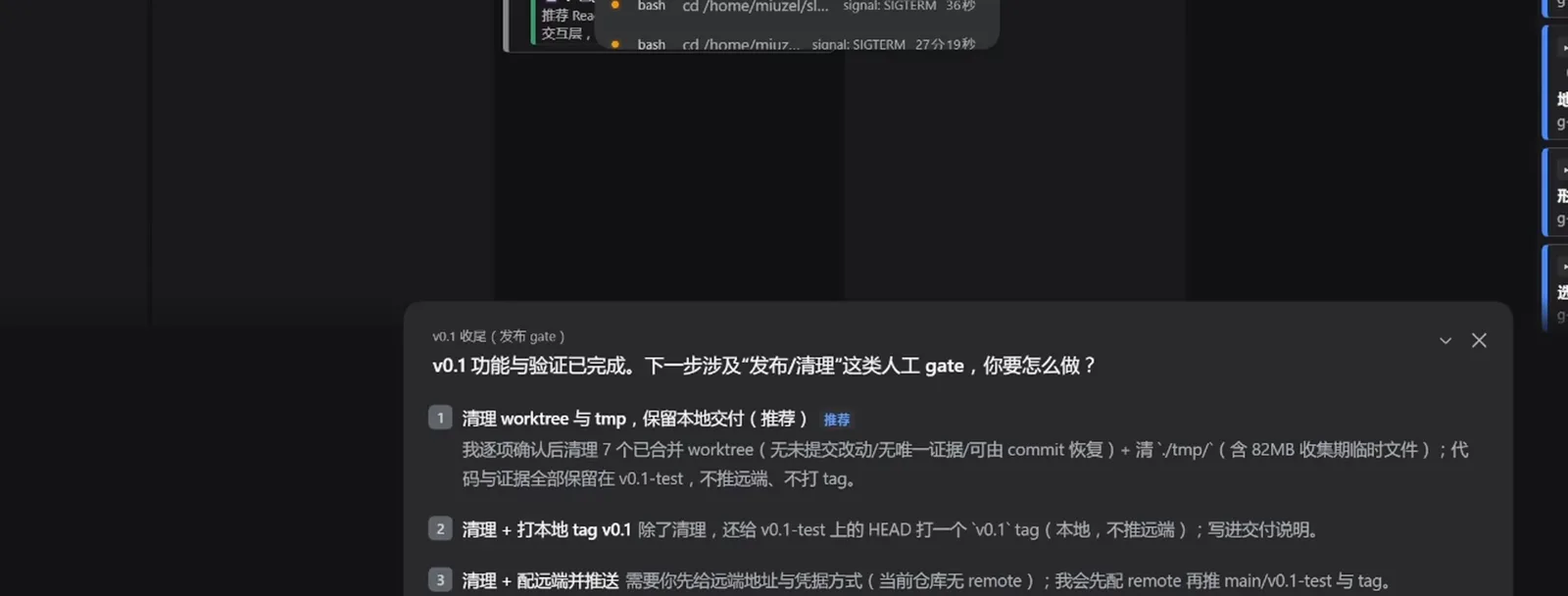
Nothing ships without the owner's pick.Watch at 4:45
Part 2 · The feature tour (demo data, same plugin)
- 5
The demo tour: one board, the full lifecycle
The feature tour runs on the plugin's own fictional demo board (workspace demo-zh; the in-app badge reads [演示数据 · 真实流程] — the flow is real, the cards are invented). One version swimlane carries cards across 描述/收集/执行/确认/交付: a collection card sits 已复核 · 共享 with its CRDT comparison note, an executing card streams 正在优化 SQLite FTS5 索引/表, and two delivered cards rest in the last column after the supervisor's 确认交付 ruling.
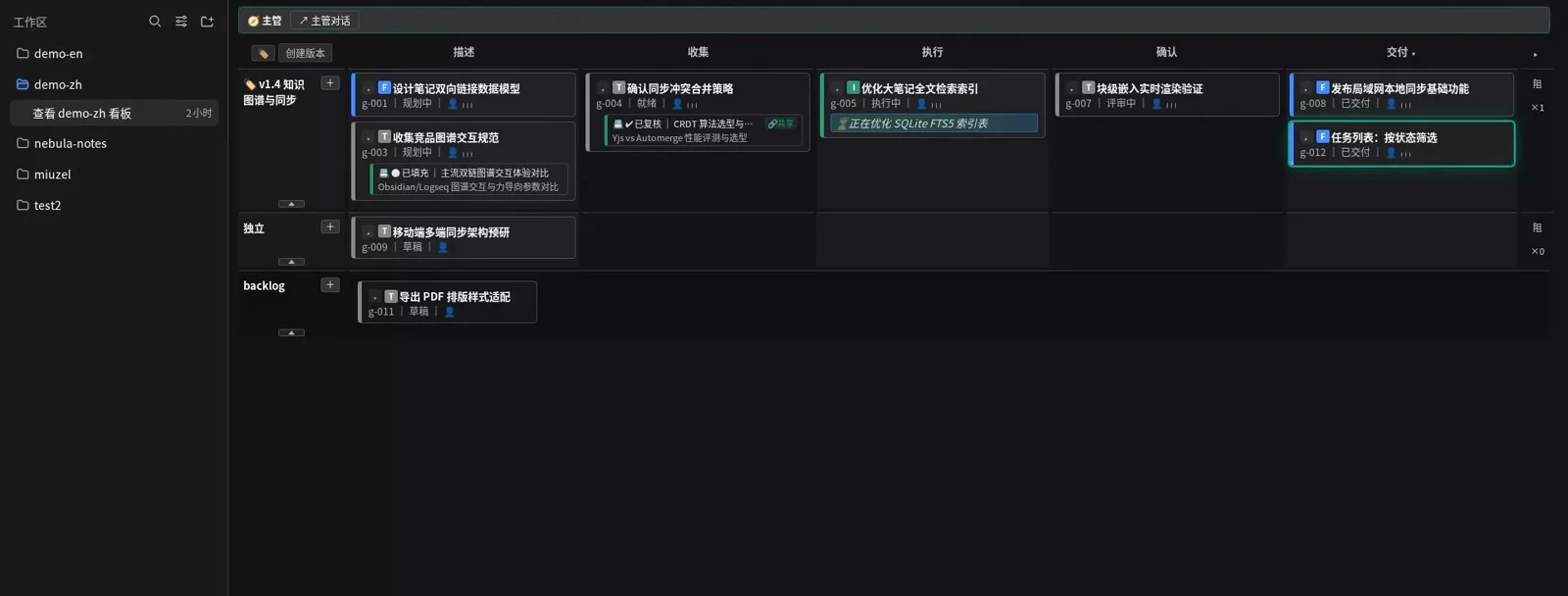
Demo cards, real mechanics — the tour board end to end.Watch at 3:30 - 6
A goal card = description + criteria, editable before dispatch
Opening g-012 任务列表:按状态筛选 shows the card's anatomy: a background story explaining why the filter matters, 范围与边界 listing what's included and excluded, acceptance points with measurable limits (16ms at 60fps), and three written 质量判据 — the third demanding an empty-state hint instead of a blank page. The 定义/润色 button hands the draft to a PM-style assistant for boundary suggestions, without letting it rewrite your goal.
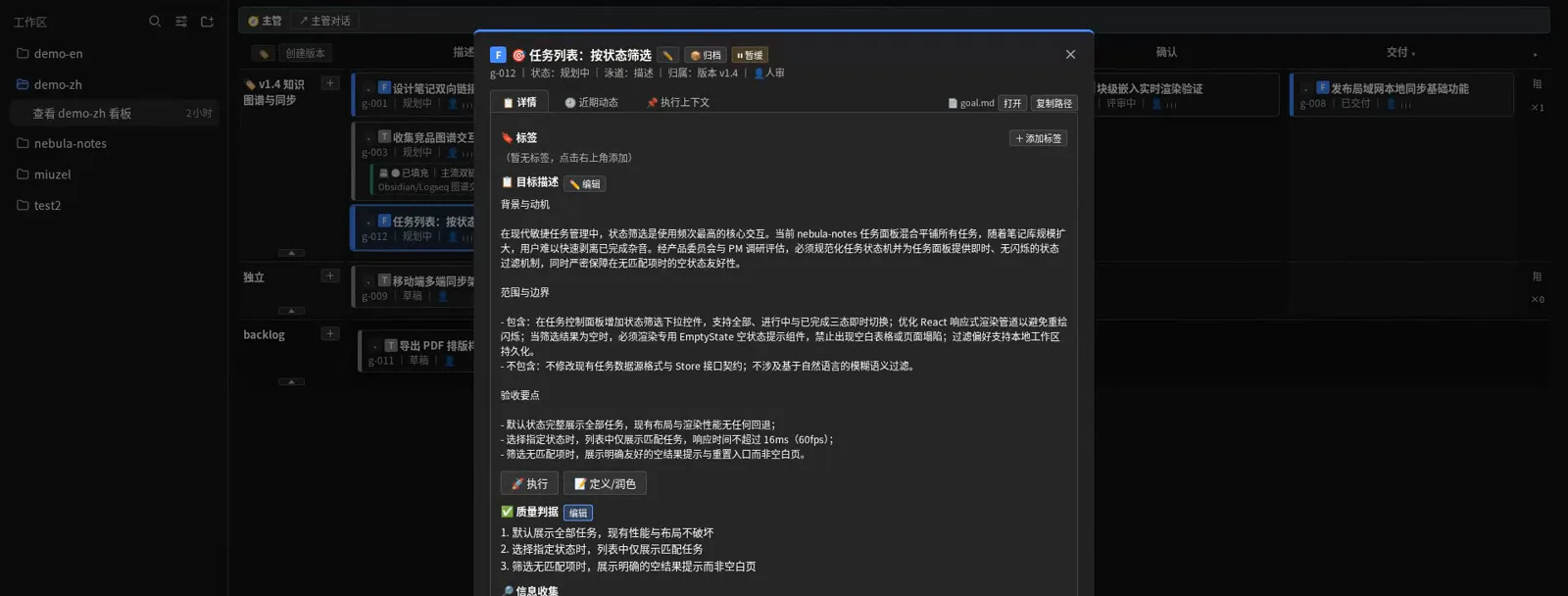
The contract lives on the card, editable until dispatch.Watch at 1:55 - 7
Dispatch context: model pickers, directives, rework handoffs
The 执行上下文 tab is the dispatch desk: a provider/model picker (DeepSeek · DeepSeek-V41-Flash, 标准模式) that warns when the last subagent is unavailable, a 最近指令 slot injected into the next attempt, and a 返工 Handoff field — the rework ticket recording what broke, what to keep, and which command to re-verify with, so the fixing agent starts from facts instead of memory.
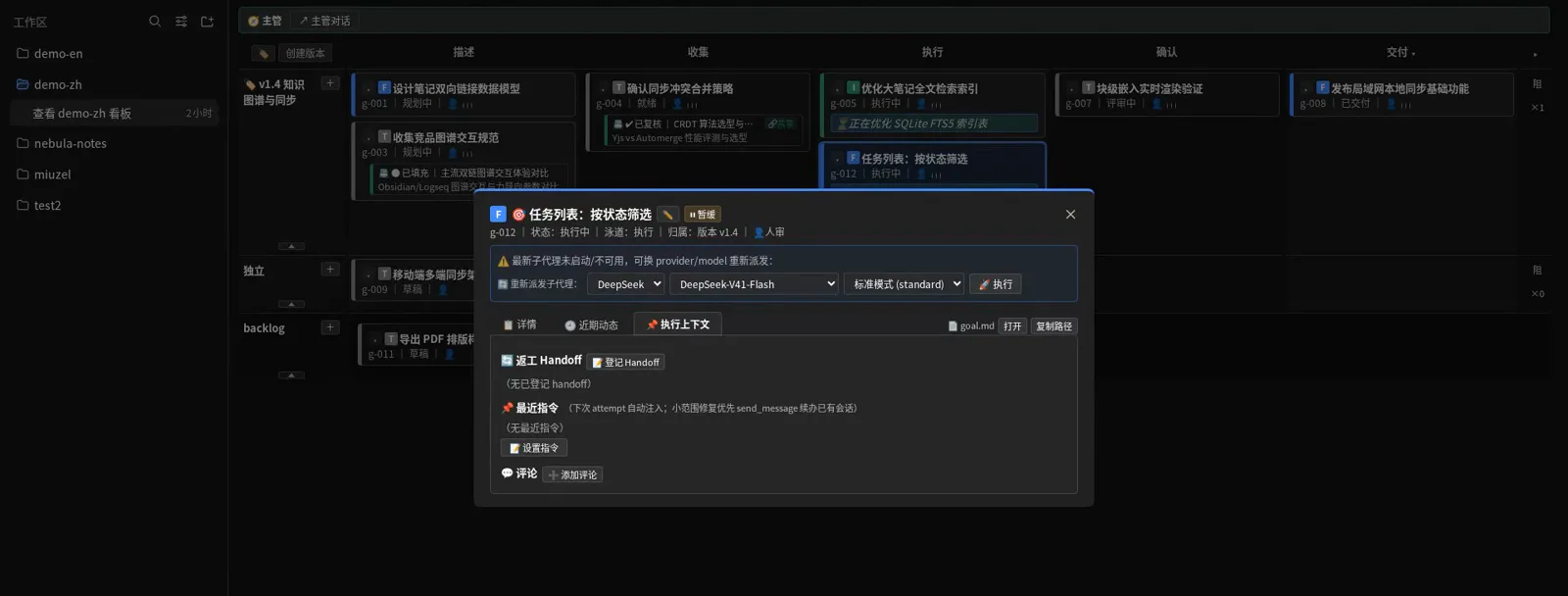
The dispatch desk: model, directive, rework ticket.Watch at 2:30
Part 3 · The five-column cron task board
- 8
A second shape: five plain columns with cron on the cards
SolitudeLin's task board keeps it simpler: 待规划 / 待办 / 进行中 / 已完成 / 已失败, colored tag filters (设计, 巡检, 文档…) and per-card scheduling. The DSH 每日泄漏巡检 card carries 定时 · 3 次执行 — every night at 22:00 it scans the workspace for leaked keys and tokens, on the plugin's own host-side cron with IANA time zones, its ledger kept in the host process so closing the page changes nothing.
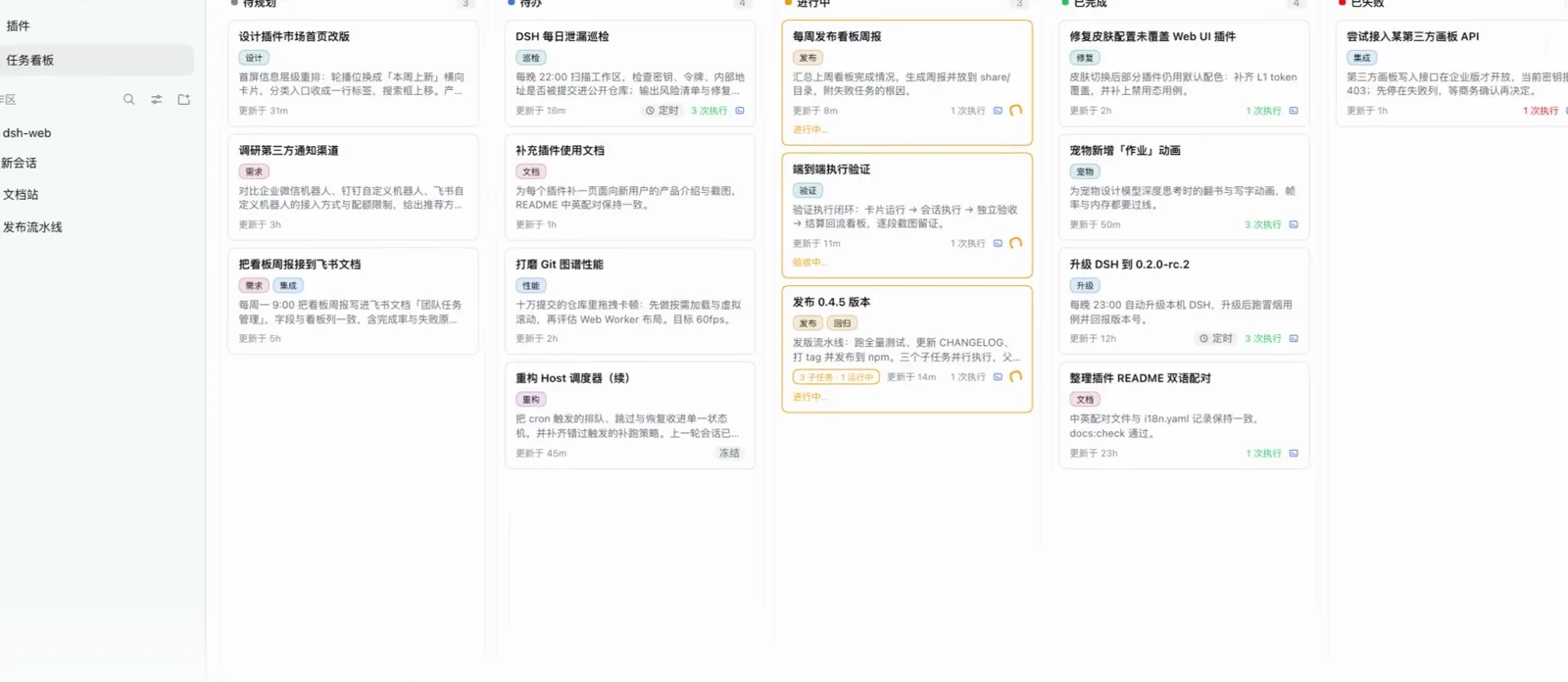
Five columns, cron on the card, ledger in the host.Watch at 0:15 - 9
Paste a note, get a structured task
The new-task dialog's AI 解析 takes a rough note — fix the skin config that misses plugins, hook the weekly board report to Feishu, run a nightly leak patrol at 22:00 — and the model fills 标题, 描述 and a full 执行 Prompt below. Collapsibles pin the run profile up front: 执行设置 inherits the deployment default, 运行方式 is 多轮 /goal for multi-round continuation, and 创建并执行 opens a real DSH session with the workspace, preset and permissions you pinned.
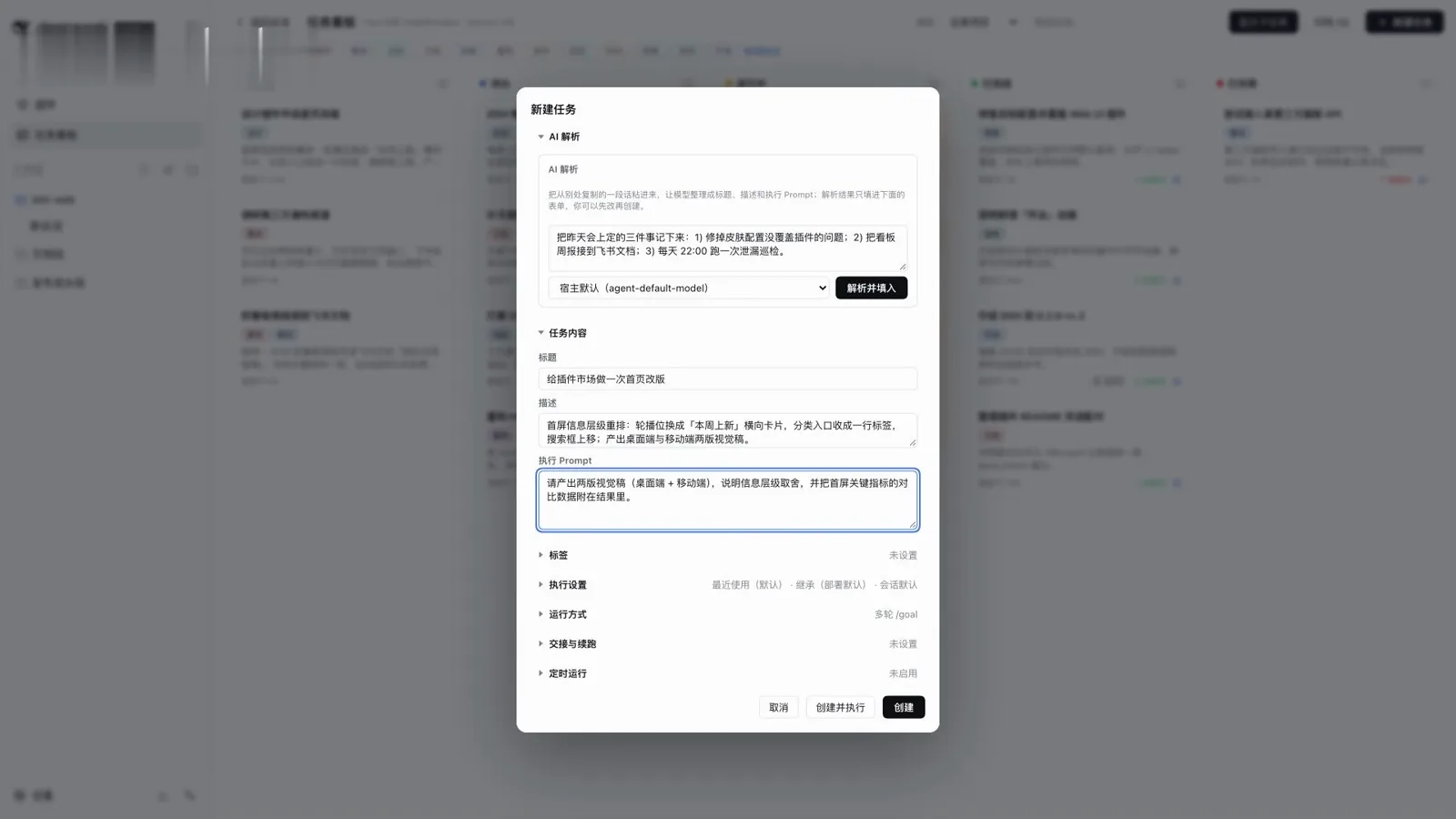
One paste in, a runnable task out.Watch at 0:32 - 10
Independent acceptance: two rounds, A/B swapped, 65 to pass
Finishing a card isn't done: an acceptance report opens with 质量验收 1/2 · 验收异常 0/2, judged by deepseek-official/deepseek-v4-flash at reasoning strength high. Three criteria — Specification Adherence 88.0%, Output Match 84.0%, Error Signal Detection 86.0% — each clear the 65.0 threshold, each judged twice with A/B positions swapped to average out position bias, with the evidence scope (128,400 chars, 57 traces) and the judge's own token bill printed below.
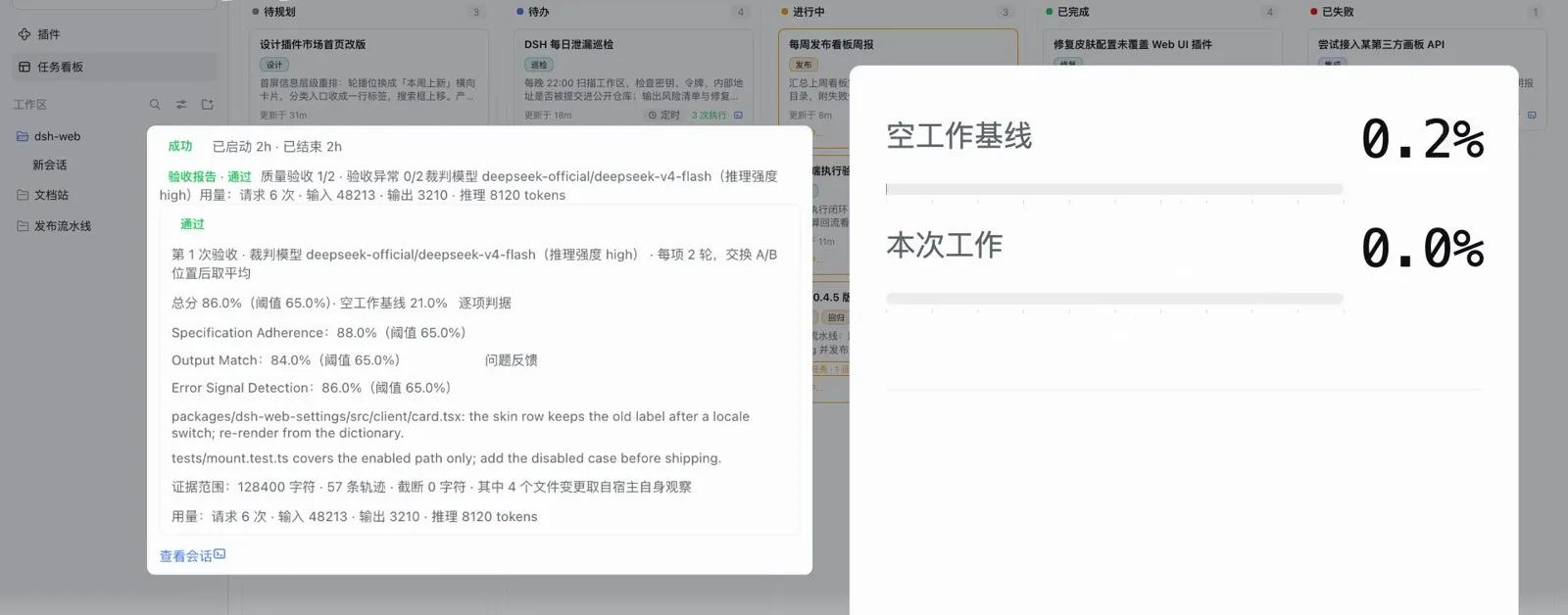
Two rounds, swapped positions, 65 or it doesn't pass.Watch at 1:04
FAQ
The questions this page gets asked, answered from the recordings and the plugin repos.
Which kanban plugins for DeepSeek Harness does this page cover?
Two. dsh-graph (miuzel/dsh-graph, install: dsh plugin --profile web add dsh-graph) is the goal kanban — version swimlanes, criteria-first execution, worktree attempts, review receipts, 51 graph_* tools, data stored as plain files plus an append-only events.jsonl under .dsh-graph. The second is @linxin666/dsh-client-ui-task-board (install: dsh plugin --profile web add @linxin666/dsh-client-ui-task-board@latest) — the five-column board with cron scheduling, real-session execution and A/B acceptance, distributed through the zhu1090093659/dsh-web ecosystem. Both names come from the uploaders' own descriptions; the repos were re-verified via the GitHub API on 2026-10-10.
Is what I see in the frames real work or demo data?
Mixed, on purpose, and labeled per source. Part 1's delivery run is stated by its uploader to be a real recording — a 220kV substation wiring-diagram editor delivered in 5h44m with 6 owner messages and 22 verdicts. Part 2's tour runs on the plugin's fictional demo data (workspace demo-zh/nebula-notes; the description says so and the in-app badge reads 演示数据 · 真实流程). Part 3's board shows the real UI with fictional task content, also per its uploader. The frames keep each source's own honesty — no mixing.
How is a task kanban different from chat, or from plan mode?
Plan mode structures one conversation: propose, review, approve, execute. A kanban structures the work between conversations: goals survive context resets, criteria are written before dispatch, attempts run in isolated worktrees, and the card — not your memory — carries status. dsh-graph even ships graph_handoff and graph_claim_supervisor so a fresh session can take over an existing board idempotently.
Can these boards run tasks on a schedule?
The five-column board can: its Host-side cron takes IANA time zones (the leak-patrol card runs nightly at 22:00, Asia/Shanghai) and the ledger lives in the host process, so closing the page doesn't stop scheduled runs. dsh-graph itself is a board, not a scheduler — DSH's own timed tasks and reminders are the automation-tasks axis. They compose: a scheduled task can create or move cards, and cards can open real sessions.
What stops the agent from marking its own work done?
Design, in both plugins. In dsh-graph the lifecycle is engine-enforced (draft → planning → collecting → ready → in_progress → review → delivered), review checks output against the criteria registered before execution, and the delivered badge requires the owner's verdict — in the recorded run the version dialog refused to publish while one goal wasn't delivered. The task board adds independent acceptance: a separate judge model scores three criteria, each judged twice with A/B positions swapped, and 65 is the floor.
Is there a workflow-canvas alternative?
Yes — dsh-deepseek-flow draws the workflow as a canvas and manages it visually; it's a neighbor position rather than a kanban. If what you want is branching conversations instead of work orders, that's the ThoughtDAG canvas. And for a shared board for humans and agents, the dsh-web ecosystem also lists dedicated dsh-kanban projects (alpacachen/dsh-kanban, ★13 at the 2026-10-10 check).
Related guides
Neighbors in the workflow cluster — and what each one is actually about.
From spec to shipped: a real project in DSH
The full delivery loop — interrogate requirements into CONTEXT.md and ADRs, turn them into a PRD, slice GitHub issues, then develop and merge task by task.
Read the guidedsh automation tasks, hands-on
Create a scheduled reminder from a chat message, enable the built-in Automation tasks panel and read delivery records — 10 steps with timestamps
Read the guidedsh infinite canvas: branch contexts with ThoughtDAG
Questions become nodes, lines inject a summary or the full context, PDFs grow branches, and old Claude Code sessions import read-only — an illustrated canvas walkthrough.
Read the guidePlan mode: /plan, review, approve
How the /plan command works in DeepSeek Harness — the orange plan marker, the exit_plan_mode review card, and how it differs from running direct, in ten verified screenshots.
Read the guideSession management, hands-on
Find where sessions live in the Desktop sidebar, archive and restore from the built-in panel, then bulk-select with the session-multiselect plugin — 9 frames, each with a timestamp
Read the guideDSH work status: taskbar light & done alerts
A three-color taskbar light mirrors the agent's state, and toasts or phone push call you back the moment a task finishes or needs a decision.
Read the guideSources and credits
All three recordings are from Bilibili creators — two by the dsh-graph author (self-reported as GitHub miuzel) and one by the task-board plugin's author (self-reported as zhu1090093659 / npm linxin666); identities are stated as self-reported, not independently verified, and none of the material is from the DSH team. Every frame above links back to its own timestamp. View counts are Bilibili API values as of the 2026-10-10 check; star counts were verified via the GitHub API the same day.