
Plug dsh into QQ: the dsh-im plugin and a NapCat field test
Route A installs a plugin and scans a QR; Route B puts NapCat, the QQ protocol side, in front of dsh — 9 frame-checked screenshots, each deep-linked to its source video.
Last updated: 2026-10-03
Can DeepSeek Harness live inside QQ? Yes — and there are two routes. Route A is dsh-im, an open-source plugin (verified on GitHub as xmanrui/dsh-im, ★1.6k, MIT): install it with one command, scan a QR code in settings, and an IM bot is wired into dsh. QQ is one of nine channels alongside WeChat, Feishu, DingTalk, WeCom, Telegram, Discord, WhatsApp and Slack. Route B adds NapCat — a community protocol-side implementation of the QQ client — which is what the live recording uses for group-level bot features like joining groups and member analytics.
The nine screenshots below all come from two real recordings and were frame-checked one by one; every figure deep-links back to the exact second of its source video. For the WeChat/Feishu side of the same plugin, see the WeChat integration guide. WeChat integration: the same plugin, WeChat axis
TL;DR
- ▸Route A: install dsh-im with one command → Settings → Plugins → IM robot → scan the QR. QQ is one of nine channels (WeChat, Feishu, DingTalk, WeCom, QQ, Telegram, Discord, WhatsApp, Slack).
- ▸Route B: NapCat (★10.8k QQ protocol side) + the dsh web UI's 'QQ chat' workspace — messages land as sessions, with cache hits measured at 80%.
- ▸Live demo: the bot joins a group as a member, swaps photos and 10-second voice messages in private chat, works across sessions, and maps 18 group members into 16 relationships.
- ▸Terminology: dsh-im is the plugin, NapCat is the protocol side (not a plugin), and MoonBot is the video author's private panel with no public repo — don't go searching for it.
From zero to a QQ bot on dsh, in 9 steps
Route A: the dsh-im plugin (official channels)
- 1
Install the dsh-im plugin
Two equivalent commands come straight from the README: the one-line installer npx -y github:xmanrui/dsh-im install, or the plugin-market route dsh plugin --profile web add @xmanrui/dsh-im. If you previously installed dsh-feishu, dsh-weixin or dsh-dingtalk directly, the installer replaces them with dsh-im and keeps your existing channel configs and keys.
$npx -y github:xmanrui/dsh-im install$dsh plugin --profile web add @xmanrui/dsh-im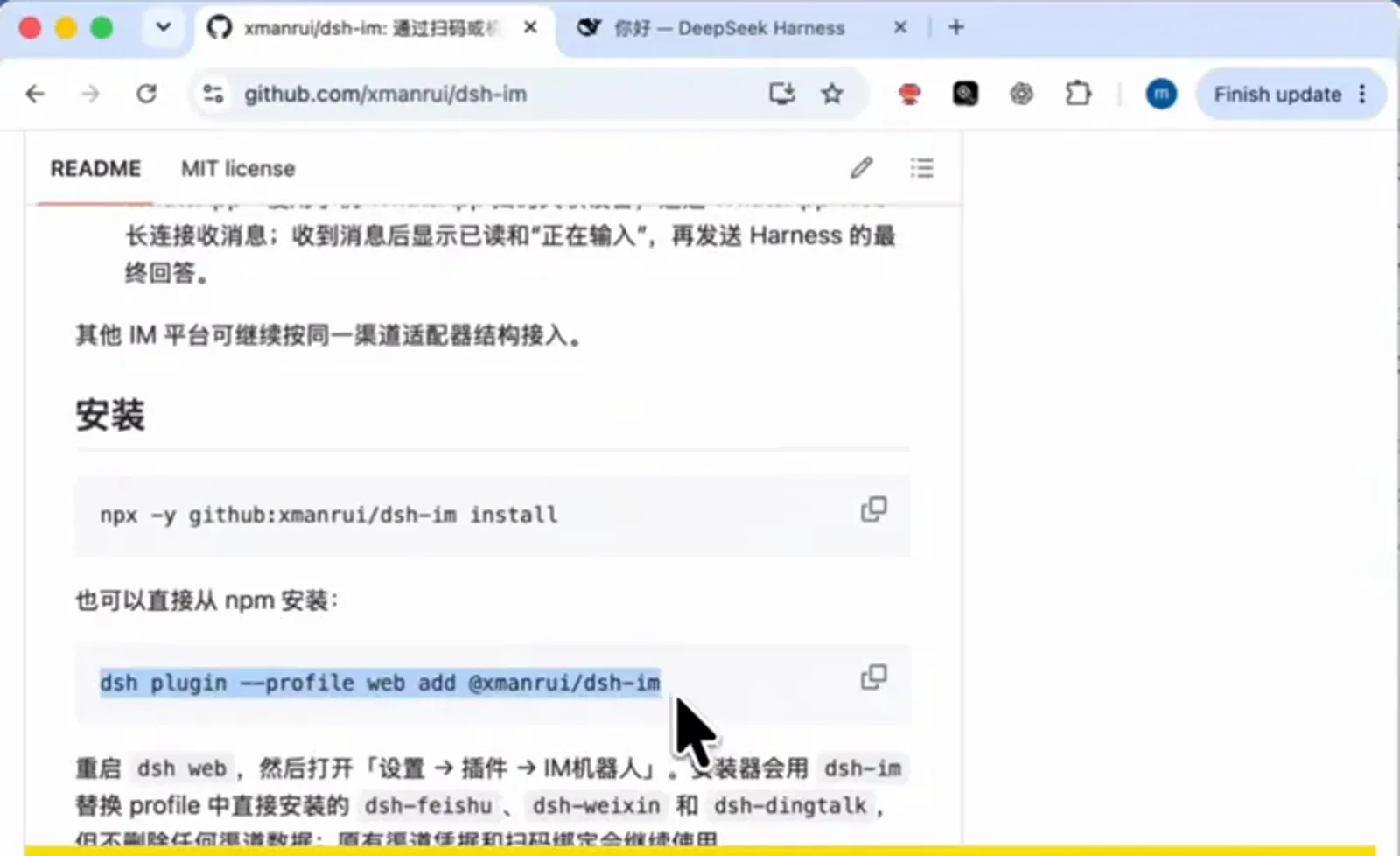
Two install paths from the README; either line gets the plugin onto your machine.Watch at 0:52 - 2
Scan to pair: Settings → Plugins → IM robot
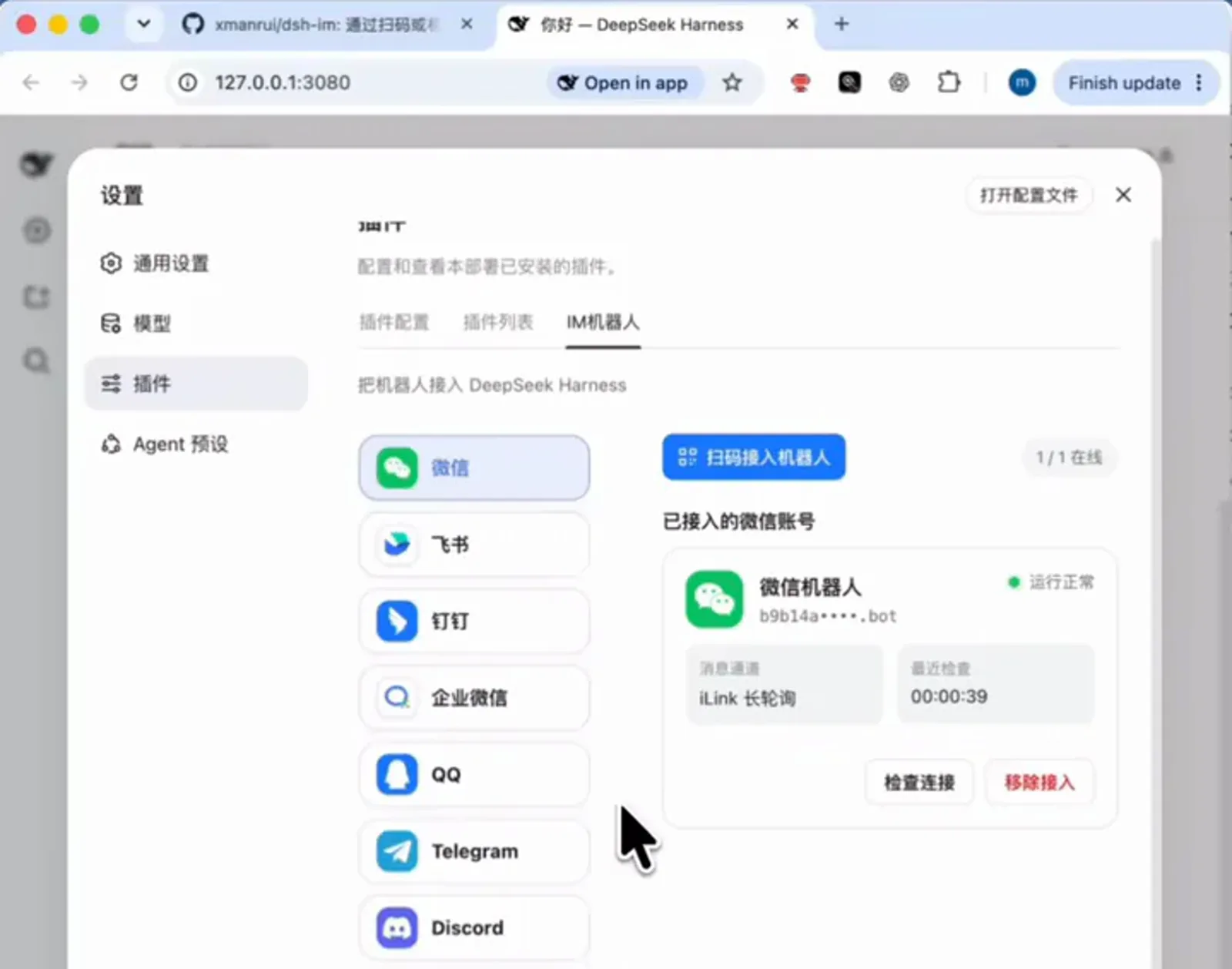
Restart dsh web and a new IM-robot panel appears in settings: each of the nine channels pairs by QR code. The recording shows an already-connected WeChat bot card reading 'running normally, message channel iLink long-polling, 1/1 online'; QQ pairs the same way. Once connected, incoming messages get a read receipt and a 'typing' indicator before the harness's final answer comes back.
After the scan the card turns green: running normally, 1/1 online.Watch at 0:14
Route B: NapCat, the QQ protocol side
- 3
Meet NapCat: the QQ protocol side
Route B starts one layer lower. NapCat (NapNeko/NapCatQQ, ★10.8k) implements the QQ client protocol, and its WebUI — reachable at 127.0.0.1:6099 with a token — centralizes the bot account and versions: the recording runs NapCat 4.9.49 on QQ 9.9.26, with two network configs hosting one HTTP server and one WebSocket server. dsh never touches this layer directly; NapCat translates QQ into an ordinary message source.
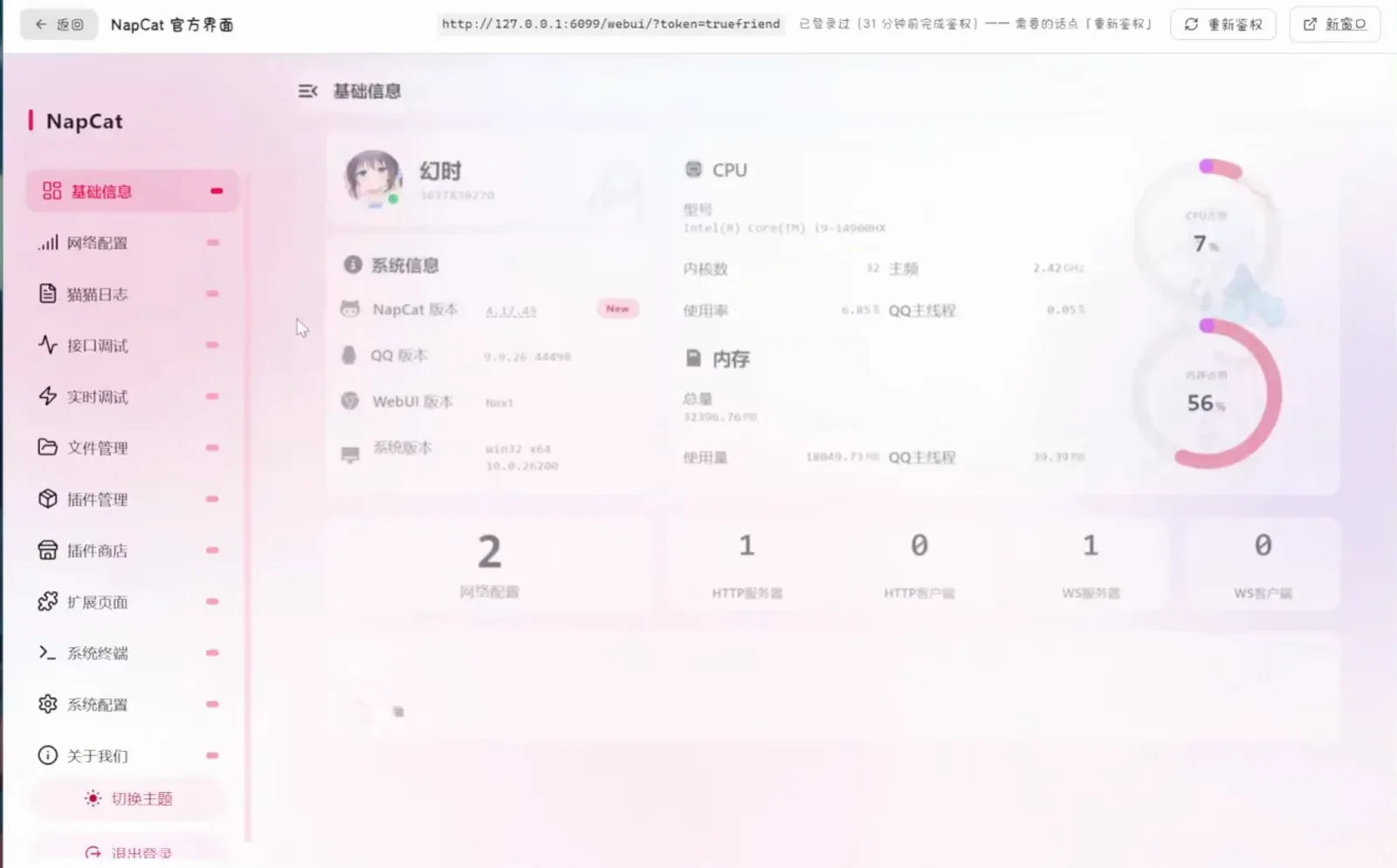
NapCat runs beside your QQ client; its network side is wired up in this WebUI.Watch at 3:16 - 4
Watch QQ messages land inside dsh
With NapCat wired up, the dsh web UI grows a 'QQ chat' workspace: private and group conversations appear as sessions, a role card (SPEECH RULES) is injected automatically, wake events like '[Wake] private:… sleep ended' scroll through the log, and the status bar measures 1 round, first token in 0.6 s and cache hits at 80%. From dsh's point of view, the bot is just another chat window.
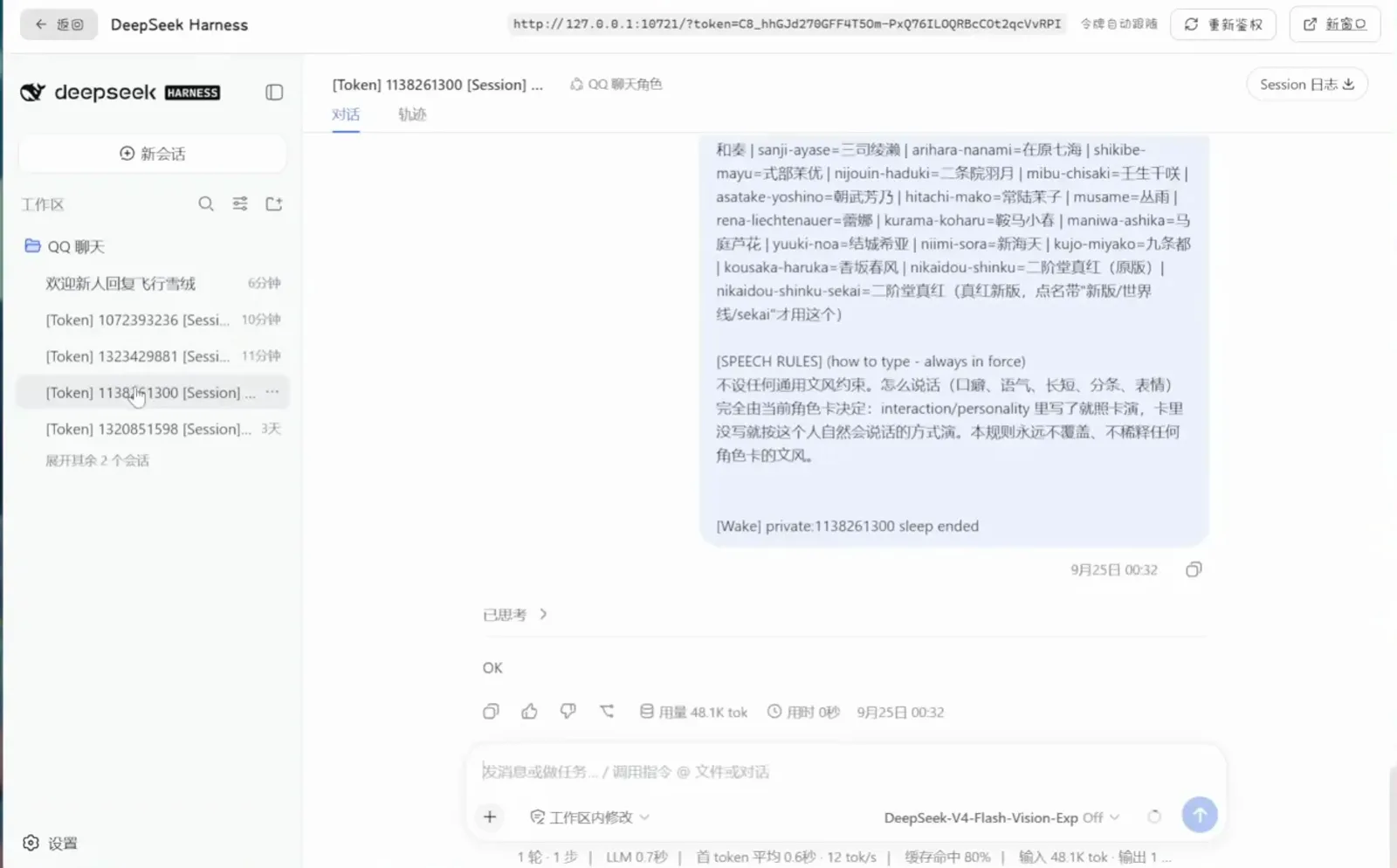
No glue code in sight — QQ messages simply become dsh sessions.Watch at 3:24
Field test: switches, persona, member insights
- 5
See what it can do: groups, pictures, voice
In the recording, the bot sits in a 5-person group's member list under the name 'DeepSeek Harness'; private chat exchanges a photo and a 10-second voice message both ways; the author notes that 'in theory every operation can cross sessions', and web search works too — 'yes, though not always accurate'. The Easter egg: the bot posts a first-person ATRI diary to its own QQ Zone.
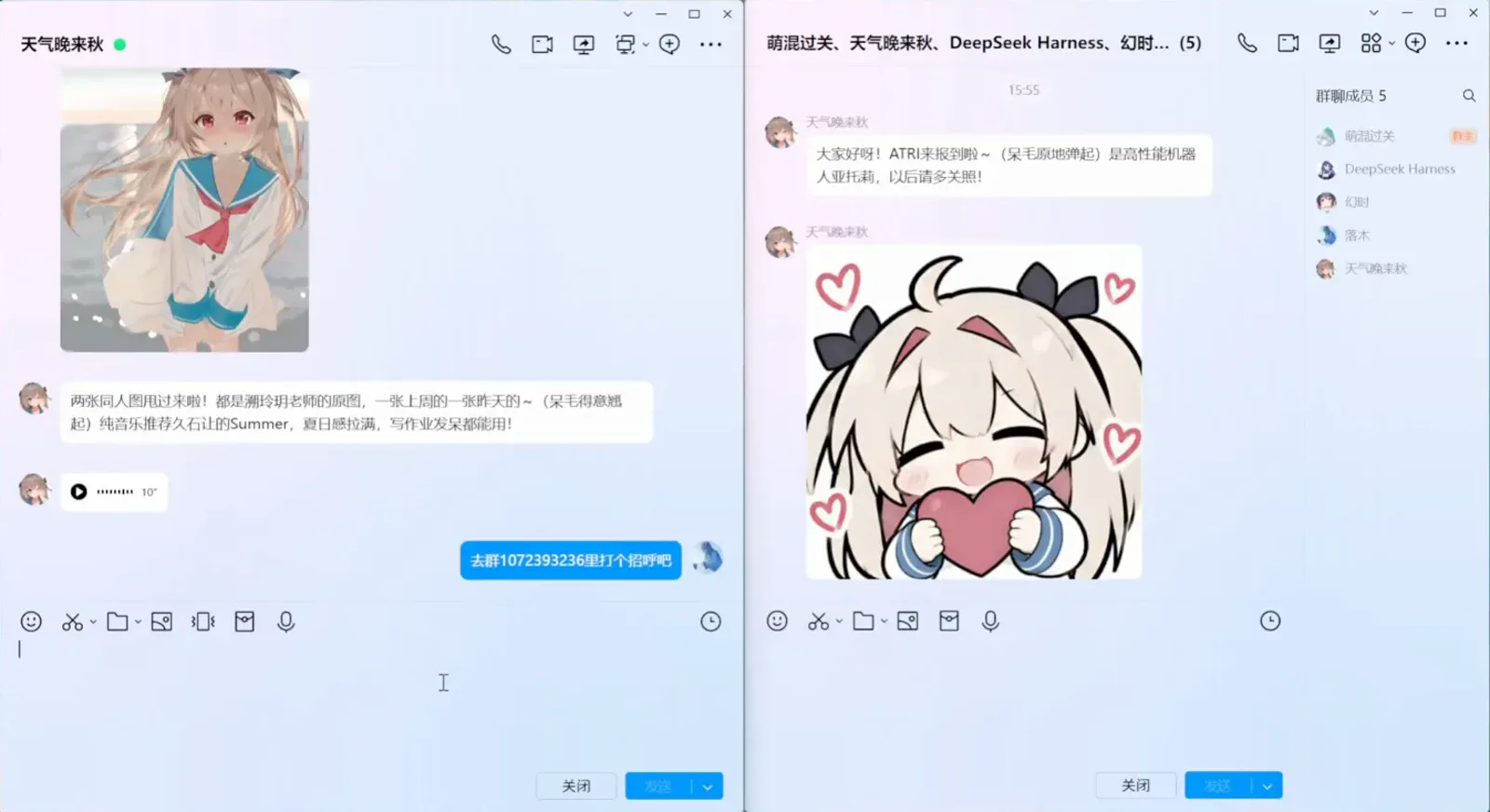
It joins groups as a member and handles pictures and voice in private chat.Watch at 2:00 - 6
Set the bot's behavior switches
The MoonBot panel (the video author's own build — see the FAQ) shows the knobs that matter for a group bot: enable the full agent suite, multi-turn injection, private-chat-only persistence (up to 24 back-and-forths, idle close at 1,800,000 ms), friend-request trust with auto-accept plus a friend guard, and a 100,000-word document quota.
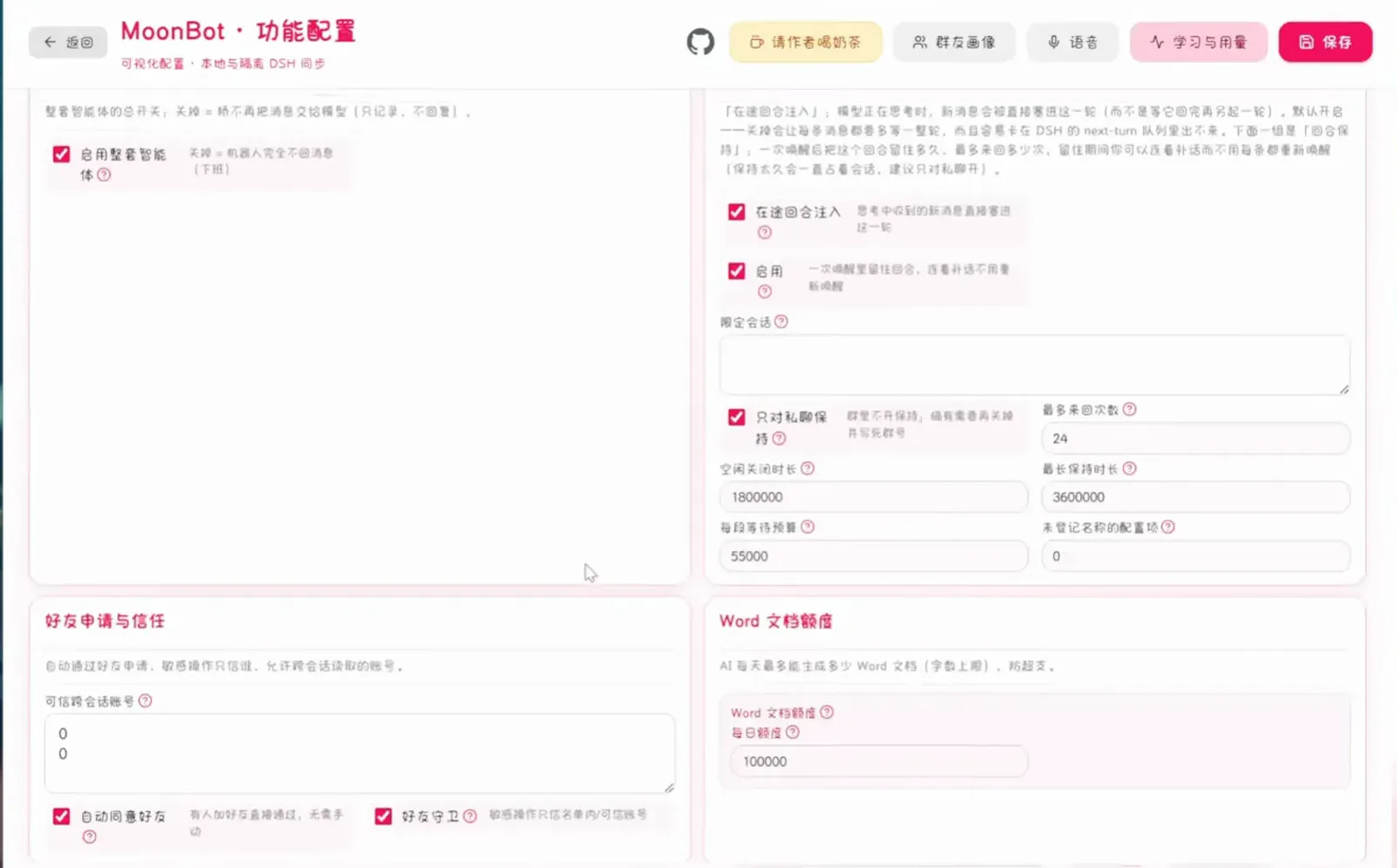
Turn limits, friend trust, quotas — the switches that keep a group bot polite live here.Watch at 3:36 - 7
Give the bot a standing persona
One screen defines who the bot is: a persistent automation preamble plus a free-form prompt, saved once and inherited by every chat. How formal, how chatty, how terse — it's all decided here, because QQ group culture runs on personality.
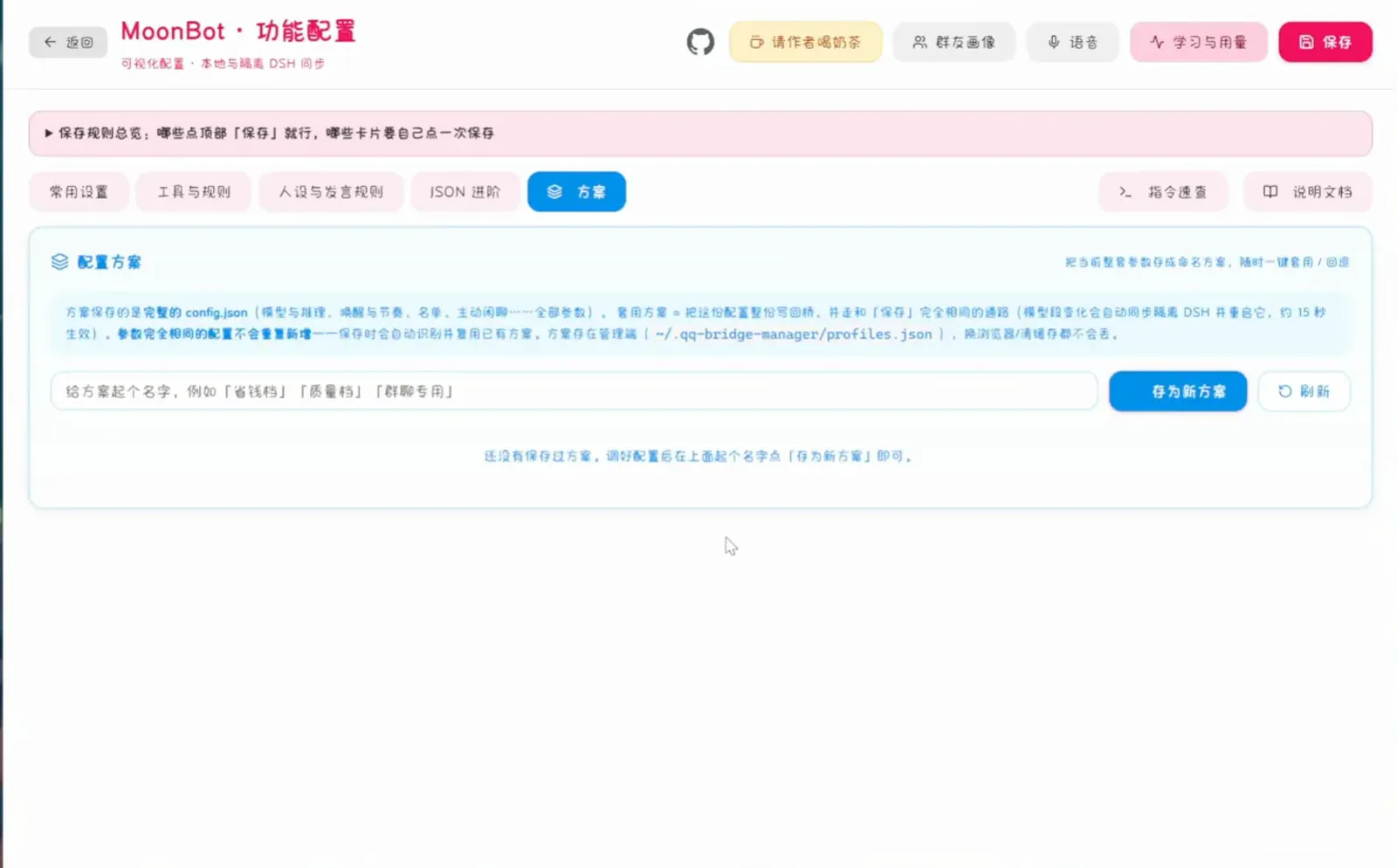
Set the persona once; every chat inherits it.Watch at 4:00 - 8
Read the room: the group-member graph
After running in a group for a while, the panel draws a relationship graph — 18 people and 16 connections in the recording, line thickness encoding interaction strength, with legend entries for owner, group owner, admin and private-chat roles. Clicking any person opens their card.
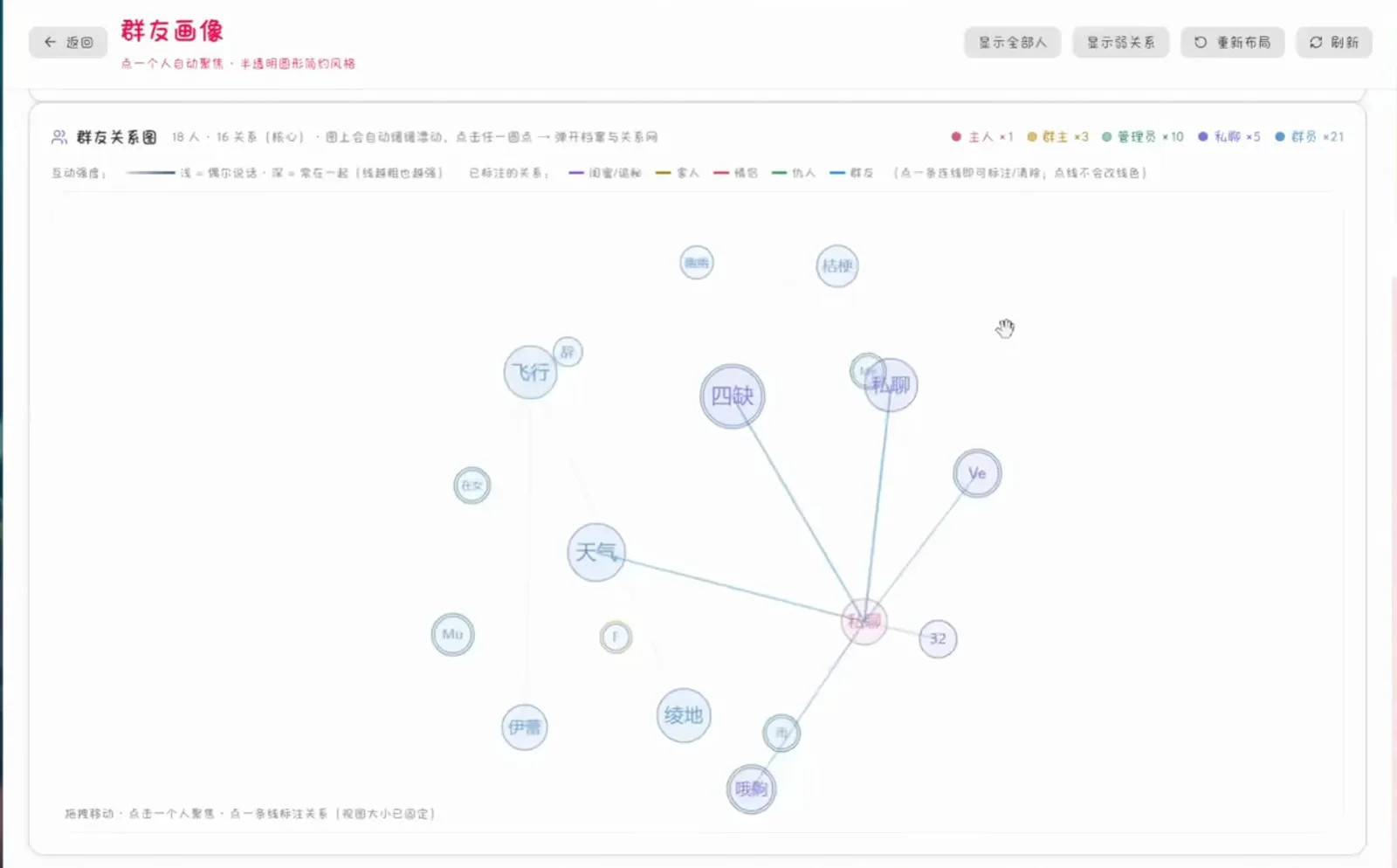
Weeks of group chat, condensed into one social map.Watch at 4:45 - 9
Open a member profile
Each member's dialog puts a chat-style summary up top with a timeline of logged interactions and their connection web underneath — the data source for the graph in the previous step. dsh sees this data all along; it's just arranged for humans here.
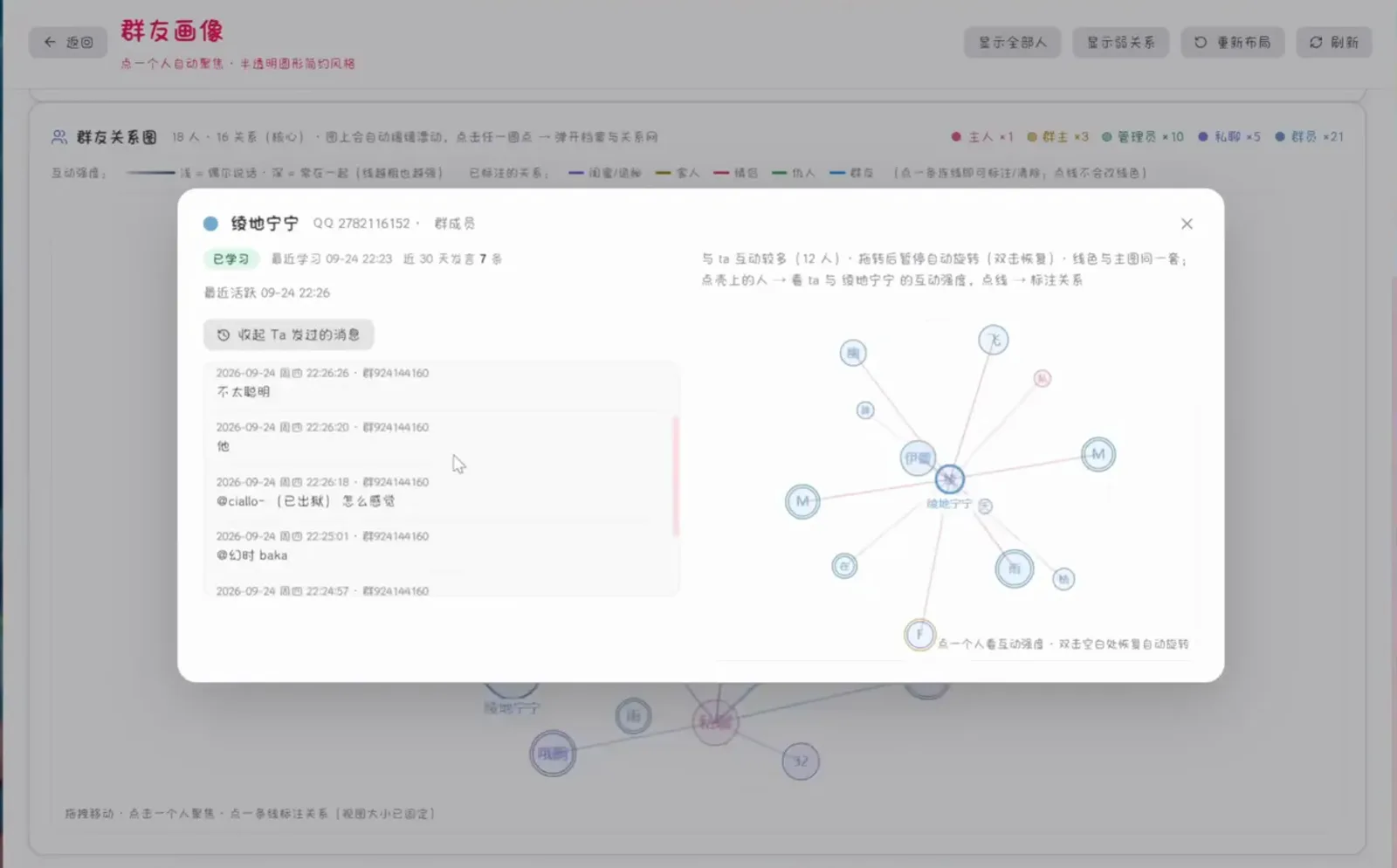
Click a dot and the bot tells you who this person is and how they talk.Watch at 4:50
FAQ: wiring dsh to QQ
The six questions people actually ask before connecting the two.
Can DeepSeek Harness run a QQ bot?
Yes — two routes. Route A installs the dsh-im plugin (one npx command) and pairs QQ from Settings → Plugins → IM robot by QR code; QQ is one of nine supported channels. Route B puts NapCat, an open-source protocol-side implementation, in front of dsh — that's the path behind the group-level features in this guide's recording, like joining groups and member analytics. Use either one alone, or both together.
What's the difference between dsh-im and NapCat — which should I pick?
dsh-im is a dsh plugin that connects through each platform's official channels: scan a QR and you're done, across nine messengers including QQ, WeChat, Telegram and Discord. NapCat (NapCatQQ) is not a dsh plugin at all — it implements the QQ client protocol, which is how the recording produces more QQ-native group behavior. Pick dsh-im for the easy official path; add NapCat when you need group-level bot features.
Is NapCat an official Tencent product? Is it safe?
No. NapCat (GitHub: NapNeko/NapCatQQ, ★10.8k, TypeScript) is a community open-source project implementing a modern protocol side on top of NTQQ. It is affiliated with neither Tencent nor DeepSeek Harness, so evaluate the risk yourself and follow QQ's terms of service before tying a real account to it. This page only quotes its publicly posted demo footage.
What can the QQ bot actually do once connected?
Per the recording: it joins a group as an ordinary member, exchanges photos and 10-second voice messages in private chat, 'in theory every operation can cross sessions', it runs web searches when asked ('yes, though not always accurate', per the author), and it even posts a first-person diary to its QQ Zone. The member graph covers 18 people and 16 relationships, with a profile card one click away. Your dsh models and plugins all keep working — the bot is just another door for messages into the harness.
Is MoonBot a plugin? Where do I download it?
It isn't. MoonBot is the control panel the video author (等一只萝卜子) built for their own deployment — it has no public repository and cannot be installed. The public, reproducible path is dsh-im for official-channel access plus NapCat for the protocol side; treat the MoonBot screens as a demo of what that combination can do.
Besides QQ, which chat apps can dsh connect to?
dsh-im ships nine channels at once: WeChat, Feishu, DingTalk, WeCom, QQ, Telegram, Discord, WhatsApp and Slack. Outside mainland China, Telegram and Discord are the lowest-friction pair, and the same QR-pairing panel handles them. For the WeChat/Feishu side, our WeChat integration guide walks it step by step.
Related guides
Keep going: more dsh guides and collections on this site.
WeChat integration: the same plugin, WeChat axis
The same dsh-im plugin on the WeChat/Feishu side — QR pairing, phone-side approvals and bot replies, walked step by step on real screens.
Read the guideInstalling plugins you can trust
dsh-im is one member of a much bigger ecosystem: how plugin installation actually works, and how to vet third-party code before you run it.
Read the guideThe dsh Web UI, guided
The IM-robot panel and the QQ-chat workspace both live in the web UI — launching, port 3080 and the panel map, in one tour.
Read the guideLAN access & ports
A QQ bot only reaches dsh on the same machine by default; open the web UI to your LAN safely — firewall and ports, explained once.
Read the guideRemote access from anywhere
Beyond the LAN: tunnels and tokens for reaching dsh from outside — weigh the exposure before you point a bot at it.
Read the guideRemote & mobile collection
The catalog of phone, tunnel and QR-pairing plugins — the full remote-access toolbox around chat-side entry points like this one.
Read the guideSources & credits
All screenshots come from two third-party recordings and were frame-checked one by one; every figure deep-links back to its source video at the exact second. The vertical dsh-im video is a cropped re-export — its yellow title/subtitle banners appear in no frame — and the NapCat recording's aquarium wallpaper is removed by tight window crops. The MoonBot panels are the video author's own build with no public repository. Repo names and stars re-verified via the GitHub API on 2026-10-03: xmanrui/dsh-im (★1,589, MIT) and NapNeko/NapCatQQ (★10,830).