
How to Find dsh Plugins: Market, Directory, Manager
The built-in plugin market, the awesome-dsh-plugin.com community directory and the official Plugins manager — five real frames from two recordings, each deep-linked back to the source video.
Last updated: 2026-09-25
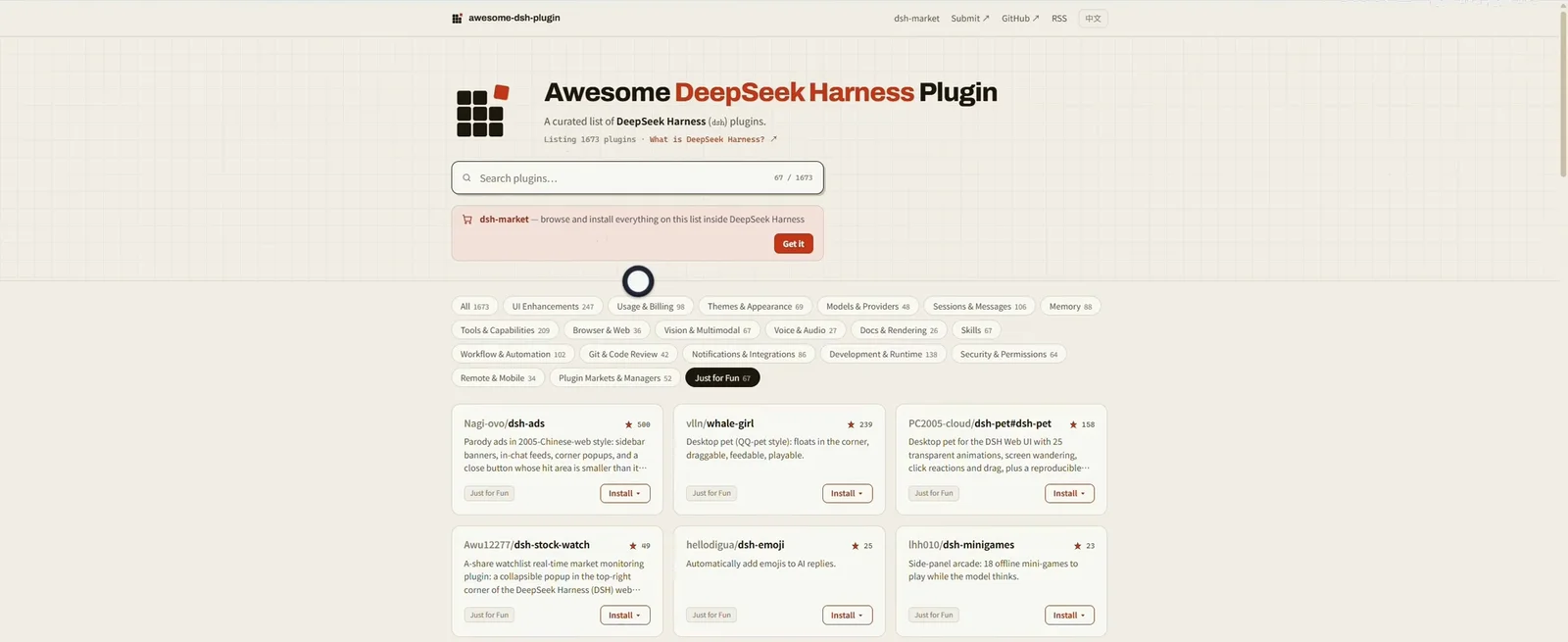
Everything in DeepSeek Harness is a plugin, and the ecosystem has outgrown any single list: the built-in market counted 1,677 community entries on the day this was recorded, while the third-party directory awesome-dsh-plugin.com lists 1,673 more across 21 categories. Finding the right plugin comes down to three paths — search the market, browse the directory, then verify what actually loaded — and this page walks each one with frames from two real screen recordings.
The market and directory frames come from a Bilibili walkthrough by PM刘搞定 (Chinese UI); the two Plugins-manager frames come from AISeeKing's YouTube review, recorded on the 0.1.5-rc.1 developer preview, so labels there may differ slightly from the stable release. Every screenshot keeps its deep link to the source video — star counts and listing numbers are as-recorded, not live values.
TL;DR
- ▸In-app market: Settings → 插件市场 (Plugin market). The Discover tab has category chips (memory, tools & capabilities, browser & web…), a search box and an Install button on every card.
- ▸Community directory: awesome-dsh-plugin.com lists 1,673 plugins in 21 categories with per-card Install menus; each card opens a detail page with the exact dsh plugin add command and a third-party-code warning.
- ▸Verify: Settings → Plugins shows Plugin configuration (Shell, Agent loop, Subagent, Web search) and a Plugin list where every installed plugin carries an Enabled badge.
The walkthrough, step by step
Find a plugin worth installing
- 1
Search the built-in plugin market
Open Settings and pick 插件市场 (Plugin market) in the left column — the Discover tab opens on 发现社区为 DeepSeek Harness 打造的能力 · 1677. Filter with the category chips (memory, UI enhancement, models & accounts…), type keywords like 记账 or 天气 into the search box, and read each card's star count and release date before hitting Install. The 主题, 已安装 (4) and 备份与恢复 tabs next to it cover themes, what you already have, and backup/restore.
设置 → 插件市场发现社区为 DeepSeek Harness 打造的能力 · 1677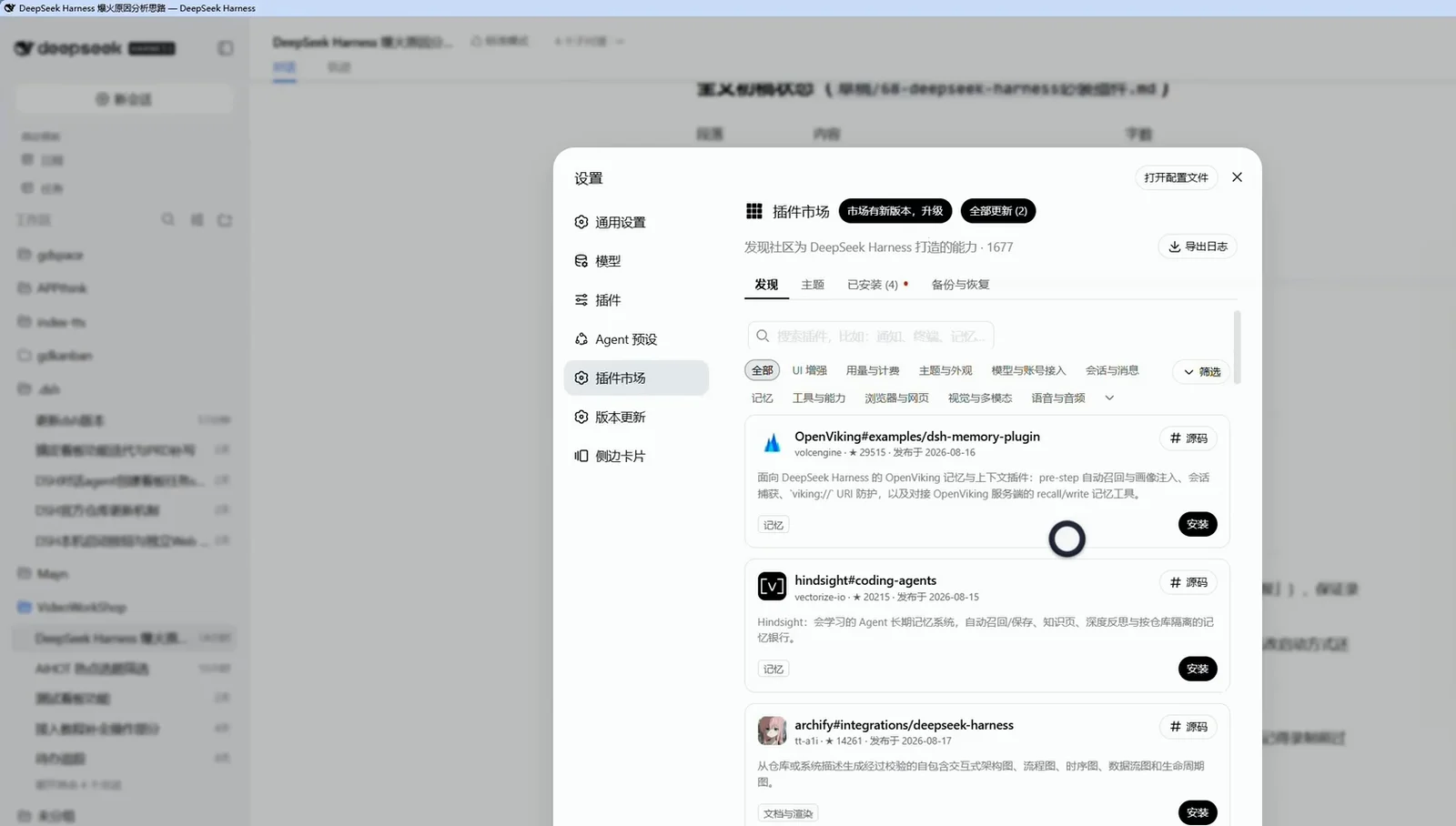
The in-app market in one screen: 1,677 entries, category chips, star counts, one-click Install.Watch at 1:13 - 2
Browse the awesome-dsh directory by category
awesome-dsh-plugin.com is the community's curated list — 1,673 plugins across 21 categories on recording day, including entries the in-app market doesn't surface. The hero image above is its Just for Fun category (67/1673); open any card — say vlln/whale-girl, a ★239 desktop pet — and the detail page shows stars, category, the date added, plus the ready-to-paste install command dsh plugin --profile web add github:vlln/whale-girl. The page also says it plainly: any plugin runs third-party code with your permissions and can read files, use credentials and reach the network — only install sources you trust, and pin a commit when you can.
dsh plugin --profile web add github:vlln/whale-girlListing 1673 plugins · 21 categories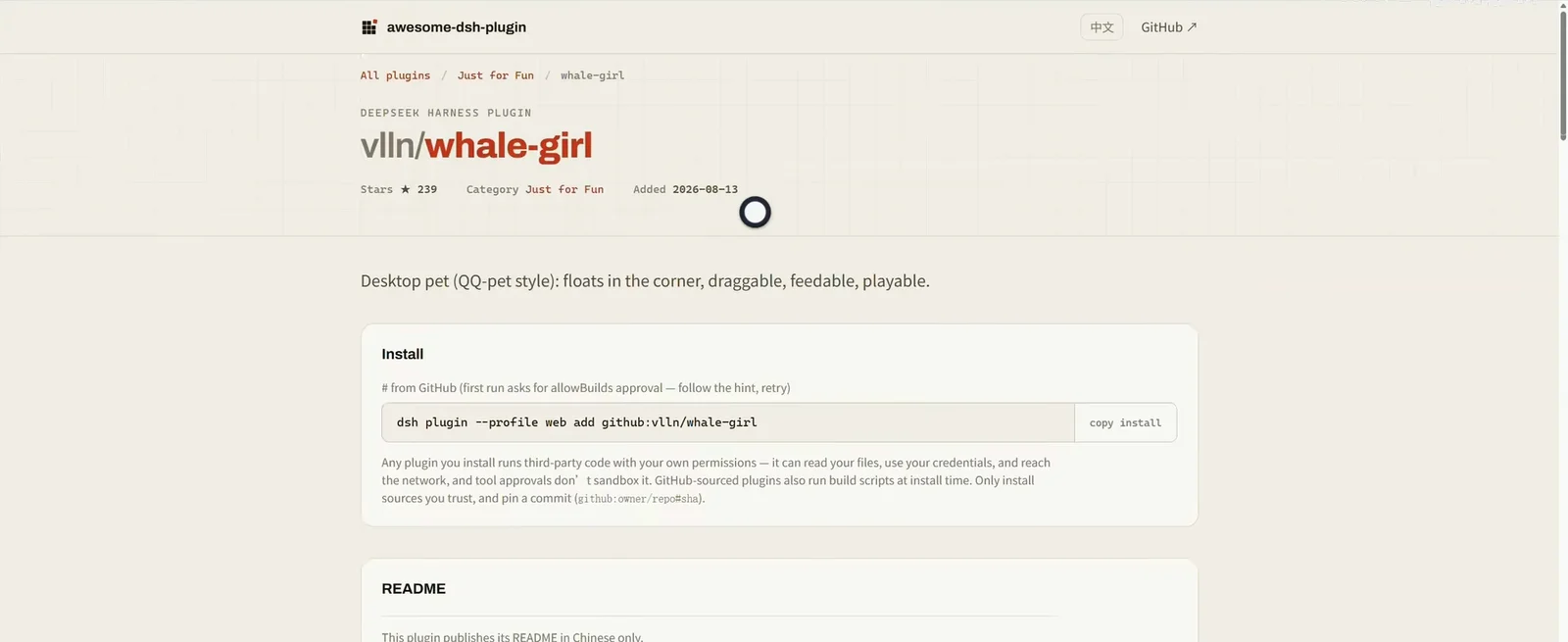
Every directory card opens into a detail page: a copy-paste install command plus a third-party-code warning.Watch at 1:32
Check it in the official manager
- 3
Open the official Plugins manager
Installing is half the story — the manager lives at Settings → Plugins. The Plugin configuration tab groups four cards: Shell (limits every command the agent runs), Agent loop (how the agent dispatches tool calls), Subagent (which models agents may choose for subagents) and Web search (the DeepSeek search provider), with Open configuration file in the corner for direct edits. These frames were recorded on the 0.1.5-rc.1 developer preview, so expect small label differences on stable.
Settings → Plugins → Plugin configurationShell / Agent loop / Subagent / Web search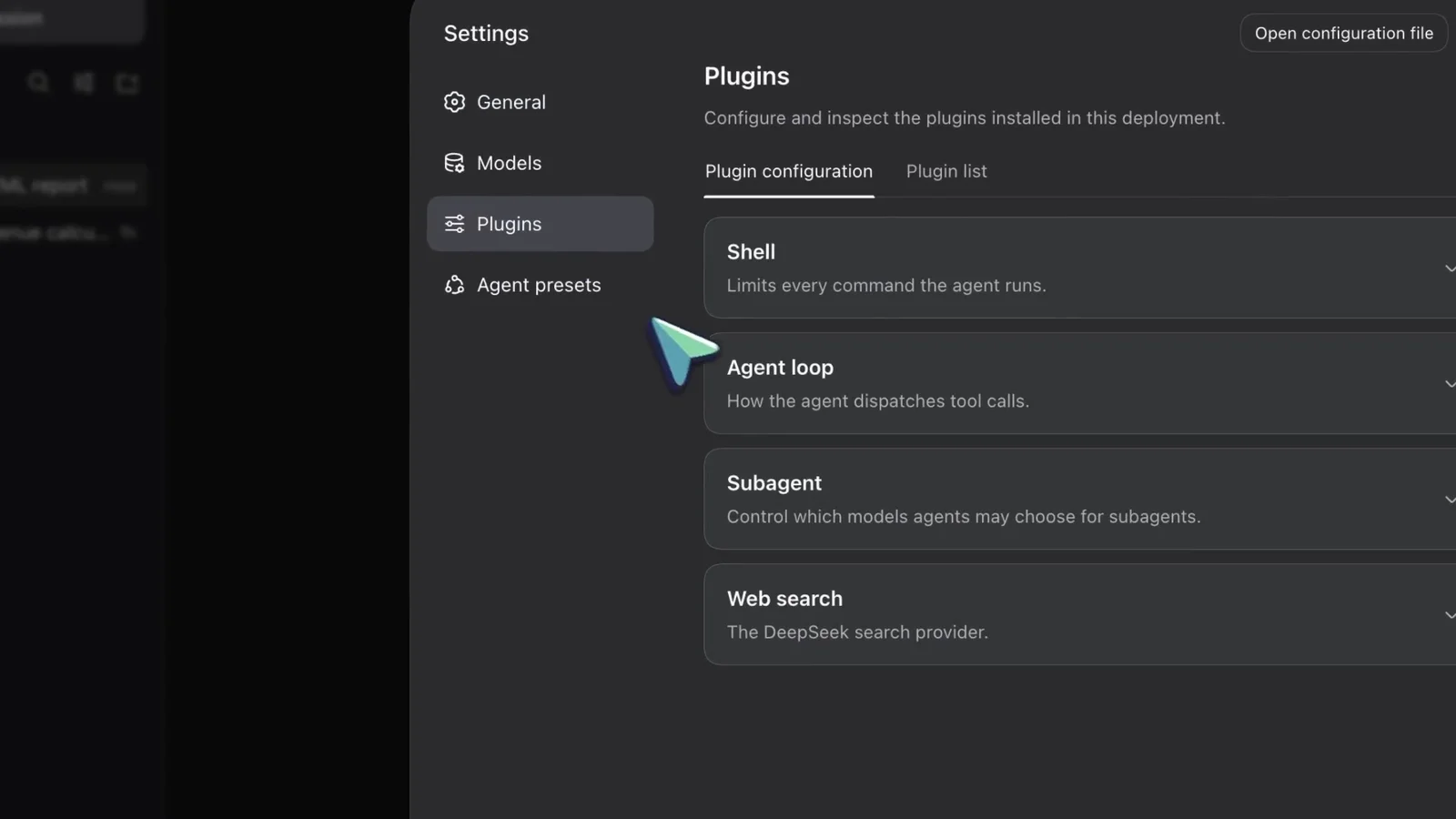
Settings → Plugins — the official manager, recorded on the 0.1.5-rc.1 developer preview.Watch at 8:04 - 4
Audit the Plugin list before you trust it
Switch to the Plugin list tab and every installed plugin appears in two columns — tool-fs, tool-jobs, skill-filessystem, command-goal, plan-mode, compaction-basic… — each with a green Enabled badge and a dropdown to toggle or configure it. Anything you just installed from the market or the directory should show up here; if it doesn't, it didn't load.
Settings → Plugins → Plugin listEnabled ✓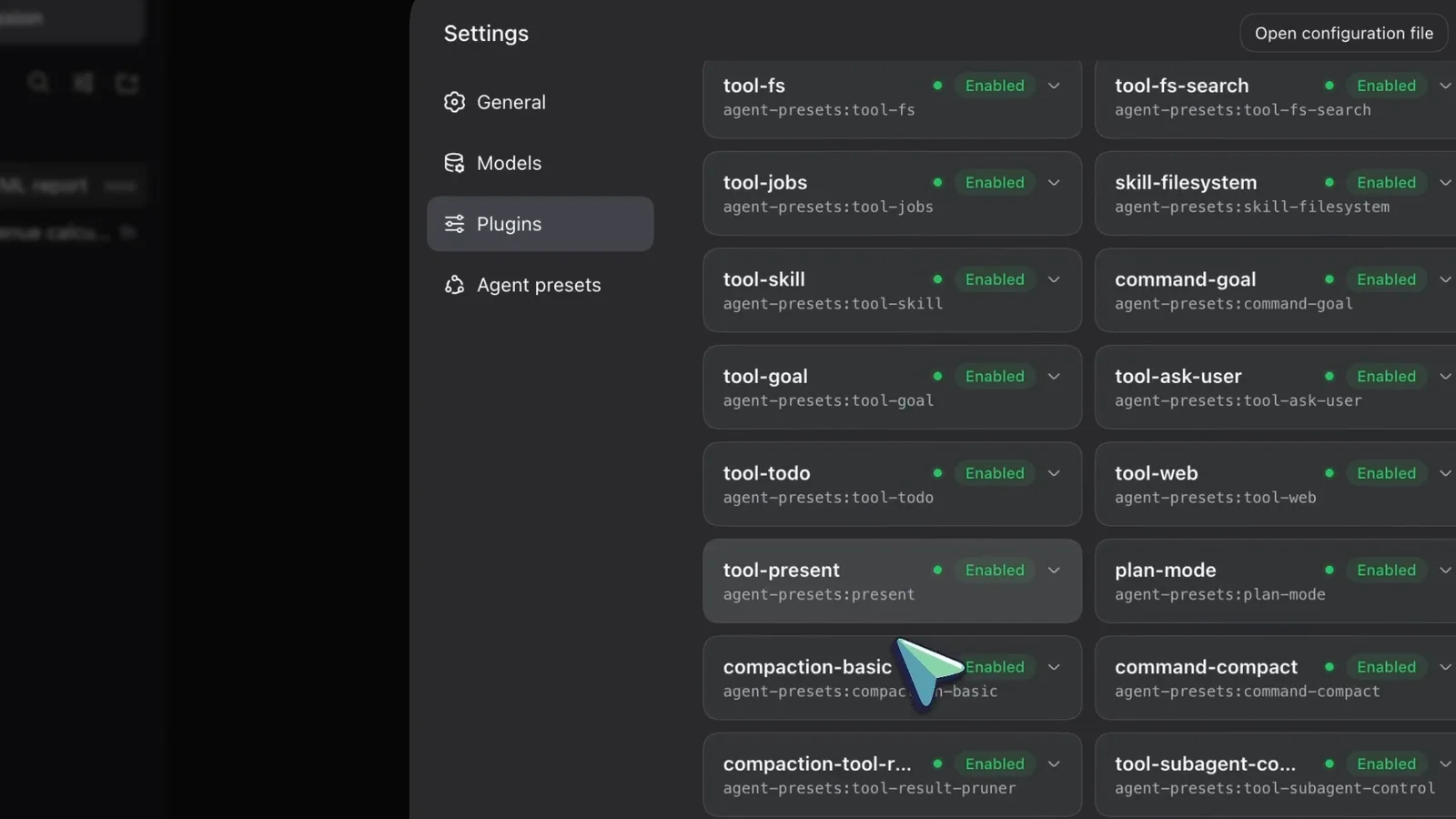
Sixteen entries visible, all Enabled — the ground truth of what actually loaded.Watch at 8:06
How to tell a plugin is worth installing
- ▸Stars and release dates are heat signals, not quality scores — every number on this page was captured on recording day, so re-check the card before installing.
- ▸Read the permission warning once, for real: a plugin can read your files, use your credentials and reach the network, and tool approvals don't sandbox it.
- ▸Prefer entries with an install command you can pin to a commit (github:owner/repo#sha) and a README you can actually read.
- ▸Still unsure? Start from our curated picks — the must-have plugins and the best skills were both filtered with the same checklist.
Frequently asked questions
Quick answers about finding and vetting dsh plugins.
Where is the dsh plugin market?
Inside the app: Settings → 插件市场 (Plugin market), fifth entry in the left column. The Discover tab lists everything with category chips and a search box; 已安装 shows what's installed and 备份与恢复 covers backup and restore.
A plugin isn't in the market — where else can I look?
Try the awesome-dsh-plugin.com directory: 1,673 plugins in 21 categories when recorded, including entries the market doesn't list. Each detail page carries a ready-to-paste install command, and the site's dsh-market banner notes you can browse the whole list inside DeepSeek Harness after installing that plugin.
How do I judge whether a plugin is safe to install?
Treat stars and release dates as heat, not endorsement. Read the third-party-code warning (files, credentials, network), prefer sources you trust or can pin to a commit, and after installing check Settings → Plugins → Plugin list, where every entry shows its Enabled state.
Why do the manager screenshots look different from my UI?
The two Settings → Plugins frames come from AISeeKing's YouTube review of the 0.1.5-rc.1 developer preview (English UI), while the market and directory frames are the Chinese UI recorded by PM刘搞定. Between versions expect small label differences, but the find → install → verify paths are the same.
Related guides
Install, pick and manage — the pages this one leans on.
Plugin installation
Market, npm and manual installs, plus how to verify a plugin loaded.
Read the guideMust-have dsh plugins
Twelve picks across every category, judged with the same checklist as this guide.
Read the guideBest skills to install
Skills are the other half of the ecosystem — which ones are worth enabling.
Read the guidePlugin collections
Curated bundles by scenario — a fourth way to find plugins, pre-grouped.
Read the guidedsh-tui terminal guide
A full-screen community terminal that is itself a plugin, frame by frame.
Read the guideSources and credits
All frames are captured from public videos; channel watermarks, burned-in subtitles and post-production callouts were cropped out or avoided, and every image deep-links back to the source timestamp. Star counts and listing numbers are as-recorded, and the Plugins-manager frames were recorded on the 0.1.5-rc.1 developer preview. Before installing anything, read Plugin installation