
Give every agent its own whitelists: dsh-agent-studio, frame by frame
A 118-second screen recording, unpacked frame by frame: every model turn reads exactly three catalogs — the system prompt, the tool list and the skill list. Install, build three whitelists, bind a preset, say one word, then verify the trimmed context in dsh-context.
Last updated: 2026-10-25
On 2026-09-22 the uploader 我可是森森呢 published a 118-second recording of their own open-source plugin, thissensen/dsh-agent-studio (7,481 views per the 2026-10-25 Bilibili view-API check): visually assembling each agent's prompts, tools, skills, subagents and fallback models into per-agent whitelists — anything off the list never enters the context. Every frame on this page comes from that recording, checked step by step against the repo README.
The premise in one sentence: a model turn reads exactly three catalogs — the system prompt, the tool catalog, the skill catalog. The more plugins, tools and MCP servers you install, the bigger all three grow. dsh-agent-studio writes a whitelist per agent: segments off the list are not delivered, tools off the list are not served, skills off the list stay invisible. The config lives in the plugin's own data, host presets are never touched, and uninstalling restores everything.
The short version
- ▸Every model turn reads exactly three catalogs: system prompt, tool catalog, skill catalog — and they only grow as you install more.
- ▸dsh-agent-studio writes one whitelist per catalog, per agent: off-list segments aren't delivered, tools aren't served, skills stay invisible. Config lives in the plugin's own data; presets untouched; uninstall restores.
- ▸Subagents get their own model, reasoning effort, prompts, tools and skills; when the main model is rate-limited or down, a cross-provider fallback chain steps in — an empty chain means zero takeover.
- ▸Three install routes: one npm command, an offline GitHub Release tgz, or a source link:. Restart DSH and look for 设置 → Agent 中心. npm latest is 0.1.8 (published 2026-10-20).
Nine steps to a whitelisted agent
Why you need this
- 1
First, the premise: three catalogs per turn
The README is blunt about it: what a model sees each turn is exactly three documents — the system prompt, the tool catalog, the skill catalog. Segments registered by the preset get delivered as-is, the tool surface ships in full from installed plugins, every model-invocable skill enters the catalog, and DSH's stock subagent config is rudimentary — no easy way to set its prompt, tools, skills or model. dsh-agent-studio turns agents into assemblies: prompt, tool and skill sets compose an agent, subagents are just as customizable, official PTC mode stays compatible, and cross-provider fallback candidates are supported.
Install and restart
- 2
Three install routes, one restart
Pick whichever matches your setup: the npm one-liner when you have network; a Releases tgz for offline or intranet (it's the same package as npm, no build needed — swap the version in the filename for the one you downloaded); or a source install via link:, where editing lib/ takes effect immediately. --profile takes web (pure web) or desktop (an Electron shell over the same web host). All three routes end with one DSH restart, then the panel appears under 设置 → Agent 中心. The plugin requires dsh >= 0.2.1-alpha.2 (the full-feature floor — delegation depends on an API added there); the community desktop build bundles an older platform, so install legacy dsh-agent-studio@0.1.5 on that side.
$dsh plugin --profile web add dsh-agent-studio$dsh plugin --profile web add "./dsh-agent-studio-0.1.8.tgz"$dsh plugin --profile web add "link:<源码目录的绝对路径>"
Trim the three catalogs per agent
- 3
Whitelist one: prompt sets trim the system prompt
Open 设置 → Agent 中心 and build a prompt set first. Segments come in two kinds: platform-preset segments are read-only and follow platform upgrades (the PTC-only tools:sdk among them), while custom segments carry your own text and accept the platform's registered interpolation variables. In the video the uploader walks the segments of their 狼烟提示词 set (id prompt-set-3), checking only what's needed — install no set at all and the delivery is an empty prompt; the order of segments in a set is the delivery order.
$编辑「狼烟提示词」$id prompt-set-3$tools:sdk$PTC 专属$+ 平台预设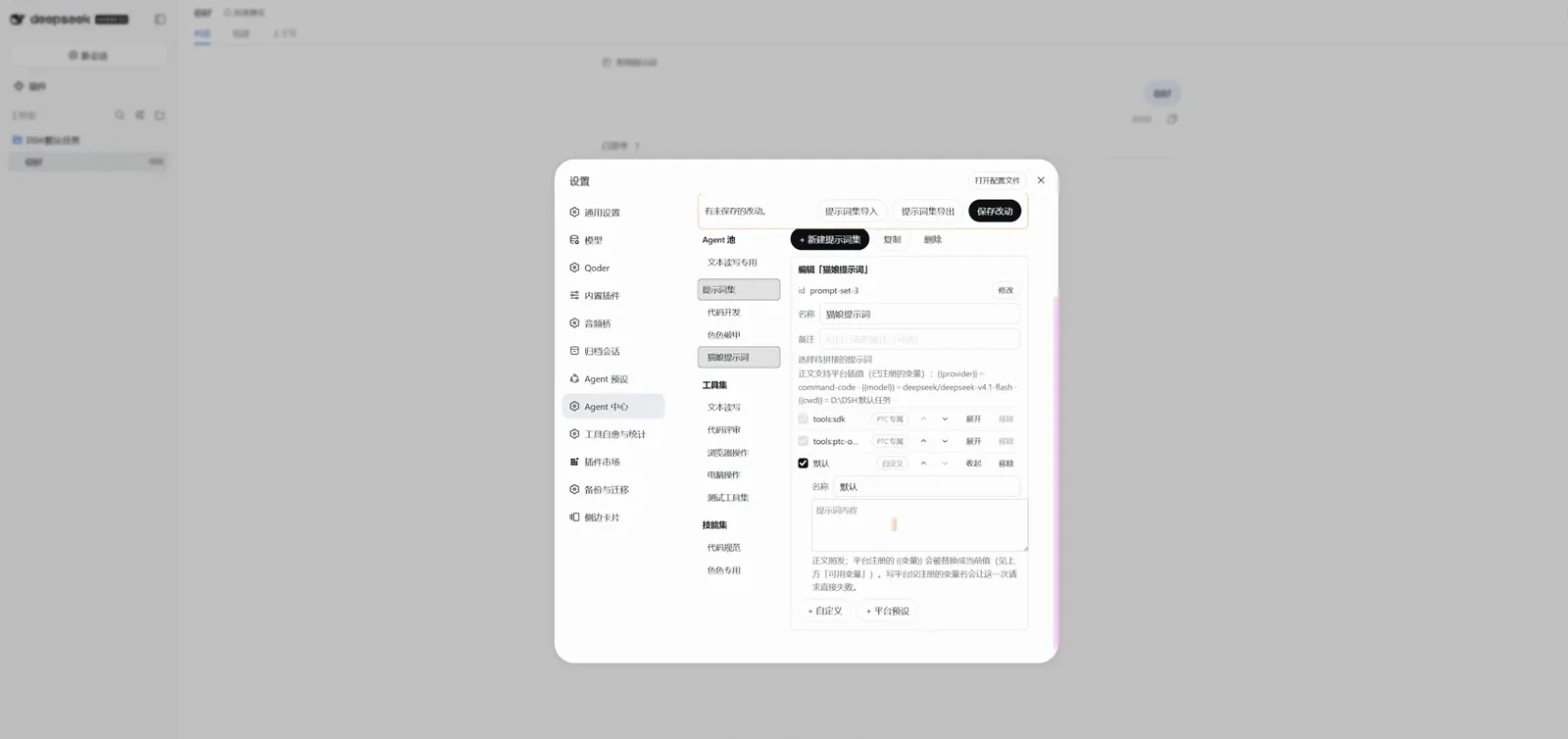
Platform segments are read-only and follow upgrades; custom segments are yours to write.Watch at 0:45 on Bilibili - 4
Whitelist two: tool sets hide the rest
Tool candidates are grouped by source, read live from the preset's current tool surface — no test message needed. The set created in the video holds 37 candidates: 其他来源 (other sources) at 0/10, and dsh-agent-studio's own group at 0/2 (studio_delegate and studio_list_subagents). Pick what this agent needs; install nothing and it gets no tools at all. Note that skill is a required entry — without it the AI cannot invoke skills on its own.
$编辑「未命名工具集」$id tool-set-6$候选 1 / 共 37$dsh-agent-studio 0/2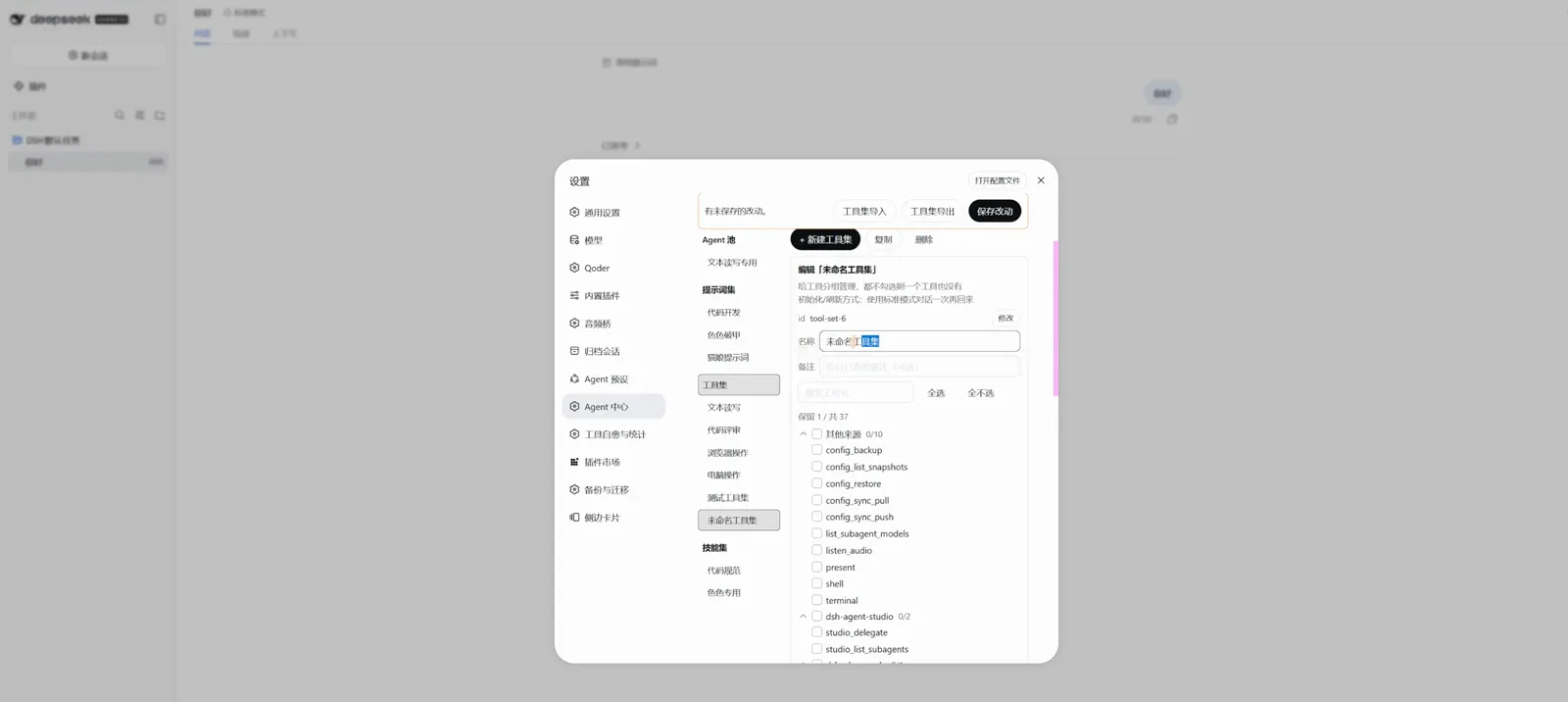
Candidates grouped by source: what you check is what the model sees.Watch at 0:55 on Bilibili - 5
Background tools as needed, skills likewise
Scroll down to the background-jobs group: job_kill, job_list and job_output all checked (3/3), plus dsh-skill's skill (1/1) — this agent can manage background jobs and invoke skills on its own, and sees nothing from the other groups. Skill sets work the same way: candidates grouped by source and collapsible; check what the model may see, leave the rest invisible.
$dsh-tool-jobs 3/3$job_kill$job_list$job_output$dsh-skill 1/1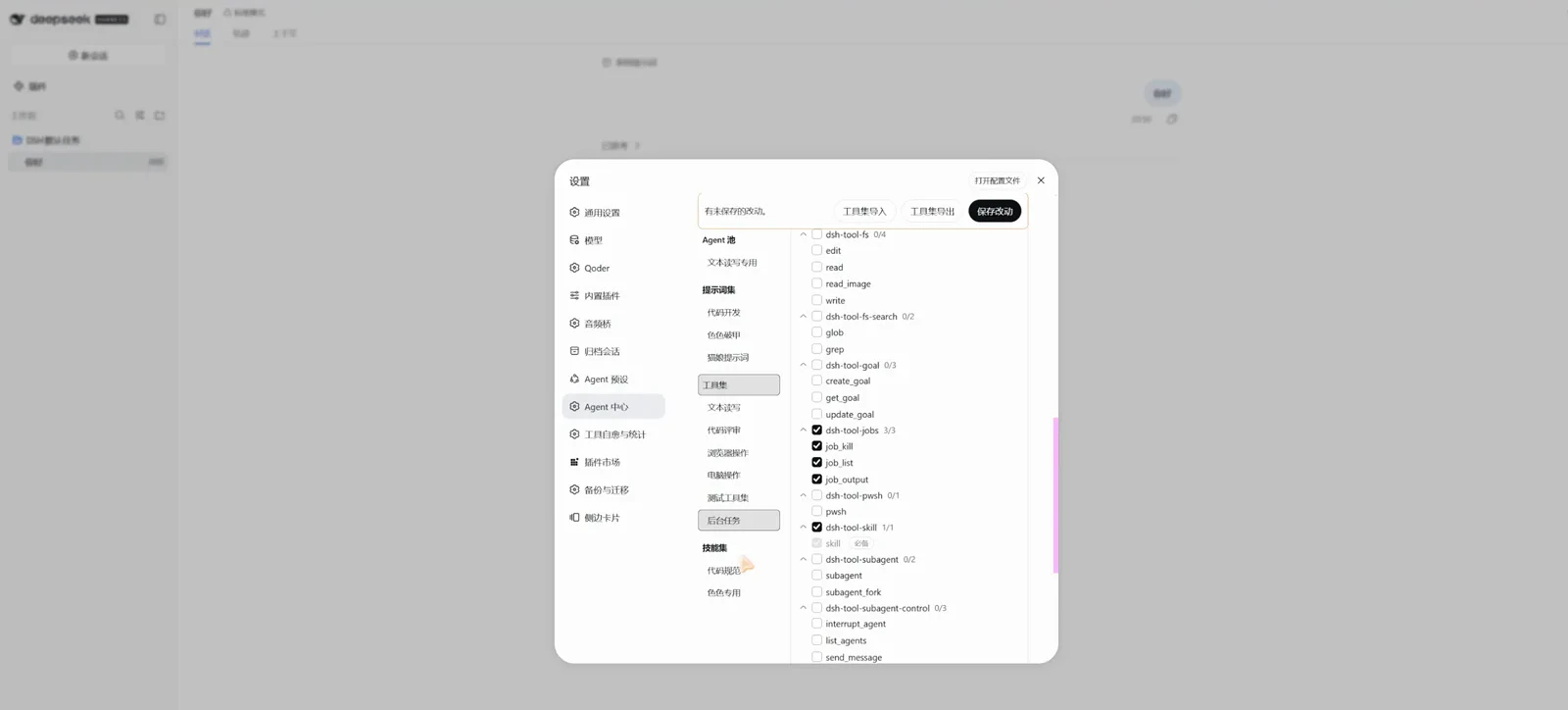
This agent manages background jobs and invokes skills; every other group stays invisible.Watch at 1:05 on Bilibili
Subagents and the fallback chain
- 6
Subagents get their own model
An agent's edit form carries a when-used-as-subagent model config: the provider dropdown offers 继承本会话 (inherit session) alongside SenseAudio, CCSwitch, Command Code, DeepSeek and Qoder, with reasoning effort and fallbacks configured separately — the official subagent inherits the whole main agent instead. Two caveats: dispatch must go through the plugin's studio_delegate tool for the identity to register (official subagent dispatch gets no role registration), and each agent's note line is what the model reads when deciding where to route a task.
$(继承本会话)$SenseAudio$CCSwitch$Command Code$DeepSeek$Qoder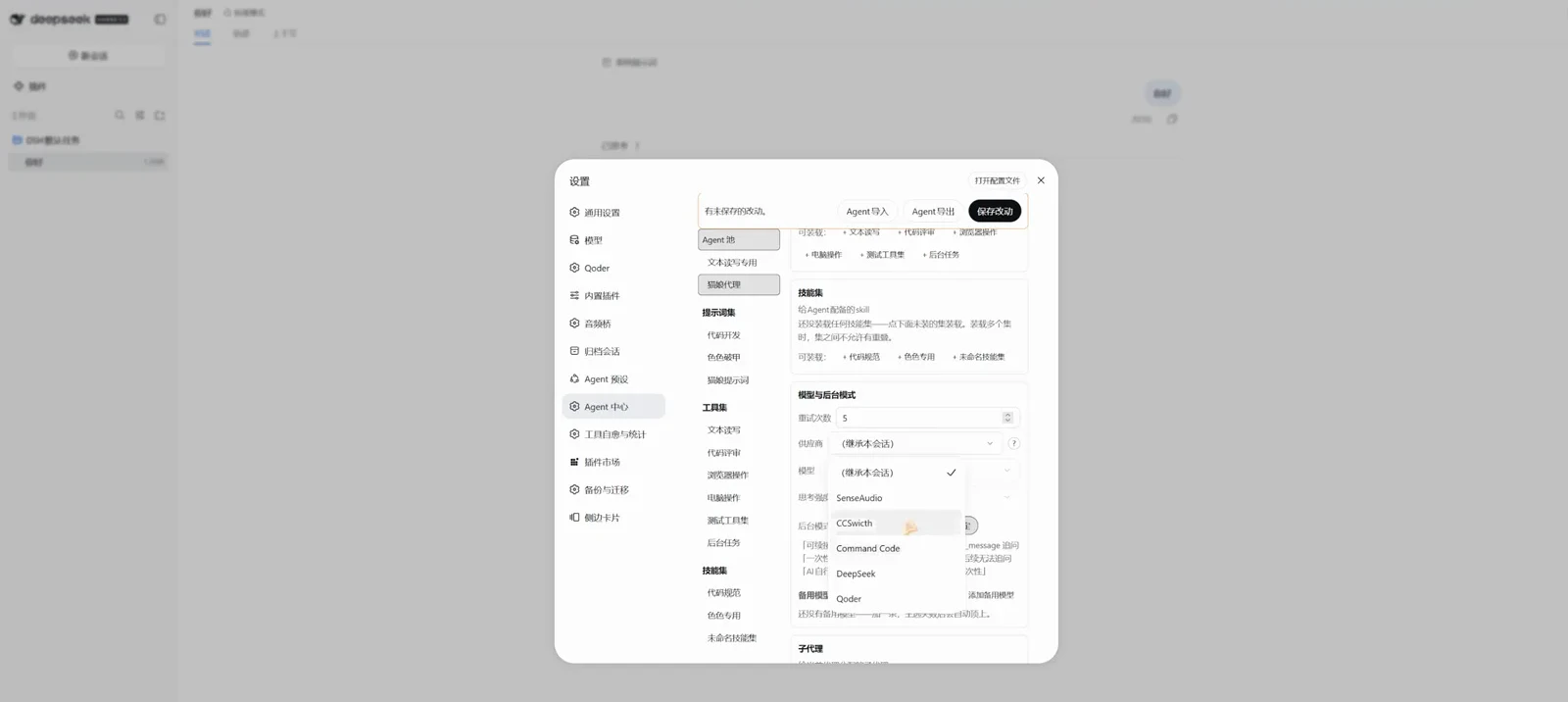
Retries default to 5; dispatch via studio_delegate is what registers this identity.Watch at 1:25 on Bilibili - 7
The fallback chain: next candidate, cross-provider
The model-and-background section takes a fallback candidate chain that may cross providers: the video's primary is Command Code's DeepSeek V4.1 Flash (reasoning Low, background mode set to AI decides), with 备用1 (fallback 1) on another provider. Retries default to 5 per candidate: retryable errors (empty response, rate limit, timeout) exhaust the cap before switching; quota exhaustion and dead credentials switch immediately. No chain configured means zero takeover — while everything works the plugin never touches your choice; the whole chain failing is a normal request failure, and the session does not switch back automatically.
$重试次数 5$DeepSeek V4.1 Flash$AI自行决定$备用1$Command Code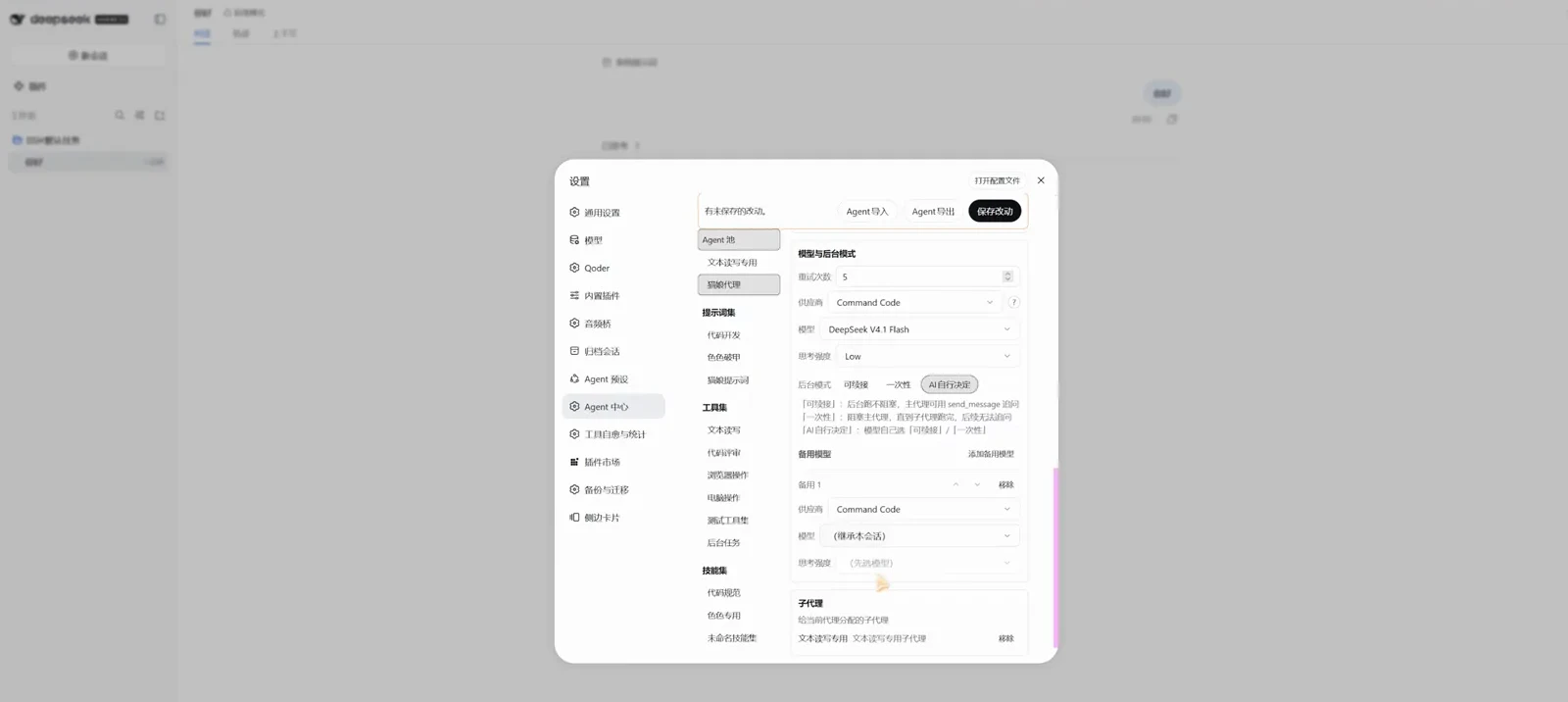
Fallback candidates may cross providers; with no chain, the plugin never touches retries.Watch at 1:30 on Bilibili
Bind a preset and verify
- 8
Create a preset and bind the agent
Head to the agent-preset page and create one: creating copies the source preset's entire catalog (prompt combination, skills and resources included) and leaves the source untouched — the video uses 标准模式 (standard mode) with the new id test. The binding rule across all three surfaces is one phrase: nothing installed means nothing delivered. Bind the preset to your finished agent and hit save — only saving writes to disk, don't forget.
$新建预设$来源 标准模式$新 id test$创建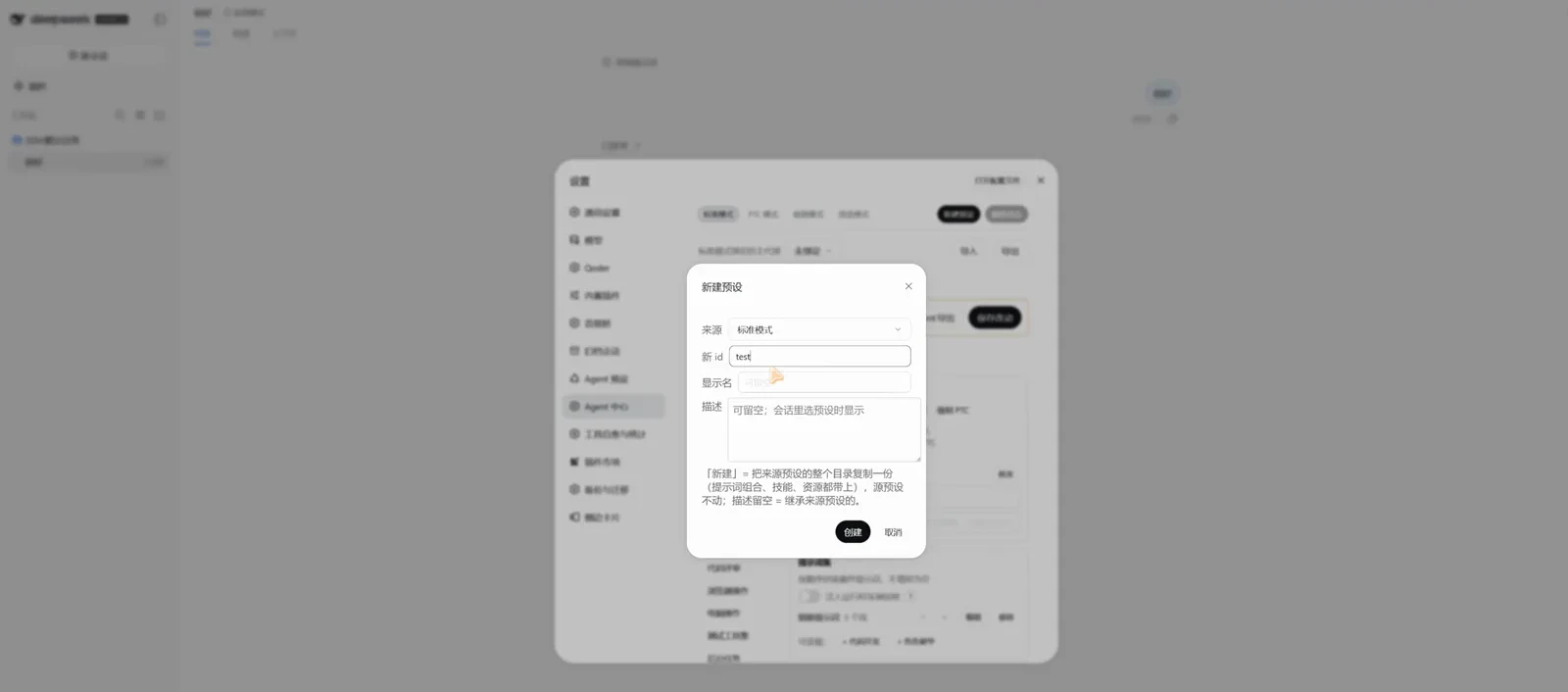
The source preset stays untouched; whichever agent you bind it to takes over.Watch at 1:35 on Bilibili - 9
Say one word, verify with dsh-context
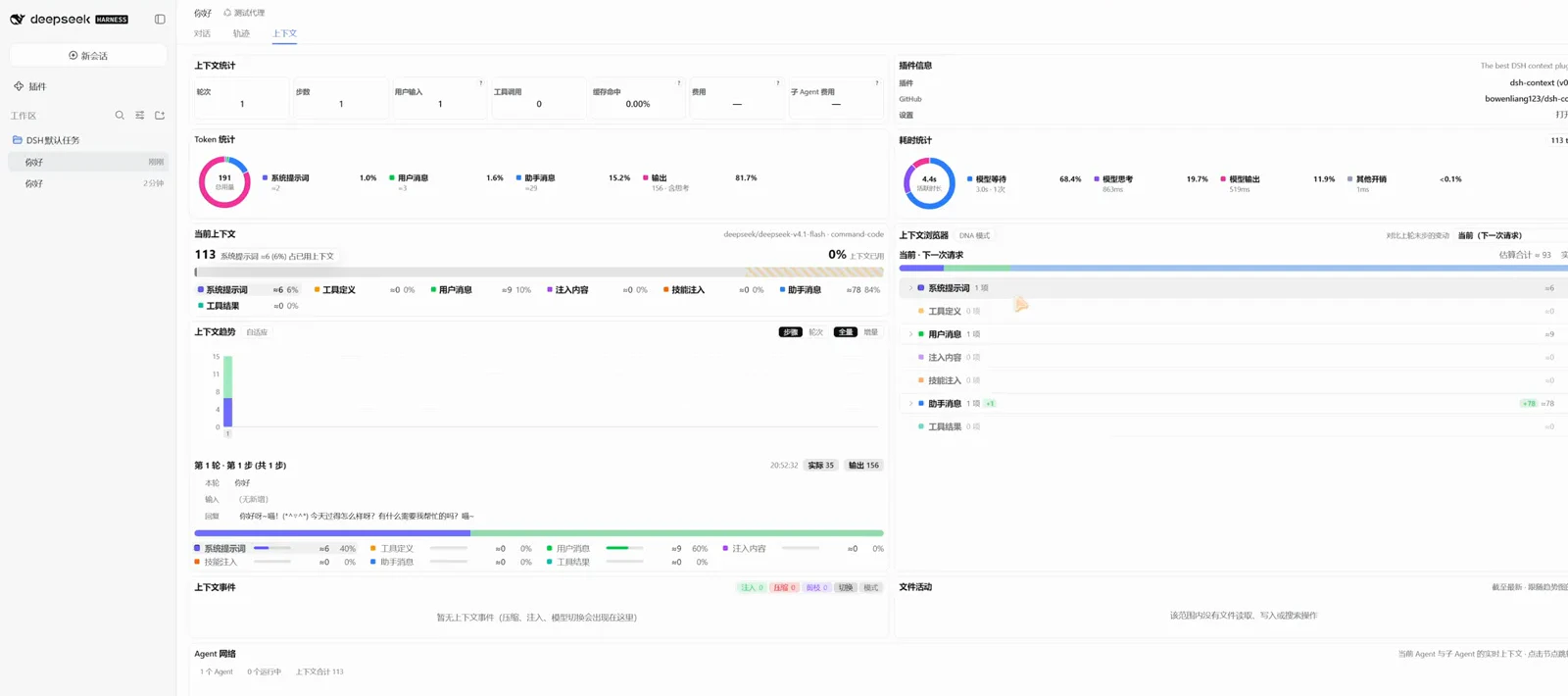
Open a new conversation on the bound preset, send a greeting, then read the turn in dsh-context's context page: current context 113 with the system prompt at ≈6 (6% of used context) in a single segment — the whitelists really did trim all three catalogs. That's the closing shot of the video, with dsh-context (bowenliang123/dsh-context) visible in the plugin panel; the README lists it as the companion inspector.
$113 系统提示词 ≈6 (6%)$系统提示词 1 段$deepseek/deepseek-v4.1-flash · command-codeThree more readings from the same frame: 191 total, assistant output at 81.7%.Watch at 1:50 on Bilibili
FAQ
Five questions covering install, safety and verification.
Installed it — where's the panel?
Three usual causes: no restart — every install route needs one DSH restart; wrong place — the panel lives at 设置 → Agent 中心 (or flip the register-to-mainpage switch in the panel footer to surface it on the main page and sidebar); wrong profile — --profile web installs into the pure web build, --profile desktop into the desktop build, and whichever profile you launch is the one that shows it. Also note the community desktop build bundles a platform below the plugin's minimum, so that side needs legacy dsh-agent-studio@0.1.5.
Will it break my existing presets?
No. All config lives in the plugin's own settings namespace agent-studio; existing host preset definitions are never modified. Unbind and the preset is restored on the spot; fully uninstall with dsh plugin --profile web remove dsh-agent-studio and no trace remains in host config. The one exception cuts the other way: minimal-style presets can't be re-segmented at all — platform design, and a small loss since they only have one segment.
What does the model actually see each turn?
Three things: the system prompt, the tool catalog, the skill catalog. The plugin's semantic rule is nothing installed means nothing delivered: no prompt set delivers an empty prompt, no tool set serves zero tools, no skill set exposes zero skills; install some and only what's checked gets through. Sets loaded onto one agent may not overlap members — both the UI and the write endpoint enforce it.
How do I verify the whitelists took effect?
Add dsh-context (bowenliang123/dsh-context, Apache-2.0). It shows exactly what the model received this turn — prompts, tools and skills — and the video's closing acceptance shot is dsh-context's context page: first turn on the bound agent, one system-prompt segment at ≈6, 6% of used context. This site also has a dedicated dsh-context walkthrough (context visualization).
How does a subagent get its own model?
In the agent editor, the when-used-as-subagent model, reasoning effort and fallbacks are all configured independently — no more whole-inheritance from the main agent. Two caveats: dispatch must go through the plugin's studio_delegate tool for that standalone config to apply (official subagent dispatch carries no role registration), and dispatching several at once is fine — identities are registered before the calls are made.
Related guides
Adjacent problems, different answers — one sentence each to draw the line.
Agent teams on a dashboard, hands-on
AgentTeams puts a whole team on one dashboard to watch it run; the Agent Center on this page governs a single agent's three catalogs.
Read the guideBuild a custom DSH agent preset
Creator mode rewrites the preset's own prompt combination; this page never touches preset definitions — it hangs whitelists per agent and restores on unbind.
Read the guideSet up MCP servers in DeepSeek Harness
Hooking up MCP only ever adds tools; this page decides, per agent, which of them actually enter the catalog.
Read the guideCut dsh token burn: dsh-ops field test
That guide saves tokens at execution time (log replay, PTC mode, the dsh-ops field test); this one trims context at assembly time — the two complement each other.
Read the guideSources and credits
All 7 frames come from 我可是森森呢's recording (BV18ihr6mEno, 118 seconds, published 2026-09-22; 7,481 views per the 2026-10-25 Bilibili view-API check), credited and deep-linked per frame, with burned-in captions and the corner watermark removed at export — each frame re-verified against the matching moment of the 1080p source on 2026-10-25. Facts are grounded in the README of thissensen/dsh-agent-studio (verified via the GitHub API on 2026-10-25: ★41, MIT, created 2026-09-18, pushed 2026-10-20; npm latest 0.1.8 also published 2026-10-20; the README carries an online docs site and a CI badge — npm package, docs and CI being three engineering signals). The video description self-reports that repository, and the Bilibili name 我可是森森呢 echoes the GitHub handle thissensen, but the identity rests on that echo alone and is treated here as not independently verified. The acceptance frame shows dsh-context (bowenliang123/dsh-context, Apache-2.0, ★3540, pushed 2026-10-24), the companion inspector, kept distinct from the studio panel throughout.