
DSH Agent Teams, Hands-On: Dashboard, Roster & Team Chat
Six verified frames from a real Agent Teams dashboard run — worker roster, per-agent tools, a bounded-DAG task board, team chat and controller pairing — each deep-linked to the source video.
Last updated: 2026-10-07
Agent teams are the long-haul shape of multi-agent work in DeepSeek Harness: a persistent roster with a lead, where named workers pick up tasks, report back and keep a project moving across many turns. The official rc.1 release notes describe an "Agent Team panel that shows members and tasks in real time, viewable and switchable from the session header", and the official repo ships experimental agent-team packages under packages/experimental. The six frames on this page come from a third-party channel's real running dashboard — the panel is the community project toolclub/dsh-agent-team-gui (★282, checked 2026-10-07), and the team and task data on screen belongs to the channel that recorded it, not to an official demo.
If all you need is to hand one task to a child agent and carry on, that is dispatch, not a team — DeepSeek Harness subagents: run agent teams in parallel
TL;DR
- ▸An agent team is a persistent crew — a lead (dsh-lead in the frames) plus named workers — alive across a whole project, not a one-shot spawn.
- ▸The panel is live: every member card carries a real-time state (RUNNING / Disabled) — the members-and-tasks view the official rc.1 notes describe.
- ▸Tools are tuned per agent: the lead's table shows read_file and write_file individually enabled and synced, each with its own disable button.
- ▸Real work shows in the board: a bounded-DAG workflow with finished modules, a per-task SUCCESS check (21/21 passed) and a chat log of heartbeats, an outage and its recovery.
The walkthrough: six frames from a real run
Part 1 · Read the dashboard
- 1
Start at the overview globe
The dashboard's home screen is mission control: a 3D globe with the team's workers in orbit, a left column counting 2 of 4 workers active, 1 team, 6 projects and a connected Matrix bridge, plus a sync log streaming down the right edge. When the globe is lit and the counters move, the team is alive.
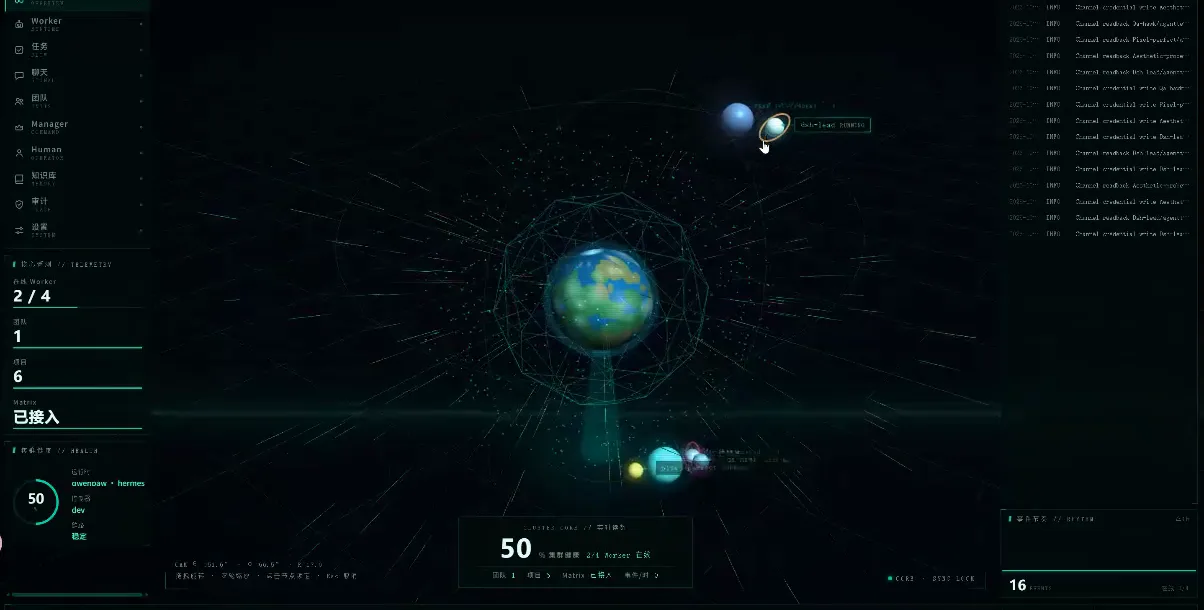
Overview page: a lit globe and moving counters mean the agent team is mid-run.Watch at 0:10 - 2
Read the worker roster
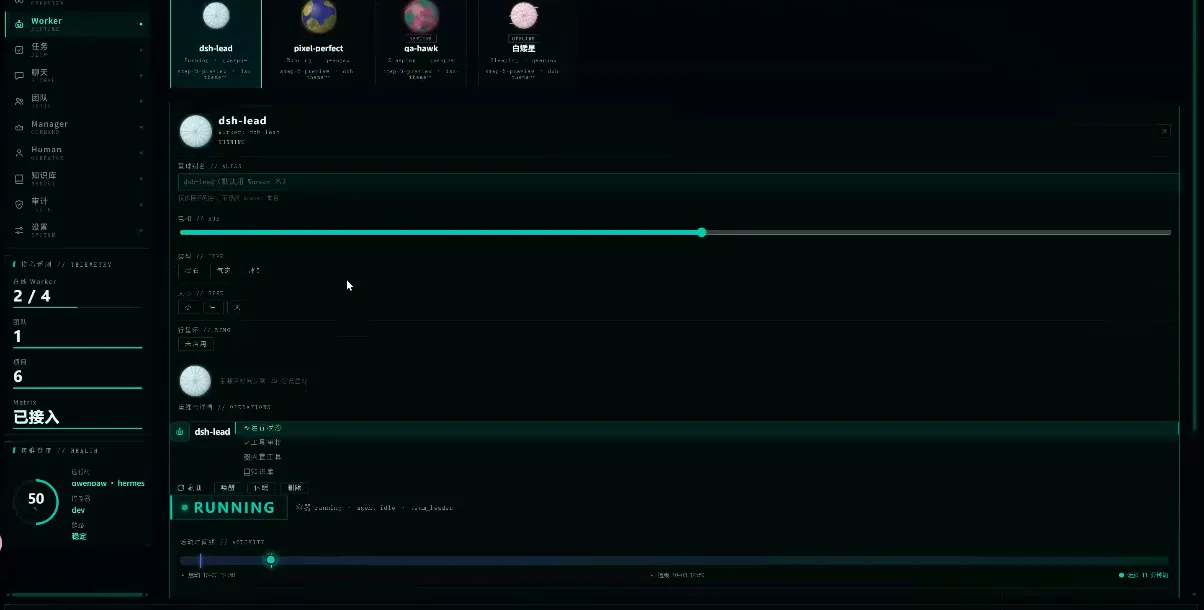
Every teammate gets a card with a live state. In the frames, lead dsh-lead is selected and RUNNING at about 57 percent, pixel-perfect is running, and qa-hawk and Baiya are disabled. The detail pane lists the lead's capability tags (spawn, preview, web), its progress bar and a runtime counter — the real-time member view the official rc.1 release notes promise.
The roster is the team's heartbeat: member, state, progress and runtime, updating live.Watch at 0:25
Part 2 · Wire up the team
- 3
Tune tools per agent
Open a member's tools tab and you get a per-agent permission table, not a global switch: the lead's rows list read_file and write_file, each with enabled and synced flags, a plain-language description ("Read file contents", "Write content to file") and a disable button on the right. That granularity — per-agent model and tools — is exactly what the dashboard repo's README advertises.
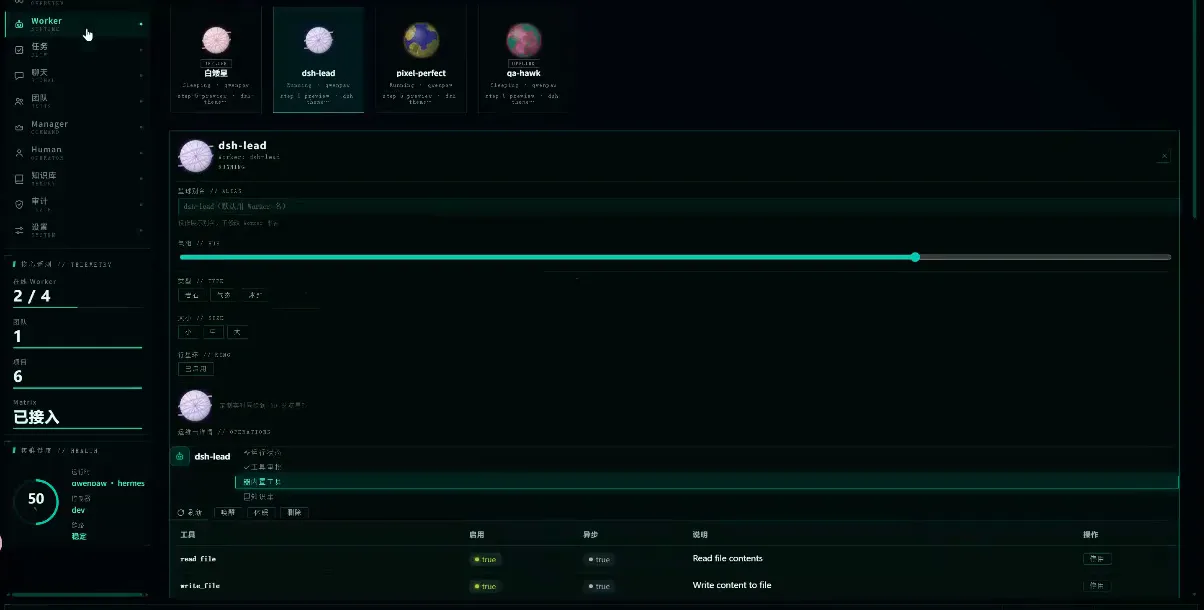
Tools are granted per member, not per team — one row per tool, one click to revoke.Watch at 0:50 - 4
Pair DSH Desktop with the controller
The dashboard is a separate surface, so it needs one-time pairing: the settings panel saves a controller address (http://192.168.1.20:8099 in the frames), a stored controller token and an admin account on a local Matrix server, then shows status cards for controller, token and Matrix. The panel also states plainly that DSH session data stays local and is not uploaded — and the DSH Desktop sidebar on the left (plugins → Agent Teams control center) is where the connection lives.
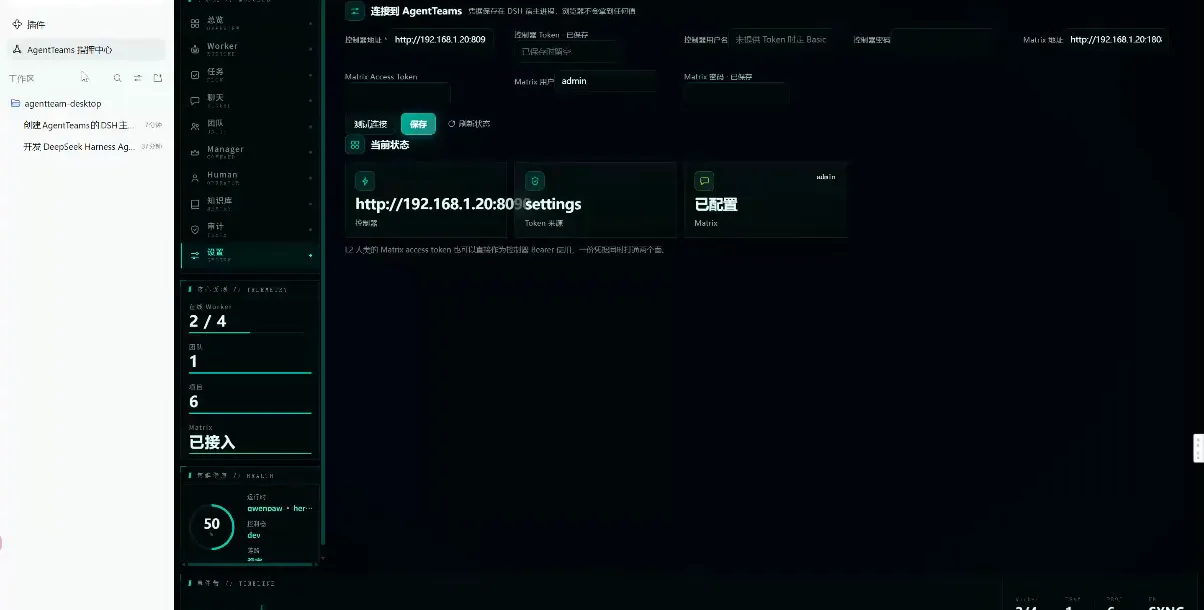
One-time pairing: address, token and Matrix account — with the data-stays-local statement on the panel itself.Watch at 1:52
Part 3 · Run a real job
- 5
Follow the task board
The tasks view lists projects, and each project expands into a workflow — a bounded DAG. The recording's Kylin V10 Server hardening project shows state tabs (all 4 / runnable 0 / running 0 / completed 8 / blocked 1), three finished hardening modules owned by aesthetic-probe, cerThink and pixel-perfect, and a task detail reporting SUCCESS with all 21 checks passed — result.md grew from 136 to 1,736 lines. The change log below (planned → prepared · delegate_task · Leader) is the DAG doing its job.
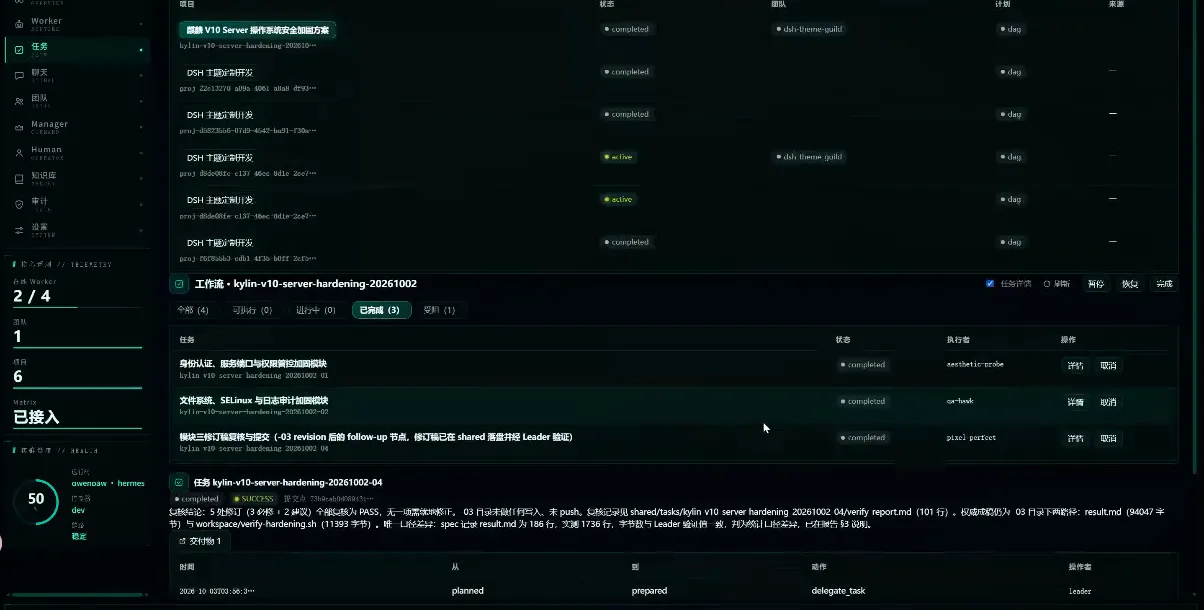
A bounded DAG mid-run: tabs by state, owners per module, and a SUCCESS block with verification receipts.Watch at 1:05 - 6
Watch the team chat
Chat is where the coordination becomes legible. The sidebar groups conversations by team, worker, leader DM, task and system; the Manager stream in the frames carries heartbeat reports (07:24Z progress, 07:58Z decision attribution), an account of a 14-hour monitoring gap and its recovery, an escalation closed after about 16.5 hours, and a closing team-status line (dsh-lead running, pixel-perfect running, the rest standing by). To audit why a team did what it did, start here.
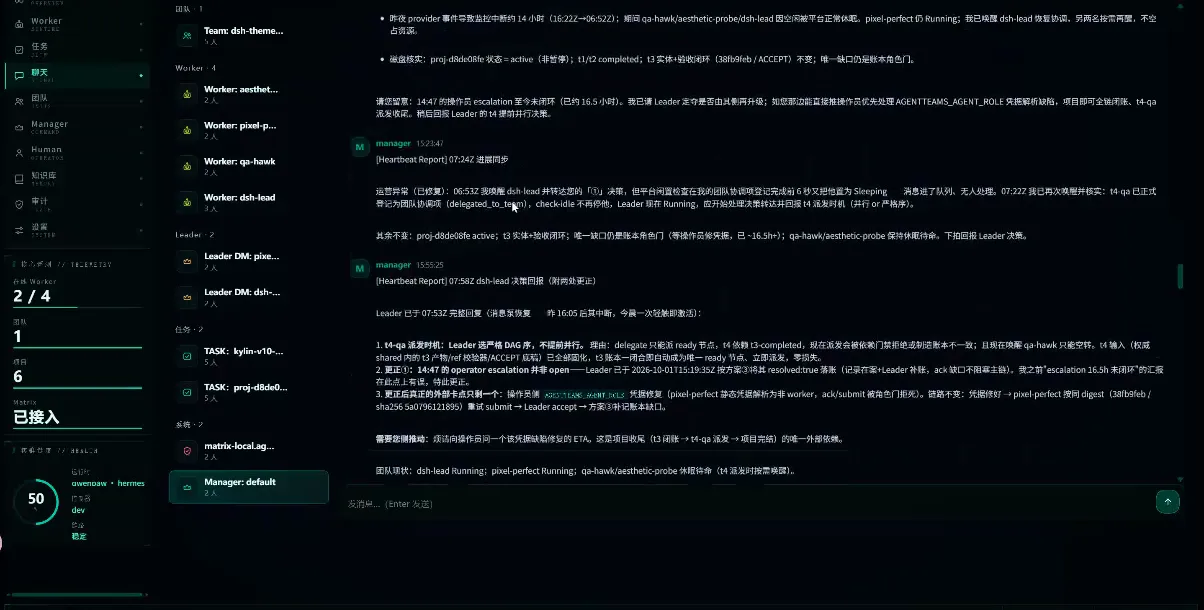
Heartbeats, escalations, recovery — the chat stream doubles as the team's audit log.Watch at 1:40
Agent teams FAQ
The questions people actually ask about agent teams, answered from the official repo and the frames above.
How are agent teams different from ordinary sub-agents?
Direction of control. A sub-agent is dispatch: the parent spawns a child for one task, reads the result and carries on alone — that axis is covered in the subagents guide. An agent team is a persistent roster: named members keep running over a long horizon, message each other, report through heartbeats and share one task board, which is what the chat frame in this walkthrough records. Community explainers draw the same topology — members messaging members while a lead coordinates the workers.
How do I enable the official experimental agent-team package?
It lives in the official repo, not a marketplace: packages/experimental contains agent-team, agent-team-profile and client-ui-agent-team (GitHub contents listing checked 2026-10-07). Watch out for tutorial slides that list "five official packages" — the repository only carries the three names above. Experimental also means the API can churn between releases, so pin your version and re-read the package README after upgrading.
What is the community dashboard shown on this page?
toolclub/dsh-agent-team-gui (★282, checked 2026-10-07) — a persistent multi-model workflow-team GUI whose README advertises dynamic lead planning, bounded DAGs, per-agent model/tools, a Run Center and token insights; those keywords match the frames item by item. On the plugin side of the ecosystem, the most-starred community plugin is NanmiCoder/dsh-agent-teams (★1,946, "AgentTeams plugin for DeepSeek Harness"). Neither is the official experimental package.
Which tasks are worth an agent team?
Work that outlives one prompt: multi-module projects with verifiable deliverables. The frames show a realistic specimen — a server-hardening project split into modules owned by different workers, each task closed by an automated verification (21 checks passed) and a lead keeping the board moving. If a job fits in one prompt or one sub-agent dispatch, a team is overhead; when it needs division of labor plus an audit trail, it fits.
Is what's on screen official DeepSeek Harness UI?
No. All six frames come from a third-party channel's real dashboard recording (Nil爱唠叨, published 2026-10-06); the member names, the Kylin project and the chat traffic are that channel's own running data, credited here as an ecosystem example. Hands-on recordings of the official experimental package are still missing — when a clean source appears, this page will add them.
Related guides
The neighboring axes: dispatch, the loop, presets and scheduled work.
DeepSeek Harness subagents: run agent teams in parallel
Spawn a five-subagent squad, monitor each child from the header, read completion reports and pin models per subagent — frame-verified steps
Read the guidedsh agent loop, explained
How one dsh turn actually runs: turn lifecycle, plugin hook points, and the loop guards that prevent runaway sessions.
Read the guideBuild a custom DSH agent preset
Use Creator mode to design your own DeepSeek Harness preset, wire in plugins, and read the run stats — verified frame by frame.
Read the guidedsh automation tasks, hands-on
Create a scheduled reminder from a chat message, enable the built-in Automation tasks panel and read delivery records — 10 steps with timestamps
Read the guideDSH Workflow Plugins (DeepSeek Harness)
Workflows and multi-agent orchestration that make agent jobs repeatable.
Read the guideSources & credits
All six frames come from the single Bilibili recording above, credited with per-frame deep links. Text-only fact sources, no frames taken: 翻车老头's slide explainer (roster / mailbox / task-board vocabulary — its "five official packages" slide does not match the GitHub listing), 程序员阿江-Relakkes's launch video (the one-command launch narrative and the team.json lead-config concept; the repo name shown in that video, Relakkes/dsh-agent-teams, does not exist on GitHub — 404, checked 2026-10-07 — and is deliberately not cited), and AI超元域's walkthrough (multi-agent topology narration). Star counts from the GitHub API on 2026-10-07; play counts from the yt-dlp API.