
dsh-provider-qoder
キュレーション掲載メンテナンス: 活発mo-n/dsh-provider-qoder
Qoder のサブスクリプションを DeepSeek Harness で利用するためのプロバイダープラグインです。
$ dsh plugin add dsh-provider-qoder9
スター
2
フォーク
TypeScript
言語
MIT
ライセンス
2026-09-08
作成日
2026-09-29
最終プッシュ
README
dsh-provider-qoder



English | 简体中文
Use your Qoder subscription in DeepSeek Harness (DSH), supporting multimodality, web search, and tool calls across Global and China Qoder services.
The plugin handles authentication and model communication, while tool execution, workspace operations, and permission management are handled by DSH. This project is a community adapter plugin and is not affiliated with Qoder or DeepSeek.
Features
- Configure subscription access via Qoder Personal Access Token (PAT).
- Supports both Global (
global) and China (china) services. - Automatically fetches available models for your account, supports selecting enabled models, and displays pricing multipliers and reasoning effort options when reported by the service.
- Supports multimodality, web search, and tool calls.
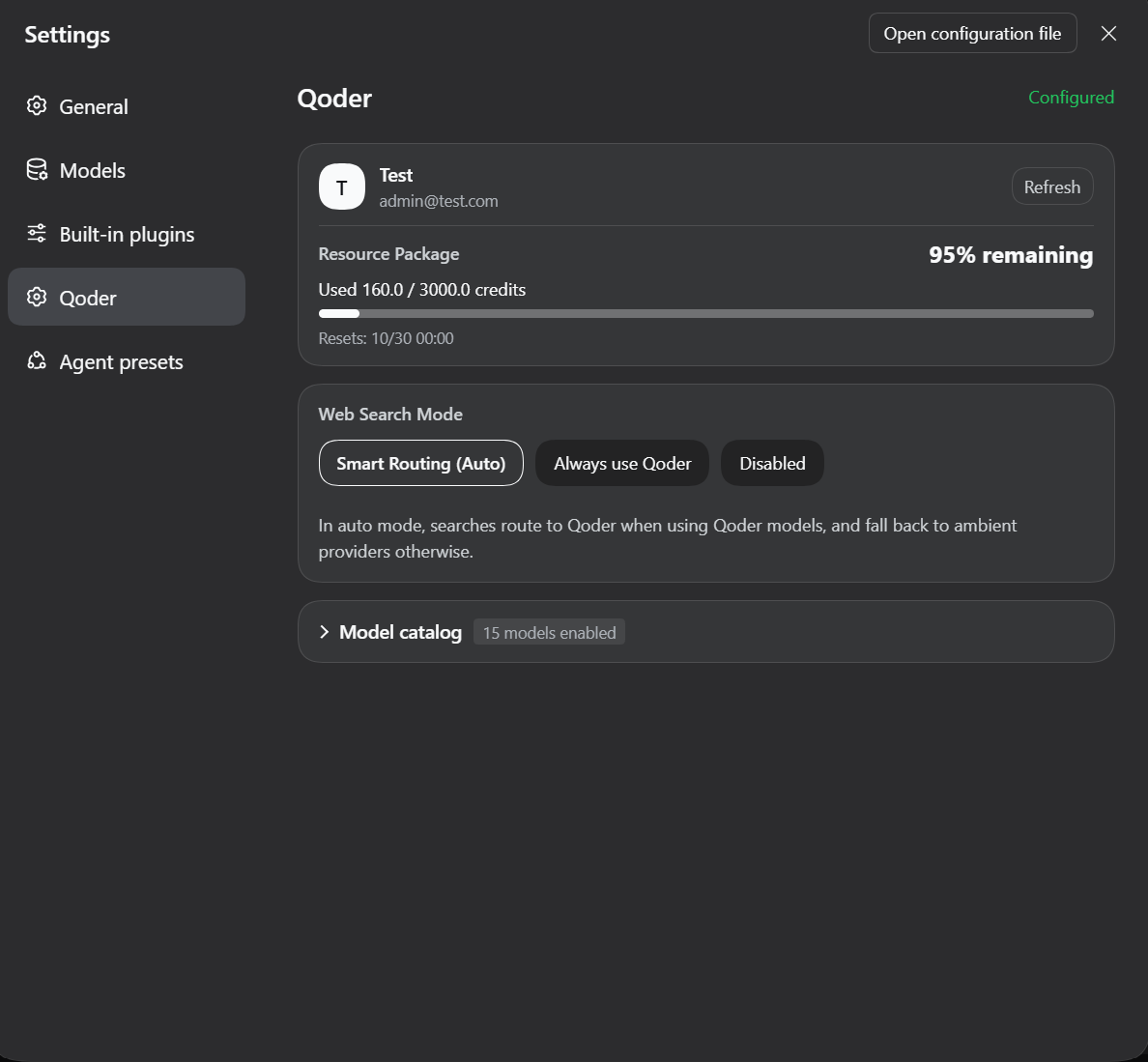
- View account information, quota, and reset dates in Settings.
Installation
Prerequisites
- An active Qoder subscription and a PAT matching the selected service region.
- The DSH profile running the plugin must provide a managed credentials service; when configuring via the settings page, the credential storage must also be writable.
- Requirements: DSH
>=0.1.7-rc.2.
Install from npm
Run in your terminal:
dsh plugin --profile web add dsh-provider-qoder
Configuration & Usage
1. Save Service Region and PAT
Open DSH Web, navigate to Settings → Models, locate the Qoder Credentials card at the bottom of the page, and click Edit.
| Service Region | Account Domain |
|---|---|
| Global (default) | qoder.com |
| China (CN) | qoder.com.cn |
Select the region matching your account, enter your Qoder PAT into the input box labeled API Key, and click Save.
Once saved, the plugin automatically fetches the list of supported models for your account, making them immediately available in the DSH model picker.
2. View Account & Manage Models
Open Settings → Qoder to view account and quota details, configure the web search policy, and adjust enabled models:
Upcoming Features
- [ ] Request rate-limiting queue mechanism
- [ ] Connect with Qoder's Protobuf protocol
References
- pi-provider-qoder - Reference implementation for Qoder authentication, API communication, and protocol handling.
Feedback
Please report issues via GitHub Issues with the plugin and DSH versions, selected service region, reproduction steps, and sanitized error messages. Do not submit PATs, short-lived tokens, or personal account information.
License
This project is licensed under the MIT License.
連携・共有 の他のプラグイン
dsh-notification
by omdsh-dev
DeepSeek Harness ターン完了のデスクトップ通知。結果別制御とキーワード include/exclude
dsh-open-in-vscode
by omdsh-dev
DSH Web GUI からワークスペースを VS Code で直接オープン
fn-os-apps
by tnnevol
飛牛(fnOS)向けアプリの Monorepo。DeepSeek Harness と飛牛 OS 環境で動作する各種アプリケーションを一括管理します。
dsh-lark-bot
by plutokeating
dsh-lark-bot:Feishu/Lark 桥接。流式カード、ワークスペース、並行タスク、多役 Agent、跨セッション通知、安全网