
README
dsh-db-mcp




English | 中文
A DSH plugin that hands your databases to the agent. Register a connection once, then just ask — the agent queries it through MCP tools and answers in the conversation.
The fastest path is the one you already walked: import the connections DBeaver already knows, saved passwords included, and skip typing anything.
Three things you do not have to do
- Do not retype connections. The importer reads your DBeaver workspace
(
data-sources.json) and decryptscredentials-config.jsonwith DBeaver's own key, so host, port, database, user and the saved password arrive together. Tick the boxes, click import, done. Existing endpoints are marked, so the same connection is never added twice. - Do not configure DSH. The bundle inserts one Loader row. The plugin starts its
own Python MCP server and registers the tools itself — no
dsh-mcp-clientrow, no JSON to edit, no environment variable to export. - Do not prepare a Python environment. No venv to create, no
pip installto run by hand: the panel finds an interpreter, builds.venvand installs the driver packages from Runtime → Install / repair dependencies.
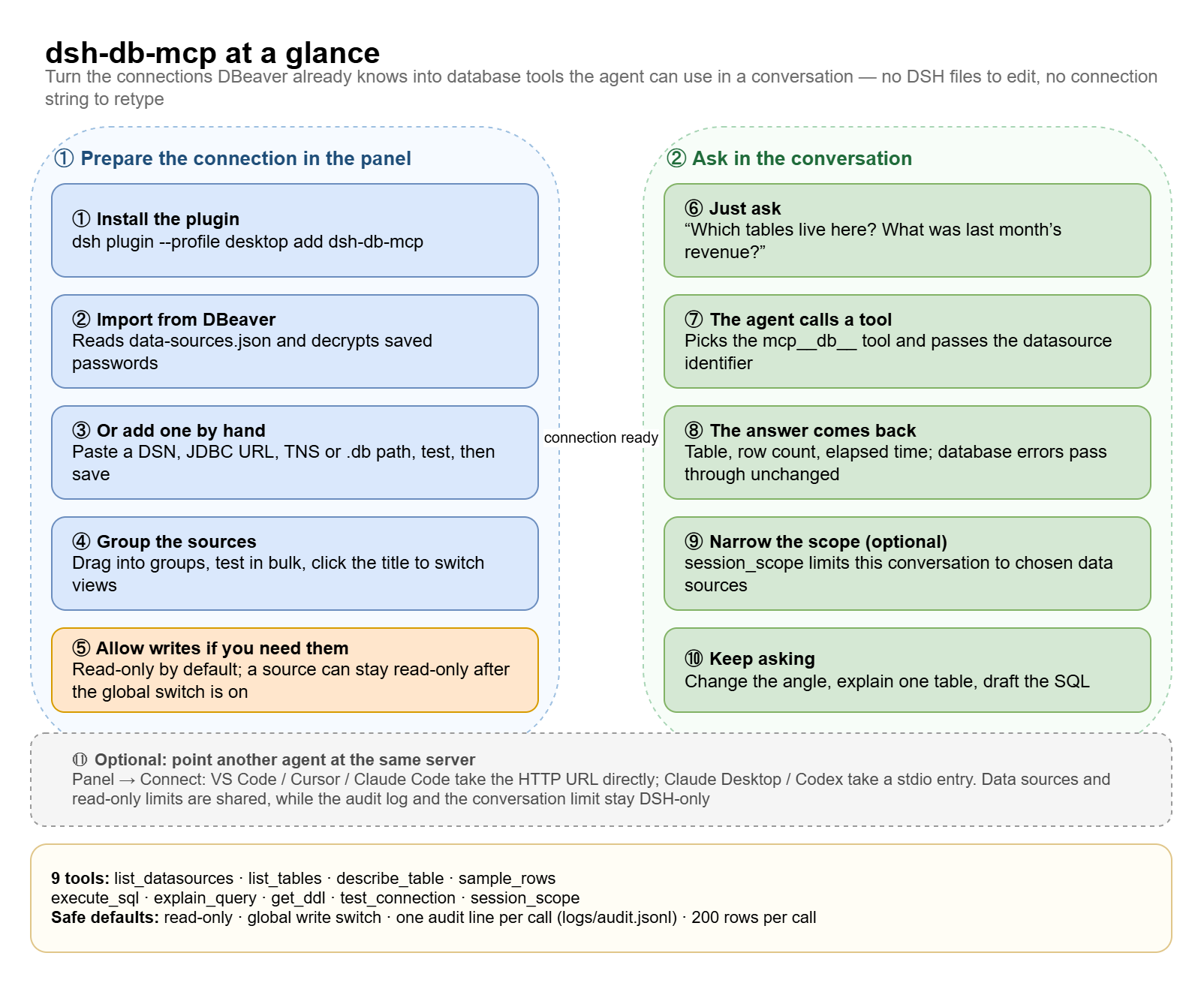
How it works, on one page
Left: what you do in the panel. Right: what happens in the conversation once a source exists.
Screenshots
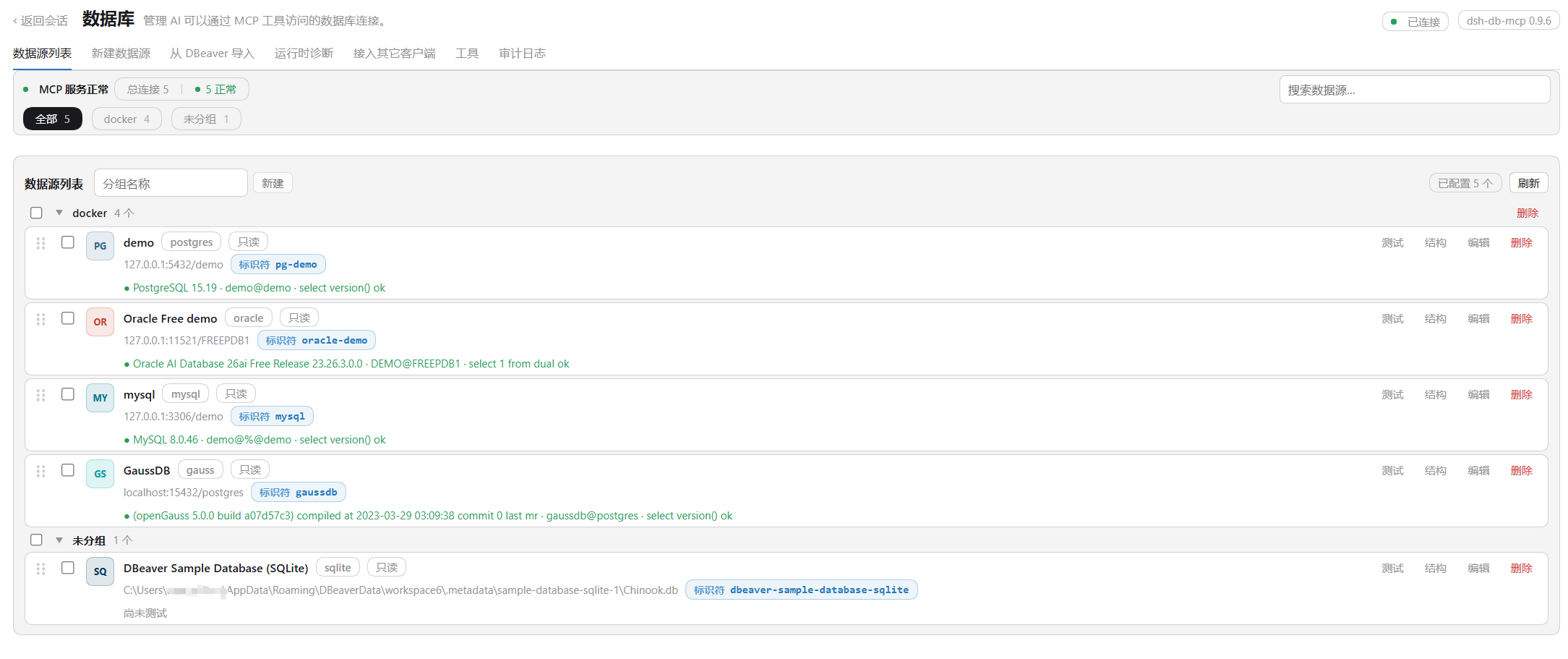
The source list. A health strip across the top, sources grouped the way you grouped them, engine badges, the identifier each tool call needs, and a failed probe stays inline with its full error and a copy button. The Import from DBeaver tab sits right next to it.
One set of sources, every DSH you run
The registry lives in ~/.dsh/db-mcp/ (datasources.json + secrets.json, mode
0600), not inside a profile. So:
- Install it in the desktop app, the web UI, or both — they read the same file, so a source imported once shows up everywhere.
- Run several DSH windows at the same time. Each instance starts its own Python service; the first takes the HTTP port and the next ones step to the following free port automatically, so nothing refuses to start.
- Upgrade or reinstall without redoing the setup. Sources, groups, settings and the audit log survive; only the plugin code is replaced.
The same server, for your other agents
The panel publishes the identical MCP server over streamable HTTP. The Connect
tab shows the address (http://127.0.0.1:8765/dsh-db-mcp) and writes the entry for
you with one click:
| Client | Written as |
|---|---|
| VS Code / VS Code Insiders | HTTP entry in mcp.json |
| Cursor | HTTP entry in ~/.cursor/mcp.json |
| Claude Code | HTTP entry in ~/.claude.json |
| Claude Desktop | stdio entry in claude_desktop_config.json |
| Codex CLI | [mcp_servers.dsh-db-mcp] in ~/.codex/config.toml |
Point JetBrains AI or anything else that speaks MCP at the same URL and it works too. Data sources, the read-only flag, the writable schemas and the DDL switch are shared; the audit log, the tool list and the conversation-level limit stay inside DSH. The safety page has the line-by-line table; clients.md walks through the endpoint.
Requirements
| Needs | |
|---|---|
| DSH | >= 0.2.0-rc.2 (declared in engines.dsh) |
| Node.js | the runtime DSH itself ships (24.x). The plugin only uses node:sqlite — available from 22.5 — for the in-process SQLite probe; if it is missing, the Python driver covers SQLite and the panel says so |
| Python | 3.10 or newer for the bundled server (mcp, psycopg, oracledb and pydantic all require 3.10+; tested on 3.13). The panel creates the venv; you only need an interpreter on PATH or set pythonPath in the plugin config |
| Database drivers | installed by the panel into that venv: mcp, psycopg[binary], py-opengauss, PyMySQL, oracledb, cryptography. SQLite needs nothing extra |
| OS | Windows, macOS or Linux. Venv paths (.venv/Scripts/python.exe vs .venv/bin/python) and the DBeaver workspace location are detected per platform |
Run
dsh plugin --profile desktop add dsh-db-mcp   # desktop app
dsh plugin --profile web add dsh-db-mcp       # web UI
--profile picks the profile to install into (desktop and web ship with DSH;
any other name is created on first use). Remove with
dsh plugin --profile desktop remove dsh-db-mcp.
Upgrading has its own traps — pnpm's metadata cache, its release cooldown, and Windows holding the old files open. See Updating from the app; if the app asks you to disable other configurations first, restart DSH and update again (that releases the running app's hold on the bundle).
Then:
- Sidebar → Data sources.
- Import from DBeaver → tick the connections → Import selected.
- Ask the agent something like "which tables does my Chinook database have?"
A connection whose password was never saved shows no password; open the source
once and type it — it goes to secrets.json and never comes back to the page.
更多「MCP 与协议」插件
rea
作者 morluto
用智能体逆向工程一切,从应用行为一直到原生二进制。
reactive-resume
作者 reactive-resume
开源简历制作插件,强调隐私保护,支持自定义、可移植和自托管。
next-ai-draw-io
作者 dayuanjiang
通过对话创建和编辑 draw.io 图表,提供 Web、桌面应用及 MCP 服务,可用于流程图和架构图绘制。
everos
作者 evermind-ai
为所有 AI 智能体提供的便携统一记忆层,本地优先、Markdown 原生、数据归用户所有,跨应用与工作流自进化。