
DSH Office Plugins in Action: One Sentence to a Presentable PPT with DeepSeek Harness
A step-by-step photo walkthrough of Boxuegu's episode 7: install dsh-univer-office from the marketplace, type one sentence, and watch DeepSeek Harness research the market, build a 6-slide deck in the Univer editor, merge it into your workspace and present it — 12 verified screenshots.
Last updated: 2026-09-17
The best way to learn what the dsh office plugins can do is to watch one do real work. In this 296-second course recording, Boxuegu's instructor installs dsh-univer-office from the DeepSeek Harness marketplace, then types a single sentence into the chat — "query today's A-share market, recommend 3 stocks, and make it a PPT" — and the agent handles the research, the spreadsheet and the layout on its own.
This guide breaks the recording into 10 steps: searching the marketplace for office, one-click install, slide-by-slide generation inside the Univer editor, merging into your workspace, and a final run-through in presentation mode. All 12 screenshots come from that video and each links back to its exact moment. For which office plugins to install, the companion office-docs collection has you covered.
TL;DR
- ▸One plugin is enough: search "office" in the marketplace and install dsh-univer-office by dream-num (spreadsheets, docs, presentations, base tables) — a page refresh activates it, no API key.
- ▸One sentence does it: "query today's A-share market, recommend 3 stocks, make a PPT." The agent loads the univer skills, verifies the date and closing data via web search, then generates all 6 slides.
- ▸You approve the result: slides are drafted in a separate worktree window (an "editing" badge up top), and only "merge into current version" writes them into your workspace. Six planned tasks, six completed — then present it.
Run the dsh office plugin in ten steps
- 1
Search the marketplace for office, pick dsh-univer-office
Settings → Plugin marketplace (1,650 community capabilities), type office into the search box. The top hit, dsh-univer-office by dream-num (18 stars, released 2026-08-19), promises to "create, edit, check and deliver spreadsheets, docs, presentations, base tables and canvases, with live preview and worktree review." Below it, dsh-office-tools is a leaner file toolkit for Word/Excel/PowerPoint. The video picks the first one.
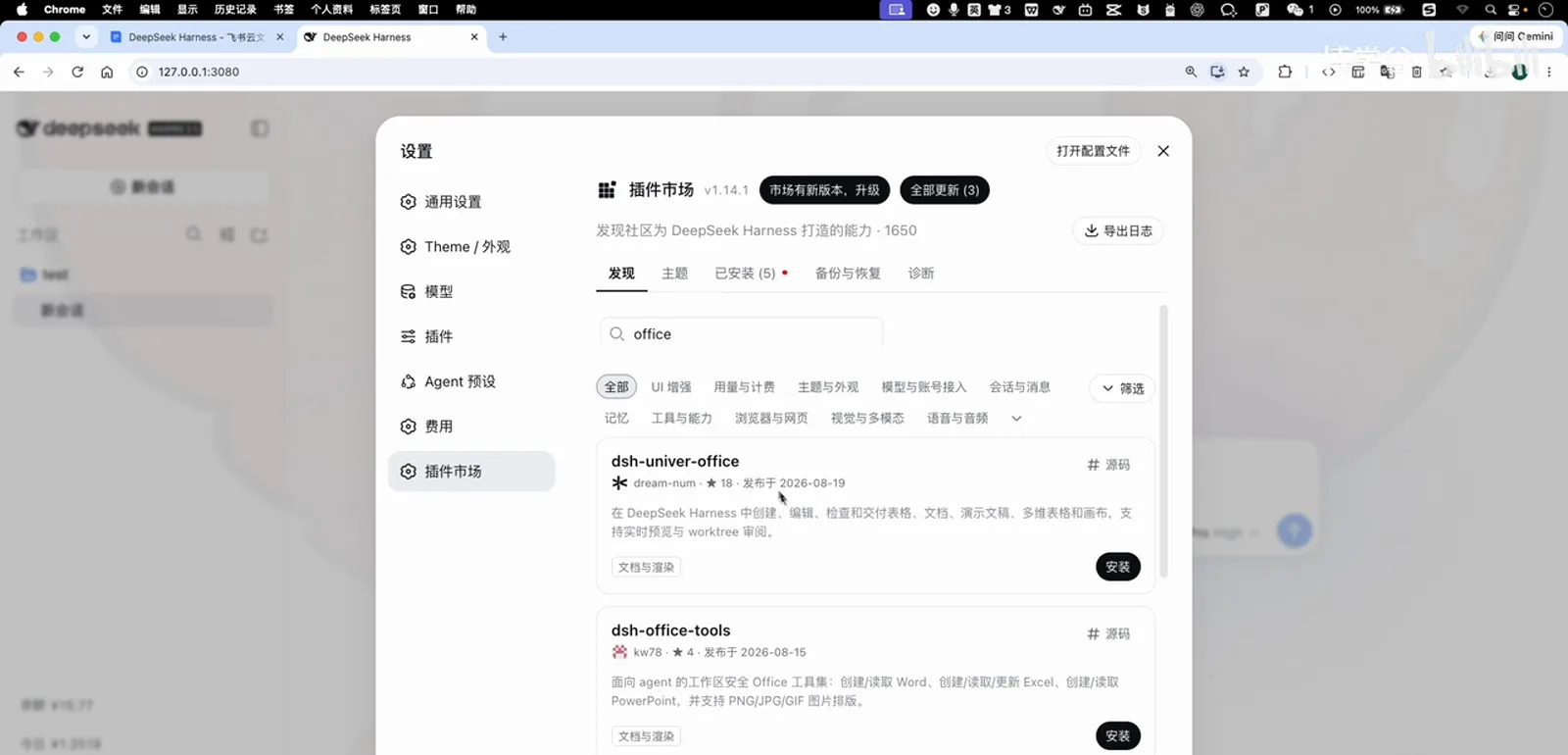
Searching the marketplace for office; the first hit is dsh-univer-officeWatch at 0:43 - 2
Install, and wait for "installed and active"
Hit install on the dsh-univer-office card and confirm. When the progress bar finishes, the new-session screen greets you with a toast: "dsh-univer-office installed and active." The narration suggests refreshing the page — no restart, and no API key anywhere in the flow.
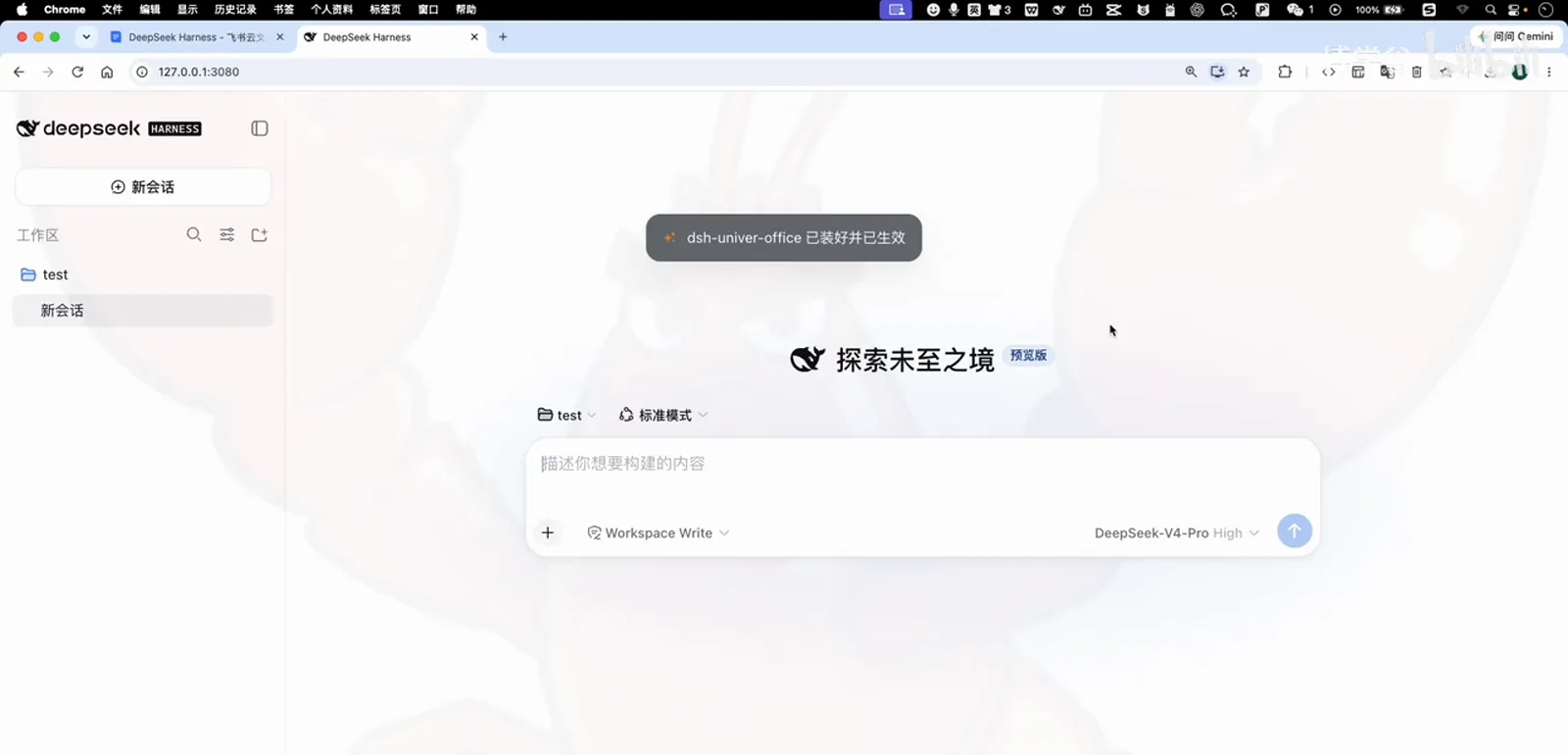
Installed — refresh the page and it's liveWatch at 1:01 - 3
Give it one sentence
In the workspace chat, type one natural-language request — "query today's A-share market, recommend 3 stocks, and make it a ppt" — with DeepSeek-V4-Pro selected, and hit enter. No template, no parameters; the whole office intent lives in that sentence.
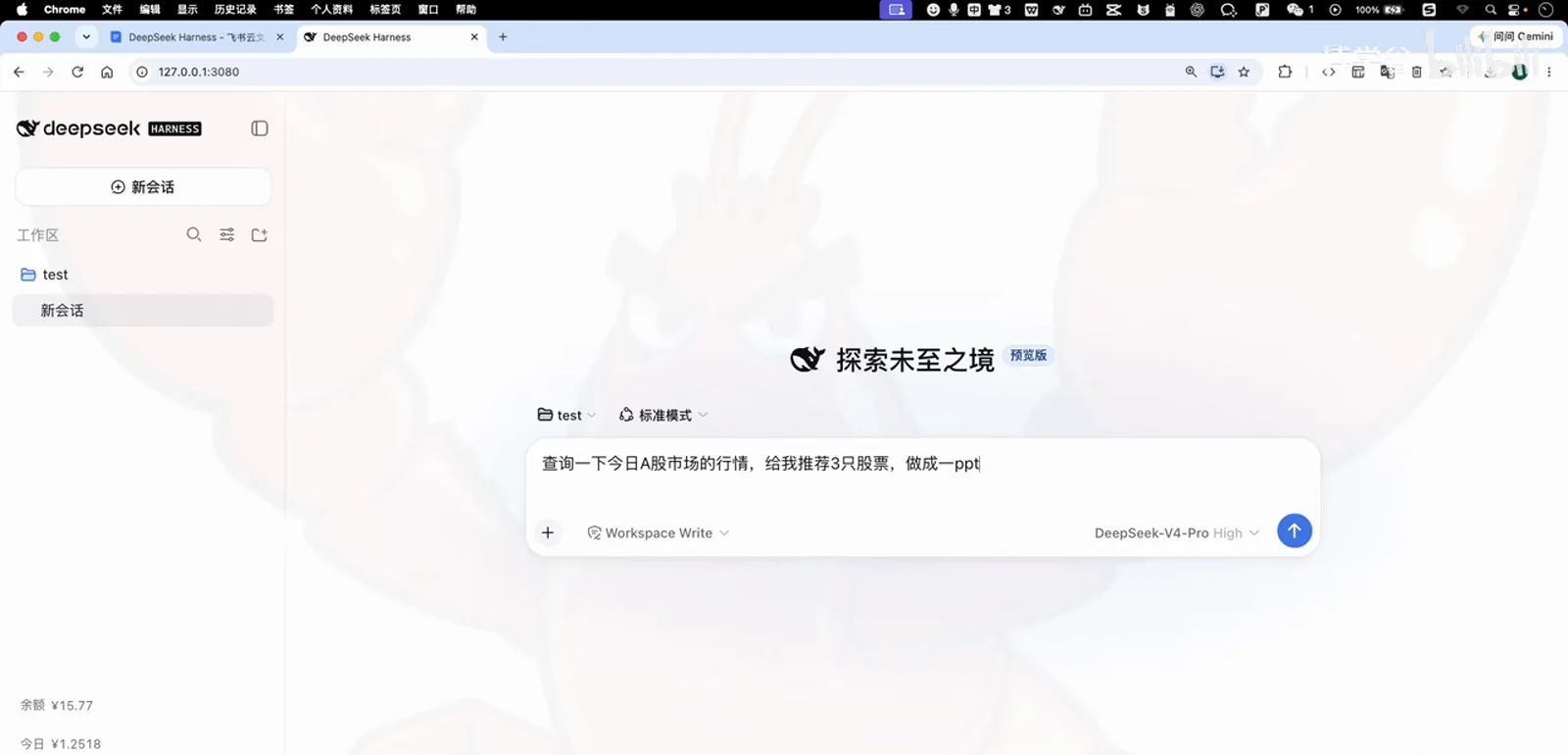
One sentence is all it takes — hit enterWatch at 1:29 - 4
The agent researches on its own
The task log shows the full chain: skill-catalog injection → the univer and univer-slide skills → a Bash call for today's date (2026-08-20) → three web searches (Shanghai/Shenzhen/ChiNext index quotes, Aug 20 quotes, the Aug 19 close) → 30-odd seconds of deep diving. It even notices the results are mixing in stale 2025 data and re-queries against the real date.
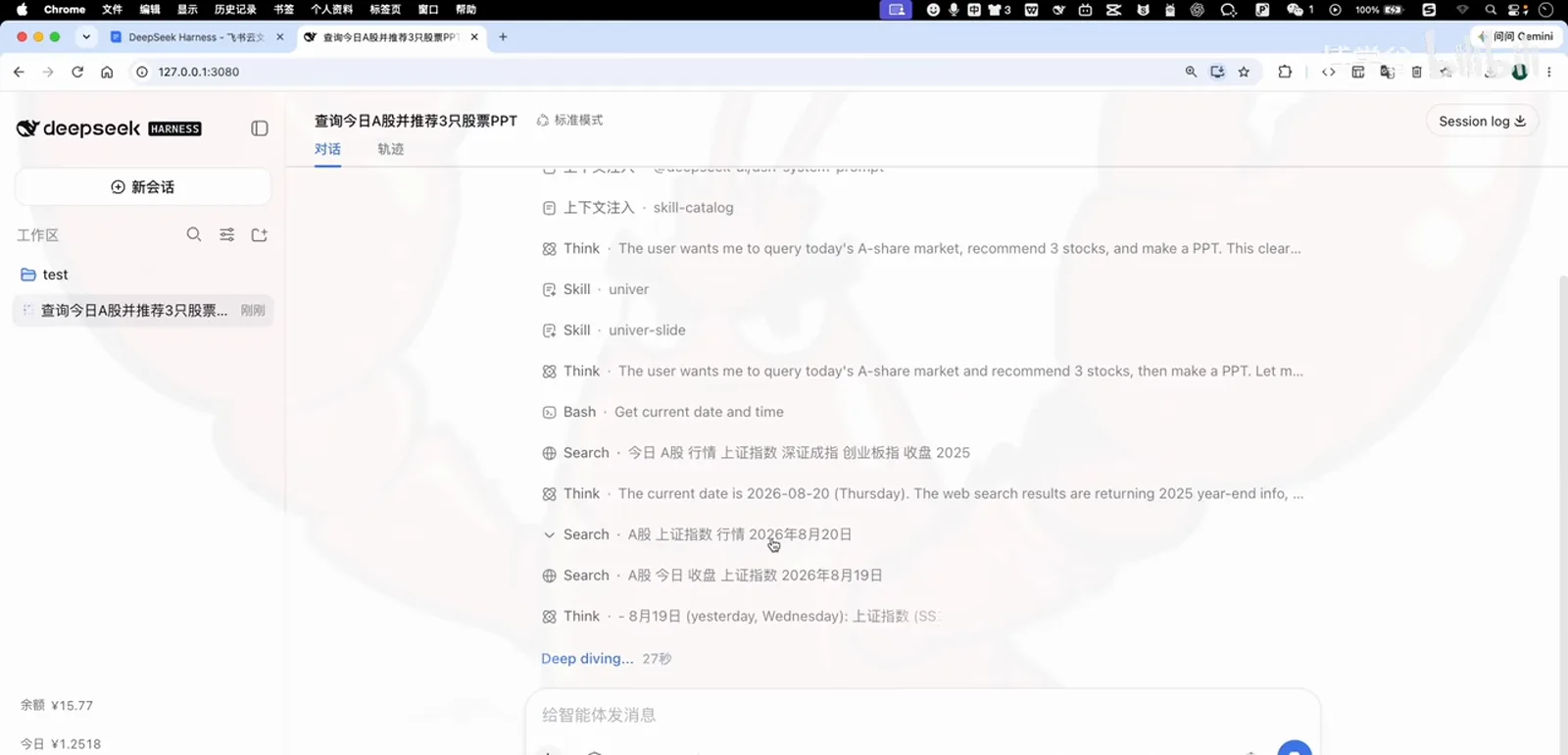
Web research: date, indices and closing data verified one by oneWatch at 1:57 - 5
The Univer editor pops out; the cover takes shape
Once the research wraps, a separate editor window (ashare-deck · ashare-recommendations.univer) pops up with an "editing" badge in its title bar. The dark cover slide lands first: "Today's A-share market & stock picks," subtitled "major indices open higher; precious metals and innovative drugs lead."
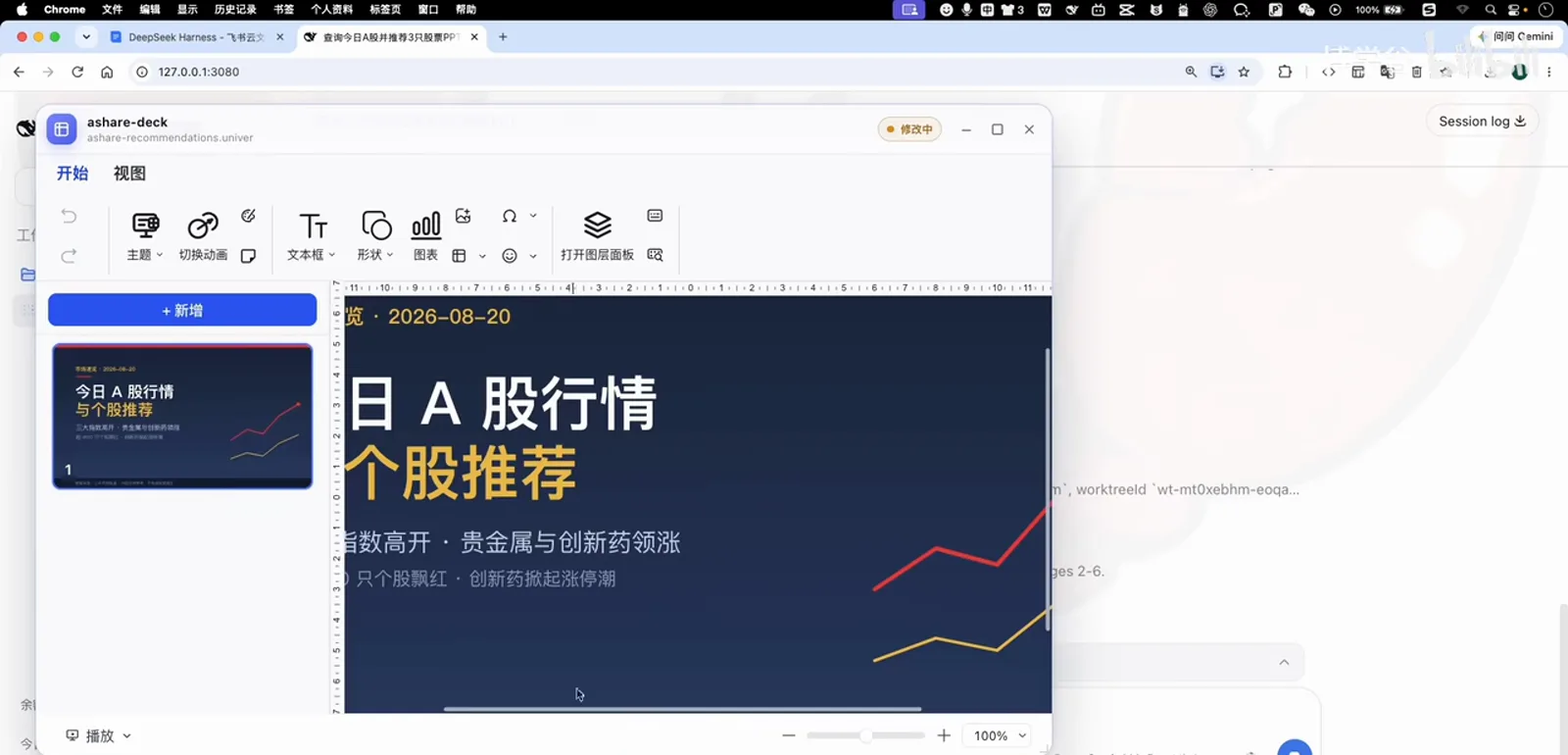
The editor pops out; the cover slide lands firstWatch at 2:30 - 6
Market overview and stock-detail slides follow
Next comes the market-overview slide — Shanghai Composite 3,894.42 slipping below 3,900, Shenzhen Component rebounding on the open, ChiNext +1.27% leading at the bell — then a stock-detail table: 603259.SH WuXi AppTec (CXO · innovative drugs), 601899.SH Zijin Mining (precious metals · gold), 600276.SH Hengrui Pharma (innovative drugs · leader), each with a one-line thesis. Table, charts and layout, all automatic.
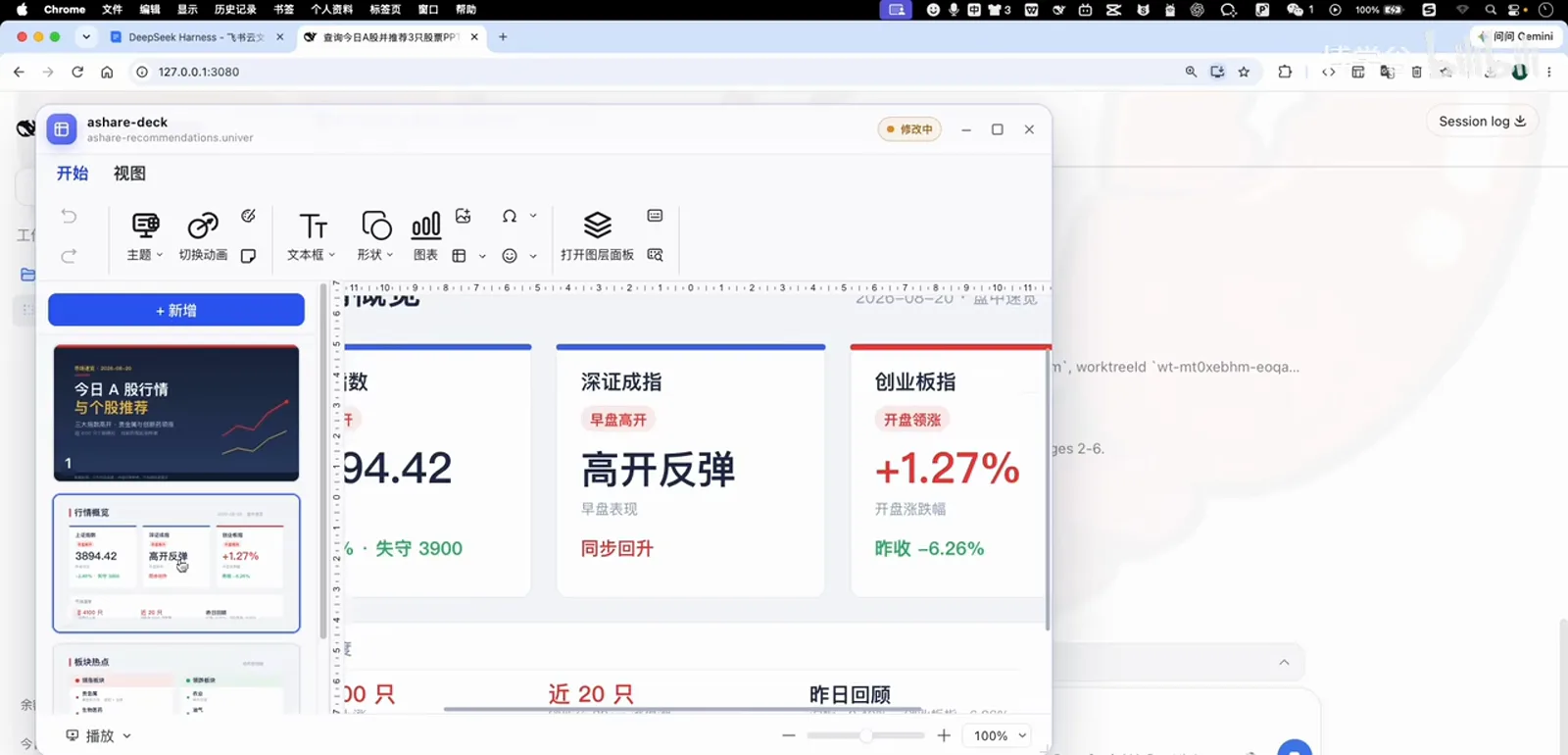
Market overview: three indices on one screenWatch at 2:40 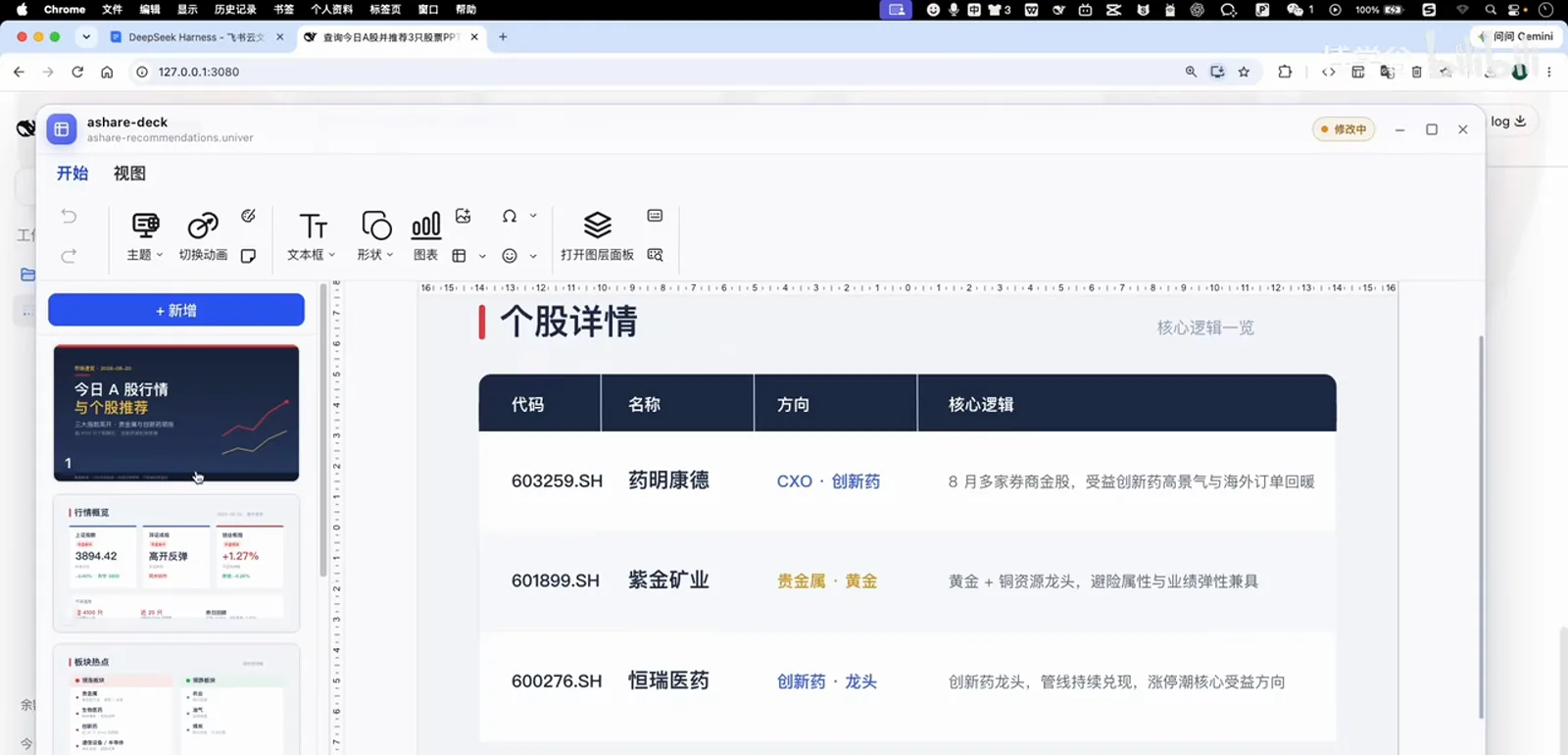
Stock details: tickers, directions and theses includedWatch at 2:45 - 7
A risk-disclosure slide appears unprompted
The final slide is a risk disclosure: four disclaimers covering "for research reference only," "markets carry risk," "intraday data may lag," and "picks are examples, not guarantees," signed off with "rational investing · long-termism · avoid chasing rallies." Nobody asked for compliance copy — the agent wrote it into the deck itself.
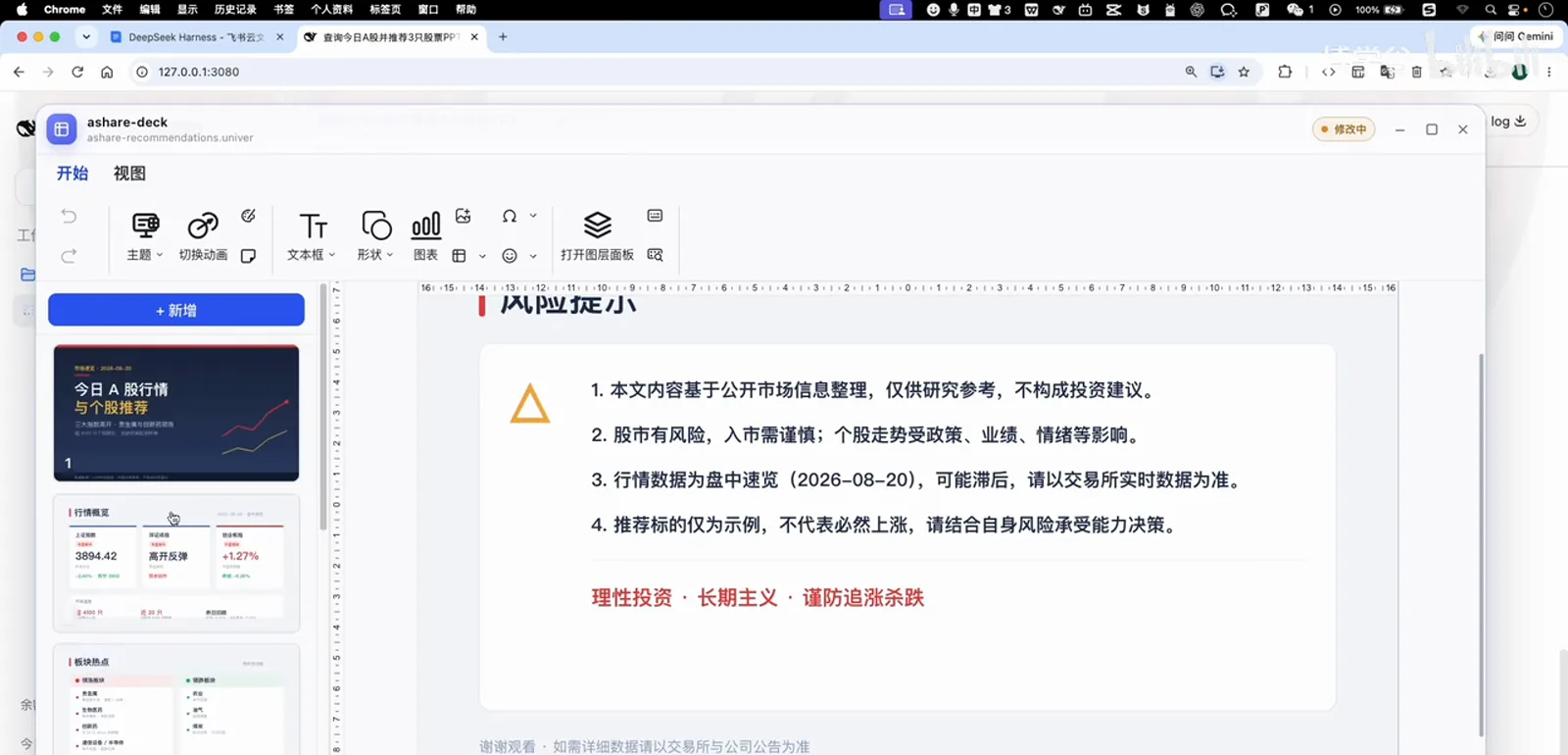
The risk page shows up without being askedWatch at 3:04 - 8
Back in the chat, confirm the merge
When it's done, the agent lists its sources in the session and a worktree review card appears: ashare-recommendations.univer marked "pending confirmation," with two buttons — merge into current version, or discard. As the narration puts it: it builds in a separate place first; only your confirmation moves it into the workspace.
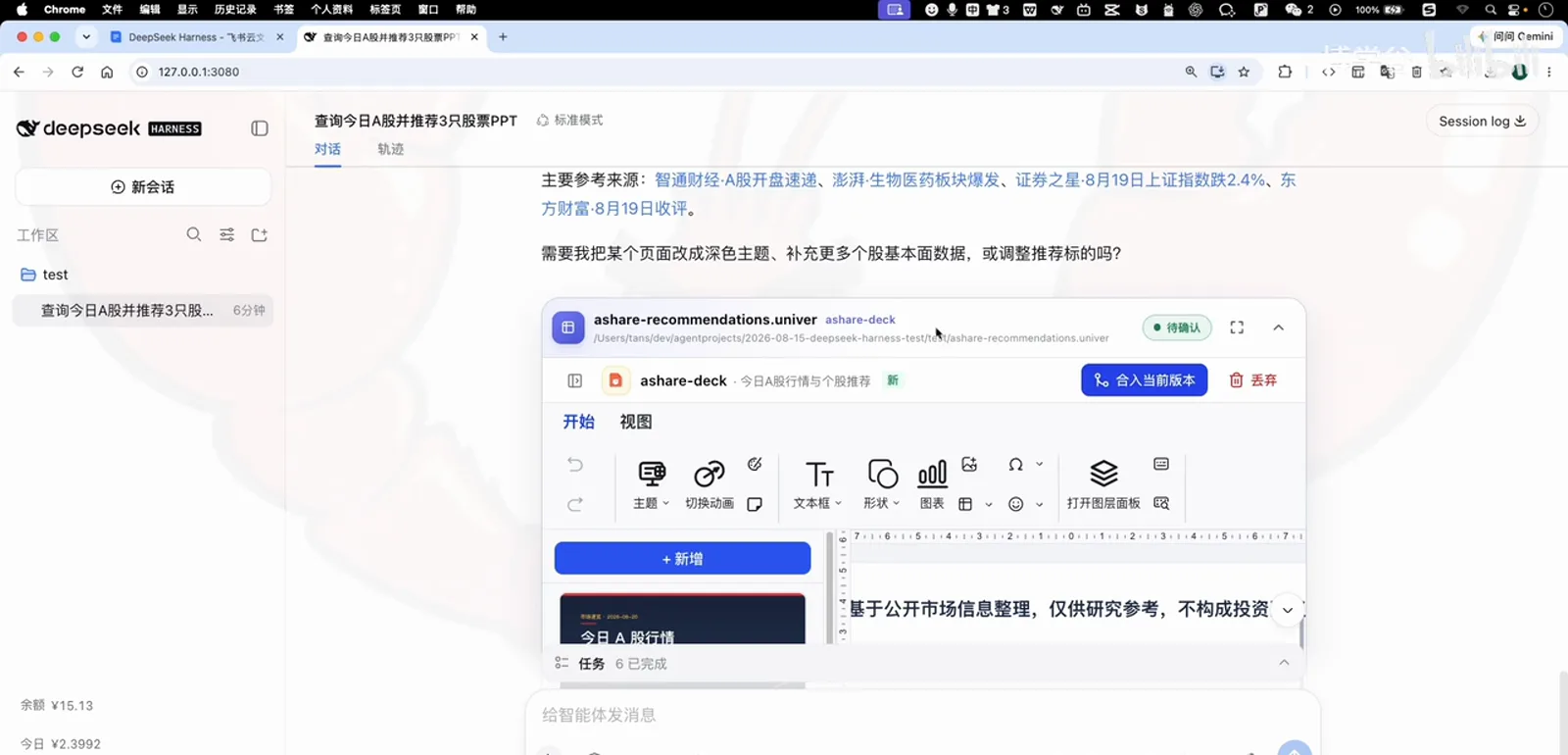
Confirm the merge and the deck moves into your workspaceWatch at 3:34 - 9
All six tasks check out
Expand the task panel and all six items are ticked — market research and analysis, stock details, creating the univer job, running the snapshot, importing into the workspace, exporting the deck. Narration: "It planned six tasks and finished all six in one pass." The human contributed exactly one thing: that sentence.
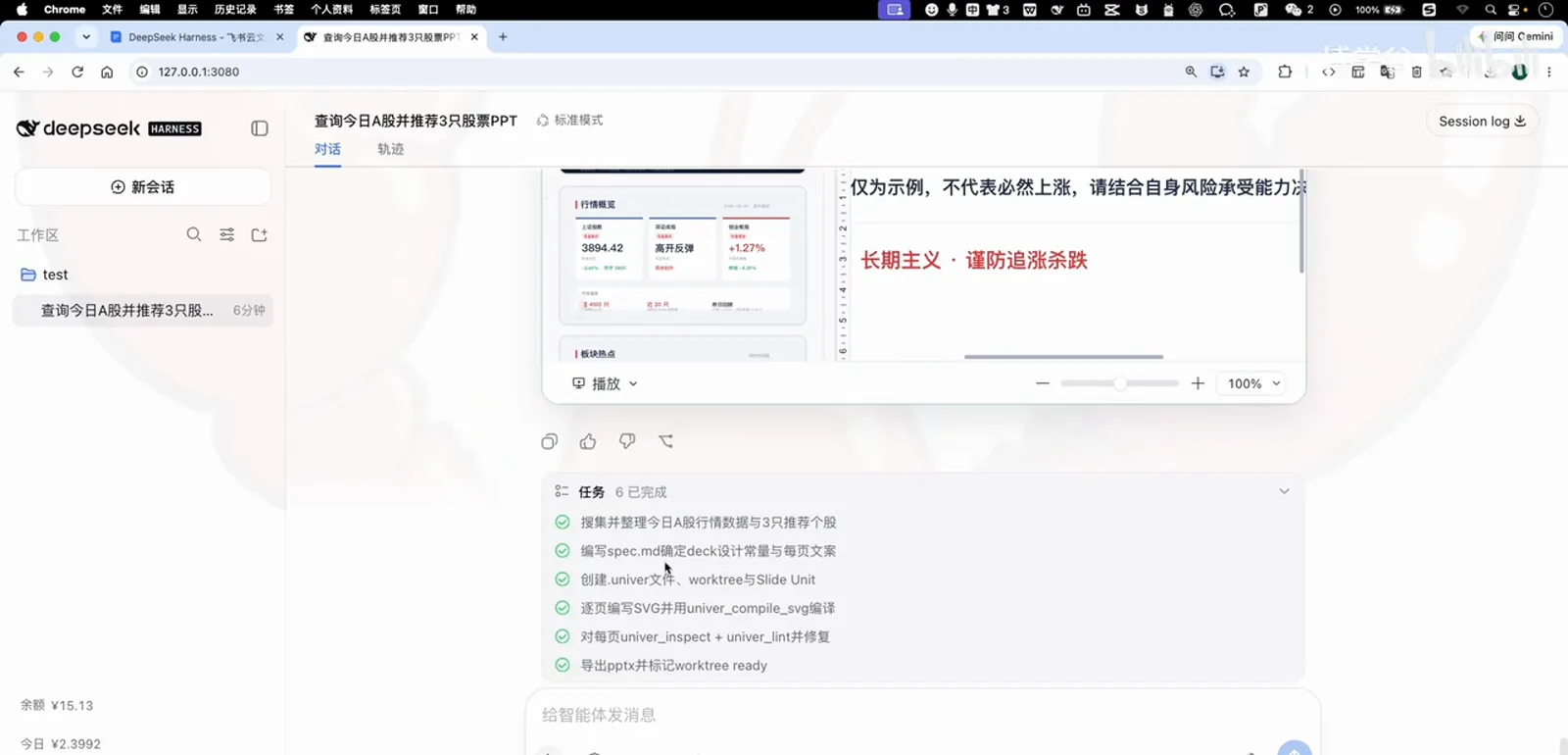
Six planned tasks, all completed in one passWatch at 3:58 - 10
Present it
Hit play in the editor and it switches to presentation mode: a 1/6 pager control, a filmstrip of all six slides, fullscreen, page turns and exit. "This is what productivity looks like," the narration concludes — and the same flow covers spreadsheets and documents. Drop in your own work scenario and go.
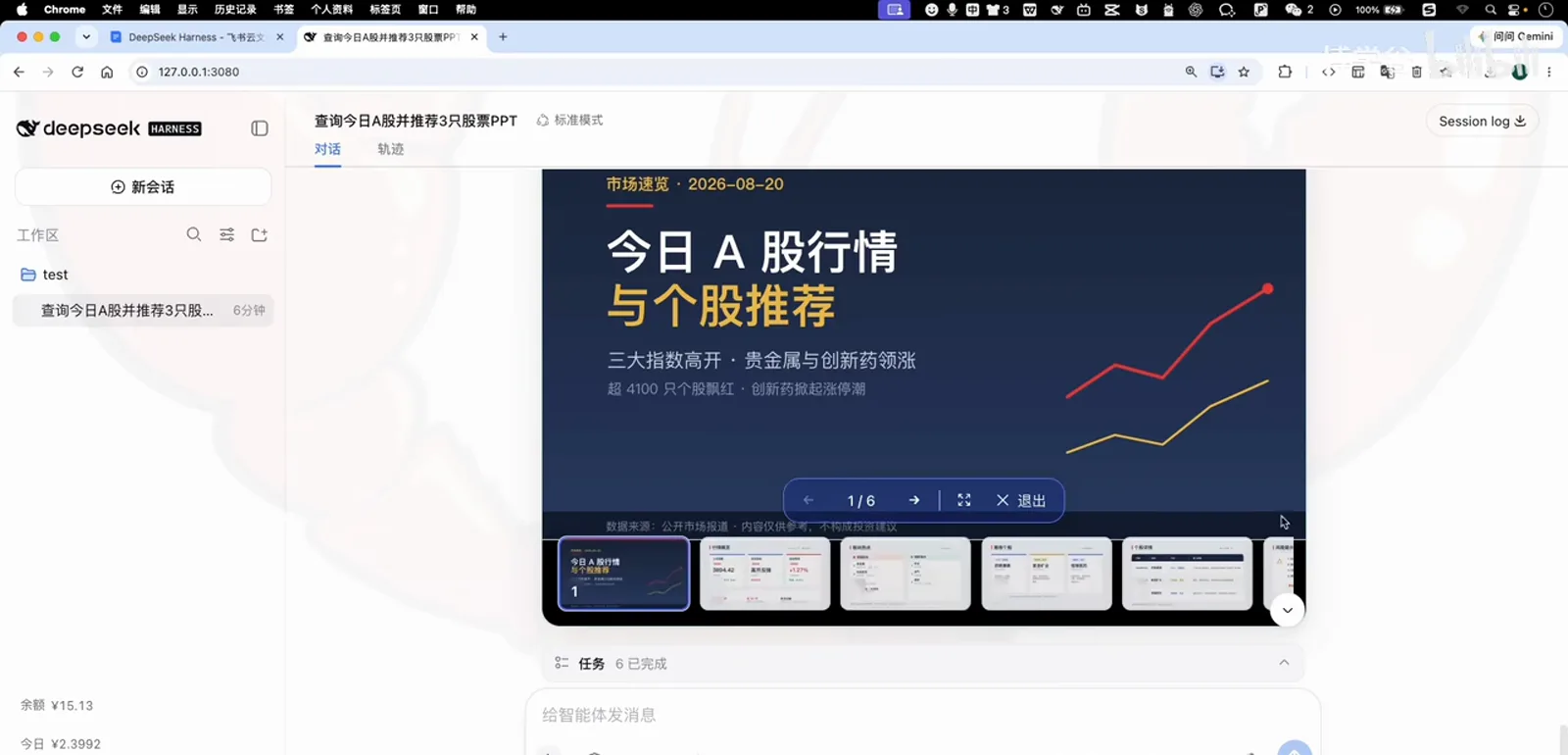
Final check: present all six slidesWatch at 4:08
dsh office plugin FAQ
Quick answers on univer-office, API keys, where the deck lands, and how this page relates to the collection.
What is dsh-univer-office?
A community plugin (maintained by dream-num) that embeds the Univer office suite into DeepSeek Harness: it lets the agent create and edit spreadsheets, documents, presentations, base tables and canvases, with live preview and worktree review. It's what gets installed in the video; if you only need to read and write .docx/.xlsx/.pptx files, dsh-office-tools in the same search results is a lighter alternative.
Does it need an API key or extra setup?
No. From install to finished deck, no key configuration ever appears in the video — install, refresh, go. What you consume is invocation quota of the model already configured in DeepSeek Harness: during this demo the balance shown in the corner drops from ¥15.77 to ¥15.13, under 1 yuan.
Where does the generated PPT live?
During generation it lives in a separate worktree review window (ashare-recommendations.univer); only after you click "merge into current version" is it written into your workspace. From there you can present it in place (6 slides in this demo), keep editing it, or export it as a file.
How does this page relate to the /collections/office-docs collection?
They complement each other. The collection answers "which plugins to install" — 18 editor-picked office plugins in one place; this page answers "how to use them" — one full run from install to finished deck, following the course recording.
Related DeepSeek Harness guides
What to install, how to install it, and who else needs this — one article each.
office-docs plugin collection
18 editor-picked Word/Excel/PPT plugins — what to install lives there; how to use them lives here.
Read the guideInstalling DSH plugins correctly
Marketplace search, install and troubleshooting in full — the long version of step one.
Read the guideMust-have DSH plugins
Beyond office work: the essential plugins to round out your DeepSeek Harness.
Read the guideNovel-writing workbench
Another "one sentence, finished product" scenario: long-form fiction and short drama.
Read the guideExcel consolidation: 1,800 rows, one prompt
Three expense sheets merge into a reviewed summary workbook — no plugin, no formulas.
Read the guideSources & credits
All screenshots come from the course recording below and belong to Boxuegu — every image links back to its moment. Plugin names, the prompt wording and UI states follow what's on screen.