
README
dsh-archived-sessions(DSH 会话管理)
中文
一个 DSH Web 插件:在「设置」中提供会话管理,统一管理本机上的所有对话。
功能
- 双标签页:所有对话(未归档)与归档会话
- 视图切换:单列表或按工作区分组(无工作区归属的会话兜底归入「未分组」)
- 按标题 + 相对时间浏览对话,最近的排在最前
- 搜索框:按标题或 ID 实时过滤会话列表
- 勾选 / 拖动批量勾选 / 全选 / 批量归档(记录保留)/ 批量删除(永久删除,带确认弹窗)
- 「删除会话」入口已移至会话头部(适配 DSH 0.1.0-rc.8):rc.8 起官方侧边栏行菜单(⋮)不再开放插件注入点(只剩 重命名/分叉/归档),删除按钮改放在打开的会话标题栏(🗑 垃圾桶图标)——确认弹窗可细粒度勾选删除其下子对话 / 下载·产出文件 / 整个文件夹,默认只删会话本身
- 归档页支持移出归档(回到所有对话)
- 打开记录文件夹按钮:在系统文件管理器中打开所选会话的记录目录,跨平台(
explorer/open/xdg-open) - 每行可展开详情(默认收起):占用空间、最后更新、活动统计(轮次、步骤、消息数、工具调用分布、fetch 记录)、产出/下载文件、父会话与子会话(分叉)
- 子代理会话嵌套显示在父会话下方(缩进 + 「子代理」徽标);父会话被删除或缺失时自动浮出为顶层行
- 删除父会话不会级联:子代理、分叉、下载/产出文件均保留,除非你显式勾选它们——避免误删
- 当前打开的会话显示「当前会话」徽标,且不可删除
截图
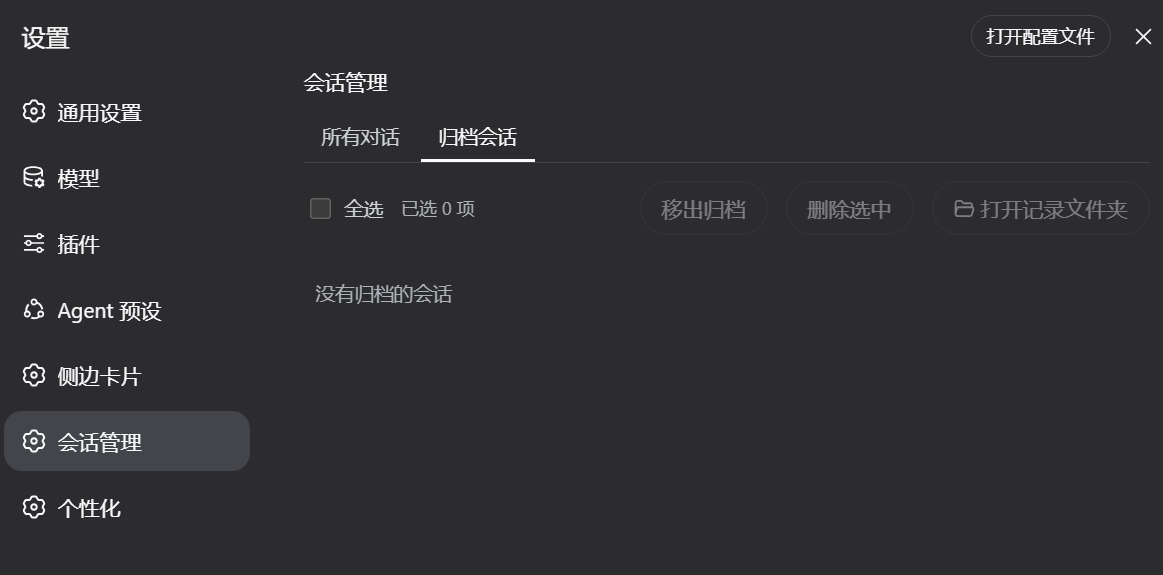
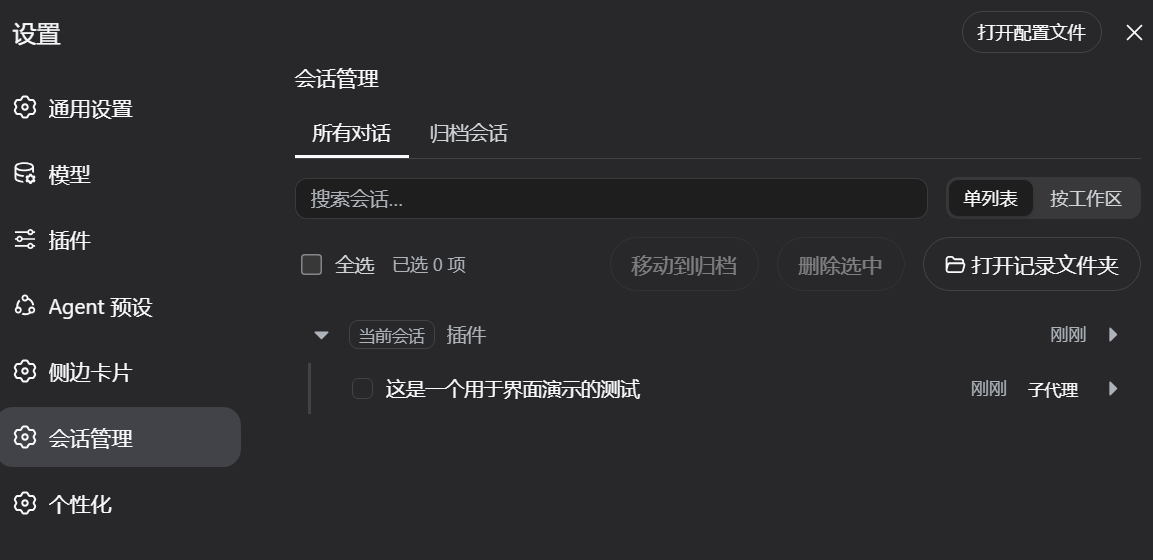
归档会话视图 / 子代理会话嵌套在父会话下
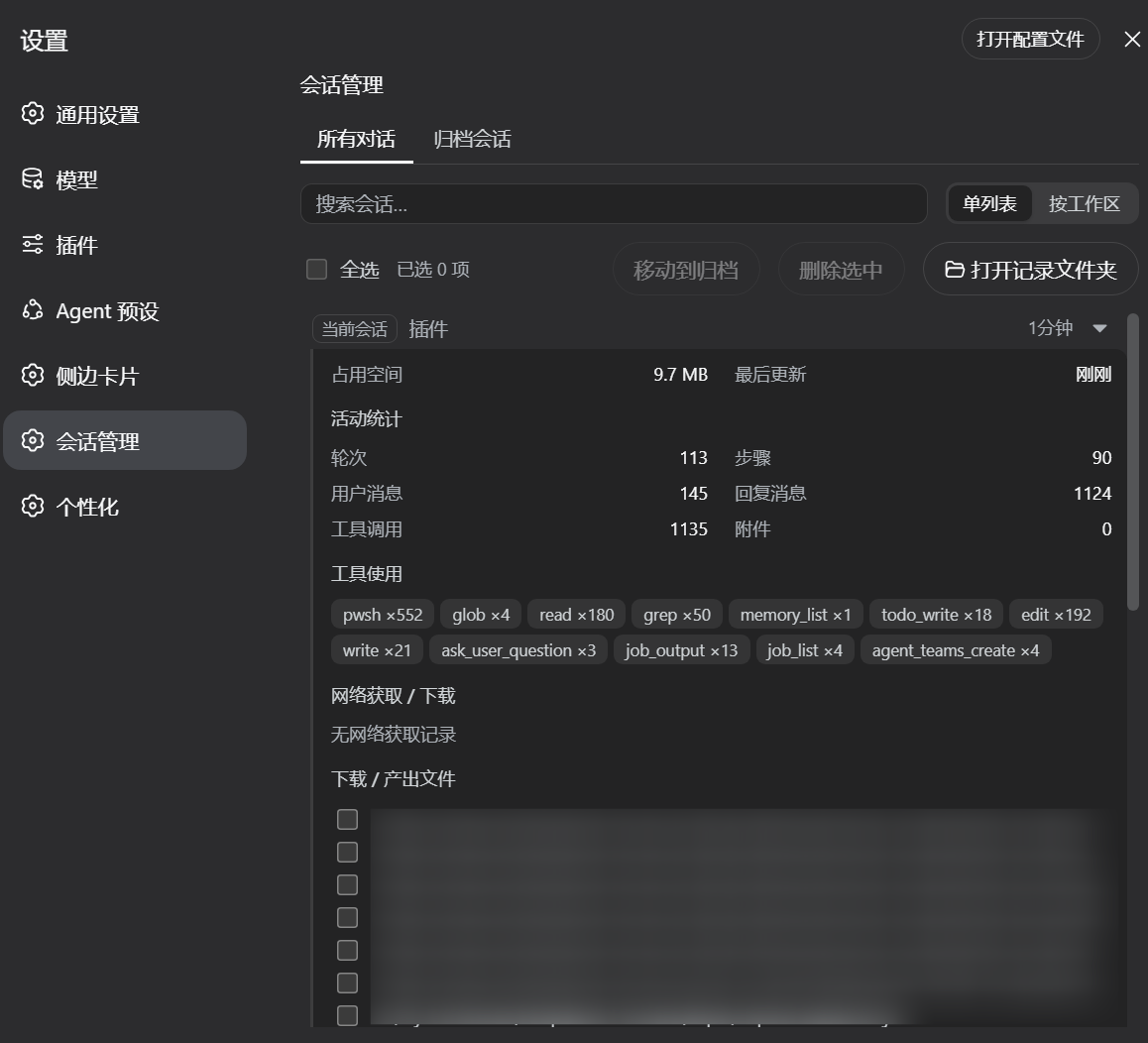
详情面板(含活动统计、产出文件、关联对话)
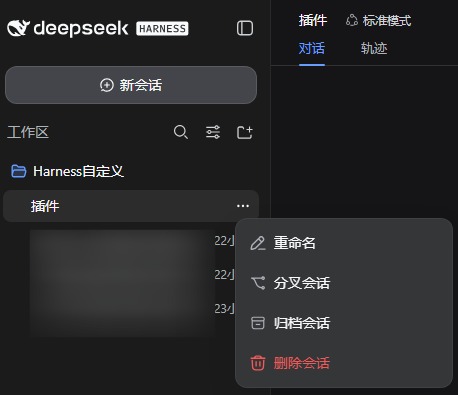
会话头部「删除会话」入口(rc.8 起删除入口移至会话头部)
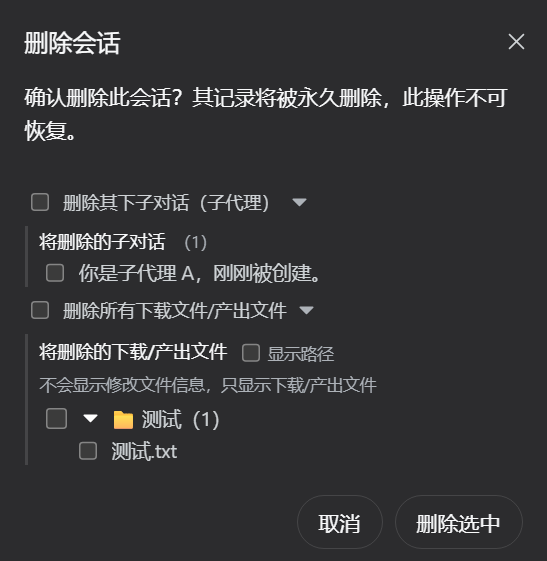
删除确认弹窗——可勾选删除其下子对话 / 下载·产出文件 / 整个文件夹
安装
方式一:直接 tarball 安装
dsh plugin --profile web add https://codeload.github.com/Zephyr-vibe/dsh-archived-sessions/tar.gz/refs/heads/main
如果 pnpm 拦截构建脚本,在命令末尾加 --ignore-scripts:
dsh plugin --profile web add https://codeload.github.com/Zephyr-vibe/dsh-archived-sessions/tar.gz/refs/heads/main --ignore-scripts
方式二:让 agent 安装
告诉你的 DSH 智能体:
帮我把这个项目安装为插件:https://github.com/Zephyr-vibe/dsh-archived-sessions
agent 会下载项目、放入 profile 的 node_modules 并注册到 dsh.profile.bundles。
安装后重启 web 端,即可在「设置」中看到「会话管理」入口。
兼容性
- 零配置:会话目录按官方 DSH 布局(
$DSH_HOME/sessions/<project-key>/<session-id>/)自动识别,无需核心补丁 - 归档 / 恢复:基于官方
archiveSession相同的registry状态原语实现 - 删除不级联:只删除所选会话,子代理、分叉与文件均保留;运行中的会话拒绝删除(409)
- API 仅信任本机请求(127.0.0.1 / localhost / ::1);仅使用官方公开 API(
workspaceRegistry、sessionPersistence)
更新日志
0.1.5
背景:适配 DSH 核心 0.1.0-rc.8 更新。 rc.8 移除了官方
workspaceRegistry.deleteSession与sessionPersistence.remove,官方侧边栏会话行菜单(⋮)也只保留 重命名/分叉/归档 且不再开放插件注入点——本版本针对这些变化重做删除链路、补回删除入口,并修复升级过程中暴露的若干问题。
- 修复:删除后 live 会话残留(核心 rc.8 兼容)——rc.8 移除官方删除原语后,旧版删除只做工作区 detach + 磁盘清理,会漏掉仍挂在 sessions store 里的 live 会话:删除后它依旧出现在列表,且因工作区已 detach 而落入「未分组」(重启后才会消失);现在删除前先 flush 全部目标会话日志,删除后用官方公开原语
SessionStore.liveEntryFor + detachEntered摘除 live 会话(广播session/disposed,持久化状态同步清理),并保持 0.1.3 的「只删自己 / 不级联」语义不变 - 修复:删除会话后残留空文件夹——「删除文件」模式(filePaths)与「保留文件」模式(deleteFiles=false)之前只删记录 log、会话目录残留为空壳;现在所有删除分支最终都会清理会话目录(工作区产出文件不受影响),并等待 persistence retire 落定后兜底重删(防尾部 flush 自动 mkdir 重建目录)
- 修复:点开会话详情面板崩溃变空——文件分组代码引用了浏览器端不存在的 node
sep变量(0.1.4 回归),当会话产出文件位于工作区内子文件夹时抛ReferenceError: sep is not defined,被错误边界捕获后整个会话管理区域空白;已改为字面分隔符拼接 - 「删除会话」按钮从行菜单移到会话头部(rc.8 适配)——rc.8 侧边栏行菜单(⋮)不再开放插件注入点(只剩 重命名/分叉/归档),删除入口改放到打开的会话头部操作区(官方
conversation.session.header.actionsslot,自动携带 sessionId),带确认弹窗走/archived/api/delete,发布后任何导入本插件的部署都能获得删除能力 - 头部删除弹窗带细粒度选项:与设置面板一致——可勾选删除其下子对话(子代理,含孙级)与下载/产出文件(可展开查看具体列表、显示路径开关),默认都不勾选(只删会话本身)
- 增强:头部删除弹窗显示可整删的文件夹节点——文件按父目录归组,工作区根以下的子文件夹显示为 📁 节点(可展开、可勾选整删),工作区根本身绝不可整删;details API 新增返回
cwd作为根判断依据(取不到 cwd 时宁可不推导文件夹) - 修复:头部删除弹窗展开详情崩溃——
baseName原本定义在设置面板组件闭包内,头部删除弹窗访问不到(ReferenceError: baseName is not defined,slot 入口崩溃导致删除按钮消失);已提升为模块级函数,两处共用 - 增强:检测 shell 命令创建的产出文件——详情/删除的文件列表原先只认
write/edit工具的file_path;现在也解析pwsh/bash的Set-Content/Add-Content/Out-File/New-Item及>/>>重定向中的路径(经 stat+isFile 存在性过滤,排除目录与残留 token)
0.1.4
- 详情面板关联对话区:只显示子代理个数(父会话/分叉不再列出)
- 删除弹窗子代理区:只显示子代理(含孙级等全部后代),标题带个数
- 文件列表完善:树形文件夹展开、列表滚动、显示路径开关(默认只显示文件名)、文件夹路径与文件一致
- 文件夹行样式统一:与文件行完全相同的组件与样式,无间距差异;箭头展开/收起带旋转动画
- 删除会话/删除文件后自动清理空父目录(直到非空或工作区根,根目录绝不删除)
- 已物理删除的文件不再出现在详情/删除弹窗(host 端 stat 过滤)
- 修复:文件列表包含子代理产出、id 格式兼容(
session-前缀)、工作区外文件兜底显示文件名
0.1.3
- 删除确认弹窗升级:两行确认;可细粒度勾选删除的子代理(含孙级)与下载/产出文件,默认都不勾选
- 删除级联与文件选项:删除会话时可一并删除其下子代理(cascade / subagentIds)、下载与产出文件(filePaths,含整个文件夹)
- 文件夹删除安全规则:工作区根目录绝不删除;子文件夹可整删(递归);删除后自动清理空目录(逐级直到非空或工作区根)
- 文件列表树形显示:文件夹可展开查看内部文件;列表超出时滚动显示;"显示路径"开关(默认只显示文件名,实时切换完整路径)
- 默认按工作区分组;视图切换按钮顺序调整(按工作区在前)
- 修复:子代理收集双向 id 匹配(
session-前缀兼容)、文件列表包含子代理产出、工作区外文件兜底显示文件名
0.1.2
- 搜索框:按标题或 ID 实时过滤会话列表
- 详情面板活动统计:轮次、步骤、用户/助手消息、工具调用分布与 fetch 记录
- 更安全的文件删除:只能删除该会话的产出文件(拒绝目录),带确认弹窗与失败汇总
- 批量操作分批执行(每批 20 个)——选中数百会话不再压垮浏览器
- 父会话删除后,孤儿子代理会话在工作区视图仍可见
- 详情子会话不再重复列出;单个工作区异常不再阻塞整次删除
- 相对时间自动刷新;键盘(Tab + Enter/Space)选择;拖拽选择在窗口外释放不再卡住
- 打开记录文件夹支持无工作目录会话(
_no-cwd布局);删除不存在的会话返回 404 - 详情响应有界(文件 ≤ 200、fetch ≤ 50),大会话保持流畅
0.1.1
- 子代理会话默认折叠,点击父行箭头展开/收起
- 子代理跟随父会话归入正确的工作区分组(不再落入「未分组」)
- 删除父会话不再级联:子代理、分叉与文件均保留,除非显式勾选
- 打开记录文件夹按钮;批量归档/恢复/删除带确认;当前会话保护
- 纯净 Harness 零配置——仅使用官方 API,无核心补丁
0.1.0
- 首个版本:双标签(所有对话/归档会话)、单列表/按工作区视图、批量归档与删除、详情展开、子代理嵌套
许可证
MIT — © 2026 Zephyr-vibe
English
A DSH web plugin: a Session Manager in Settings — manage every conversation on this machine in one place.
Features
- Two tabs: All conversations (non-archived) and Archived
- View modes: flat list or grouped by workspace (sessions without a workspace fall back to "Ungrouped")
- Browse conversations by title + relative time, newest first
- Search box: filter the session list by title or id in real time
- Checkbox / drag-to-select / select-all / batch archive (records kept) / batch delete (permanent, with a confirmation modal)
- The "Delete session" entry moved to the session header (adapted for DSH 0.1.0-rc.8): since rc.8 the official sidebar row menu (⋮) no longer exposes a plugin injection point (only Rename / Fork / Archive remain), so the delete button now lives in the opened session's title bar (🗑 trash icon) — its confirmation dialog lets you optionally delete this session's sub-conversations / downloaded·produced files / whole folders, with nothing checked by default (only the session itself)
- Unarchive from the Archived tab (move back to All conversations)
- Open record folder button: opens the selected session's record directory in your OS file manager — cross-platform via
explorer/open/xdg-open - Expand each row for details (collapsed by default): size on disk, last update, activity stats (turns, steps, messages, tool-call distribution, fetch history), produced/downloaded files, parent and child (fork) sessions
- Subagent sessions are shown nested under their parent conversation (indented, with a "subagent" badge); when the parent is deleted or missing they surface as top-level rows
- Deleting a parent session does NOT cascade: subagent children, forks, and downloaded/produced files are kept unless you explicitly select them — nothing is lost accidentally
- The currently open session shows a Current badge and cannot be deleted
Screenshots
Archived view / Subagent sessions nested under their parent
Detail panel — activity stats, produced files, related conversations
Header "Delete session" entry (since rc.8 the delete entry moved to the session header)
Delete confirmation dialog — optionally delete sub-conversations / downloaded·produced files / whole folders
Install
Option 1: Direct tarball install
dsh plugin --profile web add https://codeload.github.com/Zephyr-vibe/dsh-archived-sessions/tar.gz/refs/heads/main
If pnpm blocks build scripts, append --ignore-scripts:
dsh plugin --profile web add https://codeload.github.com/Zephyr-vibe/dsh-archived-sessions/tar.gz/refs/heads/main --ignore-scripts
Option 2: Let an agent install it
Tell your DSH agent:
帮我把这个项目安装为插件:https://github.com/Zephyr-vibe/dsh-archived-sessions
The agent downloads the repo, places it into the profile's node_modules, and registers it in dsh.profile.bundles.
After installing, restart the web app — the Session Manager appears in Settings automatically.
Compatibility
- Zero config: session directories are auto-detected from the official DSH layout (
$DSH_HOME/sessions/<project-key>/<session-id>/) — no core patches - Archive / unarchive: built on the same
registrystate primitives as the officialarchiveSession - Non-cascading delete: only the selected session is removed; subagents, forks and files are kept; running sessions are rejected (409)
- Loopback-only API (127.0.0.1 / localhost / ::1); official public APIs only (
workspaceRegistry,sessionPersistence)
Changelog
0.1.5
Background: adaptation to the DSH core 0.1.0-rc.8 update. rc.8 removed the official
workspaceRegistry.deleteSessionandsessionPersistence.remove, and the official sidebar row menu (⋮) now keeps only Rename / Fork / Archive with no plugin injection point — this release reworks the delete pipeline, restores a delete entry, and fixes several issues surfaced by the upgrade.
- Fix: live session left behind after delete (core rc.8 compatibility) — with the official delete primitives gone, the old delete path only detached the workspace and removed disk files, leaving the live session still mounted in the sessions store: it kept appearing in the list, and with its workspace gone it fell into "Ungrouped" (vanishing only after a restart); deletion now flushes all target logs first, then detaches the live session through the official public primitives
SessionStore.liveEntryFor + detachEntered(broadcastssession/disposed, persistence state cleaned up in turn), keeping the 0.1.3 "delete only the selected session / no cascade" semantics - Fix: empty session folder left after delete — the "delete files" mode (
filePaths) and "keep files" mode (deleteFiles:false) previously removed only the record log, leaving the session directory as an empty shell; every delete branch now cleans up the session directory in the end (workspace-produced files are unaffected), and waits for the persistence retirement to settle before a final idempotent re-remove (guarding against the tail flush auto-mkdirrecreating the directory) - Fix: session detail panel crashing blank — the file-grouping code referenced the browser-absent node
sepvariable (a 0.1.4 regression); with produced files inside a workspace sub-folder it threwReferenceError: sep is not defined, and the error boundary blanked the whole session-manager area; now joined with a literal separator - The "Delete session" button moved from the row menu to the session header (rc.8 adaptation) — since rc.8 the sidebar row menu (⋮) no longer exposes a plugin injection point (only Rename / Fork / Archive remain); the delete entry now lives in the opened session's header actions (official
conversation.session.header.actionsslot, which carries the sessionId), with a confirmation dialog calling/archived/api/delete, and works in any deployment that imports the plugin - Header delete dialog with fine-grained options: same as the settings panel — optionally delete the session's sub-conversations (subagents, incl. grandchildren) and downloaded/produced files (expandable lists, show-paths toggle); nothing checked by default (only the session itself is deleted)
- Enhance: header delete dialog shows deletable folder nodes — files are grouped by parent directory; sub-folders under the workspace root appear as 📁 nodes (expandable, checkable for whole-folder delete), and the workspace root itself can never be deleted; the
detailsAPI now returnscwdas the root check basis (whencwdis unavailable no folder nodes are derived at all) - Fix: header delete dialog crash on expanding details —
baseNamelived inside the settings-panel component closure, unreachable from the header delete dialog (ReferenceError: baseName is not defined, slot entry crashed and the delete button vanished); hoisted to module scope, shared by both - Enhance: detect produced files created via shell — the details/delete file list previously recognized only
write/edittoolfile_paths; it now also parses paths inpwsh/bashSet-Content/Add-Content/Out-File/New-Itemand>/>>redirects (filtered by astat+isFileexistence check, dropping directories and stray tokens)
0.1.4
- Detail "related conversations": now shows only the subagent count (parent / forks no longer listed)
- Delete dialog subagent section: shows only subagents (all descendants incl. grandchildren), with a count
- File list polish: tree-style folder expansion, scrolling, "show paths" toggle (filenames by default), folder paths consistent with files
- Folder rows share the exact file-row component/style — no spacing drift; arrow expand/collapse with rotation animation
- Deleting a session or file prunes empty parent directories (up to the first non-empty dir or the workspace root; roots are never deleted)
- Physically deleted files no longer appear in details / delete dialogs (host-side stat filter)
- Fixes: file list includes subagent outputs; id format tolerance (
session-prefix); files outside workspace roots fall back to filenames
0.1.3
- Upgraded delete confirmation: two-line confirm; fine-grained selection of subagents (incl. grandchildren) and downloaded/produced files, nothing checked by default
- Cascade & file options: deleting a session can also remove its subagents (
cascade/subagentIds) and its downloaded/produced files (filePaths, including whole folders) - Folder deletion safety: workspace roots are never deleted; sub-folders can be removed recursively; empty parent directories are pruned automatically (up to the first non-empty dir or the workspace root)
- Tree-style file list: folders expand to show their files; the list scrolls when long; a "show paths" toggle (filenames by default, full paths in real time)
- Workspace view by default; view switch order adjusted (workspace first)
- Fixes: bidirectional subagent id matching (
session-prefix tolerant), file list includes subagent outputs, files outside workspace roots fall back to filenames
0.1.2
- Search box: filter the session list by title or id in real time
- Activity stats in the detail panel: turns, steps, user/assistant messages, tool-call distribution and fetch history
- Safer file deletion: only files produced by the session can be deleted (directories rejected), with a confirmation dialog and all-settled error summary
- Batch operations now run in batches of 20 — selecting hundreds of sessions no longer floods the browser
- Orphan subagent sessions (parent deleted) are visible again in the workspace view
- Detail lineage no longer lists the same subagent twice; a failing workspace no longer blocks an entire delete
- Relative timestamps refresh automatically; keyboard (Tab + Enter/Space) selection; drag-select no longer sticks after releasing outside the window
- Open-record-folder now works for sessions without a working directory (
_no-cwdlayout); deleting a missing session returns 404 - Detail responses are bounded (files ≤ 200, fetches ≤ 50) so huge sessions stay snappy
0.1.1
- Subagent sessions are now collapsed by default and expand on click (expand/collapse arrow on the parent row)
- Subagents follow their parent into the correct workspace group (no longer dumped into "Ungrouped")
- Deleting a parent session is now non-cascading: subagents, forks, and files are kept unless explicitly selected
- Open-record-folder button; batch archive / unarchive / delete with confirmation; current-session protection
- Zero config on stock Harness — official APIs only, no core patches
0.1.0
- Initial release: two tabs (All conversations / Archived), flat / by-workspace views, batch archive & delete, detail expansion, subagent nesting
License
MIT — © 2026 Zephyr-vibe
更多「Session 與訊息」外掛
memos
作者 memtensor
面向 LLM 與 AI 智慧體的自進化記憶系統,提供超持久記憶、混合檢索與跨任務技能複用,可顯著節省 Token。
dsh-anchored-standard
作者 xiaobright
DeepSeek Harness 兩階段預設:先最小對齊引導,再啟用完整標準工具集。
dsh-infinite-gen-4
作者 minglink
DeepSeek v4.1 flash 網路安全紅隊工具(無限四代) 求 Star 收藏 ⭐歡迎大家提交專案的改進
mem9
作者 mem9-ai
每輪自動回憶 + 後臺智慧攝取 + 五個記憶工具,為 DSH 加持記憶。