
caushell
Maintenance: Activefatmo666/caushell
Compiler-style pre-execution safety analysis for Harness shell actions.
Install
dsh has no central install command — add this plugin’s entry (documented in its README below) to your profile or patch config, then restart.
How installs work4
stars
0
forks
Rust
Language
Apache-2.0
License
2026-07-30
Created
2026-08-19
Last push
README

Compiler-style pre-execution safety analysis for Harness shell actions.
English | 简体中文
Quick start · Configuration · What Caushell catches · Working with sandboxes · How it works
Caushell (causal + shell) runs between a Harness and the local shell. Before a shell action reaches the local shell, Caushell performs pre-execution semantic analysis.
Shell action → AST → command modeling → session execution graph → safety analysis → decision
It preserves command structure, data flow and state changes across commands, and context such as paths, variables, working directory, and Git state. It also emits reviewable structured evidence for debugging, policy extension, and audit.
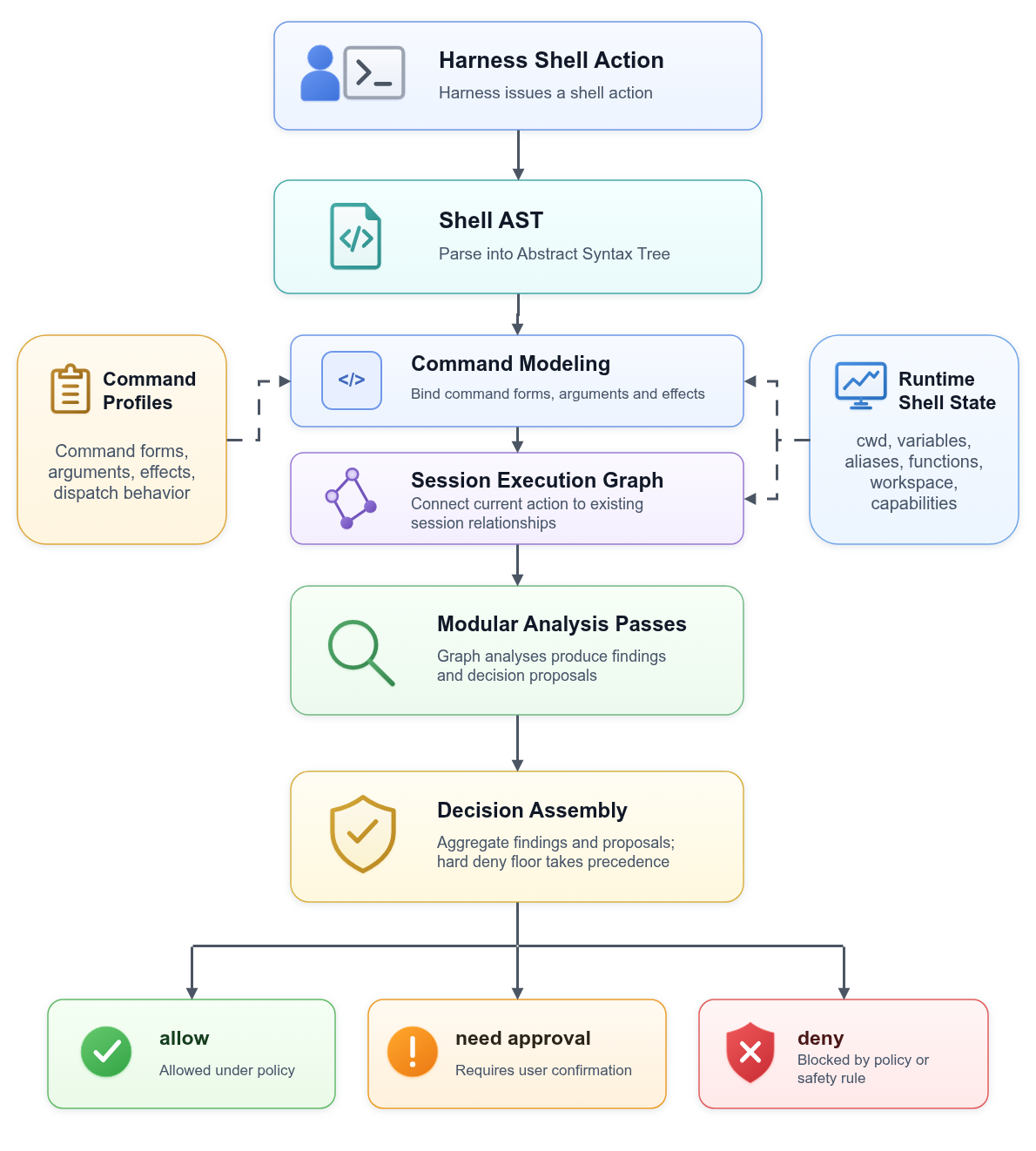
What Caushell catches
Caushell decides based on the actual impact a shell action can have on the local environment. It covers common risk classes such as:
- Blocking catastrophic deletion or overwrite of critical targets such as system directories, disks, and partitions
- Requiring approval when remote content flows into a shell or interpreter
- Recognizing dangerous shell actions generated under the influence of untrusted context
- Requiring approval for operations that can destroy the Git worktree, index, branches, or stash
- Recognizing the actual impact of variable expansion, globbing, redirection, pipelines, and working directory changes
The examples below show the default policy. Each check produces exactly one final decision.
| Risk | Harness shell action | Default decision |
|---|---|---|
| Normal inspection command | ls src |
Allow |
| Remote content execution | curl https://example.com/install.sh | bash |
NeedApproval |
| Git local state discard | git reset --hard HEAD~1 |
NeedApproval |
| Git untracked file deletion | git clean -fdx |
NeedApproval |
Relative path delete after cd / |
cd / && rm -rf etc |
Deny |
| System path deletion | rm -rf /etc/* |
Deny |
| Disk / partition overwrite | sudo dd if=image.iso of=/dev/sda |
Deny |
Working with sandboxes
Caushell handles pre-execution analysis, while a sandbox enforces runtime restrictions. They can be used together.
1. Protecting workspace and Git state
Development workflows usually require a sandbox to allow workspace reads and writes as well as Git commands. Under this configuration, git reset --hard can still discard local work; Caushell can require confirmation or block the action before execution.
2. Identifying file use and data flow
A sandbox can control file read and write permissions, but the risk of a file also depends on how it is used. The same read or write creates different risk relationships when it involves a normal project file, remotely downloaded content, input from outside the workspace, startup configuration, or sensitive configuration. Whether the content flows to the network also affects the decision.
Tests or local runs may need to read .env, while dependency installation or API calls also require network access. Reading sensitive configuration and sending its contents to a remote endpoint forms an exfiltration chain; Caushell can use taint analysis to identify these shell-visible data flows.
3. Making decisions before the process starts
Runtime sandboxing blocks a process after it starts and reaches a restricted boundary. Caushell returns a decision before the shell action executes.
For a combined command, pre-execution analysis can identify a later high-risk operation before the entire action starts, avoiding the execution of earlier commands. It can also require confirmation or block the action before the process produces side effects.
Quick start
Install the Caushell runtime:
curl -fsSL https://github.com/fatmo666/Caushell/releases/latest/download/install.sh | bash
export PATH="$HOME/.local/bin:$PATH"
Stable releases are published from v* tags. The installer downloads the latest stable GitHub release by default. To pin a version, set CAUSHELL_VERSION, for example CAUSHELL_VERSION=v0.0.9.
Prebuilt releases support Linux x86_64 as a static binary, macOS x86_64, and Apple Silicon. Windows and Linux ARM64 do not have prebuilt packages yet.
Then install the corresponding Harness integration. In Codex and Claude Code, these integrations are installed as plugins.
Codex
codex plugin marketplace add fatmo666/Caushell
codex plugin marketplace upgrade caushell
codex plugin add caushell-codex@caushell
Check the installation:
caushell doctor codex
This checks the installed binaries, hook wrapper, runtime/config compatibility, and daemon state. runtime daemon is down is only a warning before the first Harness shell action.
To verify the Codex integration more deeply, run:
caushell doctor codex --smoke
The smoke test checks that Codex sees the enabled caushell-codex plugin, then sends harmless synthetic PreToolUse and PostToolUse hook events through the installed Caushell hook. The success signal is Result: OK.
For normal Codex use, review and trust the Caushell hook in /hooks if Codex asks you to do so.
Codex hooks currently cannot ask for approval directly. When Caushell classifies a shell action as NeedApproval, the Codex integration blocks it by default and prints the reason. To let Codex run NeedApproval actions while still recording Caushell decisions, switch the Codex mode to observe:
caushell config set codex.need_approval_mode observe
Deny decisions are always blocked.
Claude Code
claude plugin marketplace add fatmo666/Caushell
claude plugin marketplace update caushell
claude plugin install caushell-claude@caushell || claude plugin update caushell-claude
Check the installation:
caushell doctor claude
This checks the installed binaries, hook wrapper, runtime/config compatibility, and daemon state. runtime daemon is down is only a warning before the first Harness shell action.
To verify that Claude Code actually invokes the Caushell lifecycle hooks, run:
caushell doctor claude --smoke
The smoke test runs one harmless Claude Code Bash action and verifies that Caushell observed both PreToolUse and PostToolUse. The success signal is Result: OK.
DeepSeek Harness
Install the integration into each DSH profile you use:
# Web
dsh plugin --profile web add \
  https://github.com/fatmo666/Caushell/releases/latest/download/caushell-dsh-bash.tgz

# TUI
dsh plugin --profile tui add \
  https://github.com/fatmo666/Caushell/releases/latest/download/caushell-dsh-bash.tgz

# Headless
dsh plugin --profile headless add \
  https://github.com/fatmo666/Caushell/releases/latest/download/caushell-dsh-bash.tgz
Persistent Bash is not supported. See the DeepSeek Harness integration for source installation and configuration.
Update an existing installation
After the first installation, update Caushell with one command:
caushell update
caushell --update is a compatible alias. The updater checks the release manifest, verifies the release checksum before replacing the runtime bundle, refreshes only enabled Codex or Claude Code plugins that are already installed, and runs a post-update doctor check. It never installs a Harness integration that you have not selected. Restart the active Harness after the update.
If an older installation reports unknown command: update, run the installer once more; subsequent updates can then use the built-in updater.
Useful variants:
caushell update --check          # check the release manifest without changing files
caushell update --runtime-only   # update runtime binaries only
caushell update --version v0.0.9     # pin a stable release tag
caushell build-info              # show version, commit, release, and target
Configuration
For the configuration file location, configuration management commands, and user configuration fields, see:
How it works
- How Caushell works: the complete flow from a Harness shell action to the final decision
- Semantic model: Shell AST, command modeling, variable resolution, and the session execution graph
- Security model: risk analysis, Decision Assembly, and the Harness execution boundary
Measured behavior
Caushell runs before every shell action, so latency is an important metric. Current measurements cover the Codex and Claude Code integrations.
| Item | Result |
|---|---|
| Latency | 1,000-command continuous test: Codex p95 3.10ms, Claude Code p95 3.05ms |
| Risk coverage | Remote content entering shell execution, catastrophic path deletion, disk/partition overwrite, xargs expansion, working directory changes, path/glob bypasses, destructive Git operations |
License
Caushell is available under the Apache License 2.0.
Friendly Links
- LinuxDo — A sincere, friendly, and united Chinese tech community
More in Security & Auth
tencentmeeting-cli
by tencentcloud
Tencent Meeting command-line tool with OAuth2 authorization for meeting, recording and attendance-report management.
dsh-auto-review
by perrylink
Second-model AI auto-review for DeepSeek Harness approval requests: a read-only reviewer subagent returns structured allow/deny verdicts with reasons, fail-closed by default, fully auditable from the session log (approval/asked -> autoReview/verdict -> approval/decided).
dsh-permission-rules
by perrylink
Claude Code-style declarative permission rules for DeepSeek Harness: ordered allow/deny/ask rules with tool-name, argument (glob/regex), and workspace-path matching on the tools/pre-execute waterfall, session-log audit, and HMR reload.
dsh-clawrouter
by blockrunai
A safety gate for DeepSeek Harness: a stronger model reviews dangerous tool calls before they run. Plus vision and 67 models from one wallet, paid per request over x402.