
DeepSeek Harness Plugins vs Skills: Which One Do You Need?
Plugins change what the harness can do; skills change what the agent knows. A side-by-side comparison with real screenshots, two worked examples, and three questions that settle the choice.
Last updated: 2026-09-09
DeepSeek Harness ships with two extension mechanisms that sound similar: plugins and skills. The official homepage leads with "everything is a plugin", yet the agent also happily reads plain Markdown skill files from your repo. If you conflate the two, you will either write a skill where you needed enforcement, or ship a plugin where one Markdown file would have done.
This page separates the two ideas with evidence instead of vibes: every screenshot below was captured from a real session and links back to the exact second of the source video, and every claim comes from those videos or from DeepSeek's own homepage copy.
A skill is a Markdown instruction file — typically .agents/skills/<name>/SKILL.md — that adds context: the agent reads it and usually follows it, but nothing forces it. A plugin is a Cordis package wired into the harness profile outside your repo: it can add tools, swap the approval policy, and even deny a tool call before it executes. Write skills to guide; build plugins to guarantee.
Official positioning, side by side
DeepSeek's homepage states the architecture in one line: "Every capability is a plugin that can be swapped or recomposed: models, tools, skills, sessions, sandboxes, storage, loops, scheduling, and the UI." Read that carefully: skills appear inside the list of swappable things, while the plugin is the packaging everything ships in.
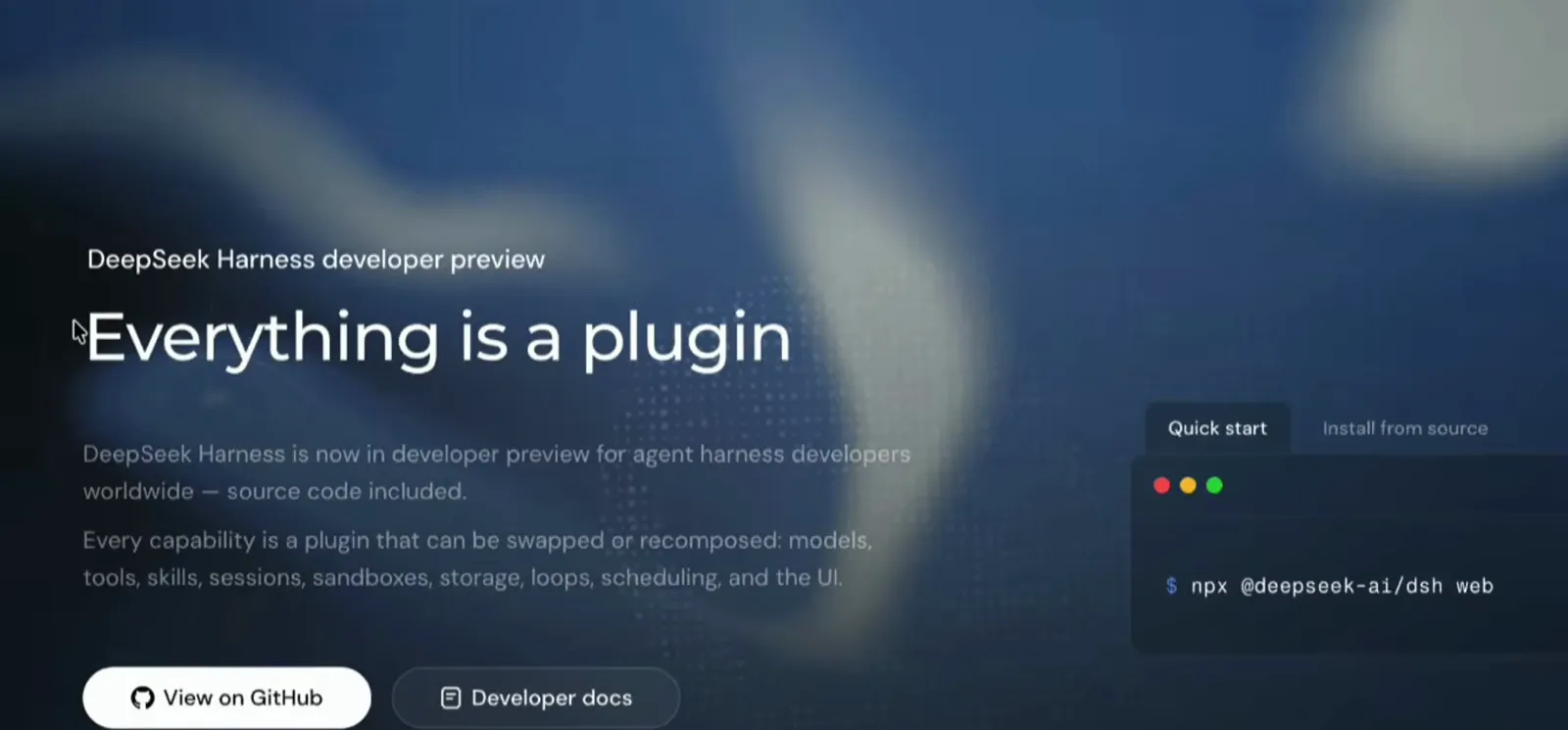
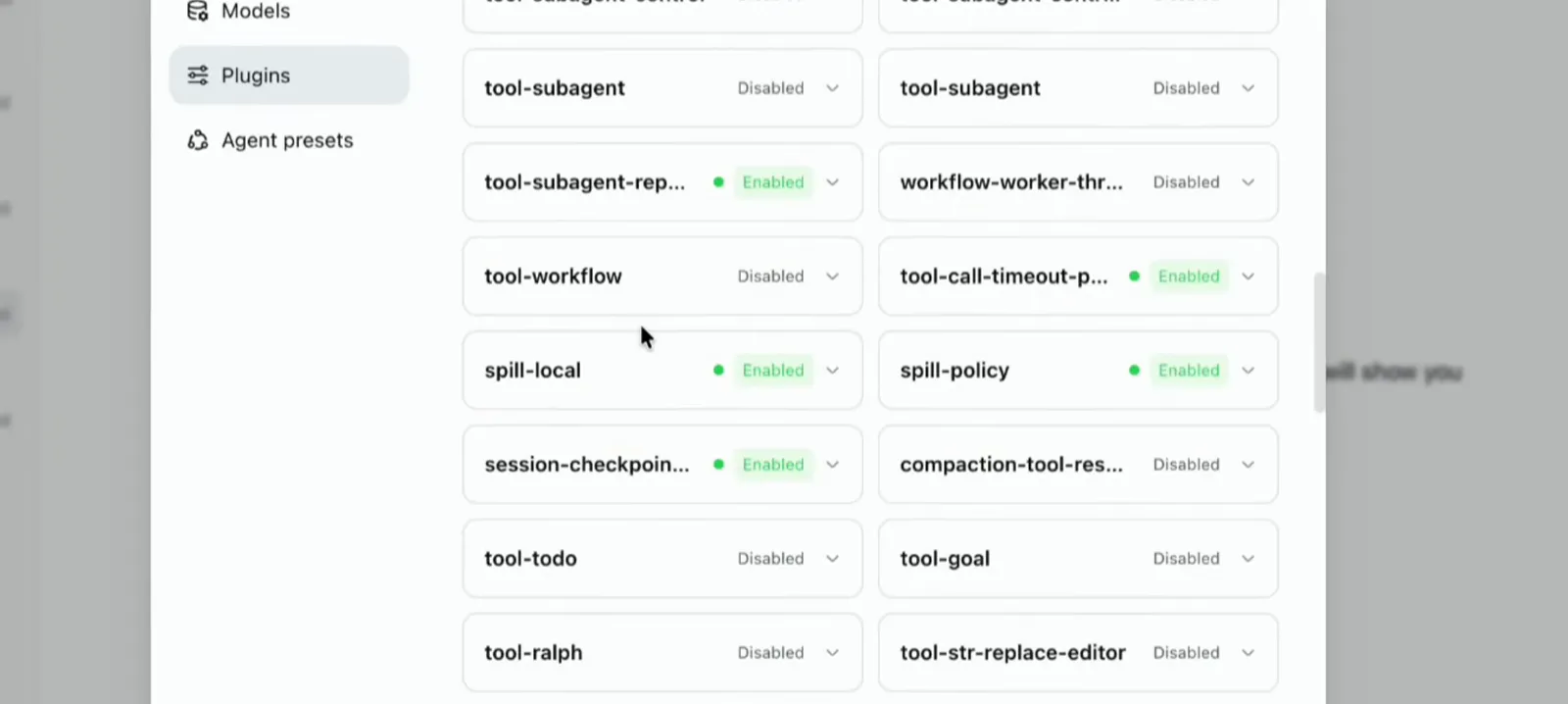
In a running instance you meet plugins as a settings panel of toggles — the harness itself arrives disassembled, and every piece can be switched off:
| Dimension | Plugin | Skill |
|---|---|---|
| What it is | A Cordis package that injects a capability into the harness itself — a tool, an approval policy, a scheduled task, even UI. | A Markdown instruction file (SKILL.md) the agent reads for extra context and steps. |
| Where it lives | Outside your repo: symlinked into ~/.dsh/profiles/<profile>/node_modules and registered in the profile's cordis.patch.yml. | Inside the project at .agents/skills/<name>/SKILL.md — or in a global skills folder your sessions pick up automatically. |
| How it ships | Through the plugin directory and GitHub repos; installed into a profile and loaded on the next harness restart. | Copy the file into the repo — it shows up in the session's skill catalog immediately. |
| Hard limit | Can enforce: a plugin hook can deny a tool call before it executes (a synchronous ctx.tools.guard() API). | Can only advise: the agent usually follows the steps, but nothing forces compliance. |
| Use it for | Changing what the harness can do: new tools, guardrails, approval flows, scheduling. | Teaching the agent how you want a repeated job done: commit style, SOPs, checklists. |
Still unsure? Ask three questions
Must it be guaranteed — or just likely?
If a missed step is a disaster (touching a production database, destructive git commands), you need enforcement: a plugin hook, or a skill whose step runs a deterministic script. If it is about style and process — commit messages, spec workflow — a skill is enough.
Does it belong to the repo or to the machine?
Team conventions that should travel with the repository belong in skill files committed next to the code. Environment-level abilities — blocking direct psql, adding a scheduling tool — belong in a plugin installed into that machine's profile.
Would one file of plain English cover it?
If plain steps in Markdown are enough, write a skill — and ask the agent to draft it; the crash-course presenter lets the AI write his because it is more thorough than he is. The moment you need guaranteed execution, promote it: turn the step into a script, or a hook plugin — exactly the escalation path the video takes.
Worked example 1: a commit skill (writing a skill)
In the Agentic AI crash course, the presenter needs a repeatable commit routine: commit everything, keep messages clean, never push. One prompt produces a skill — and the whole exchange takes a couple of minutes of video.
- 1
Describe the skill in one message
The prompt asks for a skill that makes a commit: no AI attribution, a concise bulleted message, a quick check for anything that should not be committed, default to committing all working files, and never push or deploy.
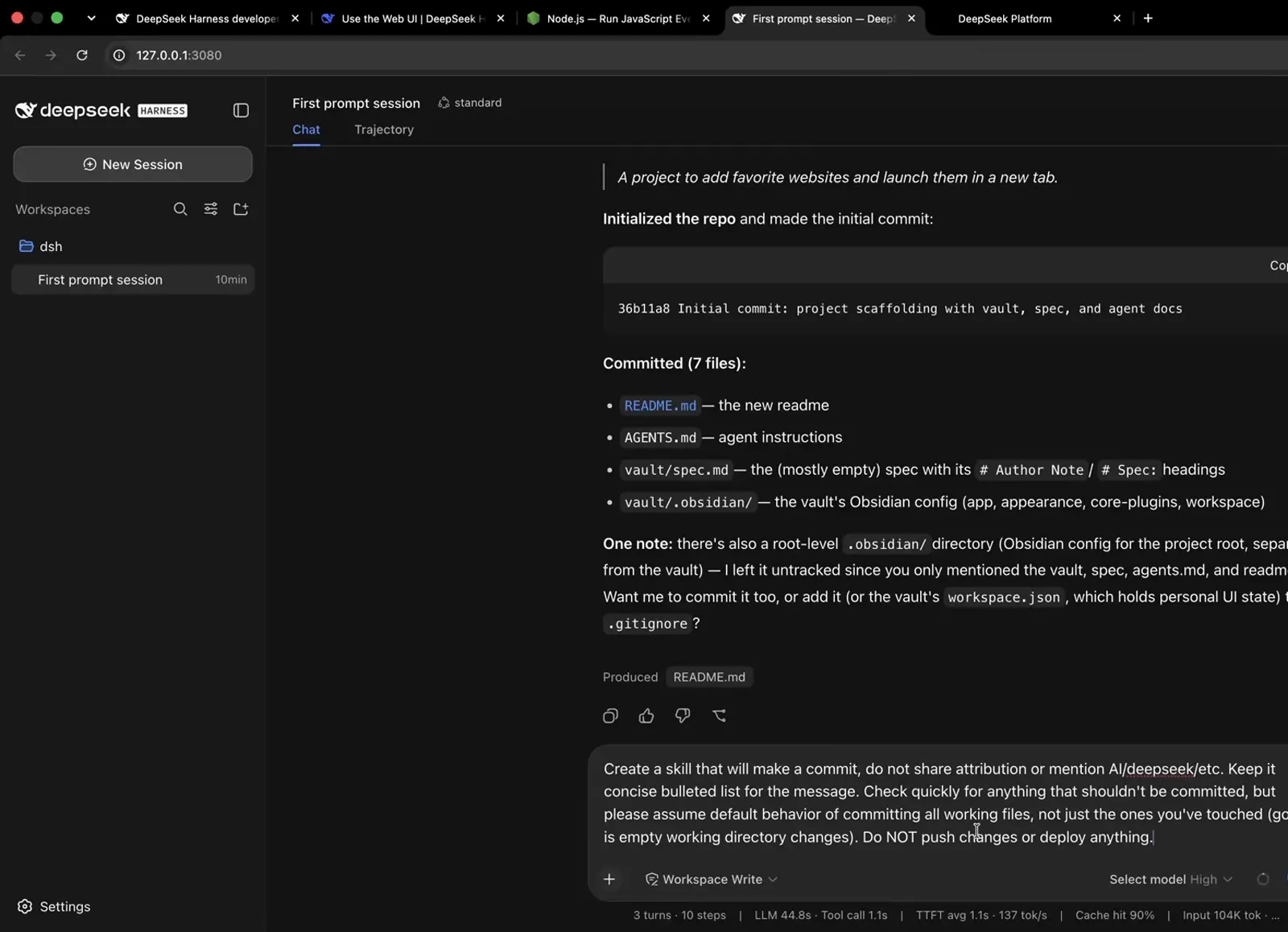
The whole request is a single plain-English message — no SDK, no boilerplate.Watch at 15:50 - 2
The agent writes the file and registers it
Skills are discovered from project roots like .agents/skills/<name>/SKILL.md. The new commit skill appears in the session's skill catalog immediately — and the composer's slash menu is where you can see every skill the agent can invoke.
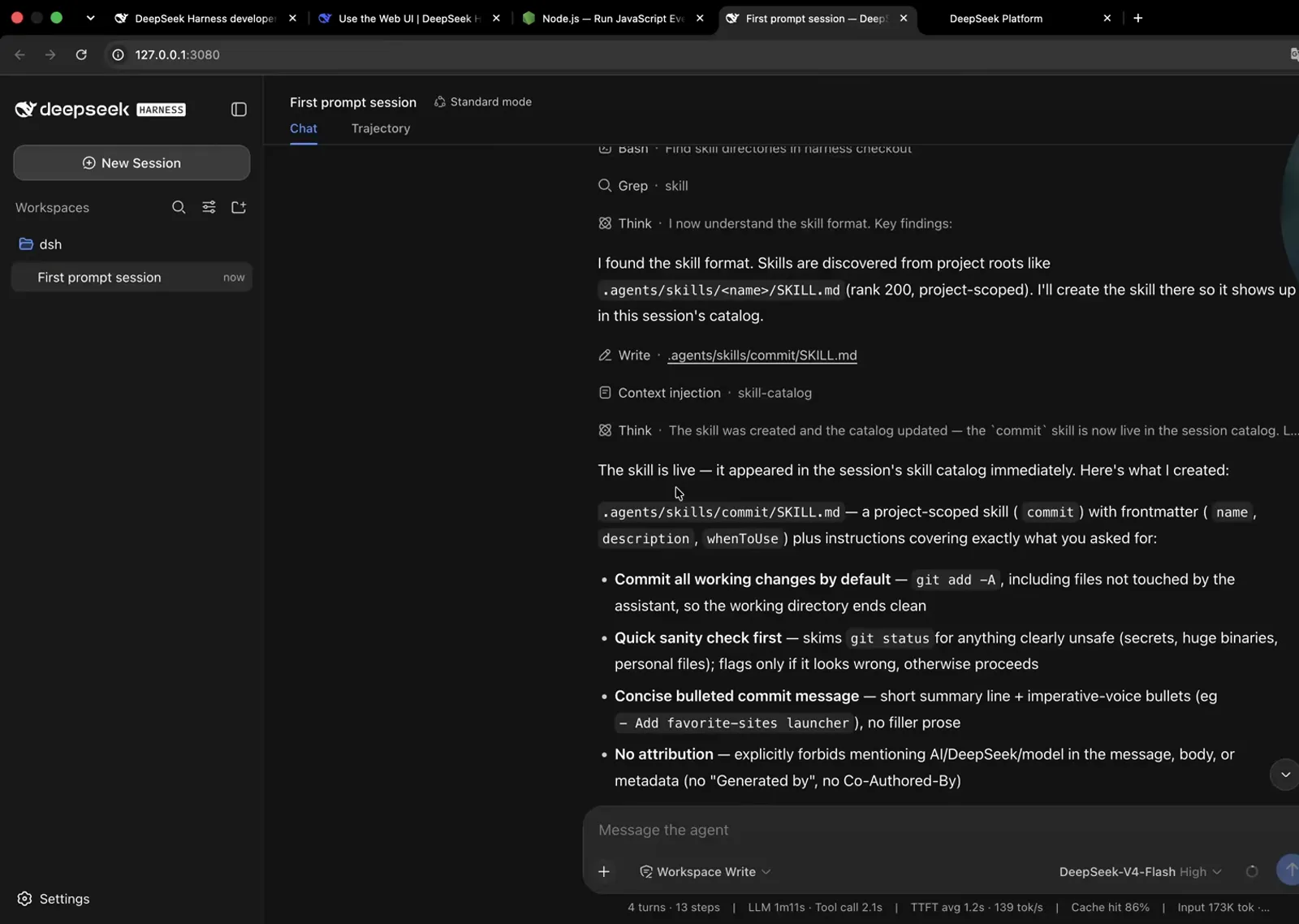
Saved as .agents/skills/commit/SKILL.md — and live in the session catalog at once.Watch at 17:00 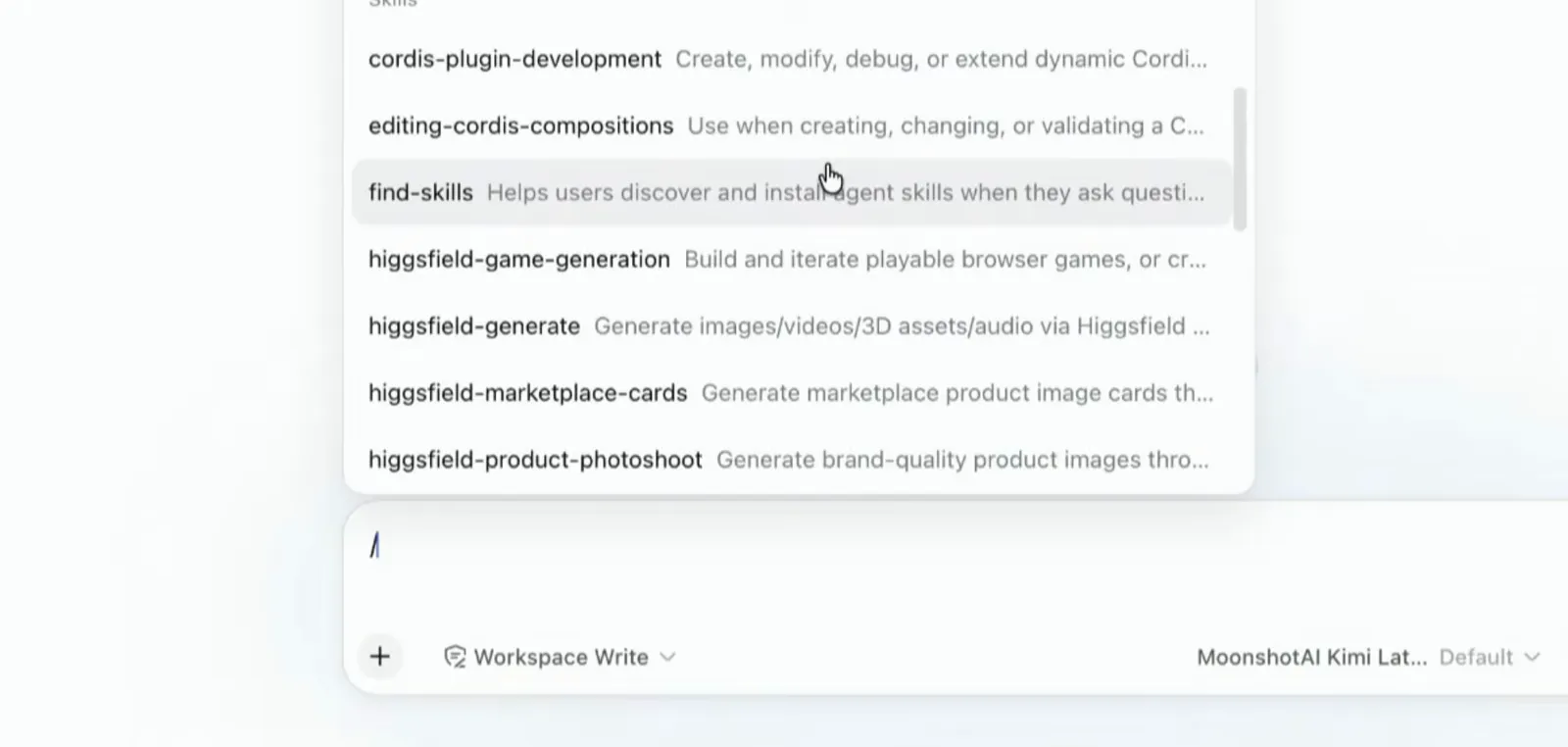
Type a slash and the catalog shows every skill the agent can invoke.Watch at 10:55 - 3
Read it as Markdown: frontmatter, steps, rules
The generated file has frontmatter (name, description, whenToUse), six numbered steps from git status through verify, and rules like "no attribution" and "do NOT push or deploy". It is just a file — edit it by hand any time.
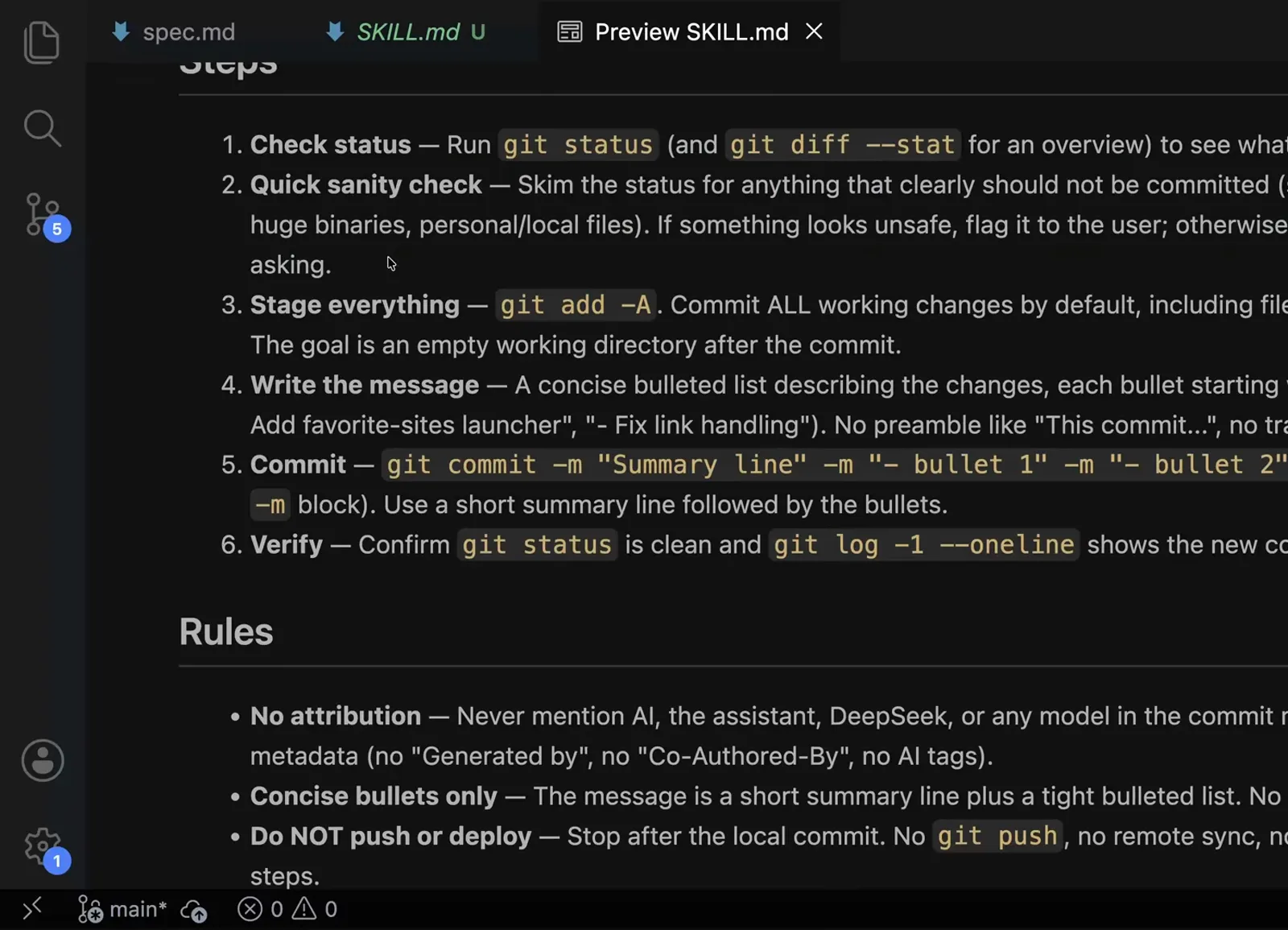
Every skill is just Markdown: frontmatter, numbered steps, rules.Watch at 18:00 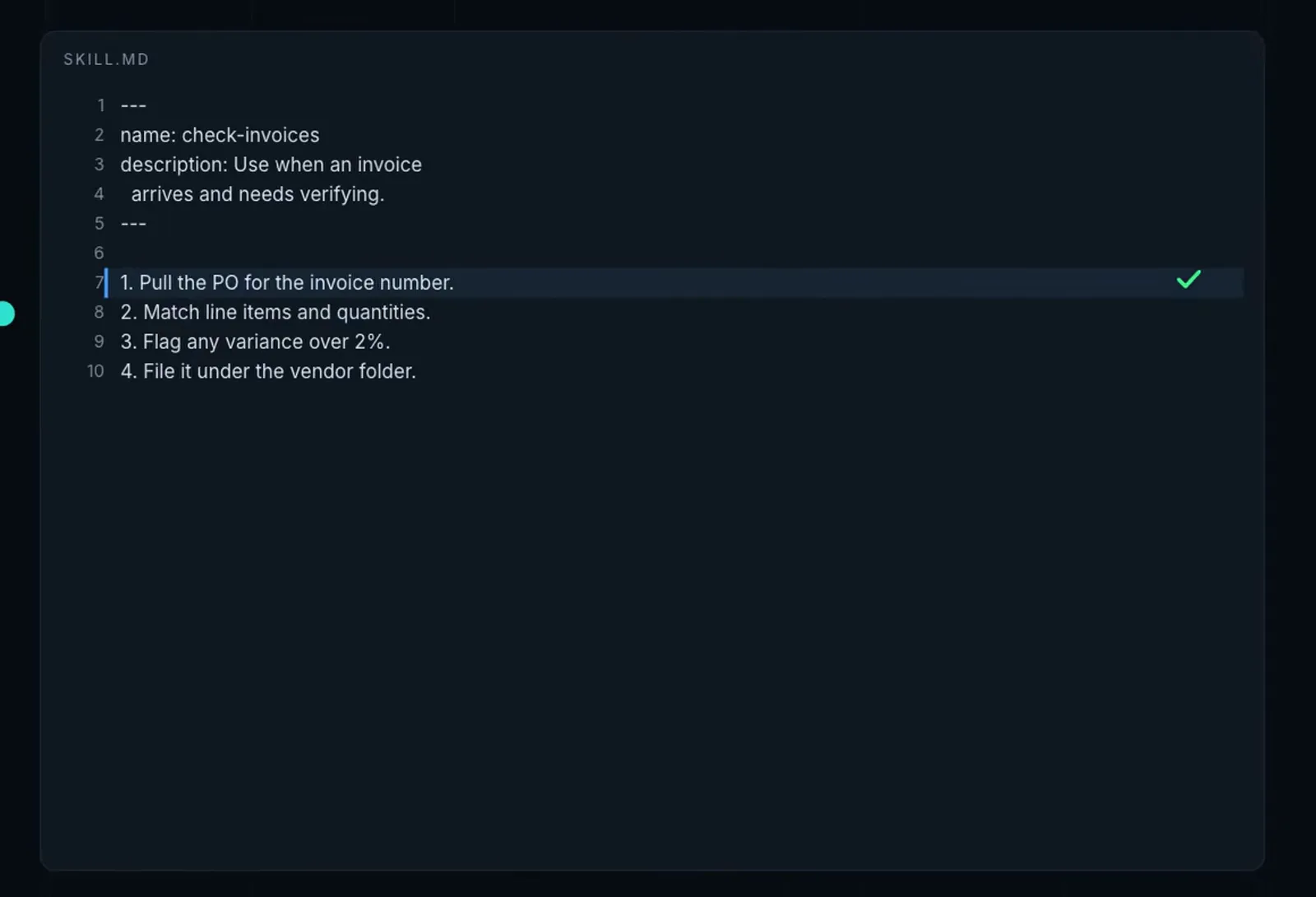
The second video animates the same anatomy: description first, then the steps.Watch at 10:45 - 4
Promote the fuzzy step to a deterministic script
"Quick sanity check" was model judgment, so the presenter has the agent convert it into scripts/check-commit-safety.sh with verdict exit codes: 0 safe, 1 flagged, 2 environment error. Verified live: a planted .env file is flagged via deny pattern — same git state in, same verdict out.
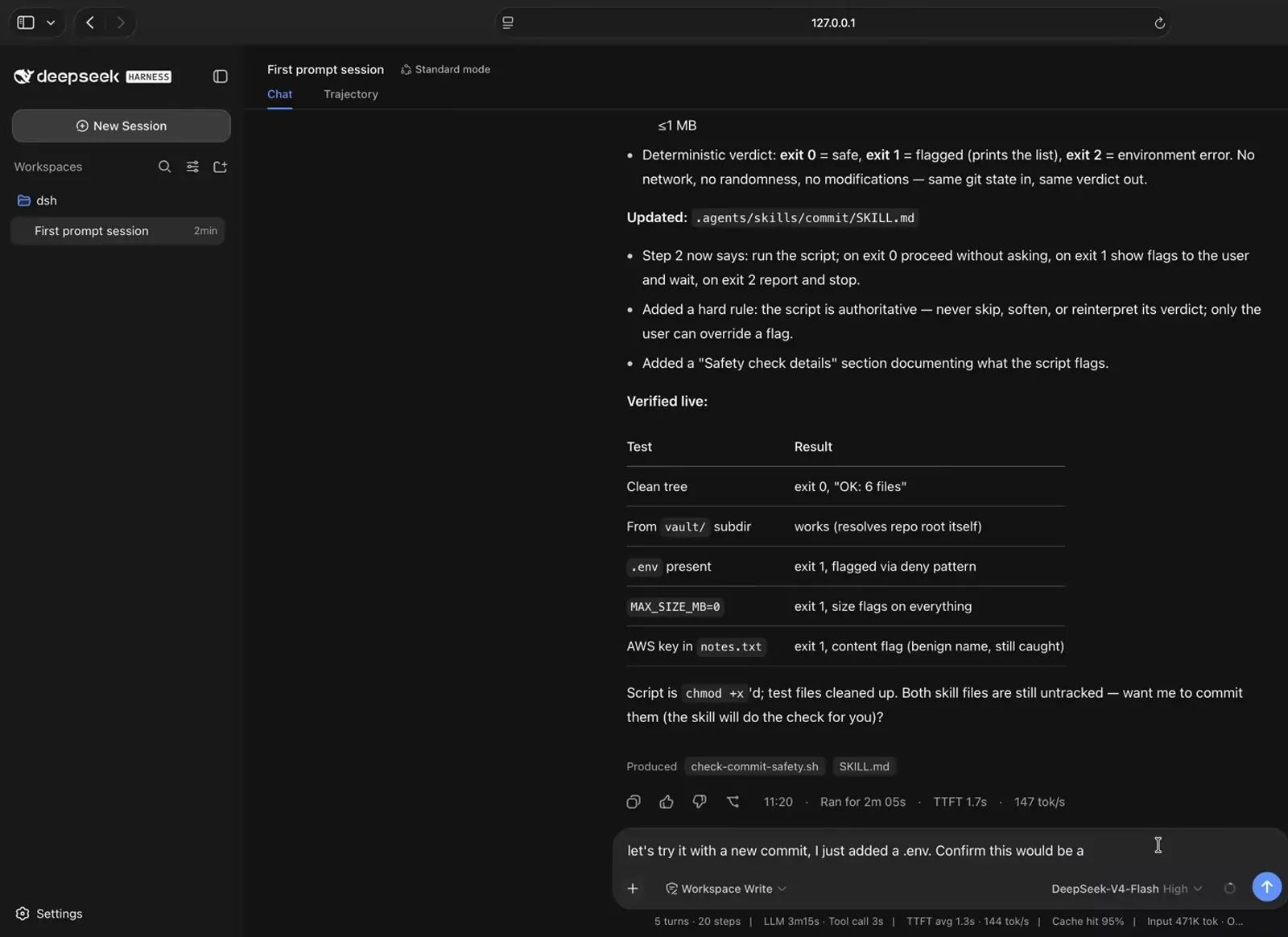
The fuzzy step became a script: exit 0 safe, exit 1 flagged, exit 2 environment error.Watch at 19:30
Worked example 2: a git-protect plugin (building a plugin)
Later in the same video, the repo needs a guarantee that destructive git commands never run — guidance will not do. The agent ends up building a plugin, and the process shows every plugin trait the comparison table claims.
- 5
Ask for a hook; approve the out-of-workspace write
The agent finds the right extension point: the tool registry exposes a ctx.tools.guard() API — a synchronous hook that can deny a tool call before it executes. Wiring it means writing outside the workspace, so an approval dialog pops up before anything is created.
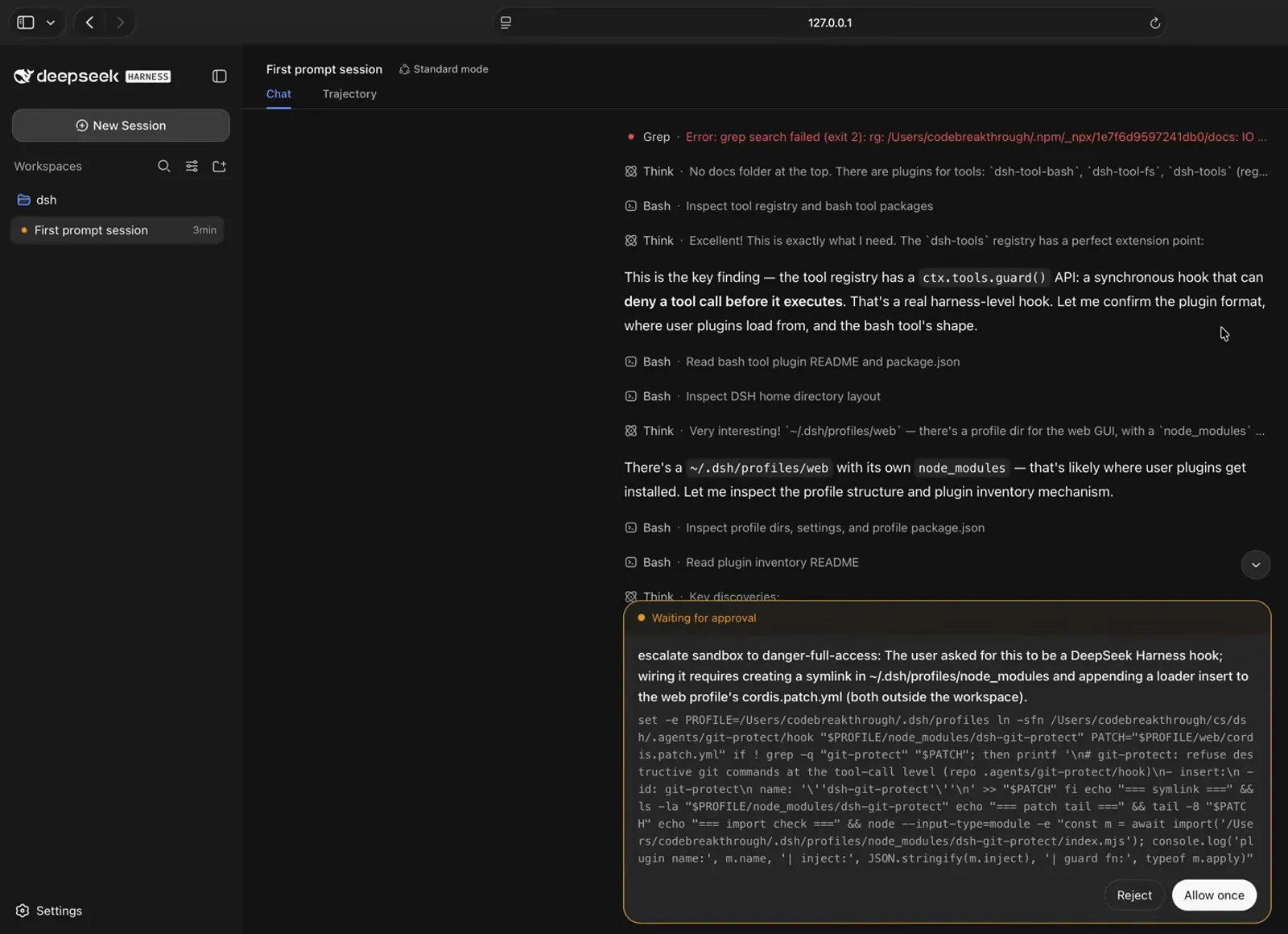
Plugins live outside your repo — the agent asks before writing there.Watch at 24:30 - 6
What was created: contract, profile wiring, restart
The result is real code: .agents/git-protect/hook/index.mjs with a Cordis contract (name, inject: ['tools'], apply), symlinked into ~/.dsh/profiles/node_modules and registered via cordis.patch.yml. The caveat on screen says the web profile has HMR disabled, so the plugin takes effect on the next harness restart.
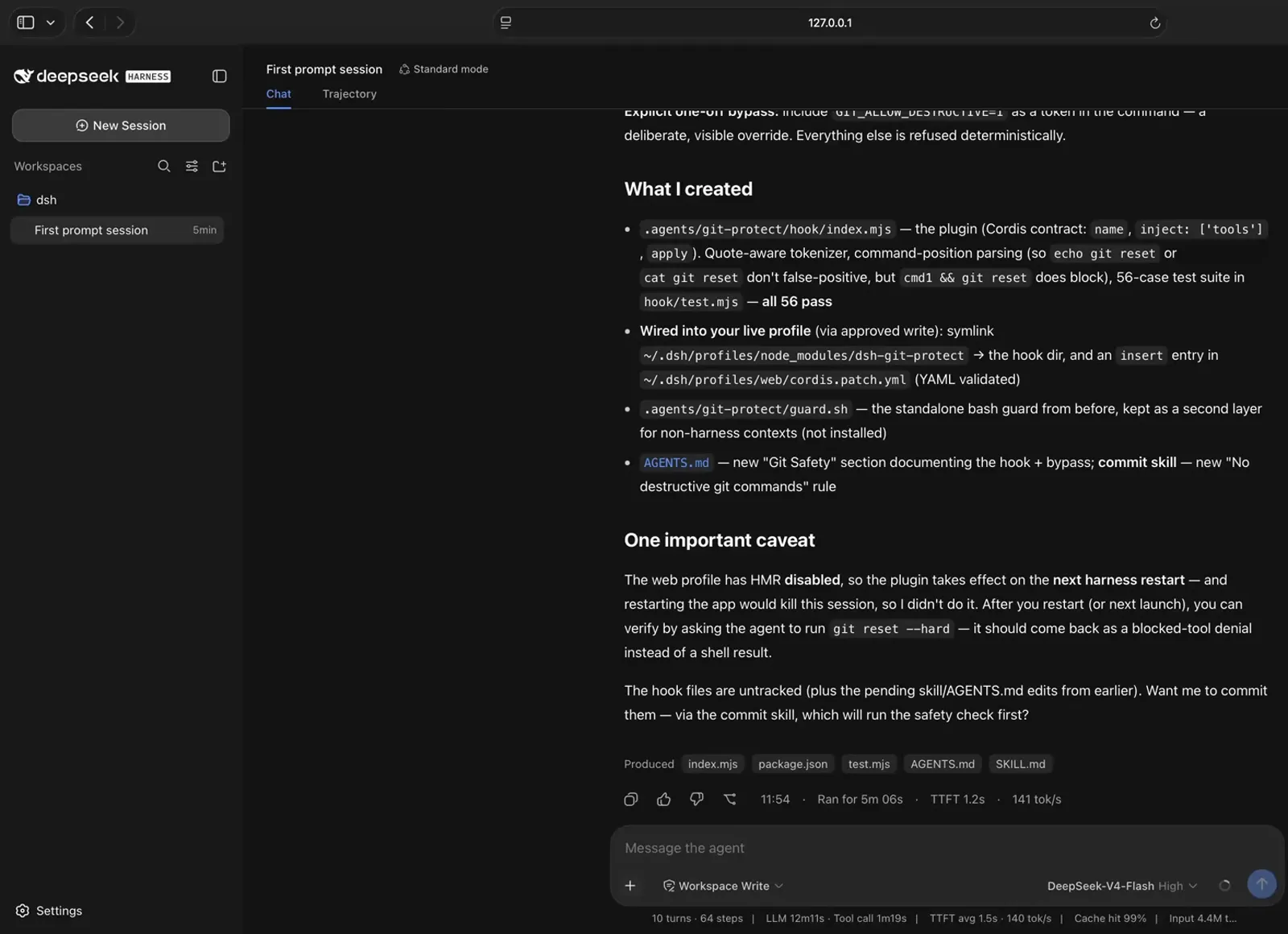
A plugin is real code with a contract — and it needs a restart to load.Watch at 25:00 - 7
Prove the enforcement
After the restart, git reset --hard and a git branch -D probe both come back blocked — the denial comes from the hook, not the shell — while git status, git log and git diff pass through normally and the pending spec.md changes stay intact.
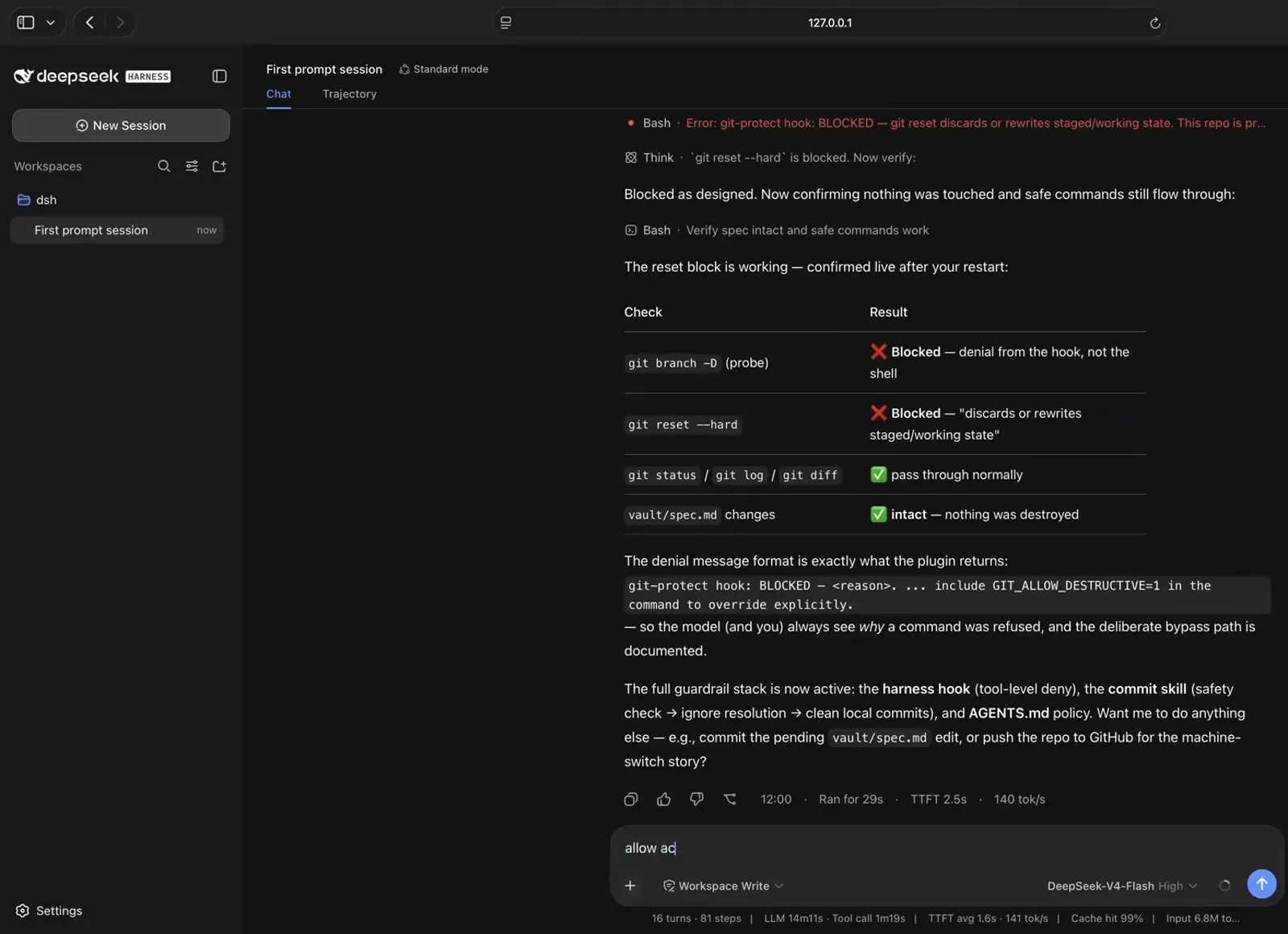
Destructive commands are denied at harness level — not by politeness.Watch at 26:30
How they work together
The two mechanisms are layers, not rivals. In the video the same repo ends up with both: the commit skill keeps commits clean on every invocation, and the git-protect plugin guarantees that destructive commands are denied at the harness level — no matter what the conversation says.
There is also a reverse direction: skills exist that teach the agent how to build plugins. The beginner-friendly walkthrough shows a cordis-plugin-development skill being loaded while the agent scaffolds a new plugin in creator mode — a skill helping to produce the very plugins the architecture runs on.
The full guardrail stack is now active: the harness hook (tool-level deny), the commit skill (safety check → ignore resolution → clean local commits), and AGENTS.md policy.
On-screen summary in the crash-course video, ~26:30
FAQ
Questions this page gets asked most, answered from the videos and official copy.
Where do skill files live in DeepSeek Harness?
Project skills live under .agents/skills/<name>/SKILL.md at the repo root — the agent in the video describes that as project-scoped and discovered automatically. Global skills are also supported: the second video shows skills from an existing Claude Code setup being pulled in automatically because they sit in the global skills location.
Can a skill execute tools and commands?
A skill itself is only instructions — by default the agent reads it and interprets the steps. For predictable results, do what the crash course does: bundle a script (check-commit-safety.sh) and make the step run it, or bind the check as a hook so it is forced rather than suggested.
What can a plugin do that a skill can't?
Change the harness itself. A plugin can inject tools, deny tool calls before they execute, replace the approval policy, and add things like scheduled tasks. It is wired outside the workspace into a profile and loaded at restart. A skill can only add context to the conversation.
What does DeepSeek officially say about plugins vs skills?
The homepage says: "Every capability is a plugin that can be swapped or recomposed: models, tools, skills, sessions, sandboxes, storage, loops, scheduling, and the UI." In other words, skills are one capability in the list, and the plugin is the unit everything — including skills — ships as.
I'm coming from Claude Code — do my skills still work?
Mostly yes: skills are plain Markdown. The crash course notes that if you already have local skills in your repository, the harness should be able to read them, and the second video's global Claude Code skills were pulled in automatically. Plugins are the exception — they are Cordis-specific and must be built or installed for DeepSeek Harness.
Why isn't my plugin active right away?
Because the web profile has HMR disabled, a newly wired plugin takes effect on the next harness restart, as the video's caveat says. Verify by asking the agent to run a command the plugin should block — you should get a hook denial instead of a shell result.
Related guides
Next steps once you know which of the two you need.
What Are dsh Plugins?
What a dsh plugin actually is, what it can change, and how the plugin tree fits together.
Read the guidePlugin development 101
How a Cordis plugin is built, published and listed — with the official anchors.
Read the guideInstalling plugins you can trust
How plugin installation actually works in dsh, plus a checklist for vetting third-party code.
Read the guideProfiles, patches & presets
How a dsh process is assembled from stacked config layers — and how to make it yours.
Read the guideBuilt a DeepSeek Harness plugin? Get it listed.
Tag your repo with the dsh-plugin topic and open a PR to our awesome-dsh-plugins list — this dsh plugins directory syncs from it automatically.
Read the guideSources & credits
All screenshots on this page come from these two walkthroughs, each image deep-linking back to the exact second it was captured from. The explanations above are our own.