
Teach dsh to draw: img2img-studio install and multi-channel image generation
What the img2img-studio Agent Skill draws, how to install it and its settings panel, how the MiniMax fallback chain and ChatGPT web-account quota work — a 12-step field recording by the plugin's own author.
Last updated: 2026-10-04
Can dsh draw pictures? Yes — hand it the img2img-studio Agent Skill and it generates through API channels and ChatGPT web accounts. This page is a 12-step screenshot field recording of the plugin author's own 295-second demo (he bills it as replicating the Codex image experience inside dsh): install the skill and its settings panel, read the MiniMax fallback card, line up free web quota, then generate, inpaint, and re-edit a poster without leaving the chat. Every frame was checked against the source recording's watermark, burned-in subtitles, and taskbar before export.
This page is the drawing track. If you want dsh to look at images instead — describing, extracting, recognizing — that is the companion vision skill's job, covered step by step in the image recognition guide. dsh image recognition walkthrough
TL;DR
- ▸img2img-studio is an MIT Agent Skill (★5) by GitHub user Dogwind221: L1 vision, a Step-0 routing gate (channel, style, detail needs), then multi-provider generation. Node.js 18+ is the only hard requirement; the core script has zero third-party dependencies.
- ▸Channels cascade: ChatGPT web accounts draw first (free tier included), codex-cli carries your own subscription, then the API chain — DashScope by default, with MiniMax, Z.AI, Seedream, and OpenAI-compatible endpoints behind it. Quota errors never retry; the chain just moves on.
- ▸Free quota is a first-class citizen: the panel tracks each web account's tier (Free/Plus/5x/20x) with a rolling 24-hour ledger. The video's own account reads quota 3 with zero used; the narrator estimates roughly five free web images a day — his figure, time-sensitive.
- ▸Editing happens in chat: paste a reference (a JSON chip rides along), ask, mark up the result in the inpaint editor, and re-edit the demo poster — every screenshot below deep-links back to the author's recording.
The 12-step walkthrough
Install: from the author's GitHub into dsh
- 1
Meet the author's GitHub before you install
The video opens on the GitHub home of Dogwind221 — the account behind the Bilibili channel Dogwindi (same person, two names; the skill lives at img2img-studio, and no "dsh-image-studio" repository exists). Two repos matter here: img2img-studio (★5, MIT, TypeScript, pushed 2026-09-17 per the 2026-10-04 API check) and the companion dsh-vision-skill (★1) that lends sight to text-only models. The live repo description is longer than most summaries quote: a "图生图工作室 Agent Skill" covering L1 vision, the Step-0 routing gate, multi-provider generation, e-commerce sets, and photo-art with zine styles.
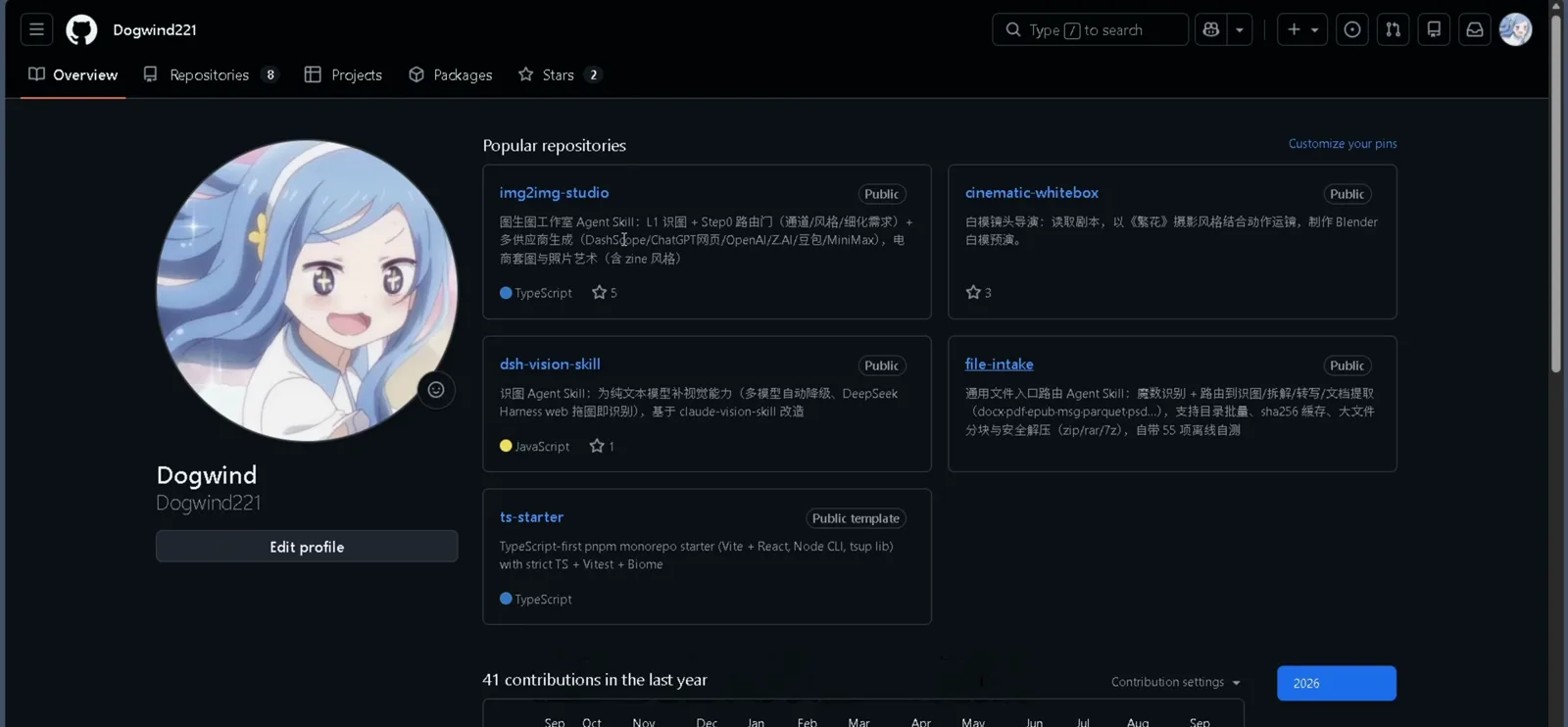
The plugin author's GitHub profile — both repos this guide uses live under one account.Watch at 1:00 - 2
Install the skill: drag it in or copy it to the skills folder
The recording shows the field-tested path: the repository lands in dsh's file-cache dialog and installs from there. The README (verbatim below) documents the manual equivalent — copy the folder into your agent's skills directory. Node.js 18+ is the only requirement, and the generation script itself carries zero third-party dependencies.
$Copy-Item -Recurse -Force "img2img-studio" "$env:USERPROFILE\.agents\skills\"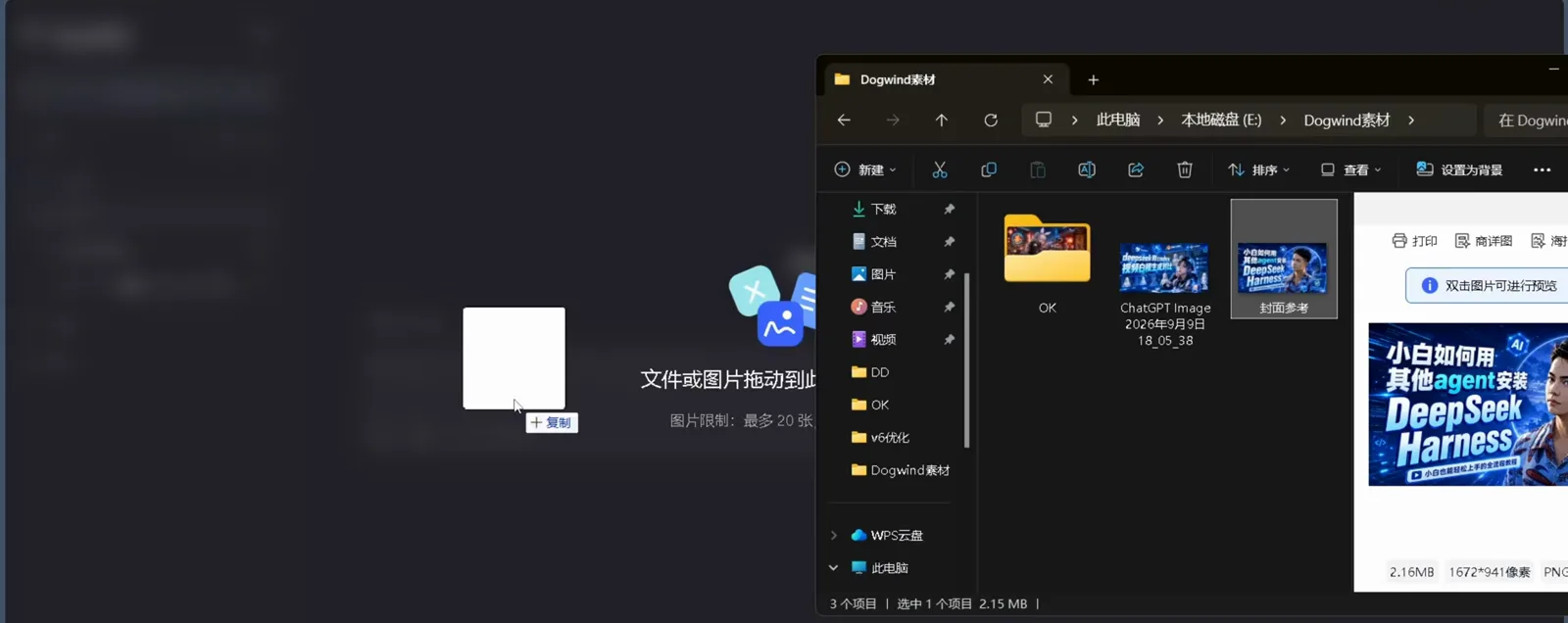
Drag the repo into dsh and the file-cache dialog takes over — install without touching a terminal.Watch at 0:24 - 3
Add the bundled plugin for the panel and the editor
The skill already works from a terminal, but the settings panel and the inpaint editor you will meet in this guide come from the bundled dsh-img2img-config plugin — "one package, two faces," in the README's words. The release note pinned in the chat (this frame) writes out the clone-and-assemble steps, and the README's exact sequence is below.
$$plugin = "$env:USERPROFILE\.agents\skills\img2img-studio\plugins\dsh-img2img-config"$node "$plugin\scripts\build.mjs"$dev_install_package "$plugin"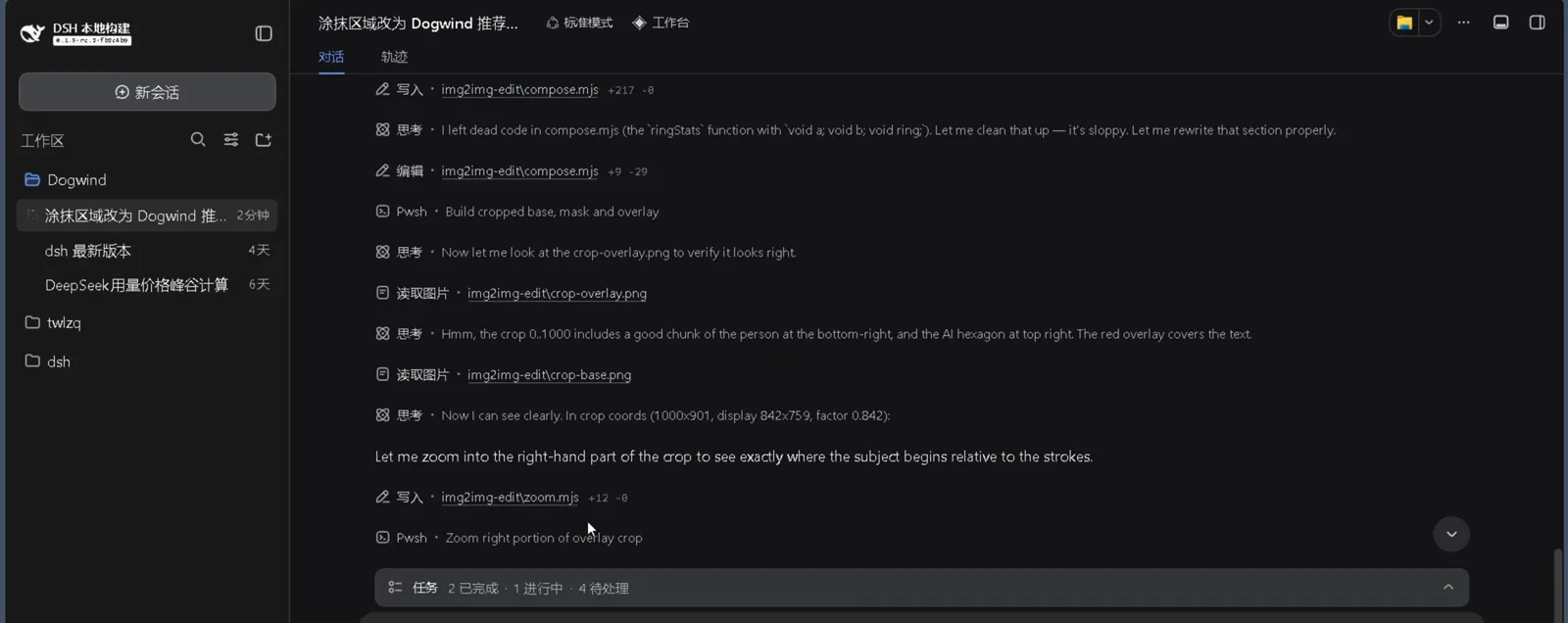
The author's own install note, pinned in chat: clone the repo, build the bundled plugin, assemble it into the profile.Watch at 4:24
Configure: the vision-and-image settings panel
- 4
Find Settings → 识图与生图 (Vision & Image)
In the dsh webui the recording uses (127.0.0.1:3080, a local build), Settings opens a modal with two stacked sections: 识图器 (dsh.vision.skill) for looking at images and 生图模块 (img2img.studio) for drawing them. This frame catches the top of that modal with the Enabled status segments — proof that step 3's optional plugin registered both of its faces.
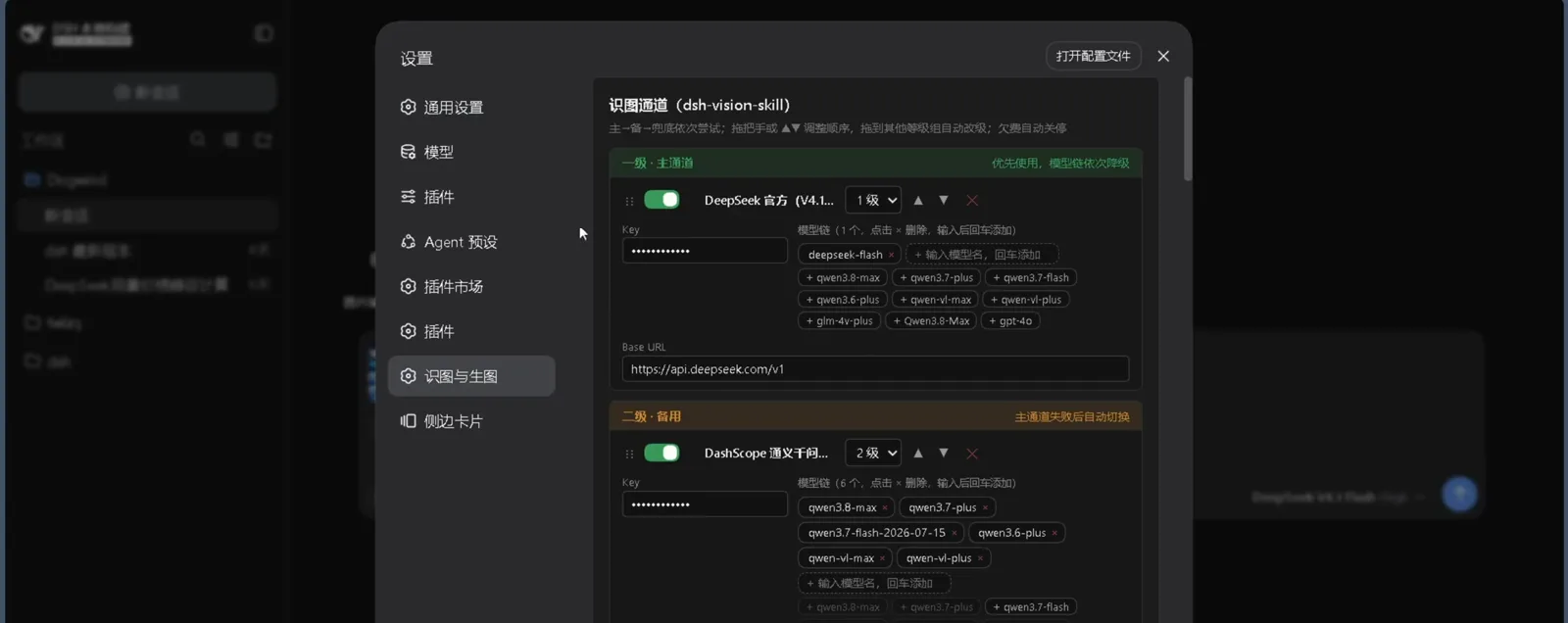
Settings → 识图与生图: the vision skill and the generation module each get a status segment.Watch at 1:46 - 5
Read the MiniMax card: fallback badge, model chain, Base URL
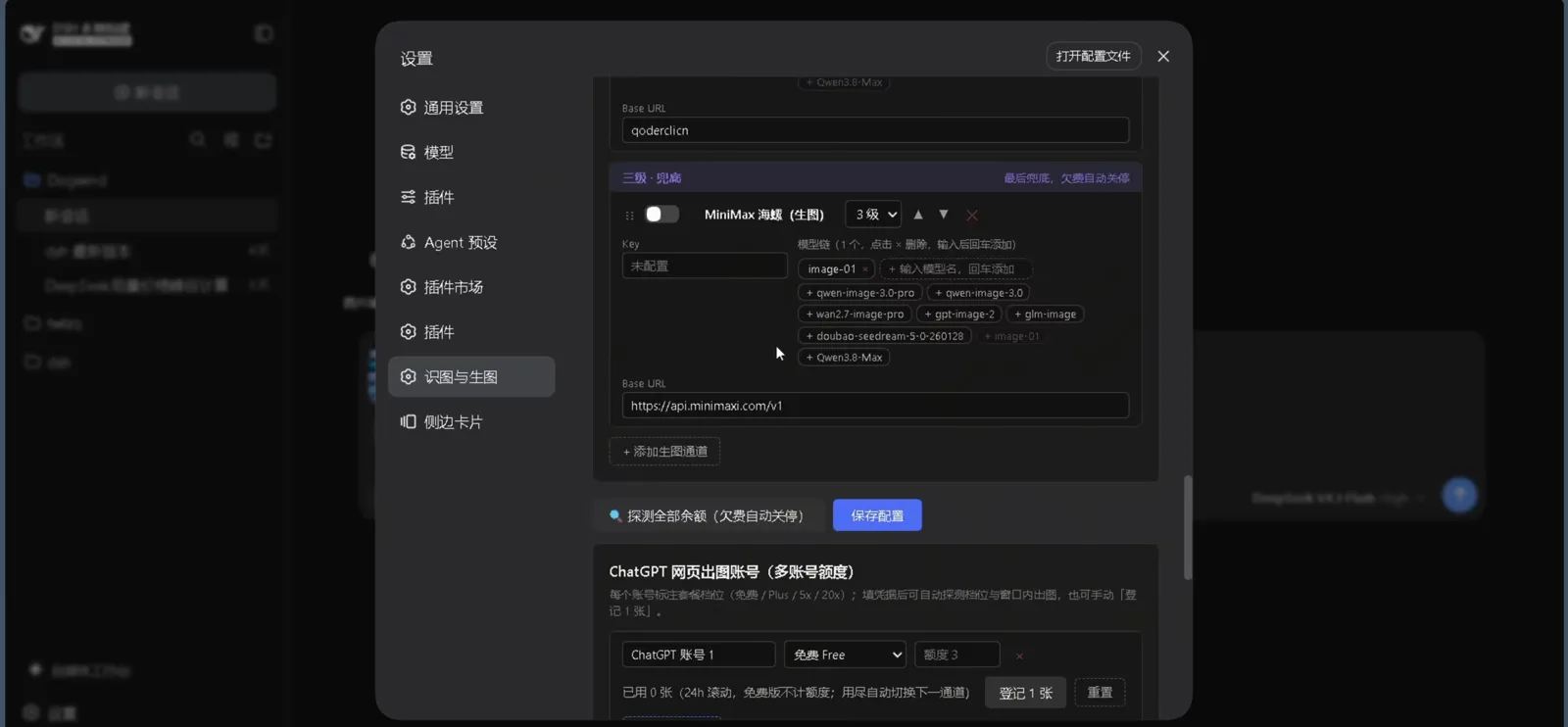
The hero frame deserves a slow read. The author's MiniMax Hailuo card carries a purple "三级·兜底" badge — the last resort of his chain, set to shut itself off when the account runs dry — plus an inline key-not-configured hint. Its model chain strings eight chips together: image-01, qwen-image-3.0-pro, qwen-image-3.0, wan2.7-image-pro, gpt-image-2, glm-image, doubao-seedream-5.0-260120, and Qwen3.8-Max. Chips delete with a click on ×, new ones join by typing and pressing Enter, the Base URL points at api.minimaxi.com/v1, and "+ 添加生图通道" grows the panel with another card.
Last in line, first to be switched off when it owes money: the fallback philosophy in one card.Watch at 2:30 - 6
Probe balances, then save — the panel writes your .env
Two controls close the panel: 探测全部余额 (probe all balances, with the debt-auto-shutdown note baked into the label) and 保存配置. Saving is not cosmetic: per the README, the panel writes GEN_PROVIDER_ORDER, the provider keys, and IMG_CHATGPT_WEB_ACCOUNTS straight back into the skill's scripts/.env, and the vision settings into the vision skill's own .env — either skill can live without the other.
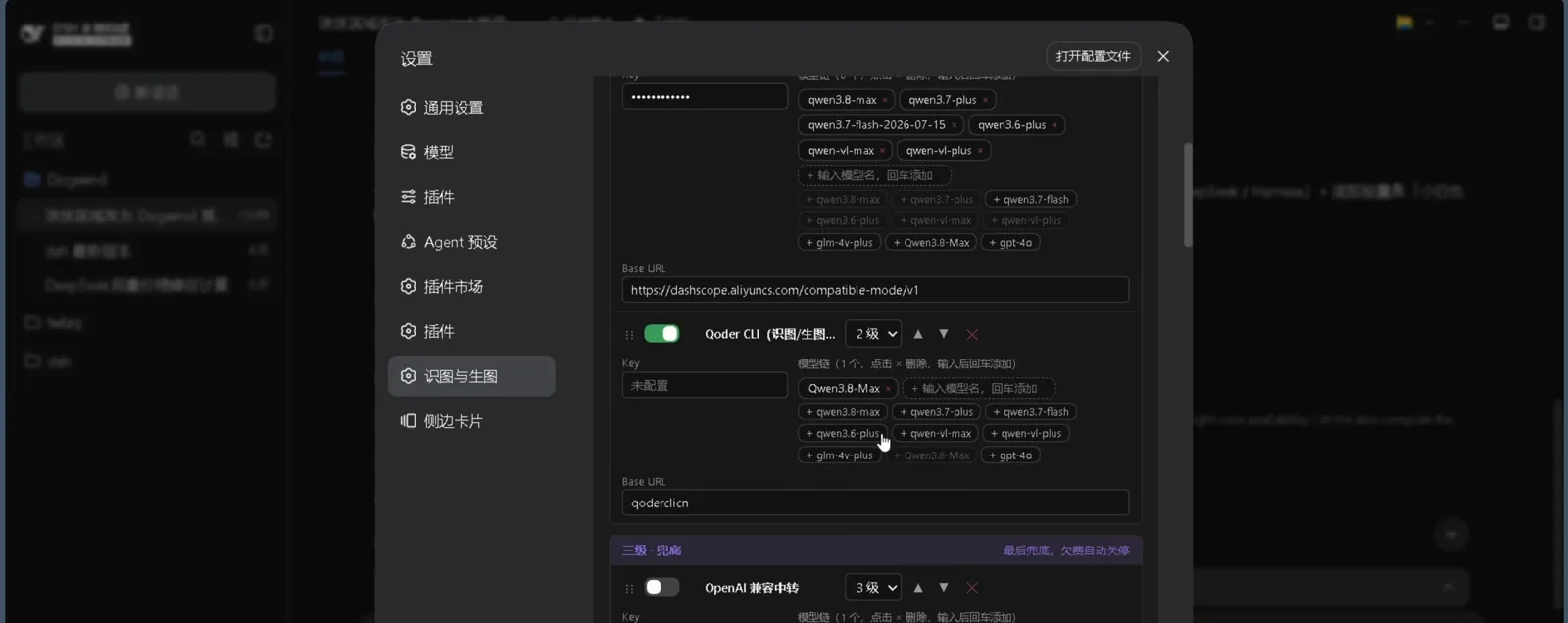
Probe every balance once, then save — the panel writes the order and the keys back into the skills' .env files.Watch at 3:56 - 7
Line up ChatGPT web accounts for free quota
The other supply route needs no API key at all. The ChatGPT web-image section lists accounts with their plan tier — Free, Plus, 5x, 20x — and the recording's account 1 reads 免费 Free · 额度 3 · 已用 0 张 on a rolling 24-hour window. The panel can auto-detect the tier once credentials are in, or you log a draw by hand with 登记 1 张; when a free account's window runs dry, the chain switches to the next channel on its own.
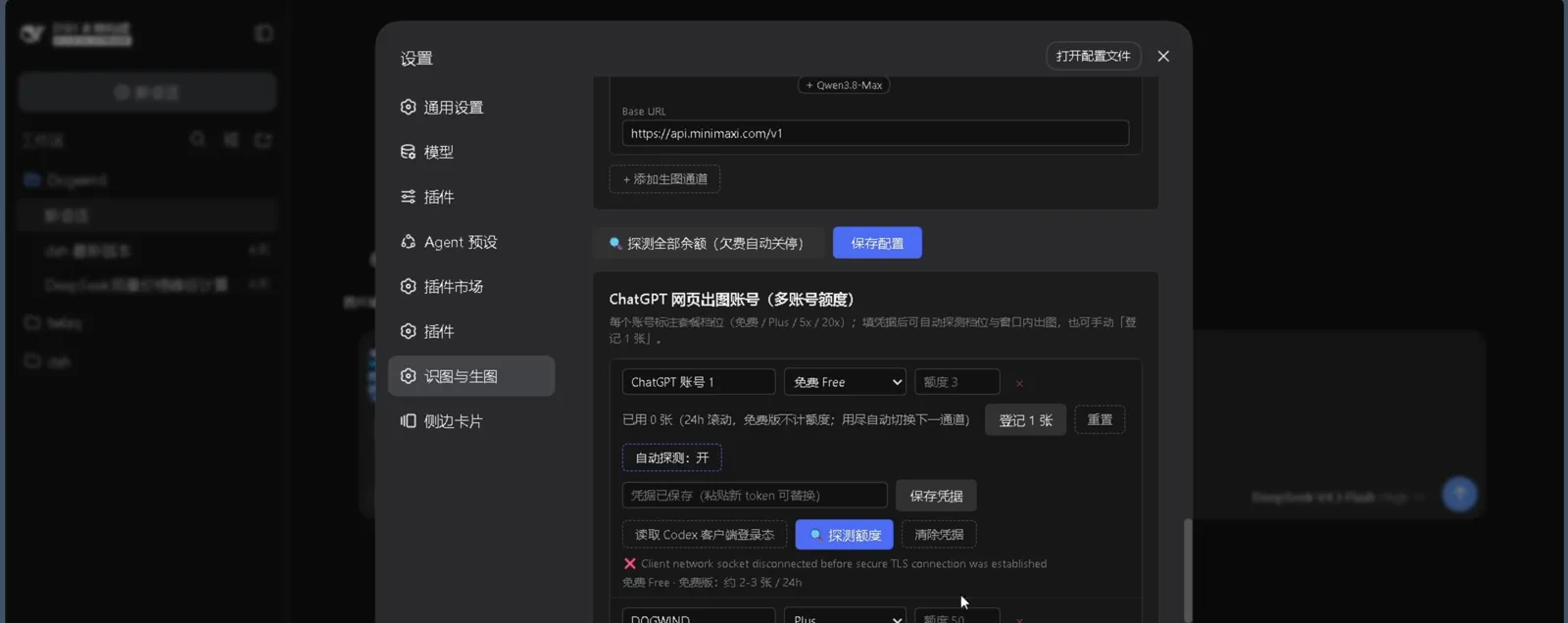
Free tier, quota 3, zero used — the free ride the whole channel chain is designed to spend first.Watch at 2:56
Generate and edit: images, inpainting, cover re-edits
- 8
Hand dsh an image: paste plus the JSON chip
Generation starts conversationally. Paste a reference into the chat composer and the message carries both the image and a JSON attachment chip — exactly the input an image-to-image request needs. The README adds a power detail: DSH 0.1.5+ messages embed a normalized read-only copy of the file, so most references work as-is, and pointing at the local original preserves full quality.
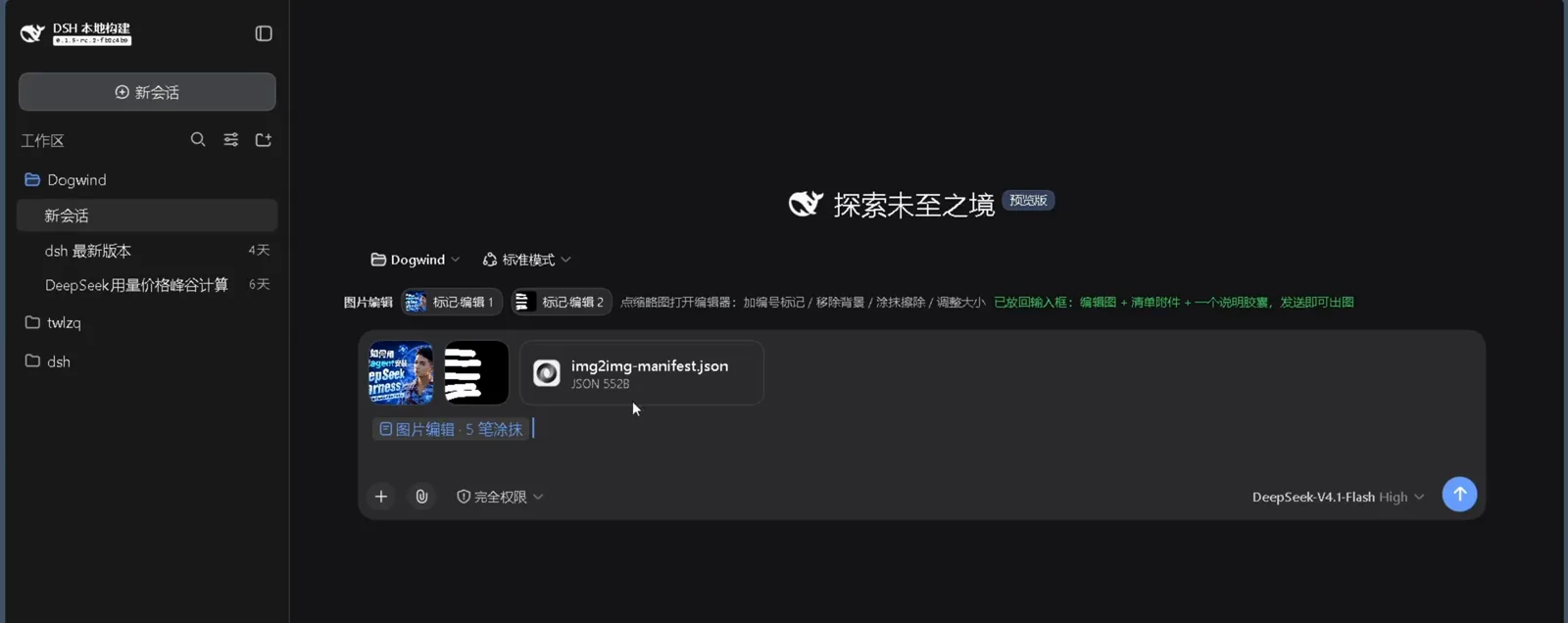
One paste, one chip — from here you talk the picture into existence, just like in ChatGPT.Watch at 1:34 - 9
First image out — with a receipt in the modal
The "first image generated" modal keeps the record of the completed run — the receipt that the channel chain actually drew something. Prefer the terminal? The README's quick start is two commands (below): list the configured providers without leaking keys, then generate with a prompt, a size, and an output directory.
$node "$env:USERPROFILE\.agents\skills\img2img-studio\scripts\generate_image.mjs" --list-providers$node "$env:USERPROFILE\.agents\skills\img2img-studio\scripts\generate_image.mjs" --prompt "红色苹果白底产品图" --size 1:1 --output-dir out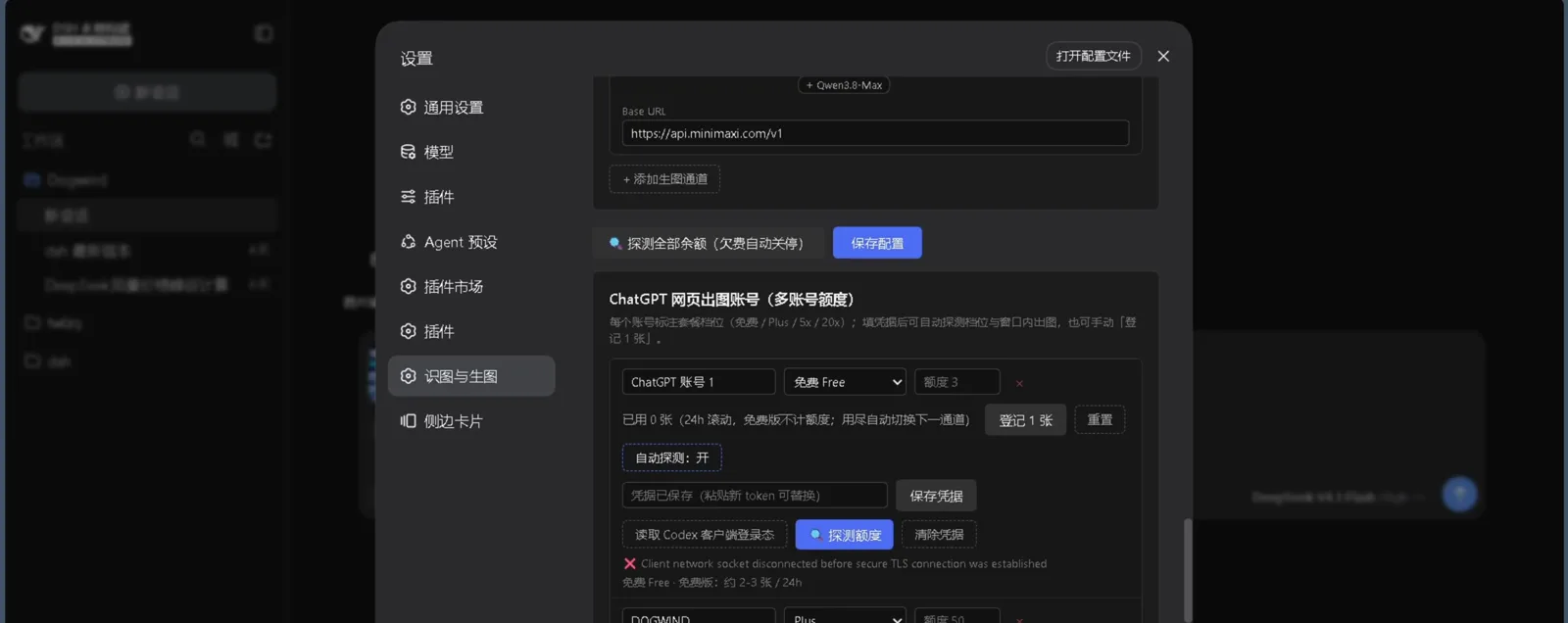
"The first image has been generated" — the modal keeps the record so you can trace which channel did the work.Watch at 2:50 - 10
Fix it in place with the inpaint editor
Above the input box sits the bundled editor's strip: mark, cut out, smear-erase, resize. The recording puts its brush to work on a poster, painting the region to change while the property toolbar stands by. Edits round-trip back into the composer, so the follow-up request carries the marked-up image with it.
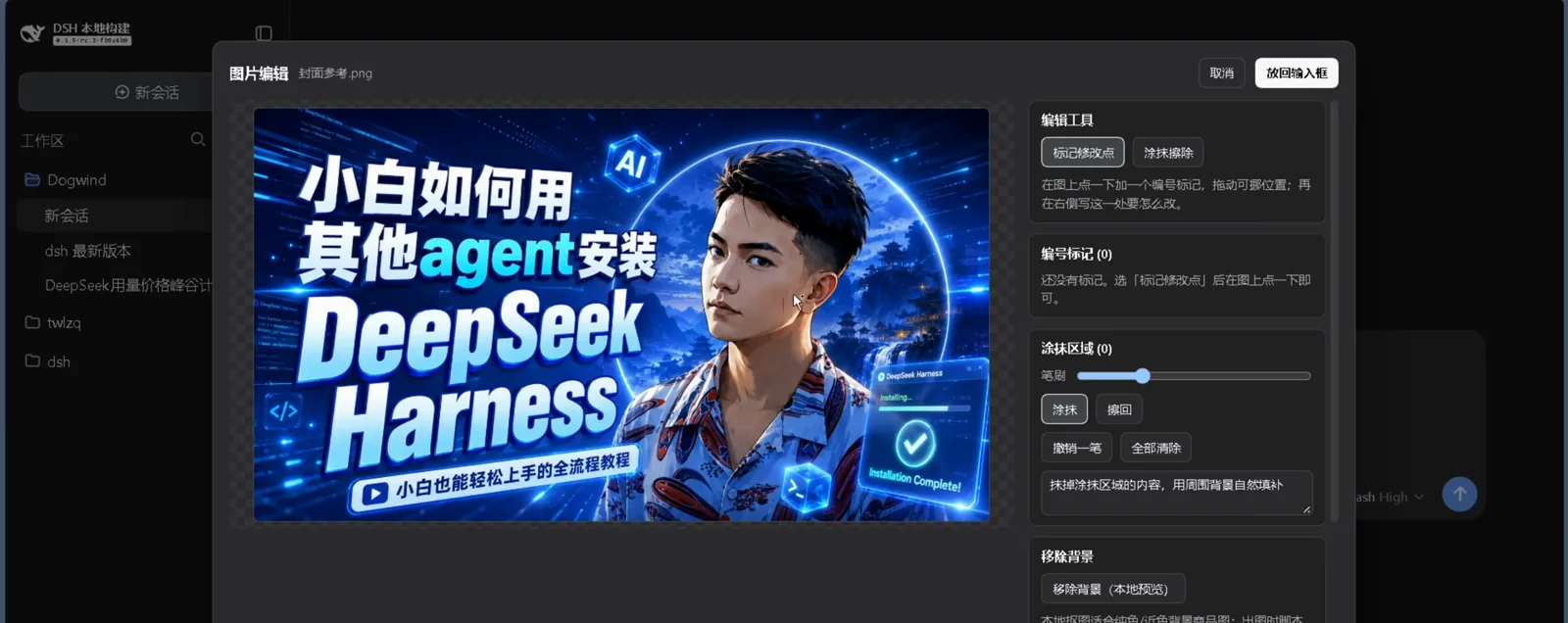
Brush first, ask second: the marked-up image rides along with your edit request automatically.Watch at 1:16 - 11
Re-edit the cover poster from chat
The video's field test: the author's "how a beginner installs DeepSeek Harness with other agents" poster goes back under the knife — the request message pairs a quoted reference chip with the poster card it targets. Per the README, the editor's marked and masked requests land through a dedicated workflow (resize, background removal, erase, local edit) in the skill's edit script.
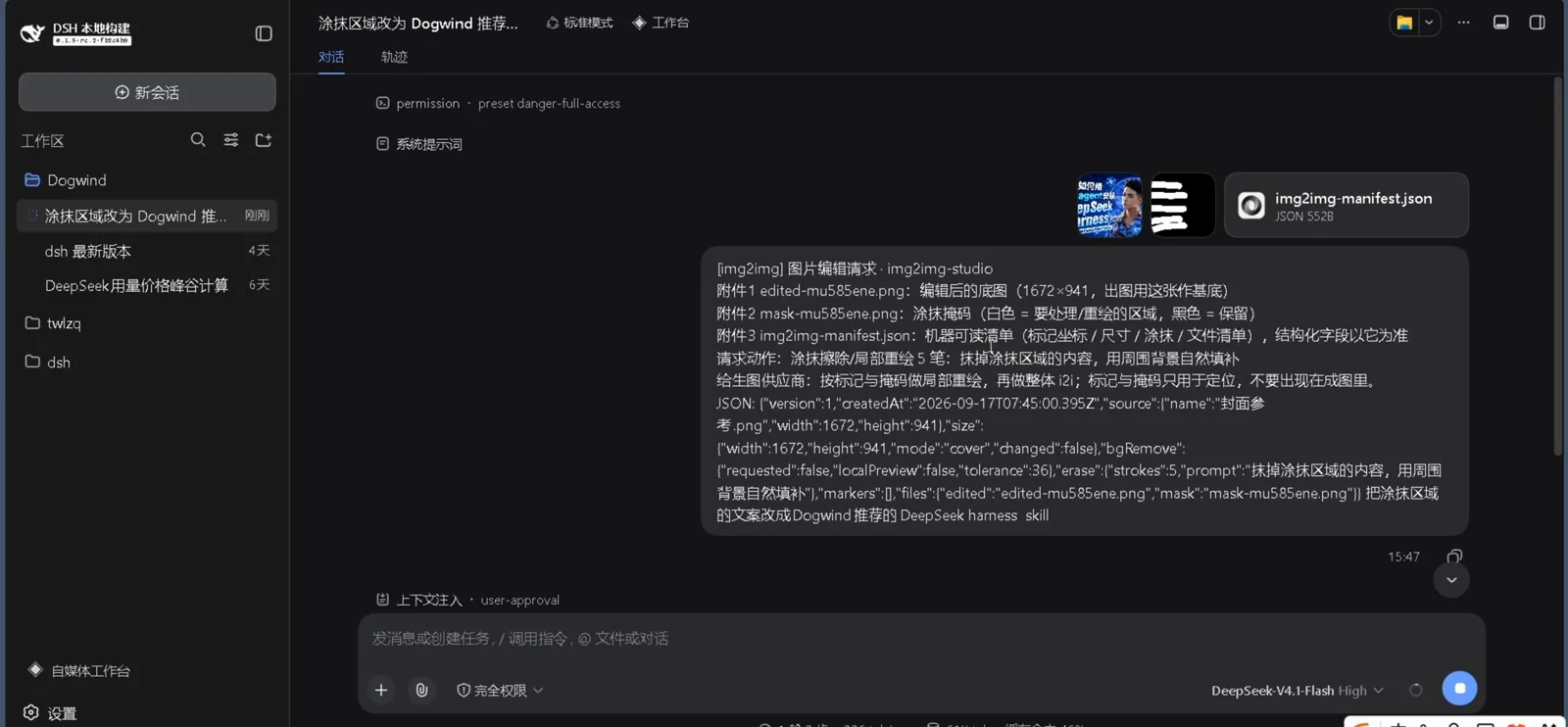
The demo's guinea pig is a real poster about installing dsh itself — a fitting test subject.Watch at 3:12 - 12
Two things the author wants you to know
The closing slide, "两件你应该知道的事" (two things you should know): first, the harness's version cadence as shown in the video differs from the official site's current presentation — treat actual releases as the source of truth; second, the skill's tool-flow documentation gets same-day commits after basic revisions. Both are the narrator's own remarks — a fitting end note from the plugin's author.
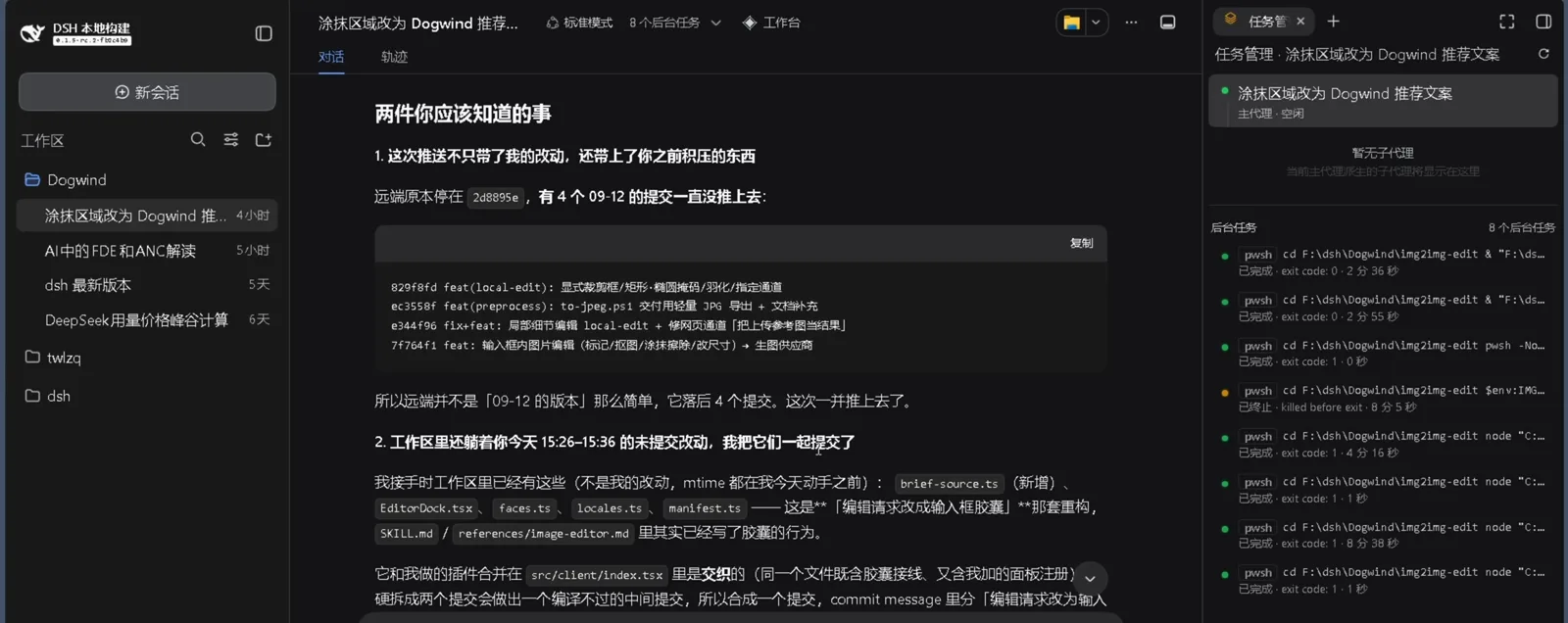
The author signs off with version-pace facts and a docs promise — worth hearing before you install.Watch at 4:50
FAQ
Questions worth answering before you install an image-generation skill.
Which image-generation services does this dsh image plugin support?
Per the README (re-checked via the GitHub API on 2026-10-04): ChatGPT web accounts run at level-1 priority on image 2.5, codex-cli carries your own subscription, and the API channels cover DashScope qwen-image (default), OpenAI-compatible endpoints (gpt-image-2), Z.AI GLM-Image, ByteDance Seedream, MiniMax Hailuo image-01, and local chatgpt-web-class services. The video's panel also shows a MiniMax card carrying eight model chips from image-01 to Qwen3.8-Max.
Do I need my own API key?
Not necessarily. ChatGPT web mode runs on account quota with no API key; DashScope starts with zero config by reusing the vision skill's key (or your own DASHSCOPE_API_KEY). Every dedicated API channel does need its own credential — MINIMAX_API_KEY, ZAI_API_KEY, ARK_API_KEY for Seedream, or IMG_API_KEY for OpenAI-compatible endpoints. The panel marks unconfigured keys inline, and the balance probe tells you which channels are actually alive.
How much free quota is there?
The web channel is the free ride. In the recording, account 1 sits at Free tier with quota 3 on a rolling 24-hour window and zero used; the narrator adds that free web drawing runs about five images a day with weekend giveaways — his own estimate, time-sensitive. The README is more conservative: free accounts carry no local cap, and the chain simply moves to the next channel once the server starts refusing (quota errors never retry, and --skip-exhausted can skip drained paid accounts too).
How is this different from other dsh drawing plugins in the collection?
Form and supply routes. img2img-studio is an Agent Skill — a markdown workflow plus zero-dependency scripts — with an optional bundled plugin for the settings panel and editor; it is not a classic web plugin package. Its two supply routes are API channels plus a ChatGPT web-account pool. The /collections/image-generation catalog lists the alternatives: dsh-image-gen's conversational drawing, vox-director video generation, and local ComfyUI pipelines. Browse there to compare, come back here to install this one.
Does it handle Chinese prompts and Chinese text inside images?
Yes. The README's own quick-start example is a Chinese prompt ("红色苹果白底产品图" — a red apple on a white background), and among the API channels it calls out Z.AI GLM-Image as notably strong at rendering Chinese text, though that channel does not accept reference images. ChatGPT web mode and DashScope handle Chinese prompts as well; the whole routing gate converses in your language before any image is drawn.
Can I use the generated images commercially?
The skill's code is MIT, but two caveats come straight from the README. First, the zine-gathered photo-art style derives from Zeejay0's personally-licensed, non-commercial style work — commercial use of that specific style needs the original author's permission. Second, each provider's terms govern its output: automated drawing through a ChatGPT web account runs on your account, so mind OpenAI's terms of use, and check the API provider's commercial terms before selling what it renders.
My model is text-only — does drawing still work?
Yes, with the companion skill. dsh-vision-skill is a conditional dependency, not a hard prerequisite: multimodal models with read_image look at references natively, while text-only models route through the vision skill's multi-model chain. Keep both in the same skills directory and the generation script can even reuse the vision key — the zero-config path the README documents. Only pure text-to-image work with keys already set needs neither.
Related guides
The rest of the dsh image and plugin track.
dsh image generation plugin collection
The catalog side of this cluster: conversational drawing with dsh-image-gen, video direction with vox-director, and local ComfyUI pipelines — see what exists before picking one.
Read the guidedsh image recognition walkthrough
The other half of the vision pair: dsh-vision-skill lets text-only models understand images you drag into the web UI. Seeing there, drawing here.
Read the guidedsh video generation walkthrough
From stills to motion: the video-generation track records a ComfyUI-driven pipeline turning prompts into finished clips.
Read the guideHow to install dsh plugins
The general install playbook — web-profile adds, local paths, and the restart rules that apply well beyond one image skill.
Read the guideHow to switch dsh models
Multimodal or text-only decides whether you need the vision companion skill at all — that choice starts at model switching.
Read the guideHow to find dsh plugins
Marketplaces, awesome lists, and search tricks for tracking down the next skill once this one is drawing.
Read the guideSources and credits
All 12 frames come from the plugin author's own screen recording; each figure deep-links back to that moment with a ?t= offset. The recording is the author's own work — credited here with his Bilibili channel name (Dogwindi) and his GitHub account (Dogwind221), which the video and repo confirm are the same person. Repo facts were re-checked via the GitHub API on 2026-10-04.