
dsh-cyberworkstation
Maintenance: Activewzznne/dsh-cyberworkstation
One-click DeepSeek Harness bundle — cyberpunk desktop launcher, SillyTavern-grade control deck, 8 production plugins, and an AI skin studio with markets.
$ dsh plugin add dsh-cyberworkstationInstall
dsh has no central install command — add this plugin’s entry (documented in its README) to your profile or patch config, then restart.
How installs work25
stars
0
forks
TypeScript
Language
NOASSERTION
License
2026-08-19
Created
2026-09-16
Last push
README
DSH CyberWorkStation
中文 | English
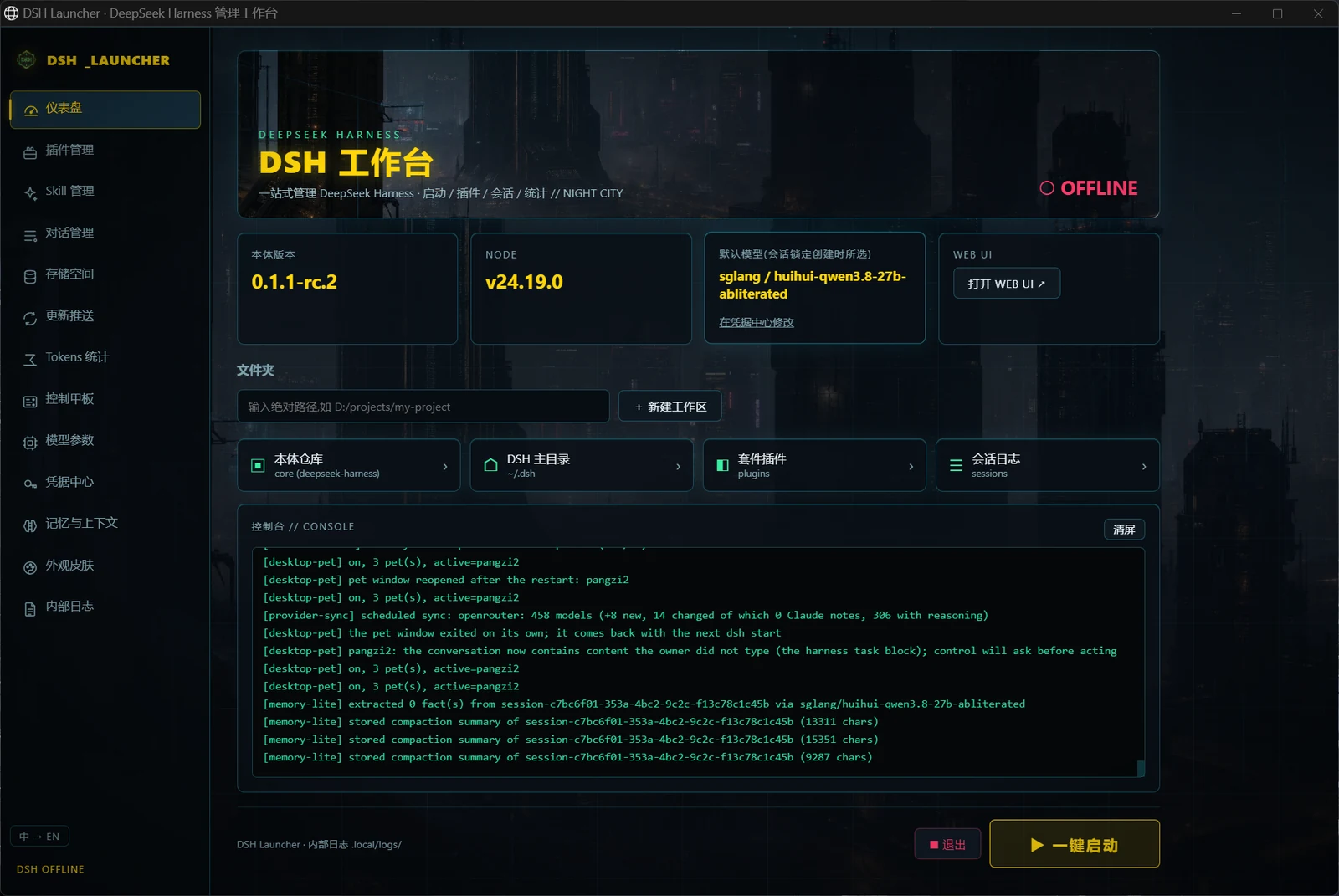
DSH CyberWorkStation is a desktop launcher and a set of 22 plugins for DeepSeek Harness (dsh). It is built for people who want to run dsh as a daily tool rather than a command-line experiment: start it with a double-click, keep every setting and every key in one place, see what the model is doing and what it costs, and pick up new capabilities without opening a config file. The upstream core sits unchanged under core/, so all of this survives a core upgrade.
Vendored core: dsh 0.1.5-rc.2 (upstream tag dsh-v0.1.5-rc.2).
core: 0.1.5-rc.2 · plugins: 22 · skills: 10 · license: MIT
If this is useful to you, a star helps other dsh users find it.
Contents
- What this is
- The launcher, page by page
- Inside dsh itself
- What the screenshots cannot show
- Context and memory
- Plugin roster
- Skills
- For contributors
- Skins and artwork
- License and credits
What this is
Out of the box, dsh is a command-line agent with a functional but plain web UI. Everything around it, from choosing a model to installing a plugin, happens in a terminal or in settings.yaml. This repository wraps that core in two layers so that the whole workflow happens on screen.
The first layer is the DSH Launcher, a small program of its own. Double-clicking it opens a window with 13 pages that together cover the life cycle of a dsh installation: starting and stopping the core, installing plugins and skills, browsing sessions and storage, updating and checking the environment, reading token statistics, editing the Control Deck, tuning model parameters, managing credentials, editing memory and context, switching skins, and reading logs.
The second layer is a set of 22 plugins that live inside dsh's own pages. They add a Credentials Center, model-list sync, web search, media APIs, a desktop pet and a usage-and-cost page to Settings, and message editing, temporary chats, file drops and thinking levels to the conversation itself. Nothing is bolted on top of the interface; each panel appears where a built-in one would. Of the 22, 19 were written for this suite and 3 are forks of other people's MIT projects; 8 further community plugins are used as they are, and the roster at the end lists each one with its provenance.
"The core" throughout this document means the upstream deepseek-harness checked out under core/. It is used exactly as published, which is what lets the Updates page swap it for any upstream version.
A few properties shape how the whole thing feels in use. Every feature is a plugin or a separate program, so a core upgrade never costs you a feature. A setting changed on a launcher page or in dsh's Settings is picked up within about 1.5 seconds, with no restart step. API keys go into dsh's credential store, or into the Windows Credential Manager when the keyring plugin is installed, and nowhere else. Both the launcher and dsh listen on this machine only.
At a glance
| Part | Count | Notes |
|---|---|---|
| DSH Launcher | 13 pages · zh / en · 3 skins | launcher/, double-click DSH启动器.exe; the core is up in about 5 s |
| Suite plugins | 22 (19 original · 3 forks) | plugins/, registered automatically at setup |
| Community plugins | 8 + 1 MCP memory server | installed from the launcher's plugin market, not in the repo |
| Optional in-tree core capabilities | 10 upstream packages | persistent terminal, scheduling, LSP, MCP client, Claude Code / Codex hook bridges |
| Engineering skills | 7 (Claude Code) | architecture / plugins / frontend / ops / playbook / testing / local models |
| In-dsh skills | 3 | skin studio, control-deck authoring, desktop-pet making |
| Skins | 3 launcher · 2 frontend · community skins on demand | managed on the launcher's Skins page |
flowchart LR
  subgraph L["DSH Launcher · 127.0.0.1:3090"]
    L1["Dashboard / Plugins / Skills / Sessions / Storage / Updates"]
    L2["Tokens / Control Deck / Model params / Credentials / Memory / Skins / Logs"]
  end
  subgraph D["dsh core · 127.0.0.1:3080 · unmodified"]
    D0["dsh runtime · sessions · tools · Web UI"]
    D1["22 suite plugins"]
    D2["8 community plugins + optional core capabilities"]
  end
  L -- "start / stop / install / update" --> D
  L -- "edit config, live within 1.5 s" --> D1
Quick start (step by step)
What you need: Windows 10 / 11, Edge or Chrome, and one API key (OpenRouter or DeepSeek official — either is enough). Using an API needs no GPU; an ordinary PC is fine. A GPU only matters if you run models locally.
Step 1: install two free programs
- Git: open https://git-scm.com/download/win , download "64-bit Git for Windows Setup", and click Next through the defaults. The setup script checks for it, and the launcher's one-click update relies on it.
- Node.js: open https://nodejs.org , download the build marked LTS (24.x; 22.19 or later also works, avoid 23.x), and click Next through the defaults.
Then open a new terminal to verify (an old window cannot see freshly installed programs): press Win + R, type cmd, press Enter, and run:
git --version
node -v
Both lines should print a version (for example git version 2.51.0 and v24.19.0). "Not recognized as an internal or external command" means the install did not finish or the window was not reopened.
Step 2: download the project
In the same terminal, type each line and press Enter (replace D: with the drive you prefer; the folder name is up to you):
D:
mkdir AI
cd AI
git clone https://github.com/WZZNNE/DSH-CyberWorkStation.git
cd DSH-CyberWorkStation
More in Desktop & Apps
open-design
by nexu-io
The 1st Collaborative AI Design Agent Workspace. Local-first and open source. Create motion, prototypes, websites, apps, dashboards, presentations, images, and videos with your team and AI agents. Share work, exchange feedback, and iterate together in one workspace.
dsh-desktop
by anywhere-labs
Modern desktop client for the DeepSeek Harness (dsh) plugin ecosystem. Everything is a plugin — even the desktop shell itself.
picgo
by molunerfinn
:rocket: The Ultimate Image Uploader for Efficient Creators. Supports Obsidian, Typora, VS Code etc. and 60+ image hosting services (S3, GitHub, Cloudflare R2, Imgur, Aliyun OSS...). Paste, upload, done.
dsh-desktop
by dataelement
Modern desktop client for the DeepSeek Harness (dsh) plugin ecosystem.