
dsh-plugin-codex
Curated pickMaintenance: Activewss534857356/dsh-plugin-codex
Codex App Server model provider for DeepSeek Harness using your local Codex login.
Install
dsh has no central install command — add this plugin’s entry (documented in its README below) to your profile or patch config, then restart.
How installs work4
stars
0
forks
TypeScript
Language
MIT
License
2026-08-15
Created
2026-08-15
Last push
README
dsh-llm-codex-app-server
English | 中文
dsh-llm-codex-app-server registers a DeepSeek Harness main-model provider backed by the locally authenticated Codex App Server. It is an out-of-tree Harness bundle, so installing it does not modify the deepseek-harness repository.
This differs from Harness's built-in @deepseek-ai/dsh-subagent-codex. The built-in package exposes Codex as a delegated child Agent. This package registers on ctx.llm, so codex-local is a selectable provider for the Harness Agent loop.
Screenshot
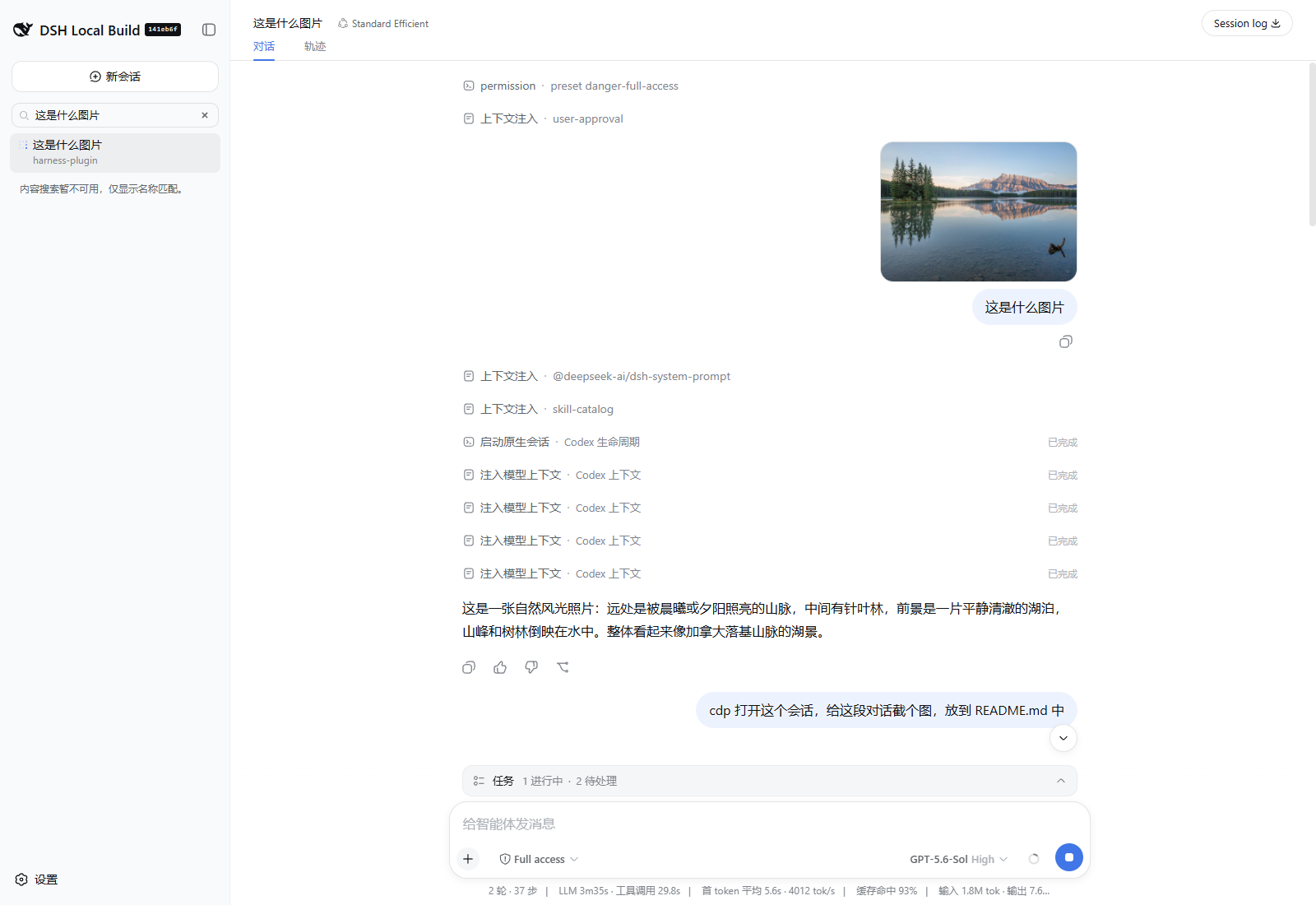
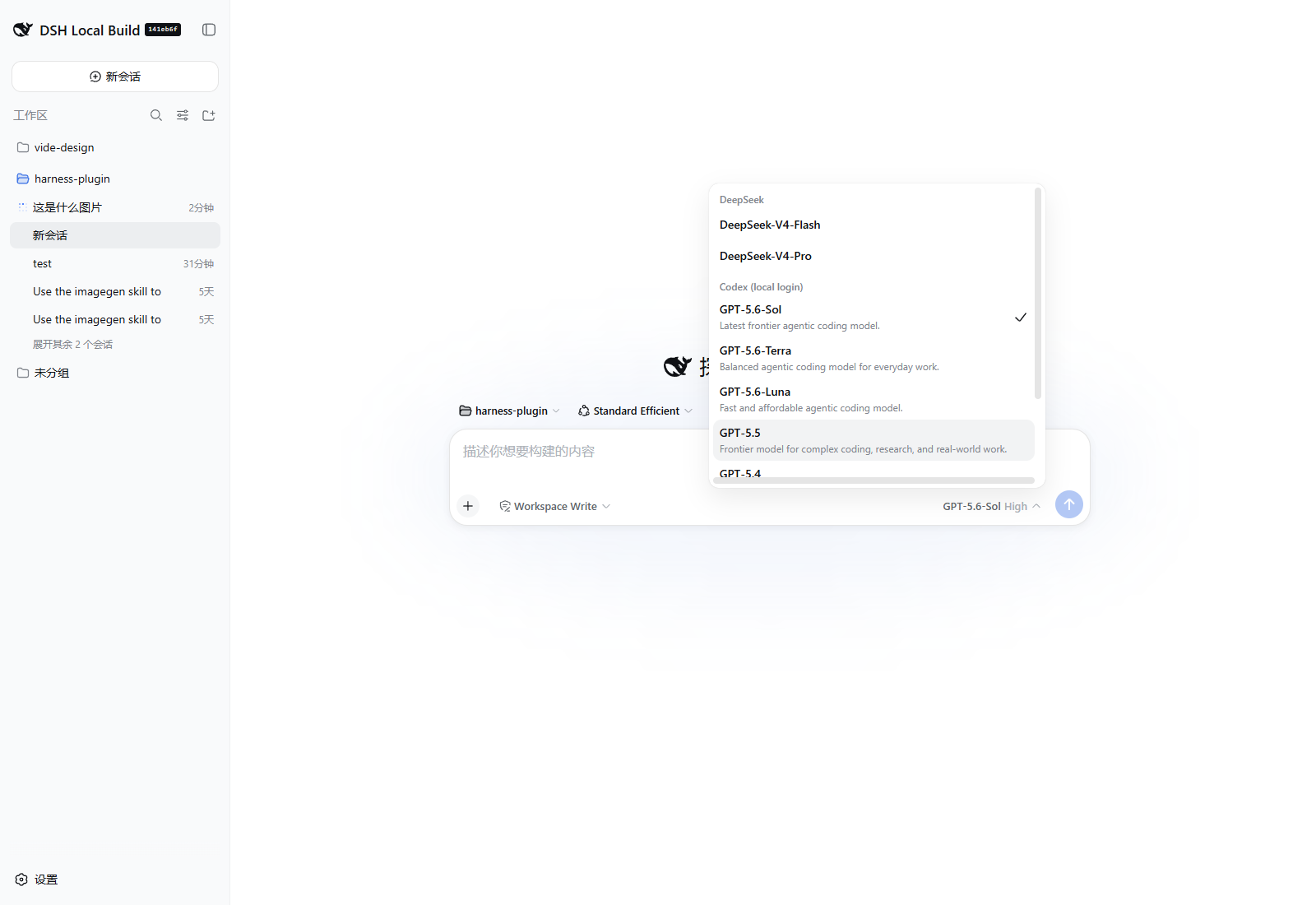
How it works
An ordinary Harness conversation session reuses one pinned @openai/codex@0.147.0 App Server in a private empty directory and one ephemeral thread while its bounded cache lease remains valid. The process uses the native Codex account state under CODEX_HOME; the plugin never reads, copies, logs, or stores OAuth tokens or API keys. Requests without a session id and auxiliary requests remain one-shot.
The adapter supplies the Harness system text as App Server base instructions, reconstructs cold threads by injecting all logged Harness messages before an empty turn, declares Harness tools under the deepseek_harness App Server namespace, and sends later ordinary user messages through native turn input. When one DSH step appends several inbox messages, the first starts the turn and the rest enter that same turn through ordered turn/steer requests. The outer Harness skill tool is exposed there as harness_skill; its argument schema accepts only names from the current Harness session catalog, while Codex-native skills stay on Codex's own loader. A warm thread is reused only when the complete request is an append-only continuation the adapter can reproduce; otherwise it is discarded and rebuilt. App Server still adds Codex-owned instructions and tools. This is deliberately a layered provider, not a raw-model transport or a claim that Harness replaces the Codex prompt.
Reasoning, assistant text, usage, Codex-owned context, diagnostics, and action lifecycles are converted to Harness stream events as they arrive. Codex cached input is reported through Harness cacheReadTokens, so the standard token meter and conversation statistics display the cache-hit percentage without provider-specific UI. Each codex-action block carries a category (lifecycle, context, action, or diagnostic), the parsed phase, the exact protocolEvent, and its JSON protocol snapshot. Raw Code Mode calls and outcomes are included even when App Server emits no corresponding ThreadItem. A failed or declined Codex-native action remains an action outcome and does not fail the Harness model request unless App Server reports that the turn itself failed.
Harness user images and image-bearing tool results remain durable ImageAttachmentRef values in messages, replay, and cache identity. Immediately before an App Server boundary, the adapter verifies each retained attachment and transiently converts it to the protocol-specific image form: Responses input_image for cold reconstruction, v2 image input for a warm user turn, or inputImage for a pending dynamic-tool callback. The oldest model-visible images are replaced deterministically when their projected base64 payload exceeds maxRequestImageBytes; omitted images are never read. Completed Codex-native image outputs travel the opposite direction: they are decoded and committed through Harness's attachment service before publication, emitted as standard Harness image blocks, and replaced by small durable markers in trajectory and replay. No data URL is persisted. A chat attachment is not an implicit workspace mutation: producing public/example.png or another project file still requires Codex to request a declared Harness mutation tool with an explicit destination.
The package also ships a browser plugin. It shadows the stock Assistant cell at a lower slot priority, preserves the standard text, reasoning, image, and generic fallback presentations, and renders codex-action blocks with Harness's compact disclosure row and state dot. Image groups delegate to the rc.8 conversation.message.images slot; the standard Web profile composes its ui-attachment owner, while a custom host must compose that presentation plugin just as the stock Assistant renderer requires. The collapsed row shows the interpreted action, category, and phase; expanding it reveals the summary, exact protocol event, action id, and the durable JSON record in Harness's JSON tree. thread/start explicitly reports layered prompt ownership and discovered instruction-source count; it is not labeled as a Harness tool or request failure.
The thread/start block is provider lifecycle disclosure, not evidence that the model performed a native action. Codex-added developer, system, and user messages that are not part of injected Harness history appear as context/injected reports. They remain logged for audit but are not fed back as Harness-authored history on the next stateless request.
When App Server requests a declared tool in the deepseek_harness namespace, the adapter emits a real Harness tool-call, ends that model step, and leaves the App Server callback pending. Namespace and mapped name must both match before the call crosses into Harness; harness_skill additionally requires an exact current Harness catalog name and maps back to skill only after validation. An unnamespaced Codex-native call remains provider trajectory even when its name resembles a Harness tool; only a validated namespaced Harness call is hidden from the native-action presentation. Harness owns execution, approval, presentation, and durable logging for those calls. The next append-only request replies with the logged tool result, steers any following inbox messages into the active turn in order, and continues that same Codex turn. A replacement or other non-prefix history change forces a cold reconstruction.
Install
Authenticate the native CLI once:
codex login
Build and pack this checkout:
pnpm install
pnpm run check
Install the generated tarball into a Harness profile:
dsh plugin --profile web add ./dist/dsh-llm-codex-app-server-0.1.17.tgz
dsh --profile web --dump-config
dsh --profile web
The bundle registers provider codex-local and every model shown by the pinned App Server's default picker: gpt-5.6-sol, gpt-5.6-terra, gpt-5.6-luna, gpt-5.5, gpt-5.4, gpt-5.4-mini, and gpt-5.3-codex-spark. Select one in the Models UI. Installation does not replace the profile's default model automatically. App Server routes marked as hidden are not added to the selector.
Harness profiles set autoInstallPeers: false, so installation may report missing peer dependencies. At boot, the profile module fallback supplies those peers from the current Harness installation so the plugin shares its Cordis and service instances.
For source installation, use dsh plugin --profile web add github:<owner>/<repo>#<commit>. The package's prepare script builds TypeScript during a Git install, so pnpm must allow that package build. A packed tarball or npm release is already built.
Remove the bundle from the profile with:
dsh plugin --profile web remove dsh-llm-codex-app-server
Configuration
Later profile patch layers can replace the llm-codex-app-server row. A replacement must restate the complete config because Harness patch rows do not deep-merge.
| Key | Default | Meaning |
|---|---|---|
provider |
codex-local |
Harness provider route. |
displayName |
Codex (local login) |
Selector label. |
modelProvider |
openai |
Codex App Server model-provider id. |
models |
Seven visible App Server catalog entries | Advisory model metadata, input modalities, and reasoning choices. The shipped snapshot declares image input for the six routes observed with it and text-only for Spark; omitted/custom modalities default to text-only. Unlisted safe model ids remain routable as text-only. |
timeoutMs |
300000 |
Wall-clock limit for one App Server turn. |
disposeGraceMs |
3000 |
Process-tree termination grace. |
maxJsonRpcLineBytes |
8388608 |
Maximum bytes accepted from App Server stdout for one newline-delimited JSON-RPC message. Parsed messages do not count toward a cumulative stdout limit. |
maxRequestImageBytes |
20971520 |
Maximum projected base64 image payload hydrated into one model request; oldest model-visible images become deterministic omission text first. |
maxStderrBytes |
65536 |
Maximum retained diagnostic output. |
maxRetries |
0 |
Harness-visible retries for transient process or provider failures. |
maxCachedSessions |
8 |
Maximum idle or tool-waiting session leases retained before least-recently-used eviction. Active requests may temporarily exceed it. |
sessionIdleTimeoutMs |
600000 |
Idle lifetime of a cached App Server session thread. |
env |
{} |
Explicit child environment layered over Harness's scrubbed parent environment. Use this to pass CODEX_HOME when it is nonstandard. |
Example override:
- id: llm-codex-app-server
  name: dsh-llm-codex-app-server
  config:
    provider: codex-local
    displayName: Codex (local login)
    modelProvider: openai
    models:
      - id: gpt-5.6-sol
        name: GPT-5.6-Sol
        contextWindow: 1050000
        inputModalities: [text, image]
        reasoningEfforts: [low, medium, high, xhigh, max, ultra]
        defaultReasoningEffort: low
    timeoutMs: 600000
    disposeGraceMs: 3000
    maxJsonRpcLineBytes: 8388608
    maxRequestImageBytes: 20971520
    maxStderrBytes: 65536
    maxRetries: 0
    maxCachedSessions: 8
    sessionIdleTimeoutMs: 600000
    env:
      CODEX_HOME: !!js process.env.CODEX_HOME
Compatibility and limitations
- The protocol baseline is Codex CLI
0.147.0; the dependency and runtime handshake are pinned because the experimental App Server protocol is version-sensitive. - The default catalog exposes each model's full context window:
1050000for GPT-5.4, GPT-5.5, and the GPT-5.6 family;400000forgpt-5.4-mini; and128000forgpt-5.3-codex-spark. The pinned App Server may report a smaller effective working window in usage notifications. A deployment that enforces that smaller limit can override model metadata; a provider-confirmed context overflow remains eligible for Harness compaction and retry. - The default model catalog is a dated
model/listsnapshot observed with App Server0.147.0: GPT-5.6 Sol/Terra/Luna, GPT-5.5, GPT-5.4, and GPT-5.4 Mini declared text+image input; GPT-5.3 Codex Spark declared text only. The server/account catalog may change independently of the package, so every Codex upgrade must re-probe it. Custom entries withoutinputModalitiesand unlisted ids remain text-only. - Codex co-owns the model-visible instructions and tool catalog. The keyless wire test records the extra permission, primary-agent, collaboration, environment, interaction, and code-mode layers that remain after supported thread overrides.
- Code Mode remains enabled because
gpt-5.6-soluses it to dispatch App Server dynamic tools. Codex-native image generation and image viewing remain enabled so Codex'simagegenskill retains its required tools; unrelated optional native integrations remain disabled. - Image input, image-bearing tool results, and native generated images require the profile's durable
ctx.attachmentsservice. Image bytes are subject to its media, byte, count, aggregate-byte, pixel, and side-dimension limits and are never stored inline in messages,codex-actionblocks, or replay state. - Native Codex actions may still occur. They run in a private empty working directory under a read-only sandbox with approvals set to
never; their lifecycle snapshots are displayed as provider trajectory, and approval or interaction requests are safely declined unless the protocol can answer them without user authority. - Discovered instruction sources are shown in the
thread/startlifecycle report. A non-empty report is disclosure, not a request failure. Codex-generated context that is absent from this list is reported separately ascontext/injected. - Models that affirmatively declare
imageaccept ordered image-only or mixed text/image user prompts and image-bearing Harness tool results. Text-only, unavailable, custom-without-declaration, and uncatalogued routes reject image history before process startup. temperature,maxTokens, andstopare rejected because App Server0.147.0exposes no reliable equivalents. Auxiliary calls that requiremaxTokens, including LLM-backed session titles and basic compaction, must route to another provider; configurecompaction-basicwith asummarizationProvider/summarizationModelpair that supports an output cap.- App Server automatic compaction is configured at Harness's safe integer ceiling so Harness can replace logged history first. Any native compaction item or notification still makes the live lease non-reusable and is never written into reconstructible replay state. Basic compaction must use a summarization provider that supports its
maxTokensrequirement. CODEX_INTERNAL_ORIGINATOR_OVERRIDE=deepseek-harnessidentifies adapter requests; this internal compatibility point is reverified on Codex upgrades.- Session-scoped threads are in-memory disposable caches. The Harness log and adapter replay state reconstruct model-visible history after process restart, plugin reload, expiry, eviction, compaction, fork, repair, retry mismatch, or any changed request epoch; Codex rollout files are never resumed.
- Harness rc.8 stores adapter replay inside
ReplayEnvelope.response; the plugin still accepts pre-envelope version-4 sessions. Replay state version4contains only provider outputs initems, while observed Codex-owned context stays incontextItemsfor audit and is never reinjected. User/tool/generated image payloads use durable attachment markers. Cold rebuild hydrates retained provider-visible markers; a warm continuation hydrates only appended user or tool-result content. Harness calls retain theirdeepseek_harnessnamespace and mapped App Server name. Reconstruction coalesces cumulative snapshots by stable provider item or call identity, drops any unpaired Code Mode custom call/output that a fresh process cannot resume, and falls back to Harness message reconstruction for older replay versions. - Authentication and subscription availability belong to the native Codex installation. Login failures surface as Harness
AUTHfailures; the plugin provides no credential UI.
Development
The raw-transport claim was rejected in ADR 0001 after the provider investigation captured Codex-owned instructions and tools on the outbound request. ADR 0002 accepts the implemented ownership split. ADR 0003 records how raw actions, provider context, replay, and Harness tool calls remain distinct. ADR 0004 records the client renderer shadow used by the out-of-tree bundle. ADR 0005 bounds cold replay reconstruction by provider identity. ADR 0006 defines exact session continuation and disposable cache ownership. ADR 0007 makes the App Server namespace the tool-ownership label. ADR 0008 keeps the native image tools required by Codex's image skill. ADR 0009 records durable generated-image projection. ADR 0010 defines marker-based image input, bounded hydration, and truthful modality advertisement.
pnpm run typecheck
pnpm run test
pnpm run build
pnpm pack --pack-destination dist
Unit and wire tests require no account. With codex login already completed, run the real local-login round trip:
pnpm run test:e2e
The real test loads the Harness LLM and local-subprocess providers, completes a Harness tool round trip, ordinary follow-up, and durable image-input turn on one cached App Server thread, records any provider cache evidence without requiring nondeterministic cache accounting, and verifies process-tree quiescence after plugin disposal.
More in Integrations & Sharing
dsh-notification
by omdsh-dev
Desktop notifications for DeepSeek Harness turn completions, with per-outcome controls and include/exclude keyword rules.
dsh-open-in-vscode
by omdsh-dev
Open DeepSeek Harness workspace directories in VS Code directly from the web GUI.
dsh-lark-bot
by plutokeating
Feishu/Lark bridge for DeepSeek Harness: scan-to-connect PersonalAgent binding, streaming cards, git-worktree project workspaces, parallel per-scope tasks, multi-role agents, cross-session notify, in-chat model/key management, and a safety-net guardian that still answers in Feishu after dsh crashes.
dsh-session-notification
by dingyi222666
Notifications for four session states, with browser alerts and prompts.