
pianpianui
Maintenance: Activetdyangbo/pianpianui
A Lin Pianpian themed UI plugin for DeepSeek Harness, using the character from 'Aihong: Ten Days After the City Fell' as a translucent page background with adjustable opacity and depth.
$ dsh plugin add pianpianuiInstall
dsh has no central install command — add this plugin’s entry (documented in its README below) to your profile or patch config, then restart.
How installs work4
stars
0
forks
JavaScript
Language
MIT
License
2026-08-23
Created
2026-09-13
Last push
README
PianpianUI
PianpianUI 是一个 DeepSeek Harness Web UI 插件。安装后,它会改变聊天主页面样式,使用《哀鸿:城破十日记》中的角色林翩翩作为半透明背景,并保留正常聊天界面的可读性。
安装
从 GitHub 在线安装
使用 DSH 命令直接安装:
dsh plugin --profile web add git+https://github.com/tdyangbo/PianpianUI.git
下载后从本地安装
如果在线安装速度较慢或连接超时,可以下载 [PianpianUI ZIP 压缩包],解压到本地,然后使用解压目录的绝对路径安装,例如:
dsh plugin --profile web add "file:E:\software\PianpianUI-main"
请将示例路径替换为实际解压路径。该目录中应当可以直接看到 package.json、lib 和 assets,不要使用下载目录或它的上一级目录。
启动 DSH Web UI:
dsh web
如果页面仍显示旧效果,请在浏览器中按 Ctrl + F5 强制刷新。
效果预览
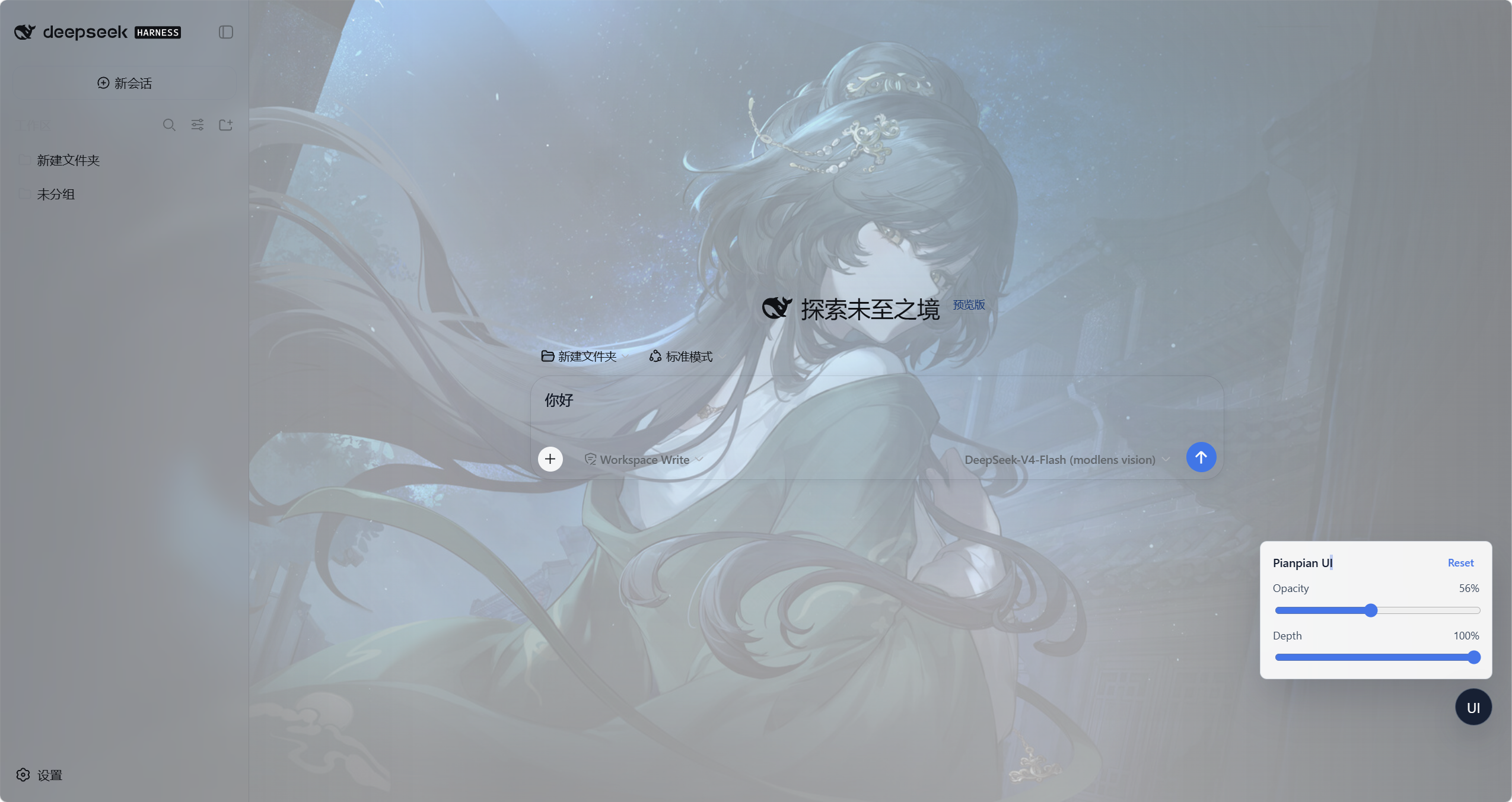
安装后的效果
- 聊天主页面会显示林翩翩半透明背景。
- 侧边栏、输入框、按钮和聊天内容仍保持清晰可读。
- 页面右下角会出现一个
UI调节按钮。 - 打开设置弹窗等非聊天页面时,调节按钮会自动隐藏。
调节背景效果
在聊天页面点击右下角 UI 按钮,可以打开调节面板。
Opacity:调节图片透明度。向右拖动,图片更明显;向左拖动,图片更淡。Depth:调节背景深度。向右拖动,背景更深、更有层次;向左拖动,界面更亮、更柔和。Reset:恢复默认显示效果。
调节结果会保存在当前浏览器中,刷新页面后仍会保留。
更新插件
如果插件已有新版本,先移除旧版本,再重新安装:
dsh plugin --profile web remove dsh-pianpian-ui
dsh plugin --profile web add git+https://github.com/tdyangbo/PianpianUI.git
dsh web
然后在浏览器中按 Ctrl + F5。
停用插件
如果不想继续使用该 UI 插件,执行:
dsh plugin --profile web remove dsh-pianpian-ui
dsh web
如果页面仍有缓存效果,请按 Ctrl + F5 或重新打开浏览器页面。
More in Themes & Skins
dsh-beauty-skins
by xierw
Beauty-themed skins for DeepSeek Harness — one-click apply with palettes extracted from wallpaper, including dynamic backgrounds.
deepseek-harness-skin
by heigeai
Skin system for DeepSeek Harness — 21 built-in skins plus custom themes generated from a single image, with contrast and readability checks.
dsh-qq2006
by laplaceyoung
A switchable QQ2006 skin for the DeepSeek Harness Web UI with a coral-blue theme and retro assets.
dsh-skin-market
by keman-ai
Skin marketplace for DeepSeek Harness — search and install community skins from dsh.a2hmarket.ai right in the settings page