
dsh-drop-to-path
Curated pickloudmore/dsh-drop-to-path
向纯文本模型投递附件:图片保留原生附件 UI,PDF/Office/压缩包/视频/音频显示为附件栏方块,发送时自动转为工作区路径;配合 dsh-vision-toolkit 提供视觉能力。
11
stars
1
forks
MIT
License
2026-08-13
Created
2026-08-14
Last push
README
dsh-drop-to-path
Drop or paste images, PDFs, office docs, zips, videos and audio into DeepSeek Harness — they reach your text-only model as workspace file paths. Images keep the native attachment UI (preview / remove), everything else shows as square chips in the attachment rail, and paths are appended automatically when you hit send.
Drop or paste images, PDFs, office docs, zips, videos and audio into DeepSeek Harness — they reach your text-only model as workspace file paths. Images keep the native attachment UI (preview / remove), everything else shows as square chips in the attachment rail, and paths are appended automatically when you hit send.

Demo
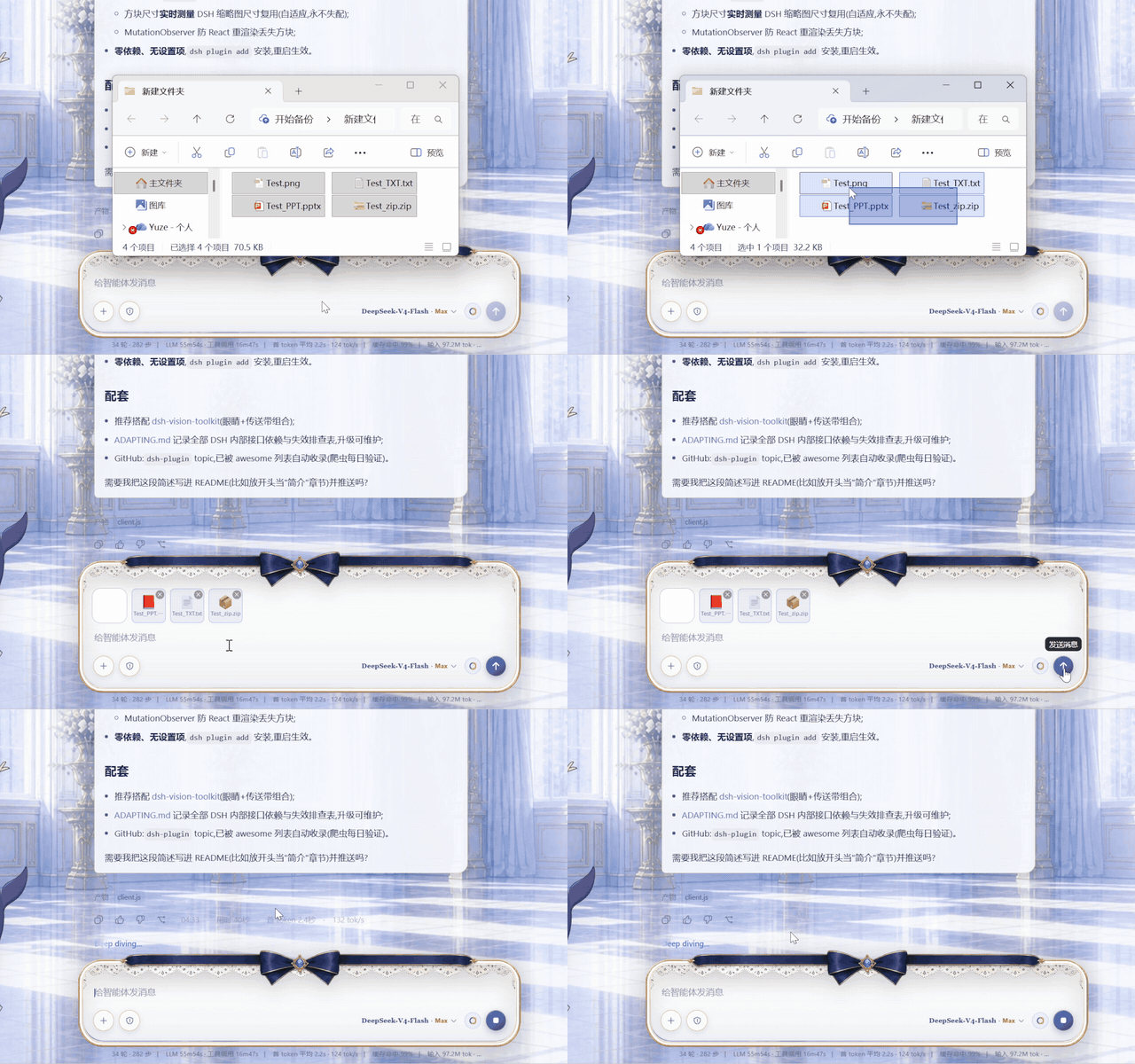
Drag images / PPT / TXT / ZIP into the composer → square file chips appear next to image thumbnails → hit send → the model receives workspace file paths.
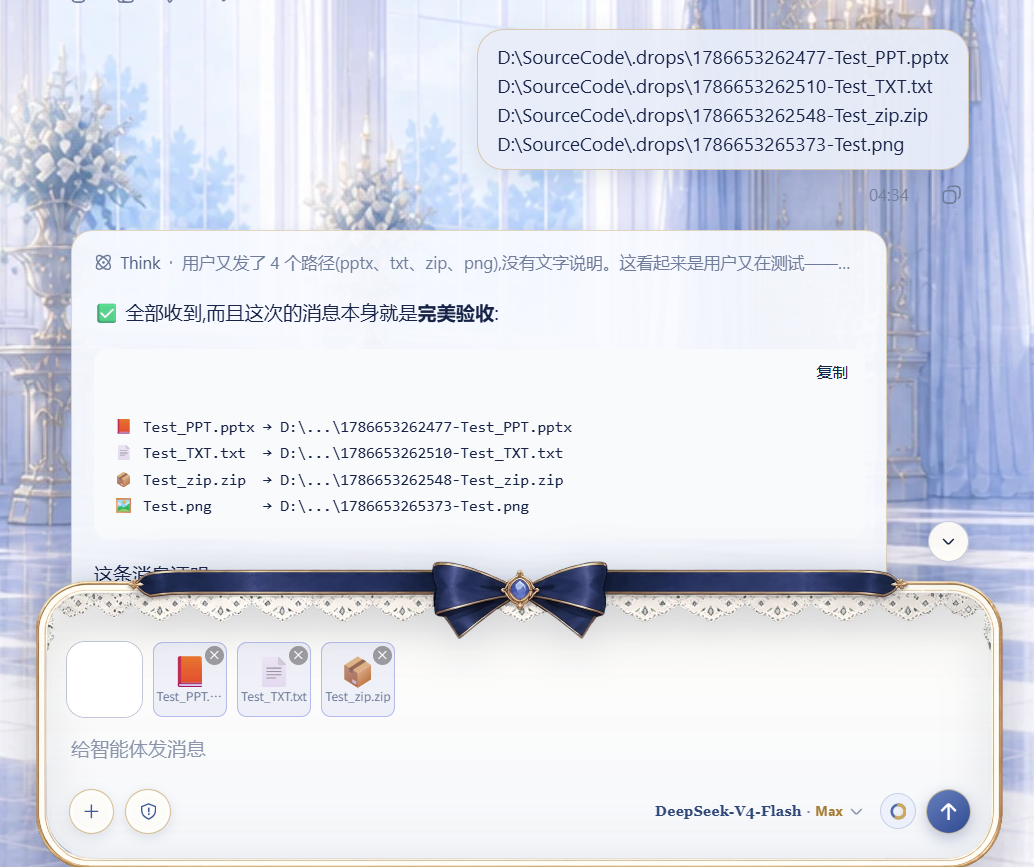
The effect: images and files arrive at the text-only model as workspace paths, ready for vision / document tools.
Why this plugin
I use a text-only model (deepseek) in DeepSeek Harness and frequently need to send screenshots to the agent. But DSH image attachments go through the model's native attachment channel, and text-only models are rejected by a preflight check before the message is even sent — the composer shows a system toast:
The current model does not support images; switch to a model that does.

Backed by the host image-admission preflight (attachment-error):
Model "deepseek-v4-flash" does not support image input.
dsh-vision-toolkit solves the "see the image" half — but its tools only accept workspace file paths, so the image must enter the message as a path. Every screenshot became: save to workspace → manually type the path into the message. Painful. And beyond images, DSH refuses to attach PDFs, office documents, videos or any non-image file at all.
After experiencing "paste and go" in another tool, I decided to bring that experience back to DSH: keep the attachment UI completely native, and convert images and files to paths only at the moment of sending. Hence this plugin.
How it works
flowchart LR
    A["Paste / drag in"] --> B{"File type?"}
    B -->|"Images<br/>png / jpg / webp / gif"| C["Native attachment card<br/>preview / remove"]
    C --> D["Hit send"]
    D --> E["Upload → workspace/.drops/"]
    E --> F["Message becomes plain text paths"]
    F --> G["Text-only model reads them<br/>with vision / document tools"]
    B -->|"Other files<br/>pdf / docx / xlsx / video…"| H["Square chip in the<br/>attachment rail<br/>format icon · ✕ remove"]
    H --> D
- The image admission preflight (
attachment-errorindsh-host-apiproxy) is bypassed: no image block is ever sent, the model only sees text. - Nothing is typed into the composer while you add files — paths are appended on send, exactly like the image conversion.
- Upload failure is never silent: a visible notice explains what happened before falling back to the native send path; messages are never swallowed.
- Supports paste and drag-and-drop; images, files and mixed batches are uploaded in order and sent as one text block of paths.
Supported file types
| Type | Extensions | Limit | Experience |
|---|---|---|---|
| Images | png jpg jpeg webp gif |
30MB | Native attachment card (preview / remove), auto-converted to paths on send |
| Documents | pdf doc docx xls xlsx ppt pptx txt md csv json |
100MB | Square chip in the attachment rail (format icon, full name on hover, ✕ to remove), path appended on send |
| Archives | zip |
100MB | Same |
| Video | mp4 mov webm mkv avi |
100MB | Same |
| Audio | mp3 wav flac m4a |
100MB | Same |
Images keep the native attachment experience. DSH itself only accepts these image formats as attachments (see the toast below) and refuses everything else — this plugin turns the rest into plain workspace paths instead, so the agent can process them with PDF / document tools.

Pairing with dsh-vision-toolkit (recommended)
🎯 Strongly recommended to pair with dsh-vision-toolkit — it is the eyes of a text-only model, this plugin is the conveyor belt:
- This plugin solves "how an image or file becomes a path" (automatic conversion on send);
- dsh-vision-toolkit solves "how a path becomes vision capability" (intent-aware image Q&A, long-screenshot OCR, UI restoration, grounding, pixel diff — 10 structured vision tools, with DSH Credentials / managed runtime / Web Settings).
Install:
dsh plugin --profile web add <path-to-dsh-vision-toolkit>(see its repo README). Together they give a text-only model an experience close to a native multimodal model.
| Scenario | Before | Now |
|---|---|---|
| Image Q&A | screenshot → save to workspace → type path | screenshot → Ctrl+V → Enter |
| Multi-image diff (pixel diff) | same, type every path | just send two images |
| Long-screenshot OCR / UI restoration | same | just send the image |
| Analyze a PDF / xlsx / video | copy it into the workspace, type the path | just drag it in and send |
Comparison with similar plugins
- dsh-drag-and-drop: dropping a file inserts its raw path into the composer, no file copying. Great for referencing files already in the workspace; images are still sent as attachments (still rejected by text-only models), and paste is not supported.
- This plugin: keeps the native attachment UI (preview / remove), automatically copies images and files to the workspace and converts them to paths on send, supports paste and drag-and-drop, and shows non-image files as removable square chips in the attachment rail. Built for "sending images and files to a text-only model".
They are complementary: use dsh-drag-and-drop to reference existing files, use this plugin to send screenshots and new files.
Installation
Requirements: DeepSeek Harness (Web profile), Node.js, dsh CLI.
# Option 1: install via dsh plugin (recommended)
dsh plugin --profile web add /path/to/dsh-drop-to-path

# Option 2: manual (matches this repo layout)
# 1. add to dependencies in package.json:
#    "@dsh-external/dsh-drop-to-path": "link:/path/to/dsh-drop-to-path"
# 2. add to dsh.profile.bundles: "@dsh-external/dsh-drop-to-path"
# 3. copy the directory (including lib/) into profiles/<name>/node_modules/@dsh-external/dsh-drop-to-path
Restart the Web profile after installing (relaunch the launcher / restart dsh web). No settings to configure.
Usage
- Paste or drop images as usual — the attachment cards behave natively (preview / remove);
- Drag or paste any other file (pdf / office / zip / video / audio) — a square chip with a format icon appears in the attachment rail next to the image thumbnails (full name on hover, ✕ to remove);
- Type your message (optional) and hit send — no attachments are sent; images and files are uploaded and their workspace paths are appended to the message automatically;
- The agent (paired with dsh-vision-toolkit) reads images with
vision_glance/vision_pixel_diffand friends, and handles documents with PDF / spreadsheet tools.
Files are stored under <workspace>/.drops/; clean them up whenever you like.
File structure
dsh-drop-to-path/
├─ package.json        bundle manifest (dsh.bundle.patch / dsh.client)
├─ cordis.patch.yml    mount row (insert drop-to-path)
├─ lib/
│  ├─ index.js         host:POST /_dsh/drop-to-path/import route
│  └─ client.js        browser: interception + sendSession wrapper + chips
├─ assets/             demo GIF, combined effect image, social preview, toasts
├─ README.md
├─ README.zh.md
└─ ADAPTING.md         upgrade adaptation guide (read before upgrading DSH)
Implementation notes
- host side (
lib/index.js): registers thewebServerroutePOST /_dsh/drop-to-path/import, accepts{ name, dataBase64 }, validates (whitelisted extensions; images ≤30MB, other files ≤100MB; Unicode-safe sanitized file names against path traversal), writes into the session workspace.drops/, returns{ ok, value: { path, kind } }. - Workspace resolution: reads
$DSH_HOME/storages/workspace.json(the durable workspace registry) and picks the workspace with the newestupdatedAt. - browser side (
lib/client.js):- pure-image drops pass through untouched (native rail + overlay handling);
- drops/pastes that contain non-image files are intercepted: files upload in order, chips are rendered, and a synthetic
dragendcloses DSH's full-screen drop overlay so the page never gets stuck; conversation.sendSessionis wrapped on the ConversationController prototype (survives instance recreation): on send, image attachments and queued files are uploaded and their paths are joined with your text into one message;- chips are square tiles sized live from the measured image-thumbnail size (falls back to 62px), with per-format icons/colors and a MutationObserver that re-renders them after React updates;
- after a successful send the chips clear; upload failures show a visible notice and fall back to the native send path — messages are never lost.
Compatibility
| DSH version | Status |
|---|---|
| 0.1.0-rc.6 (verified in this repo's environment) | ✅ Works |
This plugin depends on several undocumented internal interfaces of DSH (service names, method signatures, storage formats) and may break after a DSH upgrade. Read ADAPTING.md before upgrading — it contains the failure symptoms and the fix steps.
Contributing & adapting
- Issues / ideas: GitHub Issues.
- Plugin broken after a DSH upgrade: follow the symptom table in
ADAPTING.md, fix, and append a row to the adaptation log.
License
MIT
More in Knowledge & Research
dsh-browser
by lum1104
让 DSH 读取/点击/填表/滚动/导航当前 Chrome 标签页(文本优先,保留登录态)
modsearch
by liustack
Web/X 搜索与抓取桥:为纯文本 coding agent 提供结构化 JSON 证据(search/fetch/citations),引擎可选 Antigravity CLI(免 key)/带 key 引擎/X(Grok Build 登录态)。
argo
by taxueseek
给 Agent 用的统一搜索与证据核验:120+ 引擎、多语言路由、影视/体育/金融垂直源、双层缓存、10 个 MCP 工具
dsh-chat-import
by nwflower
从 Claude Code/Codex/ChatGPT/Cursor/Gemini/Reasonix 导入历史会话为 DSH 可续接会话(import_claude 等 6 工具 + 目录批量导入)