
dsh-vscode
lixxx1/dsh-vscode
A Claude Code/Codex-style VS Code sidebar for DeepSeek Harness. 像 Claude Code 、Codex 一样,在 VS Code 侧边栏中使用 DeepSeek Harness。
8
stars
0
forks
MIT
License
2026-08-16
Created
2026-08-17
Last push
README
DeepSeek Harness for VS Code
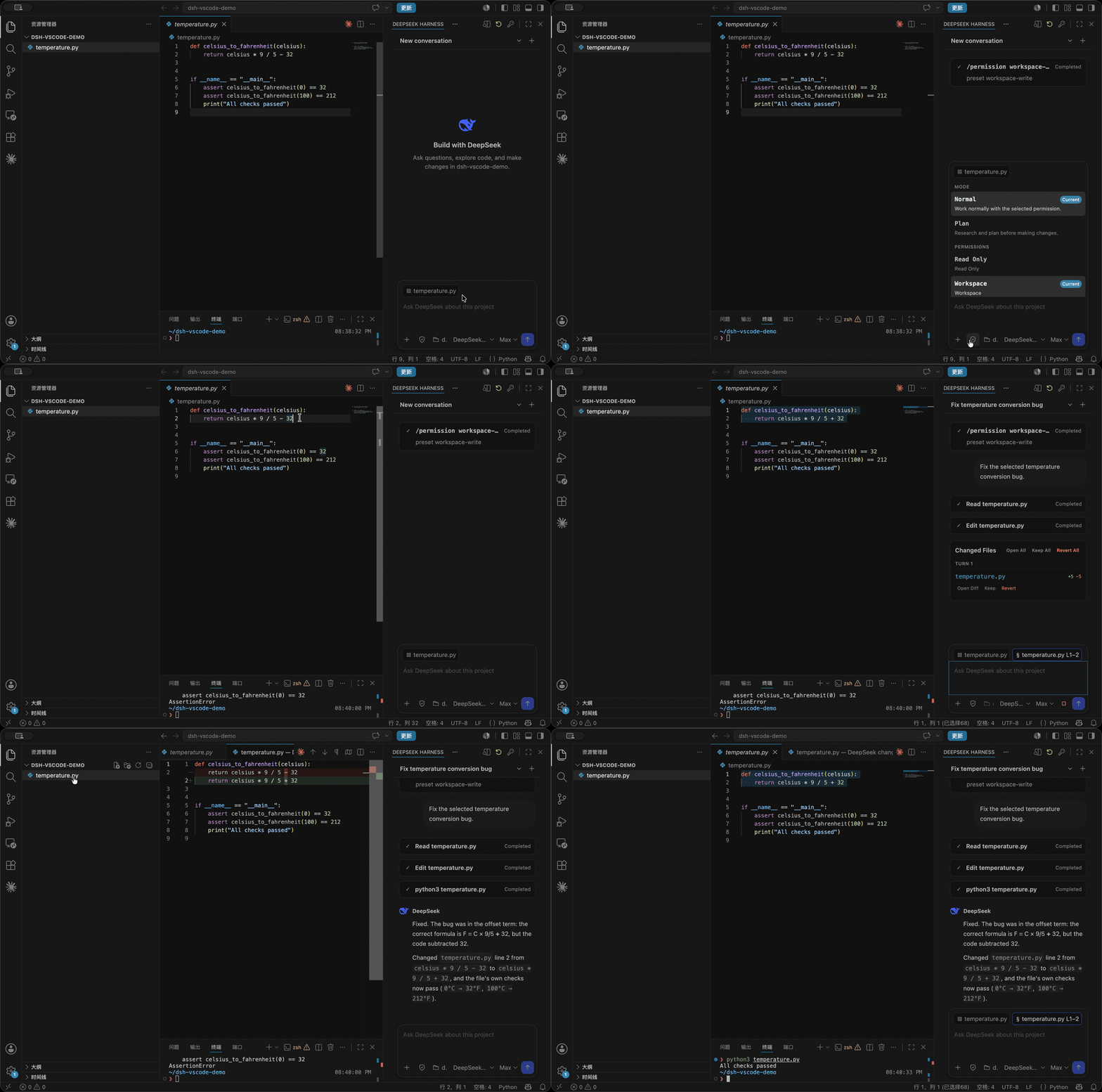
Bring DeepSeek Harness into the same place you write code. dsh-vscode gives DSH a Claude Code/Codex-style right sidebar that already understands your project, active file, and selected code.
Ask DeepSeek to inspect, change, and verify code without switching between your editor, terminal, and a separate chat window.
English | 简体中文




Features
- Work with the real DSH runtime. Sessions, streaming, tool calls, approvals, follow-up questions, and official
/commands stay inside the VS Code sidebar. - Extend DSH from VS Code. Search and install community Tools, Skills, MCP integrations, Memory, and Agent Hooks. Plugins are added to the official
webprofile and loaded by DSH after restart. - Start with the right context. DeepSeek receives the current workspace, active file, and selected code. Add specific files or folders with
@, or pin a selection with Add Selection to Chat. - Control every session. Switch official Permission and Plan modes from the composer, then choose Model and Reasoning Effort independently.
- Review edits where you code. Changed files are grouped by turn with
+/-line counts. Open them in VS Code's native Diff Editor, then Keep or safely Revert individual files or the full change set. - Stay in control while DeepSeek works. Queue, edit, remove, or steer follow-up messages. If DeepSeek reaches a dirty editor buffer, the task stops before overwriting your unsaved work.
Install
Install the official DeepSeek Harness CLI:
npm install -g @deepseek-ai/dsh
Then choose the extension channel that fits you:
Published release
Open Extensions in VS Code, search for DSH Sidebar, and select Install. You can also install it from the VS Code Marketplace.
Latest development build
To try features already available on main but not yet published to the Marketplace, build and install the latest VSIX:
git clone https://github.com/Lixxx1/dsh-vscode.git
cd dsh-vscode
pnpm install --frozen-lockfile
pnpm run package
In VS Code, run Extensions: Install from VSIX... from the Command Palette and select dsh-vscode.vsix. Development builds move faster and may be less stable; pull the latest changes and rebuild the VSIX to update.
Requires VS Code 1.100 or newer and Node.js ^22.19 or >=24.
Installing community runtime plugins also requires pnpm on your PATH.
Use
- Open a trusted project folder in VS Code.
- Select DeepSeek Harness in the right sidebar. If it is hidden, find it under Other Views.
- Use the key button to configure
DEEPSEEK_API_KEY. - Choose the Permission mode, Model, and Reasoning Effort, then start working. Use the Shield menu for Permission and Plan modes,
/for official DSH commands, and@to add files or folders. - Use the plugins button in the sidebar title to search, install, inspect, or remove community runtime plugins.
License
More in Desktop & Apps
open-design
by nexu-io
🎨 Best DeepSeek Harness Design Plugin. The open-source Claude Design alternative. 🖥️ Local-first desktop app. 🖼️ Your coding agent becomes the design engine: prototypes, landing pages, dashboards, slides, images & video — real files, HTML/PDF/PPTX/MP4 export. 🤖 Claude Code / Codex / Cursor / DeepSeek Harness / OpenCode & 20+ CLIs via BYOK.
deepseek-harness-desktop
by anywhere-labs
为 DeepSeek Harness (DSH) 插件生态打造的现代化桌面端解决方案
openbiliclaw
by whiteguo233
本地私有、开源的自进化跨平台 AI 内容发现 Agent:先理解你,再主动从 B站、小红书、抖音、YouTube、X、知乎、Reddit、微博等平台与开放 Web 寻找内容。(支持 deepseek harness 插件) | Local-first open-source cross-platform AI content discovery agent: understands you, then proactively finds content across Bilibili, Xiaohongshu, Douyin, YouTube, X, Zhihu, Reddit, Weibo and the open web.(support deepseek harness plugin)
deeptide
by paean-ai
Built by DeepSeek, for DeepSeek — a Swift-native macOS coding agent