
dsh-mcp-lens
In a curated listMaintenance: Activelabmimors/dsh-mcp-lens
Search 1,000 MCP tools through two interfaces in DeepSeek Harness. Load exact schemas on demand and keep structured results usable across tool calls.
$ dsh plugin add dsh-mcp-lensInstall
dsh has no central install command — add this plugin’s entry (documented in its README) to your profile or patch config, then restart.
How installs work12
stars
3
forks
TypeScript
Language
MIT
License
2026-08-14
Created
2026-09-11
Last push
README
MCP Lens for DeepSeek Harness
English | 简体中文


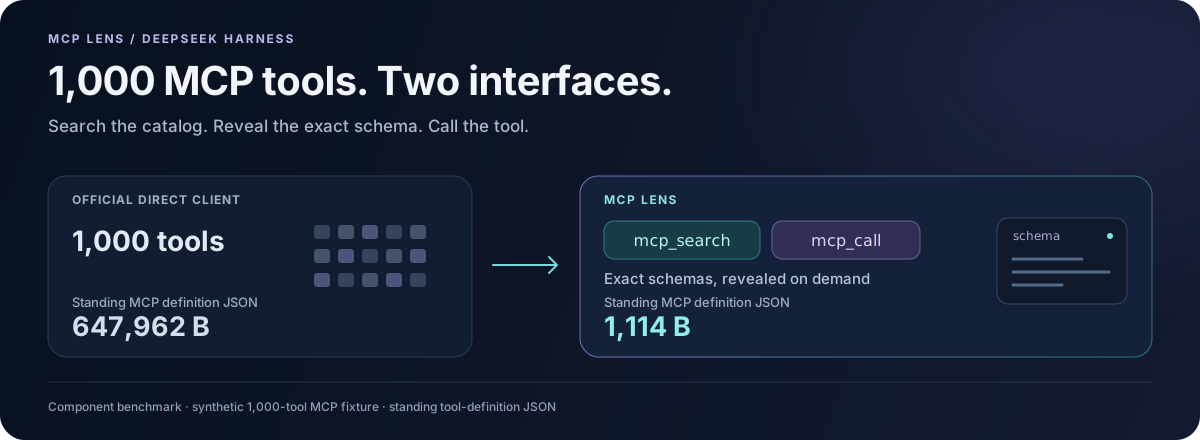
1,000 MCP tools. Two interfaces. Exact schemas when you need them.
Install · Try the 1,000-tool calculator · See product tests
Large tool catalogs take up room before the model starts solving your task. MCP Lens keeps the standing MCP definitions small, finds relevant tools across servers, and preserves the returned data needed by the next call.
MCP Lens gives DeepSeek Harness two model-facing tools:
mcp_searchfinds relevant tools and returns their exact input schemas.mcp_callcalls a specificserver/tooland returns its result, including structured data.
The two tool definitions occupy 1,114 bytes of JSON, regardless of catalog size. In the 1,000-tool component fixture, the direct client's definitions occupy 647,962 bytes. Remote schemas enter the conversation when search returns them. Connections open on demand, and repeated searches reuse the catalog index.
The latest version also fixes multi-step workflows: a customer ID returned alongside a text summary stays visible, so the model can use it to look up the customer's order. The tested data flows improved from 10/12 to 12/12. Read the September 10 results.
This works well for dozens to thousands of tools spread across MCP servers. Search adds a step; for a few tools used on nearly every request, the official direct MCP client is simpler.
Install
Use Node.js ^22.19.0 || >=24.0.0 and Harness 0.1.2-rc.1. As of September 10, 2026, Harness's npm latest and next tags point to this version.
Build Lens rc.10 from the main branch below. The published npm package is still rc.9, which targets Harness 0.1.0-rc.6.
npm install -g @deepseek-ai/dsh@0.1.2-rc.1
git clone https://github.com/labmimors/dsh-mcp-lens.git
cd dsh-mcp-lens
npm ci --ignore-scripts
npm run build
npm pack --ignore-scripts
dsh plugin --profile web add ./dsh-mcp-lens-0.1.0-rc.10.tgz
dsh plugin uses pnpm. If pnpm is missing from PATH, replace the last command with:
npm exec --yes --package=pnpm@10.20.0 -- dsh plugin --profile web add ./dsh-mcp-lens-0.1.0-rc.10.tgz
If you are keeping an existing Harness 0.1.0-rc.6 installation, use dsh plugin --profile web add dsh-mcp-lens@0.1.0-rc.9.
Connect your first MCP server
The plugin starts with no servers. Open ~/.dsh/profiles/web/cordis.patch.yml, or $DSH_HOME/profiles/web/cordis.patch.yml if you set DSH_HOME.
Replace an empty [] with this block. If the file already has other entries, append it as another top-level item; if it already has an mcp-lens item, replace that item's config.
- id: mcp-lens
  config:
    servers:
      - name: mcp-docs
        transport: streamable-http
        url: https://modelcontextprotocol.io/mcp

    cachePath: !!js dshHomePath('mcp-lens/catalog.json')
    allowTools:
      - mcp-docs/search_model_context_protocol
      - mcp-docs/query_docs_filesystem_model_context_protocol
    denyTools: ['mcp-docs/submit_feedback']
This connects the official MCP documentation server and enables its two read-only query tools. The server needs no API key; Harness uses the model provider you have configured.
Check the configuration and start Harness:
dsh --profile web --dump-config
dsh --profile web
Then ask:
Use the official MCP documentation server to explain when an MCP client should use Streamable HTTP.
Ask normal questions. The model uses mcp_search and mcp_call as needed.
Configuration
Set servers, cachePath, and the tools you want in allowTools. Patterns match server/tool, with * as a wildcard. denyTools overrides allowTools; an empty allow list enables no tools.
Each Cordis patch replaces the item's whole config, so include all custom settings you want to keep.
Local stdio server
- id: mcp-lens
  config:
    servers:
      - name: local
        transport: stdio
        command: node
        args: ['/absolute/path/to/mcp-server.mjs']
        cwd: /absolute/path/to/project

    cachePath: !!js dshHomePath('mcp-lens/catalog.json')
    allowTools: ['local/search_*', 'local/read_*']
    denyTools: ['local/delete_*']
Replace the command, paths, and tool patterns with those of your MCP server.
Authenticated HTTP server
- id: mcp-lens
  config:
    servers:
      - name: knowledge
        transport: streamable-http
        url: https://mcp.example.com/rpc
        headers:
          Authorization: !!js '`Bearer ${process.env.MCP_TOKEN}`'
        cacheNamespace: knowledge-acme-readonly

    cachePath: !!js dshHomePath('mcp-lens/catalog.json')
    allowTools: ['knowledge/read_*', 'knowledge/search_*']
    denyTools: ['*/delete_*', '*/destroy_*']
cacheNamespace identifies the account and permission scope, without containing a credential. Change it when the account or scope changes. Without it, an authenticated server's catalog stays in memory and is fetched again after restart.
Timeouts, search limits, and catalog settings
More in MCP & Protocols
rea
by morluto
Reverse engineer anything with agents, from app behavior down to native binaries.
ruflo
by ruvnet
🌊 The original agent harness. Deploy intelligent multi-player swarms, coordinate autonomous workflows, and build conversational AI systems. Features adaptive memory, self-learning intelligence, federation, vector RAG integration, and native Claude Code / Codex / Hermes and many more Integrated
reactive-resume
by reactive-resume
A one-of-a-kind resume builder that keeps your privacy in mind. Completely secure, customizable, portable, open-source and free forever. Try it out today!
next-ai-draw-io
by dayuanjiang
Draw and edit draw.io diagrams by chatting with an AI. Web app, desktop app, and an MCP server for Claude Code, Cursor, Codex and VS Code.