
dsh-agentlink
hootandy321/dsh-agentlink
Caller-side bridge from Codex and other agent frameworks to DeepSeek Harness, with observable sessions, follow-up, cancellation, and human-gated approvals.
6
stars
1
forks
MIT
License
2026-08-14
Created
2026-08-17
Last push
README
dsh-Agentlink





English | 简体中文
dsh-Agentlink is a plugin that lets you use DeepSeek Harness (DSH) from the AI work tool you already use. Your primary agent can delegate implementation, research, debugging, and long-log work to DSH, then observe, continue, or cancel those sessions without leaving its normal workflow. Codex and Claude Code are supported, ZCode integration is in progress, and OpenCode, Workbuddy, and other popular AI coding and agent tools are planned.
Caller support
| Caller | Status | Setup or availability |
|---|---|---|
| Codex | ✅ Supported | npm run setup |
| Claude Code | ✅ Supported | npm run setup:claude -- --project /absolute/path/to/project |
| ZCode | 🚧 In progress | Adapter behavior and packaging are being validated |
| OpenCode | ⏳ Planned | Not available yet |
| Workbuddy | ⏳ Planned | Not available yet |
Only callers marked Supported have an installation path in this repository today. Planned entries are directions, not release commitments.
Installation
Prepare the environment first: you need Node.js 22+, a supported caller (Codex or Claude Code), and a working DSH CLI. Configure your preferred model in DSH once; dsh-Agentlink uses that live route automatically.
Install with your AI agent
Send the following repository URL and prompt to Codex or another coding agent:
Install dsh-Agentlink from https://github.com/hootandy321/dsh-Agentlink.
Check Node.js 22+, the DSH CLI, and my DSH Web Host first. Clone it into a location I approve,
run npm install and npm test. For Codex, run npm run setup -- --yes. For Claude Code, run
npm run setup:claude -- --yes --project /absolute/path/to/my/project.
For Claude Code, let setup install the project MCP entry and shipped project skill; use --replace and --replace-skill only after reviewing existing files.
If dsh_agentlink or the legacy dsh_collab entry already exists, show me the conflict before using --replace.
Do not start or stop dsh web for me. Tell me when I need to reload the selected caller and approve project MCP trust.
Manual installation
-
Check the environment. DSH CLI
0.1.0-rc.6is the current tested target.node --version dsh --version -
Start the official DSH Web Host in its own terminal.
dsh web -
Clone the repository and install its dependencies.
git clone https://github.com/hootandy321/dsh-Agentlink.git cd dsh-Agentlink npm install -
Configure your caller.
For Codex:
npm run setup
npm run doctor
The Codex wizard backs up the Codex TOML configuration and installs the MCP entry with
approval_mode = "prompt". Restart Codex, then use/mcpor Codex Settings to confirm thatdsh_agentlinkis connected. For fully manual TOML setup, see Manual Codex MCP configuration.For Claude Code 2.1.199 or newer, point the setup command at the project that should share
.mcp.json:npm run setup:claude -- --project /absolute/path/to/your/project cd /absolute/path/to/your/project claude mcp get dsh_agentlinkThe Claude setup edits only that project's
.mcp.jsonand.claude/skills/claude-code-dsh/SKILL.md, and preserves unrelated servers. It reports each of these separately:- MCP registration
- project trust
- Claude skill status
- Claude approval support
- DSH permission/sandbox ownership
- DSH Host reachability
Open Claude Code in the project and approve the pending server through
/mcp; the bridge marksdsh_resolve_approvalas requiring human interaction.Add
--yesfor unattended defaults. To update an existing MCP entry, review it first and then add--replace; to update an existing Claude project skill, review it first and then add--replace-skill; to manage the skill yourself, add--no-skill. Both installers recognize the legacydsh_collabentry and migrate it todsh_agentlinkonly after explicit replacement approval. Neither installer starts DSH, changes DSH permission/sandbox settings, or restarts the caller.
The doctor reports the bridge's fail-closed lock locations under DSH_BRIDGE_HOME read-only and never cleans them, so it is safe to run even when a lock is present.
This source patch stops new projection/chunk floods from expanding the coordination ledger, but it does not compact an existing 5 MB+ ledger. Preserve the old bridge home for inspection; new delegations can use a separate DSH_BRIDGE_HOME. DSH session.history, not the bridge ledger, remains the conversation source of truth. See Known issues for the conservative recovery boundary.
dsh-Agentlink is a caller-side plugin, not a DSH Cordis bundle. Do not install it with dsh plugin --profile ... add ....
Why dsh-Agentlink?
Use DSH's Harness capabilities
DSH combines persistent sessions, tool execution, subagents, and human supervision for complex work. dsh-Agentlink lets your primary caller—currently Codex or Claude Code—discuss and coordinate with that second harness while you stay in the same workflow.
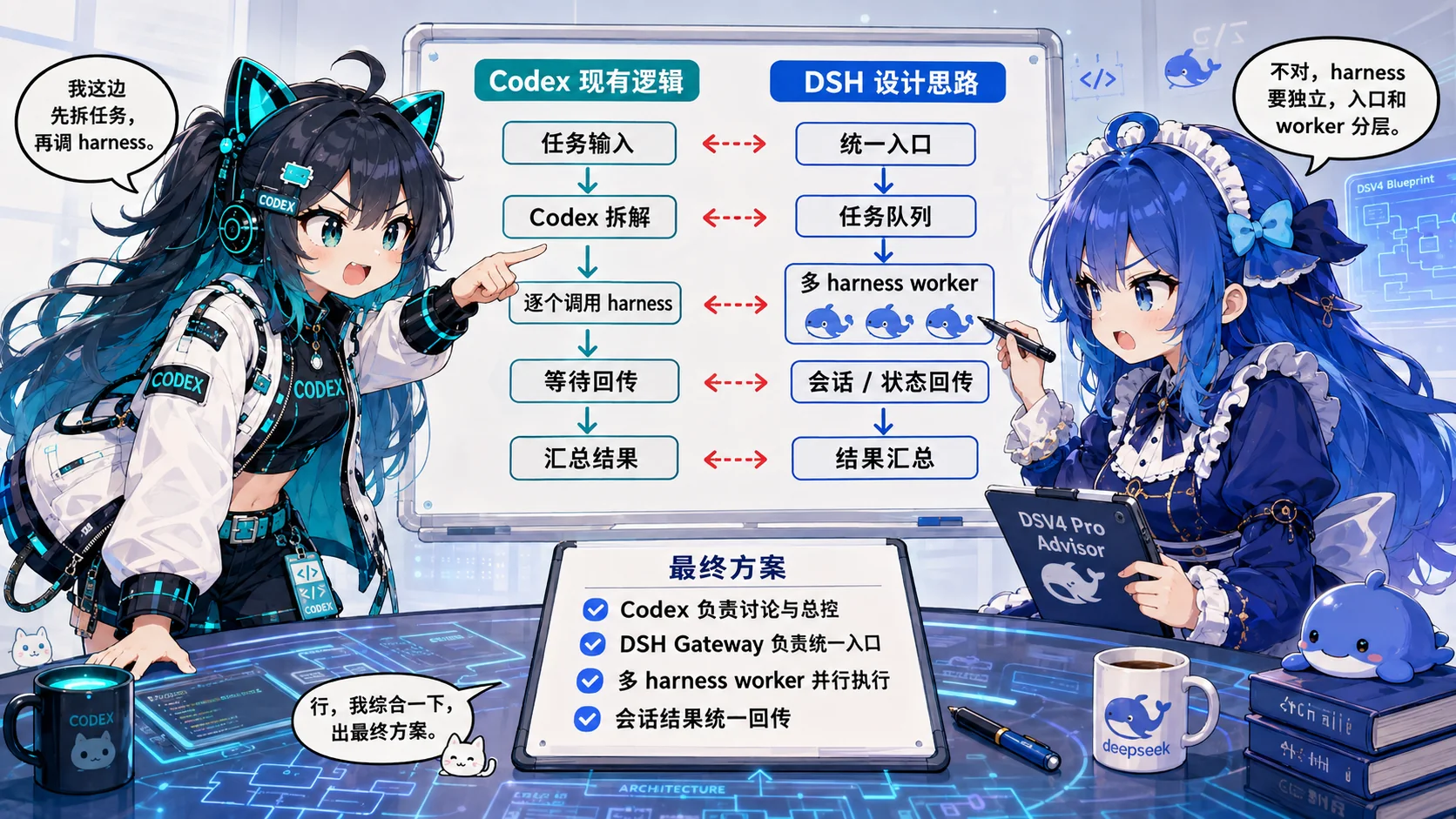
Codex keeps planning and supervision; DSH provides the execution harness, sessions, and workers.
More than another native subagent
A native subagent remains inside the caller's own agent tree. dsh-Agentlink adds a separate, user-configured harness: its sessions stay visible in DSH Web, can use DSH's own workers and model route, and can be observed, continued, or canceled by the primary caller.

Use the primary agent for judgment and validation, while DSH handles larger execution workloads through the model you configured there.
Save time and cost
- Save time. Route implementation, research, extraction, and long-log work to a fast model configured in DSH, such as a DeepSeek V4 route, while your primary agent keeps planning and validating.
- Save money. Moving execution-heavy workloads to a lower-cost DeepSeek route can reduce consumption on more expensive primary models.
Actual speed and cost depend on the selected model, provider, deployment, network, and task. Once installed, you can keep working in Codex or Claude Code as usual and simply ask it to delegate when DSH is the better execution path.
Use it
Once dsh web is running and your caller has loaded and trusted the MCP configuration, ask Codex or Claude Code in normal language, for example:
Use dsh-Agentlink to delegate this implementation to DSH in the current repository. Keep it visible in DSH Web, report progress, and ask me before any approval.
The caller can then delegate the task, observe its event stream, continue the same session, answer questions with you, or cancel work. Open http://127.0.0.1:3080 to inspect and interact with the same session in DSH Web.
MCP tools
dsh_host_status— connect-only Host state and capabilitiesdsh_delegate— create a root session and queue the initial prompt; detached by default (waitSeconds=0);workspaceModeis a bridge-local claim, not a DSH sandbox selectordsh_followup— continue the same root session with explicitmode="queue"|"steer"(defaultqueue)dsh_continue— compatibility alias fordsh_followupdsh_status— availability, execution, lineage, queue, pending interactions, final message, cursors, and workspace claim semanticsdsh_tail— bounded event digests using a bridge task cursordsh_wait— wait up to 30 seconds for a durable event, state change, pending interaction, or terminal statusdsh_observe— compatibility alias arounddsh_wait; bridge cursors replace raw session seq cursorsdsh_cancel—scope="turn"|"queue"dsh_list— task mappings enriched with current derived statusdsh_answer_question— typed answer for a pending question rpcIddsh_resolve_approval— typedallow_once|rejectresponse for a pending approval rpcIddsh_release_workspace— explicitly release a persistent bridge workspace claim without closing the DSH session
Normal delegation has no model argument. Configure the desired model only when installing or adjusting DSH. Each delegate reads session.models.current and trusts the Host's routable boolean; it neither changes the model nor derives routability from catalog groups.
dsh_wait observes durable bridge state. Assistant delta/chunk frames and top-level session/projection snapshots are skipped, so they do not bump the task revision or wake waiters; complete final messages remain observable through status/tail after the turn ends.
Roadmap
These are planned directions, not implemented capabilities or release commitments.
- More caller entrypoints — complete ZCode support, then add OpenCode, Workbuddy, Claude Desktop MCP, and other callers through the shared Integration Pack architecture.
- Agent invocation and information transport — improve prompt organization, context packaging, output digests, and compression while keeping questions, approvals, errors, and final answers reliable.
- DSH plugin-aware sessions — preserve the current
agentPresetpath for preset-based plugins, add read-only preset/capability validation and resolved-preset reporting, and introduce a declarative session launch profile only when a plugin proves it needs typed post-create initialization. - More integrations — expand after the shared Runtime and caller compatibility contract stabilize.
More documentation
- Architecture and safety model — identity, state, recovery, approvals, cancellation, and workspace coordination
- Multi-caller extension architecture — shared Runtime and Integration Pack boundaries for Codex, Claude Code, and future callers
- Validation guide — compatibility and operator acceptance checks
- Known issues — current upgrade and concurrency caveats
- Contributing and security
License
Alpha note: DSH is still in developer preview and this community project is independent of DeepSeek and OpenAI. 0.1.0-alpha.1 contains a shared-ledger concurrency bug; it is fixed in 0.1.0-alpha.2. Read Known issues before upgrading or running concurrent bridge processes.
More in MCP & Protocols
openpencil
by zseven-w
The world's first open-source AI-native vector design tool and the first to feature concurrent Agent Teams. Design-as-Code. Turn prompts into UI directly on the live canvas. A modern alternative to Pencil.
agent-qa
by vostride
Open-source self-improving QA agent for software teams. A test harness with memory. Write tests in natural language for web and mobile. agent-qa learns from every run, adapts to UI changes, and catches regressions before you ship.
coding-tools-mcp
by xytom
Give any AI agent the ability to code
awesome-deepseek-harness
by 0xsline
DeepSeek Harness (DSH) ecosystem: curated plugins, tools, and infrastructure from dsh-external/hub and the public dsh-plugin topic.