
dsh-excel-chat
Curated pickMaintenance: Activehccccc01333/dsh-excel-chat
dsh-excel-chat — talk to Excel in DeepSeek Harness: create, edit, repair, and verify spreadsheets by conversation (cells, formulas, styles, filters, tables, charts); every edit is auto-validated.
$ dsh plugin add dsh-excel-chatInstall
dsh has no central install command — add this plugin’s entry (documented in its README below) to your profile or patch config, then restart.
How installs work11
stars
0
forks
TypeScript
Language
MIT
License
2026-08-14
Created
2026-10-17
Last push
README
dsh-excel-chat — 和 Excel 对话,把活干完
简体中文 | English




第三方(dsh.so)对发布版本做静态安全扫描与 安装运行验证:当前 风险 low、0 条严重/高危/中危发现、未检测到外部凭据。

在 DeepSeek Harness 里用自然语言
操作 Excel:说一句“给 D 列加毛利公式、表头加粗、冻结首行、加筛选”,agent 会自动
调用 excel_operate 完成;每次编辑后自动体检公式有没有被弄坏,也可以让它
“检查这个表哪里算错了”并自动修复。所有工作都在对话里完成,不需要记 Excel 操作。
为什么用它
大多数“让 AI 改表格”的方案到执行就结束了——它把公式写下去,然后告诉你“已完成”。 这个项目在执行之后还有两步,那两步才是它存在的理由:
- 它验证自己有没有改坏。 每次操作后自动体检:列内公式模式是否偏移、有没有 hardcode、引用是否失效、有没有循环引用。改坏了它会说,而不是等你打开 Excel 才发现。
- 它给出改前改后的证据。 单元格级 diff、可回滚的审计日志、写进文件本身的健康报告。
第三件不太显眼但同样重要:核心能力不依赖 Excel。公式校验与修复、读写单元格、 样式、汇总、关联、透视表(写 XML)都是纯 JavaScript 实现的,macOS 和 Linux 上一样能跑; 只有需要真正调用 Excel 的功能(图表、原生透视表、PDF 导出)才要求 Windows。
最近更新
v0.43.0(2026-10-15)· 完整更新日志 · Releases
目录

想先看它跑起来?克隆仓库后 npm run demo 会在示例文件上走完
改表 → 体检 → 修复 → 复验 → 输出,打印引擎的真实输出 —— 不需要模型,也不需要先装 dsh。
完整输出与上手步骤见 5 分钟上手。
以前这里放的是 2026-08-15 录的演示(约 v0.23),界面和操作目录都已经变了,留着会误导。
现在随版本一起更新的是 npm run demo,并且有测试钉住它的输出
(少了一个阶段、或者修复失效了,测试会红)。一版新的界面录屏欢迎贡献。
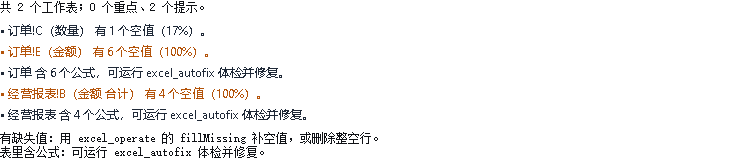
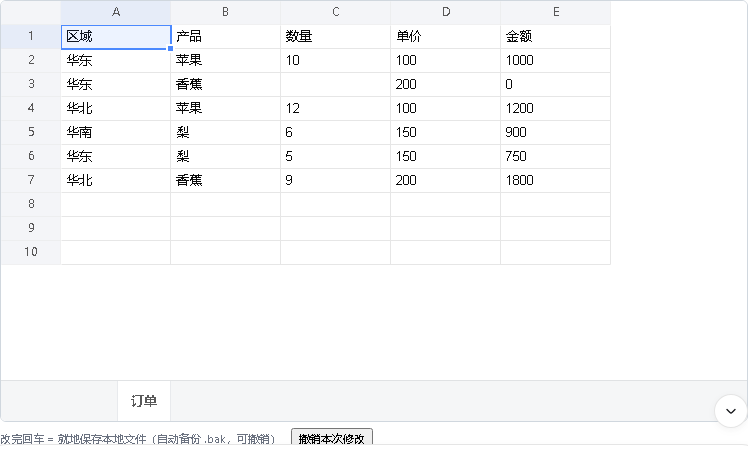
功能实录(对话内真实截图)
| 能力菜单:给文件就给你选项 | 数据洞察:自动发现数据问题 |
|---|---|
 |
 |
| 表格预览:对话内真网格 | 公式体检 + 自动修复:差异一目了然 |
|---|---|
 |
 |
下面这张是为什么敢让它动手:同一列公式,一行被静默弄坏,它指出来并修好—— 图中的异常位置、修复前后公式、健康分都是引擎真实输出。
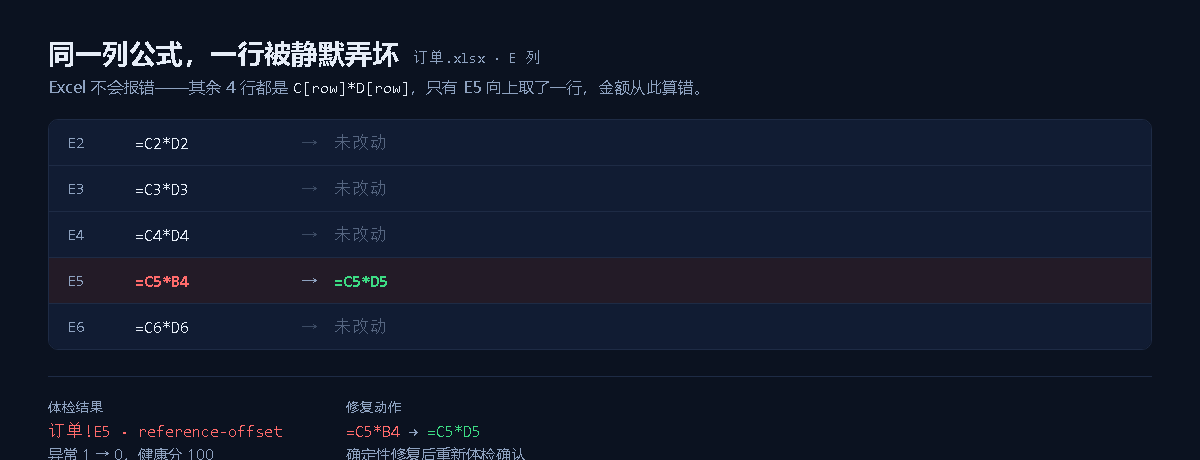
四张截图都是 DeepSeek Harness Web 里真实模型调用工具后,在消息流工具行内 渲染出的结果:能力菜单、问题清单、可编辑表格、修复前后差异。
架构
flowchart LR
  U[用户自然语言] --> H[DeepSeek Harness]
  H --> P["excel_profile / excel_read · 结构速览 / 分页读取"]
  P --> M["excel_menu / excel_insight · 能力菜单 / 数据洞察"]
  M --> O["excel_operate / excel_task · 操作 DSL / 多步编排 / Goal 闭环"]
  O --> V["excel_validate_formulas · 公式体检"]
  V -->|异常| R["excel_autofix / excel_repair_formulas · 确定性修复 + LLM 修复"]
  V -->|干净| OUT[输出 workbook]
  R --> V2[复验]
  V2 --> OUT
  OUT --> X["excel_explain_formula / excel_diff_workbook / excel_undo · 解释 / 对比 / 可回滚"]
核心闭环:理解 → 操作 → 验证 → 修复 → 复验 → 输出;excel_task 的 goal 模式
把这条闭环升级为 Plan → Act → Observe → Verify → Replan 的 Agent 循环。
5 分钟上手
第一步:先看它做什么(不用装 dsh)
git clone https://github.com/hccccc01333/dsh-excel-chat && cd dsh-excel-chat
npm install && npm run demo
npm run demo 在示例文件的副本上跑一遍完整闭环,打印的是引擎的真实输出:
① 改表   「按区域汇总金额,输出到新表」
         销售台账-汇总:A1「区域」 B1「金额 合计」/ 华东 / 华北 / 华南 / 总计
② 体检   编辑后自动体检:87 个单元格,14 条公式 —— 检出 1 处异常
         · 销售台账!G9  [reference-offset]
③ 修复   销售台账!G9   =E9*F8  →  =E9*F9
④ 复验   异常 0 —— 公式列重新一致
⑤ 输出   repaired.xlsx + 审计日志(改前改后都在,可回滚)
注意第 ② 步:那处错误表里本来就有 —— 你只让它汇总,它顺手查了出来。
examples/sales-ledger.xlsx 就是仓库里那一份,没有任何真实业务数据——
10 条编造的订单、3 个编造的区域。演示跑在临时副本上,仓库里的文件不会被改动。
第二步:接上对话
前提:已安装 DeepSeek Harness(dsh CLI 或桌面端)。
dsh plugin --profile demo add dsh-excel-chat      # 从 npm 安装
# 或从 GitHub 安装:
# dsh plugin --profile demo add github:hccccc01333/dsh-excel-chat
# 或本地 bundle 目录:
# dsh plugin --profile demo add ./bundle
dsh web --profile demo                             # 打开对话界面
想让我们知道有人在用? 官方命令不上报任何东西,所以我们看不见使用者 —— 这个插件至今的公开安装计数是 0。 换成社区市场的可追踪 CLI 即可(命令与官方完全等价,只是额外上报一条匿名安装结果, 一个本地生成的安装 ID,不是账号、也不是人):
npx dsh1024 plugin --profile demo add dsh-excel-chat
它是第三方工具(MIT,源码), 不是本项目的依赖。不想用就忽略这段,官方命令一直有效。
装完先自检一次,确认宿主包隔离和引擎都正常:
dsh-excel-chat-doctor                              # npm 全局/npx 可用时
# 或 profile 内直接跑:
# ~/.dsh/profiles/demo/node_modules/.bin/dsh-excel-chat-doctor
把 examples/sales-ledger.xlsx 拖进对话,照着说三句,就能走完
理解 → 操作 → 验证 → 修复 → 复验 → 输出:
- 「看一下这份台账有没有问题」——它会指出金额列里那一格公式的问题
- 「修掉它」——修复后复验(这一步的判定是确定性的,不靠模型自我感觉)
- 「按区域汇总金额,输出到新表」——生成汇总表,表头加粗、冻结首行
也可以换成别的说法,或者换成你自己的文件:
- “帮我把 report.xlsx 做成报表:D 列毛利、E 列合计、表头加粗、冻结首行、加筛选”
- “检查 sales.xlsx 的 D 列公式有没有错,不对的修掉”
- “按区域生成透视表,金额合计,再生成柱状图”
平台说明:公式校验/修复、读写单元格、样式、汇总、合并、邮件合并等功能跨平台; 图表创建/改参、原生透视表、图表 PNG 导出、PDF 导出需要 Windows + 本机安装 Excel。
锁定版本:dsh plugin --profile demo add dsh-excel-chat@0.43.0(不写版本默认 latest)。
切换输出语言(默认中文):在 profile 的 cordis.patch.yml 里加一条覆盖——
- id: vera / config: / language: en。注意只翻译给人看的消息,工作簿里的数据
(汇总标签、生成的表名)不翻译,因为代码依赖它们。详见 docs/usage.md。
完整使用指南见 docs/usage.md,岗位用法(运营/产品/数分)见 docs/roles.md。
工具
按你想做什么分组,不是按代码模块。
先看懂文件
| 工具 | 作用 |
|---|---|
excel_profile |
大表速览:识别表头、每列类型/缺失/唯一值/数值区间/高频值/样例,给出建议读取范围;配合 excel_read 的 maxRows 分页,避免整表灌入对话爆 token |
excel_semantic_profile |
语义画像:把每列分类为 时间/维度/指标/标识,识别数据粒度、派生指标(公式)和跨表关联键;分析类任务先跑它,agent 不再猜“地区是不是 B 列” |
excel_read |
精确读取:值/公式/类型/数字格式/字体/填充/对齐/合并/数据有效性,编辑前看清单元格状态 |
excel_preview |
表格预览:把指定表/区域渲染成 Markdown 表格(对话内直接看到)+ HTML 预览文件,回答“看看这个表长什么样” |
excel_menu |
不会描述也没关系:给文件就能拿到菜单——一句话总结表里有什么,再列出清洗/补空值/报表/透视/图表/体检/通知/岗位模板等可选方案,每个带示例话术,直接选就行 |
excel_insight |
数据洞察:一句话摘要 + 缺失/重复/异常值/负值/空格/公式等启发式体检 + 分析结论(指标按周期的趋势、指标是否集中在少数类别) + 下一步建议,回答“这表有什么问题”“这表有什么趋势”“帮我总结一下” |
动手改文件
| 工具 | 作用 |
|---|---|
excel_operate |
精细化 Excel 操作,77 种(写值、增删行列、排序、报表模板、透视、关联、条件格式、图表之外的绝大多数格式与结构操作)——完整清单见下方折叠块 |
excel_task |
两种模式:steps 多步编排(每步自动体检公式、坏了自动修);goal Agent 闭环(LLM 规划步骤 → 执行 → 验证 → 未达成自动重规划,最多 maxRounds 轮) |
excel_undo |
按 excel_operate 自动生成的 .patch.json 审计日志回滚编辑 |
excel_operate 的 77 种操作(点开)
写值、填充/序列、行列增删、复制/移动/转置/仅粘贴值、格式刷(copyStyle)、公式转值(freezeFormulas)、唯一值提取(uniqueValues)、排名列(rankColumn)、排序(多键 / 按填充色或字体色 / 自定义序列)、report 一键报表模板(排序+汇总+动态透视+筛选+样式+冻结+格式)、分类汇总、动态透视报表、二维交叉透视表(crosstab)、两表精确关联回填(joinSheets,无公式 VLOOKUP)、高级筛选、样式(字号/字体/边框/删除线/旋转/缩进)、数据有效性、条件格式(数据条/色阶/图标集)、自动筛选、结构化表格、页面设置、页眉页脚(headerFooter)、打印分页符(rowPageBreaks)、打印标题行/列(printTitles)、命名区域、冻结/取消冻结窗格、缩放(setZoom)、网格线开关(showGridLines)、显示公式视图(showFormulas)、隐藏行列(hideRows/hideColumns)、行列分组折叠(groupRows/groupColumns)、自适应列宽(autoFitColumnWidths)、超链接(站内跳转与外部 URL)、单元格批注(addComment)、每行趋势迷你图(addSparklines)、嵌入图片(insertImage,png/jpeg/gif,可指定像素尺寸,纯 XML 层实现、跨平台不依赖 Excel)、导入/导出 CSV(importCsv/exportCsv,导出默认加公式注入防护)、查找替换、工作表保护(细化权限)、邮件合并、工作表管理(增删改名复制隐藏标签色/重排 moveSheet)、文档属性与打开时重算(setWorkbookProperties)、合并、取消全部合并(unmergeAll)、数据清洗(去重/填充缺失/删空行空列/去空格/大小写转换/全角半角标准化/分列(分隔符或固定宽度)/区域清除 clearRange)、整行条件高亮(highlightRows)、两表模糊匹配(fuzzyMatch)。
每次操作后自动复验公式并写审计日志,所以改坏了能查出来、也能回滚。
公式体检与修复(这个项目的核心)
| 工具 | 作用 |
|---|---|
excel_validate_formulas |
静默公式错误检测:列 pattern 偏移、结构不匹配、hardcode、空行、循环引用、#REF!/#DIV/0! 等错误值 |
excel_autofix |
一键自愈闭环:体检 → 确定性修复(可选 LLM)→ 复检 → 人话汇报,输出修复副本(自动附带隐藏健康报告表,可 healthReport:false 关闭) |
excel_repair_formulas |
确定性修复 + 可选 LLM 修复(useLlm / autoTable / oraclePath / outPath),输出修复副本并复验 |
excel_health_report |
把公式体检报告写进工作簿本身:隐藏「_dsh_体检报告」表,含健康分、异常清单、生成时间,报告跟着文件走 |
excel_find_errors |
列出所有错误值单元格(#DIV/0! / #N/A / #NAME? / #NULL! / #NUM! / #REF! / #VALUE! / #GETTING_DATA),附上产生它的公式与按错误码的计数。能区分「真错误值」和「内容恰好长成这样的文本」,避免误报 |
excel_explain_formula |
公式白话解释:解析函数(SUMIFS/VLOOKUP/IF/日期/文本/统计)、引用区域、跨表引用,回答“这个公式是什么意思” |
excel_compile_formula |
Formula IR(binary / ratio / aggregate / function:VLOOKUP、IF、XLOOKUP、统计、日期等)→ 确定性 Excel 公式 |
excel_trace |
追踪单元格的公式依赖链路:引用(它读了谁)/ 从属(谁读了它),可指定层数。Excel 的追踪箭头是界面状态、不写进文件,所以这里以数据形式给出链路,每格附带当前值与深度,并报告循环引用 |
对比与图表
| 工具 | 作用 |
|---|---|
excel_diff_workbook |
两个 workbook 的单元格级 diff |
excel_validate_charts |
图表结构校验:类型、系列、缺失单元格、二维范围、日期排序 |
excel_validate_charts_visual |
Excel 导出 PNG + 视觉 LLM 评审 |
excel_create_chart / excel_modify_chart |
用本地 Excel 创建图表、修改类型/标题/图例/坐标轴(Windows) |
excel_export_charts |
用本地 Excel 把图表导出为 PNG(Windows) |
excel_create_pivot |
原生数据透视表(pivotCache + pivotTable):多行字段、列字段、报表筛选器 + 值字段,Excel 生成、可刷新(Windows) |
excel_export_pdf |
用本机 Excel COM 把工作簿或单个工作表导出为 PDF(Windows,只读打开不动源文件) |
评测与可靠性
能力深度与可靠性进展:144 个职场任务的自建评测语料(ExcelBench lite),覆盖 77 个操作里的 73 个, goal 模式 + glm-5.3-flash 全量实测成功率 86%(DeepSeek 基线 52%)。 逐次跑分的公开结果表见 docs/benchmark-results.md (由原始输出生成,你可以自己跑一行加进去);指标与失败归因见 docs/benchmark.md;右侧可编辑 Excel 面板的设计与实测见 docs/web-panel.md。
一个例子:它怎么发现问题
同一列里其他行都是 =B[行]-C[行],而 D4 写成了 =B4-C3(引用偏了一行)——
excel_validate_formulas 会把它报成 reference-offset 异常,置信度 = 多数派占比
(比如 4 行里 3 行一致,就是 0.75)。它不是「猜哪里可疑」,而是拿同一列的模式去比。
工具接受 cells(单元格映射)或 path(.xlsx 绝对路径),二者给且只给一个。
相关链接
- npm:https://www.npmjs.com/package/dsh-excel-chat
- GitHub:https://github.com/hccccc01333/dsh-excel-chat
- 版本说明:Releases · CHANGELOG
- 社区收录:awesome-dsh-plugin
已知限制
- Formula parsing is a lightweight scanner, not a full grammar: quoted strings are stripped and
cell-like tokens followed by
(are treated as function names. The awkward shapes that approach invites —1E5ahead of a real reference, a quote doubled inside a string,LOG10— are pinned by tests intests/formula.test.tsrather than left to chance. - Whole-column references (
Sales!$H:$H) do not produce cell-level dependency edges. - Range edges are enumerated only up to 10,000 cells; larger ranges contribute start/end edges only.
- The web panel edits the first sheet only. The grid library's edit event carries a row and a column but no sheet identity, and its instance exposes only the sheet it was built with. An edit made while another sheet is on screen is therefore reported against the first one. Everything reachable through the tools and the CLI is unaffected.
- Undo restores the file but not the panel.
/excel-undoputs the workbook back, and the grid goes on showing the pre-undo data until the file is read again. A command result carrieskind,textandsourceEventSeqand nothing else, so the panel has no channel to ask for a fresh read — closing this needs a capability the host does not expose yet.
More in Knowledge & Research
weknora
by tencent
Open-source LLM knowledge platform: turn raw documents into a queryable RAG, an autonomous reasoning agent, and a self-maintaining Wiki.
honcho
by plastic-labs
Memory library for building stateful agents
webnovel-writer
by lingfengqaq
A long-form Chinese web-novel writing assistant for Claude Code and DeepSeek Harness, designed to reduce memory loss and hallucinations in serialized projects of up to 2 million characters.
mirage
by strukto-ai
The World's First Virtual Terminal for AI Agents