
deepseek-harness-tui
In a curated listMaintenance: Maintainedgxinxing/deepseek-harness-tui
Terminal-native interactive TUI for DeepSeek Harness (dsh) — built with Ink, React for terminals
$ dsh plugin add deepseek-harness-tuiInstall
dsh has no central install command — add this plugin’s entry (documented in its README) to your profile or patch config, then restart.
How installs work12
stars
1
forks
JavaScript
Language
MIT
License
2026-08-13
Created
2026-08-13
Last push
README
deepseek-harness-tui
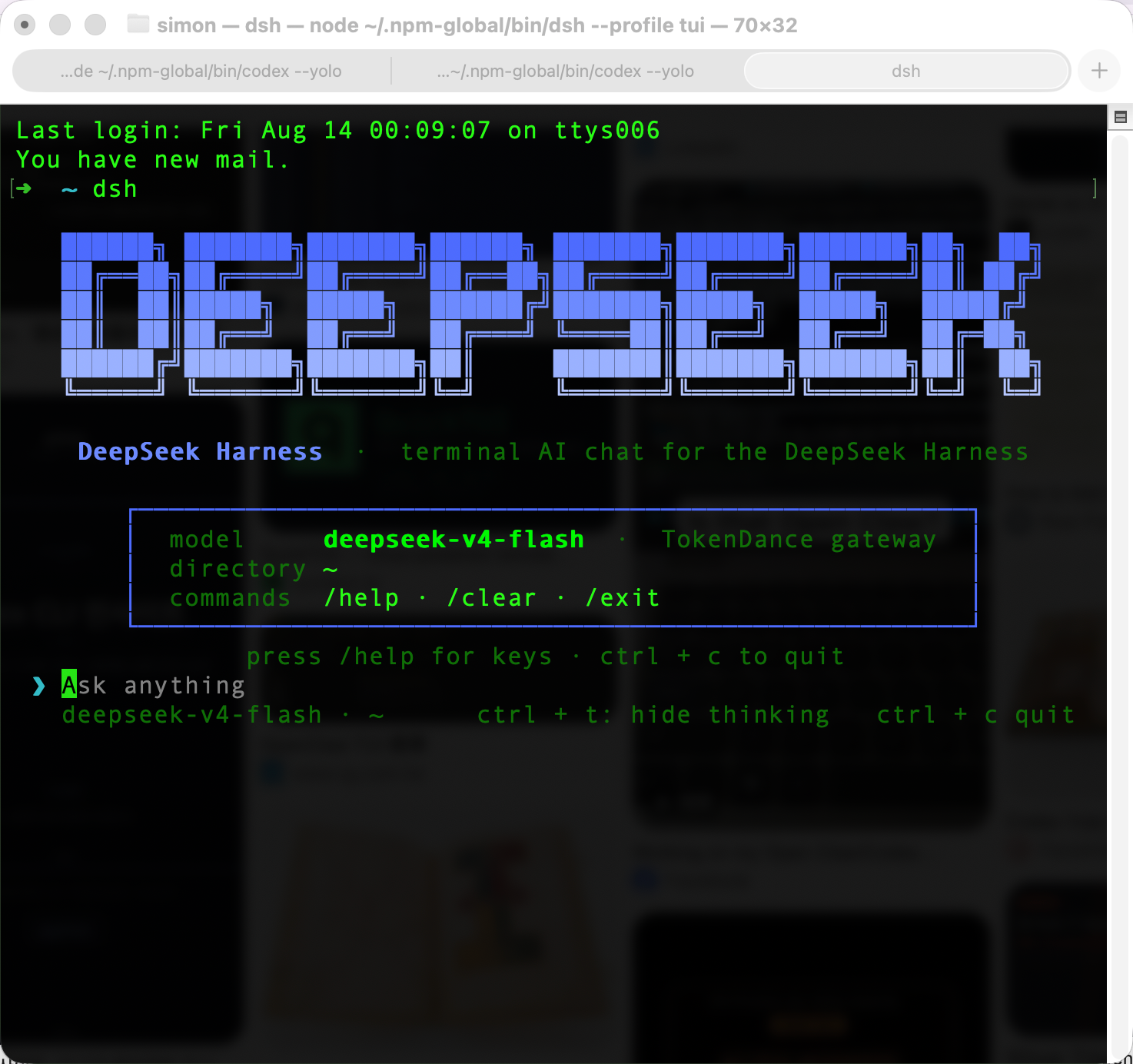
An interactive terminal chat for DeepSeek Harness — terminal-native style, built with Ink (React for terminals).
Give it a TokenDance key and a dsh install; run dsh --profile tui and you get a zero-chrome terminal chat with DeepSeek models: bottom-anchored transcript, tool calls folded into cells, thinking folding, and a theme that adapts to your terminal via OSC 11. It's a thin, readable plugin (~800 lines of UI) — not a re-implementation of the harness.


Install
Requires Node.js ≥ 20 and the DeepSeek Harness CLI:
npm install -g @deepseek-ai/dsh        # the harness (no Homebrew tap yet)
git clone https://github.com/gxinxing/deepseek-harness-tui
cd deepseek-harness-tui && pnpm install
Wire the plugin bundle into the tui profile (one-time):
dsh plugin --profile tui add @deepseek-ai/dsh-headless
dsh plugin --profile tui add /path/to/deepseek-harness-tui
Use
export TOKENDANCE_API_KEY=sk-...   # or add it to ~/.dsh/.credentials.yaml (0600)
dsh --profile tui                  # open the TUI
In the TUI: ctrl + t folds the thinking trace, esc interrupts the running turn, /help shows all keys and commands.
What it does
- Terminal-native UI, not a re-skinned echo. The transcript is the surface — no boxes, no chrome. The DeepSeek brand banner (ANSI Shadow logo, gradient) greets you only on the empty state; model · cwd live in a dim footer.
- Tool calls fold into cells.
⠋ Running <cmd>while active →✓ <cmd> • 1.2s(or✗on error), with output merged into the cell, dimmed, and truncated head + tail (… +N lines). No interleaved wall of raw output. - Theme derived from your terminal. OSC 11 probes the real background: message tints and code chips are blended from it (12% white over dark, 4% black over light) — never hardcoded hex. Force a theme with
DSH_TUI_BG=#fffffffor testing. - Thinking you can fold.
ctrl + ttoggles the reasoning trace;escaborts the turn at any time viaagent.cancel({ kind: 'user' }). - Markdown that keeps its shape. Headers keep their
#, fenced blocks keep their fences, inline code gets a subtle chip — and CJK/emoji wrap at correct character widths with an aligned gutter. - A live viewport. The transcript is bottom-anchored; the tail is always visible. Busy state shows a braille spinner + compact elapsed timer (
Working 5s).
Learn more
- INTEGRATION-NOTES.md — event shapes, patch semantics, and the integration deep-dive (how
session/eventmaps to the UI) - DeepSeek Harness — the underlying agent framework
- Model routing (TokenDance) — gateway config, credentials, and the one-time tool-call guard
Model routing (TokenDance)
The profile patch (cordis.patch.yml) routes llm-deepseek through the TokenDance gateway:
llm-deepseek:
  apiKeyEnv: TOKENDANCE_API_KEY
  baseURL: https://tokendance.space/gateway/v1
The provider is registered in ~/.dsh/settings.yaml (llm-pi-ai.providers.tokendance): OpenAI-compatible endpoint, thinkingFormat: deepseek, models deepseek-v4-flash (default) and deepseek-v4-pro. Switch models by editing the provider's models list or overriding llm-deepseek.model in your profile patch.
Prerequisite fix (one-time, per dsh install). TokenDance streams subsequent tool-call deltas with empty
name/id; the stock@deepseek-ai/dsh-llm-deepseekadapter overwrites the first frame's call id with""and the harness loops onunknown tool "". Apply the guard innode_modules/@deepseek-ai/dsh-llm-deepseek/lib/index.js:- if (call.id !== void 0) block.callId = call.id + if (call.id) block.callId = call.id - ... if (call.function?.name !== void 0) ... + ... if (call.function?.name) ...Applied 2026-08-13 on this machine. The edit lives in the global dsh install and is lost on
dshupgrade — re-apply after upgrading (worth an upstream PR).
Self-inspection · Self-repair · Self-update loop
This project ships a complete automated quality gate — inspect → repair → update — closed loop:
┌──────────────┐    ┌──────────────┐    ┌──────────────┐
│  Local dev   │    │  Pre-commit  │    │  CI / PR     │
│  pnpm check  │───▶│  lint-staged │───▶│  ci.yml      │
│  (one-shot)  │    │  (git commit)│    │  (GitHub)    │
└──────────────┘    └──────────────┘    └──────────────┘
      ▲                                       │
      │                                       ▼
      │                            ┌──────────────────────┐
      │                            │  lint + format:check  │
      │                            │  + test (Node 20/22)  │
      │                            └──────────────────────┘
      │                                       │
      ▼                                       ▼
┌──────────────────────────────────────────────────────────┐
│          deps.yml  (auto-scan every Mon 06:00 UTC)        │
│  Update found → auto PR → review & merge → closed loop   │
└──────────────────────────────────────────────────────────┘
Local inspection
pnpm check        # all-in-one: lint → format:check → test
pnpm lint         # code quality (ESLint)
pnpm format:check # style gate (Prettier)
pnpm test         # unit tests (Node built-in runner, 57 cases)
Local self-repair
More in UI & Experience
huashu-design
by alchaincyf
Creates selectable design directions and delivers interactive prototypes, PPTX, animations, and visual assets.
dsh-tui
by ccch1mneyyy
Claude Code 风格全屏终端 TUI:像素鲸鱼顶栏、双流光大字、实时工作状态行、思考流式展开、双击 Esc 时间回溯、上下文进度条 + TPS 仪表;接入 Agent preset(standard/code/minimal/cordis)、Skills、MCP、Goals、Todos、子代理,/ 命令注册表与随附技能(audit/bug/review/practice/pr_comments/release-notes/vuln-check);纯插件挂载零核心改动。
dsh-better-sidebar
by omdsh-dev
Full sidebar workbench with file rendering and editing, terminal, Git, and subagents; third-party plugins can register new tabs.
dsh-media-desk
by woniuniuniu
Capture ideas and generate scripts, titles, covers, images, storyboards, schedules, and review data in a sidebar media workspace.