
dsh-code
Maintenance: Activeguoxiucai/dsh-code
pi tui style code agent base on deepseek harness
$ dsh plugin add dsh-codeInstall
dsh has no central install command — add this plugin’s entry (documented in its README below) to your profile or patch config, then restart.
How installs work5
stars
4
forks
TypeScript
Language
MIT
License
2026-08-16
Created
2026-09-19
Last push
README
dsh-code
A DeepSeek Harness terminal coding agent for developers who prefer a focused TUI workflow.
English · 简体中文




[!IMPORTANT]
dsh-codeis an independent community project, not an official DeepSeek distribution. DeepSeek Harness is also in developer preview, so compatibility-breaking upstream changes may occur between pinned baselines.
Why dsh-code?
DeepSeek Harness provides an
official Web UI and a plugin-first agent runtime. dsh-code is for developers
who prefer to stay in the terminal: it packages the same DSH agent semantics in
a compact, keyboard-driven interface that works naturally beside shells,
editors, Git, and remote development environments.
The product draws on the interaction ideas of
Pi and uses
@earendil-works/pi-tui
for terminal rendering. It does not fork or replace the agent core. The Agent
Loop, sessions, model adapters, tools, sandbox, permissions, MCP, Skills,
Plan/Todo, and sub-agents remain owned by the pinned DSH runtime.
In short:
DeepSeek Harness agent runtime + Pi-inspired terminal UX + pi-tui renderer
Requirements
| Component | Supported in the first release |
|---|---|
| macOS | 14 or later, Apple Silicon (arm64) |
| Windows | Windows 10 or later, x64 |
| Node.js | 22.19+ (Node 23 excluded) or 24+ |
| Package manager | npm for normal installation |
Linux, macOS Intel/Rosetta, Windows ARM, and standalone installations without Node.js are not supported in the first release.
Version 0.1.5 still rejects Linux at the product entry point. Ubuntu CI validates source builds and automated tests, not Linux CLI/TUI support. See the Linux validation report for evidence and remaining checks.
Installation
npm
npm install -g @tsingwill/dsh-code
Install the current release candidate instead of the stable channel:
npm install -g @tsingwill/dsh-code@next
Verify the installation:
dsh-code --version
dsh-code --help
The scoped npm package is @tsingwill/dsh-code; the installed command remains
the shorter dsh-code.
Build from source
git clone --recurse-submodules https://github.com/guoxiucai/dsh-code.git
cd dsh-code
corepack enable
corepack prepare pnpm@11.7.0 --activate
pnpm install --frozen-lockfile
pnpm run build:lib
pnpm run build
node lib/bin.js
Preview
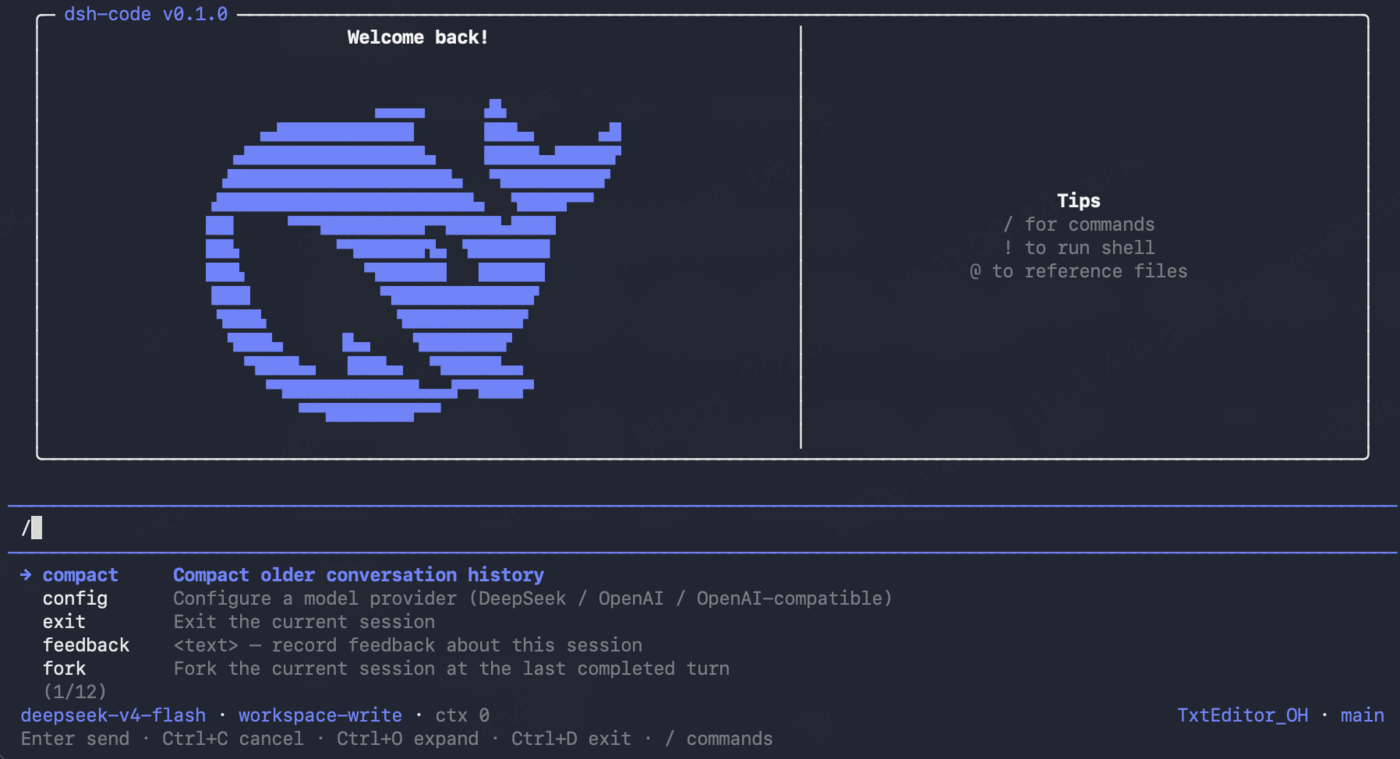
Highlights
- Terminal-native workflow — streaming Markdown, five-line collapsed reasoning and verbose tool bodies, always-visible line-numbered file diffs, selectable/copyable results, themed paste markers, shell blocks, and a bottom-pinned composer.
- Standard and PTC modes — Standard makes direct tool calls; PTC composes multi-step work in one TypeScript program. PTC child calls use native tool rows, with long bodies collapsed and file diffs always visible.
- DeepSeek Harness semantics — uses DSH's public session/events and services; there is no second agent loop, session store, permission engine, or tool registry.
- Model setup in the TUI — configure DeepSeek, OpenAI, or an OpenAI-compatible endpoint through an inline, reversible wizard.
- Safe project startup — canonical-path trust records and
read-only,workspace-write, ordanger-full-accesspermission presets. - Persistent sessions — start, resume, search, delete, fork from a historical request, clone the current snapshot, inspect statistics, and compact context.
- Agent visibility and decisions — dedicated Plan/Todo states, queued-user message feedback, tool progress, retry and compaction indicators, one-shot approval bars, structured questions, plan review, and a clickable active sub-agent indicator with cancel/remove controls.
- Fast terminal controls — slash-command completion, fuzzy
@file and folder completion, direct!shell mode, inline selectors, and keyboard-first navigation. - Independent installation — stores product data under
~/.dsh-code, keeps a separately installeddshcommand untouched, and supports explicit updates. - Adaptive visuals — a DeepSeek-blue palette tuned independently for dark and light terminal backgrounds.
Architecture
dsh-code is deliberately a thin terminal host over a fixed DSH baseline:
flowchart TB
  User["Terminal user"] --> CLI["dsh-code launcher"]
  CLI --> TUI["Terminal host<br/>Pi-inspired UX + pi-tui"]
  TUI --> API["Public DSH services<br/>session/event + AgentHandle"]
  API --> DSH["@deepseek-ai/dsh-base<br/>Standard / PTC Agent Preset"]
  DSH --> Runtime["Agent Loop · Sessions · Models · Tools<br/>Sandbox · Permissions · MCP · Skills<br/>Plan/Todo · Sub-agents"]
The launcher owns only product concerns: command parsing, ~/.dsh-code home
isolation, project trust, session selection, profile initialization, updates,
and delegation to the upstream DSH executable. The TUI renders structured
events and sends input back through the public AgentHandle API.
The TUI exposes only the upstream standard (Standard) and ptc (PTC) Agent
Presets. New sessions default to Standard and may select PTC at startup or via
/mode before the first turn. The mode locks when that turn starts; resume
always reconstructs the preset recorded in the event log, so an existing tool
history never changes schema underneath itself.
See the accepted architecture decisions in docs/adr/ and the
exact upstream revision in UPSTREAM_BASELINE.md.
Quick start
cd /path/to/your/project
dsh-code
On the first launch for a project:
- Review the canonical project path and choose a permission preset.
- If
~/.dsh-code/.credentials.yamlhas no saved API credential, dsh-code automatically opens the inline provider setup. - Select a provider, save the first API token and default model, then send a
task in the editor. Use
/configlater to add or change providers.
For the official DeepSeek API, /config asks for the API key and default model.
For an OpenAI-compatible service, the wizard keeps five explicit values:
- provider route ID;
- base URL;
- credential environment-variable name (pre-filled from the route ID);
- API key;
- model ID.
The wizard uses DeepSeek-compatible examples, supports Esc to return to the
previous step, and writes values only after the final step succeeds. Credentials
are stored owner-only in ~/.dsh-code/.credentials.yaml.
Usage
Command line
| Command | Description |
|---|---|
dsh-code |
Start a new interactive TUI session |
dsh-code --mode standard|ptc |
Start a new session in Standard or PTC mode |
dsh-code -c, --continue |
Continue the latest session for this project |
dsh-code -r, --resume |
Open the searchable session picker |
dsh-code resume [session-id] |
Resume a selected or explicit session |
dsh-code -p "<task>" |
Run one headless task and print the final answer |
dsh-code -p "<task>" --approve |
Trust the project non-interactively using workspace-write |
dsh-code plugin <command> |
Delegate profile plugin management to DSH (requires pnpm) |
dsh-code update --check |
Check the stable npm channel for an update |
dsh-code update |
Confirm and install the available update |
dsh-code update --channel next |
Select the release-candidate channel |
Interactive commands
| Command | Description |
|---|---|
/config |
Configure DeepSeek, OpenAI, or an OpenAI-compatible provider |
/model |
Switch the active model using an inline selector |
/mode [standard|ptc] |
Select a blank session's mode; locked after the first turn |
/permission |
Select the active permission preset |
/goal |
View and manage the upstream DSH long-running goal inline |
/skills [search] |
Discover skills; Space toggles dsh-code-only enablement and Enter invokes the selected skill |
/agents |
Inspect active sub-agents and cancel or remove their tasks inline |
/mcp |
Manage dsh-code user/project MCP servers with live status; explicitly import independent copies from DSH/Codex/Claude |
/rename [title] |
Rename and pin the current session title |
/jobs |
Inspect output or stop background jobs owned by this session |
/export [path] |
Export the current session as Markdown or JSONL |
/session |
Show session, message, tool, model, and token statistics |
/new |
Switch to a new empty Standard session |
/resume |
Open the hierarchical full-screen session picker and switch to the selection |
/fork |
Fork before a selected historical user request and switch to it |
/clone |
Clone the current session snapshot and switch to the clone |
/web |
Suspend the TUI, open dsh-code's package-local DSH Web UI, then reload the current session when Web stops |
/compact |
Compact the current context through DSH |
/quit, /exit |
Exit when the agent is idle |
!<command> |
Run a shell/PowerShell command without sending it to the model |
Additional commands supplied by the pinned DSH profile remain discoverable
through / autocomplete.
While /web is active, the terminal is a read-only lifecycle screen. Closing
the browser tab does not stop the local Web process; press Esc in the terminal
to stop Web safely and return to the reloaded TUI, or Ctrl+D to stop Web and
exit dsh-code.
Essential keys
| Key | Action |
|---|---|
Enter |
Send input or confirm an inline selection |
Esc |
Go back/cancel an inline step; interrupt the active turn |
Ctrl+C / Command+C |
Copy the selected result text; never interrupts the active turn |
Ctrl+O |
Expand/collapse reasoning and verbose tool bodies (5 visual lines by default); file diffs stay expanded |
Ctrl+D |
Exit when idle |
/ |
Open command completion |
@ |
Fuzzy-complete project files and folders (fd enables faster discovery) |
Approvals and structured questions
When a tool requests sandbox escalation or a hook returns ask, dsh-code pins
a one-shot Allow once / Reject bar above the composer. The choice applies
only to that request; Esc cancels it and does not create a persistent grant.
The DSH ask_user_question tool and plan-mode review use the same bottom-pinned
interaction area. Single-choice questions submit immediately; multi-choice
questions use Space to toggle entries and Enter on Continue to submit.
Select Type an answer… and press Enter to edit that same row in place; no
panel content shifts. While editing, Esc returns to the preceding menu. Long
plan Markdown is bounded to six lines and scrolls with
PgUp / PgDn. Parallel requests are queued so one prompt cannot replace
another.
Sessions, configuration, and isolation
By default all dsh-code state lives under ~/.dsh-code:
~/.dsh-code/
├── .credentials.yaml       # owner-only provider credentials
├── profiles/dsh-code/      # fixed DSH profile + terminal host patch
├── projects/               # canonical-path trust records
└── sessions/               # persisted sessions grouped by project
Set DSH_CODE_HOME to use a different root. On launch, dsh-code sets the
delegated DSH_HOME to this isolated directory and disables DSH telemetry. It
does not import or overwrite standalone DSH settings, credentials, sessions,
plugins, or MCP configuration, so a globally installed upstream dsh binary
remains independent. The bundled DSH skill registry does perform read-only
discovery from compatible skill roots: project .dsh/.agents/.codex/.claude,
dsh-code user ~/.dsh-code/skills, and user ~/.dsh/.agents/.codex/.claude
skill directories. dsh-code does not install, delete, copy, or update those
skills; /skills reports the winning upstream registry entry and its source in
a single-level picker. Space enables or disables the selected entry and Enter
places an enabled, user-invocable skill in the editor.
Its enable/disable switch is a dsh-code-only overlay stored at
~/.dsh-code/skill-preferences.json; it never edits the source SKILL.md or
changes another product's skill state. A disabled skill is hidden from both the
model catalog and user slash invocation in dsh-code.
dsh-code owns separate MCP configuration at ~/.dsh-code/mcp.json (user scope)
and .dsh-code/mcp.json (trusted-project scope). /mcp shows only those owned
rows by default; Import from other agents… performs an on-demand, read-only
scan of standalone DSH, OpenAI Codex, and Claude Code. The imported snapshot is
then managed independently and never follows or modifies its source. Space
enables or disables a row, project scope overrides a same-named user row, and
add/import/edit/remove operations hot-reconcile the public upstream MCP client
inside the current process. A green ● connected means at least one tool is
registered; connecting, disabled, overridden, error, and not-connected states
have distinct indicators. Imported environment/header values may contain
credentials, so both files are private (0600 where supported) and the project
file is gitignored. Legacy project MCP rows in .dsh-code/cordis.patch.yml are
migrated once while unrelated project plugin rows remain intact. Stdio server
stderr is isolated from the alternate-screen UI and written to rotating private
logs under ~/.dsh-code/logs/mcp/<server>.stderr.log.
Updating
Updates are explicit; dsh-code does not silently update itself:
dsh-code update --check
dsh-code update
dsh-code update --channel next
dsh-code update --version 0.1.2
The update command is supported for npm-global installations. Source checkouts should be updated with Git and rebuilt with the same tool that installed them.
Development and verification
pnpm run typecheck
pnpm test
pnpm run build
The repository pins DeepSeek Harness as the deepseek-harness/ git submodule.
Product code stays at the repository root; upstream changes belong in a
dedicated baseline update or should be contributed to DSH first.
Release design, platform compilation, candidate verification, and the update
strategy are documented in docs/NPM_RELEASE.md.
Contributing and security
- Read
CONTRIBUTING.mdbefore opening a pull request. - Use GitHub Issues for public bug reports and feature requests.
- Report vulnerabilities privately as described in
SECURITY.md. - Never attach unredacted API keys, session logs, credentials, or crash logs.
Relationship and attribution
dsh-code is a downstream, independent community project. It is not affiliated
with or endorsed by DeepSeek AI or the Pi maintainers.
- Agent runtime: DeepSeek Harness
- TUI renderer and interaction inspiration: Pi
- Product distribution and terminal host: this repository
The dsh-code terminal-whale logo adapts the official DeepSeek whale silhouette
with a terminal window and prompt. The DeepSeek name and official whale artwork
belong to their respective owners; see NOTICE for complete attribution.
License
MIT © 2026 guoxiucai. Third-party notices are listed in
THIRD_PARTY_NOTICES.md.
More in CLI & Terminal
deepseek-reasonix
by esengine
DeepSeek-native AI coding agent for your terminal. Engineered around prefix-cache stability — leave it running.
mnemon
by mnemon-dev
LLM-supervised persistent memory for AI agents — graph-based recall, cross-session knowledge, single binary. Works with DeepSeek Harness, Claude Code, OpenClaw, and any agent runtime.
phi
by pulseaiclub
a coding agent, rpc plugin, sub-agents, hashline edits, and mcp
sivtr
by ariestar
A unified memory workspace for agents and people, making terminal output and AI session context searchable and reusable across local workspaces.