
dsh-bash-terminal-ts
In a curated listMaintenance: Activedrscrewdriver/dsh-bash-terminal-ts
Shell tool with four Windows backends (PowerShell / Git Bash / WSL / MSYS2) plus an interactive PTY terminal; the MSYS2 backend starts bash.exe with -lc so /etc/profile puts /usr/bin and /mingw64/bin on PATH, and injects MSYSTEM=MINGW64 into the PTY environment. Written in TypeScript, targets DSH 0.1.2+.
$ dsh plugin add dsh-bash-terminal-tsInstall
dsh has no central install command — add this plugin’s entry (documented in its README) to your profile or patch config, then restart.
How installs work2
stars
0
forks
JavaScript
Language
MIT
License
2026-09-11
Created
2026-11-18
Last push
README
dsh-bash-terminal-ts
🌐 简体中文 | English | Français | Deutsch | Italiano | Русский | Español | Português · 社区交流:LINUX DO · GitHub
🌐 简体中文 | English | Français | Deutsch | Italiano | Русский | Español | Português · 社区交流:LINUX DO · GitHub

DSH(DeepSeek Harness)插件:一个 shell 工具,在 Windows 上统一执行 PowerShell / Git Bash / MSYS2 / WSL / Niubash 五种终端命令。
本仓库是
MAXeaglet/dsh-bash-terminal的 TypeScript 重写,带可用的 MSYS2/MINGW64 支持。兼容线按 DSH 宿主段划分,各线共用包名dsh-bash-terminal-ts,以 npm dist-tag 区分:
DSH 段 分支 插件版本 npm dist-tag >=0.1.0-rc.2 <0.3.0-0(有界区间,非枚举)main(本分支,跨版本主干)0.8.x latest>=0.2.0-rc.1 <0.2.1-0compat/0.2.0(历史,冻结)0.7.x dsh-0.2.00.1.7-rc.1 – 0.1.7.x compat/0.1.70.6.x dsh-0.1.70.1.5-alpha.1 – 0.1.5-rc.x ts/0.1.5(历史,冻结)≤ 0.5.2 dsh-0.1.50.1.2-alpha.1 – 0.1.2-rc.x main早期提交(按 tag 冻结)≤ 0.4.2 dsh-0.1.2请按你的 DSH 版本选线安装;各线版本系列互不重叠,
^安装不会跨线解析。
| 后端 | 实际执行 | 语法 / 路径 | 环境变量 |
|---|---|---|---|
powershell(默认) |
pwsh -NoLogo -NoProfile -NonInteractive -Command <cmd> |
PowerShell;C:\... |
$env:NAME |
gitbash |
Git for Windows bash -lc <cmd> |
POSIX;/d/workspace;PATH 含 /usr/bin、/mingw64/bin |
$NAME |
msys2 |
MSYS2 bash -lc <cmd>(C:\msys64\usr\bin\bash.exe) |
POSIX;/c/...;PATH 含 /usr/bin、/mingw64/bin(gcc / make) |
$NAME(自动注入 MSYSTEM=MINGW64) |
wsl |
wsl [-d <distro>] -e bash -lc <cmd> |
Linux;/mnt/d/... |
$NAME(经 WSLENV) |
niu |
Niubash niu -lc <cmd>(Rust 原生 bash 5.3 语义,无 MSYS 模拟层) |
POSIX;C:\... 与 /c/... 均按确定性规则转换;命令层为 WinuxCmd(178 applets) |
$NAME |
每次调用都启动全新 shell:不保留状态(cwd / 变量 / 别名)——请传 workdir 而不是用 cd。
界面预览
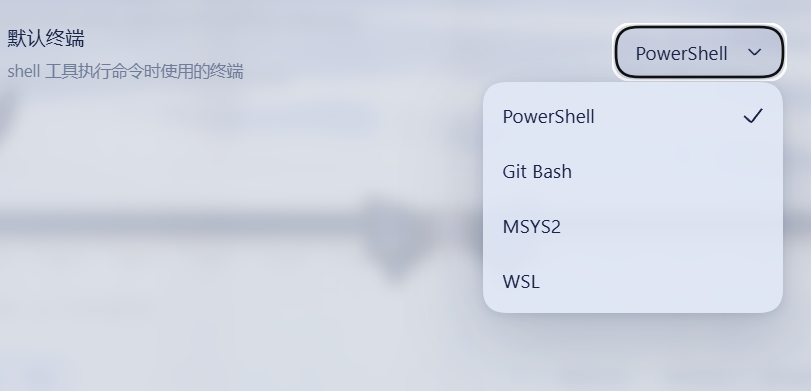
设置 → 通用 里的「默认终端」行:用户在 PowerShell / Git Bash / MSYS2 / WSL 之间选择,shell 工具只按这个设置执行,模型无法覆盖:
设计要点
- 终端由用户决定,AI 无法更改:Web UI 设置页(设置 → 通用)出现"默认终端"下拉(PowerShell / Git Bash / MSYS2 / WSL);
shell工具永远只使用该设置,不暴露终端参数给模型。设置通过 DSH settings 系统持久化(settings.yaml)。 - 不占用
ctx.shell能力接缝:DSH 自带的沙箱化pwsh工具保持原样可用;本插件的shell工具是额外的多终端入口。 - 通过共享的
ctx.subprocessseam 派生进程:进程树终止(Windowstaskkill /T)、SIGTERM→grace→SIGKILL、输出 spill 文件,与官方dsh-tool-bash/dsh-tool-pwsh行为一致。 - 后台任务注册进通用
jobsregistry,支持run_in_background/job_output/job_kill。 - 前端设置页的「默认终端」是枚举(UI 自动渲染为下拉),模型每次调用都只按该设置执行,无法自行切换终端。
- 钉版 POSIX 运行时载荷(第五个一等终端后端,默认关):载荷包
@drscrewdriver/posix-runtime-win32-x64(命名政策:我们的制品不带 bash/gitbash/msys token;里面是 Git-for-Windows 运行时树)。两层开关:enablePosixPayload: true(操作者门,启动时跑摘要校验)+ 设置页里的「POSIX payload」行开关shellPayload(默认关,决定已装载载荷能否进选择器/被选为默认终端);它有自己的目录行、专属工具描述(bash -lc)、交互终端与payload-unconfined执法面,不顶替 Git Bash 槽位。载荷不随包下载,用node scripts/provision-payload.mjs --from <本地 PortableGit SFX>自备(反解包 + SHA-256 钉版,自管不取用任何第三方载荷包);检测到已装 WSL 发行版时只记一条建议日志(WSL 里的 bash 通常更好用,拿不准选wsl),不屏蔽载荷行——硬门只有摘要校验一条;校验不过即 fail-closed,绝不裸跑、绝不静默换执行器。详见src/payload.ts头注释。 - 终端语义预设模板(
agent-presets/):把「默认终端 + 命令语法 + 终端归属权」显式声明在 Agent Preset 层的可分发模板(PowerShell / Git Bash / MSYS2 / WSL2 / 钉版 POSIX 载荷 / Niubash 六变体,含 Terminal authority 锚),用npm run presets:install装机——对标那些「安装即改写默认终端语义」的插件:同一份 bash-first 体验,由你在预设层自己选,可审计、可复现。
安装(web profile)
标准安装(npm 发布后,官方 bundle 机制)
插件带官方 dsh.bundle manifest(包内 cordis.patch.yml),profile 列出本包时 DSH 自动应用挂载,无需手改 profile 配置:
# 1. 安装插件包
npm install -g dsh-bash-terminal-ts
dsh plugin --profile web add dsh-bash-terminal-ts   # 自动加进 profile 的 bundles 并应用 patch

# 2. patch DSH 设置白名单(DSH 限制,见下方说明)
powershell -ExecutionPolicy Bypass -File install.ps1 install

# 3. 重启 dsh web
已用临时 profile 实测:
bundles: [dsh-bash-terminal-ts]→ dump-config 自动出现tool-bash-terminalentry。
pnpm 用户须知:node-pty 构建脚本放行
本插件依赖原生 PTY 库 node-pty(微软维护,VS Code 同款)实现交互终端。自 0.7.1 起钉在 1.2.0-beta.15(与 DSH 宿主两条版本线同版):该线 tarball 自带全平台预编译产物,pnpm 10+ 即使拦截安装脚本,运行时加载器也会兜底从 prebuilds/<platform>-<arch>/ 加载,不编译即可运行。pnpm add 末尾的下述提示只是告知脚本被跳过,放行一次即可消除:
Error: ERR_PNPM_IGNORED_BUILDS
  Ignored build scripts: node-pty@1.2.0-beta.15
pnpm approve-builds      # 交互式勾选 node-pty
# 或在 profile 的 package.json 声明后重建:
#   "pnpm": { "onlyBuiltDependencies": ["node-pty"] }
pnpm rebuild node-pty
自有 dsh 插件中仅本插件带原生依赖;其余 0.2.0 线插件(search-index、session-steward、patch-edit-plus、browser-cdp、date-wrapper)与 live-token-stats 均为纯 JS 包,pnpm 直接安装即可,无需放行。
本地开发安装(junction 直连,改源码即时生效)
# 1. 链接插件包到 profile 的 node_modules(junction,改源码即时生效)
$profile = "$env:USERPROFILE\.dsh\profiles\web"
New-Item -ItemType Junction -Path "$profile\node_modules\dsh-bash-terminal-ts" -Target "D:\workspace\projects\dsh-bash-terminal-ts" | Out-Null

# 2. 让插件能解析 @deepseek-ai/* 依赖(junction 到 profile 的依赖树,插件与宿主共用同一份模块实例)
New-Item -ItemType Junction -Path "D:\workspace\projects\dsh-bash-terminal-ts\node_modules\@deepseek-ai" -Target "$profile\..\node_modules\@deepseek-ai" | Out-Null

# 3. 让 profile 通过官方 bundle 挂载插件(install.ps1 install 会自动做;等价于在 dsh.profile.bundles 加 "dsh-bash-terminal-ts")
# 4. (仅修改前端源码后)重新打包 client bundle:
#    cd D:\workspace\projects\dsh-bash-terminal-ts && node scripts/build-client.mjs
# 5. 重启 dsh web
⚠️ 不要在本项目里跑
npm install:它会删掉上面第 2 步的 junction,转而给插件装一份独立的@deepseek-ai/*副本 —— 插件和宿主就不再共用模块实例,宿主升级后插件会停在旧 API 上 (本项目曾因此停在 0.1.0-rc.6)。只刷新 lock 时用npm install --package-lock-only。
More in CLI & Terminal
deepseek-harness-docker
by runzhliu
Community Docker and Kubernetes packaging for DeepSeek Harness (@deepseek-ai/dsh), with a hardened image, Compose stack, Helm chart, Web UI, and headless CLI.
deepseek-harness-android
by dphmoblie
Android app for managing a local DeepSeek Harness Ubuntu user space: runtime install/reset, Ubuntu terminal, optional Shizuku shell, and an embedded loopback-only Harness web UI.
dsh-subagent-codex
by mjylfz
Adds a subagent_codex tool that delegates tasks to the local OpenAI Codex CLI, running the work in an isolated external process.
mnemon
by mnemon-dev
LLM-supervised persistent memory for AI agents — graph-based recall, cross-session knowledge, single binary. Works with DeepSeek Harness, Claude Code, OpenClaw, and any agent runtime.